CH13: Mobile Forensics
Chapter Overview
Every chapter in this course so far has focused on computers: desktops, laptops, and servers running Windows, Linux, or macOS. The artifacts, file systems, and acquisition techniques you have learned are all built around the assumption that the evidence sits on a traditional computer with a hard drive or SSD that can be imaged using established forensic workflows.
Mobile devices break that assumption. A smartphone is not a small laptop. It is a fundamentally different type of evidence, with a different operating system architecture, different storage constraints, different encryption models, and different rules for how an investigator can access the data. The techniques you used to image a Windows PC or a MacBook do not transfer directly to an iPhone or an Android phone. At the same time, mobile devices are now present in virtually every type of criminal investigation. Drug trafficking, fraud, assault, homicide, child exploitation, cyberstalking, intellectual property theft, and corporate insider threats all produce mobile evidence. In many cases, the phone contains more relevant evidence than the suspect's computer, because people carry their phones everywhere, use them constantly, and generate a continuous stream of location data, communications, and behavioral patterns that no desktop computer can match.
This chapter introduces the foundational concepts of mobile forensics. You will learn why mobile devices require specialized handling from the moment they are encountered at a crime scene, how mobile operating systems differ from their desktop counterparts, the methods available for extracting data from locked and encrypted devices, and the key artifacts that investigators target on both iOS and Android platforms. Each of these topics has significantly more depth than a single chapter can cover, and dedicated mobile forensics study will build on every concept introduced here. The goal of this chapter is to give you a working framework so that when you encounter mobile evidence in the field or in a lab, you understand the challenges, the options, and the artifacts well enough to make sound decisions.
Learning Objectives
By the end of this chapter, you will be able to:
- Explain why mobile forensics requires different tools, techniques, and handling procedures than traditional computer forensics.
- Describe the proper first-responder procedures for seizing and preserving a mobile device, including network isolation and power management.
- Compare the iOS and Android operating system architectures at a high level, including their approaches to sandboxing, encryption, and data storage.
- Differentiate between manual, logical, file system, and physical acquisition methods and identify when each is appropriate.
- Identify key forensic artifacts stored in SQLite databases on mobile devices, including messages, call logs, and contacts, and explain the role of epoch timestamps and WAL files in mobile evidence recovery.
- Describe how location data, health records, and third-party messaging applications contribute to a "pattern of life" analysis on mobile devices.
13.1 Why Mobile Forensics Is Different
Mobile Devices in Criminal Investigations
Mobile phones are the single most common piece of digital evidence in criminal investigations today. Consider the range of cases where a phone is central to the investigation:
- Drug trafficking and distribution: Call logs, text messages, encrypted messaging apps, contact lists, and location data establish communication patterns, meeting locations, and distribution networks. Photos of drugs, cash, and weapons stored on the device provide direct evidence.
- Fraud and financial crimes: Banking applications, email, text messages, and call records connect suspects to victims. Screenshots of fraudulent transactions, phishing messages sent from the device, and location data placing the suspect at ATMs or victim addresses all reside on the phone.
- Violent crimes: Location data from the phone can place a suspect at a crime scene. Search history, messaging, and call logs can establish motive, planning, and communication with accomplices. Health data (step counts, heart rate spikes) can corroborate or contradict alibis.
- Cyberstalking and harassment: Message histories, call logs, social media activity, photo libraries, and location tracking provide a detailed record of the suspect's behavior toward the victim.
- Corporate insider threat and fraud: Company-issued or personal phones used for work may contain evidence of unauthorized data transfers, communications with competitors, or financial manipulation. Messaging apps, email, cloud storage access logs, and screenshots can reveal intent and execution.
In many of these cases, the mobile device contains more probative evidence than any computer involved in the investigation. People use their phones for hours each day, carry them to every location, and store years of personal data on them. The forensic challenge is accessing that data.
What Makes Mobile Different
If you can image a MacBook, why can't you apply the same approach to an iPhone? Several fundamental differences make mobile forensics a distinct discipline.
-
No removable storage on modern devices. Modern smartphones have their storage soldered directly to the logic board and encrypted by a hardware security module (Apple's Secure Enclave or Android's Trusted Execution Environment). Unlike a desktop or laptop, you cannot remove the storage chip, connect it to a write blocker, and create a bit-for-bit image. The storage is physically and cryptographically bound to the device.
-
No hardware write blockers. Mobile forensic tools connect through the device's USB port, the same interface used for charging and synchronization. There is no equivalent of a hardware write blocker for a mobile phone. Every interaction has the potential to modify data (updating timestamps, triggering background processes, receiving messages). Mobile forensics therefore uses a different standard of "forensically sound": changes must be minimal, necessary, and thoroughly documented.
-
Encryption is on by default. Both iOS and Android encrypt all user data on modern devices. iOS uses the Secure Enclave to manage encryption keys tied to the user's passcode and hardware identifier. Android uses file-based encryption (FBE) with keys derived from the lock screen credentials. Without the passcode, PIN, or biometric authentication, user data is effectively inaccessible through conventional means.
-
Remote wipe capability. A seized phone connected to a cellular or Wi-Fi network can receive a remote wipe command from the owner (via Find My iPhone, Google Find My Device, or an enterprise MDM platform), destroying all evidence within seconds. Network isolation is not optional; it is the first priority when a mobile device is encountered as evidence.
-
Rapid evidence volatility. Mobile devices receive data continuously: incoming calls, text messages, push notifications, app updates, and cloud synchronization all modify the device's state. Every second a seized phone remains powered on and connected, new data arrives and existing data may be overwritten or aged out.
Warning
The remote wipe threat is real and has destroyed evidence in actual cases. In one well-documented scenario, a suspect's associate remotely wiped a seized phone while it sat in an evidence room with an active cellular connection. By the time investigators attempted extraction, the device had been factory reset. Network isolation at the moment of seizure is a non-negotiable first step.
13.2 Mobile Device Handling and Preservation
First Responder Priorities
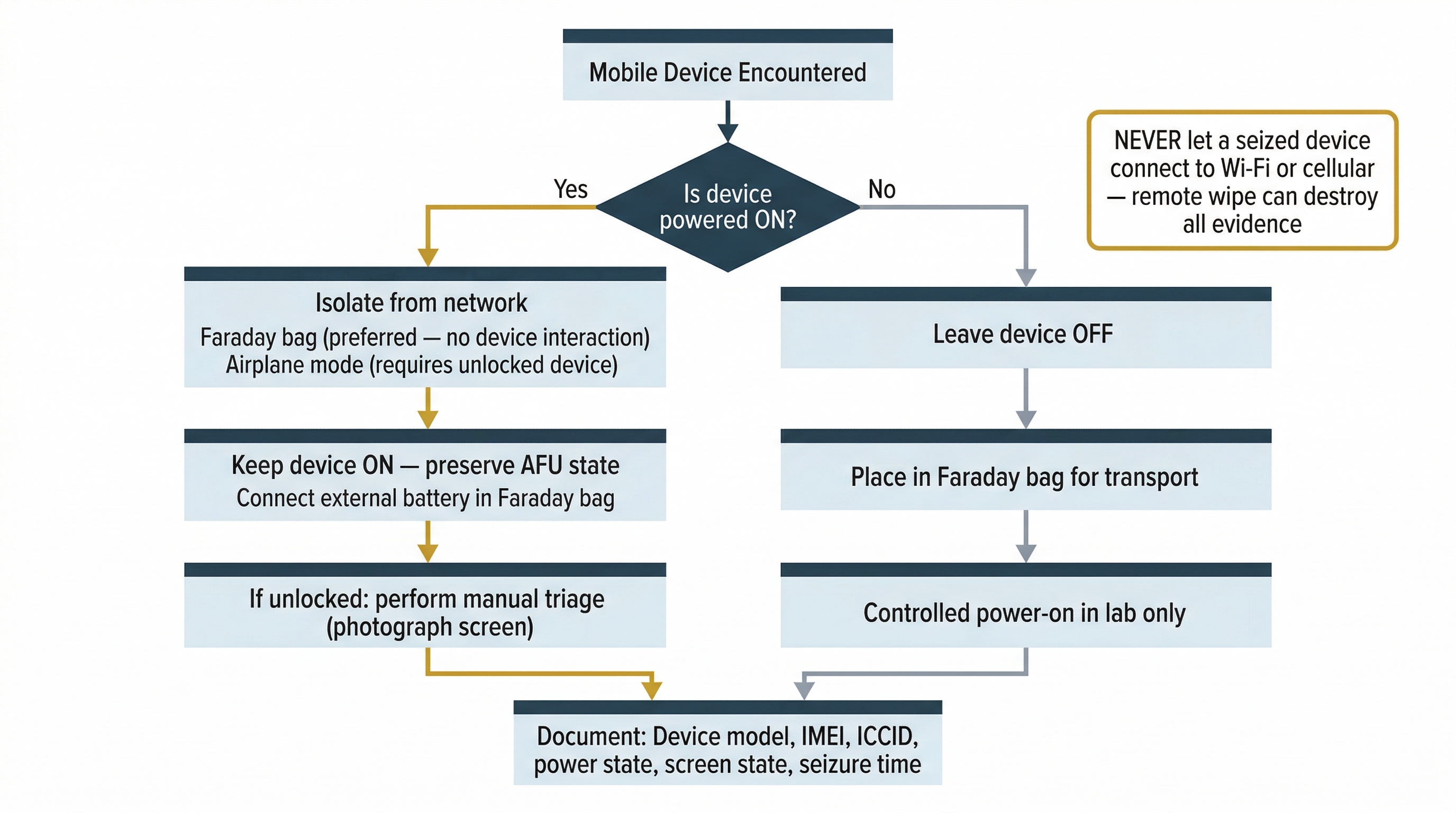
The decisions made in the first minutes after encountering a mobile device at a crime scene determine whether the evidence on that device will be available for analysis. Unlike a powered-off desktop computer that can sit in an evidence room indefinitely, a mobile device requires immediate attention to three priorities: network isolation, power management, and documentation.
Network Isolation
The first action upon encountering a mobile device is to prevent it from communicating with any network. This serves two purposes: it blocks remote wipe commands, and it prevents the device from receiving new data that could overwrite existing evidence.
There are two primary isolation methods:
-
Faraday bags are signal-blocking enclosures lined with conductive material that blocks cellular, Wi-Fi, Bluetooth, and NFC signals. When properly sealed, the device inside cannot send or receive any wireless communication. Faraday bags are the preferred isolation method because they require no interaction with the device itself.
-
Airplane mode disables the device's wireless radios through a software toggle. Enabling airplane mode is effective, but it requires unlocking the device (which may not be possible) and interacting with the operating system (which modifies data and must be documented). If the device is unlocked and accessible, enabling airplane mode before placing it in a Faraday bag provides a secondary layer of isolation.
Analyst Perspective
Faraday bags have a practical limitation: they cause the device's radio to increase its transmission power continuously as it searches for a signal, which drains the battery rapidly. If the device must remain in a Faraday bag for an extended period (during transport to the lab, for example), connect it to an external battery pack inside the bag to prevent it from powering off and potentially requiring a passcode to unlock.
Power Management: The "If On, Keep On" Rule
The power state of a mobile device at the time of seizure dictates the handling procedure.
If the device is powered on: Keep it on. A powered-on device that has been recently unlocked by the user is in an After First Unlock (AFU) state, which means the decryption keys for user data are loaded in memory. If the device powers off, those keys are purged, and the device returns to a Before First Unlock (BFU) state where significantly less data is accessible. Keeping the device powered on preserves access to the decrypted data.
If the device is powered off: Leave it off. Powering on a device may trigger startup processes, synchronization, or lock screen enforcement that could alter or destroy evidence. A powered-off device should be transported to a forensic lab where a controlled power-on can be performed under proper conditions.
The BFU and AFU distinction is one of the most critical concepts in mobile forensics, and it deserves closer examination.
Before First Unlock vs. After First Unlock
Modern mobile operating systems use encryption that is tied to the user's passcode. The encryption state changes based on whether the user has entered their passcode since the device was last powered on.
Before First Unlock (BFU): The device has been powered on (or restarted) but the user has not yet entered their passcode. In this state, most user data remains encrypted and inaccessible. On iOS, only a limited set of data is available in BFU: device identifiers, some network information, and data explicitly marked as "available before first unlock" by app developers (such as alarm clock data). On Android, the situation is similar: device-encrypted storage is accessible, but credential-encrypted storage (which contains the vast majority of user data) is not.
After First Unlock (AFU): The user has entered their passcode at least once since the device was last powered on. The decryption keys for user data are derived and loaded into memory. Even if the device subsequently locks (screen timeout), it remains in AFU state because the keys persist in memory. Most forensic extraction tools can access user data when the device is in AFU state, even if the screen is locked, because the underlying encryption keys are available.
The practical impact is stark: a phone seized while the screen is still showing the home screen (AFU, unlocked) offers the most data access. A phone seized while the screen is locked but the device has not been restarted (AFU, locked) still offers significant access to forensic tools. A phone that has been powered off or has restarted (BFU) presents the highest barrier to extraction, because the encryption keys must be derived from the passcode before any user data is readable.
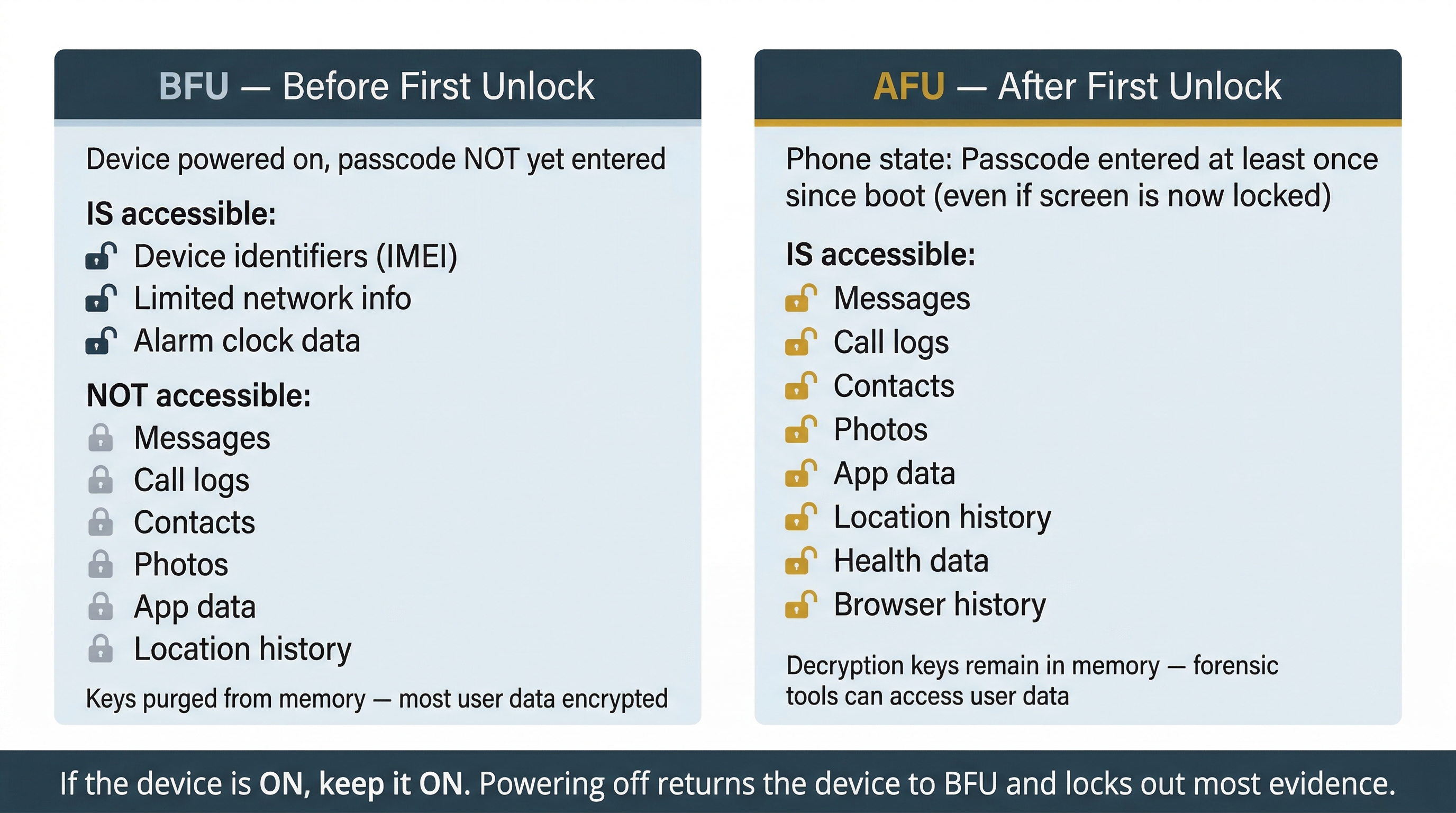
| State | Passcode Entered? | Screen | Data Accessibility | Forensic Implication |
|---|---|---|---|---|
| BFU | No (device just powered on) | Lock screen | Minimal (device ID, limited system data) | Most restrictive; advanced tools or passcode required |
| AFU (locked) | Yes (at least once since boot) | Lock screen | Keys in memory; most user data accessible to forensic tools | Primary target state for extraction |
| AFU (unlocked) | Yes | Home screen | Full access | Maximum data; perform manual triage if authorized |
Warning
Some forensic guidance recommends placing a seized phone in airplane mode immediately. Be aware that on some devices, enabling airplane mode from the lock screen is possible without unlocking, but on others, it requires authentication. If the device is in AFU state and you cannot enable airplane mode without unlocking it, use a Faraday bag instead. Do not risk triggering a restart or lockout by attempting to interact with the lock screen.
Device Identity
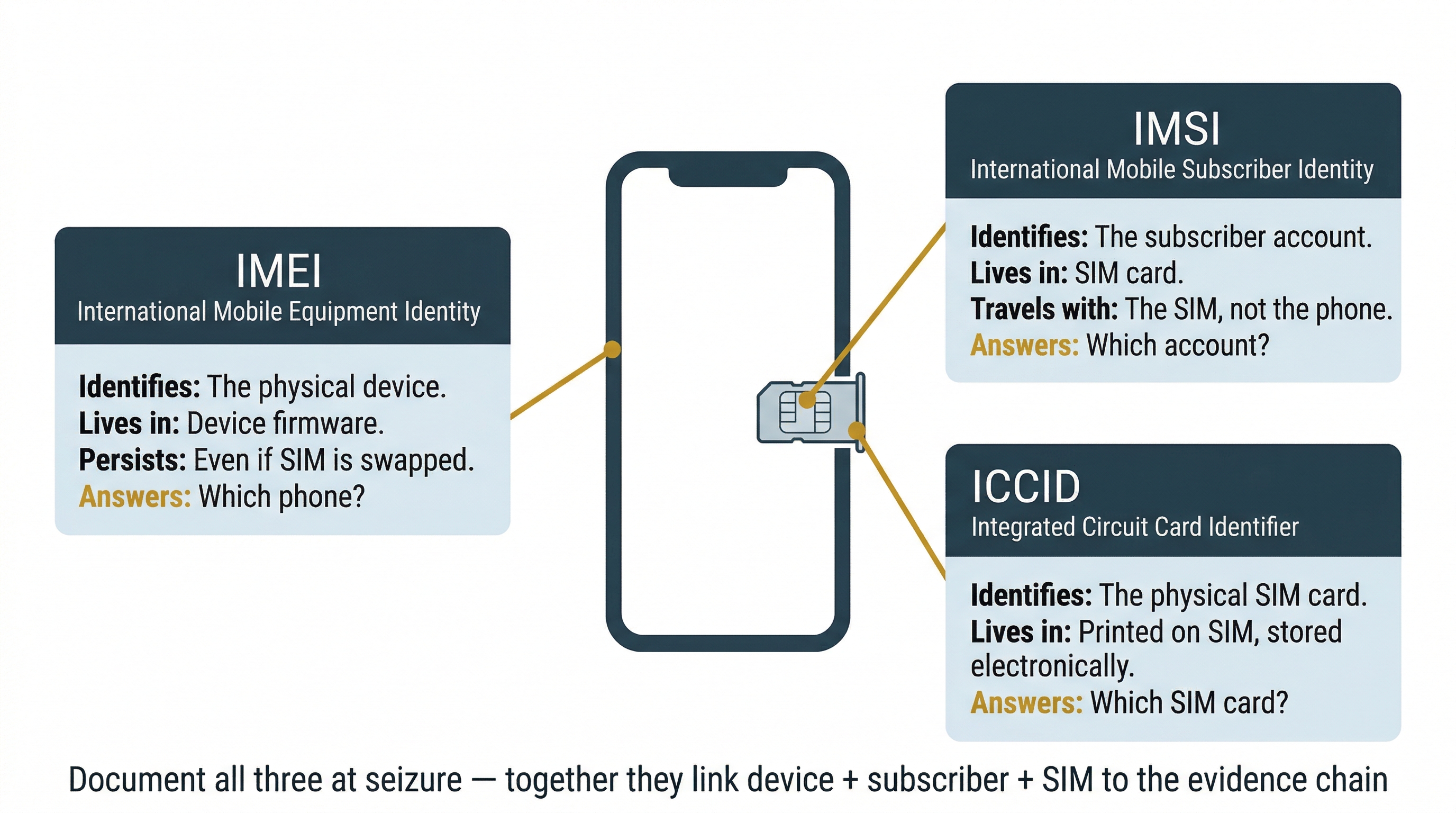
Before any acquisition begins, document the device's identifying information. Three identifiers are particularly important for investigators:
IMEI (International Mobile Equipment Identity): A 15-digit number that uniquely identifies the physical device hardware. Think of it as the serial number of the phone itself. The IMEI is printed on the device (often under the battery on older phones, or on the SIM tray or back panel on modern phones), stored in the device's firmware, and recorded by the cellular carrier every time the phone connects to the network. The IMEI persists even if the SIM card is swapped, making it the primary identifier for tracking a specific physical device across different phone numbers and carriers. On most phones, dialing *#06# displays the IMEI on screen.
IMSI (International Mobile Subscriber Identity): A number stored on the SIM card that identifies the subscriber account (the person's cellular plan) to the carrier's network. When investigators obtain carrier records, the IMSI links the device's network activity to a specific subscriber account. The IMSI travels with the SIM card, not the phone. If a suspect moves their SIM to a different phone, the IMSI remains the same but the IMEI changes.
ICCID (Integrated Circuit Card Identifier): A unique serial number that identifies the physical SIM card itself. The ICCID distinguishes one SIM card from another and is used by carriers to manage SIM inventory and activation. In investigations involving multiple SIM cards or SIM swapping, the ICCID helps track which physical SIM was used in which device and when.
These three identifiers answer three distinct questions: "Which phone?" (IMEI), "Which subscriber account?" (IMSI), and "Which SIM card?" (ICCID). Documenting all three at the time of seizure connects the physical device, the subscriber, and the SIM card to the evidence chain.
13.3 Mobile Architecture Fundamentals
iOS vs. Android: Two Approaches to the Same Problem
The global smartphone market is dominated by two operating systems: Apple's iOS and Google's Android. While both are designed to run applications on touchscreen devices, their architectures differ in ways that directly affect forensic analysis.
iOS is a closed-source operating system that runs exclusively on Apple hardware (iPhone, iPad, iPod Touch). Apple controls the hardware, the operating system, the app distribution channel (App Store), and the update cycle. This tight integration produces a uniform forensic landscape: every iPhone running the same iOS version stores data in the same locations, using the same file formats, with the same encryption model.
Android is an open-source operating system developed by Google and adapted by dozens of hardware manufacturers (Samsung, Google Pixel, Motorola, OnePlus, and many others). Each manufacturer can modify the operating system, add custom features, change default applications, and control their own update schedule. This fragmentation creates a more complex forensic landscape: the exact file paths, database schemas, and available artifacts can vary between manufacturers, models, and Android versions.
For investigators, the key forensic distinctions are:
- iOS is more standardized: fewer variables, more predictable artifact locations, consistent database schemas across all devices running the same version.
- Android requires more flexibility: more variables, manufacturer-specific considerations, and varying database paths and schemas. However, the open architecture also provides more potential access points for extraction.
- iOS updates are distributed simultaneously to all supported devices. Android updates depend on the manufacturer and carrier, creating a wider range of OS versions in active use.
- iOS app distribution is controlled exclusively through the App Store. Android allows sideloading (installing apps from outside the Play Store), which can introduce forensically relevant artifacts that indicate the user intentionally bypassed default security.
Application Sandboxing
Both iOS and Android enforce application sandboxing, a security model where each application runs in its own isolated environment and cannot directly access another application's data. On iOS, each app gets its own directory within the file system, and the operating system prevents apps from reading each other's files. On Android, each app is assigned its own Linux user ID (UID), and Linux file permissions enforce isolation between apps.
Sandboxing has a direct forensic implication: an application's data (messages, databases, cached files, preferences) is stored within that application's sandbox directory. To extract data from WhatsApp, you need access to WhatsApp's sandbox. To extract data from Signal, you need access to Signal's sandbox. A logical extraction may capture some of this data through the operating system's backup mechanism, but a file system or physical extraction provides more complete access to individual app sandboxes.
Encryption by Default
Both platforms now encrypt user data by default, but their implementations differ.
iOS encryption is managed by the Secure Enclave, a dedicated hardware security module built into every Apple chip since the A7 (iPhone 5s, 2013). Key characteristics:
- The Secure Enclave generates, stores, and manages encryption keys independently from the main processor.
- Even if an attacker compromises iOS, they cannot extract encryption keys from the Secure Enclave.
- File-level encryption uses keys derived from the device's unique hardware key (UID) combined with the user's passcode.
- Different files have different protection classes that determine when they are accessible: always, after first unlock, or only while unlocked.
Android encryption has evolved through several models. Modern Android devices (Android 10 and later) use file-based encryption (FBE), which encrypts different files with different keys. FBE creates two storage areas:
- Device-encrypted (DE) storage: Available immediately at boot, before the user enters their passcode. Contains essential system functions (phone dialer, alarm clock).
- Credential-encrypted (CE) storage: Requires the user's lock screen credentials to decrypt. Contains the majority of user data (messages, contacts, app data), making it inaccessible until the user authenticates.
Jailbreaking and Rooting
Jailbreaking (iOS) and rooting (Android) are processes that bypass the operating system's built-in security restrictions to grant the user (or an attacker) elevated privileges.
Jailbreaking on iOS exploits a vulnerability in the operating system or boot chain to disable Apple's code-signing enforcement and sandbox restrictions. A jailbroken iPhone can run unsigned applications, access the full file system, and modify system files. Indicators of jailbreaking include:
- Presence of Cydia or Sileo app stores
- Modified system partitions
- Jailbreak-related files in
/private/var/ - The jailbreak itself may provide the investigator with deeper file system access than otherwise possible
Rooting on Android typically involves unlocking the bootloader and installing a modified recovery image or using an exploit to gain root (superuser) access. Indicators of rooting include:
- Presence of a
subinary - Root management apps like Magisk or SuperSU
- Custom recovery like TWRP
- Unlocked bootloader status
Rooting artifacts are forensically significant because they indicate the user intentionally modified the device's security model, which may be relevant to the investigation's narrative.
Analyst Perspective
The presence of jailbreak or root artifacts on a device is itself evidence. In an insider threat case, a jailbroken company-issued phone suggests the user intentionally circumvented corporate security controls. In a criminal case, rooting a phone may indicate technical sophistication relevant to the suspect's capability to commit the alleged offense. Always document jailbreak/root status as a finding, regardless of whether the jailbreak was used in the commission of the crime.
13.4 Mobile Acquisition Methods
The Acquisition Pyramid
Mobile forensic acquisition methods are often visualized as a pyramid. Each level of the pyramid captures progressively more data but requires progressively more access, more specialized tools, or more advanced techniques.
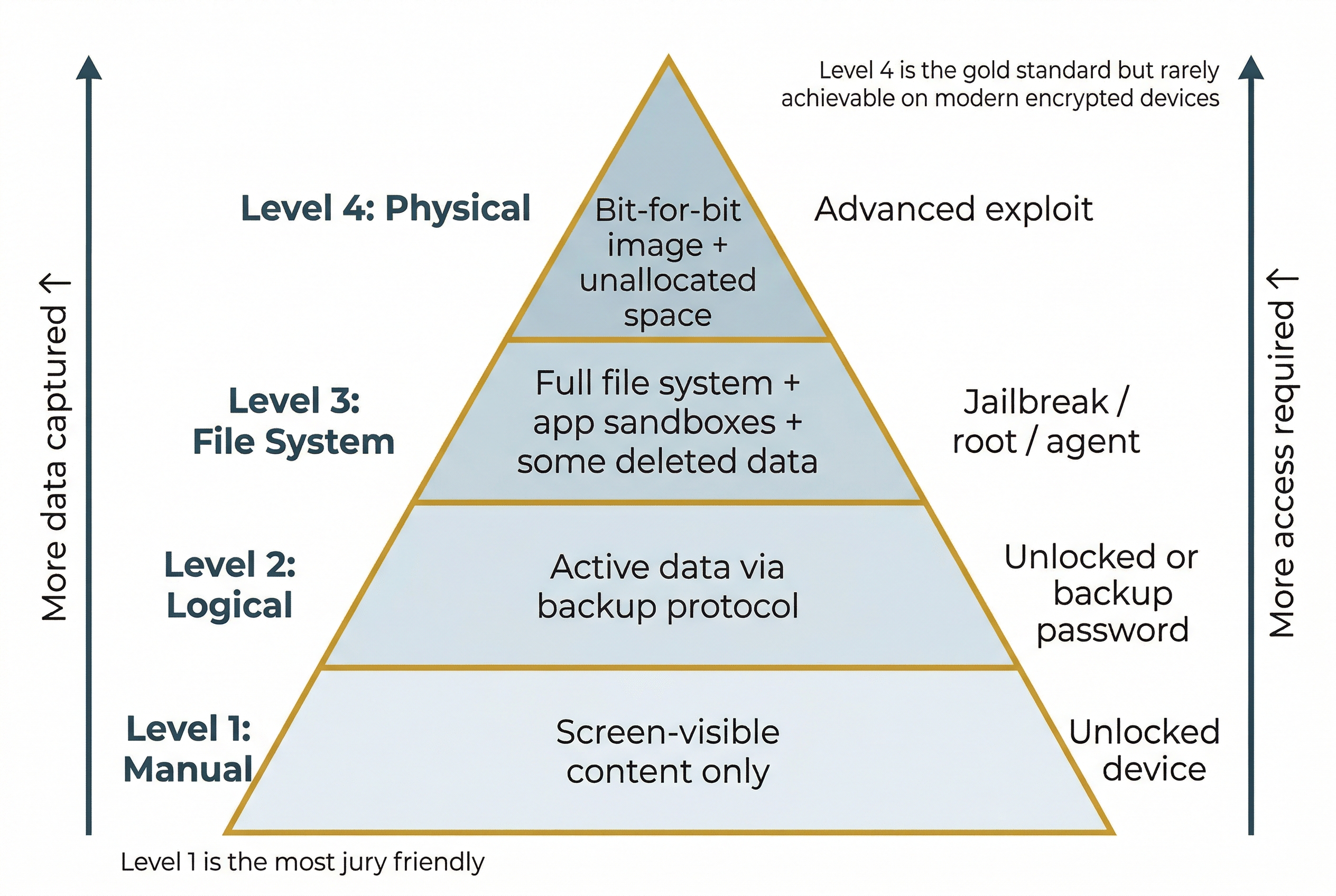
Level 1: Manual Acquisition. The examiner physically interacts with the unlocked device, navigating through screens and photographing or recording the content displayed.
- Captures only what is visible on screen: messages, call logs, photos as displayed in the user interface.
- Does not capture deleted data, database metadata, or artifacts hidden below the UI.
- Least technical method and least complete, but sometimes the only option when no forensic tools support the device model.
- Can be performed immediately at a crime scene by a trained first responder.
- Jury friendly: Manual acquisition produces photographs and screen recordings that are intuitive for non-technical audiences. Jurors can see exactly what the examiner saw on the device, making this method particularly effective for courtroom presentation, even when other methods capture more data.
Level 2: Logical Acquisition. The forensic tool communicates with the device's operating system through standard interfaces (the same protocols used for backups and data synchronization).
- On iOS, this typically uses the iTunes/Finder backup protocol to create a backup of the device.
- On Android, this may use the Android Debug Bridge (ADB) backup function or a vendor-specific protocol.
- Captures active data: messages, contacts, call logs, photos, application data, and settings.
- Does not capture deleted data or data outside the backup scope.
- Requires the device to be unlocked or the examiner to have the backup password.
Level 3: File System Acquisition. The forensic tool gains access to the device's full file system, not just the data exposed through the backup protocol.
- Captures everything in a logical acquisition, plus system files, application sandbox contents, caches, and temporary files.
- May recover data that has been deleted at the application level but not yet overwritten in the database (WAL files, free pages).
- Typically requires elevated access: a jailbreak on iOS, root access or an agent installed on Android, or a tool-specific exploit.
Level 4: Physical Acquisition. The forensic tool creates a bit-for-bit image of the device's storage, including unallocated space where deleted data may persist.
- Provides the most complete evidence set but is the most difficult to achieve on modern encrypted devices.
- On older devices (pre-encryption era), physical imaging was straightforward.
- On modern devices, hardware encryption makes a raw physical image unreadable without the decryption keys.
- True physical acquisition of a modern, encrypted smartphone requires advanced exploits or specialized commercial tools that can derive or bypass the encryption.
| Level | Method | What It Captures | What It Misses | Access Required | Key Advantage |
|---|---|---|---|---|---|
| 1 | Manual | Visible on-screen content | Everything not displayed | Unlocked device | Jury friendly; no tools needed |
| 2 | Logical | Active data via backup protocol | Deleted data, system files, some app data | Unlocked or backup password | Fast, well-documented, widely supported |
| 3 | File System | Full file system including app sandboxes | Unallocated space (in most cases) | Elevated access (jailbreak/root/agent) | Captures app sandboxes and some deleted data |
| 4 | Physical | Bit-for-bit image including unallocated space | Nothing (complete image) | Advanced exploit or hardware technique | Most complete; gold standard for recovery |
Logical Acquisition in Practice
For many investigations, logical acquisition is the most commonly used method because it balances data yield with practical feasibility. Two platform-specific approaches are the most common.
iOS: iTunes/Finder Backup. When an iPhone is connected to a Mac or PC and a backup is initiated, the device generates a structured export of user data including messages, call history, contacts, photos, application data, notes, calendars, and settings.
- If the backup is encrypted (a checkbox in Finder or iTunes), it also includes sensitive data that unencrypted backups exclude: saved Wi-Fi passwords, Health data, Keychain entries, and web browsing history.
- For forensic purposes, always create an encrypted backup if possible, because it captures a broader set of artifacts.
- Free, open-source tools such as libimobiledevice can perform iOS logical extractions from the command line without requiring iTunes.
Android: ADB (Android Debug Bridge). ADB is a command-line tool that communicates with Android devices over USB.
adb backupcreates a logical backup of application data and shared storage.- Many applications opt out of ADB backup, meaning their data is excluded from the capture.
- Google has been gradually deprecating the ADB backup function in newer Android versions.
- For a more complete logical extraction on Android, commercial forensic tools use vendor-specific protocols or install a lightweight agent on the device.
The checkm8 Exploit
checkm8 (pronounced "checkmate") is a hardware-level vulnerability discovered in 2019 that affects the boot ROM (the very first code that runs when the device powers on) of Apple devices using the A5 through A11 chips. This includes iPhones from the iPhone 4S through the iPhone X. Because the vulnerability exists in read-only hardware (the boot ROM cannot be updated), Apple cannot patch it through a software update.
The checkm8 exploit allows a forensic tool to boot the device into a custom environment that bypasses iOS security restrictions, enabling file system extraction and, in some cases, brute-force passcode attacks. The open-source checkra1n tool implements checkm8 as a jailbreak, and commercial forensic tools (Cellebrite, GrayKey) incorporate checkm8 into their extraction workflows.
The forensic significance of checkm8 is substantial: it provides reliable file system access to a large installed base of Apple devices (hundreds of millions of iPhones) that would otherwise require the user's passcode. However, it does not affect devices with A12 chips or newer (iPhone XR, XS, and all subsequent models), which use a patched boot ROM.
Forensic Tool Landscape
| Tool | Platform Support | Acquisition Types | Cost |
|---|---|---|---|
| Cellebrite UFED/Premium | iOS, Android | Logical, file system, physical (select devices), advanced unlock | Commercial license |
| Magnet AXIOM / GrayKey | iOS, Android | Logical, file system, advanced brute-force (GrayKey) | Commercial license |
| MSAB XRY | iOS, Android | Logical, file system, physical (select devices) | Commercial license |
| libimobiledevice | iOS | Logical (backup protocol), device pairing, file access | Free, open source |
| ADB (Android Debug Bridge) | Android | Logical backup, file pull, shell access | Free (part of Android SDK) |
| checkra1n | iOS (A5-A11 devices) | Jailbreak enabling file system access | Free, open source |
| iLEAPP | iOS | Artifact parsing from logical/file system extractions | Free, open source |
| ALEAPP | Android | Artifact parsing from logical/file system extractions | Free, open source |
Analyst Perspective
In practice, most forensic labs use a combination of commercial and open-source tools. A common workflow is: acquire with a commercial tool (Cellebrite or AXIOM), then validate key findings using an open-source parser (iLEAPP or ALEAPP) or manual SQLite examination. Cross-tool validation strengthens the reliability of your findings and is a best practice recommended by NIST and SWGDE.
13.5 Core Mobile Artifacts and SQLite Databases
SQLite: The Mobile Data Standard
In Chapter 7, you learned that modern web browsers store their data in SQLite databases, and you used DB Browser for SQLite to examine Chrome and Firefox history files. Mobile devices take this concept much further. On both iOS and Android, SQLite is the standard storage format for virtually all structured data: text messages, call logs, contacts, calendar entries, notes, health records, location data, and application-specific data are all stored in SQLite databases. A skilled examiner who understands SQLite can extract evidence from any mobile device, regardless of the commercial tools available.
The same principles you applied to browser databases in Chapter 7 apply here. Each database contains tables with rows and columns. Each table stores a specific type of record (messages, calls, contacts). SQL queries filter and extract the specific records relevant to the investigation. The difference is scale: a desktop browser might have one or two forensically relevant databases, while a smartphone can contain dozens, spread across the operating system and every installed application.
Understanding Epoch Timestamps
One critical skill for mobile forensics that extends beyond what Chapter 7 introduced is interpreting epoch timestamps. Most mobile databases do not store dates and times in a human-readable format like "March 15, 2026, 2:30 PM." Instead, they store timestamps as a single integer representing the number of seconds (or milliseconds, or microseconds) elapsed since a fixed reference point called the epoch.
Different platforms use different epochs:
| Epoch Name | Reference Point | Unit | Used By |
|---|---|---|---|
| Unix Epoch | January 1, 1970 00:00:00 UTC | Seconds or milliseconds | Android, most Linux-based systems, WhatsApp, many third-party apps |
| Mac Absolute Time (Cocoa) | January 1, 2001 00:00:00 UTC | Seconds | iOS, macOS, Apple applications |
| WebKit/Chrome Time | January 1, 1601 00:00:00 UTC | Microseconds | Chrome browser, some Chromium-based apps |
For example, the Unix timestamp 1742054400 represents March 15, 2026 at 16:00:00 UTC. If you encounter this number in a call log database without understanding epoch timestamps, it looks like meaningless data. Converting it to a human-readable date requires knowing which epoch the database uses and what unit (seconds vs. milliseconds vs. microseconds) the value represents.
A timestamp stored in milliseconds will be roughly 1,000 times larger than one stored in seconds for the same date. If you see a 13-digit number in a timestamp field (like 1742054400000), it is almost certainly milliseconds since the Unix epoch. A 10-digit number (like 1742054400) is seconds. An 18-digit number (like 13351708800000000) is likely WebKit/Chrome microseconds.
Tools such as DCode (free, by Digital Detective), Epoch Converter (epochconverter.com), and CyberChef (free, by GCHQ) can decode epoch timestamps across all common formats. Commercial forensic tools handle this conversion automatically during parsing, but an investigator must be able to decode timestamps manually to validate tool output and to examine databases that commercial tools may not fully support.
Warning
Timezone handling is a common source of error in mobile forensics. Most epoch timestamps are stored in UTC. The investigator must convert UTC to the local timezone relevant to the investigation when constructing a timeline. Confusing UTC with local time can shift events by hours, potentially placing a suspect at the wrong location at the wrong time.
Key iOS Databases
iOS stores its core communication and activity data in well-defined SQLite databases within the device's file system. The table below lists the databases most commonly targeted in investigations.
| Database | File Path | Key Tables | What It Contains |
|---|---|---|---|
| sms.db | /private/var/mobile/Library/SMS/sms.db |
message, handle, chat |
iMessage, SMS, and MMS conversations with timestamps, sender/recipient, read status, and attachment references |
| CallHistory.storedata | /private/var/mobile/Library/CallHistoryDB/CallHistory.storedata |
ZCALLRECORD |
Incoming, outgoing, and missed calls with phone numbers, timestamps, and duration |
| AddressBook.sqlitedb | /private/var/mobile/Library/AddressBook/AddressBook.sqlitedb |
ABPerson, ABMultiValue |
Contact names, phone numbers, email addresses, and associated metadata |
| History.db | App sandbox for Safari | history_items, history_visits |
Safari browsing history with URLs and visit timestamps |
| Photos.sqlite | /private/var/mobile/Media/PhotoData/Photos.sqlite |
ZASSET, ZADDITIONALASSETATTRIBUTES |
Photo and video metadata including creation date, GPS coordinates, camera model, and file paths |
| knowledgeC.db | /private/var/mobile/Library/CoreDuet/Knowledge/knowledgeC.db |
Multiple | Application usage, screen state, media playback (the same "pattern of life" database from Chapter 12, here on iOS) |
Key Android Databases
Android's database locations vary by manufacturer and Android version, but the core databases follow a consistent pattern on stock Android and Google Pixel devices. Samsung, Motorola, and other manufacturers may use different file paths or database names for their default applications.
| Database | Typical File Path | Key Tables | What It Contains |
|---|---|---|---|
| mmssms.db | /data/data/com.android.providers.telephony/databases/mmssms.db |
sms, threads |
SMS and MMS messages with timestamps, sender/recipient, message body, and read status |
| calllog.db | /data/data/com.android.providers.contacts/databases/calllog.db |
calls |
Call records with phone numbers, timestamps, duration, and call type (incoming/outgoing/missed) |
| contacts2.db | /data/data/com.android.providers.contacts/databases/contacts2.db |
raw_contacts, data |
Contact information (uses a normalized structure that requires JOINing multiple tables) |
| History | /data/data/com.android.chrome/app_chrome/Default/History |
urls, visits |
Chrome browsing history with URLs and visit timestamps |
| WifiConfigStore.xml | /data/misc/apexdata/com.android.wifi/WifiConfigStore.xml |
N/A (XML) | Saved Wi-Fi network names (SSIDs) and connection history |
WAL Files: Recovering Deleted Data
In Chapter 7, you learned that SQLite databases store their data in structured tables. What you may not have explored in depth is how SQLite handles database writes. Modern SQLite databases use a mechanism called a Write-Ahead Log (WAL) file. When an application writes new data to a database (sending a message, logging a call), the changes are first written to a separate WAL file (with a .wal extension) before being merged into the main database file.
The forensic significance of WAL files is that they often contain data that has been deleted from the main database. When a user deletes a text message, the application removes the record from the main database. But the original "write" record for that message may still exist in the WAL file, waiting to be checkpointed (merged) or overwritten. If the WAL file has not been checkpointed since the deletion, the deleted message may be fully recoverable.
Similarly, SQLite databases contain free pages: pages within the database file that previously held data but have been marked as available for reuse. Deleted records may persist on free pages until the database engine reuses that space. File system and physical acquisitions can capture these free pages, while logical acquisitions typically do not.
Analyst Perspective
Always look for the WAL file alongside any SQLite database you examine. On iOS, the WAL file for sms.db is sms.db-wal, located in the same directory. On Android, the same naming convention applies. Open the WAL file in a hex editor or use a forensic tool that parses WAL content (such as Cellebrite Physical Analyzer or the Sanderson SQLite Forensic Toolkit) to identify deleted records.
13.6 Pattern of Life: Location and Behavioral Data
Location Data
Smartphones continuously record location data through multiple mechanisms. Even when the user is not actively using a navigation application, the device logs its position through GPS, cell tower connections, Wi-Fi network proximity, and Bluetooth beacons. This data, aggregated over time, creates a detailed record of the user's movements that investigators refer to as a pattern of life.
iOS location artifacts are stored in several databases:
cache_encryptedB.dbin thecom.apple.routineddirectory records Wi-Fi, cell tower, and GPS location points with timestamps.- Significant Locations (stored in an encrypted database in the same directory) records places the user visits frequently, including arrival and departure times.
- Apple retains this data on-device for personalization (transit suggestions, photo organization), and it is available through a file system extraction.
Android location artifacts are distributed across multiple sources:
- Google Location History (if enabled) records periodic GPS fixes and uploads them to the user's Google account.
- On-device location data appears in various app databases, the Google Play Services cache, and cell tower/Wi-Fi connection logs.
- Carrier records (cell tower connection logs obtained through legal process) provide an independent location data source that does not depend on device extraction at all.
Health and Fitness Data
Health and fitness data from smartphones and connected wearables (Apple Watch, Fitbit, Garmin) has emerged as forensically significant evidence. This data can corroborate or contradict a suspect's alibi with surprising precision.
Types of health and fitness data commonly relevant to investigations:
- Step count data records when the user was walking, running, or stationary, with timestamps. A suspect who claims they were asleep at 2:00 AM but whose phone recorded 500 steps between 2:00 and 2:30 AM has a credibility problem.
- Heart rate data from a connected wearable can indicate physical exertion, stress, or specific activities at particular times. Elevated heart rate during a time window that coincides with a crime can be corroborative evidence.
- Sleep data records when the device detected the user was asleep and when they woke up. This can support or refute alibi claims about the suspect's activity during overnight hours.
- GPS/workout routes from fitness apps record precise paths the user traveled during exercise, which may place them near crime scenes or contradict stated movements.
On iOS, health data is stored in the HealthKit database (healthdb_secure.sqlite) within the Health app's sandbox. This database is only included in encrypted iTunes/Finder backups, not unencrypted ones. On Android, health data locations vary by the fitness application used (Google Fit, Samsung Health, etc.).
Third-Party Messaging Applications
The default SMS/MMS databases capture standard text messages, but many users communicate primarily through third-party messaging applications. These apps present both opportunities and challenges for investigators.
WhatsApp is the most widely used third-party messaging platform globally.
- Message database: iOS at
ChatStorage.sqlitein the app sandbox; Android atmsgstore.dbin the app sandbox. - Messages are end-to-end encrypted in transit, but the local database stores messages in a readable format once decrypted by the app.
- WhatsApp backups to iCloud (iOS) or Google Drive (Android) may also contain message data, depending on the user's backup settings.
Signal is designed for maximum privacy.
- Signal's message database is encrypted with a key derived from the device's secure storage.
- Signal does not include its data in standard iOS or Android backups.
- Accessing Signal messages typically requires a file system extraction with the device in AFU state, so that the decryption keys are available in memory.
Telegram offers two distinct chat modes:
- Standard chats are stored on Telegram's servers and accessible with account credentials. They may appear in logical extractions.
- Secret Chats are end-to-end encrypted and stored only on the device. Accessing Secret Chat data requires file system extraction.
| App | Encryption Model | Included in Backup? | Database Location (iOS) | Database Location (Android) |
|---|---|---|---|---|
| End-to-end (transit); local DB readable | iOS: Yes (encrypted backup); Android: Google Drive backup | ChatStorage.sqlite in app sandbox | msgstore.db in app sandbox | |
| Signal | End-to-end; local DB encrypted at rest | No (excluded from backups) | signal.sqlite in app sandbox | signal.db in app sandbox |
| Telegram | Standard chats: server-side; Secret Chats: E2E | Partial (standard chats may appear) | Varies by version | Varies by version |
Putting It Together
Scenario: A suspect is accused of participating in a series of nighttime commercial burglaries. The suspect claims he was home asleep on each of the nights in question. His Android phone has been seized, and a logical extraction has been performed using Cellebrite UFED. The extraction is validated by re-parsing with ALEAPP.
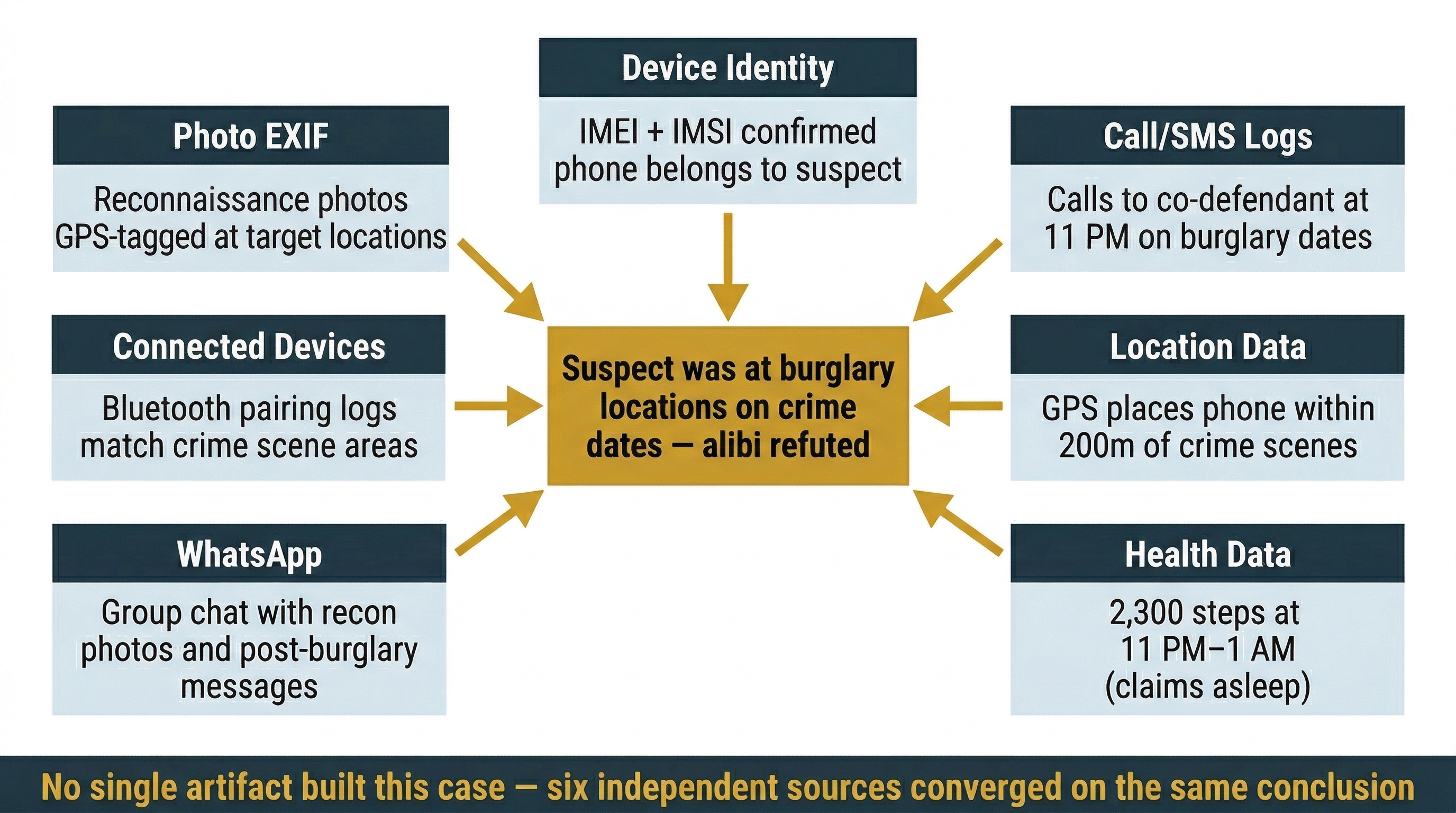
Step 1: Device Identification. Document the IMEI from the device and the ICCID from the SIM tray. Query the carrier with a legal order to confirm the subscriber identity associated with the IMSI on the SIM card, establishing that this phone belongs to the suspect.
Step 2: Call and Message History. Parse calllog.db and mmssms.db. The call log shows three outgoing calls to a known co-defendant between 11:00 PM and 11:30 PM on three of the burglary dates. The SMS database contains messages discussing "the job" and confirming meeting locations. Decode the Unix epoch timestamps in the date column to establish the precise timing of each communication.
Step 3: Location Data. Extract Google Location History from the device. GPS points place the phone within 200 meters of two of the burglarized businesses during the time windows of the crimes. Wi-Fi connection logs in WifiConfigStore.xml show the phone connected to a Wi-Fi network named "BrewPub_Guest" at 11:45 PM; the brew pub is located next door to one of the burglarized businesses.
Step 4: Health Data. The suspect uses Google Fit with a connected smartwatch. Step count data shows 2,300 steps between 11:00 PM and 1:00 AM on each of the burglary nights, directly contradicting his claim of being asleep. Heart rate data shows elevated readings during the same time windows.
Step 5: Third-Party Messaging. The suspect's WhatsApp database (msgstore.db) contains a group chat with three participants. Messages in the group include photographs of the commercial properties taken during daytime reconnaissance, discussions of entry points, and post-burglary messages confirming "we're clear." WAL file analysis recovers two additional messages that were deleted from the main database but not yet checkpointed.
Step 6: Photo and Media Analysis. The phone's photo gallery contains images with EXIF GPS coordinates matching the burglarized locations. The photo timestamps (decoded from epoch values in the media database) correspond to the reconnaissance dates identified in the WhatsApp messages.
This analysis draws on every category of mobile artifact covered in this chapter: device identity, communication records, location data, health data, third-party messaging, and media metadata. Each artifact type independently corroborates the others, building a case that is far stronger than any single evidence source alone.
Chapter Summary
This chapter introduced mobile forensics as a distinct discipline with unique challenges that separate it from the desktop and laptop forensics covered in the preceding chapters.
Key concepts covered include:
- Mobile devices are present in virtually every criminal investigation and frequently contain more relevant evidence than computers. Drug trafficking, fraud, violent crime, cyberstalking, and corporate insider threats all produce mobile evidence.
- Mobile forensics differs fundamentally from desktop forensics. You cannot remove the storage, cannot use hardware write blockers, must contend with default encryption, and face the threat of remote wipe. The standard for forensic soundness in mobile contexts is that changes are minimal, necessary, and documented.
- First responder handling determines evidence availability. Network isolation (Faraday bags or airplane mode) prevents remote wipe. Power management preserves the device's encryption state. The "if on, keep on" rule maintains AFU state and the decryption keys in memory.
- BFU vs. AFU is the most critical encryption concept in mobile forensics. A device in After First Unlock state has its decryption keys in memory, making user data accessible to forensic tools. A device in Before First Unlock state has most user data encrypted and inaccessible without the passcode.
- Device identifiers (IMEI, IMSI, ICCID) answer distinct questions. IMEI identifies the physical device, IMSI identifies the subscriber account, and ICCID identifies the SIM card. Documenting all three connects the device to the evidence chain.
- iOS and Android differ in openness and fragmentation, but both enforce application sandboxing and default encryption. Jailbreaking (iOS) and rooting (Android) bypass security restrictions and leave detectable forensic artifacts.
- The acquisition pyramid defines four levels of data extraction: manual, logical, file system, and physical. Each level captures progressively more data but requires more access. Manual acquisition is the most jury friendly because it produces intuitive photographs and screen recordings. Logical acquisition (iTunes backup for iOS, ADB for Android) is the most commonly used method. The checkm8 exploit enables file system access on iPhones with A5-A11 chips.
- SQLite databases are the universal data store on mobile devices, extending the same database format you encountered in browser forensics (Chapter 7). Key databases include sms.db (iOS messages), CallHistory.storedata (iOS calls), mmssms.db (Android SMS), and calllog.db (Android calls).
- Epoch timestamps require careful decoding. Unix epoch, Mac Absolute Time, and WebKit time use different reference points and units. Timezone conversion from UTC to local time is essential for accurate timelines.
- WAL files and free pages in SQLite databases can contain deleted records that persist until overwritten. Always examine WAL files alongside their parent database.
- Location data from GPS, cell towers, Wi-Fi, and Bluetooth creates a continuous pattern of life. Health and fitness data (step counts, heart rate, sleep) can corroborate or refute alibis. Third-party messaging apps (WhatsApp, Signal, Telegram) store communication data in their application sandboxes with varying encryption and backup behaviors.
Chapter 14 moves beyond individual devices to examine cloud forensics and social media investigation, where evidence resides on remote servers rather than local storage, and legal mechanisms for obtaining that data become the primary challenge.
Quick-Reference Tables
Table A: Mobile Forensic Artifact Locations
| Artifact | iOS Location | Android Location | What It Reveals |
|---|---|---|---|
| SMS/MMS messages | /private/var/mobile/Library/SMS/sms.db |
/data/data/com.android.providers.telephony/databases/mmssms.db |
Text message content, timestamps, sender/recipient |
| Call history | CallHistory.storedata in CallHistoryDB |
/data/data/com.android.providers.contacts/databases/calllog.db |
Call records, duration, timestamps, call type |
| Contacts | AddressBook.sqlitedb in AddressBook |
/data/data/com.android.providers.contacts/databases/contacts2.db |
Names, phone numbers, email addresses |
| Browser history | Safari History.db in app sandbox |
Chrome History in app_chrome directory |
URLs visited, visit timestamps |
| Photos/media metadata | Photos.sqlite in PhotoData |
Media database varies by manufacturer | GPS coordinates, timestamps, camera data |
| Location data | cache_encryptedB.db, Significant Locations |
Google Location History, Wi-Fi logs | GPS fixes, cell tower connections, Wi-Fi proximity |
| KnowledgeC / Pattern of life | knowledgeC.db in CoreDuet/Knowledge |
Varies (Google Play Services, manufacturer) | App usage, screen state, media playback |
| Health data | healthdb_secure.sqlite (encrypted backups only) |
Google Fit / Samsung Health databases | Steps, heart rate, sleep, activity |
ChatStorage.sqlite in app sandbox |
msgstore.db in app sandbox |
Messages, attachments, group chats | |
| Signal | signal.sqlite in app sandbox |
signal.db in app sandbox |
Encrypted messages (requires AFU state) |
| Wi-Fi history | Plist in SystemConfiguration | WifiConfigStore.xml |
Saved networks, connection history |
Table B: Epoch Timestamp Reference
| Epoch | Reference Point | Unit | Typical Digit Count | Conversion Example |
|---|---|---|---|---|
| Unix | Jan 1, 1970 00:00 UTC | Seconds | 10 digits | 1742054400 = Mar 15, 2026 16:00 UTC |
| Unix (ms) | Jan 1, 1970 00:00 UTC | Milliseconds | 13 digits | 1742054400000 = Mar 15, 2026 16:00 UTC |
| Mac Absolute | Jan 1, 2001 00:00 UTC | Seconds | 9 digits | 795974400 = Mar 15, 2026 16:00 UTC |
| WebKit/Chrome | Jan 1, 1601 00:00 UTC | Microseconds | 17-18 digits | 13351708800000000 = Mar 15, 2026 16:00 UTC |
Table C: Acquisition Method Comparison
| Method | Data Captured | Deleted Data? | Pros | Cons | Tools |
|---|---|---|---|---|---|
| Manual | Screen-visible content only | No | Jury friendly; no special tools needed; can be performed at the scene by a first responder | Least complete; only captures visible data; time-consuming; no metadata | Camera, screen recording |
| Logical | Active data via backup protocol | No (generally) | Fast; well-documented process; no device modification needed; widely supported | Misses deleted data, system files, and some app data; backup password may be required | iTunes, ADB, libimobiledevice, commercial suites |
| File System | Full file system including app sandboxes | Partial (WAL files, free pages) | Captures app sandbox data, caches, and some deleted records; comprehensive for analysis | Requires elevated access (jailbreak/root/agent); may modify device state; not always legally defensible | checkra1n, commercial suites |
| Physical | Bit-for-bit image including unallocated space | Yes (if not overwritten) | Most complete evidence set; captures unallocated space; gold standard for data recovery | Extremely difficult on modern encrypted devices; requires advanced exploits; may not be achievable | Commercial suites, legacy: JTAG, chip-off |
Table D: Device Identifier Reference
| Identifier | What It Identifies | Where It Lives | How to Obtain | Forensic Purpose |
|---|---|---|---|---|
| IMEI | Physical device hardware | Device firmware, SIM tray label | Dial *#06#, check SIM tray, carrier records |
Track a specific phone across SIM swaps and carriers |
| IMSI | Subscriber account | SIM card | Carrier records, SIM reader | Link network activity to a subscriber identity |
| ICCID | Physical SIM card | Printed on SIM, stored electronically | Visual inspection, SIM reader | Track which SIM was in which device and when |