CH14: Cloud Forensics and Social Media Investigations
Chapter Overview
Every previous chapter in this course has focused on evidence that sits, in some form, on a physical device in your custody. Registry hives, browser caches, mobile SQLite databases, and email archives all share one comforting property: once you have the device, you have the evidence. Cloud services and social media platforms break that assumption. A suspect's files may be synchronized to Microsoft OneDrive, their family photos stored in Apple iCloud, and their public statements posted to Instagram, TikTok, Discord, and Telegram. The device in your evidence locker holds only fragments of the full record. The rest lives on servers owned by a third party, often in another jurisdiction, under terms of service that do not contemplate your investigation.
This chapter introduces the two adjacent disciplines that address this reality. Cloud forensics is the practice of identifying, preserving, and analyzing evidence that either sits on a local endpoint because a cloud synchronization client placed it there, or lives entirely with a cloud service provider and must be obtained through legal process. Social media investigations focus on capturing, authenticating, and interpreting content posted to public or semi-public platforms, using tools that produce results a court will accept.
You will not become a cloud forensics specialist after reading this chapter. Deeper technical work with sync databases, log parsers, and cloud-native acquisition tools belongs to later coursework and focused professional training. The goal here is to give you the investigator's mental model: what cloud evidence exists, where it lives, what legal instrument you need to obtain it, and what commercial tools the field actually uses to capture social media content in a defensible way.
Learning Objectives
By the end of this chapter, you will be able to:
- Describe the NIST cloud service and deployment models and identify where user-created evidence resides in each.
- Recognize the common cloud synchronization artifacts that OneDrive, Google Drive, Dropbox, and iCloud leave on a local workstation.
- Identify the legal instruments (preservation letter, subpoena, 2703(d) order, search warrant, CLOUD Act request) required to obtain specific categories of provider-held data.
- Evaluate social media content as evidence, accounting for authenticity, volatility, and jurisdictional challenges.
- Compare the commercial platforms and open-source OSINT tools that investigators use to capture and analyze social media evidence.
14.1 Cloud Computing for Investigators
The word "cloud" is marketing language for a simple idea: someone else owns the hardware. When a user saves a document to Microsoft 365, that file is written to a disk in a Microsoft data center. When they upload a photo to Instagram, that image is stored in Meta's infrastructure. The user is renting compute and storage from a service provider rather than owning it.
The National Institute of Standards and Technology formally defined cloud computing in NIST Special Publication 800-145. For an investigator, the useful parts of that definition are the service models and the deployment models, because each one changes the answer to a single question: who holds the evidence, the user or the provider?
The Three Service Models
Each service model changes how much of the stack the customer controls and, by extension, how much of the evidence the investigator can reach without the provider's cooperation.
- Software as a Service (SaaS) delivers a complete application that the user accesses through a browser or thin client. The provider controls the application, the infrastructure, and the data.
- Examples: Gmail, Microsoft 365, Dropbox, Salesforce, Instagram, TikTok, Discord.
- Who holds user data: The provider, almost entirely.
- Investigator access: Endpoint artifacts (browser cache, sync client data) plus legal process directed at the provider.
- Takeaway: SaaS evidence depends heavily on provider cooperation and the legal instrument used to compel it.
- Platform as a Service (PaaS) gives the customer a managed runtime environment in which to deploy their own applications. The provider runs the operating system and infrastructure; the customer supplies the application code.
- Examples: Microsoft Azure App Service, Google App Engine, AWS Elastic Beanstalk, Heroku.
- Who holds user data: Shared. Application data lives in provider-managed databases; the customer can usually export it.
- Investigator access: Customer data export plus provider request for infrastructure-level logs.
- Takeaway: PaaS cases often require both a cooperating customer and a cooperating provider to reconstruct the full picture.
- Infrastructure as a Service (IaaS) rents virtual machines, storage, and networking. The customer controls the operating system and application stack.
- Examples: Amazon EC2, Azure Virtual Machines, Google Compute Engine, DigitalOcean Droplets.
- Who holds user data: The customer, functionally. The provider hosts the disks but does not operate the software.
- Investigator access: Virtual machine snapshot acquired through the customer or by warrant, then analyzed with traditional forensic tools.
- Takeaway: IaaS is the most familiar model forensically, because a VM snapshot behaves much like a disk image.
The Four Deployment Models
Deployment model determines who shares the infrastructure and where it physically sits. That drives the jurisdictional analysis for every cloud case.
- Public cloud serves many unrelated customers on shared infrastructure.
- Examples: AWS, Microsoft Azure, Google Cloud Platform, Oracle Cloud.
- Forensic implication: Data often crosses national borders, raising jurisdictional and sovereignty questions.
- Private cloud is dedicated to a single organization and often resides on-premises or in a leased data center.
- Examples: On-premises VMware or OpenStack deployments, dedicated hosted environments.
- Forensic implication: The organization typically controls the evidence directly. A subpoena or warrant to the organization is usually sufficient.
- Community cloud is shared among organizations with common requirements.
- Examples: Healthcare consortiums governed by HIPAA, federal agency shared-service environments (FedRAMP-authorized community clouds).
- Forensic implication: Evidence may be governed by sector-specific regulations that shape retention, disclosure, and breach notification requirements.
- Hybrid cloud combines two or more of the above, typically a private component for sensitive data and a public component for elastic workloads.
- Examples: A manufacturer running HR systems in a private cloud and customer-facing services in AWS.
- Forensic implication: Evidence is split. The investigator must map which systems live where before selecting legal process.
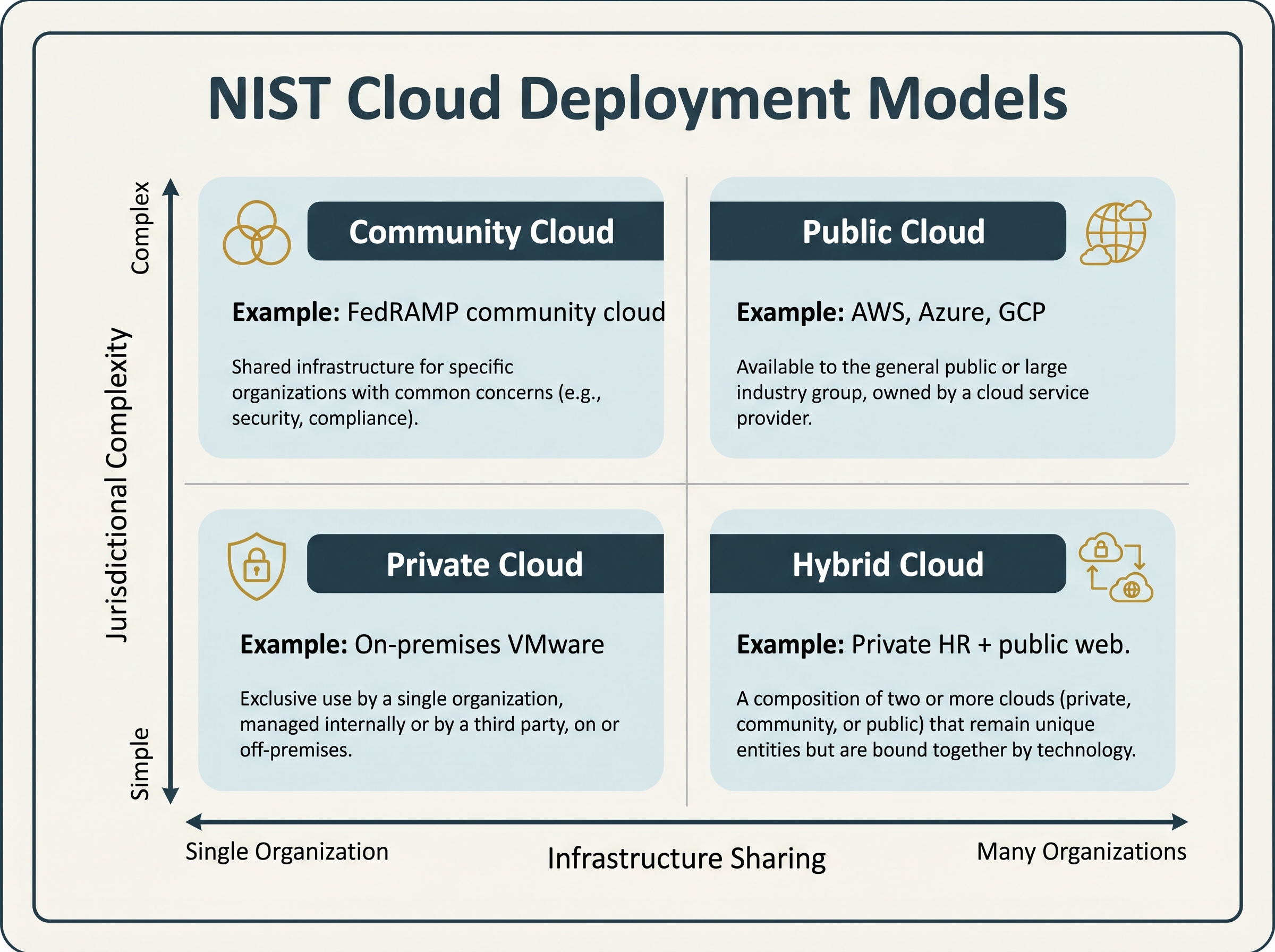
Figure 14.1: NIST cloud deployment models plotted against jurisdictional complexity. Public and hybrid clouds produce the hardest cross-border questions for investigators.
Analyst Perspective
You do not need to memorize NIST 800-145 to work a case. You do need to ask three questions for every cloud service in an investigation: What service model is this? Who owns the data under the terms of service? What legal process will the provider accept? Those three answers shape every acquisition decision that follows.
Cloud Evidence Quick Reference
| Service Model | Typical User Data | Investigator Access Point | Example Platforms |
|---|---|---|---|
| SaaS | Files, messages, posts, photos | Endpoint artifacts plus provider request | OneDrive, Gmail, Instagram |
| PaaS | Application data in managed databases | Customer export plus provider request | Azure App Service, App Engine |
| IaaS | Full virtual disk contents | VM snapshot via customer or warrant | EC2, Azure VMs, Compute Engine |
14.2 Cloud Synchronization Artifacts on the Local Machine
Before you write a single preservation letter, examine the endpoint. Modern operating systems ship with cloud synchronization clients preinstalled:
- Windows 11 installs and activates OneDrive during setup.
- macOS prompts users to sign into iCloud on first boot.
- Chromebooks are built around Google Drive.
Any of these clients, once active, writes a significant trail to the local disk. Sync folders hold actual file content. Configuration files record the user's account identifier. Log files document when files were added, modified, deleted, or shared. An investigator who skips the endpoint goes to the provider empty-handed.
![Radial artifact map centered on a Windows laptop with four sync clients radiating outward. OneDrive at the top shows default folder C:\Users\[User]\OneDrive\, logs at %LocalAppData%\Microsoft\OneDrive\logs\, and the Files On-Demand placeholder feature. Google Drive at the right shows G:\My Drive\ as a virtual folder, the metadata_sqlite_db database, and Stream mode. Dropbox at the bottom shows the default Dropbox folder, the nucleus.sqlite3 database, and the Selective Sync feature. iCloud at the left shows the iCloudDrive folder, the Apple Computer\CloudKit path, and on-demand download.](../img/ch14_sync_artifact_map.png)
Figure 14.2: Major cloud sync clients and the artifacts each leaves on a Windows endpoint. Examining these artifacts is standard practice before approaching the provider.
OneDrive (Microsoft)
OneDrive ships with Windows 10 and Windows 11 and runs for every user who has signed into a Microsoft account. Key artifact locations:
- Default sync folder:
- Personal accounts:
C:\Users\[Username]\OneDrive\ - Work or school accounts:
C:\Users\[Username]\OneDrive - [Organization]\
- Personal accounts:
- Log files:
%LocalAppData%\Microsoft\OneDrive\logs\- Record sync transactions including file additions, deletions, and account switches.
- Configuration and account information:
%LocalAppData%\Microsoft\OneDrive\settings\
OneDrive also offers a feature called Files On-Demand:
- Files in the sync folder may exist only as metadata placeholders rather than full local copies.
- The file appears in the directory listing with a name, size, and timestamp.
- The actual content is stored in the cloud and downloaded only when the user opens it.
- Investigator implication: An examiner who assumes every file in the OneDrive folder has local content available for acquisition will be wrong, and wrong in a way that matters.
Google Drive for Desktop
Google's current sync client, Drive for Desktop, replaced the older Backup and Sync application in 2021. Key artifact locations:
- Working directory:
%AppData%\Google\DriveFS\ - Core database:
metadata_sqlite_db(a SQLite database inside the working directory)- Tracks file identifiers, local paths, modification timestamps, hashes, and sharing status.
- Two sync modes that affect what content is actually on disk:
- Mirror mode: creates full local copies of all files.
- Stream mode: uses virtual files similar to OneDrive's Files On-Demand.
Dropbox
Dropbox stores its sync folder at a user-configurable path. Key artifact locations:
- Default sync folder:
C:\Users\[Username]\Dropbox\(user may have changed this) - Configuration and state databases:
%AppData%\Dropbox\nucleus.sqlite3— file metadata and sync status.sync_history.db— historical record of file events.
- Selective Sync feature:
- Allows a user to exclude specific folders from the local copy.
- Excluded folders leave no file content on the endpoint.
- The database still records their existence, signaling that additional evidence lives with the provider.
iCloud for Windows and macOS
Apple's iCloud client is less thoroughly documented in the forensic literature than the other three platforms. Known artifact locations:
- Windows artifact paths:
%AppData%\Apple Computer\CloudKit\%LocalAppData%\Apple\CloudKit\
- macOS iCloud Drive integration:
~/Library/Mobile Documents/com~apple~CloudDocs/ - iCloud Photos: populates a local thumbnail database that is investigatively useful even when full-resolution originals remain in the cloud.
Warning
Files On-Demand placeholders look identical to real files in a directory listing. A file showing 4 MB with a recent modified timestamp may contain zero bytes of actual content on the disk. Always check the hydration state before concluding that a file was present locally at the time of seizure. Failing to do so has produced embarrassing report corrections in real cases.
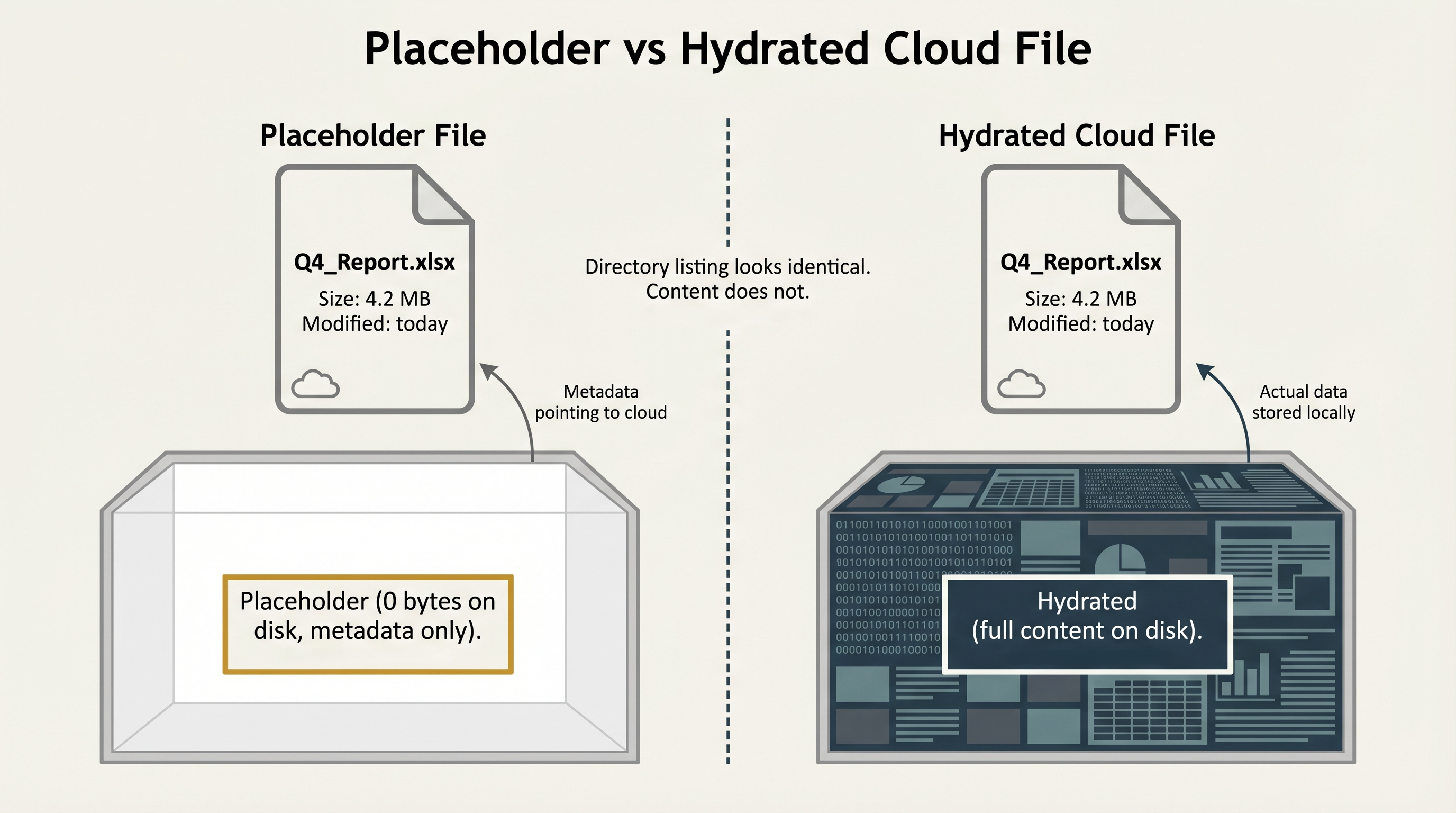
Figure 14.3: Placeholder files and hydrated files are visually indistinguishable in a directory listing. Only the hydrated file contains actual content on the disk.
Supporting Windows Artifacts
Cloud sync logs are not the only record of cloud activity on a Windows endpoint. Several standard Windows artifacts corroborate the sync client's own logs:
- Prefetch files for
OneDrive.exe,GoogleDriveFS.exe, andDropbox.exerecord when each client ran and how often. - Shellbags preserve the user's Explorer navigation into cloud sync folders, even after the folders are removed.
- Jump Lists record recent files opened from cloud sync folders.
- NTFS USN Journal records file creation, deletion, and rename events in cloud sync folders at the file system level.
A single artifact rarely tells the full story. Cross-referencing sync logs with Prefetch, Shellbags, and the USN Journal builds a defensible timeline.
Cloud Sync Client Artifact Quick Reference
| Client | Default Sync Folder | Primary Logs/Databases | Placeholder Feature |
|---|---|---|---|
| OneDrive | C:\Users\[User]\OneDrive\ |
%LocalAppData%\Microsoft\OneDrive\logs\ |
Files On-Demand |
| Google Drive | G:\My Drive\ (virtual) or user path |
%AppData%\Google\DriveFS\metadata_sqlite_db |
Stream mode |
| Dropbox | C:\Users\[User]\Dropbox\ |
%AppData%\Dropbox\nucleus.sqlite3 |
Selective Sync |
| iCloud (Windows) | C:\Users\[User]\iCloudDrive\ |
%AppData%\Apple Computer\CloudKit\ |
On-demand download |
14.3 Obtaining Evidence from the Provider
Local artifacts tell you that a cloud account existed, show you activity patterns, and sometimes reveal the filenames of cloud-only data. They do not give you the content of files the user never downloaded, messages stored only on the provider's servers, or log data the provider retains but never pushes to the endpoint. For that content, you need the provider's cooperation, and the provider will demand specific legal process before producing it.
The Stored Communications Act
The Stored Communications Act (SCA), codified at 18 U.S.C. 2701 through 2712, governs government access to electronic communications and records held by service providers. The SCA divides provider-held data into tiers, and the legal instrument required increases in formality as the sensitivity of the data increases.
- Subpoena reaches basic subscriber information: the account holder's name, address, billing information, IP addresses used at login, and session times. A subpoena does not reach communication content.
- Court order under 2703(d) reaches transactional records and other non-content information such as header metadata, access logs, and more detailed connection records. The government must show "specific and articulable facts" that the records are relevant to an ongoing investigation.
- Search warrant is required for content, including the body of email messages, file contents, and private messages. The government must show probable cause.
Preservation Letters
An SCA request takes time to prepare, and providers do not hold all data indefinitely. The solution, built into the statute, is the preservation letter under 18 U.S.C. 2703(f). A law enforcement agency may send a preservation letter to a provider requiring it to preserve existing records for 90 days, renewable once for another 90 days. The preservation does not compel disclosure. It simply freezes the evidence in place while the investigator works on the underlying legal process. This should be the first step whenever cloud involvement is identified.
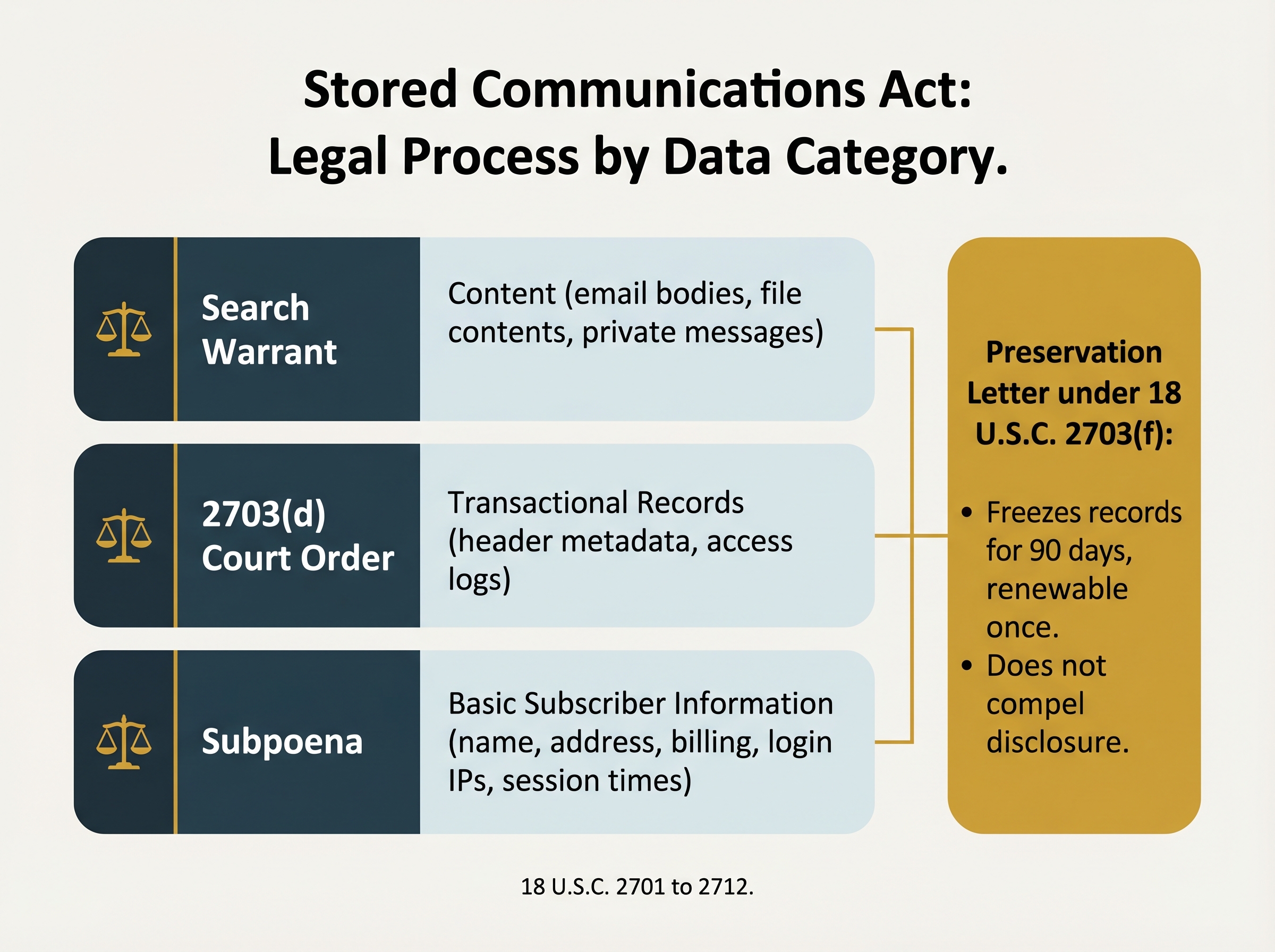
Figure 14.4: Stored Communications Act tiers of legal process, with the 2703(f) preservation letter shown separately. The required instrument increases in formality as the sensitivity of the data increases.
The CLOUD Act
The Clarifying Lawful Overseas Use of Data Act (CLOUD Act) was enacted in 2018 in response to Microsoft Corp. v. United States (sometimes called the "Microsoft Ireland" case), which asked whether a U.S. warrant could compel Microsoft to produce email content stored on servers in Dublin. The Supreme Court heard the case but the CLOUD Act rendered it moot. The statute makes clear that U.S. providers must produce data in their possession, custody, or control regardless of where that data is physically stored. The Act also authorizes executive agreements with foreign governments to streamline cross-border data requests.
Fourth Amendment Case Law
Two Supreme Court decisions shape how the Fourth Amendment applies to digital and cloud evidence:
- Riley v. California, 573 U.S. 373 (2014), held that police generally may not search digital information on a cell phone seized from an arrestee without a warrant. The decision rejected the argument that a phone is analogous to a wallet or a cigarette pack. For cloud forensics, Riley establishes that the warrant requirement applies robustly to the digital content of a seized device, and by extension to cloud accounts accessed through that device.
- Carpenter v. United States, 585 U.S. 296 (2018), held that the government's acquisition of historical cell-site location information from a wireless carrier is a Fourth Amendment search that generally requires a warrant. Carpenter narrowed the third-party doctrine (the rule that information voluntarily shared with a third party loses its reasonable expectation of privacy) as applied to modern digital records, and its reasoning influences how courts evaluate warrant requirements for other cloud-held data.
Legal Process Quick Reference
| Data Category | Required Instrument | Typical Provider Response Time |
|---|---|---|
| Subscriber information | Subpoena | Days to weeks |
| Transactional records, metadata | 2703(d) order | Weeks |
| Content (messages, files) | Search warrant | Weeks |
| Cross-border provider data | CLOUD Act (U.S. warrant) | Weeks |
| Preservation (90 days + renewal) | 2703(f) letter | Immediate |
Warning
A warrant to search a laptop does not authorize you to log into the user's cloud account using cached credentials on that laptop. Accessing the live cloud account is a separate search that generally requires its own legal authority. This distinction has produced suppression motions in real cases. When in doubt, consult the prosecutor before touching a live cloud session.
14.4 Social Media as an Evidence Source
Social media evidence appears in nearly every category of case an investigator will work. Threats and stalking leave direct records. Employment disputes and harassment claims hinge on posts, comments, and direct messages. Fraud cases reveal lifestyle evidence inconsistent with claimed income. Violent crime investigations use posts, check-ins, and photo metadata to establish location and association. In civil litigation, social media is often the first place plaintiffs and defendants look for admissions and contradictions.
The evidence falls into several categories:
- Public posts, photos, and videos visible to anyone or to a defined audience.
- Direct messages between accounts, typically visible only to the participants and the platform.
- Comments, reactions, and shares that build association and timeline evidence.
- Profile information including display names, biographies, linked accounts, and account creation dates.
- Follower and following graphs that reveal relationships and communities.
- Live and ephemeral content such as Stories, Snaps, and live streams that disappear by design.
The Volatility Problem
Unlike a disk image, social media content can vanish between the moment an investigator first sees it and the moment they attempt to capture it. The account holder can delete a post. The platform can remove content for policy violations. Automated retention windows expire. In one widely cited example, a suspect deleted an entire Facebook timeline between the filing of charges and the service of a preservation letter, destroying defense-relevant exculpatory posts along with inculpatory evidence. When an investigator sees relevant content on a public profile, the first action is not to read it carefully. The first action is to preserve it.
Jurisdiction and Account Ownership
Social media profiles do not come with verified identity. Anonymous handles, accounts registered from foreign IP addresses, and accounts on platforms headquartered outside the United States all complicate the investigation. Some platforms will respond only to legal process from their home jurisdiction. Others will require formal treaty procedures for non-U.S. law enforcement requests. The investigator must confirm early whether the target platform will accept a U.S. legal instrument or whether a mutual legal assistance treaty (MLAT) request is required.
14.5 Capturing and Preserving Social Media Evidence
Why Raw Screenshots Fail
The first instinct of most investigators confronted with a damning Instagram post is to take a screenshot. This is almost always inadequate as a sole capture method. A screenshot preserves no hash, no HTTP headers, no source HTML, and no chain-of-custody metadata. It is trivially forged. Courts have increasingly pushed back on screenshots offered as the only form of social media evidence, and opposing counsel will challenge authenticity under Federal Rule of Evidence 901.
Defensible Capture
A defensible social media capture records more than the visible image. At minimum, it should include:
- The full rendered page, not just the visible viewport.
- The underlying HTML source and any referenced resources (images, videos).
- HTTP headers and the server-returned timestamp.
- The investigator's local system time and the network path used.
- A cryptographic hash (SHA-256 or SHA-1) of the complete capture bundle.
- A contemporaneous log recording who performed the capture, when, and from what machine.
Tools designed for this purpose produce all of these elements in a single workflow and output a package the investigator can sign and store under chain of custody.
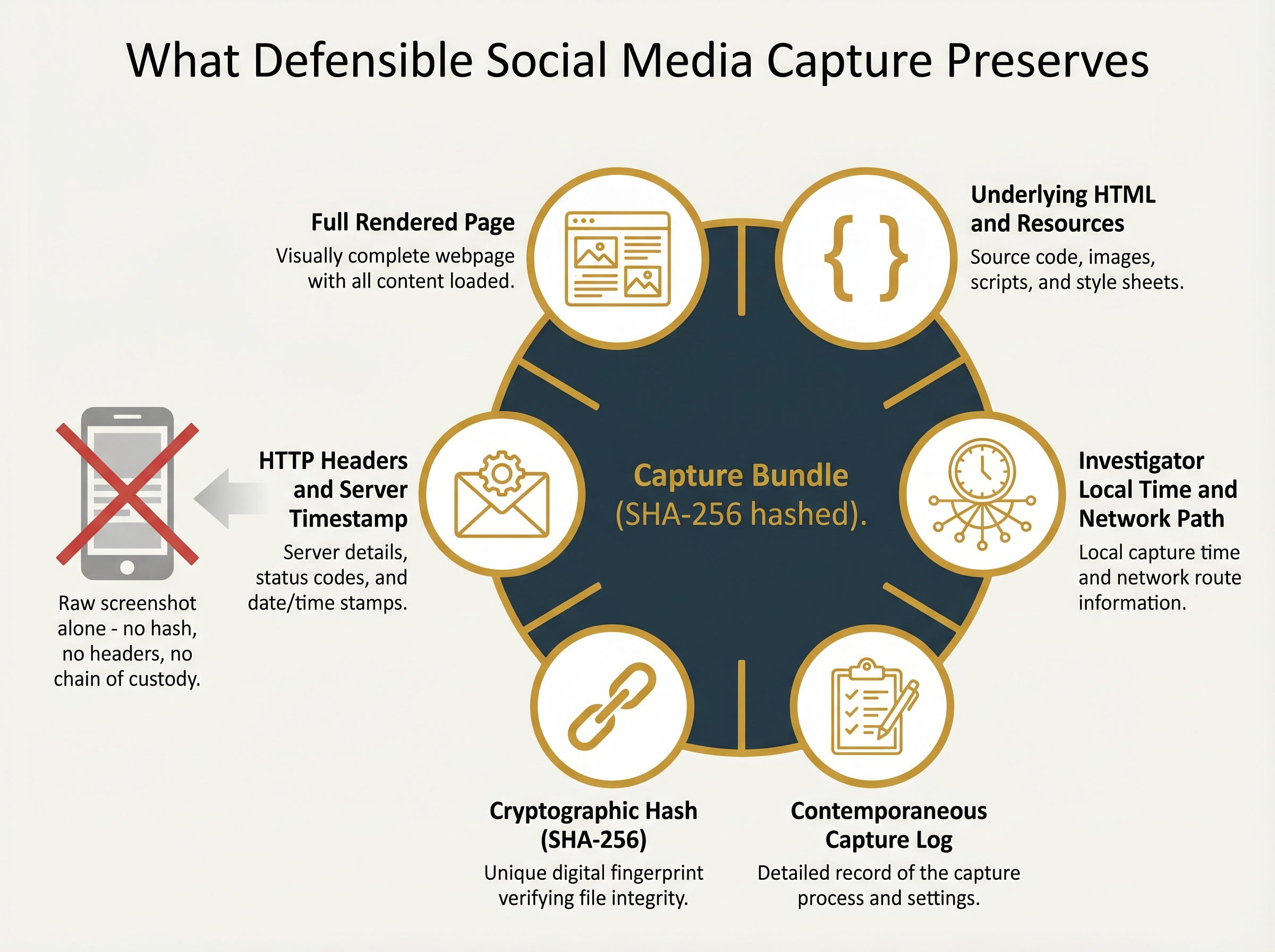
Figure 14.5: Contents of a defensible social media capture bundle compared to a raw screenshot. A screenshot alone lacks every element a court needs to authenticate the capture under Federal Rule of Evidence 901.
Provider Cooperation
Major platforms operate law enforcement request portals. Meta (Facebook, Instagram, WhatsApp, Threads) uses its Law Enforcement Online Request System. X (formerly Twitter) has a legal request portal. TikTok, Discord, Snapchat, and Reddit all publish transparency reports and accept formal legal process through their respective portals. Provider cooperation produces the most authoritative record (the provider's own data), but turnaround is measured in weeks, not minutes. When content is actively visible and at risk of deletion, independent capture and a preservation letter go out in parallel.
Analyst Perspective
Capture first, analyze second. If you spend ten minutes reading through a suspect's Twitter feed before you start your capture, and the account is suspended or deleted during those ten minutes, your case is meaningfully weaker. The capture tool runs silently while you work. Start it before you read.
14.6 Commercial Tools for Social Media Investigations
The field has settled on a small number of tools for defensible social media capture. You do not need hands-on expertise with all of them to be effective, but you should be able to name the categories and match a tool to a scenario.
- X1 Social Discovery is a dedicated social media collection platform used in both law enforcement and civil eDiscovery. It captures content from major social platforms, websites, and webmail, produces MD5/SHA hashes, and preserves metadata in a format that survives challenge under FRE 901.
- Hunchly is a browser extension used for open-source investigations. It automatically captures every page an investigator visits during a session, with hashes, timestamps, and a searchable case database. Hunchly is the de facto standard for OSINT investigators who need to document their research process without manually saving every page.
- Pagefreezer and Hanzo are enterprise-grade web and social media archival platforms. Both are used heavily in regulated industries for compliance preservation and in civil litigation for large-scale social media capture. Output is designed to be court-admissible.
- Magnet AXIOM Cloud is part of Magnet Forensics' AXIOM suite. It integrates with endpoint examinations and can acquire data from cloud accounts when credentials, tokens, or legal authority allow. It is a common choice for law enforcement labs that already use AXIOM for disk and mobile forensics.
- Cellebrite Cloud Analyzer (formerly UFED Cloud Analyzer) performs account-level cloud acquisition from a wide range of services. Like AXIOM Cloud, it is typically paired with legal process and is used by agencies that already operate in the Cellebrite ecosystem.
Social Media Investigation Tool Quick Reference
| Tool | Primary Use Case | Typical User | Output |
|---|---|---|---|
| X1 Social Discovery | Dedicated social capture | LE and civil eDiscovery | Hashed, metadata-preserved archive |
| Hunchly | OSINT session recording | OSINT investigators | Auto-captured browsing log |
| Pagefreezer / Hanzo | Enterprise compliance archival | Regulated industries, civil litigation | Court-admissible archive |
| Magnet AXIOM Cloud | Cloud + endpoint integration | LE forensic labs | AXIOM case file |
| Cellebrite Cloud Analyzer | Cloud account acquisition | LE agencies | UFDR case file |
14.7 OSINT Tools and Techniques
Open-source intelligence (OSINT) is the discipline of collecting and analyzing publicly available information. An investigator working a social media case is almost always doing OSINT, whether they call it that or not. The line between OSINT and forensic evidence collection matters: OSINT techniques inform an investigation and develop leads, but the evidence itself still has to be captured with the defensible methods described in 14.5 if it is going to hold up in court.
Several tools and techniques appear repeatedly in investigative workflows:
- Maltego visualizes relationships between entities (people, accounts, email addresses, domains, IP addresses) using "transforms" that query public data sources. Investigators use it to map connections between a suspect's online identities.
- SpiderFoot automates OSINT collection across hundreds of data sources. Given a starting point such as an email address or username, it pulls related data (breached credentials, associated accounts, linked domains) into a single report.
- Sherlock and similar username-enumeration tools check whether a given handle exists across dozens of platforms. This is useful for confirming that a username on one platform belongs to the same person active on others.
- Reverse image search through Google Images, Yandex, and TinEye identifies where a photo has appeared elsewhere online, which can confirm or refute claims about a photo's origin.
- EXIF metadata analysis on photos posted before platform stripping can reveal camera model, timestamps, and sometimes GPS coordinates. Most major platforms now strip EXIF data on upload, but archived and downloaded copies may retain it.
Warning
OSINT collection on social platforms can violate the platform's terms of service even when it is legal. Using automated scraping tools against a platform's anti-automation controls can trigger account bans, IP blocks, and (in rare cases) civil liability under the Computer Fraud and Abuse Act. Know your agency's policy and the platform's rules before deploying automated OSINT tooling.
Putting It Together: A Workplace Harassment Investigation
A mid-sized manufacturing company contracts with your firm to investigate a harassment complaint. The complainant, a former employee, alleges that the respondent (still employed) sent harassing direct messages through Instagram, posted demeaning content referencing the complainant on a personal TikTok account, and exfiltrated internal company documents to a personal OneDrive account before the complainant's resignation. You receive the company-issued laptop the respondent used, along with written consent from the company to examine it.
Your workflow draws from every concept in this chapter.
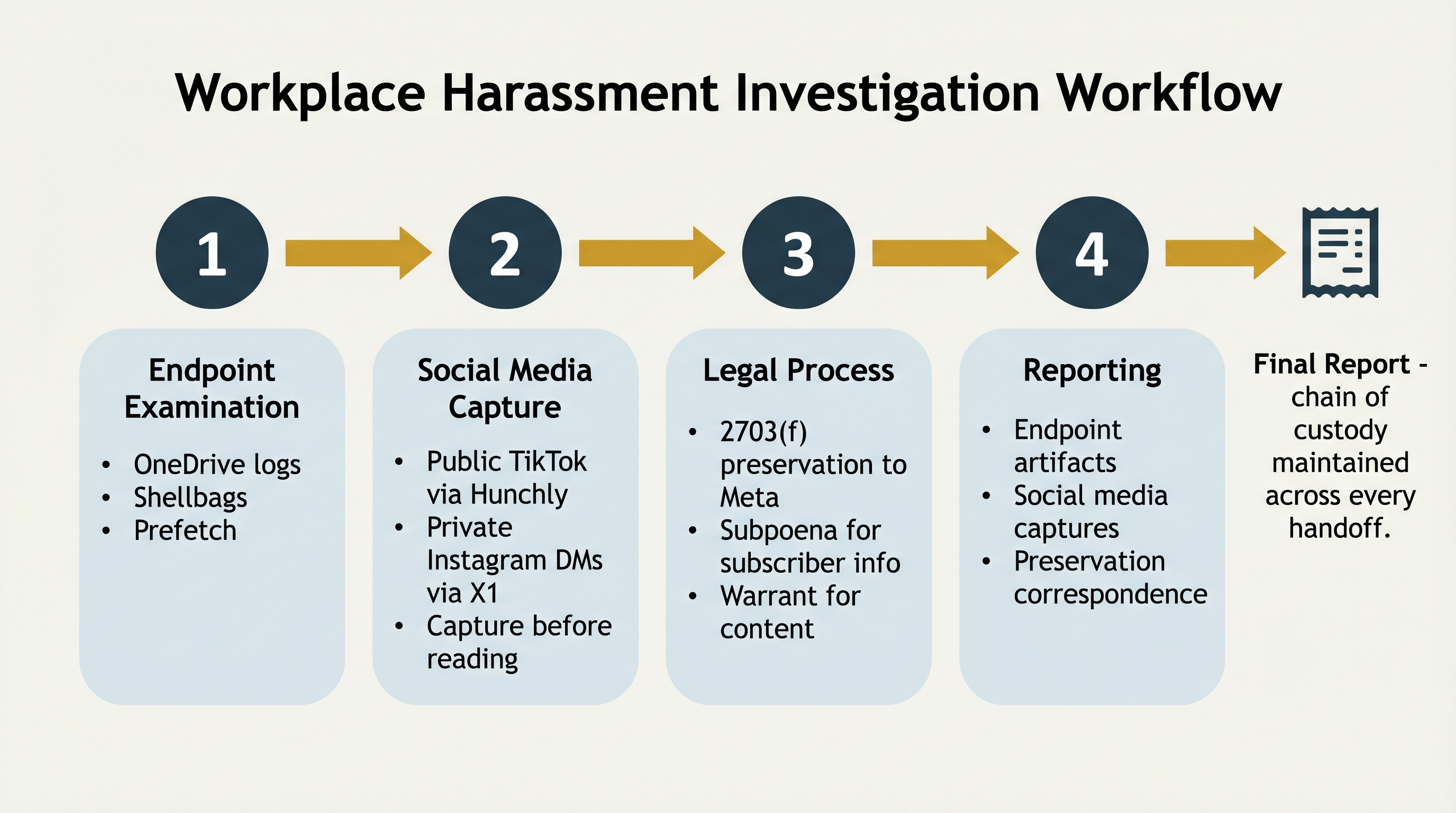
Figure 14.6: The four-step workflow for the workplace harassment scenario, from endpoint examination through legal process to reporting. Each handoff preserves the chain of custody.
Step 1: Endpoint examination. You image the laptop and work the cloud artifact trail.
- OneDrive logs (
%LocalAppData%\Microsoft\OneDrive\logs\):- Show sign-ins to both the corporate tenant and a personal Microsoft account within the same session.
- Document file uploads to the personal account with filenames matching internal sales reports.
- Shellbags: confirm the respondent navigated into the personal OneDrive sync folder during the period in question.
- Prefetch: shows
OneDrive.exerunning during off-hours, corroborating the log timeline.
Step 2: Social media capture. With endpoint evidence secured, you turn to the social media allegations.
- Public TikTok profile (respondent):
- Capture with Hunchly before reading the content to preserve every post and comment with timestamps and hashes.
- Identify three posts that reference the complainant.
- Private Instagram direct messages:
- Public capture is not possible because the messages are private.
- Work with the complainant to capture screenshots from her own account using X1 Social Discovery, which preserves the message metadata alongside the visible content.
Step 3: Legal process. You coordinate with counsel to lock down provider-held data before it can be deleted.
- Preservation letter under 18 U.S.C. 2703(f) sent to Meta, freezing the Instagram account records for 90 days.
- Subpoena for subscriber information follows.
- Search warrant for message content is pursued if the investigation supports it.
Step 4: Reporting. You present three interlocking pieces of evidence:
- Endpoint artifacts documenting the document exfiltration to personal OneDrive.
- Hunchly and X1 Social Discovery captures of the social media content.
- Preservation correspondence with Meta ensuring the underlying provider data remains available.
The complainant's attorney, the company's HR counsel, and the respondent's attorney all receive the same documentation, reviewed under the same chain of custody. The workforce roles engaged in this scenario include:
- Digital forensic analyst — endpoint examination and artifact analysis.
- Private investigator or corporate security investigator — social media capture and OSINT research.
- Outside counsel — legal process, preservation letters, and coordination with the providers.
Each role hands work to the next, and the quality of the final report depends on every handoff holding up.
Chapter Summary
- Cloud computing is simply "someone else's computer." The NIST service models (SaaS, PaaS, IaaS) and deployment models (public, private, community, hybrid) determine where evidence resides and who controls access.
- Modern endpoints carry cloud synchronization clients (OneDrive, Google Drive, Dropbox, iCloud) that leave sync folders, configuration files, log files, and SQLite databases on the local disk. An investigator should examine these endpoint artifacts before approaching the provider.
- Provider-held evidence requires specific legal process: subpoenas for subscriber information, 2703(d) orders for transactional records, and warrants for content. Preservation letters under 2703(f) freeze records for 90 days while other process is developed.
- The CLOUD Act (2018) clarified that U.S. providers must produce data regardless of physical storage location. Riley v. California (2014) and Carpenter v. United States (2018) shape the Fourth Amendment framework for digital and cloud evidence.
- Social media evidence is volatile and must be captured with defensible methods. Raw screenshots are inadequate. Commercial tools (X1 Social Discovery, Hunchly, Pagefreezer, Hanzo, Magnet AXIOM Cloud, Cellebrite Cloud Analyzer) produce court-admissible captures with hashes and preserved metadata.
- OSINT tools (Maltego, SpiderFoot, Sherlock, reverse image search) develop leads and map relationships, but the evidence itself still must be captured with forensic rigor if it is going to court.