CH10: Eradication & Remediation
Introduction
In Chapter 9, we locked down the perimeter. The attacker's C2 channels are severed, compromised hosts are isolated, stolen credentials are revoked, and the environment is stabilized. The containment hold has passed without signs of breakout.
Now it is time for the cleanup operation.
Eradication is the systematic removal of every trace of the attacker's presence from the environment — their malware, their backdoors, their rogue accounts, and their persistence mechanisms. Remediation is the process of fixing the underlying weaknesses that allowed the breach in the first place — the unpatched vulnerability, the missing segmentation, the stale service account.
These are distinct but inseparable operations. Eradication without remediation is temporary; the attacker (or the next one) walks through the same open door. Remediation without eradication is futile; you are patching the wall while the intruder is still inside the building.
This chapter covers both operations and the critical verification step that must occur before the organization transitions to Recovery (Chapter 11). The greatest risk in this phase is impatience — declaring victory too early and moving to recovery before the attacker is truly gone.
Learning Objectives
By the end of this chapter, you will be able to:
- Conduct a Root Cause Analysis using the "Five Whys" technique to identify underlying process and control failures — not just the technical exploit.
- Compare the re-image approach to the antivirus-clean approach and justify why modern IR favors wiping and rebuilding compromised systems.
- Identify common persistence mechanisms and explain the methodology for systematic documentation and removal.
- Apply remediation actions including credential resets (KRBTGT), vulnerability patching, and security control hardening to prevent recurrence.
- Evaluate verification and assurance methods to confirm the adversary is truly gone before transitioning to Recovery.
10.1 Root Cause Analysis
In Chapter 8, we introduced the concept of Root Cause Analysis (RCA) as a preliminary step during the Analysis phase — asking "Why was this possible?" before handing off to Containment. That initial RCA was based on incomplete information; the team was still scoping the breach.
Now, with containment complete and the full scope defined, the team conducts the definitive RCA. This is the version that feeds directly into the eradication checklist (what to remove) and the remediation plan (what to fix).
Symptoms vs. Root Causes
The most common mistake in RCA is confusing the mechanism of the attack with the reason it succeeded. Consider the difference:
- Symptom: Ransomware encrypted the file server.
- Technical Mechanism: The attacker used Mimikatz to dump credentials from LSASS memory.
- Root Cause: The Finance workstation had unrestricted RDP access to the file server because the network was flat — no segmentation had been implemented despite three years of audit recommendations.
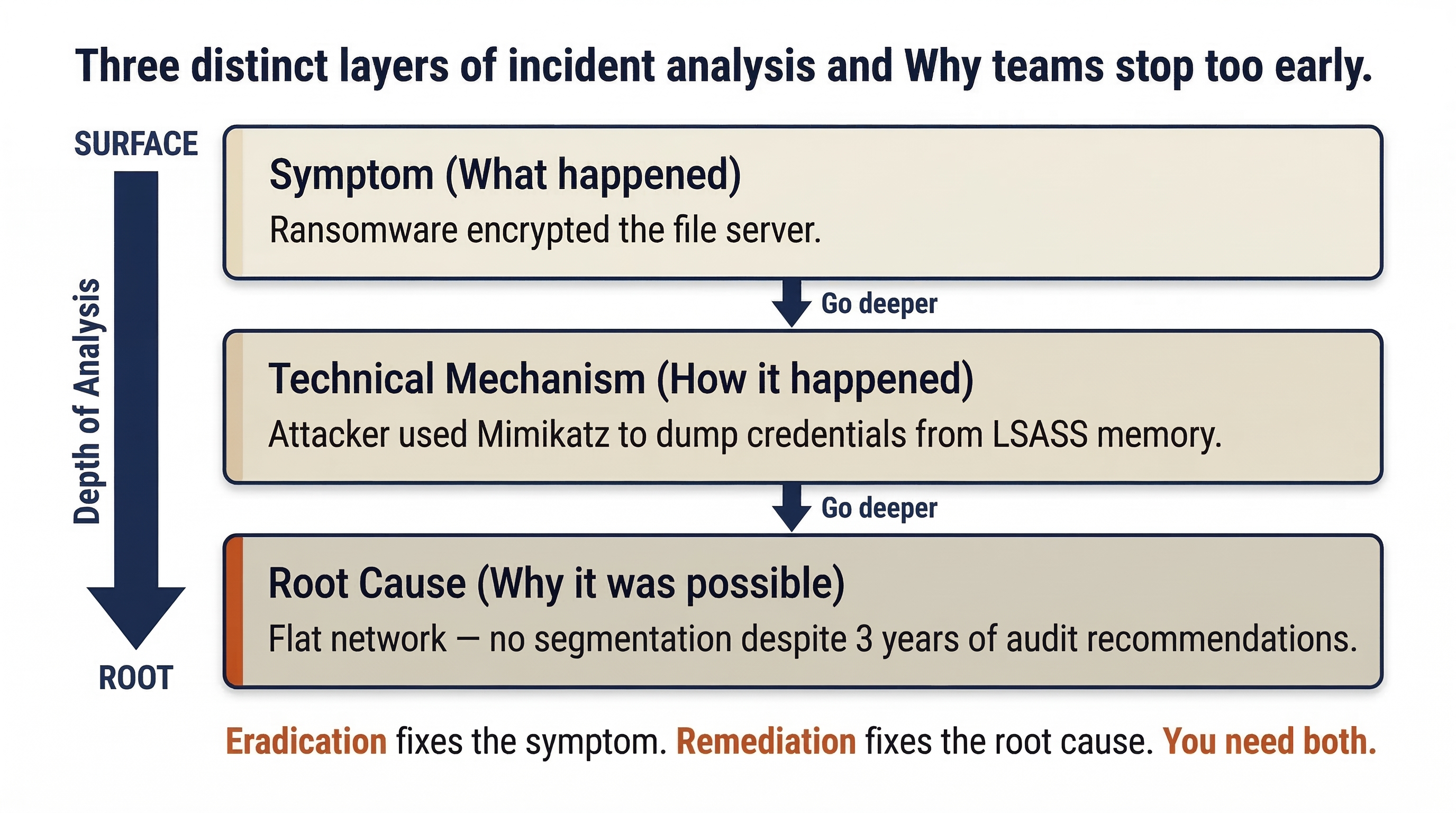
Eradication addresses the symptom and mechanism (remove the ransomware, reset the stolen credentials). Remediation addresses the root cause (implement network segmentation). Both are required.
The "Five Whys" in Practice
The "Five Whys" technique (introduced briefly in Chapter 8) is a structured method for drilling past the technical surface to reach the process or governance failure underneath. In the Eradication phase, the team applies it with the benefit of full incident scope.
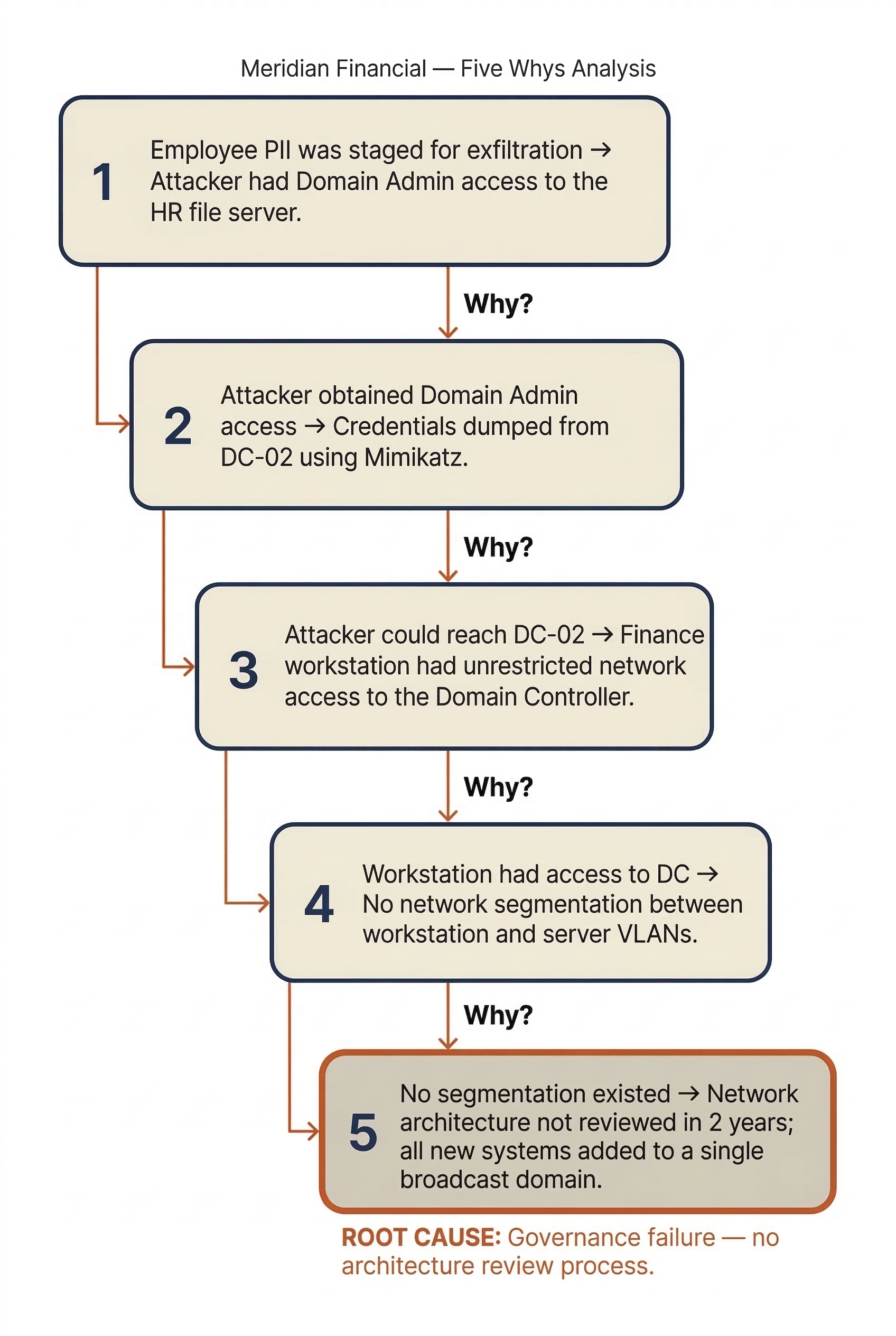
Applied to the Meridian Financial scenario from Chapter 9:
- Why was employee PII staged for exfiltration? → Because the attacker had Domain Admin access to the HR file server.
- Why did the attacker obtain Domain Admin access? → Because they dumped credentials from DC-02 using a Mimikatz variant.
- Why could they reach DC-02? → Because the compromised Finance workstation had unrestricted network access to the Domain Controller.
- Why did a Finance workstation have access to a Domain Controller? → Because the network was flat — no segmentation existed between workstation and server VLANs.
- Why was there no segmentation? → Because the network architecture had not been reviewed since the company moved to a new office two years ago, and new systems were added to a single broadcast domain.
The root cause is not "the attacker used Mimikatz." The root cause is a governance failure: the absence of a network architecture review process and the lack of segmentation between workstation and server tiers.
Multiple Root Causes
Most significant incidents have more than one contributing root cause. For the Meridian scenario, the RCA might identify:
- Root Cause 1: No network segmentation (flat network allowed lateral movement).
- Root Cause 2: The
svc-backupservice account had Domain Admin privileges and its password had not been rotated in 14 months. - Root Cause 3: The email gateway did not block macro-enabled document attachments, allowing the initial phishing payload to reach the user.
- Root Cause 4: No MFA was required for RDP access to servers.
Each root cause generates a corresponding remediation action item. The RCA is not about assigning blame to individuals — it is about identifying the systemic failures that, if corrected, would have prevented or significantly limited the breach.
Analyst Perspective
The RCA produces two critical outputs that drive the rest of this chapter. First, it generates the eradication checklist — the specific artifacts, accounts, and persistence mechanisms the attacker left behind that must be removed. Second, it produces the remediation plan — the control gaps and process failures that must be fixed to prevent recurrence. If you skip the RCA and jump straight to reimaging machines, you will clean the environment but leave the front door wide open.
10.2 Eradication Procedures
Eradication is the methodical removal of the attacker's foothold. This includes their malware, tools, rogue accounts, persistence mechanisms, and any modifications they made to the environment. The operative word is methodical — rushed eradication misses artifacts and leads to re-compromise.
The Re-Image vs. Clean Decision
When a system is confirmed compromised, the team faces a fundamental choice: attempt to "clean" the system using antivirus and manual removal, or wipe it entirely and rebuild from a known-good image.
Modern incident response strongly favors the re-image approach. The reasoning is straightforward:
- Rootkits and bootkits can modify the operating system at a level that antivirus cannot reliably detect or remove. A system that appears "clean" may still harbor kernel-level compromise.
- Fileless malware resides entirely in memory and the Registry, leaving no traditional file for AV to scan. While the malware itself disappears on reboot, the persistence mechanism that reloads it may survive a cleaning attempt.
- Tampered system binaries — an attacker who has achieved administrative access can replace legitimate system files (DLLs, drivers) with backdoored versions. AV signature databases cannot account for every possible modification.
- Confidence: After a re-image from a known-good source, the team can state with high confidence that the system is clean. After an AV cleaning, the team can only state that known threats were removed — an important distinction for the Incident Report and any legal proceedings.
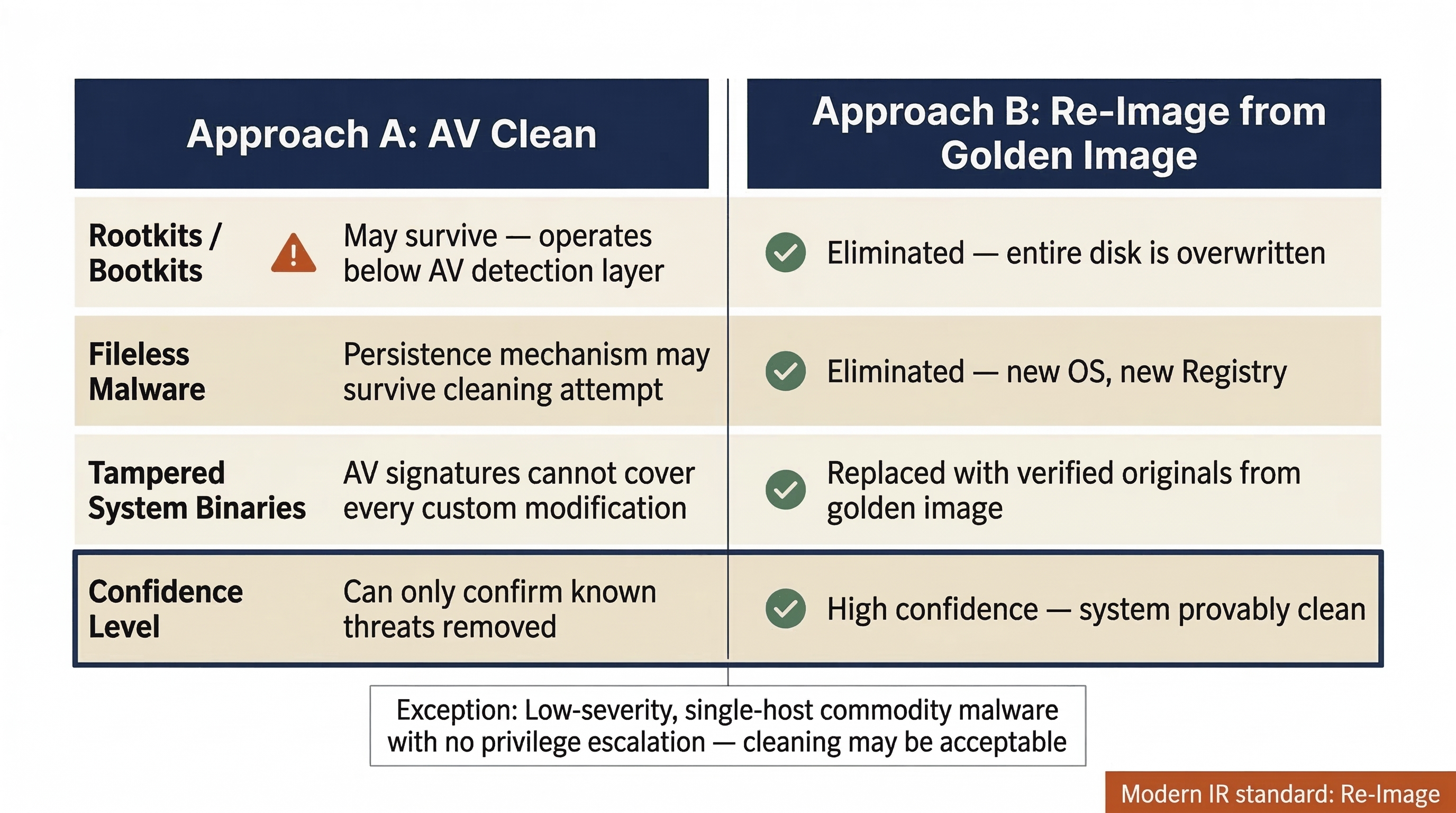
When cleaning might be acceptable: In low-severity incidents where the scope is definitively limited to a single host, no privilege escalation occurred, and the malware is a well-understood commodity threat (e.g., a basic adware infection), cleaning may be a pragmatic choice. These cases are the exception, not the rule.
Warning
"Antivirus Says It's Clean" Is Not Eradication
A common and dangerous mistake is to run a full antivirus scan, see "0 threats found," and declare the system eradicated. Antivirus is a detection tool, not a verification tool. It can only find what it has signatures for. A targeted attacker using custom tooling, living-off-the-land techniques, or modified open-source tools will not appear in any signature database. The re-image approach eliminates this uncertainty entirely.
Systematic Persistence Removal
Before reimaging a compromised system, the team must document every persistence mechanism the attacker installed. This documentation serves the forensic record and the Incident Report — it proves what the attacker did and validates the eradication actions taken.
Persistence mechanisms are the attacker's insurance policy — the techniques they use to ensure their access survives reboots, password changes, or partial cleanup attempts. A thorough eradication requires hunting for each category.
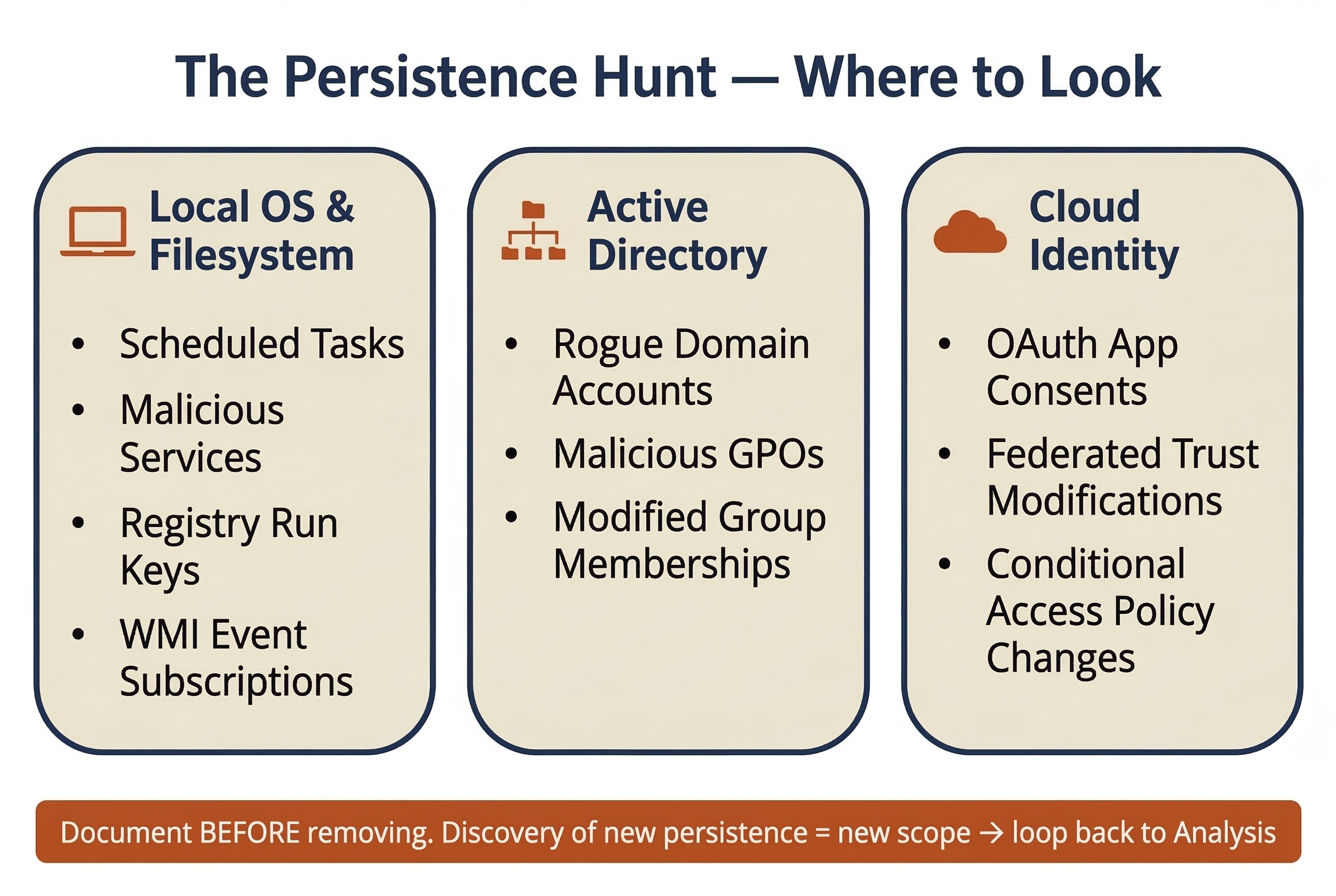
| Persistence Mechanism | Typical Location | Detection Method | Eradication Action |
|---|---|---|---|
| Scheduled Tasks | C:\Windows\System32\Tasks\ or schtasks /query |
Review task list for unfamiliar entries; check creation timestamps | Document and delete the task; reimage the host |
| Windows Services | HKLM\SYSTEM\CurrentControlSet\Services\ |
Compare running services against baseline; check for unsigned binaries | Document and remove the service; reimage |
| WMI Event Subscriptions | WMI repository (wmic /namespace queries) |
Use tools like Autoruns or Get-WMIObject to enumerate subscriptions | Document and remove; reimage |
| Registry Run Keys | HKLM\Software\Microsoft\Windows\CurrentVersion\Run and RunOnce |
Autoruns, Registry Explorer | Document and delete keys; reimage |
| Rogue Local/Domain Accounts | Active Directory, local SAM database | Compare current accounts against known-good baseline; check creation dates | Disable and document; remove from AD |
| Malicious Group Policy Objects | Active Directory Group Policy | Review GPOs modified during the incident window; compare against backups | Revert to known-good GPO; document changes |
| OAuth Application Consents | Cloud identity provider (Entra ID, Google Workspace) | Review enterprise application consents; check for unfamiliar apps with broad permissions | Revoke consent and remove the application |
| SSH Authorized Keys | ~/.ssh/authorized_keys on Linux/macOS |
Compare against known-good key inventory | Remove unauthorized keys; reimage if warranted |
Warning
New Persistence = New Scope
If the eradication team discovers a persistence mechanism that was not identified during the Analysis phase (Chapter 8) — for example, a rogue GPO that deploys a backdoor to every domain-joined machine — the incident scope has expanded. The team is technically back in Detection/Analysis. The Incident Commander must be notified, and the new scope must be investigated before eradication continues. This iterative loop is normal in complex incidents.
10.3 The Cycle Is Circular
The IR lifecycle diagram from Chapter 5 shows a clean, linear progression: Preparation → Detection → Analysis → Containment → Eradication → Recovery → Lessons Learned. The operational reality is far messier.
Looping Back
During eradication, any of the following discoveries can send the team back to earlier phases:
- A new backdoor is found on a system that was not in the original scope → return to Analysis to investigate the new host and determine how the attacker reached it.
- A persistence mechanism is removed, but the system is re-compromised within hours → return to Detection to identify the alternate access path.
- A rogue account is discovered in a cloud tenant that was not previously investigated → return to Analysis to scope the cloud compromise.
These loops are not failures — they are the process working correctly. The alternative (ignoring new findings and pressing forward to Recovery) is far worse.
The Danger of Premature Recovery
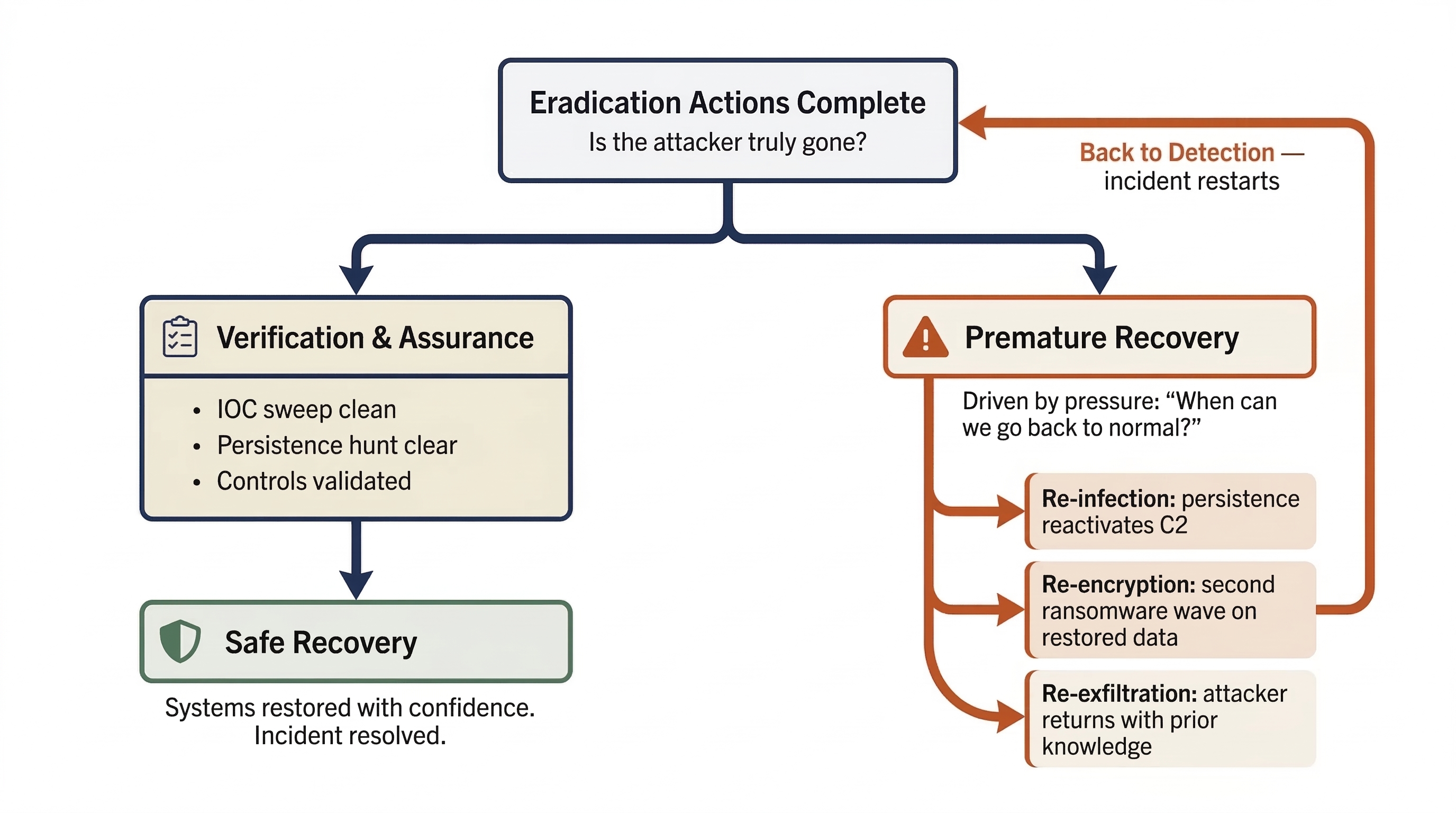
The single greatest risk in the Eradication phase is moving to Recovery before eradication is complete. Premature recovery occurs when organizational pressure — from executives, customers, or regulators — pushes the team to restore operations before the attacker has been fully removed.
The consequences are predictable and severe:
- Re-infection: The attacker's persistence mechanism survives on a system that was "cleaned" rather than reimaged. Within hours of reconnecting to the network, the malware reactivates and re-establishes C2.
- Re-encryption: In ransomware incidents, a missed backdoor allows the attacker to deploy a second wave of encryption on the freshly restored data.
- Re-exfiltration: If the attacker's access path is not fully closed, they can return to steal additional data, leveraging knowledge gained from their first intrusion.
The Incident Commander must formally verify that eradication is complete before authorizing the transition to Recovery. This verification is covered in Section 10.5.
Analyst Perspective
When leadership asks "When can we go back to normal?" — and they will ask this repeatedly — resist the urge to give an optimistic timeline. The honest answer is: "When we have verified that every trace of the attacker is removed and the root causes are addressed." Recovering a compromised Domain Controller that still has a scheduled task executing a beacon every 15 minutes does not save time — it restarts the entire incident. Frame it this way for executives: "Recovering 24 hours early and getting re-compromised costs us two weeks. Spending an extra 24 hours on verification costs us one day."
10.4 Remediation
While eradication removes the attacker, remediation closes the doors they walked through. Remediation actions are derived directly from the Root Cause Analysis (Section 10.1) and must address every contributing factor identified.
Credential Remediation
In most significant breaches, the attacker obtains credentials — often privileged credentials. Eradication removes the attacker's tools, but if the stolen credentials remain valid, the attacker (or anyone who purchased them on a dark web marketplace) can simply log back in.
The KRBTGT Account Reset
In Active Directory environments where the attacker achieved Domain Admin access, the KRBTGT account must be reset. The KRBTGT account is the key that signs all Kerberos Ticket-Granting Tickets (TGTs) in the domain. If an attacker obtains the KRBTGT password hash, they can forge "Golden Tickets" — authentication tokens that grant unrestricted access to any resource in the domain, bypassing all access controls.
The KRBTGT reset must follow a specific procedure:
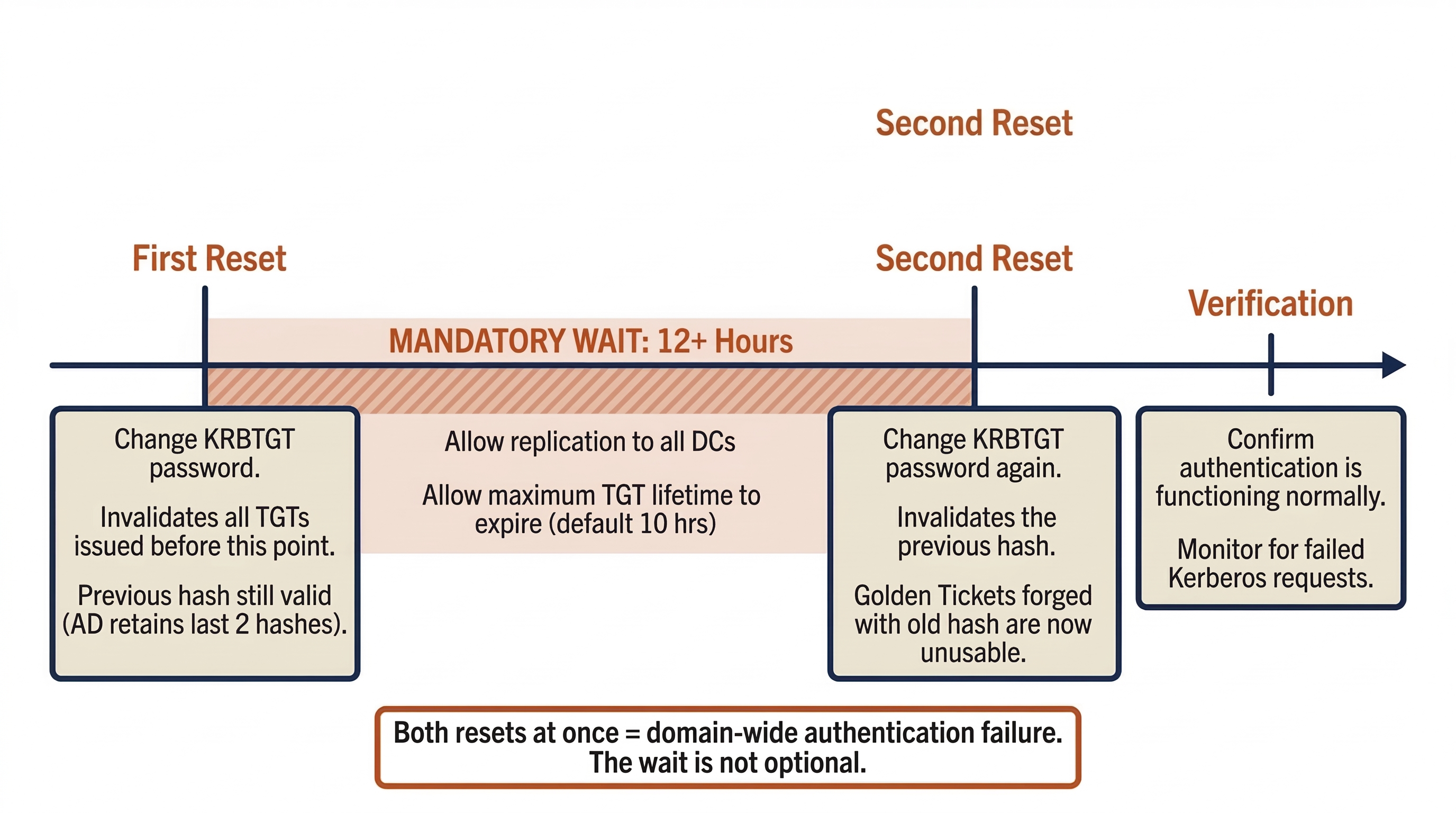
- First Reset: Change the KRBTGT password. This invalidates all TGTs issued before the reset. However, the previous KRBTGT password hash remains valid (Active Directory retains the last two password hashes for the KRBTGT account to ensure continuity during replication).
- Wait 12+ Hours: Allow the first reset to replicate to all Domain Controllers and allow the maximum TGT lifetime to expire (default is 10 hours).
- Second Reset: Change the KRBTGT password again. This invalidates the previous hash, ensuring that any Golden Tickets forged with the old hash are now completely unusable.
Performing both resets simultaneously (without the waiting period) can cause domain-wide authentication failures as all existing tickets are immediately invalidated before new ones can be issued.
Additional Credential Actions:
- Reset all Domain Admin and Enterprise Admin passwords.
- Rotate all service account credentials, particularly those confirmed or suspected to be compromised.
- Reset the passwords of any accounts that were cached on compromised systems.
- Force a password change for the general user population if the scope suggests broad credential theft (e.g., NTDS.dit exfiltration).
Vulnerability Remediation
The specific vulnerability exploited for initial access must be patched. If the phishing email delivered a macro-enabled document, the email gateway must be reconfigured to block or quarantine macro-enabled attachments. If the initial access was through an unpatched VPN appliance, the patch must be applied (and the appliance's credentials rotated, since the attacker likely harvested them).
Beyond the specific exploit, the team should conduct a broader vulnerability assessment of systems within the blast radius. Attackers rarely exploit a single weakness — they chain vulnerabilities. Patching only the initial access vector while leaving the lateral movement path open invites the next attacker to use a different entry point but follow the same internal route.
Configuration Remediation
Configuration remediation addresses the architectural and policy gaps identified in the RCA:
- Network Segmentation: Implementing VLAN segmentation between workstation, server, and management tiers. Restricting RDP, SMB, and WinRM access between tiers to authorized management hosts only.
- Multi-Factor Authentication: Enforcing MFA for all remote access (VPN, RDP), all privileged account usage, and all cloud/SaaS administrative actions.
- Legacy Protocol Retirement: Disabling NTLMv1, LLMNR, NetBIOS Name Service, and other legacy protocols that facilitate credential theft and relay attacks.
- Email Gateway Hardening: Blocking macro-enabled attachments, implementing DMARC/DKIM/SPF to reduce spoofing, and enhancing sandboxing for executable content.
- Least Privilege Enforcement: Removing unnecessary administrative access, implementing tiered administration models, and deploying Privileged Access Management (PAM) solutions.
Not all configuration remediation can be completed during the incident. Some changes (full network segmentation, PAM deployment) are multi-month projects. Section 10.6 addresses how to track these long-term remediation items.
10.5 Verification and Hardening
Eradication and remediation produce a theoretically clean environment. Verification proves it. This step must occur before the Incident Commander authorizes the transition to Recovery (Chapter 11).
Clean Rebuild and Baselines
Every system that was reimaged should be rebuilt to a hardened baseline, not simply restored to its pre-incident configuration. The pre-incident configuration is what allowed the breach in the first place.
Hardened baselines should include:
- Operating system patched to the current security update.
- EDR agent installed, active, and reporting to the central console.
- Local firewall configured with the principle of least privilege.
- Unnecessary services and protocols disabled.
- Logging configured and verified as flowing to the SIEM.
Where the organization uses Infrastructure as Code (IaC) — Terraform, Ansible, or similar tools — the rebuild should be executed from code to ensure consistency and repeatability. Manual rebuilds introduce configuration drift and increase the risk of missing a hardening step.
Control Validation
Before reconnecting rebuilt systems to the production network, the team must verify that the security controls relied upon during the incident are actually functioning:
- EDR Coverage: Are agents deployed on every rebuilt system? Are they in the correct policy group? Are they reporting current telemetry?
- Logging: Is every rebuilt system sending logs to the SIEM? Are the log sources that were missing during the investigation (the ones identified as timeline gaps in Chapter 8) now configured?
- MFA: Is MFA enforced for the accounts and access methods identified in the RCA?
- Segmentation: Are the new firewall rules and VLAN configurations active and blocking traffic as intended?
- Firewall Blocks: Are the C2 IP/domain blocks from Containment (Chapter 9) now permanent rules, not temporary entries that will expire?
Assurance Checks
The final verification step is active hunting — looking for evidence that the attacker is still present or that persistence mechanisms were missed.
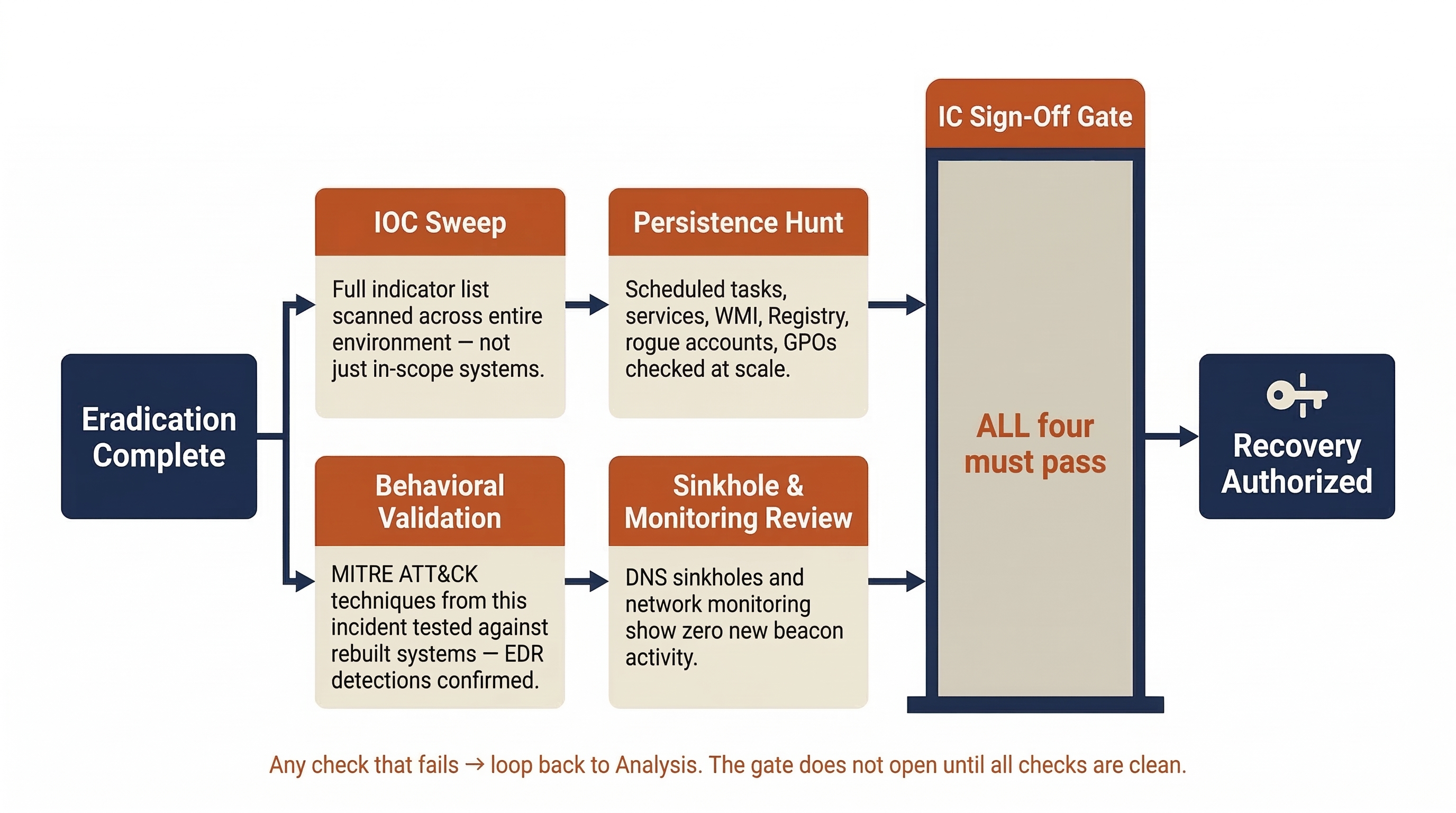
- IOC Sweep: Run the full list of Indicators of Compromise from this incident (file hashes, C2 domains, registry keys, account names) against the entire environment, not just the systems that were in scope. The question is: "Did the attacker reach further than we think?"
- Persistence Hunt: Specifically search for the persistence mechanism types documented in Section 10.2 across all domain-joined systems. Use tools like Autoruns, Velociraptor, or OSQuery to query at scale.
- Behavioral Validation: If the attacker's TTPs were mapped to MITRE ATT&CK during Analysis, run targeted hunts for those specific techniques. For example, if the attacker used LSASS credential dumping, verify that the EDR detection for that technique fires correctly on rebuilt systems.
- Sinkhole and Monitoring Review: Confirm that the DNS sinkholes and network monitoring deployed during Containment show no new beacon activity from any system in the environment.
Only when these assurance checks return clean results should the Incident Commander authorize the transition to Recovery.
Putting It Together: Eradication at Meridian Financial Services
Continuing the scenario from Chapter 9, the Meridian Financial CSIRT has completed the containment hold. All four compromised hosts are isolated, the C2 infrastructure is sinkholed and blocked, and no new beacon activity has been observed for 36 hours. The Incident Commander authorizes the transition to Eradication.
Step 1: Root Cause Analysis
The team conducts the formal RCA, identifying four contributing root causes:
| Root Cause | Category | Remediation Required |
|---|---|---|
| Flat network — no segmentation between workstations and servers | Architecture | Implement VLAN segmentation with inter-VLAN firewall rules |
svc-backup service account had Domain Admin privileges, password unrotated for 14 months |
Identity & Access | Rotate credential, reduce to minimum necessary privileges, implement PAM |
| Email gateway permitted macro-enabled document attachments | Perimeter Defense | Block macro-enabled attachments; enhance sandboxing |
| No MFA required for RDP access to servers | Authentication | Enforce MFA for all remote and privileged access |
Step 2: Eradication Execution
The eradication team works through the compromised systems:
- WS-FIN-042, FS-HR-01, WS-MKTG-019: All three are reimaged from the organization's golden image. Before reimaging, the team documents every persistence artifact: two scheduled tasks, one malicious Windows service, and three Registry Run key entries.
- DC-02: The Domain Controller is demoted (its FSMO roles were already transferred to DC-01 and DC-03 during containment). The server is reimaged, promoted back to a Domain Controller, and replicated from the clean DCs.
Step 3: Discovery During Eradication
While reviewing Group Policy Objects as part of the persistence hunt, the team discovers a rogue GPO (Update-Agent-Config) that was created during the incident window. The GPO deploys a PowerShell script to every domain-joined machine at startup.
This is new scope. The Incident Commander halts eradication on other systems and assigns an analyst to investigate:
- The GPO was created using the compromised
svc-backupaccount. - The PowerShell script downloads a secondary payload from a different C2 domain not previously identified.
- A scan of all domain-joined machines reveals that 12 workstations executed the script before containment severed network access.
The team loops back to Analysis for those 12 workstations, then returns to Eradication. The rogue GPO is removed and documented.
Step 4: Credential Remediation
- The KRBTGT account password is reset (first reset).
- After a 14-hour waiting period, the second KRBTGT reset is performed.
- All Domain Admin and Enterprise Admin passwords are rotated.
- The
svc-backupaccount is reconfigured with minimum necessary privileges and a new credential, managed through PAM with automatic rotation.
Step 5: Verification
- IOC sweep across all 2,000 endpoints returns clean results.
- The new C2 domain discovered via the rogue GPO is sinkholed; no additional beacons detected.
- EDR agents are confirmed active and reporting on all rebuilt systems.
- SIEM log flow is verified from every rebuilt host.
The Incident Commander signs off on eradication and authorizes the transition to Recovery.
10.6 Remediation Tracking and Risk Acceptance
Not every remediation action can be completed during the incident. Network segmentation redesigns, PAM deployments, and email gateway migrations may take weeks or months. The IR team's responsibility is to ensure that every remediation item is captured, assigned, and tracked — not to complete all of them before the incident is closed.
The Remediation Tracking Plan
Every finding from the RCA and eradication process becomes a tracked work item with clear ownership. The following template provides a framework:
| Finding | Remediation Action | Owner | Due Date | Status | Compensating Control (if delayed) |
|---|---|---|---|---|---|
| Flat network / no segmentation | Implement VLAN segmentation between workstation, server, and management tiers | Network Engineering (J. Torres) | 90 days | In Progress | Temporary host-based firewall rules restricting SMB/RDP between tiers |
svc-backup had DA privileges, no rotation |
Reduce to minimum privilege; enroll in PAM with 30-day rotation | Identity Team (L. Park) | 14 days | Complete | N/A |
| Email gateway permits macro attachments | Block macro-enabled attachments; implement sandboxing | Email Admin (R. Singh) | 30 days | In Progress | User awareness advisory issued; SOC monitoring for macro execution |
| No MFA for RDP to servers | Enforce MFA for all RDP access via Conditional Access | Identity Team (L. Park) | 7 days | Complete | N/A |
| Rogue GPO deployment mechanism | Implement GPO change monitoring and alerting | AD Admin (K. Rowe) | 21 days | Not Started | Manual weekly GPO audit until monitoring is deployed |
Exceptions and Compensating Controls
When a remediation action cannot be implemented immediately, the organization must formally document the risk acceptance and implement an interim compensating control.
A compensating control is not a permanent solution — it is a temporary measure that reduces the risk while the real fix is in progress. In the table above, "Temporary host-based firewall rules restricting SMB/RDP between tiers" is the compensating control for the network segmentation project. It does not provide the same protection as proper VLAN segmentation, but it significantly reduces the lateral movement risk until the full implementation is complete.
The remediation tracking plan feeds directly into the Post-Incident Review (Chapter 11), where the team verifies that all items are progressing and that compensating controls remain in place for outstanding items.
Chapter Summary
Eradication and Remediation are the twin operations that transform a contained incident into a resolved one. Eradication removes the attacker; Remediation closes the doors they walked through.
-
Root Cause Analysis goes beyond the technical exploit to identify the process, governance, or architectural failures that permitted the breach. Most incidents have multiple contributing root causes. The RCA feeds both the eradication checklist and the remediation plan.
-
Modern IR favors reimaging over cleaning. Antivirus cannot reliably detect rootkits, fileless malware, or tampered system binaries. A re-image from a known-good source provides high confidence that the system is clean.
-
Persistence mechanisms are the attacker's insurance policy. Scheduled tasks, services, WMI subscriptions, rogue accounts, malicious GPOs, and OAuth consents must all be documented and removed. Discovery of new persistence during eradication expands the scope and loops back to Analysis.
-
The IR lifecycle is circular, not linear. Eradication frequently reveals new compromise, sending the team back to Detection and Analysis. This is the process working correctly — not a failure.
-
Premature Recovery is the greatest risk. Organizational pressure to restore operations must not override the requirement to verify that eradication is complete. Recovering before verification leads to re-infection.
-
Credential remediation centers on the KRBTGT double-reset (with a 12+ hour gap), privileged account rotation, and service account credential management.
-
Verification and assurance confirm that the attacker is gone: IOC sweeps, persistence hunts, behavioral validation, and control checks must all return clean before Recovery begins.
-
Not all remediation is immediate. Long-term fixes are tracked with owners, due dates, and compensating controls. The remediation tracking plan feeds into the Post-Incident Review.
In the next chapter, we will take the clean, verified environment and begin the Recovery process — restoring business operations, validating data integrity, and conducting the Post-Incident Review that transforms this painful experience into organizational learning.