CH13: Social Engineering & Insider Threat Playbooks
Introduction
The accounts payable manager at a regional healthcare network receives an email from a longtime medical supply vendor. The vendor's purchasing coordinator explains that the company has changed banking institutions and requests that all future payments be directed to a new account. The email comes from the vendor's actual domain, uses the coordinator's real signature block, and references a legitimate outstanding invoice by number. The AP manager updates the payment details in the ERP system and processes the next scheduled payment of $127,000 to the new account.
Three weeks later, the real vendor calls asking why their invoice is overdue. The AP manager is confused: the payment was sent on time. A phone call to the "new" bank reveals the account was opened two weeks before the email and closed the day after the funds arrived. The vendor's email account had been compromised by an attacker who spent days reading email threads, learning the invoicing cadence, and waiting for the right moment to redirect a payment.
This is not a malware infection. No exploit was fired. No payload was delivered. The attack weaponized trust between two organizations, and the entire transaction was executed through legitimate email and standard business processes.
Chapter 12 applied the IR lifecycle to ransomware, a threat that attacks systems. This chapter applies it to threats that attack people. Social engineering and insider threats exploit human trust, business relationships, and authorized access. They require the same IR lifecycle phases covered in Chapters 5 through 11, but with critical modifications: Legal and HR become early-stage partners rather than late-stage notifications, evidence consists of email headers and authentication logs rather than malware samples, and the "attacker" may be an external actor using a compromised identity, or an authorized employee sitting in the next office.
Learning Objectives
By the end of this chapter, you will be able to:
- Classify Business Email Compromise (BEC) attack patterns by type (CEO fraud, vendor impersonation, attorney impersonation, W-2/tax fraud) and explain how spoofed domains and compromised accounts produce different forensic indicators.
- Execute a structured response to a BEC incident, including mailbox forensics in cloud email platforms (Microsoft 365, Google Workspace), payment fraud escalation, and financial recovery procedures.
- Differentiate between malicious insider, negligent insider, and compromised insider threat categories, and apply the appropriate investigation procedures for each, including Legal/HR coordination requirements.
- Identify modern social engineering techniques beyond traditional phishing, including vishing with AI-generated voice, smishing, QR phishing (quishing), MFA fatigue attacks, and malicious OAuth consent grants.
- Design an Account Takeover (ATO) response procedure that includes session invalidation, token revocation, mailbox rule audit, third-party app review, and payment fraud controls.
13.1 Business Email Compromise (BEC)
The FBI's Internet Crime Complaint Center (IC3) has ranked BEC as the highest-dollar cybercrime category for multiple consecutive years. Unlike phishing, which delivers a technical payload (a malicious link or attachment), BEC delivers a social payload: a convincing request for a legitimate business action. There is no malware to detect, no exploit to patch, and no signature to write. The attack succeeds because the request appears to come from someone the target trusts, and the requested action (processing a wire transfer, updating payment details, sending employee records) falls within the target's normal job responsibilities.
This is what makes BEC fundamentally different from the technical threats covered in prior chapters. The attack surface is not a server or an endpoint. It is a business relationship.
BEC Taxonomy
BEC attacks follow recognizable patterns. Each variant targets a different relationship and pursues a different objective, but all share the same core mechanism: impersonating a trusted party to redirect money or sensitive data.
| BEC Type | Impersonated Identity | Target | Objective |
|---|---|---|---|
| CEO Fraud | Executive (CEO, CFO) | Finance/accounting staff | Wire transfer to attacker-controlled account |
| Vendor Impersonation | Trusted vendor/supplier | Accounts payable | Redirect invoice payments to new bank details |
| Attorney Impersonation | Outside legal counsel | Executive or finance | Urgent, confidential wire transfer |
| W-2 / Tax Fraud | HR executive or CEO | HR / payroll staff | Bulk employee PII (W-2 data) for identity theft and tax fraud |
| Real Estate Fraud | Title company / realtor | Homebuyer | Redirect closing funds to attacker account |
Vendor impersonation deserves particular attention because it is both common and difficult to detect. In CEO fraud, the target may notice the email came from an unfamiliar domain. In vendor impersonation, the email often comes from the vendor's actual, compromised account, making it nearly indistinguishable from legitimate correspondence.
Spoofed Domains vs. Compromised Accounts
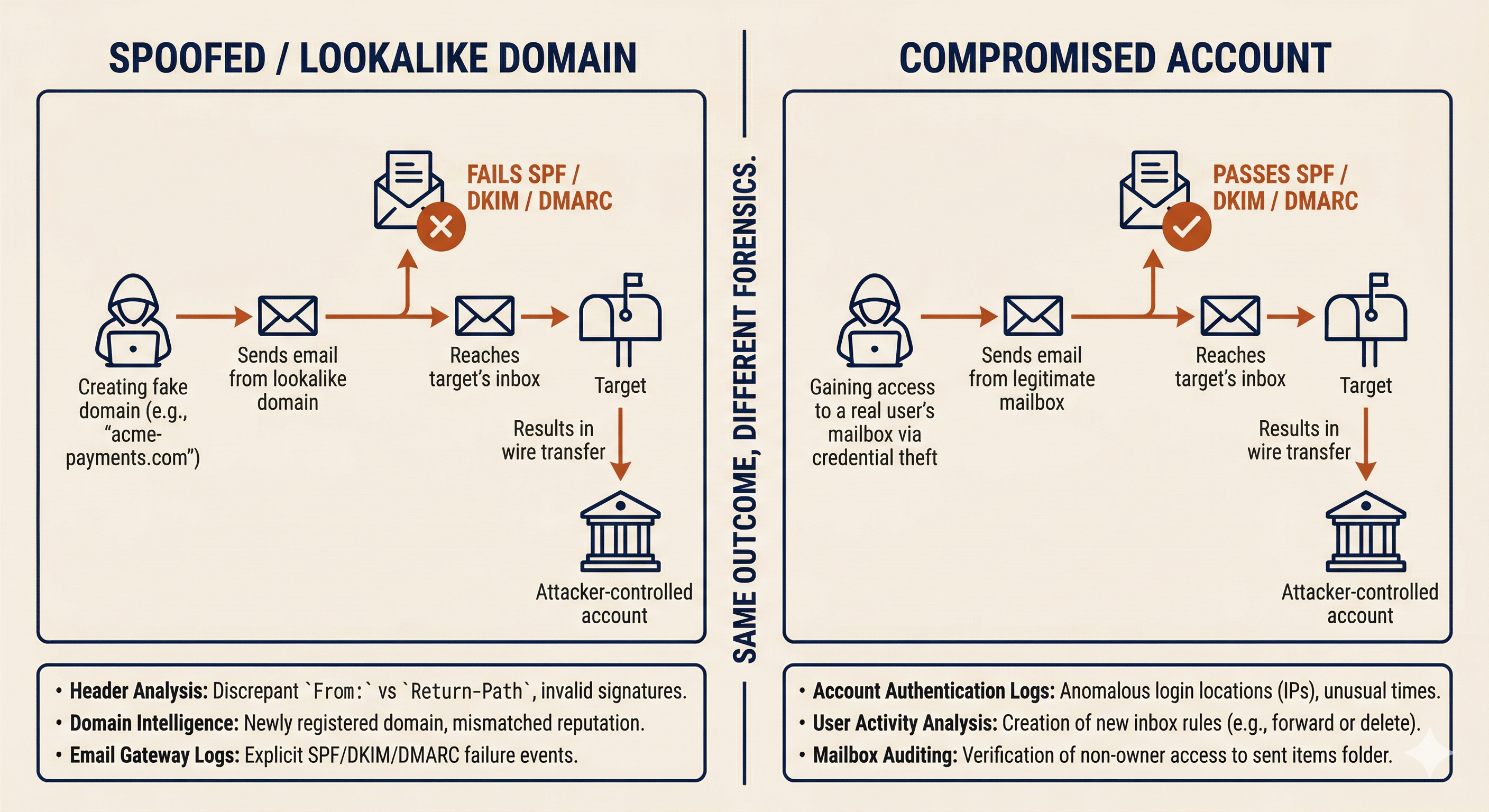
The first forensic question in any BEC investigation is: did the attacker spoof a domain, or did they compromise a real account? The answer changes the scope of the investigation, the evidence sources, and the notification obligations.
Spoofed or Lookalike Domains. The attacker registers a domain that visually resembles the impersonated organization. Common techniques include character substitution (using "rn" to mimic "m," replacing "l" with "1," or swapping ".com" for ".co"), adding or removing a word (e.g., "acme-payments.com" instead of "acme.com"), or using a different top-level domain (".net" instead of ".com"). The email is sent from infrastructure the attacker controls, not from the impersonated organization's actual mail system.
Forensic indicators for spoofed domains:
- The "From" address domain does not match the legitimate organization's domain on close inspection.
- Email authentication checks (SPF, DKIM, DMARC) fail or show alignment with the lookalike domain, not the real one.
- The email headers show the message originated from infrastructure unrelated to the impersonated organization (different sending IP, different mail server).
- The "Reply-To" address may differ from the "From" address, routing responses to an attacker-controlled mailbox.
Compromised Accounts. The attacker gains access to a real user's email account, typically through credential phishing, credential stuffing, or a prior breach. The email is sent from the legitimate mail system, passes all authentication checks (SPF, DKIM, DMARC align correctly), and appears in the impersonated user's sent folder. This is the harder scenario to detect because the email is, from a technical standpoint, genuinely sent by the victim's account.
Forensic indicators for compromised accounts:
- Email authentication (SPF, DKIM, DMARC) passes, because the message was sent from the real mail system.
- Sign-in logs may show unusual access patterns: logins from unfamiliar IP addresses, impossible travel (login from Ohio followed by login from Nigeria 30 minutes later), or new device registrations.
- Mailbox rules created by the attacker: forwarding rules that copy incoming messages to an external address, inbox rules that auto-delete replies from specific senders (to prevent the real account owner from seeing responses), or delegate access granted to an unfamiliar account.
- The compromised account's sent items contain messages the real user did not compose.
Determining the Source: The Investigation Fork
When a suspected BEC incident is reported, the investigation forks based on which scenario the evidence supports.
If the email came from a spoofed domain, the scope is contained to the target organization. The attacker does not have access to internal systems. The investigation focuses on: identifying all recipients who received messages from the spoofed domain, determining whether anyone acted on the fraudulent request, and initiating financial recovery if funds were transferred.
If the email came from a compromised account, the scope expands significantly. The attacker has (or had) access to a real mailbox, which means they may have read weeks or months of email history, harvested contact lists, learned invoicing patterns, and identified high-value targets. The investigation must include: full mailbox forensics on the compromised account, review of all outbound messages sent during the compromise window, identification of any forwarding rules or delegation changes, and notification to the compromised account's organization (if it is a third-party vendor, they need to know their account was breached).
Warning
A BEC email that passes SPF, DKIM, and DMARC authentication is not "safe." It means the message was sent from the legitimate mail infrastructure, which is exactly what happens when an account is compromised. Authentication tells you the email came from the real domain; it does not tell you the real person sent it.
BEC Investigation: Cloud Email Forensics
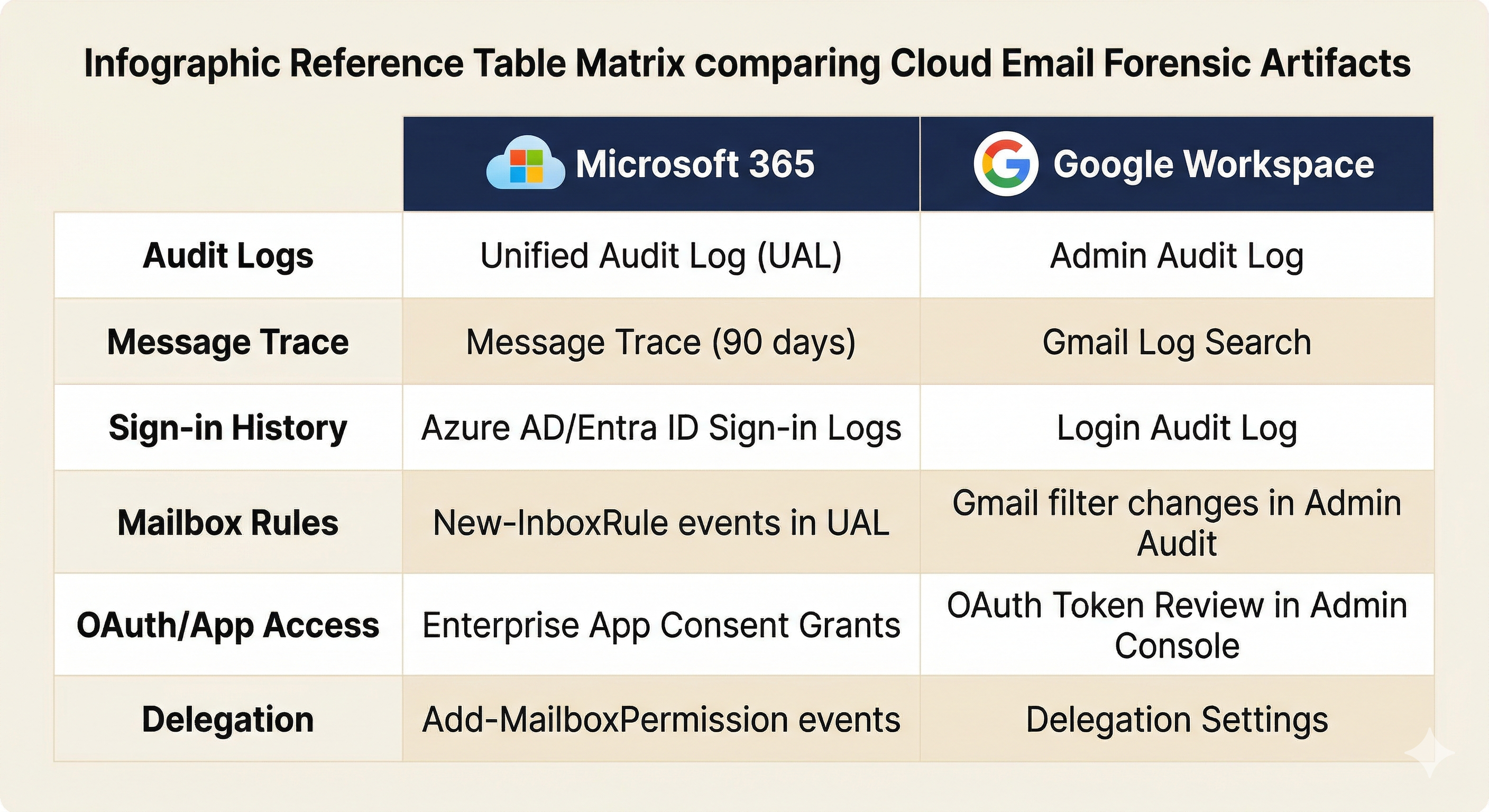
Most BEC investigations center on cloud email platforms. The two dominant platforms each provide specific forensic data sources.
Microsoft 365:
- Unified Audit Log (UAL): Records mailbox access, rule creation, permission changes, file access, and admin actions. Search for "New-InboxRule," "Set-Mailbox" (forwarding), and "Add-MailboxPermission" events during the suspected compromise window.
- Message Trace: Tracks email flow for the past 90 days. Use it to identify all messages sent from or received by the compromised account, including messages sent by the attacker.
- Sign-in Logs (Azure AD/Entra ID): Review for impossible travel, unfamiliar IP addresses, new device enrollments, and failed MFA attempts followed by a successful login.
- Mailbox Rule Review: Export all inbox rules and check for forwarding to external addresses, rules that delete messages matching specific subjects or senders, and delegate access grants.
Google Workspace:
- Admin Audit Log: Records admin-level changes to user accounts, including delegation, forwarding, and OAuth consent grants.
- Gmail Log Search: Available in the Admin console for message trace equivalent functionality.
- OAuth Token Review: Check which third-party applications have been granted access to the user's account. Malicious OAuth grants survive password changes.
- Delegation Settings: Review for any delegate access that was not authorized by the user.
Financial Recovery and Verification Procedures
When a BEC attack results in a fraudulent wire transfer, speed determines recovery. The critical window for wire recall is narrow.
Immediate actions (within 24 hours of discovery):
- Contact the originating bank and request a wire recall. Provide the transaction details, the date, and an explanation that the transfer was fraudulent.
- File a complaint with the FBI's IC3 at ic3.gov. For domestic wire transfers exceeding $50,000, the IC3's Recovery Asset Team (RAT) can coordinate with financial institutions to freeze funds before they are withdrawn.
- Notify the cyber insurance carrier. Most policies cover BEC losses, but the "duty to cooperate" clause requires prompt notification.
Verification procedures that prevent BEC (and detect it when it occurs):
The single most effective control against BEC is out-of-band verification for any change to financial information. This means calling a known, trusted phone number to confirm the request. The phone number must come from existing records (a signed contract, an internal contact database, the company's official website), never from the email requesting the change.
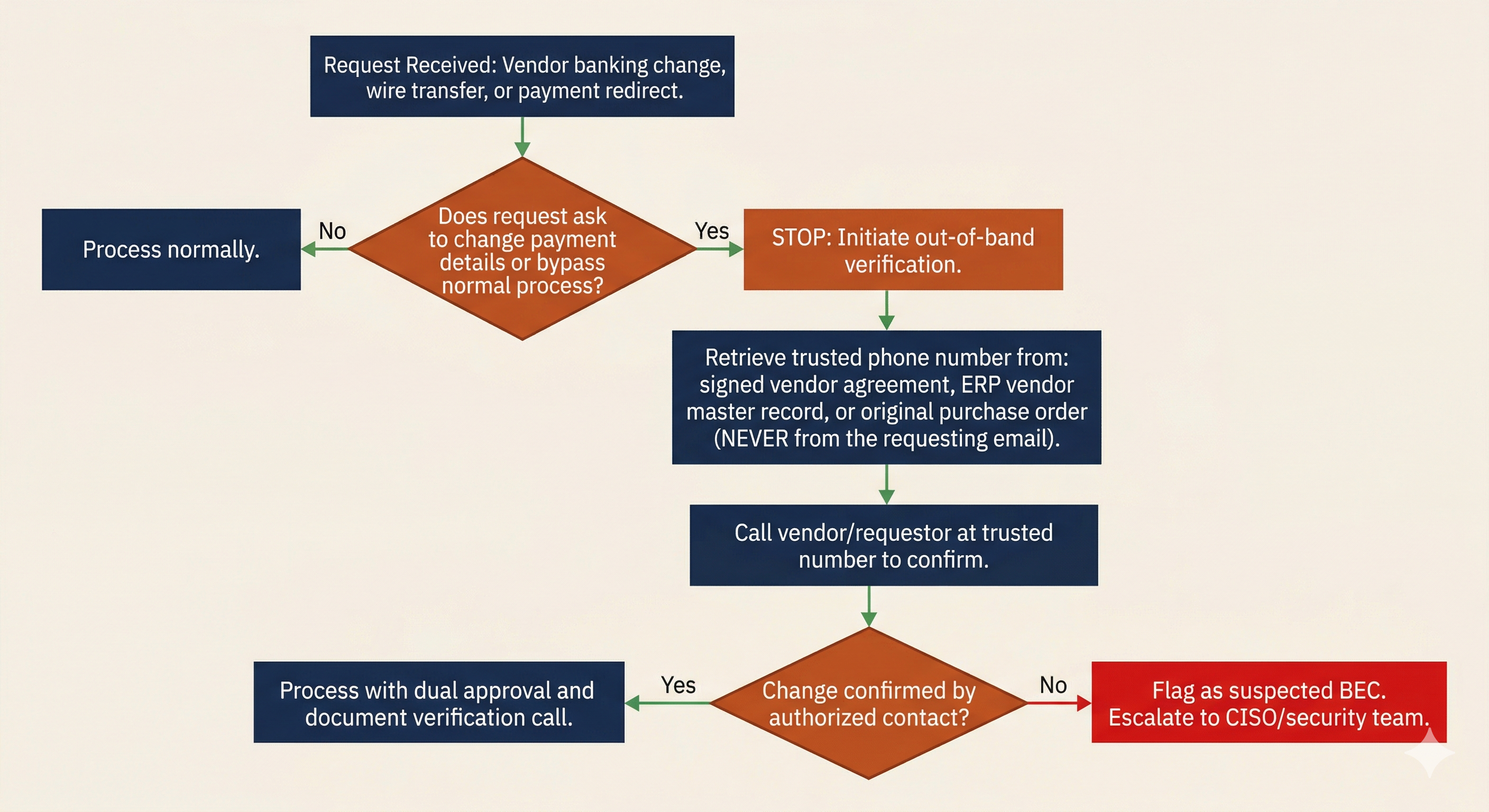
| Trigger Event | Required Verification | Method |
|---|---|---|
| New vendor bank account request | Call vendor's finance department at number on file | Phone call to number from signed vendor agreement, not from the email |
| Change to existing vendor payment details | Call vendor's primary contact at known-good number | Phone verification using number from vendor master record in ERP |
| Wire transfer request from executive | Call or meet the requesting executive directly | In-person or phone confirmation; never rely on email alone |
| Invoice from vendor with new payment instructions | Call vendor purchasing contact at number on file | Phone call to number from original purchase order or contract |
| Request to bypass normal payment approval process | Escalate to department head and finance director | Dual approval required; "urgency" is treated as a red flag, not a reason to skip controls |
Analyst Perspective
These verification procedures serve a dual purpose. They prevent BEC by forcing a second communication channel that the attacker cannot control. They also detect BEC: when the finance team calls the "CEO" to confirm a wire request and the CEO says "I never sent that," the attack is exposed. The control is both a wall and an alarm.
13.2 Insider Threat Response
Insider threats originate from authorized users. This changes the IR calculus in two fundamental ways. First, the attacker already has legitimate access, so traditional perimeter-based detection is irrelevant. Second, the investigation involves an employee, which means Legal and HR must be involved from the beginning, not as an afterthought.
Insider Threat Categories
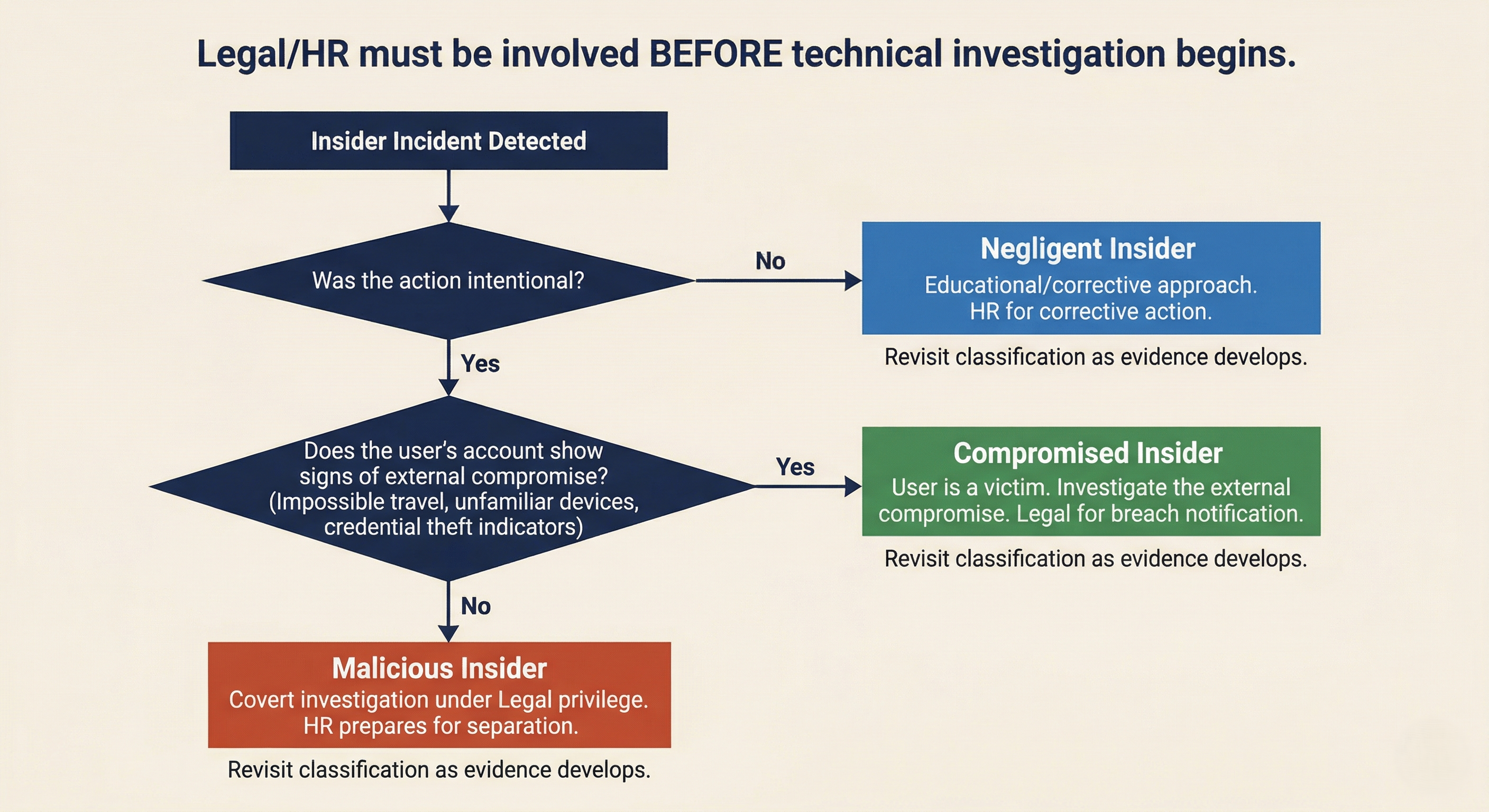
Not all insider incidents are the same. The response posture depends on the category.
| Category | Definition | Investigation Posture | Legal/HR Involvement |
|---|---|---|---|
| Malicious Insider | Deliberate data theft, sabotage, or fraud by an authorized user | Covert investigation; treat as potential criminal matter | Legal directs investigation under privilege; HR prepares for termination |
| Negligent Insider | Unintentional policy violation that causes a security incident | Educational/corrective approach; may escalate if pattern emerges | HR for corrective action; Legal if regulated data is involved |
| Compromised Insider | Authorized user whose credentials or device have been taken over by an external actor | The user is a victim; investigate the external compromise | Legal for breach notification; HR to support the affected employee |
Warning
Misclassifying the insider threat category has serious consequences. Treating a compromised insider as malicious can result in wrongful termination and legal liability for the organization. Treating a malicious insider as compromised can give them time to destroy evidence or continue exfiltration. The initial classification should be treated as a working hypothesis that is revisited as evidence develops.
Legal/HR Coordination
Insider threat investigations require Legal and HR involvement before the technical investigation begins. This is not a recommendation; in many organizations, it is policy, and for good reason.
Attorney-client privilege. When Legal counsel directs the investigation, the findings may be protected under attorney-client privilege. This matters if the investigation leads to litigation (wrongful termination claims, trade secret theft, breach of employment agreement). If the investigation is conducted without Legal's direction, the findings may be discoverable by the opposing party.
HR considerations. Employee rights vary by jurisdiction and may be governed by employment agreements, union contracts, or company policy. HR must advise on: what monitoring is permitted under existing policies (did the employee sign an acceptable use policy acknowledging monitoring?), what documentation is required for disciplinary action or termination, and what notification obligations exist.
Chain of custody. Evidence collected during an insider investigation may be needed in civil litigation, criminal prosecution, or regulatory proceedings. Documented collection procedures, hash verification, secure storage, and a maintained chain of custody log.
Authorized Remote Acquisition
When an insider investigation requires forensic collection from the subject's workstation, email, or cloud accounts, the process must be coordinated with Legal and HR to preserve confidentiality, evidence integrity, and due process.
Authorization. A written authorization from Legal (and often from a senior executive or the CISO) should document what data sources are approved for collection, the scope of the collection, and who is authorized to access the collected evidence. This authorization protects the investigators and the organization.
Confidentiality. Knowledge of the investigation must be limited to need-to-know. If the investigation targets a malicious insider, alerting the subject (directly or indirectly through information leaks) gives them the opportunity to destroy evidence, accelerate exfiltration, or take other harmful actions.
Evidence integrity. Forensic imaging is preferred over live collection when possible. If the subject's workstation must be imaged, coordinate the timing with HR. For geographically distributed employees, remote forensic collection tools (deployed through endpoint management platforms) may be necessary. Document the tool, the configuration, the time of collection, and the hash values of collected artifacts.
13.3 Social Engineering Beyond Email
BEC is the most financially damaging form of social engineering, but it is not the only vector. Modern attackers exploit every communication channel available, and several newer techniques bypass the defenses that organizations have built around email.
Vishing, Smishing, and Quishing
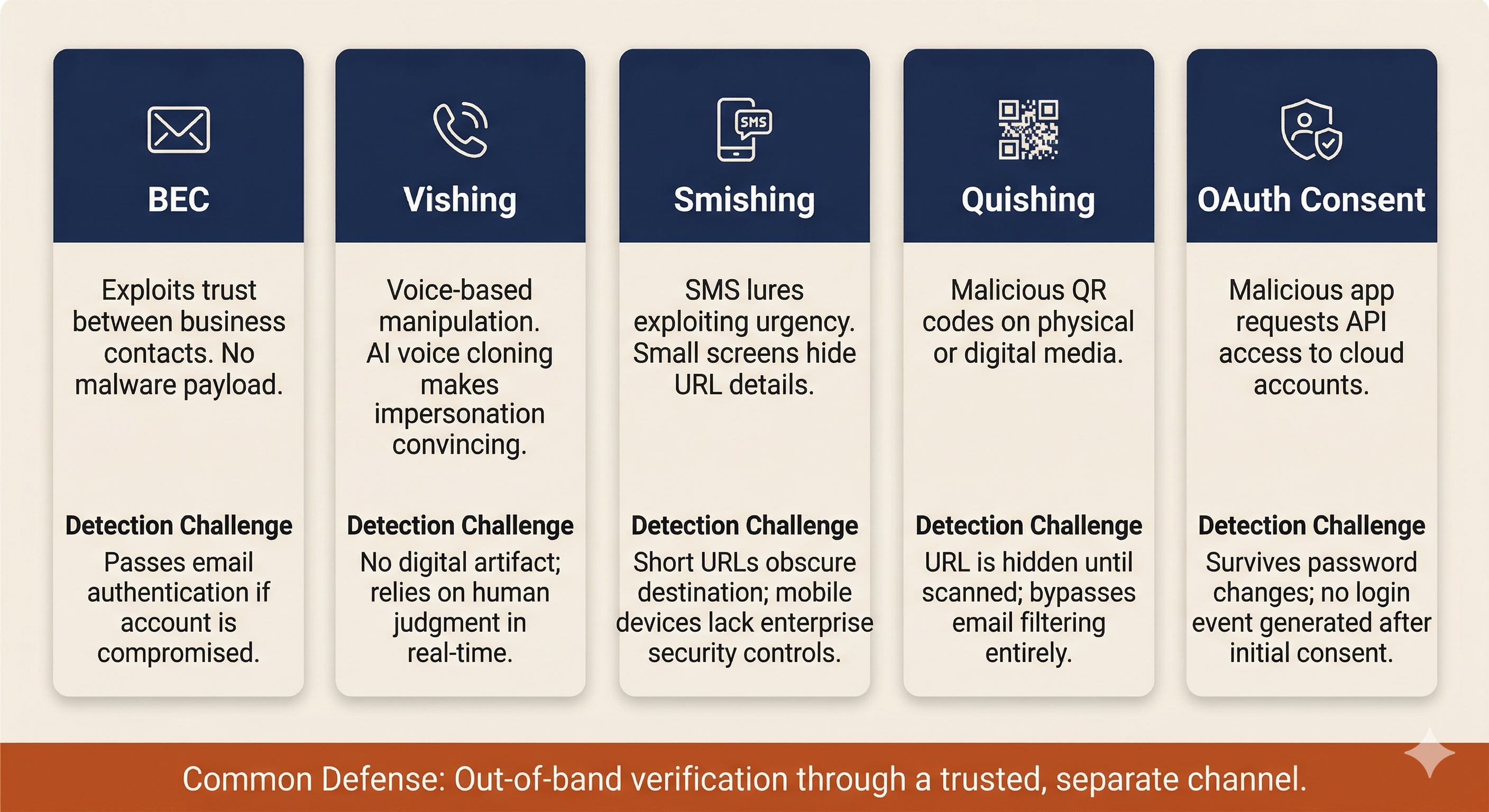
Vishing (Voice Phishing) uses phone calls to manipulate targets. Common pretexts include IT support ("We detected unusual activity on your account and need to verify your identity"), bank fraud departments ("Your account has been compromised; please confirm your account number"), and executive impersonation ("This is [CEO name], I need you to process something for me right now"). Vishing exploits the real-time pressure of a phone conversation: the target has no time to verify, consult a colleague, or think critically before responding.
Smishing (SMS Phishing) delivers lures through text messages. Common patterns include fake package delivery notifications, account lockout warnings with "verify now" links, and MFA verification code requests ("Your code is 847291. If you did not request this, reply STOP" followed by a call from the "fraud department" asking the target to read back the code). Smishing exploits the implicit trust many people place in text messages and the small screen format that makes URL inspection difficult.
Quishing (QR Code Phishing) uses malicious QR codes on physical media (parking meters, restaurant table tents, conference badges, office flyers) or embedded in emails and documents. The QR code redirects to a credential harvesting page that mimics a legitimate login portal. Quishing is particularly effective because QR codes obscure the destination URL. Users cannot see where the code points until they scan it, and by that point, they are already on the attacker's page.
The common defense: out-of-band verification. For any request that involves credentials, financial transactions, or sensitive data, verification must occur through a separate, trusted channel. If someone calls claiming to be from IT, hang up and call the IT help desk at the number published on the company intranet. If a text claims your bank account is locked, call the number on the back of your debit card. The principle is the same as the BEC verification procedures in Section 13.1: never trust the communication channel the attacker controls.
AI-Assisted Social Engineering
Generative AI has lowered the barrier to entry for social engineering attacks in two significant ways.
Deepfake voice cloning. Commercially available AI tools can clone a person's voice from a few minutes of audio. Publicly available sources of executive voice data include earnings calls, conference presentations, podcast interviews, and corporate training videos. Attackers have used AI-cloned voices in vishing calls to impersonate executives and authorize wire transfers. The voice sounds convincingly like the real person, making traditional "does this sound like my boss?" heuristics unreliable.
AI-generated phishing at scale. Large language models can generate grammatically perfect, contextually appropriate phishing emails in any language. This eliminates the spelling errors, awkward phrasing, and formatting inconsistencies that security awareness training has historically taught users to recognize as red flags. AI-generated phishing is harder to detect through content analysis because the content is, by surface quality metrics, indistinguishable from legitimate business communication.
These developments do not change the fundamental defense posture. Verification procedures (calling a known-good number, requiring in-person confirmation for high-value requests) remain effective because they operate on a channel the attacker cannot replicate with AI alone. However, they reinforce the message that training users to "look for spelling errors" is no longer sufficient as a primary detection method.
MFA Fatigue and Consent Attacks
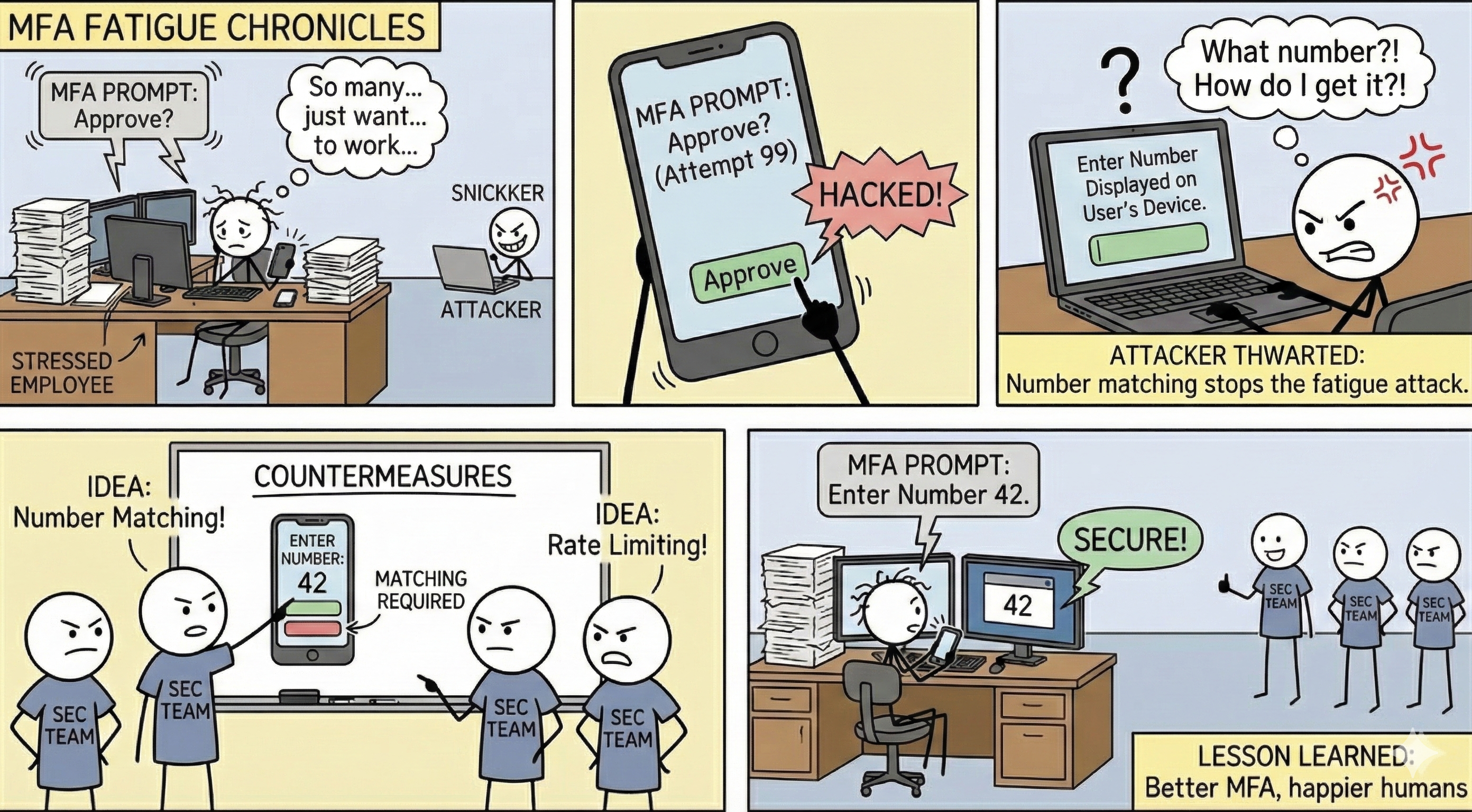
MFA Push Bombing (Fatigue Attacks). The attacker obtains valid credentials (through phishing, credential stuffing, or purchasing them from an initial access broker) and repeatedly triggers MFA push notifications on the user's phone. The user, confused or frustrated by the repeated prompts (sometimes arriving at 2 AM), eventually approves one to make them stop. The Uber breach in September 2022 used this exact technique: the attacker bombarded a contractor with push notifications and then contacted them via WhatsApp posing as IT support, asking them to approve the login.
Malicious OAuth Consent Grants. The attacker sends the target a link to authorize a third-party application (often disguised as a legitimate productivity tool or file-sharing service). When the user clicks "Allow," the application receives API access to their cloud account: email, files, calendar, and contacts. This access persists through an OAuth token that survives password changes and MFA resets. The attacker does not need the user's password; the token provides ongoing access until it is explicitly revoked.
Response to consent attacks: Revoking the OAuth token, reviewing all enterprise app consent grants across the tenant, implementing admin consent workflows that require administrator approval before any third-party app can access organizational data, and restricting user self-service app consent in Azure AD/Entra ID or Google Workspace admin settings.
13.4 Account Takeover (ATO) Response
Account takeover is the common thread connecting BEC, MFA fatigue, and consent attacks. Once an attacker controls a legitimate account, they can send emails as that user, access shared files, read internal communications, and establish persistence mechanisms that outlast a simple password reset. ATO response must be systematic and thorough.
Session Reset and Token Revocation
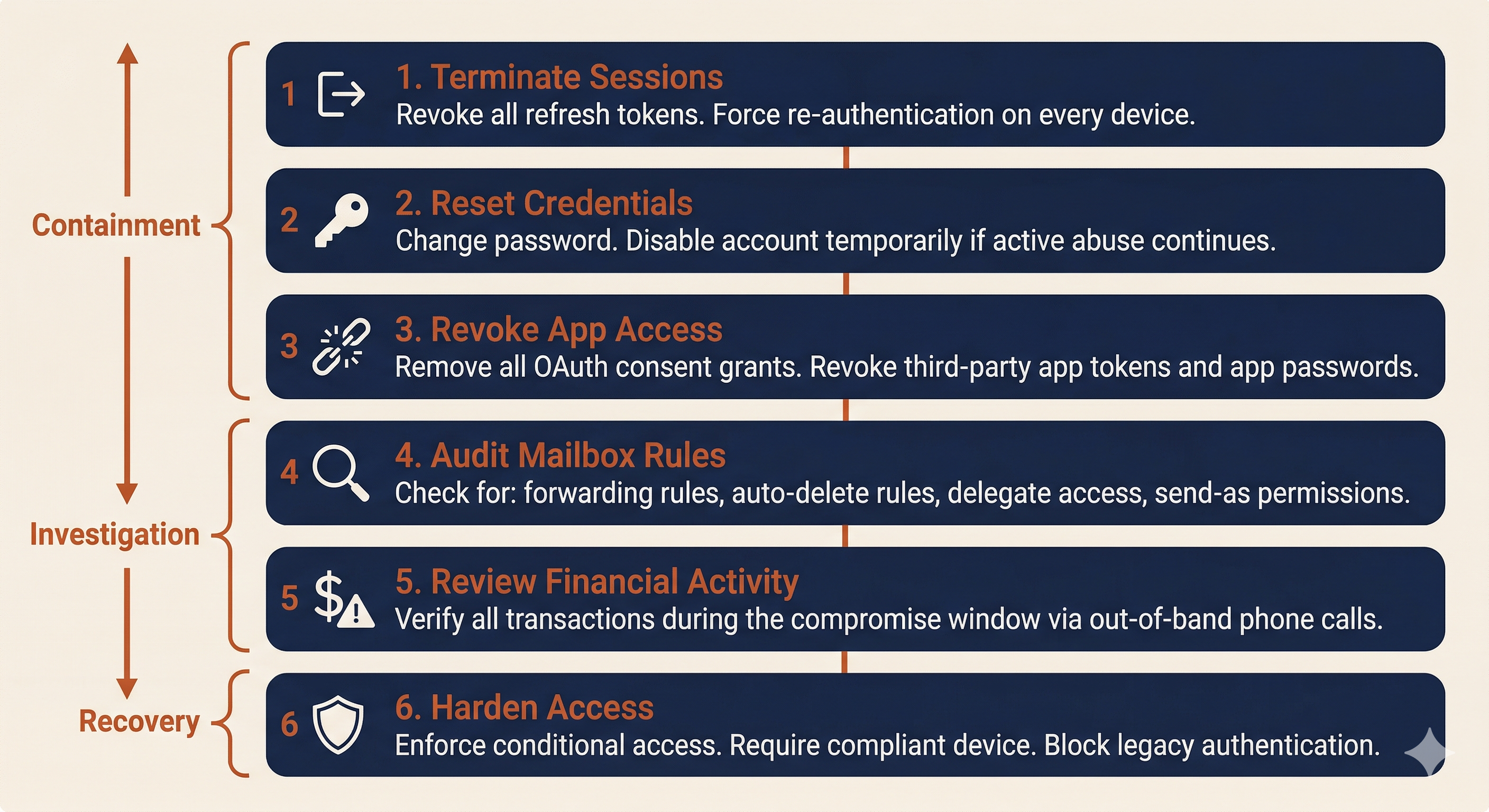
The first containment action is to terminate all active sessions and invalidate all tokens associated with the compromised account.
Microsoft 365 / Entra ID:
- Revoke all refresh tokens (forcing re-authentication on every device).
- Reset the user's password.
- Disable the account temporarily if active abuse is ongoing.
- Review and revoke all OAuth app consent grants.
- Enforce conditional access policies: require compliant device, block legacy authentication protocols, and require MFA re-registration from a verified device.
Google Workspace:
- Reset the user's sign-in cookies (Admin console).
- Reset the password.
- Revoke all third-party app access tokens.
- Review and remove connected applications.
- Review recovery phone and email settings (attackers often add their own recovery options for persistent access).
Mailbox Rule and App Review
After session termination, conduct a systematic review of the compromised mailbox for attacker-created persistence mechanisms.
Inbox rules to check for:
- Forwarding rules that copy all incoming email to an external address.
- Rules that auto-delete messages from specific senders (to hide responses from the real account owner).
- Rules that move messages matching specific subjects (e.g., "invoice," "wire," "payment") to a hidden folder.
- Delegate access granted to unfamiliar accounts.
- Send-as or send-on-behalf permissions added during the compromise window.
Third-party app integrations:
- Review all OAuth-consented applications. Remove any that were granted during or after the suspected compromise date.
- Check for mail connectors or API integrations that could provide ongoing access.
- Review any Power Automate flows (M365) or Apps Script automations (Google Workspace) created during the compromise window.
Payment Fraud Controls
The ATO response should include a review of all financial transactions processed during the compromise window. If the compromised account belongs to someone with financial authority (or someone who communicates with people who have financial authority), the attacker may have used the access to initiate or redirect payments.
The verification procedures from Section 13.1 apply here as well. Any financial transaction or payment detail change that originated from the compromised account during the compromise window should be treated as potentially fraudulent until confirmed through out-of-band verification: a phone call to a known-good number for every vendor, every payee, and every wire instruction that touched the compromised account.
13.5 Insider Risk Program Considerations
The reactive playbooks in Sections 13.1 through 13.4 address incidents after they occur. This section covers the proactive controls that reduce the likelihood and impact of insider threats and social engineering attacks.
Least Privilege and Monitoring
Role-Based Access Control (RBAC) limits each user's access to the systems and data required for their job function. If an AP clerk does not need access to the HR file share, they should not have it. If a developer does not need production database credentials, they should not have them. Every unnecessary permission is an expansion of the blast radius if that account is compromised or that employee acts maliciously.
Just-in-Time (JIT) access takes least privilege further by granting elevated permissions only when they are needed and automatically revoking them after a defined time window. An administrator who needs Domain Admin rights to perform a specific maintenance task receives those rights for 60 minutes, not permanently.
User and Entity Behavior Analytics (UEBA) establishes behavioral baselines for each user and alerts on deviations. Indicators that UEBA platforms monitor include: bulk file downloads or unusual data transfer volumes, access to resources outside the user's normal pattern, logins at unusual hours or from unusual locations, and USB device usage on systems where removable media is restricted.
Data Loss Prevention (DLP) monitors and controls the movement of sensitive data across email, cloud storage, USB devices, and print channels. DLP policies can alert on or block the transmission of files containing SSNs, credit card numbers, PHI, or other regulated data categories. For insider threat detection, DLP provides visibility into data that is leaving the organization and the identity of the user moving it.
Evidence Handling and Legal Holds
When an insider investigation is authorized, normal data retention and deletion policies must be suspended for all relevant data sources. This is a legal hold.
A legal hold directive, issued by Legal counsel, instructs IT and records management to preserve all relevant data for specified custodians (the investigation subject and potentially related users). This includes email mailboxes, file shares, cloud storage, endpoint logs, badge access records, VPN logs, and any other data source relevant to the investigation.
The practical steps are straightforward but must be documented:
- Receive written legal hold directive from counsel.
- Identify all relevant data custodians and data sources.
- Disable auto-deletion and retention policy expiration for the identified data.
- Confirm preservation in writing to counsel.
- Maintain the hold until counsel issues a release.
The connection to Chapter 5 (IR Fundamentals) is direct: the evidence handling standards from CSIRT operations apply, with the additional complexity that the "suspect" is an employee whose rights must be respected, and whose attorneys may eventually challenge every step of the collection process.
Putting It Together: Two Vignettes
Vignette 1: BEC Wire Fraud
The Organization: Lakeshore Manufacturing, a mid-size manufacturer with $85M annual revenue, 400 employees, and a 20-year relationship with several key vendors. Lakeshore uses Microsoft 365 for email and has a cyber insurance policy with a $500K BEC sublimit.
The Incident: Lakeshore's accounts payable manager receives an email from the purchasing coordinator at Apex Industrial Supply, their largest raw materials vendor. The email, sent from the coordinator's actual email address (not a lookalike domain), states that Apex has changed banks and requests that Lakeshore update the payment routing information. The email references a real open invoice (#APX-2026-0847) for $127,000 and provides new wire instructions.
The AP manager verifies the invoice number against the ERP system (it matches), notes that the email came from the correct domain and the correct contact, and updates the payment details. The next scheduled payment of $127,000 is wired to the new account.
T+0 (Three weeks later): Apex's actual purchasing coordinator calls Lakeshore asking about the overdue payment. Lakeshore's AP manager is confused: the payment was sent three weeks ago. A comparison of banking details reveals the discrepancy. The AP manager reports the incident to their supervisor, who escalates to IT and the CISO.
Decision Gate 1: What are your immediate containment and financial recovery actions?
The clock for wire recall is already at T+21 days, well past the optimal recovery window. Contact the originating bank immediately to attempt recall. File an IC3 complaint and request RAT assistance. Notify the cyber insurance carrier. Determine whether the email came from a spoofed domain or a compromised account (in this case, sign-in log review reveals the vendor's account was compromised from a foreign IP address).
T+4 hours: Investigation of the compromised vendor account (coordinated with Apex's IT team) reveals the attacker accessed the coordinator's mailbox for 11 days before sending the fraudulent request. During that time, the attacker created an inbox rule that auto-deleted any email from Lakeshore's AP domain, preventing the real coordinator from seeing Lakeshore's payment confirmation or any follow-up questions.
Decision Gate 2: The attacker had 11 days of access to the vendor's mailbox. What does this tell you about the potential scope beyond Lakeshore?
Apex likely has other customers who received similar fraudulent banking change requests. Lakeshore should confirm with Apex that they are notifying all customers, and Lakeshore's investigation should expand to check for any other emails received from the compromised account during the 11-day window.
T+24 hours: Lakeshore's bank confirms the funds cannot be recovered (the receiving account was emptied the day after the transfer). The insurance carrier begins processing the claim. Legal counsel advises on whether regulatory notification is required (in this case, no regulated personal data was compromised, so breach notification is not triggered, but the financial loss must be disclosed in financial reporting if material).
Decision Gate 3: What procedural changes does Lakeshore implement to prevent recurrence?
Mandatory phone verification for any vendor banking change, using a phone number from the original signed vendor agreement. Dual-approval workflow for wire transfers above $25,000. Finance team training on BEC recognition, with emphasis that email authentication (SPF/DKIM/DMARC passing) does not guarantee the email was sent by the real person.
Vignette 2: Insider Threat Investigation
The Organization: Same Lakeshore Manufacturing.
T+0: HR informs the CISO that Marcus, a senior manufacturing engineer with 8 years of tenure, submitted a two-week resignation notice. Marcus has accepted a position at a direct competitor. As part of his role, Marcus has access to proprietary manufacturing process documentation, customer contracts, pricing models, and R&D project files. HR and Legal request a discreet investigation to determine whether Marcus has exfiltrated any proprietary data.
Decision Gate 1: How do you scope the investigation without alerting Marcus? What data sources do you review?
Legal authorizes the investigation under attorney-client privilege and approves collection from: DLP logs, email message trace, cloud storage activity logs (OneDrive/SharePoint), USB device usage logs from the endpoint management platform, and VPN access logs. Marcus's manager is not informed (need-to-know). The investigation team consists of the CISO, one senior analyst, Legal counsel, and the HR director.
T+3 days: DLP logs reveal that over the past 10 days, Marcus uploaded 2.4GB of files to a personal Google Drive account from his corporate laptop. The files include customer contracts, pricing sheets, and three R&D project specifications. Email logs show Marcus also forwarded 14 emails containing manufacturing process documents to his personal Gmail address.
Decision Gate 2: What are the next steps, and who makes the decision about how to proceed?
Legal counsel and HR decide the course of action, not IT. Options include: immediate termination with forensic preservation of the laptop, a confrontation meeting with HR and Legal present, or continued monitoring to document additional activity. Legal advises that the evidence is sufficient to support termination for cause under the employee handbook's data handling policy.
T+5 days: Legal and HR proceed with a separation meeting. Before the meeting, the security team: disables Marcus's VPN access, prepares remote wipe for the corporate laptop (to execute after the meeting), places a legal hold on Marcus's email and cloud storage, and ensures a forensic image of the laptop is captured.
During the meeting, Marcus's corporate laptop and badge are collected. HR presents the documented evidence. Legal advises Marcus that the organization reserves all rights regarding the proprietary data.
Decision Gate 3: What happens after Marcus leaves the building?
Post-separation: execute remote wipe of the corporate laptop after confirming the forensic image is verified. Review all systems Marcus had access to and rotate any shared credentials. Monitor for any access attempts using Marcus's former credentials. Legal evaluates whether to pursue civil action (trade secret theft) or criminal referral. The DLP logs, email traces, and forensic image are preserved under legal hold as potential evidence.
Analyst Perspective
Vignette 2 requires a fundamentally different approach than any incident in Chapters 7 through 12. You cannot "isolate the host" because the employee is still working and must not know about the investigation until Legal and HR authorize disclosure. The technical skills are the same: log analysis, forensic collection, evidence preservation. The operational constraints are entirely different, and they are driven by Legal and HR, not by the SOC.
Chapter Summary
-
Social engineering and insider threats require the same IR lifecycle but with Legal and HR as early-stage partners, not late-stage notifications. The legal and procedural dimensions of these incidents are as important as the technical investigation.
-
BEC is the highest-dollar cybercrime category because it exploits trust, not technology. BEC attacks can originate from spoofed/lookalike domains or from actual compromised accounts. Compromised account BEC is harder to detect because the email passes all authentication checks (SPF, DKIM, DMARC).
-
Determining spoofed vs. compromised is the first forensic fork in a BEC investigation. Spoofed domain attacks are contained to the target organization. Compromised account attacks expand the scope to include the breached third party and all of their other customers.
-
Out-of-band verification is the single most effective control against BEC. Any change to financial information must be confirmed by calling a known, trusted phone number from existing records, never from the email requesting the change. This principle applies across all social engineering vectors: email, phone, SMS, and QR codes.
-
Insider threat investigations have three categories (malicious, negligent, compromised), and each requires a different investigative posture. Misclassification has serious consequences. Legal and HR must direct the investigation from the beginning.
-
Modern social engineering has evolved beyond email. Vishing with AI-cloned voices, MFA fatigue (push bombing), and malicious OAuth consent grants bypass the traditional indicators that security awareness training taught users to recognize.
-
ATO response is a systematic process: session reset, token revocation, password change, mailbox rule audit, third-party app review, and financial transaction verification during the compromise window.
-
Connection to Chapter 14: The monitoring controls discussed in Section 13.5 (UEBA, DLP, least privilege) generate the telemetry data that makes proactive threat hunting possible. Chapter 14 moves from waiting for these alerts to fire to actively searching for the threats that slipped through undetected.