CH10: Android Applications and Security
Chapter Overview
Chapter 9 established the Android file system as the crime scene—partitions, directories, databases, and the ADB commands used to navigate them. This chapter shifts focus from where evidence lives to what generates it: the applications themselves. Every database you queried in Chapter 9, every XML preference file, every cached thumbnail was created by an Android application. Understanding the structure of those applications—what they declare, what they request, and how they are signed—is a fundamental forensic skill that applies whether you are triaging a suspect's installed apps during a criminal investigation or analyzing a potentially malicious APK found on a compromised device.
We begin by deconstructing the Android Application Package (APK) format, examining its manifest, permissions model, and signing certificates. We then introduce the static analysis tools and techniques used to examine APKs without executing them—tools that will become central to your workflow in Chapter 13 (Android Malware Analysis). The chapter concludes with a thorough examination of Android's layered security model: the sandboxing, encryption, and access controls that define the boundaries of what forensic tools can and cannot reach.
Learning Objectives
By the end of this chapter, you will be able to:
- Deconstruct an Android APK to identify its core components (manifest, DEX code, resources, signing certificates) and explain the forensic significance of each.
- Analyze an AndroidManifest.xml to identify declared activities, services, broadcast receivers, and permissions, and assess whether they are consistent with the app's stated purpose.
- Evaluate an APK's signing certificate to determine developer identity and detect evidence of tampering or repackaging.
- Utilize static analysis tools (apktool, jadx, Pithus) and similarity techniques (fuzzy hashing, YARA) to triage and classify Android applications.
- Explain how Android's security mechanisms (sandboxing, SELinux, File-Based Encryption) impact forensic extraction capabilities, and differentiate between Before First Unlock (BFU) and After First Unlock (AFU) device states.
10.1 Understanding Android APKs
In Chapter 9, we explored the data that apps produce: their databases, preferences, and cache files stored within the /data/data/ sandbox. Now we examine the apps themselves. Every app on an Android device arrived as an APK file, and that file contains a wealth of information about the app's identity, intent, and behavior—information that is directly relevant to forensic triage and investigation.
What Is an APK?
An APK (Android Application Package) is the file format Android uses to distribute and install applications. Every app you download from Google Play, sideload from a website, or receive via a messaging app arrives as an APK file. At its core, an APK is simply a ZIP archive with a specific internal structure. You can rename any .apk file to .zip, extract it with a standard archiving tool, and browse its contents.
Users obtain APKs through several channels, and the channel itself carries forensic significance:
- Google Play Store: The official distribution channel. Google applies a cryptographic marker called frosting to every APK distributed through the Play Store. Frosting is a signature appended to the APK's ZIP End of Central Directory that proves the file was distributed through Google Play. An APK that lacks frosting was not downloaded from the Play Store—it was sideloaded, shared via messaging, or downloaded from a third-party source. This distinction matters in both criminal and malware investigations.
- Third-Party App Stores: Alternative marketplaces (APKMirror, APKPure, F-Droid) distribute APKs outside of Google's ecosystem. While many are legitimate, they bypass Google's Play Protect scanning.
- Direct Sideloading: APKs can be installed directly from a file sent via SMS, email, or downloaded from a website. This is the most common distribution method for malware and trojanized applications.
Analyst Perspective
In a child exploitation investigation, the suspect's phone contains an app that does not appear in the Google Play Store and lacks frosting. This immediately raises a red flag: the app was sideloaded. Checking the APK's signing certificate and running it through a static analysis platform should be an early step in understanding what the app actually does—it may be a legitimate app from a third-party store, or it may be a purpose-built tool designed to evade detection.
APK Internal Structure
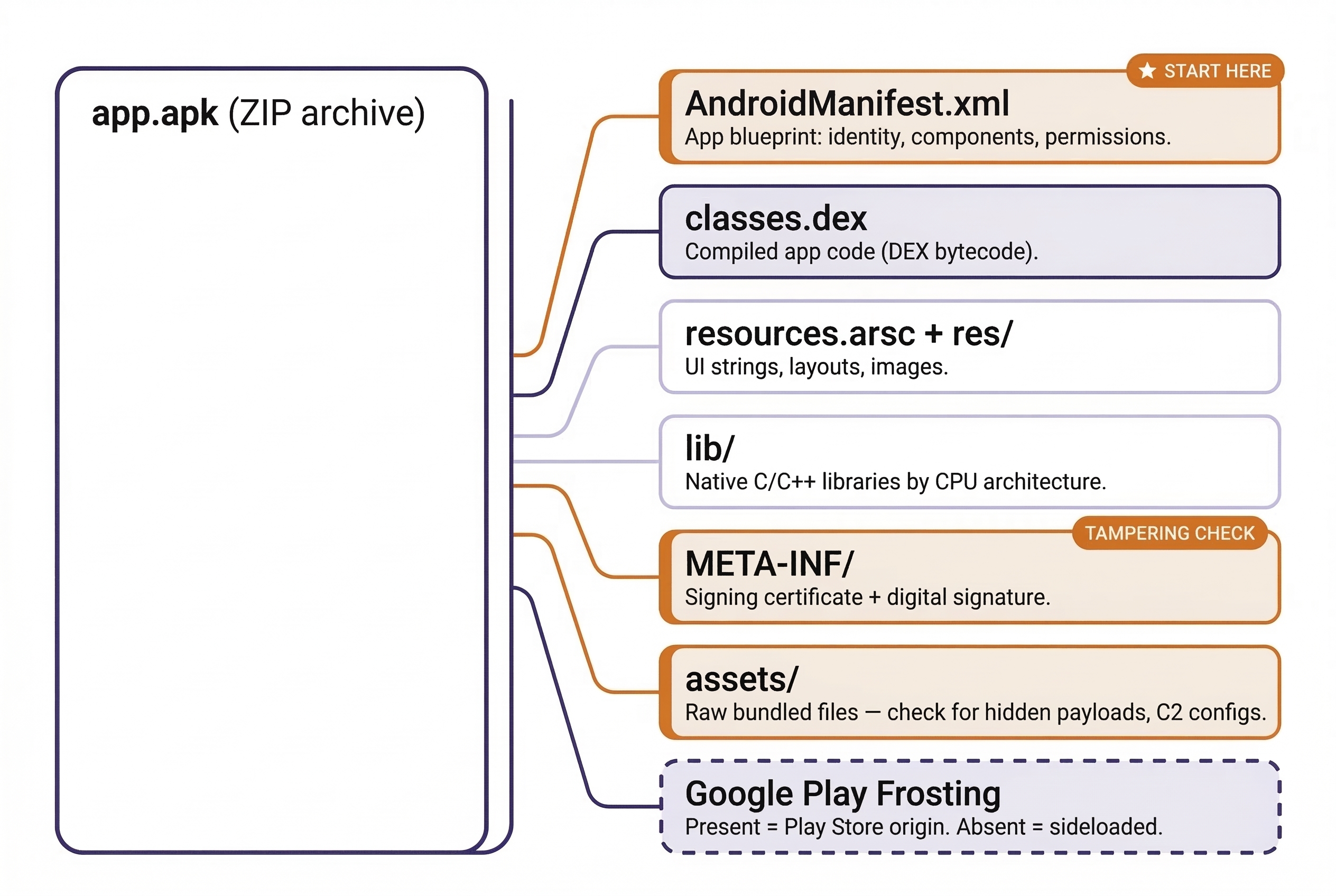
When you extract an APK, you will find the following components:
AndroidManifest.xml— The single most important file for forensic analysis. This XML file is the blueprint of the application. It declares the package name (unique identifier), target Android version, every activity (screen), service (background process), broadcast receiver (event listener), content provider (data-sharing interface), and every permission the app requests.classes.dex(andclasses2.dex,classes3.dex, etc.) — The compiled application code in Dalvik Executable (DEX) format. This is the actual logic of the app—what it does when you tap a button, what data it sends over the network, how it stores information. Larger apps split their code across multiple DEX files.resources.arsc— A compiled binary file containing the app's resources: strings (text visible to the user), dimensions, colors, and style definitions.res/— A directory of resource files: XML layouts defining the app's UI, image assets (icons, graphics), and raw resource files.lib/— Native libraries (compiled C/C++ code) organized by CPU architecture (armeabi-v7afor 32-bit ARM,arm64-v8afor 64-bit ARM,x86,x86_64). Not all apps include native libraries.META-INF/— Contains the app's digital signature and the X.509 signing certificate. Every APK must be signed before it can be installed on an Android device. The certificate identifies who signed the app and includes validity dates, a serial number, and the signer's public key.assets/— A directory for raw files bundled with the app. Developers use this for configuration files, pre-populated databases, fonts, or other data the app needs at runtime. From a forensic and malware analysis perspective, theassets/directory is worth inspecting—threat actors sometimes hide secondary payloads, encrypted configuration files, or command-and-control (C2) server addresses here.
APK Component Reference
| Component | File / Directory | Contents | Forensic Significance |
|---|---|---|---|
| Manifest | AndroidManifest.xml |
Package name, activities, services, permissions | App identity, capabilities, declared intent |
| Code | classes.dex |
Compiled application logic (DEX bytecode) | Behavioral analysis, decompilation |
| Resources | resources.arsc, res/ |
UI strings, layouts, images | Visible text, language, UI clues |
| Native Libs | lib/ |
C/C++ compiled code by architecture | Platform targeting, obfuscation |
| Certificate | META-INF/ |
X.509 signing certificate, signature files | Developer identity, tampering detection |
| Assets | assets/ |
Raw bundled files | Hidden configs, payloads, C2 addresses |
10.2 The AndroidManifest.xml Deep Dive
The manifest file deserves dedicated attention because it answers the three questions every forensic examiner asks about an app: What is it? What can it do? What does it respond to?
Package Name
The package name is the unique identifier for the app (e.g., com.wire.android for Wire, com.whatsapp for WhatsApp). The package name directly maps to the app's data directory under /data/data/ — a connection we established in Chapter 9. If you find a suspicious package name during your review of packages.xml or via adb shell pm list packages, the manifest tells you exactly what that app declared itself to be.
Activities
Activities are the individual screens of an app. The manifest declares all of them and designates one as the main activity—the entry point that launches when the user taps the app icon. When analyzing an APK, the main activity is your starting point for understanding the app's primary function.
In a trojanized app (a legitimate app modified to include malicious code), the attacker may inject additional activities not present in the legitimate version. Comparing the activity list of a suspect APK against the official version is a rapid way to identify tampering. If the legitimate Wire messenger declares 45 activities and a suspect version declares 48, those three additional activities warrant immediate scrutiny.
Services
Services are background components that run without a visible user interface. Legitimate apps use services for tasks like playing music in the background, syncing data with a cloud server, or delivering push notifications. Malware uses services for fundamentally different purposes:
- Persistence — staying active even after the user closes the app or returns to the home screen.
- Data exfiltration — silently uploading contacts, messages, call recordings, or location data to a remote server.
- Command-and-control (C2) listening — waiting for instructions from an attacker's server to activate specific surveillance functions.
A service running in the background is invisible to the user. There is no visible window, no icon in the status bar (unless the developer chooses to show one), and no indication that the app is actively doing something. This is what makes services the preferred mechanism for malware persistence.
Broadcast Receivers
Broadcast Receivers respond to system-wide events called intents. Android broadcasts intents when certain events occur—the device finishes booting, an SMS arrives, the network connection changes, the battery drops below a threshold, or a new app is installed.
Malware frequently registers receivers for the following intents:
BOOT_COMPLETED— Fires when the device finishes starting up. A malware receiver for this intent automatically restarts itself every time the device reboots, ensuring persistence even after a power cycle.SMS_RECEIVED— Fires when an incoming text message arrives. A malware receiver can intercept the message before the default messaging app processes it. This is commonly used to steal two-factor authentication (2FA) codes sent via SMS.CONNECTIVITY_CHANGE— Fires when the network connection changes. Malware can use this to detect when the device has regained internet access and immediately begin exfiltrating queued data.
Warning
A single broadcast receiver for BOOT_COMPLETED is not proof of malicious intent—many legitimate apps use it (alarm clocks, fitness trackers, VPN clients). However, a combination of BOOT_COMPLETED, SMS_RECEIVED, and network-related receivers on an app that has no legitimate reason to monitor those events is a strong indicator that warrants deeper code-level analysis.
10.3 Permissions Analysis
The manifest lists every permission the app requests from the operating system. Android's permission model is a layered access-control system that governs what device resources an app can touch.
Normal vs. Dangerous Permissions
- Normal Permissions: Granted automatically at install time. These cover low-risk capabilities like setting an alarm, accessing the internet (
INTERNET), or checking the device's network state (ACCESS_NETWORK_STATE). The user is not prompted for approval. - Dangerous Permissions: Require explicit user approval at runtime. These cover sensitive capabilities: reading contacts (
READ_CONTACTS), accessing the camera (CAMERA), recording audio (RECORD_AUDIO), reading SMS messages (READ_SMS), and accessing fine-grained GPS location (ACCESS_FINE_LOCATION).
Permissions as a Forensic Triage Tool
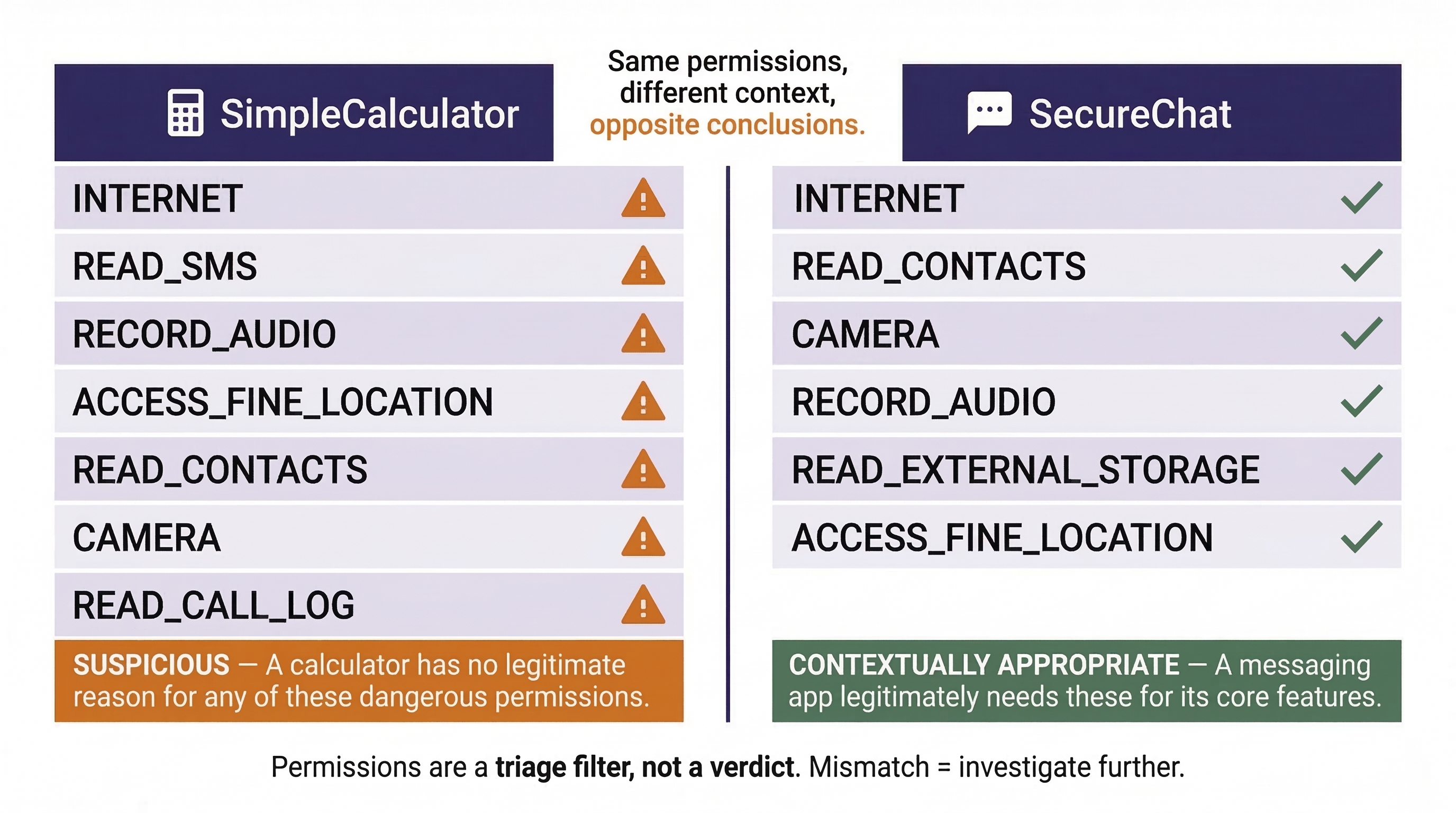
For a forensic examiner, the permission list is a rapid triage filter. You are looking for a mismatch between what the app claims to be and what it asks to do.
Consider two hypothetical apps:
- App A: "SimpleCalculator" — Requests
INTERNET,READ_SMS,RECORD_AUDIO,ACCESS_FINE_LOCATION,READ_CONTACTS,CAMERA, andREAD_CALL_LOG. A calculator has no legitimate reason to read your text messages, record your voice, or track your GPS location. Every one of those dangerous permissions is a red flag. - App B: "SecureChat" — Requests
INTERNET,READ_CONTACTS,CAMERA,RECORD_AUDIO,READ_EXTERNAL_STORAGE, andACCESS_FINE_LOCATION. A messaging app legitimately needs internet access (to send messages), contacts (to display names), camera and audio (for photo/video/voice messaging), storage (to send/receive files), and location (for location-sharing features). These permissions are contextually appropriate.
The same set of permissions that is perfectly normal for one app is deeply suspicious for another. Context is everything.
Warning
Permissions alone do not prove malicious intent—many legitimate apps request broad permissions for features the user may never use. However, excessive or contextually inappropriate permissions are a strong indicator that warrants deeper analysis. Treat permissions as a triage filter, not a verdict.
10.4 Signing Certificates and Trust
Every APK must be digitally signed with an X.509 certificate before Android will allow it to be installed. The certificate is stored in the META-INF/ directory and provides several forensically valuable fields:
- Issuer and Subject: Who created the certificate. For Google Play apps, this typically identifies the developer or company (e.g., "Wire Swiss GmbH" for Wire).
- Validity Period: The date range during which the certificate is valid. Malware authors sometimes generate certificates with specific start dates that correlate to the campaign's launch. In the TryHackMe lab exercise assigned with this chapter, you will observe how the certificate creation date of a trojanized Wire APK aligns with the timeline of the malware campaign—approximately two months after the legitimate version was released.
- Serial Number: A unique identifier for the certificate that can be used to link multiple APKs signed by the same entity. If you find five suspicious APKs on a device, and all five share the same certificate serial number, they were signed by the same actor.
- Public Key / Fingerprint: A cryptographic fingerprint that uniquely identifies the certificate.
The Tampering Test
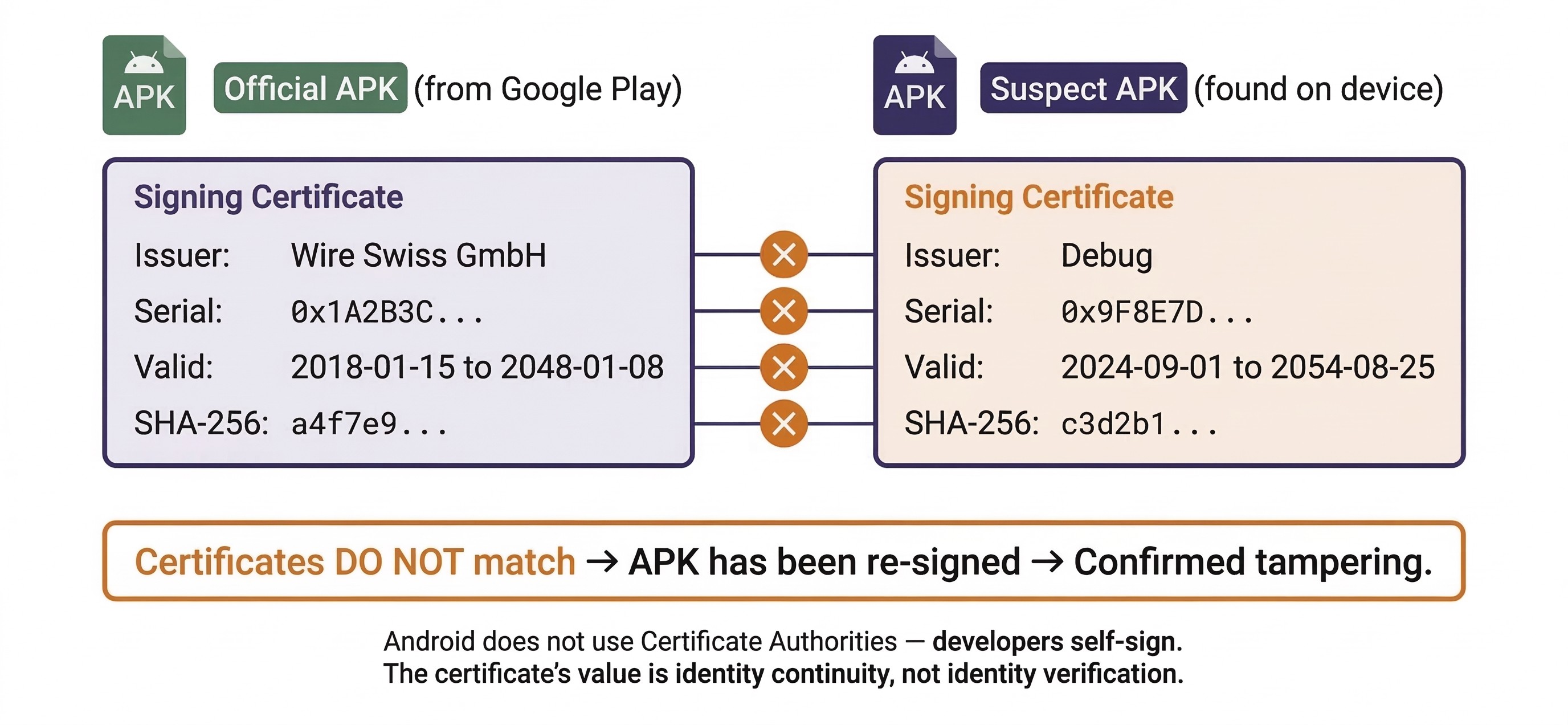
If you suspect an APK has been trojanized (a legitimate app modified to include malicious code), compare its signing certificate to the certificate used by the official developer. A legitimate Wire APK will be signed by Wire Swiss GmbH's certificate. A trojanized version will carry a different certificate—often a self-signed one generated by the attacker. This single comparison can confirm tampering in seconds.
This test works because Android's code signing model does not use a centralized Certificate Authority (CA) like web browsers do. Developers generate their own certificates and self-sign their APKs. Android trusts any certificate for installation purposes—it does not validate whether the certificate was issued by a trusted authority. The certificate's value is identity continuity: Android uses it to verify that updates to an app come from the same entity that originally published it. A trojanized version breaks this continuity because the attacker cannot sign with the original developer's private key.
10.5 APK Static Analysis Tools and Techniques
Static analysis means examining an APK without executing it—looking at its structure, reading its code, and inspecting its metadata. This is the safest form of analysis because the potentially malicious code never runs. For a forensic examiner, static analysis answers the question: What is this app designed to do?
Decompiling and Disassembling APKs
Two open-source tools form the backbone of APK static analysis:
apktool is a command-line tool that decodes the binary-encoded AndroidManifest.xml and resource files back into human-readable XML. It also disassembles the DEX code into smali, an intermediate representation that reads like assembly language for the Dalvik/ART runtime. Use apktool when you need to read the manifest, inspect resource strings (looking for hardcoded URLs, IP addresses, or suspicious text), or understand the app's declared components.
jadx takes analysis a step further by decompiling DEX bytecode back into readable Java source code. Rather than reading assembly-like smali instructions, you can read the app's logic as Java methods and classes. This is invaluable for understanding what a suspicious service or broadcast receiver actually does—for example, tracing the code path that executes when a BOOT_COMPLETED intent is received to see if it initiates a connection to a remote server.
Hash Analysis
Before performing any structural analysis, generate cryptographic hashes of the APK:
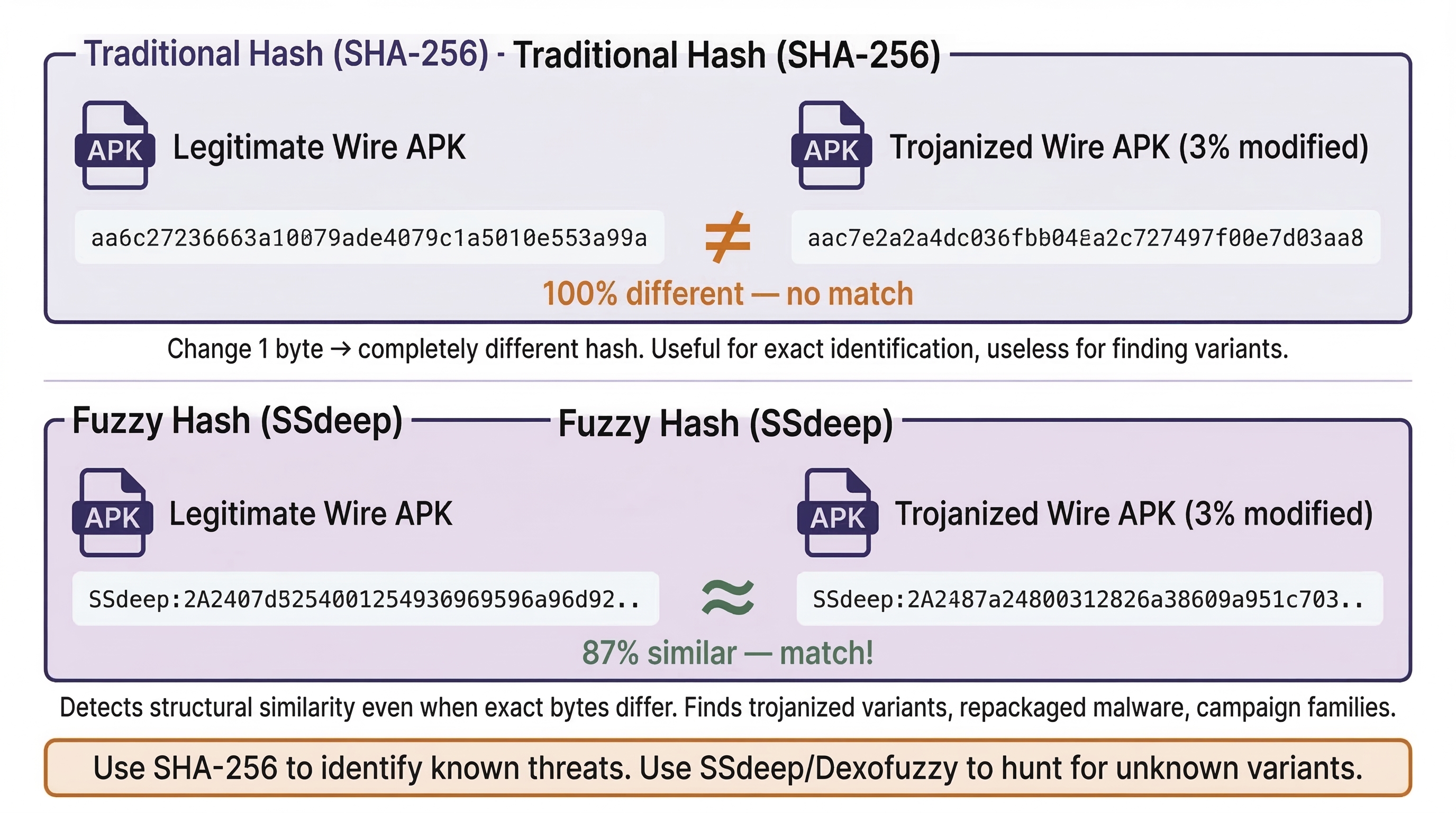
- MD5, SHA-1, SHA-256: These traditional hashes uniquely identify the exact file. Submit them to platforms like VirusTotal to check if the APK has already been identified as malicious by antivirus engines. Include them in your forensic report for evidence integrity.
However, traditional hashes are all-or-nothing: change a single byte in the APK, and the hash changes completely. This makes them useless for finding similar files. Two additional techniques address this gap:
- SSdeep (Context-Triggered Piecewise Hashing): Produces a "fuzzy hash" that allows similarity comparisons. Two APKs that are 95% identical (such as a legitimate app and its trojanized variant) will produce similar SSdeep values, even though their SHA-256 hashes are completely different. SSdeep is useful for clustering related malware samples and identifying variants of the same campaign.
- Dexofuzzy: A fuzzy hashing algorithm designed specifically for DEX files. It compares the opcode sequences (the actual instruction patterns) in compiled Android code. This allows you to find apps with similar logic even if they have been repackaged, renamed, or slightly modified. Where SSdeep compares the raw binary of the entire APK, Dexofuzzy focuses exclusively on the executable code—making it more targeted for identifying code reuse across malware families.
Online Static Analysis Platforms
Several platforms aggregate multiple analysis tools into a single interface, making them accessible without installing anything locally:
Pithus is an open-source, free, online static analysis platform specifically designed for APKs. When you upload an APK (or search by hash), Pithus generates a comprehensive report that includes:
- APK Analysis — Manifest breakdown, declared activities, services, and receivers.
- Behavior Analysis — Permissions review and threat scoring via the Quark engine, which maps app behavior to known malicious patterns (called "crimes" in Quark's terminology). Quark might flag behaviors like "sending SMS messages in the background" or "reading contacts and transmitting them over the network"—compound behaviors that individually might be benign but together indicate surveillance.
- Network Analysis — Domains and IP addresses extracted from the APK's code and resources. These are potential C2 servers or data exfiltration endpoints.
- Threat Intelligence — Antivirus detection names (from VirusTotal integration) and matched YARA rules.
- Fingerprinting — SSdeep and Dexofuzzy values for similarity hunting.
Students will use Pithus in the assigned TryHackMe lab exercise for this chapter to analyze a trojanized version of the Wire secure messaging app.
VirusTotal provides multi-engine antivirus scanning, behavioral analysis reports, and community commentary. It is the fastest way to check whether a hash is already known to the security community.
MobSF (Mobile Security Framework) can be deployed locally, which matters for law enforcement cases where uploading evidence to a third-party cloud platform may violate chain-of-custody requirements or agency policy. MobSF provides similar capabilities to Pithus but under the examiner's full control.
Analyst Perspective
In corporate incident response, an employee reports a suspicious app on their personal device being used for work (BYOD). Before escalating to a full forensic extraction—which requires legal review and HR involvement—you can pull the APK via ADB (as demonstrated in Chapter 9), generate its SHA-256 hash, and submit it to Pithus or VirusTotal within minutes. If the app matches a known malware family, you have grounds to escalate immediately. If it is clean, you have saved hours of unnecessary process. This "quick triage" workflow is one of the most common uses of static analysis in the private sector.
Introduction to YARA for APK Hunting
YARA is a pattern-matching tool used across the cybersecurity industry to identify and classify files based on textual or binary patterns. A YARA rule is essentially a set of conditions—specific strings, byte sequences, or structural characteristics—that, when matched, flag a file as belonging to a particular category (a malware family, a specific threat actor's toolkit, or a class of suspicious behavior).
In the context of APK analysis, YARA rules can match on:
- Embedded strings (server addresses, class names unique to a malware family).
- Byte patterns within the DEX code.
- Metadata extracted from the manifest.
- Structural characteristics of the APK archive itself.
A common starting condition in APK-focused YARA rules is the APK magic bytes: uint32(0) == 0x04034b50. This hexadecimal value is actually the standard ZIP file header (since APKs are ZIP archives). Including this condition ensures the rule only evaluates APK/ZIP files, avoiding false matches against unrelated file types.
The workflow connects analysis to action: you analyze a known malicious APK, identify unique indicators (a distinctive class name, an unusual embedded URL, a specific certificate serial number), and write a YARA rule that matches on those indicators. You then run that rule against a repository of APKs to find other samples exhibiting the same characteristics. Platforms like Pithus allow you to upload custom YARA rules and search their entire database retroactively.
We will return to YARA rule writing in significantly more depth in Chapter 13 (Android Malware Analysis), where you will construct rules from scratch and use them in a full threat hunting workflow. For now, understand YARA's role in the pipeline: it bridges the gap between analyzing a single suspicious APK and hunting for related samples across a corpus of thousands.
10.6 Android Security Model and Forensic Implications
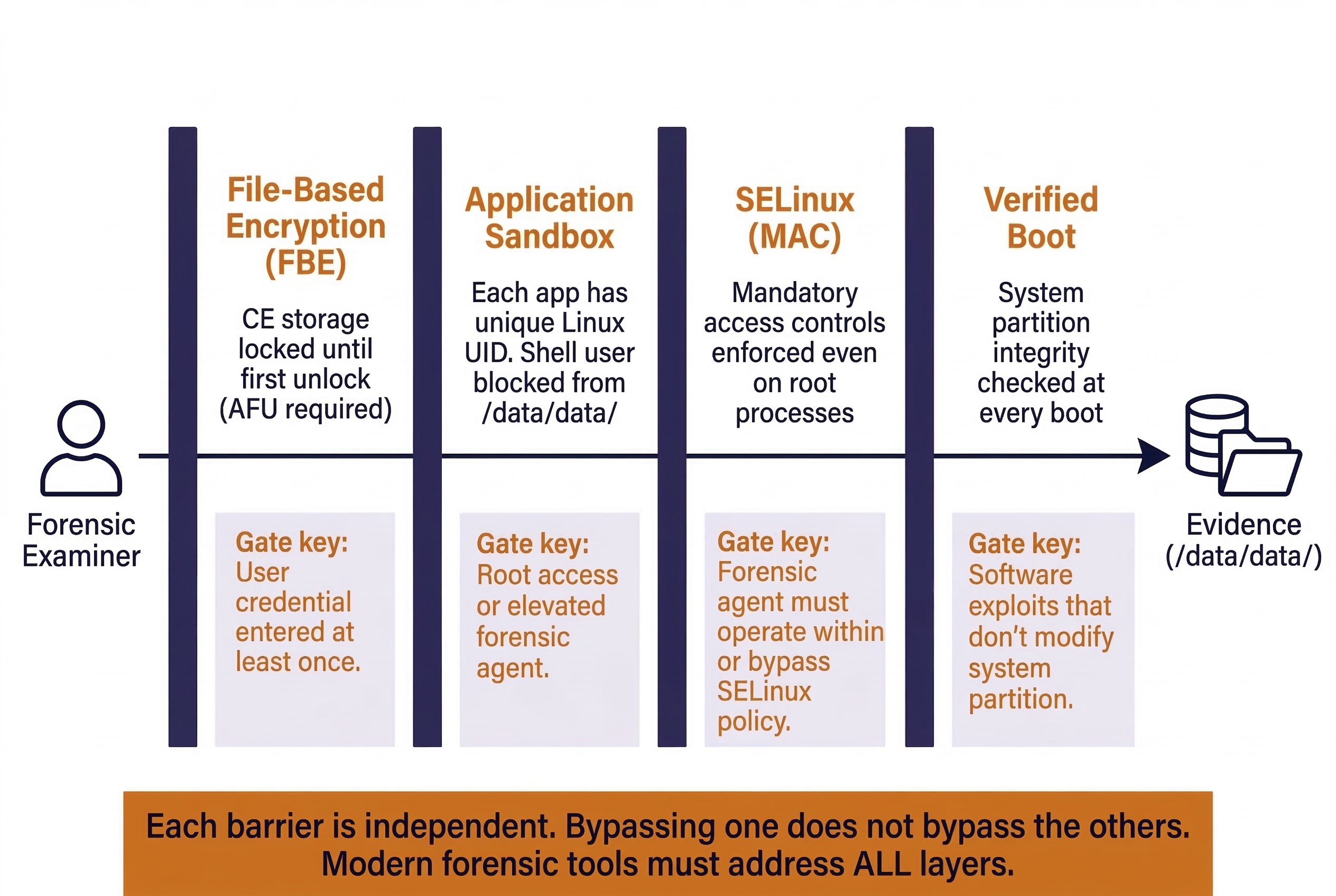
Every security mechanism on an Android device is, from the examiner's perspective, a barrier between you and the evidence. Understanding these mechanisms allows you to anticipate what data will and will not be accessible given a particular device state, extraction method, and tool capability.
Application Sandboxing
Android assigns each installed app a unique Linux User ID (UID) at install time. The app's data directory (/data/data/com.example.app/) is owned by that UID, and the Linux kernel enforces file permissions so that no other app—and no other UID—can read or write to it. This is the sandbox.
Forensic Implication: Without root-level access, a forensic tool running as a normal app (or an ADB session running as the shell user, as we demonstrated in Chapter 9) cannot read another app's sandbox. This is why logical extractions (which operate at the app API level through ContentProviders) recover less data than file system extractions (which require elevated privileges to bypass the sandbox). Commercial tools achieve file system access by pushing a temporary "agent" app with elevated privileges or by exploiting a vulnerability to gain root access.
SELinux (Security-Enhanced Linux)
Starting with Android 5.0, Google enforced SELinux in "enforcing" mode on all devices. SELinux applies mandatory access controls (MAC) on top of the standard Linux permission model. Even if a process runs as root, SELinux policies can restrict what files it can access and what system calls it can make.
Forensic Implication: SELinux is a significant reason why simply "rooting" a modern Android device is no longer sufficient for forensic access. Even with root, SELinux policies may block access to certain protected directories or prevent the execution of unauthorized binaries. Modern forensic exploits must account for both the Linux permission model and the SELinux policy layer—a two-gate system where passing through one gate does not guarantee passage through the second.
Encryption: FDE vs. FBE
Chapter 5 introduced the concept of device encryption. Here we examine Android's specific implementations and their direct impact on what you can recover.
Full Disk Encryption (FDE)
Introduced as optional in Android 4.4 and mandatory from Android 5.0 through 9.0. FDE encrypts the entire userdata partition with a single key derived from the user's lock screen credential (PIN, password, or pattern). Once the user enters their credential after a reboot, the entire partition is decrypted and remains accessible until the device is powered off.
Forensic Implication: FDE is a single-barrier model. If you have the user's credential (obtained through consent, a bypass tool, or a brute-force attack), you can decrypt the entire partition in one step. However, if the device is powered off and you do not have the credential, the entire userdata partition is encrypted and inaccessible.
File-Based Encryption (FBE)
Required on all devices shipping with Android 10 and later. FBE represents a fundamental shift from FDE: instead of encrypting the entire partition with one key, FBE encrypts individual files with different keys and creates two distinct storage classes:
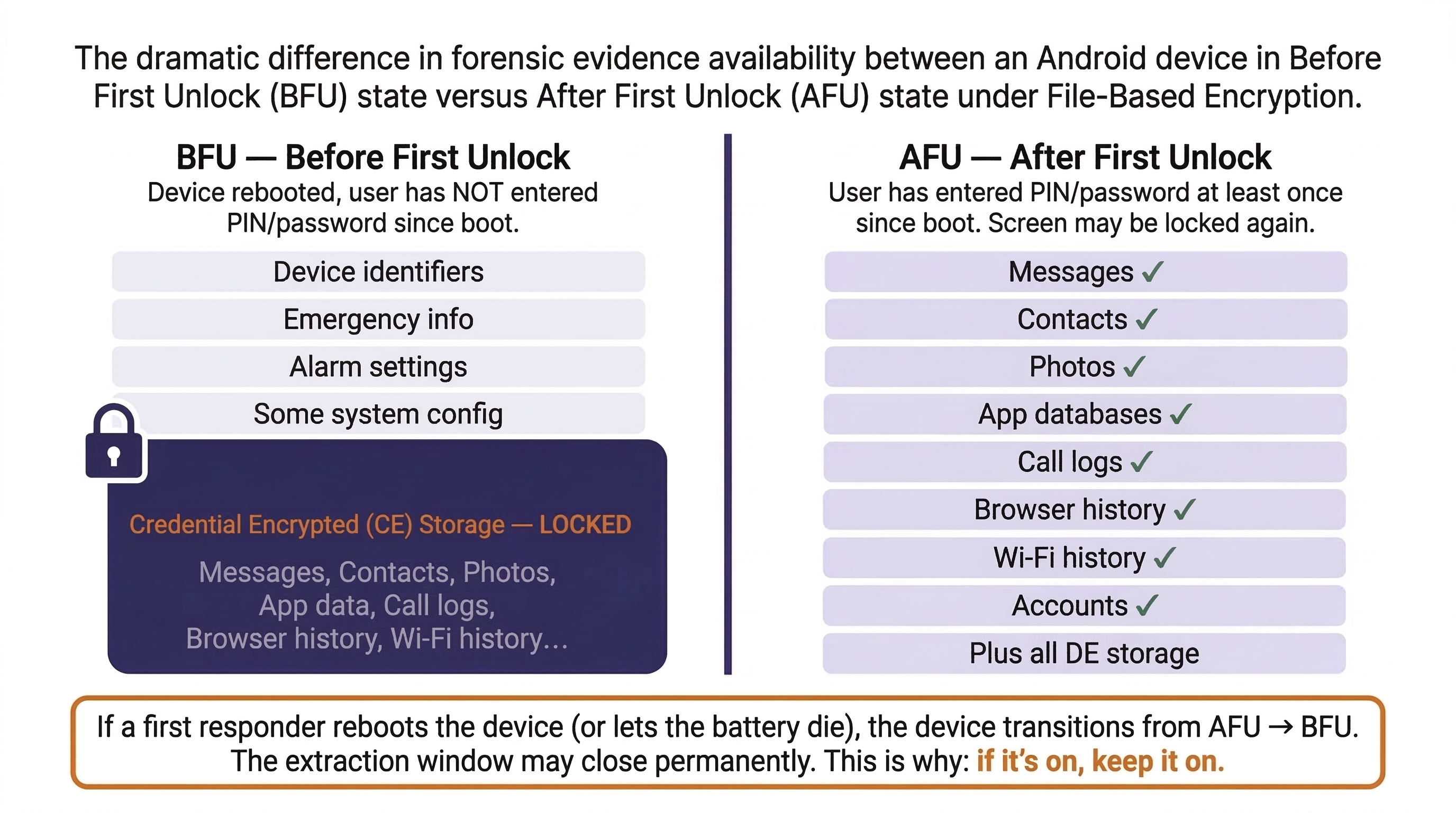
- Device Encrypted (DE) Storage: Accessible immediately after the device boots, before the user enters their lock screen credential. This storage holds data the device needs to function at boot time—alarm clocks, accessibility settings, certain system services, and emergency call capabilities.
- Credential Encrypted (CE) Storage: Accessible only after the user has entered their credential at least once since the last reboot. This is where the vast majority of user data lives—app databases, messages, photos, contacts, browsing history, and everything else we cataloged in Chapter 9.
This distinction creates two device states that are critical for forensic examiners:
- Before First Unlock (BFU): The device has been powered on (or rebooted) but the user has not yet entered their PIN/password. CE storage is encrypted and inaccessible. Only DE storage is available. A forensic extraction in this state will yield minimal user data—essentially just device identifiers, some system settings, and emergency-related information.
- After First Unlock (AFU): The user has entered their credential at least once since boot. CE storage keys are loaded into memory and remain available until the device is powered off or rebooted. A forensic extraction in this state has access to the full range of user evidence, even if the screen is currently locked.
Warning
The BFU vs. AFU distinction is arguably the most critical concept in modern Android forensics. A device that arrives at your lab in AFU state (screen locked, but previously unlocked since last boot) contains decryption keys in RAM—the full dataset is recoverable with the right tools. A device in BFU state (freshly rebooted, never unlocked since boot) is dramatically more restricted. This is the technical reason behind Chapter 3's "If it's on, keep it on" principle. If a first responder reboots a device—even accidentally, by letting the battery die—the device transitions from AFU to BFU, and the window for a full extraction may close entirely.
Verified Boot and Factory Reset Protection
Verified Boot (dm-verity): Android's Verified Boot process checks the integrity of the system partition at every boot. If the partition has been modified (e.g., by a rooting tool or a forensic examiner attempting to inject a custom binary), the device may refuse to boot or display a persistent warning. This makes it increasingly impractical to modify the system partition for forensic purposes on modern devices.
Factory Reset Protection (FRP): When a user enables a Google account on an Android device, FRP activates automatically. If the device is factory-reset without first removing the Google account, FRP locks the device to that account. The next person who sets up the device must enter the original Google credentials. While FRP is designed as an anti-theft measure, it can block forensic access to a device that has been wiped by a suspect or remotely wiped via Google's "Find My Device" service during an investigation—a scenario we described in the Chapter 1 case study.
Putting It Together: The Trojanized App Discovery
A narcotics detective seizes an Android phone during a search warrant execution at a suspected distribution hub. The suspect's phone is unlocked and in AFU state. The lab's forensic extraction reveals an app called "FlashTools" with the package name com.flash.systemtools. The app is not in the Google Play Store.
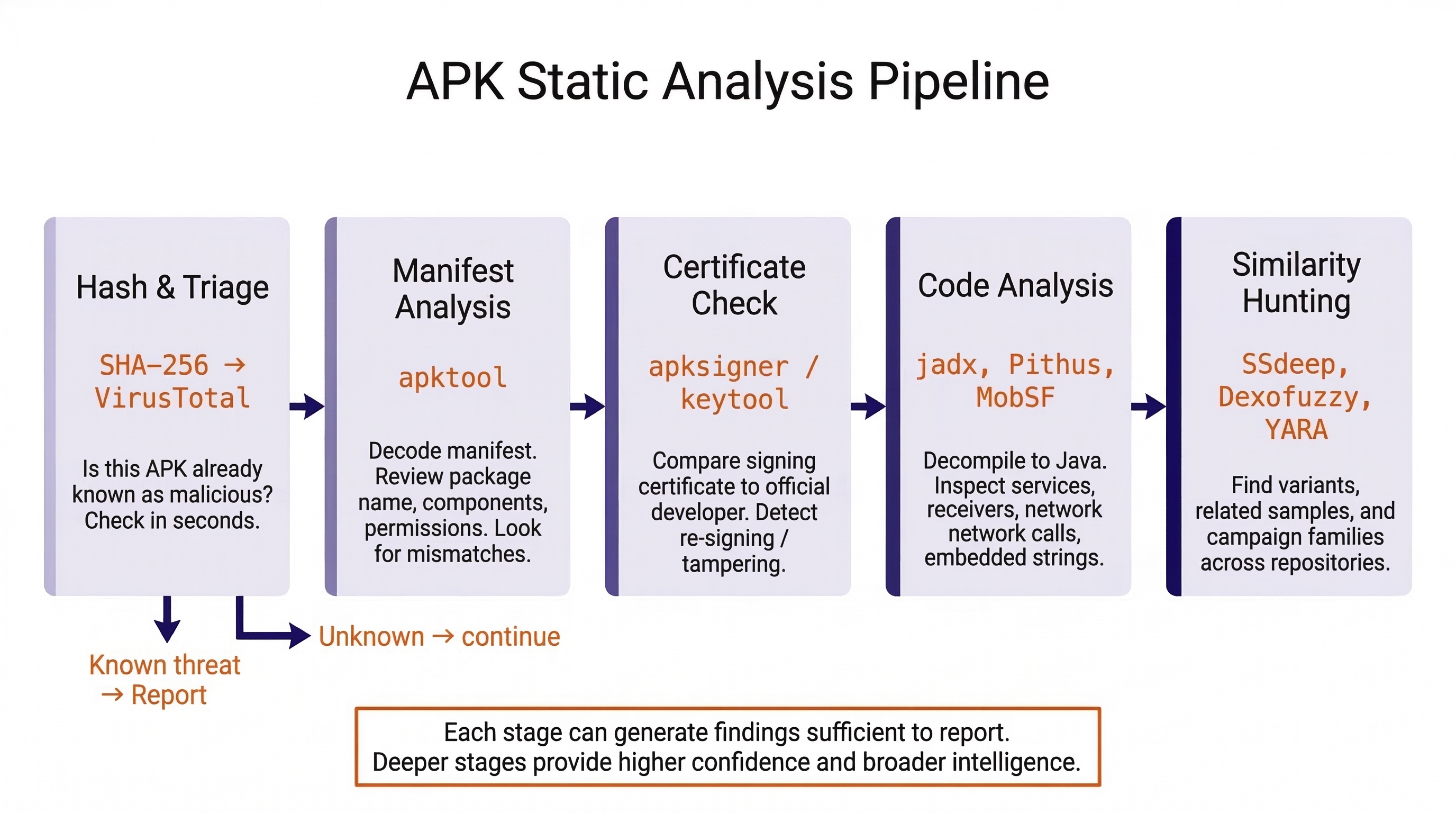
- APK Recovery: The examiner locates the APK at
/data/app/~~randomhash/com.flash.systemtools/base.apkwithin the file system extraction and copies it to the analysis workstation. - Hash Check: The SHA-256 hash is submitted to VirusTotal. Three antivirus engines flag it as a variant of a known Android RAT (Remote Access Trojan).
- Manifest Review: Using
apktool, the examiner decodes the manifest. The app declares aBOOT_COMPLETEDbroadcast receiver (persistence), two services with no corresponding UI activity (background operation), and requestsREAD_SMS,RECORD_AUDIO,ACCESS_FINE_LOCATION,READ_CONTACTS,READ_CALL_LOG, andCAMERA. For an app called "FlashTools" (implying a simple utility), these permissions are grossly inappropriate. - Certificate Analysis: The signing certificate is self-signed with the subject "Debug" and a validity start date of six weeks prior—suggesting recent creation by an amateur or automated build process.
- Pithus Upload: The APK is uploaded to Pithus for a full static analysis. The behavior analysis identifies high-confidence "crimes" including "Send SMS messages in the background" and "Read contacts and transmit over network." The network analysis reveals two hardcoded IP addresses in Eastern Europe embedded in the DEX code.
- Fuzzy Hash Hunting: The examiner takes the SSdeep hash from the Pithus report and searches for similar samples. Two other APKs with 87% similarity are found—both previously flagged as surveillance tools.
- Case Impact: The discovery shifts the investigation. The suspect may not just be a drug distributor—the RAT on the phone suggests someone was monitoring the suspect, or the suspect was monitoring others. The detective now has grounds to expand the warrant scope and investigate the C2 infrastructure.
This scenario demonstrates how APK analysis skills transform an examiner from a data extractor into an investigator who can identify threats, attribute tools, and drive case direction.
10.7 Android Security Mechanisms — Summary Matrix
The following table consolidates the security mechanisms covered in this chapter into a single reference that maps each mechanism to its forensic impact and the conditions under which it can be addressed.
Android Security Mechanisms — Forensic Impact Reference
| Security Mechanism | What It Protects | Forensic Impact | Mitigation / Conditions |
|---|---|---|---|
| App Sandboxing | /data/data/ per-app directories |
ADB shell and non-root apps cannot access app data | File system extraction via elevated agent; root exploit |
| SELinux | System-wide mandatory access control | Even root may be blocked from certain files/operations | Modern forensic agents account for SELinux policies |
| FDE (Android 5–9) | Entire userdata partition |
Partition unreadable without user credential | Credential entry, brute-force, or bypass tool |
| FBE (Android 10+) | Individual files (CE/DE classes) | CE data inaccessible in BFU state | Device must be in AFU state for full extraction |
| Verified Boot | System partition integrity | Prevents injecting forensic tools into system partition | Software exploits that operate without modifying system |
| FRP | Device setup after factory reset | Blocks device access after a remote or local wipe | Google account credentials; specialized bypass |
Chapter 10 Summary
- APK Structure: An Android Application Package is a ZIP archive containing the
AndroidManifest.xml(app blueprint), DEX files (compiled code), resources, native libraries, a signing certificate, and an assets directory. Each component provides forensically valuable information about the app's identity, behavior, and origin. - The Manifest: The
AndroidManifest.xmldeclares the package name (which maps to/data/data/), all activities (screens), services (background processes), and broadcast receivers (event listeners). Comparing a suspect APK's manifest against the legitimate version is one of the fastest methods for detecting tampering or trojanization. - Permissions as Triage: Android's permission model distinguishes between normal (auto-granted) and dangerous (user-approved) permissions. A mismatch between an app's stated purpose and its requested permissions is a strong indicator of suspicious behavior. Permissions should be treated as a triage filter that directs deeper analysis.
- Signing Certificates: Every APK carries an X.509 certificate that identifies its signer. Comparing the certificate of a suspect APK against the official developer's certificate can confirm tampering in seconds. Certificate metadata (validity dates, serial numbers) can also establish timelines and link multiple APKs to the same actor.
- Static Analysis Tools:
apktool(manifest decoding, smali disassembly),jadx(Java decompilation), Pithus (comprehensive online analysis), VirusTotal (multi-engine scanning), and MobSF (local deployment) form the core static analysis toolkit. Fuzzy hashing (SSdeep, Dexofuzzy) enables similarity hunting across sample repositories. YARA provides pattern-based detection and hunting at scale—skills that will be applied in depth in Chapter 13. - Google Play Frosting: The presence or absence of Google Play's frosting signature indicates whether an APK was distributed through the official Play Store or sideloaded from another source—a significant forensic indicator.
- Security Barriers: Application sandboxing, SELinux, and File-Based Encryption (FBE) define the boundaries of what is forensically accessible. The BFU vs. AFU device state determines whether Credential Encrypted storage is available, making first-responder device handling (Chapter 3) directly relevant to extraction success. Verified Boot prevents system partition modification, and Factory Reset Protection can lock a wiped device.