CH8: The Technical Interview — SOC & Digital Forensics
Introduction
In Chapter 7, you built the narrative scaffolding for behavioral interviews—the STAR method, the elevator pitch, and the ability to tell a professional story. Those skills get you through the first half of most interviews. This chapter prepares you for the second half: the part where the hiring manager leans forward and says, "Walk me through how you would investigate a ransomware alert."
The technical interview is where candidates with real competency separate themselves from candidates who simply memorized flashcards. The questions you will face are not trivia. A hiring manager for a Security Operations Center (SOC) or a Digital Forensics and Incident Response (DFIR) team is not testing whether you can recite the definition of "Chain of Custody." They are testing whether you can think under pressure—whether you have a methodology, whether you understand why each step matters, and whether you can communicate that process clearly to another professional.
You have already acquired the technical knowledge in your prior coursework. You know what Wireshark is. You know what a write blocker does. This chapter is not a technical refresher. It is a performance guide. Its purpose is to teach you how to present your technical knowledge in a structured, confident, and methodical way when someone is evaluating you.
Learning Objectives
By the end of this chapter, you will be able to:
- Identify the common categories of technical interview questions used for SOC Analyst and DFIR roles.
- Apply a structured methodology for "walkthrough" questions that demonstrates process-oriented thinking rather than rote memorization.
- Construct clear, narrated responses to scenario-based questions covering alert triage, log analysis, and forensic acquisition.
- Distinguish between questions that test foundational knowledge and questions that test investigative reasoning.
- Evaluate your own technical interview readiness by mapping question types to your current skill confidence levels.
8.1 What Technical Interviewers Actually Want
Before examining specific questions, you need to understand the evaluation criteria behind them. A technical interviewer is rarely looking for a single "correct" answer. They are assessing several dimensions simultaneously.
The Evaluation Framework
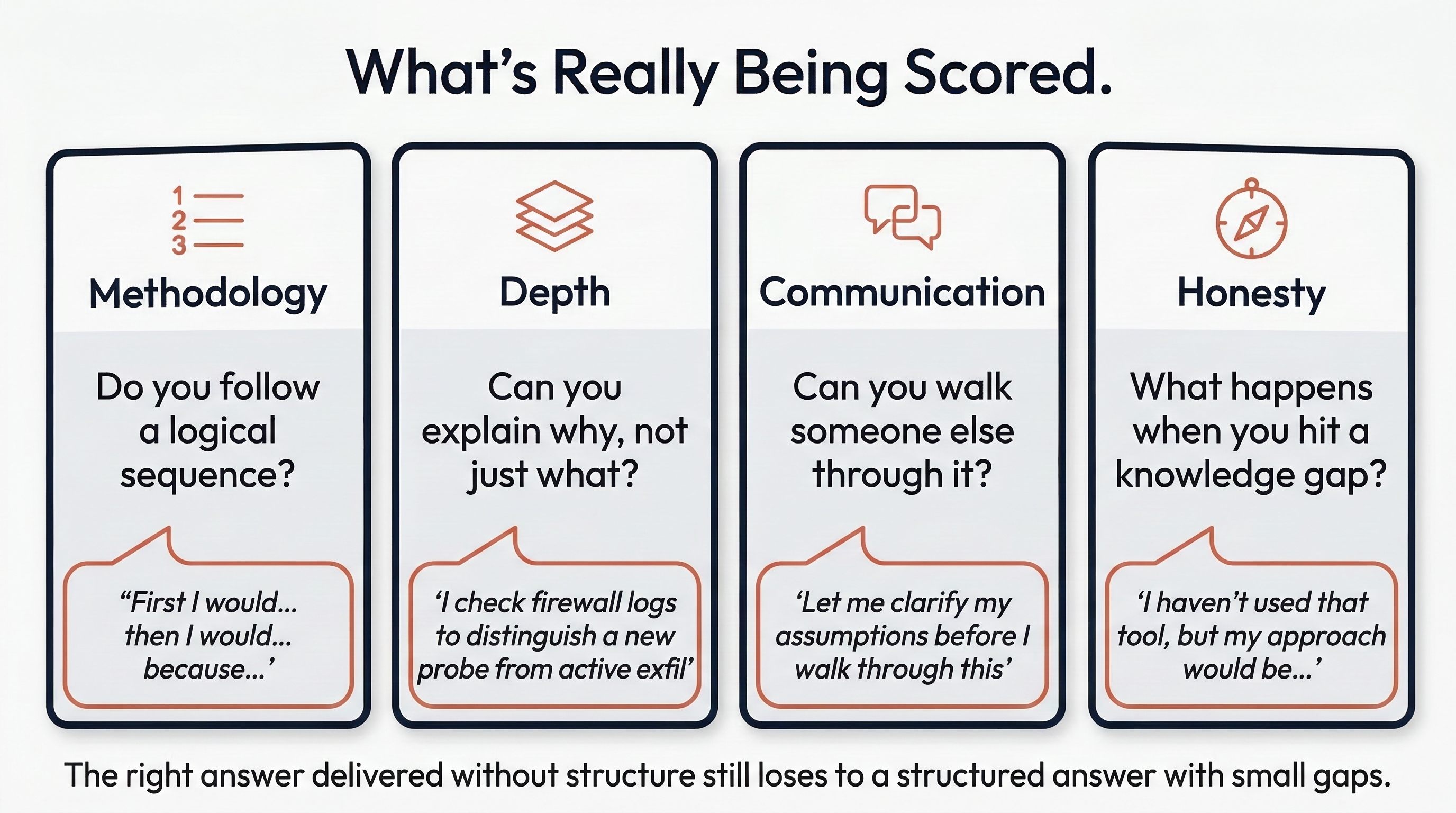
When a hiring manager asks you a technical question, they are silently scoring you against criteria like the following:
- Methodology over memorization. Do you follow a logical sequence, or do you jump to conclusions? An analyst who says, "First I would check the logs, then correlate with threat intel, then escalate based on severity" demonstrates process. An analyst who says, "I'd block the IP" demonstrates impulsiveness.
- Depth of understanding. Can you explain why you would take a specific action, not just what the action is? Saying "I would check the firewall logs" is surface-level. Saying "I would check the firewall logs to determine whether the flagged IP had any prior connection history to our network, which would help me distinguish between a new probe and an ongoing exfiltration" shows depth.
- Communication clarity. Can you walk a peer or a manager through your reasoning without losing them? In a SOC, you will need to brief a Tier 2 analyst or a shift lead. If you cannot articulate your process during an interview, they have no reason to believe you can do it on the job.
- Intellectual honesty. What happens when you hit the boundary of your knowledge? Saying "I'm not sure, but my approach would be to check the vendor documentation and consult with a senior analyst" is a strong answer. Guessing or bluffing is immediately obvious to an experienced interviewer and is far more damaging than admitting a gap.
Entry-Level Perspective
Hiring managers interviewing junior candidates expect knowledge gaps. They do not expect you to have the depth of a five-year veteran. What they are looking for is trainability: evidence that you have a logical mind, that you follow a process, and that you know how to find answers you do not already have. Demonstrating methodology is more valuable at this level than demonstrating mastery.
8.2 Categories of Technical Questions
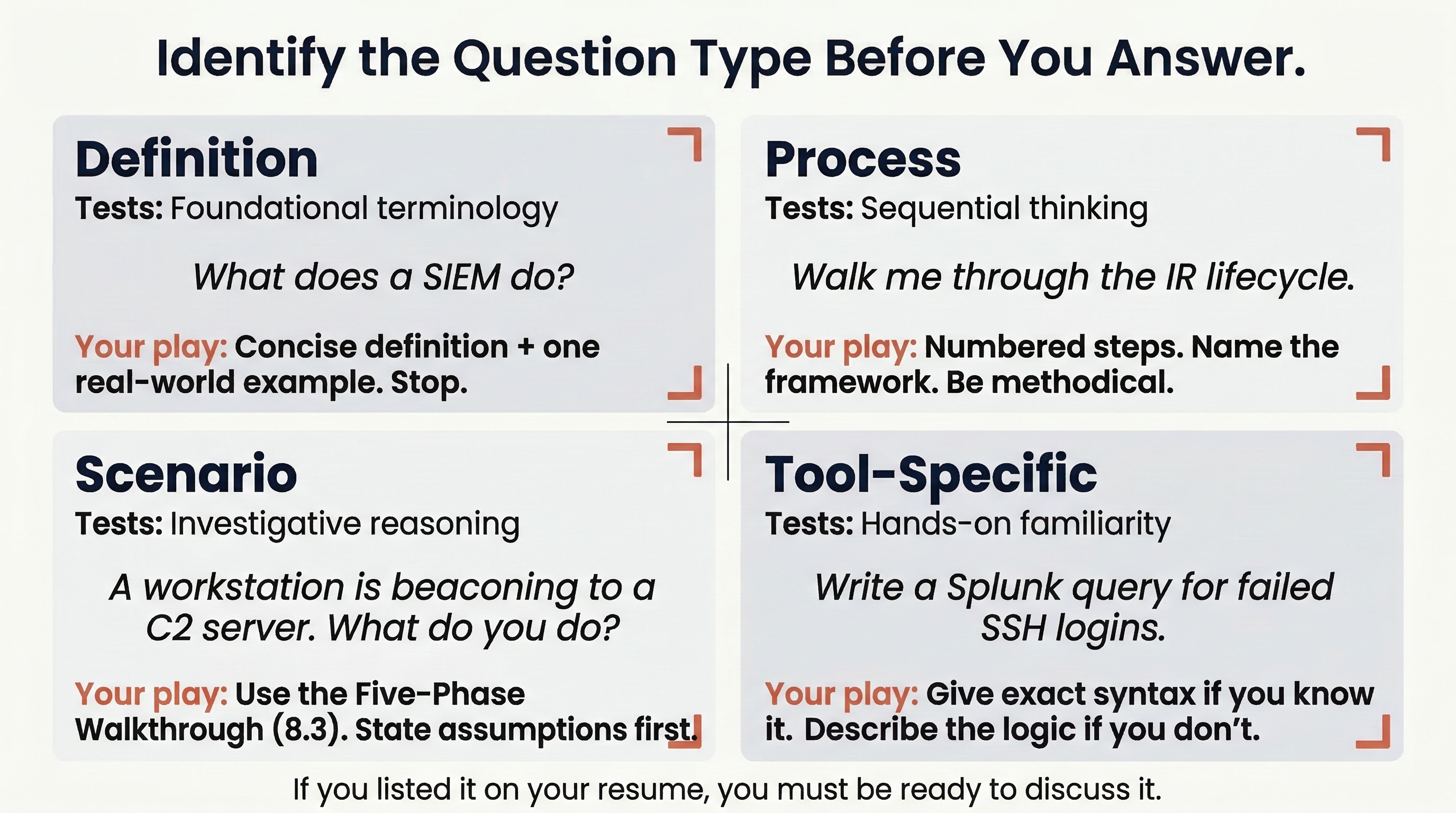
Technical interview questions for SOC and DFIR roles tend to fall into four distinct categories. Understanding which category a question belongs to helps you structure your response appropriately.
Definition Questions
These are the most straightforward. They test whether you understand fundamental terminology and concepts.
Examples:
- "What is the difference between a vulnerability and an exploit?"
- "What does a SIEM do?"
- "Explain the CIA Triad."
- "What is the purpose of a write blocker?"
How to answer them: Be concise and precise. These are not invitations to deliver a lecture. Give a clear, two-to-three sentence definition, then stop. If you can include a brief practical example, do so.
Weak response: "A SIEM is a Security Information and Event Management system. It collects logs."
Strong response: "A SIEM aggregates log data from sources across the network—firewalls, endpoints, authentication servers—and correlates that data to surface patterns that might indicate a security event. For example, a single failed login is noise, but fifty failed logins from the same external IP within a minute is a pattern the SIEM would flag as a potential brute-force attack."
Process Questions
These test whether you understand a multi-step workflow and can walk through it in order. They often begin with "Walk me through..." or "What are the steps to..."
Examples:
- "Walk me through the incident response lifecycle."
- "Describe the process of forensically imaging a hard drive."
- "How would you onboard a new log source into a SIEM?"
How to answer them: Use a numbered, sequential structure. State the framework or standard you are following if one applies (e.g., "I follow the NIST 800-61 lifecycle"). Then walk through each phase briefly. The interviewer may interrupt you to drill deeper into a specific step—that is a good sign, not a bad one.
Scenario Questions
These are the most complex and most heavily weighted. The interviewer presents a realistic situation and asks you to react to it in real time. There is no single correct answer; they are evaluating your reasoning process.
Examples:
- "You receive an alert that a workstation is beaconing to a known command-and-control server every 60 seconds. What do you do?"
- "A user reports that their files have been encrypted and there is a ransom note on their desktop. Walk me through your response."
- "You are imaging a suspect's laptop for a forensic investigation and the laptop is powered on. What are your considerations?"
How to answer them: This is where the structured walkthrough methodology (covered in Section 8.3) becomes essential. Do not rush to an answer. Pause, state your assumptions, and walk through your response step by step.
Tool-Specific Questions
These test hands-on familiarity with specific technologies. They can be conversational or, in some interviews, involve a live exercise.
Examples:
- "How would you write a Splunk query to find all failed SSH logins in the last 24 hours?"
- "What Wireshark filter would you use to isolate HTTP POST requests?"
- "In Autopsy, how would you search for deleted JPEG files on an image?"
How to answer them: If you know the answer, give the specific syntax or procedure. If you know the tool but cannot recall exact syntax, say so honestly and describe the logic of what you would do: "I would use Splunk's search command to filter on the relevant event code—I believe it is EventCode 4625 for Windows—and narrow it by time range. I would need to confirm the exact SPL syntax, but the logic is a keyword search filtered by source type and time."
Warning
Tool-specific questions are where the "Confidence Rule" from Chapter 3 becomes critical. If you listed Splunk on your resume, you must be prepared to answer questions about Splunk. If you listed Volatility, you must be able to describe its basic usage. Never list a tool you cannot discuss. The fastest way to lose credibility in a technical interview is to claim proficiency in a tool and then be unable to answer a basic question about it.
The following reference table maps each question category to the core skill it tests and the response strategy that works best for it.
| Question Category | What It Tests | Response Strategy |
|---|---|---|
| Definition | Foundational knowledge, terminology | Concise definition + one practical example |
| Process | Sequential thinking, framework knowledge | Numbered steps, reference the standard (e.g., NIST, Kill Chain) |
| Scenario | Investigative reasoning, decision-making | Structured walkthrough (see Section 8.3), state assumptions |
| Tool-Specific | Hands-on familiarity, practical recall | Exact syntax if known; describe the logic if syntax is forgotten |
8.3 The Structured Walkthrough Method
Scenario-based questions are where most entry-level candidates stumble. The pressure of an interview causes people to either freeze, skip steps, or jump straight to a conclusion ("I'd block the IP and reimage the machine"). Hiring managers are not impressed by conclusions; they are impressed by the path you took to reach them.
To combat this, adopt a consistent structure every time you are asked to respond to a scenario. Think of it as the technical equivalent of the STAR method from Chapter 7.
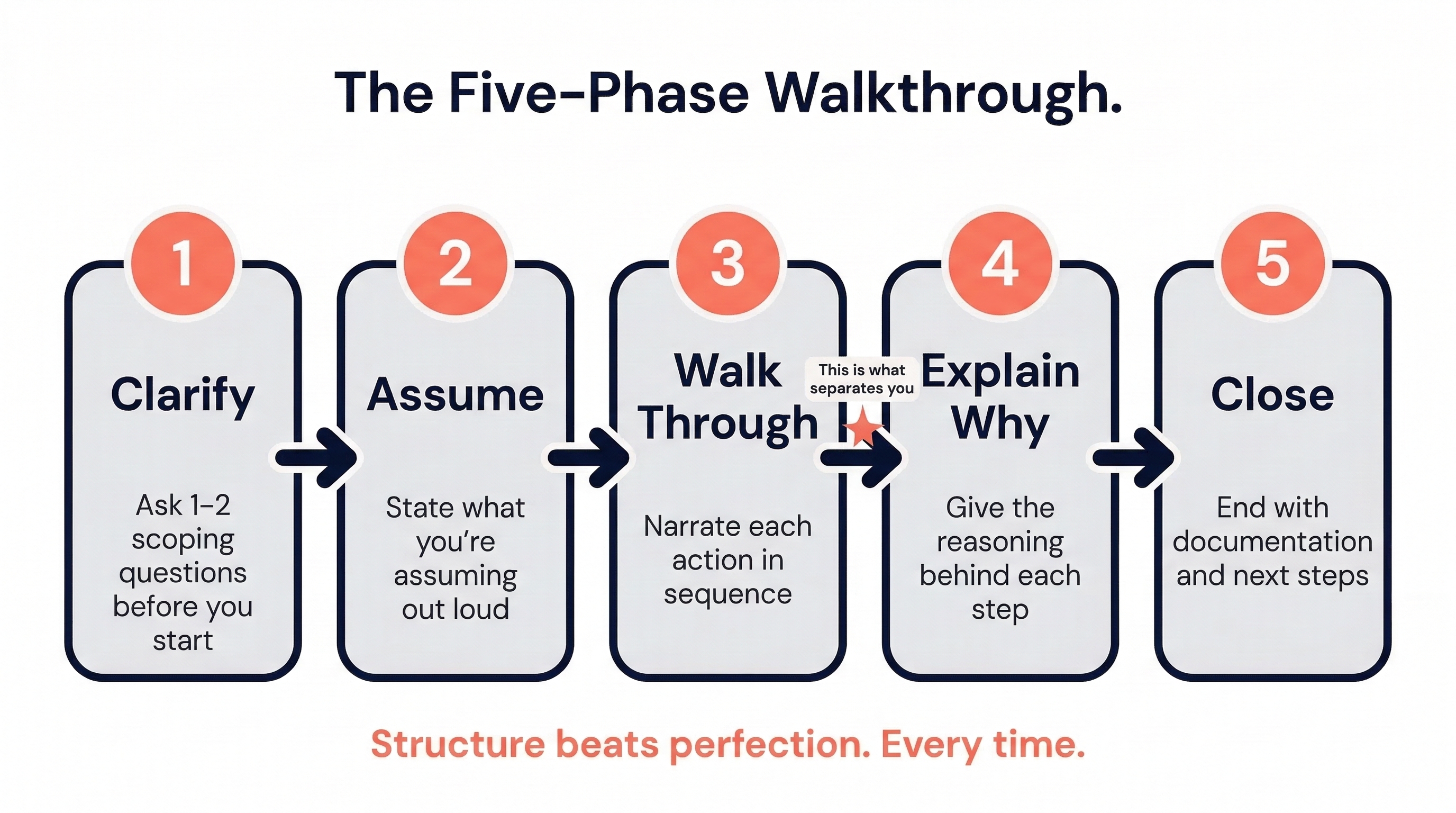
The Five-Phase Walkthrough
-
Clarify and Scope. Before you start answering, ask one or two clarifying questions. This is not a sign of weakness—it is a sign of maturity. Real-world incidents always require scoping before action. "Before I walk through my response, can I clarify—am I the Tier 1 analyst receiving this alert, or am I the incident responder who has already been handed an escalation?"
-
State Your Assumptions. If the interviewer does not provide full context (and they usually will not), state your assumptions explicitly. "I am going to assume this is a production environment and the affected system is still online." This shows the interviewer that you understand context matters and that your response would change under different conditions.
-
Walk Through Your Actions Sequentially. Narrate your steps in order. Use transitional language: "First... Next... At this point... Once I confirm that..." Do not skip ahead. If the interviewer wants you to speed up, they will tell you.
-
Explain the "Why." For each major action, briefly explain your reasoning. Do not just say "I would check the logs." Say "I would check the logs because I need to establish whether this alert correlates with any other suspicious activity on the network, which would change the severity from a standalone event to a potential campaign."
-
Close with Outcome and Documentation. End your walkthrough with what happens after the technical work is done: escalation, reporting, lessons learned. This signals that you understand the full lifecycle of an incident, not just the exciting middle part.
Entry-Level Perspective
You do not need to have the "perfect" answer. Interviewers for junior roles are evaluating your thought process, not your ability to single-handedly contain an APT. If you follow a logical structure and demonstrate that you understand why each step exists, you will outperform candidates who have more experience but cannot articulate their process.
8.4 SOC Analyst: Common Questions and Walkthrough Examples
The following section covers the question types most frequently encountered in SOC Analyst interviews. For each scenario, a sample walkthrough is provided to illustrate the structured method from Section 8.3.
The Alert Triage Walkthrough
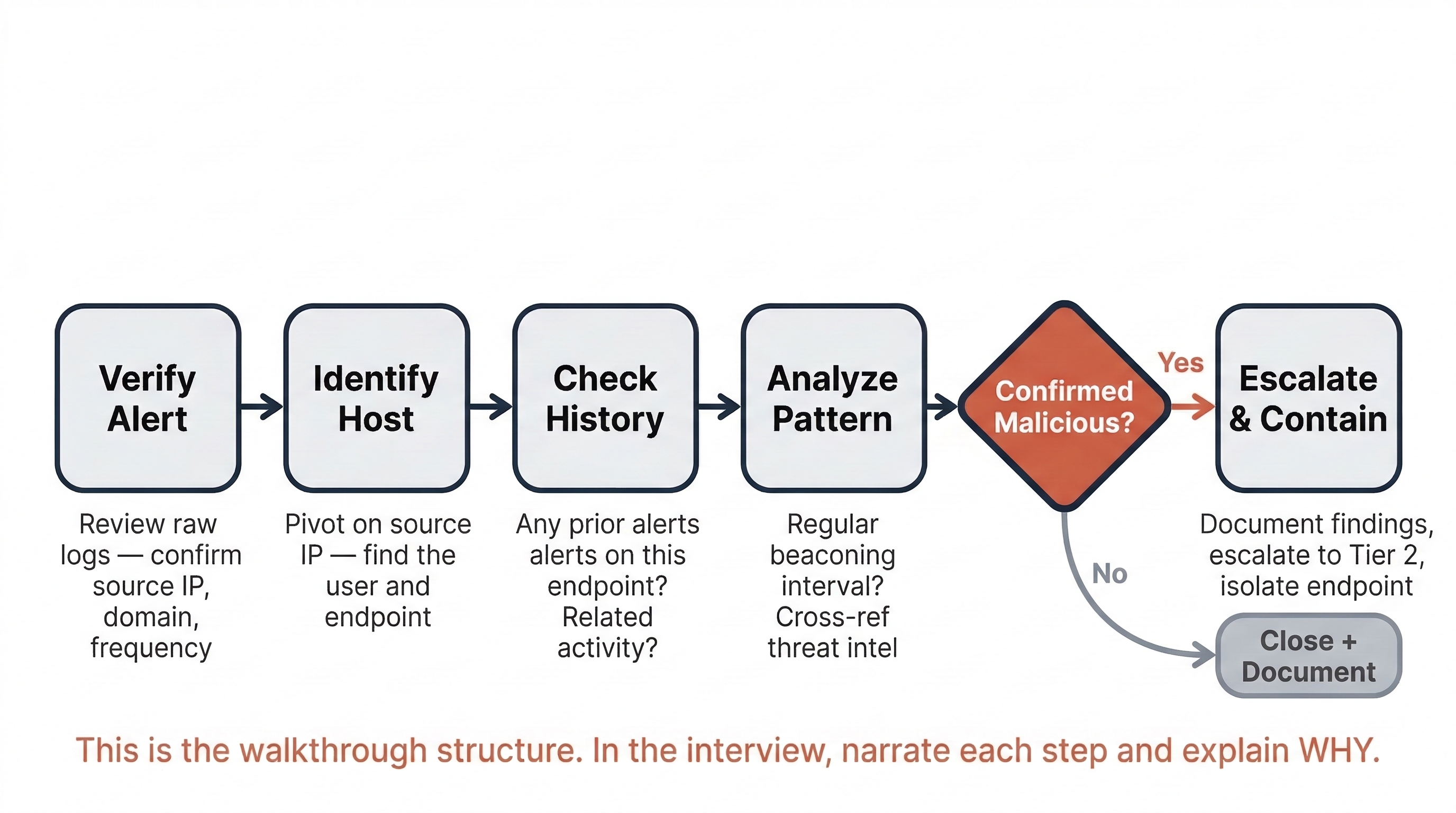
The Prompt: "You are a Tier 1 SOC Analyst. Your SIEM fires an alert indicating a workstation has made repeated DNS requests to a domain flagged as a known command-and-control (C2) server. Walk me through your investigation."
Sample Walkthrough:
"First, I would verify the alert by reviewing the raw log data in the SIEM to confirm the source IP, the destination domain, and the frequency of the requests. I want to rule out a false positive—sometimes threat intelligence feeds flag domains that have since been re-registered or sinkholed.
Next, I would pivot on the source IP to identify which user and which endpoint generated the traffic. I would check whether this endpoint has triggered any other alerts recently—for example, a prior alert for a suspicious email attachment or an unusual process execution—since C2 beaconing rarely happens in isolation.
I would then look at the beaconing pattern itself. Regular intervals—say, every 60 seconds—are a strong indicator of automated C2 communication rather than normal browsing behavior. I would cross-reference the destination domain against external threat intelligence sources like VirusTotal or AlienVault OTX to see if other organizations have reported it.
At this point, if the indicators confirm malicious activity, I would follow my organization's escalation procedures—documenting my findings in the ticketing system and escalating to the Tier 2 Incident Response team with a summary of the evidence and my assessment of the severity. If my organization's playbook authorizes Tier 1 to take containment actions, I would isolate the endpoint from the network to prevent further communication with the C2 server while the IR team investigates."
The "Explain This Alert" Question
The Prompt: "What is Event ID 4625 and why should a SOC analyst care about it?"
This is a hybrid definition/reasoning question. The interviewer wants the definition, but they also want to see whether you understand its operational significance.
Sample Response:
"Event ID 4625 is a Windows Security Log event that records a failed logon attempt. A single instance is usually benign—a user mistyping their password. But a high volume of 4625 events from a single source in a short time window is a strong indicator of a brute-force or password-spraying attack. In the SIEM, I would typically build a correlation rule or threshold alert that triggers when a specific number of 4625 events—say, ten or more within five minutes—originate from the same account or the same source IP. That shifts it from routine noise to an actionable alert."
Additional SOC Questions to Prepare For
The following questions are commonly asked in entry-level SOC interviews. Use the structured walkthrough method and the question-category framework from Section 8.2 to prepare responses for each.
- "What is the difference between an IDS and an IPS?"
- "A user reports a suspicious email with an attachment. Walk me through how you would analyze it."
- "What is lateral movement and how would you detect it in logs?"
- "Explain the difference between a false positive and a false negative. Which is more dangerous in a SOC environment, and why?"
- "You see a spike in outbound traffic from a single server at 3:00 AM. What are your first steps?"
- "What is the MITRE ATT&CK framework, and how would you use it in a SOC?"
8.5 Digital Forensics: Common Questions and Walkthrough Examples
DFIR interviews tend to place heavier emphasis on process discipline—specifically, evidence handling, legal defensibility, and documentation. The interviewer wants to know that you will not accidentally destroy evidence or break a chain of custody.
The Forensic Acquisition Walkthrough
The Prompt: "You arrive on-site to image a suspect's workstation as part of an internal investigation. The machine is powered on. Walk me through your process."
Sample Walkthrough:
"My first priority is volatile data. Since the machine is powered on, data in RAM will be lost the moment it shuts down. Before I touch the hard drive, I would perform a live memory capture using a tool like FTK Imager or a dedicated memory acquisition utility loaded from a write-protected USB drive. I would document the current state of the screen—taking a photograph—and note any running applications or open files.
Next, I need to make a decision about the disk. If the investigation requires a forensically sound disk image and the machine can be taken offline, I would perform a proper shutdown, remove the storage media, and connect it to my forensic workstation through a hardware write blocker. The write blocker ensures that the imaging process does not alter a single bit on the original drive.
I would then create a bit-for-bit forensic image using a tool like FTK Imager or dd on a Linux forensic workstation. Once the image is complete, I would generate hash values—both MD5 and SHA-256—of the original media and the image file and confirm they match. This hash verification proves that the image is an exact, unaltered copy.
Throughout this entire process, I would maintain a Chain of Custody log: documenting who handled the evidence, when, and what actions were taken. Every transfer of the evidence—from the suspect's desk to my forensic workstation to secure storage—gets a signed entry. If this chain is broken at any point, the evidence can be challenged or excluded."
The Artifact Analysis Question
The Prompt: "During an investigation, you need to prove that a specific executable was run on a Windows system. Where would you look?"
Sample Response:
"There are several Windows artifacts that record evidence of program execution. I would start with Prefetch files, which Windows creates in the C:\Windows\Prefetch directory every time an application runs—these include the executable name and a timestamp of last execution. I would also check the Amcache hive, which records metadata about executables including their file path and SHA-1 hash. ShimCache, also known as the Application Compatibility Cache, is another source—it records executables that the operating system has evaluated for compatibility, even if they were not ultimately run, so I would cross-reference it against the other artifacts for confirmation. If I needed to establish a more complete timeline, I could also examine the NTFS $MFT for file creation and modification timestamps associated with the executable. Each of these artifacts gives a piece of the picture, and correlating multiple sources strengthens the finding."
Warning
A common mistake in forensics interview responses is jumping straight to what you found without explaining how you preserved the evidence. Interviewers in DFIR roles are specifically listening for evidence handling discipline. If your walkthrough starts with "I would open the file and look at..." without first addressing acquisition and integrity verification, you have signaled that you may not be safe to put on a real case.
Additional DFIR Questions to Prepare For
- "What is the difference between a physical image and a logical image? When would you use each?"
- "Explain the difference between volatile and non-volatile evidence. Give examples of each."
- "What is the purpose of hashing in digital forensics?"
- "A user claims they never downloaded a specific file. How would you verify or disprove that claim using forensic artifacts?"
- "Walk me through the NIST Incident Response Lifecycle."
- "What would you look for in a forensic image if you suspected data exfiltration via USB?"
8.6 Preparing for the Unknown: Handling Questions You Cannot Answer
No candidate—at any level—knows everything. At some point during a technical interview, you will be asked something you do not know. How you handle that moment matters more than you might expect.
The Wrong Approach
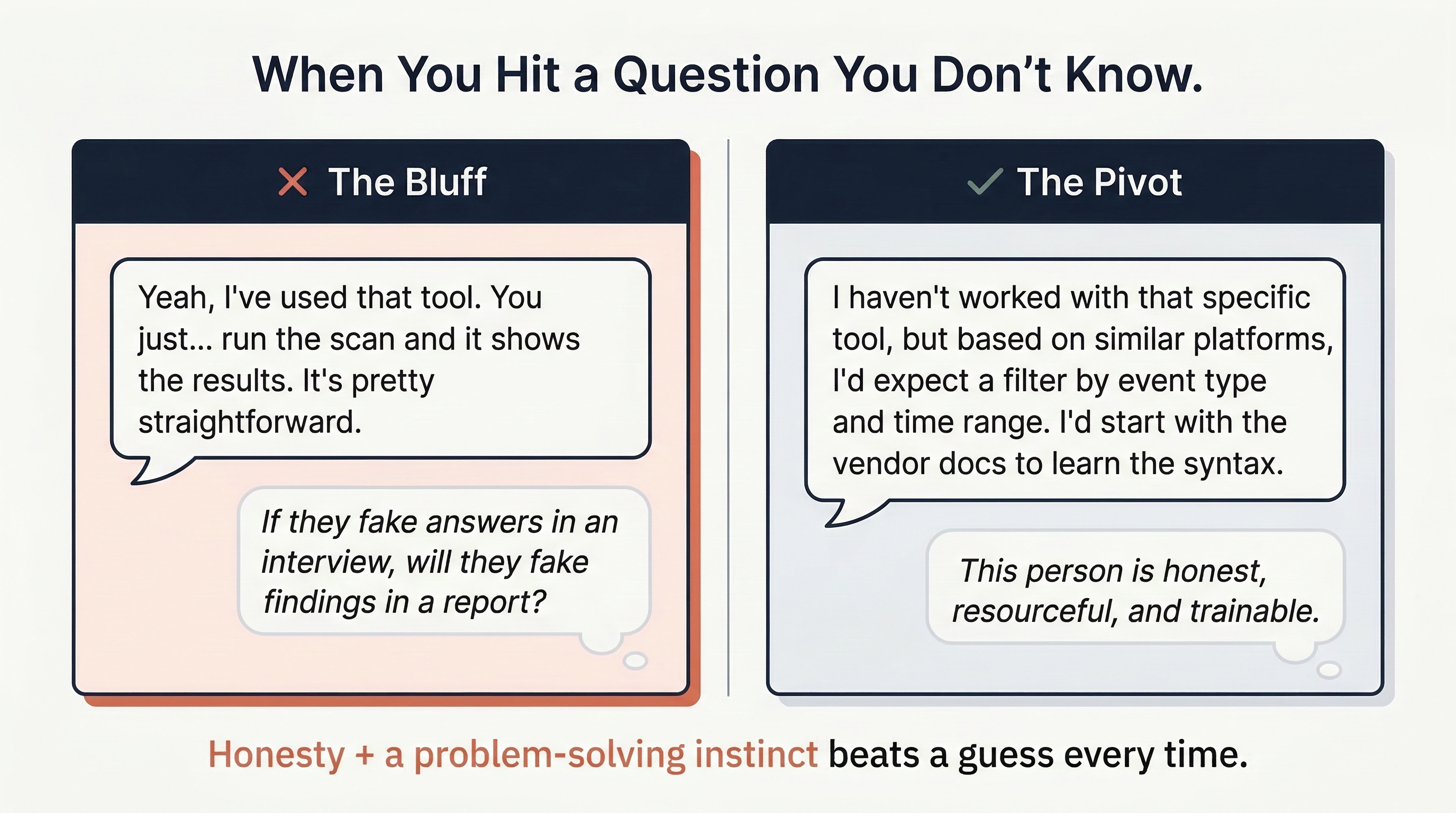
Guessing, bluffing, or providing a vague non-answer. Experienced interviewers detect this immediately, and it raises a serious concern: if this candidate fabricates answers in an interview, will they fabricate findings in an incident report?
The Right Approach
Acknowledge the gap, demonstrate your problem-solving instinct, and show how you would find the answer.
Example: "I haven't worked directly with that tool, but based on my experience with similar log analysis platforms, I would expect it to have a search function that filters by event type and time range. My first step would be to review the vendor documentation to learn the query syntax, and then I would test my queries in a development environment before running them in production."
This response accomplishes three things: it is honest, it demonstrates transferable reasoning, and it shows the interviewer that you have a methodology for closing your own knowledge gaps—which is exactly the behavior described in your Gap Analysis work from Chapter 2.
Entry-Level Perspective
Some interviewers will intentionally push you past your knowledge boundary to see how you react. This is not adversarial—it is diagnostic. They want to see whether you stay calm, think out loud, and work toward a logical answer, or whether you shut down. Treat these moments as an opportunity to demonstrate your problem-solving temperament, not as a failure.
8.7 Building Your Technical Interview Preparation Plan
Knowing the question categories and walkthrough methods is necessary but not sufficient. You must practice them aloud. Reading a sample response on a page is fundamentally different from delivering it in real time with an interviewer watching you.
The Preparation Checklist
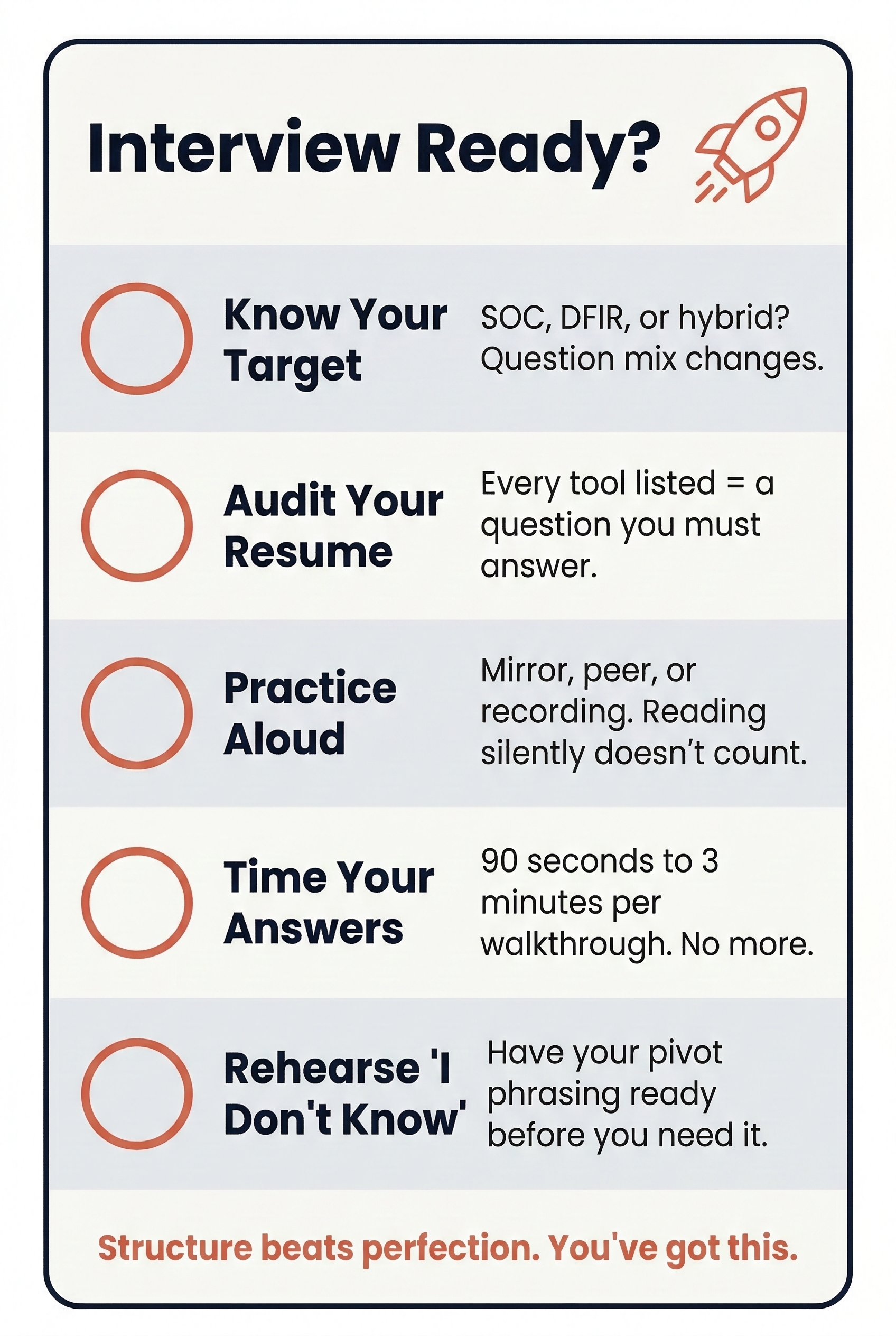
- Identify your target role. Are you interviewing for SOC, DFIR, or a hybrid position? The question distribution will differ. SOC interviews lean heavily on alert triage, log analysis, and tool-specific queries. DFIR interviews emphasize evidence handling, artifact knowledge, and documentation rigor.
- Map questions to your Skills Matrix. Revisit the Skills Matrix you built in Week 3. For every tool or concept you rated at a Confidence Level 3 or above, you should be able to answer both a definition question and a process question about it. For anything rated below a 3, either improve it through lab work or remove it from your resume.
- Practice aloud. Recruit a peer, record yourself on video, or stand in front of a mirror. The goal is to hear your own cadence and identify where you stumble, repeat yourself, or lose structure. Written preparation alone is not enough—your delivery matters.
- Time yourself. A strong walkthrough response should take between 90 seconds and three minutes. If you are consistently going past three minutes on a single question without being prompted to continue, you are likely over-explaining. Practice being thorough but disciplined.
- Prepare your "I don't know" response. Have a rehearsed, natural way of handling gaps so that you do not panic in the moment. The phrasing from Section 8.6 is a template—adapt it to your own voice.
Chapter Summary
The technical interview is not a pop quiz. It is a conversation designed to reveal how you think, how you communicate, and whether you have the disciplined methodology that a SOC or DFIR team requires. The interviewers on the other side of the table are not expecting perfection from an entry-level candidate. They are expecting structure, honesty, and curiosity.
Key Takeaways:
- Methodology wins. A structured, step-by-step walkthrough demonstrates more professional readiness than a technically correct but disorganized answer.
- Know the question types. Definition, Process, Scenario, and Tool-Specific questions each require a different response strategy. Identify the type before you start answering.
- Use the Five-Phase Walkthrough. Clarify, assume, walk through, explain the "why," and close with documentation and next steps.
- Honesty protects credibility. Admitting a gap and describing how you would close it is always stronger than guessing. The interviewer is evaluating your judgment, not just your knowledge.
- Practice out loud. Preparing answers in your head is not the same as delivering them under pressure. Rehearse with a peer, a recording, or a mirror until your delivery is fluid and confident.
The technical foundation you built throughout your degree is the raw material. This chapter gave you the framework to shape that material into interview-ready responses. In Chapter 9, we shift focus to the other side of the technical interview: GRC scenario questions, policy defense, and the ability to translate risk into business language.