CH8: Security Architecture and Infrastructure Models
Introduction
Where and how you deploy systems fundamentally shapes your security posture. Whether you run servers in your own data center, rent infrastructure from a cloud provider, or use a hybrid approach, each model carries distinct security responsibilities, architectural constraints, and operational challenges. This chapter examines the landscape of deployment models—cloud and non-cloud—and the architectural decisions that affect your risk profile.
Security architecture is not simply about choosing one model and applying controls uniformly. Cloud environments operate under a shared responsibility model where the provider secures the infrastructure and you secure your data and configuration. On-premises systems are entirely your responsibility. Understanding these distinctions is crucial for designing systems where security controls actually work.
Learning Objectives
After completing this chapter, you will be able to:
- Explain the differences between public, private, hybrid, and community cloud models and evaluate their security and operational tradeoffs.
- Describe emerging cloud deployment patterns (serverless, multicloud, infrastructure as code) and their security implications.
- Understand the shared responsibility model and apply it to evaluate where security responsibility lies in cloud environments.
- Analyze network segmentation strategies (physical and logical) and explain their role in limiting attack propagation.
- Evaluate architectural decisions (on-premises vs. cloud, proprietary vs. open source, availability vs. security) based on organizational constraints.
8.1 Cloud Architecture
Cloud computing delivers computing resources—compute, storage, networking, databases—as services over the internet, on-demand and with pay-as-you-go pricing.
Cloud Deployment Models
Public Cloud
Public cloud services are offered to the general public by a provider (AWS, Microsoft Azure, Google Cloud). Infrastructure is shared among many customers. You pay only for what you use.
Advantages:
- Lower upfront cost: No capital expenditure for servers and data center space.
- Elasticity: Scale compute and storage up or down based on demand. A web application that receives 100 requests per second during the day can scale down at night.
- Global reach: Deploy services in geographic regions worldwide, reducing latency for users.
- Managed services: The provider handles patching, maintenance, and high availability.
Security considerations:
- Multi-tenant: Your data and workloads run alongside other customers' data. The provider must ensure cryptographic and logical isolation.
- Vendor lock-in: Moving from one cloud provider to another is difficult and expensive. You depend on the provider's security and availability.
- Shared responsibility: You are responsible for securing your application, data, and access controls. The provider is responsible for physical security, network infrastructure, and hypervisor security.
Private Cloud
Private cloud is cloud infrastructure owned and operated by your organization (or a dedicated provider). It offers cloud-like benefits (self-service, elasticity, metered usage) but with infrastructure you control.
Advantages:
- Control: You own the infrastructure, security, and operations.
- Compliance: You can more easily meet compliance requirements that demand physical control (PCI DSS, HIPAA, certain government regulations).
- Performance: You optimize infrastructure for your specific needs.
Disadvantages:
- Capital cost: You must build and maintain the data center infrastructure.
- Operational burden: You manage everything—purchasing, maintenance, patching, upgrades.
- Limited elasticity: You are constrained by the hardware you own. Scaling requires purchasing new equipment, which takes time and money.
Hybrid Cloud
Hybrid cloud integrates private and public cloud. Sensitive data stays in private infrastructure; non-sensitive workloads run in public cloud. You might run your own mail server but use Office 365 for email.
Advantages:
- Flexibility: Choose the best deployment for each workload.
- Cost optimization: Expensive, latency-sensitive, or regulated data stays private. Elastic, non-critical workloads run in public cloud.
- Risk distribution: You are not fully dependent on a single cloud provider.
Disadvantages:
- Complexity: Managing two different environments multiplies operational burden.
- Integration challenges: Data and systems must communicate across boundaries. Network bandwidth and latency become concerns.
- Cost: You pay for both private infrastructure and public cloud services, potentially with less cost efficiency than choosing one.
Community Cloud
Community cloud is shared infrastructure managed for a specific community (a consortium of companies, an industry vertical, a set of organizations with common regulatory requirements). For example, a group of healthcare providers might operate a community cloud for health research, complying with HIPAA together.
Figure 8.1 distinguishes cloud deployment models by who uses the environment and how separate environments connect.
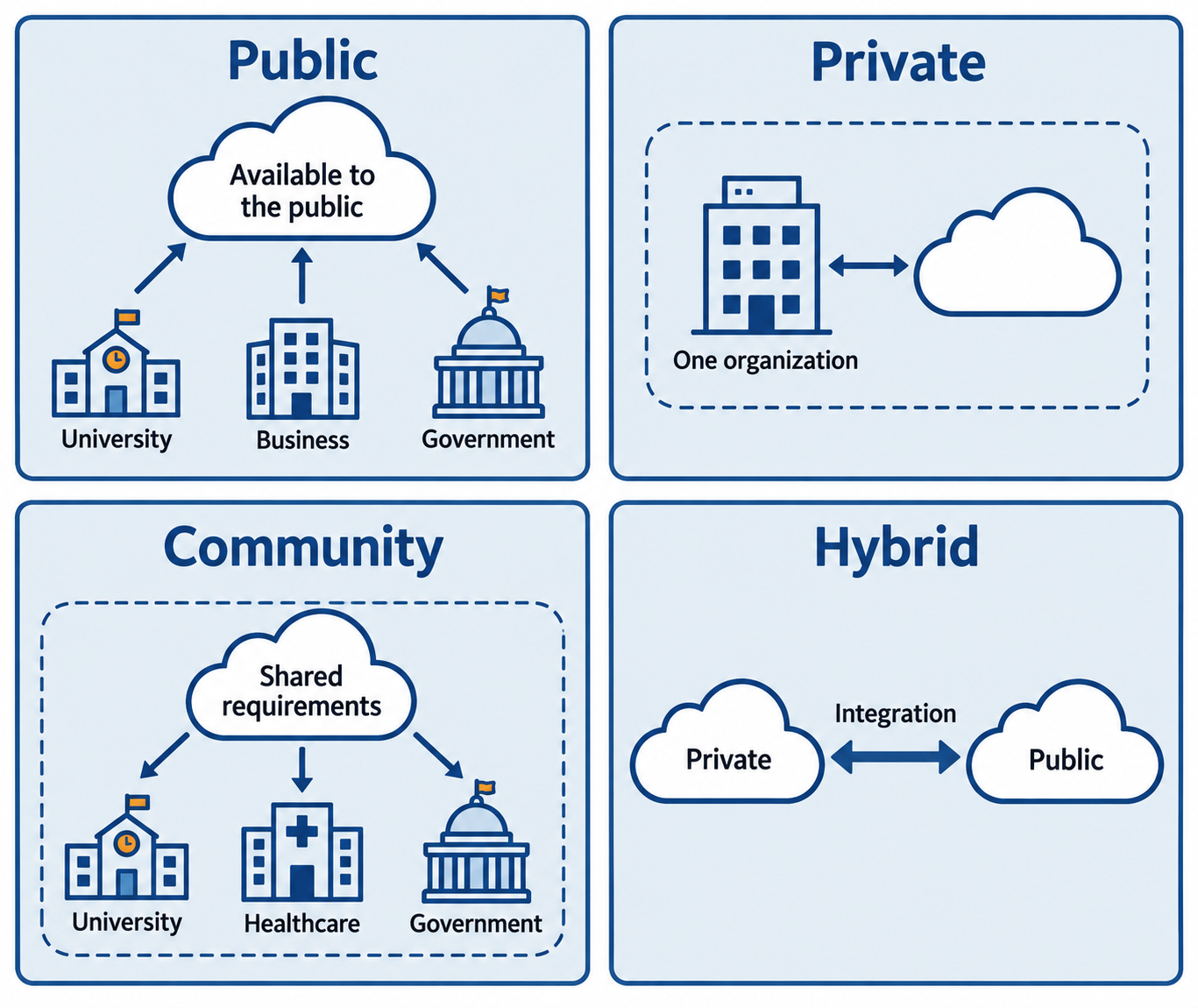
Figure 8.1: Public, private, community, and hybrid describe deployment arrangements. A private cloud serves one organization exclusively and can operate on or off its premises.
Text description for Figure 8.1
Public cloud is available for use by the general public. Private cloud is reserved for one organization, possibly with several internal business units, and may be managed by the organization, a third party, or both. Community cloud serves organizations with shared concerns. Hybrid cloud joins distinct cloud infrastructures through technology that enables data or application portability; the example links a private and a public cloud. The symbols describe deployment relationships, not guaranteed security, cost, ownership, or regulatory compliance.
Emerging Cloud Patterns
Serverless Computing
Serverless computing (e.g., AWS Lambda, Azure Functions) abstracts the server entirely. You write code and upload functions. The cloud provider automatically runs your function in response to events (an HTTP request, a file upload, a scheduled timer) and charges you for execution time, not for server uptime.
Advantages:
- No server management: You write code; the provider handles scaling, patching, and availability.
- Cost efficient: You pay only for execution. Idle functions cost nothing.
Security implications:
- Reduced attack surface: You don't patch servers because you don't manage servers.
- Language and framework constraints: You are limited to the runtimes the provider supports. Third-party libraries must be compatible.
- Function isolation: Each function runs in an isolated environment. Lateral movement between functions is difficult for attackers.
- Audit complexity: Request logs come from the provider; you have less visibility into how your code executes.
Figure 8.2 separates a serverless function’s event flow from the responsibilities that remain with the application owner.
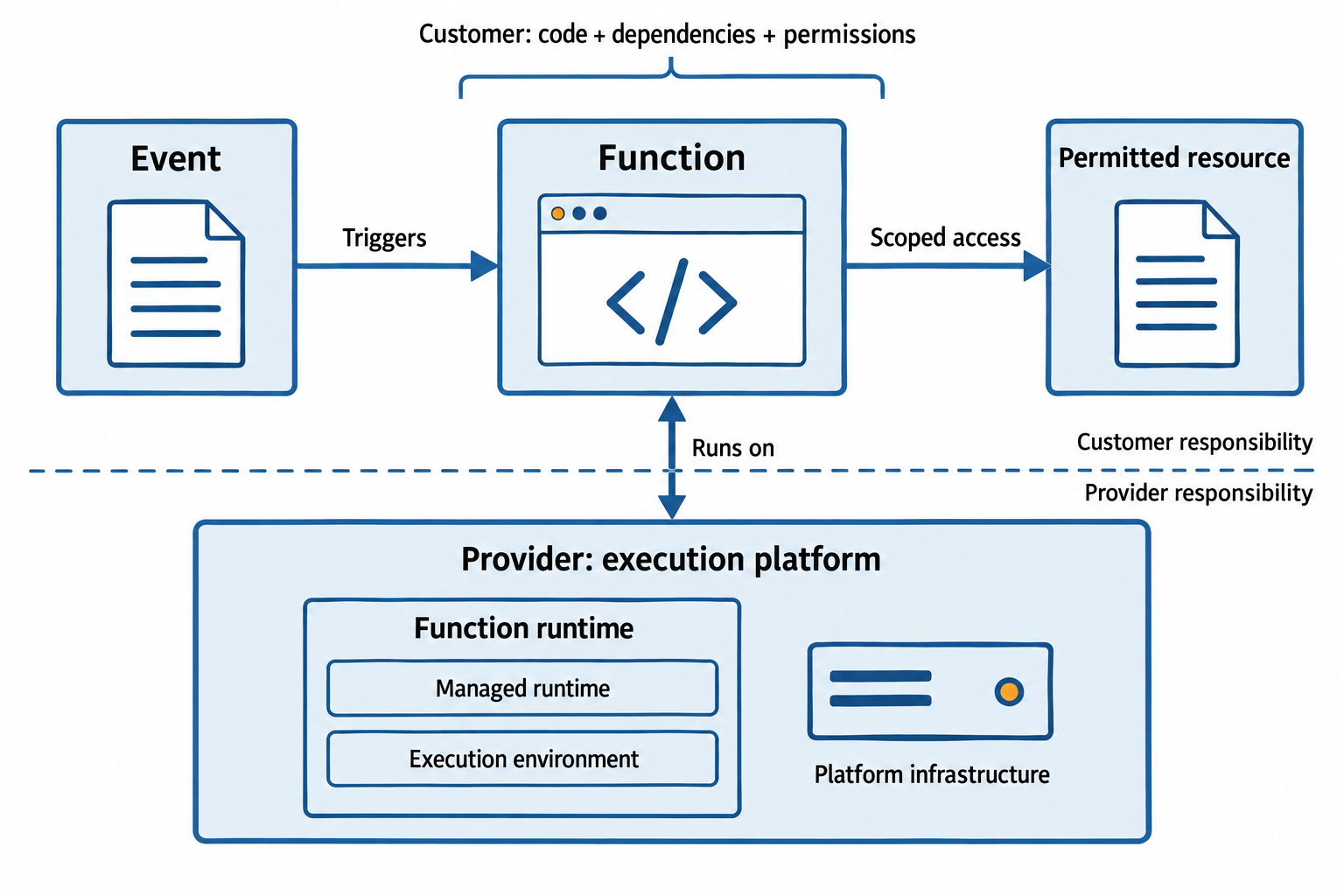
Figure 8.2: Serverless services run functions in response to events. Customers still secure their code, dependencies, permissions, and data while the provider operates the execution platform.
Text description for Figure 8.2
An event, such as a file upload, invokes a function. Its execution identity allows only the required resource operations. The application owner controls code, included libraries, permissions, and data handling. The provider operates the underlying execution infrastructure. Runtime updating depends on the service, packaging method, and update configuration; custom runtimes and customer-provided container images create additional customer work. Serverless does not remove servers or eliminate the need for authorization, logging, dependency updates, and recovery planning.
Multicloud and Cloud Portability
Multicloud is a strategy of intentionally using multiple cloud providers (AWS, Azure, Google Cloud). You avoid lock-in, distribute risk, and can choose the best provider for each service.
Infrastructure as Code (IaC) tools (Terraform, CloudFormation, Ansible) define infrastructure in code, making it portable. Instead of manually configuring servers, you write code that declares the desired state of your infrastructure. IaC simplifies deploying to multiple clouds.
Security implications:
- Complexity: Managing multiple clouds multiplies operational burden and potential for misconfiguration.
- Consistency: Consistent security policies across multiple clouds is difficult if each cloud requires different configuration syntax.
- Vendor differences: Each cloud provider has different security services, authentication models, and compliance features. Your security architecture must account for these differences.
Figure 8.3 shows how infrastructure as code (IaC) can apply common goals through configurations tailored to each provider.
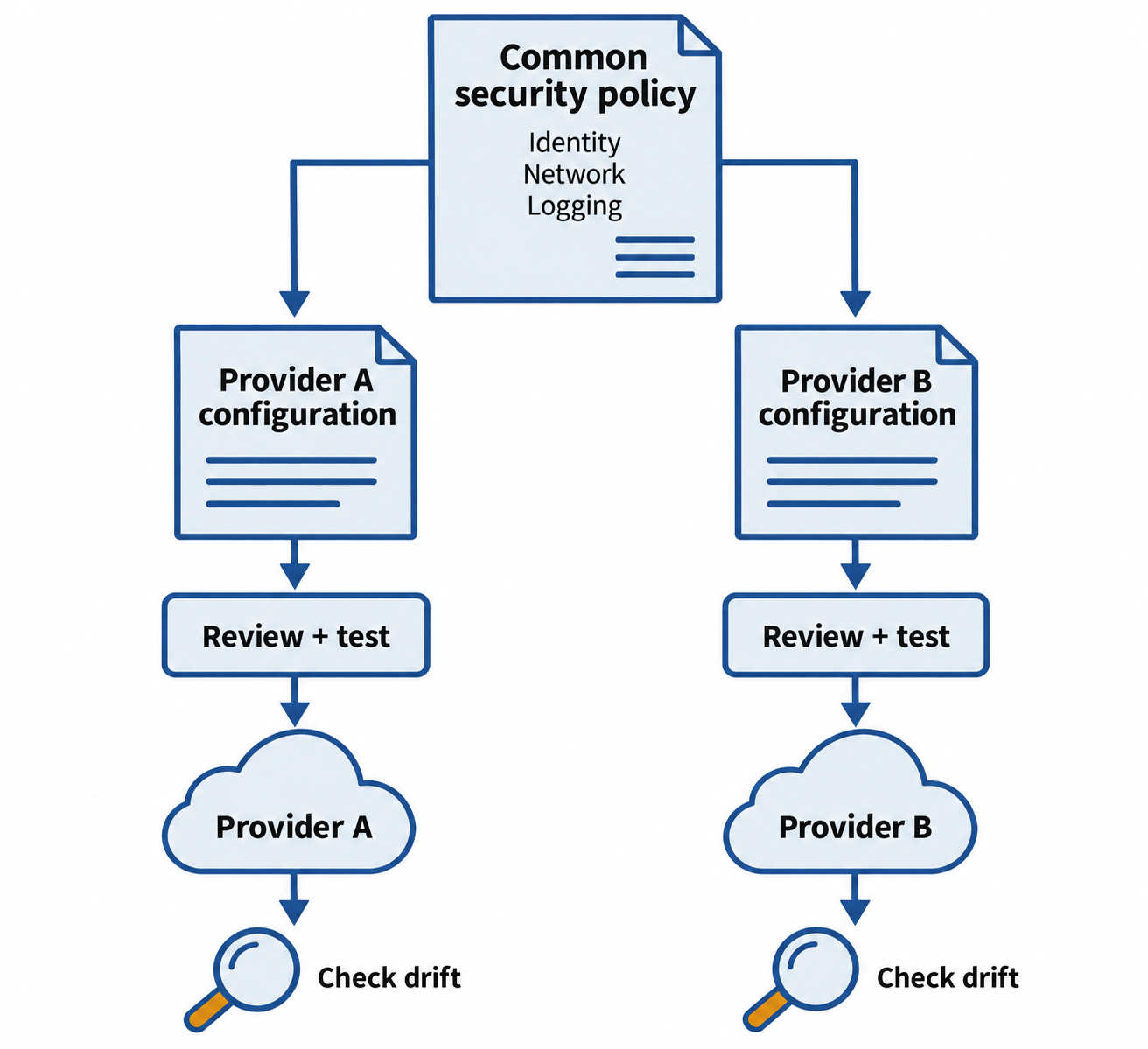
Figure 8.3: Multicloud operations require provider-specific implementation and verification. A shared policy does not make infrastructure definitions automatically portable.
Text description for Figure 8.3
Infrastructure as code records intended infrastructure in versioned definitions. The example begins with common requirements for identity, network access, and logging. Separate provider-specific definitions implement those requirements for providers A and B. Each branch is reviewed and tested before deployment, then checked for configuration drift, meaning differences between intended and actual settings. Cloud APIs, resource types, identity models, and operational behavior differ. IaC can coordinate these workflows but does not guarantee that one unchanged file works across all providers.
The Shared Responsibility Model
This is critical: in cloud environments, security responsibility is shared.
The cloud provider is responsible for:
- Physical security of data centers (locks, guards, surveillance, fire suppression).
- Security of the underlying infrastructure (hypervisors, networking, power).
- Patching infrastructure components.
- DDoS protection.
- Isolation between customers.
You are responsible for:
- Securing your application code.
- Configuring identity and access control (who can access your resources).
- Encrypting data you store (the provider may encrypt storage, but you may want to encrypt before uploading for additional protection).
- Patching your operating system and applications.
- Configuring firewalls and network access rules.
- Backing up your data.
- Disaster recovery and business continuity.
If you assume the provider will handle security and do nothing yourself, you have violated the shared responsibility model. Many cloud security breaches result from misconfigurations: publicly writable S3 buckets, unencrypted databases, or overly permissive identity and access control policies.
Figure 8.4 compares selected responsibilities in infrastructure as a service (IaaS), platform as a service (PaaS), and software as a service (SaaS), including patching the guest operating system (OS).
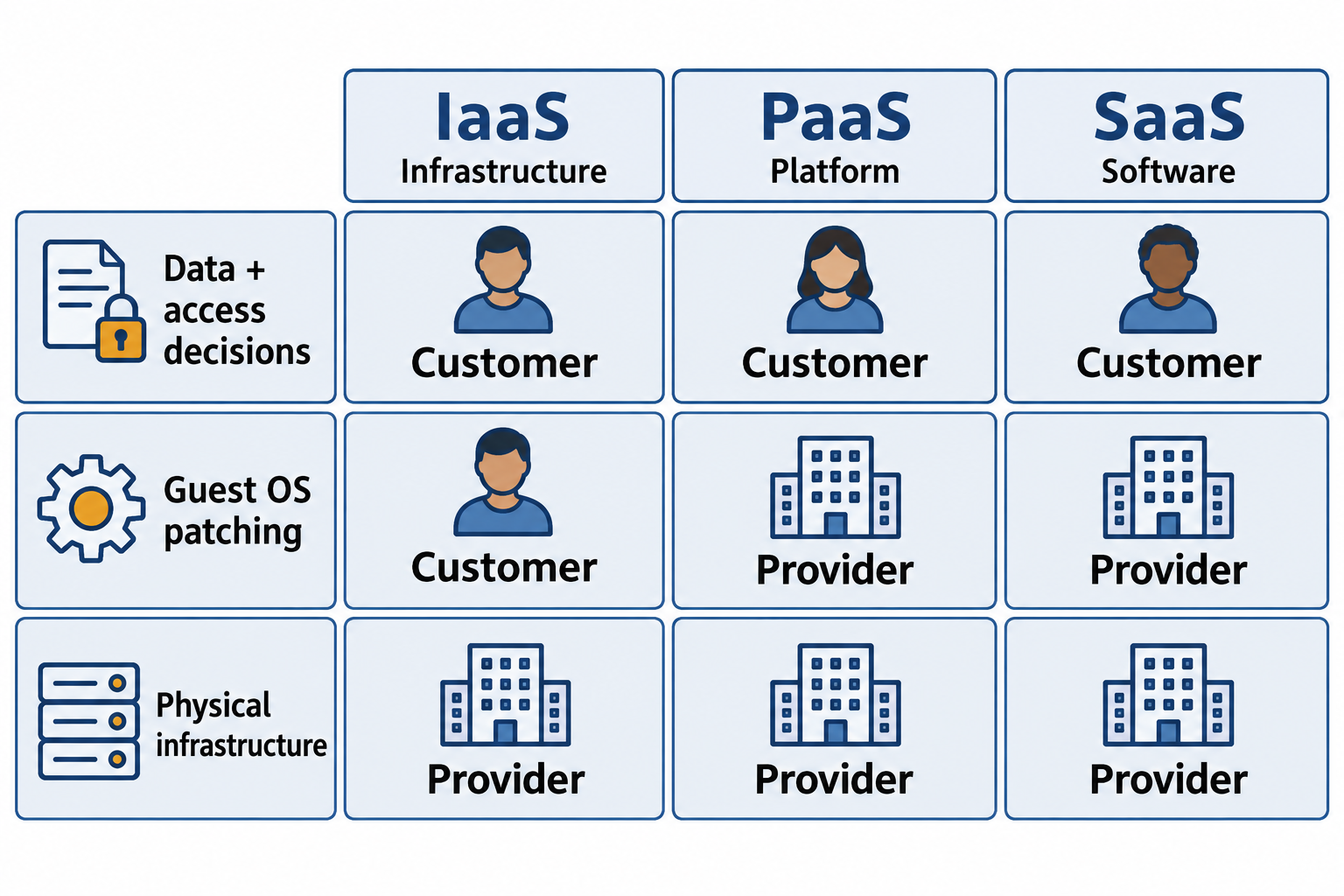
Figure 8.4: The responsibility boundary moves with the service. Customers retain responsibility for their data and access decisions, while management of the operating system shifts to the provider in typical managed platform and software services.
Text description for Figure 8.4
The grid compares typical infrastructure as a service (IaaS), platform as a service (PaaS), and software as a service (SaaS). For the selected rows, the customer decides data handling and who should have access in all three models. The customer patches the guest operating system in a typical IaaS virtual machine; the provider manages that operating-system layer in typical PaaS and SaaS offerings. The provider operates physical infrastructure in all three. Many other responsibilities, including application configuration, endpoint security, backups, and recovery, require service-specific review. The grid shows selected examples rather than a complete contractual allocation.
Shared Responsibility Missteps
A company assumes that AWS encrypts all data and disables encryption in their application to simplify development. Later, their AWS account is compromised, and an attacker reads the plaintext data. The company is responsible for encrypting sensitive data; AWS encrypting storage was defense-in-depth, not sufficient. Another company sets up a VPC with default rules allowing all traffic. Attackers exploit misconfigured rules to move laterally between applications.
Putting It Together: Cloud Architecture Decision
An organization is deciding whether to move its customer database to the cloud. The database contains personally identifiable information (PII), is subject to GDPR, and must be encrypted at rest and in transit.
- Public cloud alone is possible. AWS, Azure, and GCP all offer compliant configurations and can encrypt data. The challenge is ensuring the organization understands the shared responsibility model and implements its side correctly.
- Hybrid approach keeps the database in private infrastructure, reducing risk. Non-sensitive analytics or reporting systems move to public cloud.
- Private cloud gives maximum control but requires the organization to maintain data center infrastructure.
The decision depends on organizational risk appetite, compliance requirements, cost, and operational maturity.
8.2 Non-Cloud Deployment Models
Not all systems are cloud-based, and cloud may not be appropriate for all workloads.
On-Premises
On-premises infrastructure is built, owned, and operated by the organization. Servers are in company-owned data centers or rented colocation space. You control everything.
Appropriate for:
- Highly sensitive workloads that cannot be cloud-based due to regulatory restrictions or risk appetite.
- Systems that generate enormous amounts of data and cannot easily be moved to cloud (data transfer costs and latency are prohibitive).
- Legacy systems not designed for cloud that would require significant rework.
Challenges:
- Capital cost: Purchasing and maintaining infrastructure is expensive.
- Operational complexity: You manage everything. Security patches, hardware replacement, capacity planning, disaster recovery all fall to your team.
- Limited elasticity: Scaling requires purchasing new hardware, which takes time.
OT and SCADA Systems
Operational Technology (OT) and Supervisory Control and Data Acquisition (SCADA) systems manage physical processes: power grids, water treatment, manufacturing plants, oil refineries. These systems were often designed with reliability and performance in mind but not cybersecurity.
Security challenges:
- Legacy systems: Many SCADA systems are 10, 20, or 30 years old. Patching is difficult or impossible.
- Air-gapped networks: OT systems are often isolated (air-gapped) from the internet to reduce attack surface. This reduces external attack risk but makes them vulnerable to insider threats or attacks via USB devices.
- Reliability vs. security tradeoff: An OT system must be available 24/7. Security updates or reboots can be disruptive, so they are deferred.
- Real-time requirements: SCADA systems must respond in real-time. Encryption or logging can introduce latency that is unacceptable.
OT security requires specialized knowledge and constraints that IT security alone cannot address.
Figure 8.5 connects operational technology (OT) security to a physical control process.
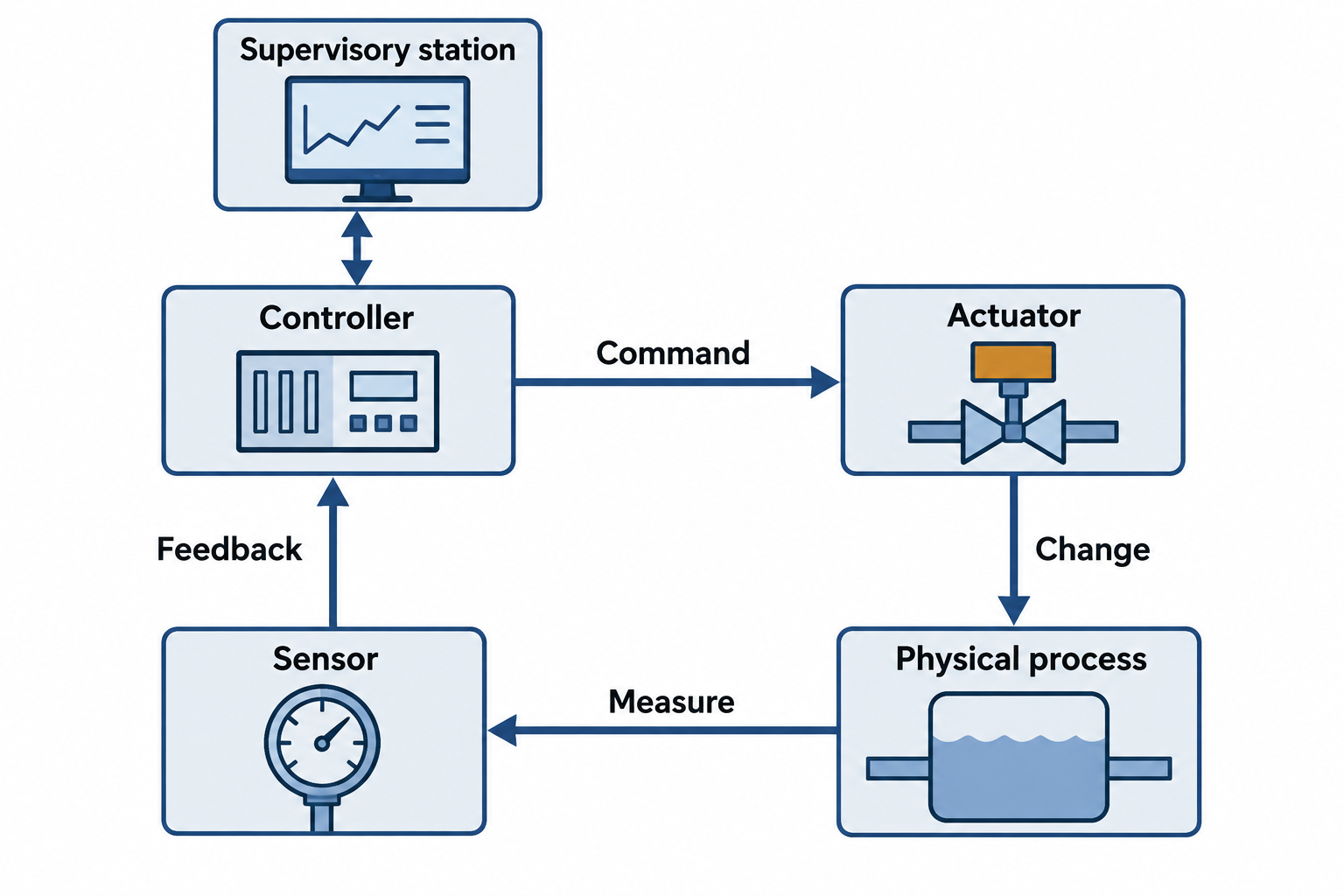
Figure 8.5: An OT control loop measures a physical process, applies control logic, and commands an actuator. Security changes must account for safety, availability, and process behavior.
Text description for Figure 8.5
Operational technology monitors or changes physical processes. In the illustrated loop, a controller sends a command to an actuator, such as a valve. The actuator changes the process. A sensor measures the resulting condition and returns information to the controller. A supervisory station supports monitoring and operator interaction. Supervisory control and data acquisition, or SCADA, is one form of supervisory system. The drawing is a conceptual feedback loop, not a wiring diagram or operating procedure. Access control, segmentation, and tested maintenance protect the system while accounting for safety and timing constraints.
Air-Gapped and Isolated Systems
An air-gapped system is not connected to the internet or any untrusted network. It is isolated for security. Examples include:
- Classified government systems in secure facilities.
- Financial trading systems that process time-sensitive transactions.
- Industrial control systems managing critical infrastructure.
Air-gapping reduces external attack surface dramatically. However, it does not eliminate risk:
- Insider threats: Someone with physical access can install malware or copy data via USB.
- Supply chain: Software installed on air-gapped systems may come precompiled with backdoors or vulnerabilities.
- Maintenance: When updates or repairs are needed, people must physically access the system, creating opportunities for compromise.
Figure 8.6 shows how a physically isolated system can still face risk through transferred media.
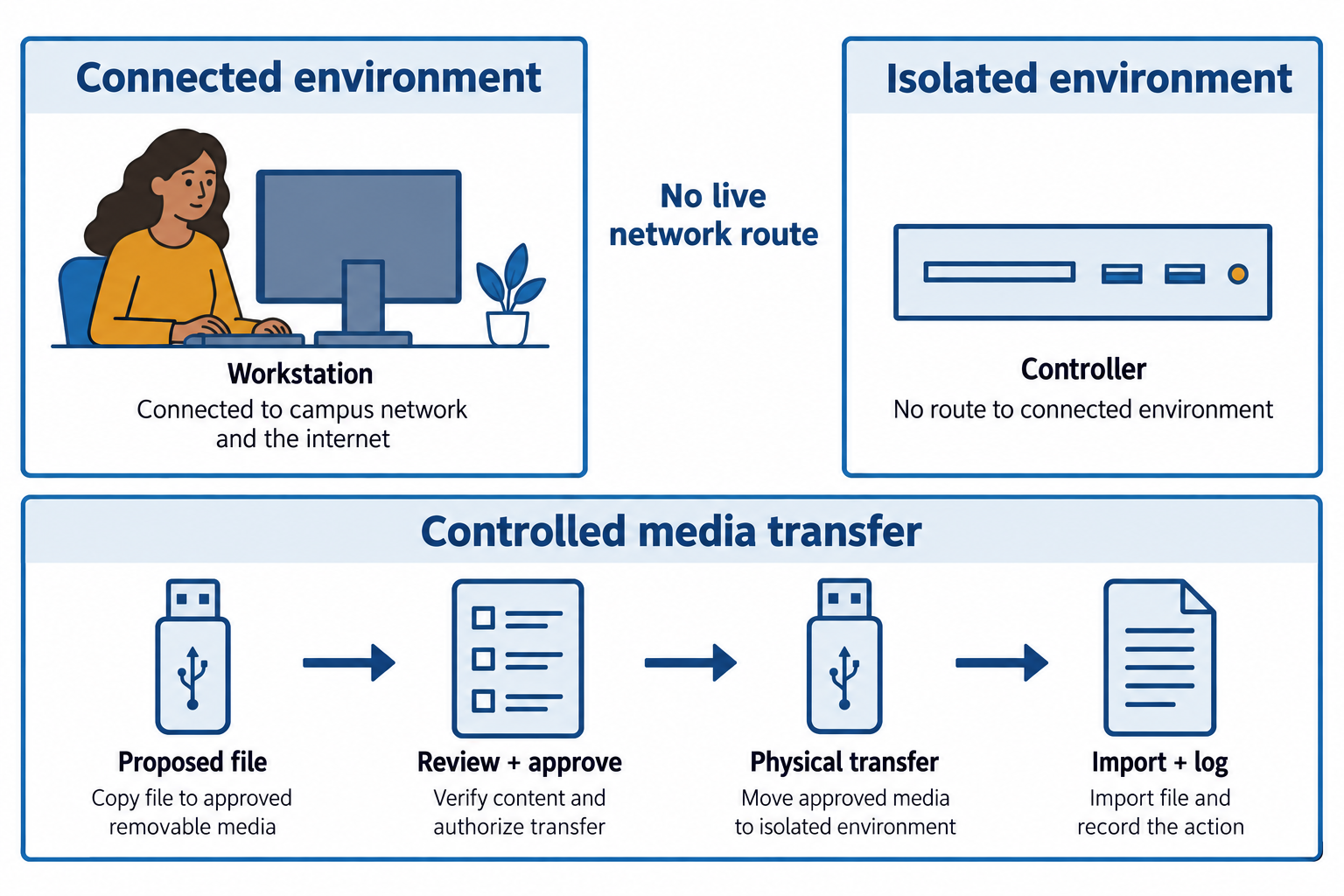
Figure 8.6: An air gap removes a live network route across the boundary. Controlled transfer procedures reduce risk from removable media and other physical paths.
Text description for Figure 8.6
The connected environment and isolated environment have no live network cable, wireless bridge, or routed connection between them. A separate workflow shows a file proposed for transfer on removable media, checked and approved according to policy, then physically carried to the isolated environment. Media checks reduce risk but cannot prove that every file or device is harmless. Inventory, authorization, provenance checks, malware controls, logging, and appropriate transfer mechanisms depend on the system. The lower arrows describe a human-controlled workflow rather than network connectivity.
Microservices Architecture
Microservices are small, independent services that communicate via APIs rather than a monolithic application. Instead of a single large database and application, you have many small services, each owning its data.
Security implications:
- Reduced blast radius: If one microservice is compromised, the attacker must breach network isolation to reach others. Lateral movement is not automatic.
- API security: Services communicate via APIs. APIs must be authenticated and authorized. API keys, OAuth tokens, or mutual TLS must be managed.
- Distributed logging and monitoring: Tracing an attack across multiple services is complex. You must correlate logs from different systems.
- Service-to-service authentication: In a monolithic system, once code is running in the same process, trust is implicit. In microservices, each service must authenticate when calling another.
Microservices architecture can improve security if implemented carefully, but it adds complexity.
Figure 8.7 follows an application programming interface (API) request across services and shows where service identities and request records matter.
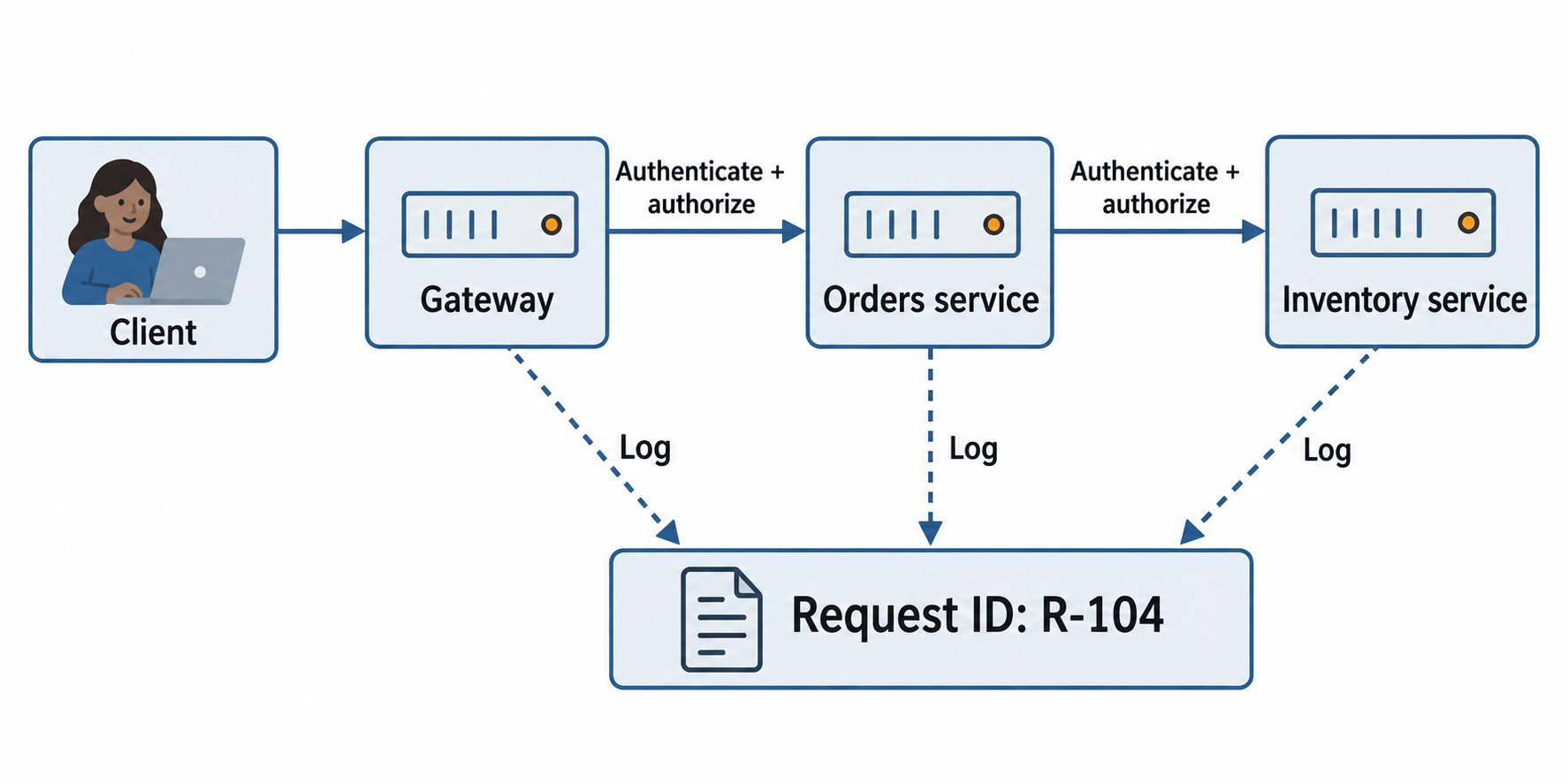
Figure 8.7: Microservices divide an application into focused services. Each service-to-service call needs appropriate authentication, authorization, and correlated logging.
Text description for Figure 8.7
A client sends a request through a gateway. The gateway calls an Orders service, which calls an Inventory service for the permitted operation. Each receiving service checks the caller’s identity and whether that call is authorized. A shared request identifier helps correlate log entries across the components without implying that credentials or sensitive content should be copied into logs. Independent services do not create automatic security isolation. Network policy, workload identity, application authorization, dependency management, and monitoring must enforce the intended boundaries.
8.3 Network Segmentation
Network segmentation divides a network into smaller, isolated segments. Segmentation limits the movement of attackers who breach one segment.
Physical Segmentation
Physical segmentation is network isolation enforced by hardware. Segments are connected via firewalls. If segment A is connected to segment B only through a firewall, traffic between A and B must pass through firewall rules.
Physical segmentation is strongest because it is enforced at the hardware level. No software bypass is possible. However, it is expensive and rigid. Adding a new segment or modifying a connection requires physical work.
Logical Segmentation
Logical segmentation uses VLANs (Virtual Local Area Networks) or software-defined networking to isolate traffic on the same physical network.
A VLAN is a virtual network. Multiple VLANs can run on the same switches and cabling, but traffic from one VLAN does not cross to another VLAN unless explicitly routed through a router or Layer 3 switch with rules.
For example:
- VLAN 10: Database servers (10.0.10.0/24)
- VLAN 20: Web servers (10.0.20.0/24)
- VLAN 30: User workstations (10.0.30.0/24)
A workstation in VLAN 30 cannot directly reach a database in VLAN 10. Traffic must be routed through a Layer 3 device with ACLs (Access Control Lists). A firewall rule might allow VLAN 30 to reach VLAN 10 only on port 5432 (database), not all ports.
Logical segmentation is more flexible and cheaper than physical segmentation but is easier to misconfigure or bypass if the switches are compromised.
Figure 8.8 compares separate physical network equipment with logical segments on shared equipment.
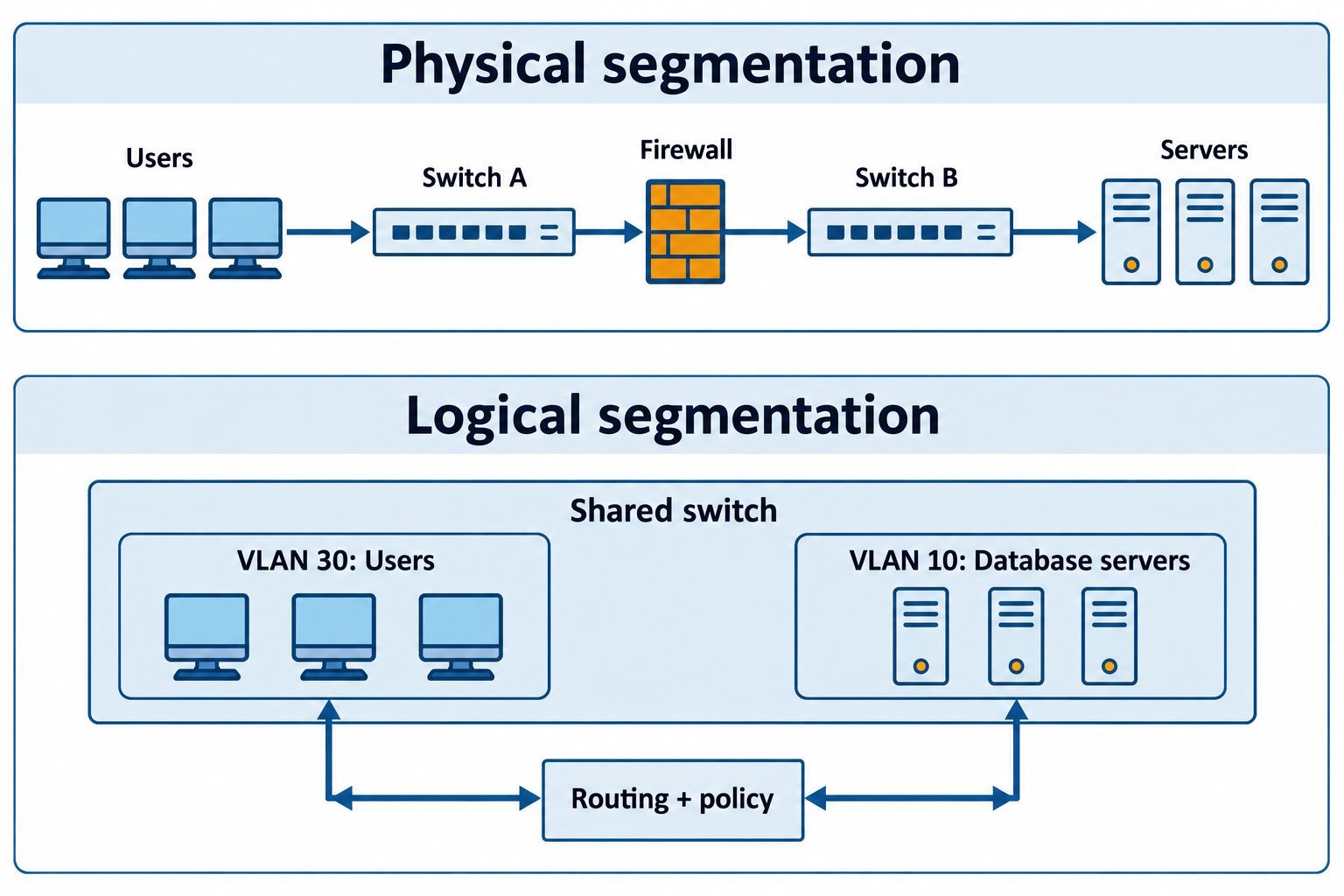
Figure 8.8: Physical and logical segmentation organize connectivity differently. Both designs need correctly enforced policy wherever traffic crosses a permitted boundary.
Text description for Figure 8.8
In the physical example, a user network and a server network connect through separate switches and a firewall that controls allowed traffic. In the logical example, two virtual local area networks (VLANs) share switch hardware. A routed path through a policy-enforcement device controls communication between them. A VLAN creates a distinct broadcast domain; it does not automatically supply a complete security policy for every routed path. Either design can fail if links, routing, or enforcement are misconfigured. The drawing shows conceptual traffic paths, not a specific cabling design.
Demilitarized Zone
A Demilitarized Zone (DMZ) is a network segment containing servers that must be accessed from the internet (web servers, mail servers, DNS servers) but should not have direct access to internal networks.
A typical DMZ architecture:
[Internet] -> [Firewall] -> [DMZ: web servers] -> [Firewall] -> [Internal Network: database, file servers]
If a web server in the DMZ is compromised, the attacker is isolated from the internal network by a second firewall. They cannot directly reach the database or file servers. This limits damage from a single compromised server.
Figure 8.9 illustrates a demilitarized zone (DMZ) with a restricted backend path.
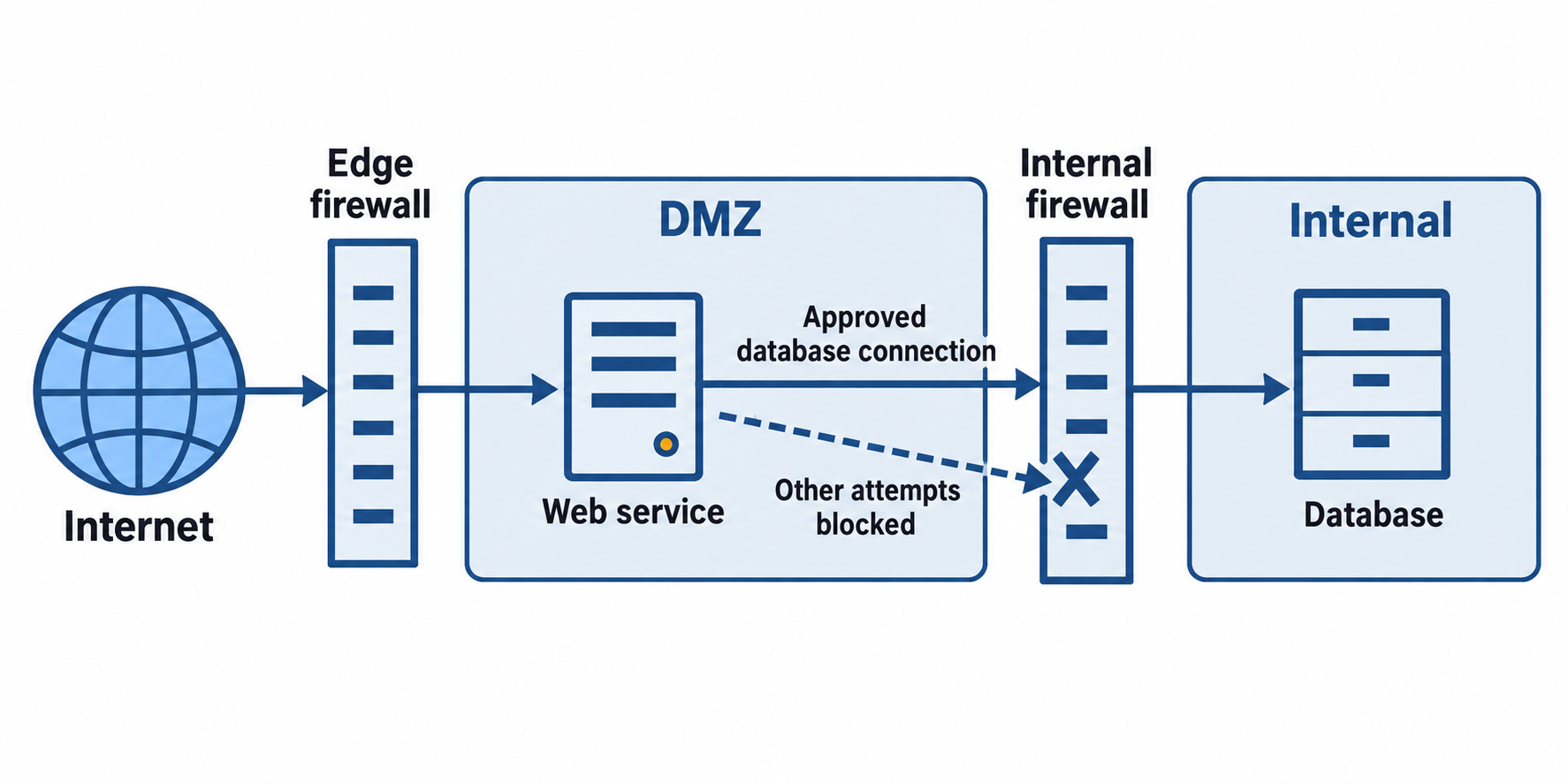
Figure 8.9: A DMZ exposes selected public services while firewall policy limits access to internal systems. Required backend connections must be narrowly allowed and monitored.
Text description for Figure 8.9
An external request reaches a web service in a demilitarized zone through an edge firewall. An internal firewall permits a specifically approved connection from the web service to its database. A separate dashed attempt toward other internal resources terminates at a blocked marker on the internal firewall. Real designs specify source, destination, service, state, and logging requirements. A compromised web service may still abuse an allowed backend path, so application authorization, patching, monitoring, and database permissions remain necessary. Firewall separation reduces reachable paths rather than making internal compromise impossible.
Micro-Segmentation
Micro-segmentation is fine-grained network segmentation where each application or even each server has its own segment. Access between segments is explicitly allowed based on business need.
For example, instead of a "database VLAN," you might have:
- Segment for production database (database-prod)
- Segment for staging database (database-staging)
- Segment for web server tier (web-tier)
- Segment for API tier (api-tier)
Each segment has firewall rules allowing only necessary traffic. Web servers can reach the database on port 5432. API servers can reach the database on port 5432 and the web tier on port 8080. Nothing else is allowed.
Micro-segmentation maximizes security by minimizing trust. However, it requires careful planning and management. Misconfigured rules can break legitimate traffic.
Figure 8.10 illustrates fine-grained segmentation with a small list of permitted application paths.
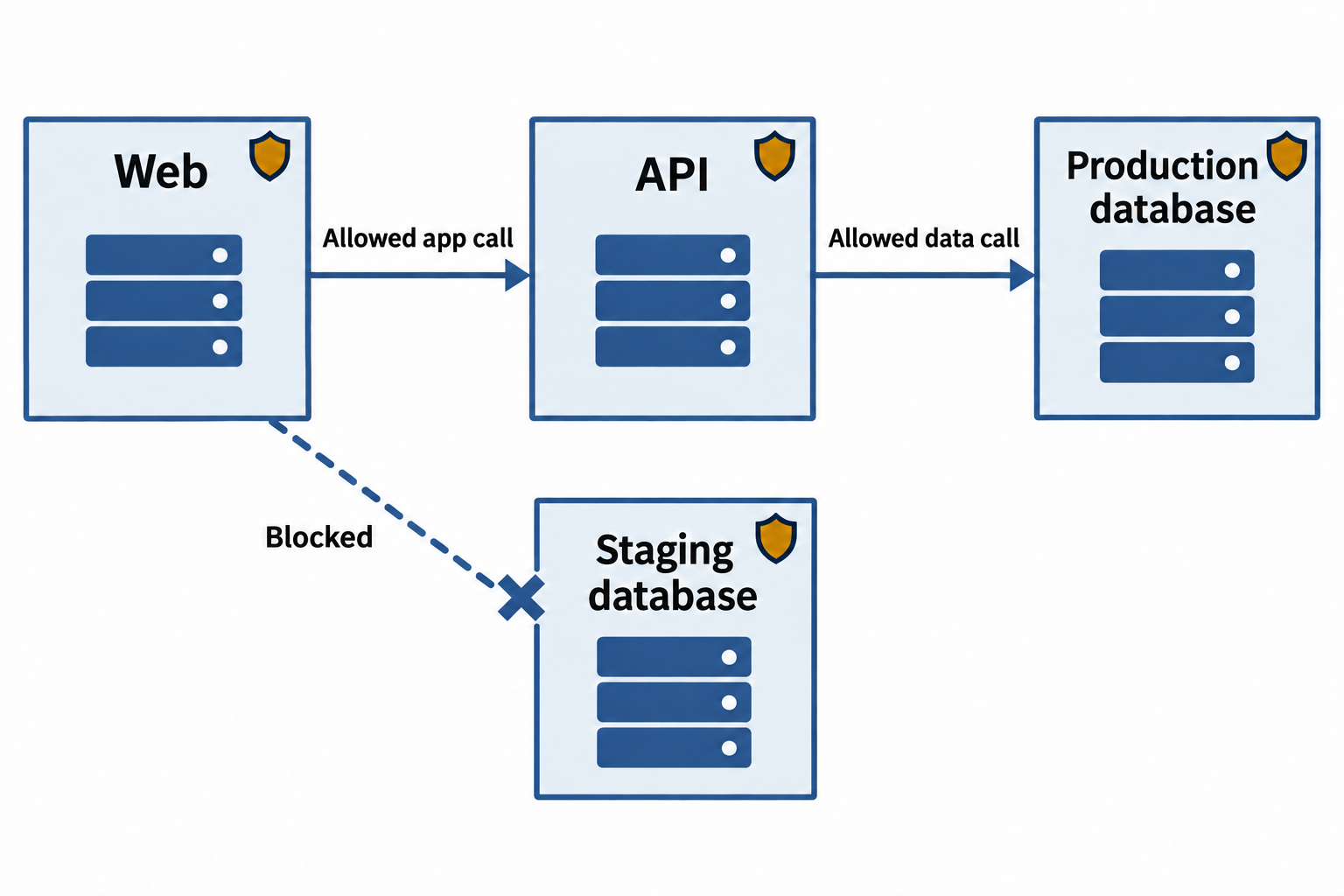
Figure 8.10: Micro-segmentation enforces specific workload-to-workload paths. The example separates production services from a staging database and blocks unspecified paths.
Text description for Figure 8.10
Each workload occupies its own policy boundary. This simplified application permits Web to call API over the designated application service and API to call the production database over its database service. An attempted Web-to-staging-database path is blocked. Other paths require explicit justification and authorization; the figure omits supporting infrastructure such as name resolution, monitoring, and administration. Dependency discovery and testing matter because an overly broad rule exposes unnecessary paths while a missing required rule can break the application.
Zero Trust Network Architecture
Traditional network security assumes that everything inside the network perimeter is trustworthy. Once you bypass the firewall, you have access to many resources.
Zero Trust assumes no default trust. Every access attempt—whether within the network or external—must be authenticated and authorized. There is no implied trust based on network location.
In a zero trust network:
- Identity verification: Every user and device must be authenticated (MFA for users, certificate-based for devices).
- Device health checks: Devices must meet minimum security standards (current patches, antivirus running, disk encryption enabled).
- Least privilege access: Each user and device is granted minimum access needed for their function.
- Continuous verification: Trust is not granted once and assumed indefinitely. Access is continuously verified.
Zero trust requires more sophisticated access control systems (Identity and Access Management, micro-segmentation, continuous monitoring) but provides stronger security.
Figure 8.11 places a policy decision and enforcement point between a request and a protected resource.
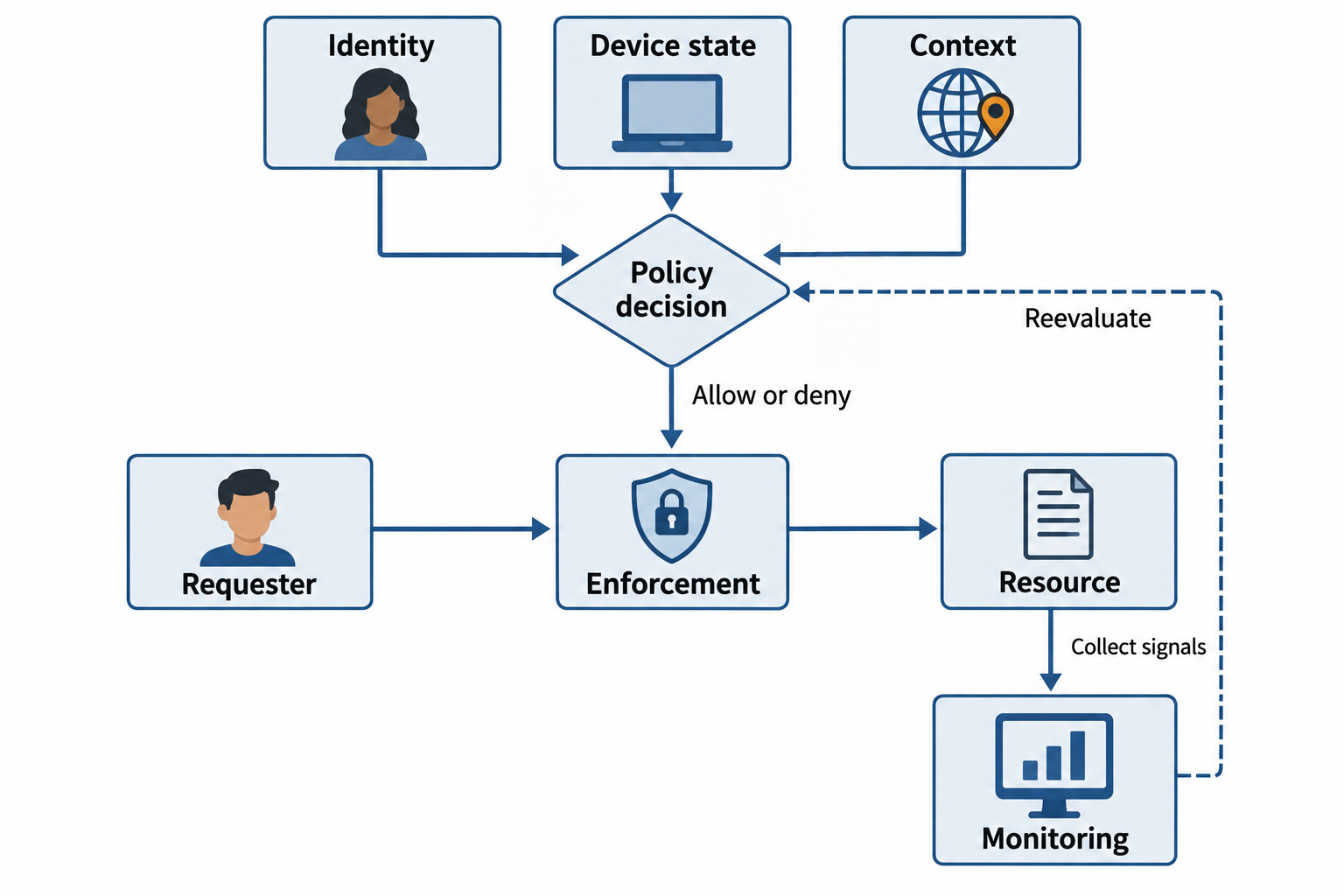
Figure 8.11: Zero trust evaluates identity, device state, and context before granting scoped access, then uses new signals to reassess that access.
Text description for Figure 8.11
A request originates from a user or workload on a device. Policy evaluates relevant identity, device-state, and context signals. An enforcement point applies the decision and permits only the authorized resource operation. Monitoring supplies new information that can trigger reevaluation or revocation. Network location alone supplies no implicit trust. This does not require a new interactive multi-factor prompt for every packet: implementations use sessions, protocol state, and risk-based checks appropriate to the resource and policy.
8.4 Technical and Business Considerations
Architectural decisions are not made in a vacuum. Multiple factors influence whether you choose on-premises, cloud, public, private, or hybrid.
Availability and Resilience
Availability is the percentage of time a system is operational and accessible. Resilience is the ability to withstand and recover from failures.
Cloud providers often provide higher availability than organizations can build themselves:
- Multi-region replication: Your data is replicated across geographic regions.
- Automatic failover: If one server fails, traffic automatically routes to another.
- Managed databases: The provider handles backups, replication, and recovery.
On-premises systems must explicitly build these capabilities, which is expensive.
However, depending on a single cloud provider creates availability risk. If the provider experiences an outage, your systems are offline. Multicloud or hybrid approaches distribute this risk.
Figure 8.12 distinguishes maintaining service through failover from recovering data from a backup.
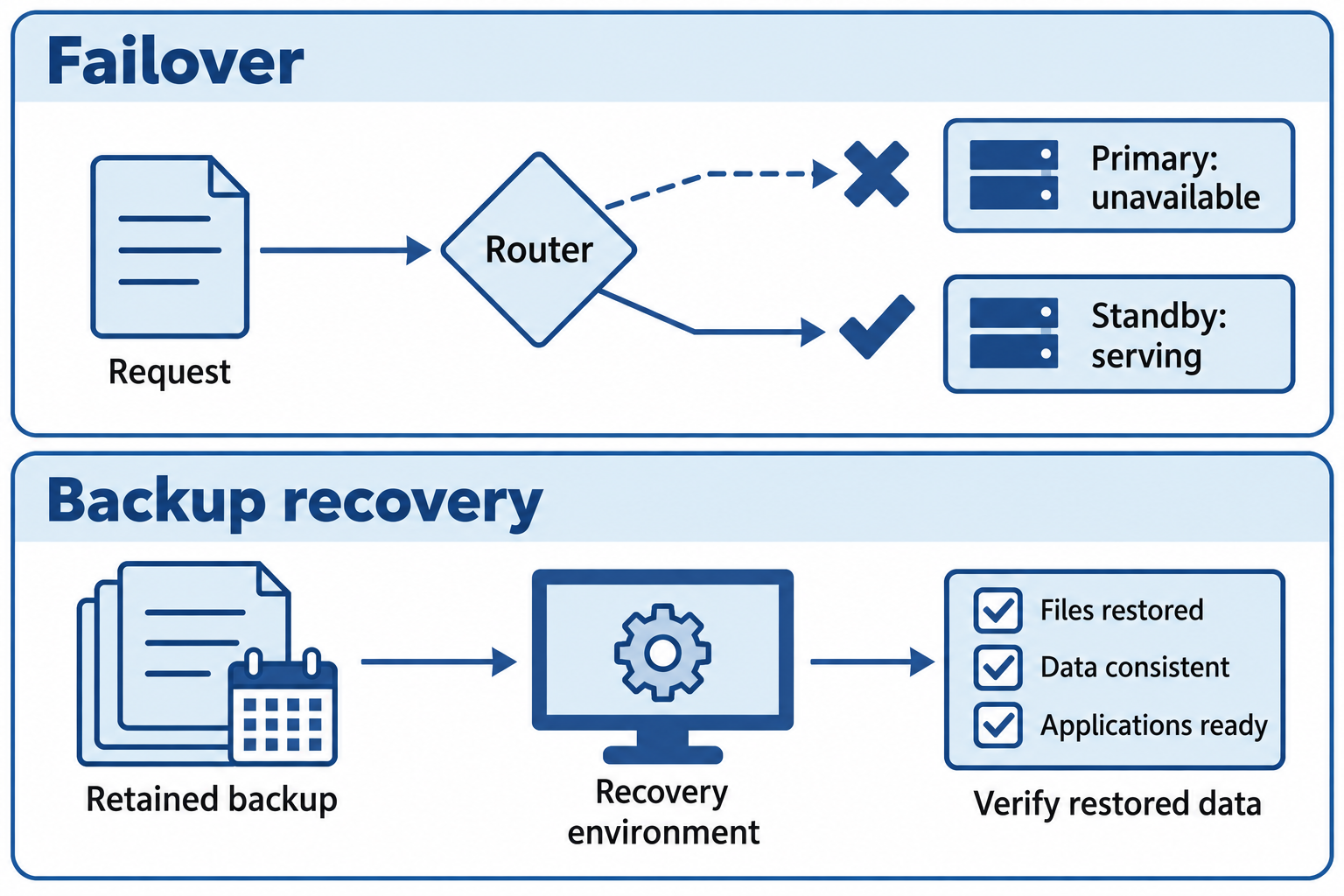
Figure 8.12: Failover redirects work to another service instance. Backup recovery restores a retained data state. Both require configuration, testing, and recovery objectives.
Text description for Figure 8.12
The failover example shows a routing component detecting an unavailable primary service and directing requests to a prepared standby. Successful failover depends on capacity, dependencies, state, and tested procedures. The recovery example restores a retained backup into a recovery environment and verifies the result. Replication can copy unwanted deletion or corruption, so a replica alone may not supply the desired recovery point. Define acceptable downtime and data loss, protect backups, and test recovery. Cloud placement, multiple regions, or multiple providers do not automatically implement these capabilities.
Data Sovereignty and Compliance
Some regulations require data to remain within a geographic jurisdiction (country, region) or under your organization's physical control.
GDPR (European Union) requires certain data to remain in the EU. HIPAA (US healthcare) allows cloud storage but requires specific contractual terms. Some US government agencies cannot use commercial cloud providers for certain data.
These requirements may necessitate private cloud or on-premises infrastructure.
Proprietary vs. Open Source
Proprietary software is owned by a vendor. You purchase licenses and depend on the vendor for updates and support. Vendor solutions (Windows, SQL Server, Salesforce) are often integrated and optimized but come with licensing costs and vendor lock-in.
Open source software (Linux, PostgreSQL, Kubernetes) is developed collaboratively and publicly. You have source code, can modify it, and are not dependent on a single vendor. However, open source may require more expertise to deploy and support (you don't get vendor support unless you pay for a third-party support contract).
Security implications:
- Proprietary: Vendor controls the update cycle. Vulnerabilities are disclosed only when the vendor patches them. You depend on the vendor's security practices.
- Open source: Many eyes review the code, potentially catching bugs faster. However, you must apply security patches yourself. Some open source projects lack resources for security auditing.
Cost
Cloud pricing is complex: compute, storage, bandwidth, and data transfer all cost money. A workload that seems cheap on paper can be expensive when all components are considered.
On-premises has upfront capital cost plus ongoing operational cost. Cloud has low upfront cost but ongoing operational cost. Hybrid approaches require managing both.
Scalability
Cloud providers offer elasticity: scale resources up and down automatically. On-premises requires purchasing hardware in advance, which is expensive if unused, or being capacity-constrained if demand exceeds what you purchased.
For workloads with variable demand (web applications, batch processing), cloud is often more cost-effective. For steady-state workloads, the economics may favor on-premises.
Decision Matrix: Infrastructure Model Evaluation
| Factor | Public Cloud | Private Cloud | On-Premises | Hybrid |
|---|---|---|---|---|
| Capital cost | Low | High | High | High |
| Operational complexity | Low | High | High | Very High |
| Elasticity | High | Medium | Low | Medium |
| Compliance flexibility | Medium | High | High | High |
| Vendor lock-in risk | High | Low | None | Medium |
| Security control | Medium | High | High | High |
| Latency | Variable | Controllable | Controllable | Variable |
Figure 8.13 frames architecture selection as a comparison of workload requirements and verified tradeoffs.
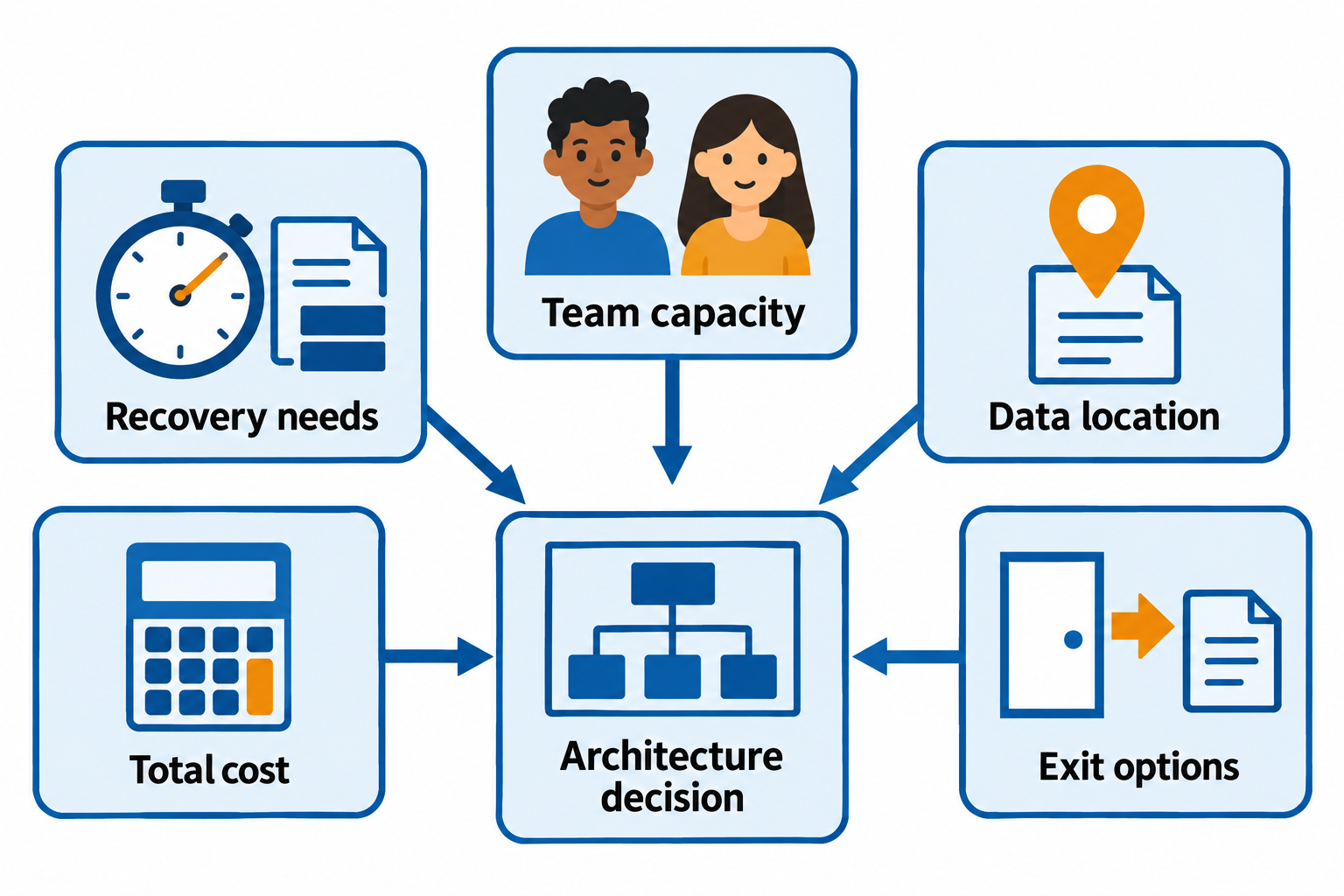
Figure 8.13: Evaluate architecture against the workload’s availability, location, operational, cost, and exit requirements. Deployment labels alone do not establish compliance or resilience.
Text description for Figure 8.13
Begin with the workload and its required outcomes. Recovery requirements specify acceptable downtime and data loss. Data-location and access requirements come from applicable policy, contracts, and law. Team capacity includes operation, patching, monitoring, and incident response. Total cost includes infrastructure, staffing, licensing, transfer, integration, and recovery. Exit options assess whether data, application behavior, and operations can move to an alternative. Compare feasible public, private, hybrid, and on-premises arrangements against those requirements, then test critical assumptions. The figure intentionally avoids universal rankings such as zero vendor lock-in for on-premises systems.
Chapter Summary
- Public cloud offers low cost, elasticity, and global reach but introduces vendor dependency and shared infrastructure. Private cloud gives control and compliance flexibility but requires capital investment and operational expertise. Hybrid and community cloud split the difference.
- Serverless, multicloud, and Infrastructure as Code are emerging patterns that trade simplicity for vendor features and operational flexibility.
- The shared responsibility model divides security between cloud provider (infrastructure) and customer (application, data, access control). Many cloud breaches result from misunderstanding this model.
- On-premises and OT/SCADA systems require full organizational responsibility and are appropriate for sensitive, legacy, or highly customized workloads.
- Network segmentation (physical, logical, DMZ, micro-segmentation) limits attack propagation. Zero Trust assumes no default trust and continuously verifies access.
- Architecture decisions balance cost, availability, compliance, complexity, and security. No single model is optimal for all organizations.