CH10: Security Operations Tools: Packet Analysis, Log Analysis, and Decoding
Introduction
Security operations begin with data: network packets flowing across infrastructure, logs generated by systems and applications, encoded artifacts captured during investigations. Raw data is nearly useless. A packet capture containing millions of packets is noise without tools to filter, decode, and analyze it. Terabytes of logs generated daily by enterprise systems are overwhelming without aggregation and correlation. Obfuscated or encoded artifacts must be decoded to reveal their meaning. This chapter introduces the operational tools that transform raw data into intelligence: packet capture and analysis tools, network-based detection systems, SIEM platforms, and decoding utilities. These are the foundational instruments of SOC work.
Learning Objectives
Upon completion of this chapter, you will be able to:
- Use packet analysis tools (Wireshark, tcpdump) to capture and examine network traffic for indicators of compromise.
- Interpret common network protocols (TCP/IP, DNS, HTTP/HTTPS, SMB) and identify suspicious behavior patterns at the packet level.
- Deploy and manage network-based intrusion detection systems (Snort and Suricata) and interpret their alerts.
- Analyze logs from multiple sources using SIEM platforms and construct complex investigative queries.
- Decode and transform obfuscated or encoded data using CyberChef and command-line tools.
- Understand structured log formats (JSON, XML, YAML, Windows Event Logs) and leverage them in forensic analysis.
10.1 Decoding and Data Transformation Tools
Attackers frequently use encoding and obfuscation to hide payloads and exfiltrated data. Decoding is the process of reversing these transformations to reveal the underlying data. CyberChef is the primary tool analysts use for this work.
CyberChef Overview
CyberChef is a web-based tool developed by the UK Government Communications Headquarters (GCHQ) that enables encoding, decoding, transformation, and analysis of data. Open the official web-based version to use it in your browser. The official GitHub repository provides source code and documentation, and the GitHub releases page provides release downloads.
For offline access, download the packaged CyberChef web app from a release's assets or use Download CyberChef in the web app. Extract the ZIP archive and open the included HTML file in your browser. Keep the extracted files together. Operations that contact external services still require network access, and you must download a newer copy manually to update the offline version.
CyberChef provides an interface where analysts:
- Input data (text, hex, base64, or files)
- Apply sequential transformations called "recipes"
- View output in real-time
Key features:
- Large library of transformations: Hundreds of built-in operations covering encoding schemes, hashing, encryption, and custom transformations
- Recipe chaining: Multiple operations applied sequentially, enabling complex transformations
- Magic function: Automatically attempts to identify encoding and decode automatically
- Search functionality: Built-in index enables searching for transformations by keyword
- Sharing: Recipes can be shared as URLs for reproducibility
Analysts use CyberChef for routine tasks: decoding base64-encoded attachments in emails, converting hex dumps to ASCII, identifying file types, extracting strings from binary files, and analyzing obfuscated scripts.
Data Privacy with Web-Based Tools
The official CyberChef application processes recipe input in the browser. Use an approved local or self-hosted copy for sensitive evidence, and consider any operation that makes a network request separately. Avoid sharing recipe URLs that include sensitive input. Preserve the original artifact and record the recipe and tool version so another analyst can reproduce the transformation. See the CyberChef project documentation and follow your organization's evidence-handling policy.
Common Encoding Schemes and Identification
Attackers and legitimate software use encoding for different reasons, including obfuscation and data transport. Analysts must identify encoding and transform it to reveal content.
Base64 is ubiquitous. It encodes binary data as ASCII text for email transport and data interchange. Base64 output is recognizable: it uses characters A–Z, a–z, 0–9, +, /, and = for padding.
Example: The text "This is secret" encodes in base64 as VGhpcyBpcyBzZWNyZXQ=. Decoding reveals the original text.
Decode this text from a Linux terminal:
printf '%s' 'VGhpcyBpcyBzZWNyZXQ=' | base64 --decode
# This is secret
Decode it in PowerShell:
[Text.Encoding]::UTF8.GetString([Convert]::FromBase64String('VGhpcyBpcyBzZWNyZXQ='))
# This is secret
These examples interpret the decoded bytes as UTF-8 text. For Base64-encoded files or other binary data, write the decoded bytes to a file instead of displaying them as text.
For example, if encoded_pdf.txt contains the Base64 text for a PDF, decode it into a new PDF file on Linux:
base64 --decode encoded_pdf.txt > recovered.pdf
file recovered.pdf
In PowerShell, write the decoded bytes directly. Avoid > for this because PowerShell's text redirection can corrupt binary files:
$pdfBytes = [Convert]::FromBase64String((Get-Content -Raw 'encoded_pdf.txt'))
[IO.File]::WriteAllBytes('recovered.pdf', $pdfBytes)
Hexadecimal (Hex) represents binary data as pairs of hex digits (0–9, A–F). Hex is common in memory dumps, packet captures, and binary file analysis.
Example: The ASCII character "A" is hex 0x41. The string "Hello" is hex 48 65 6c 6c 6f.
URL encoding (percent encoding) encodes special characters as percent (%) followed by two hex digits, allowing them to pass through URLs and web forms.
Example: A space is encoded as %20. The phrase "hello world" becomes "hello%20world".
Common values worth recognizing during URL and log analysis:
| Encoding | Character | Why it matters |
|---|---|---|
%20 |
Space | Separates words in encoded parameters or payloads. |
%2F |
/ |
Path separator; can obscure traversal paths such as ..%2F. |
%3F |
? |
Starts a URL query string. |
%26 |
& |
Separates query parameters. |
%3D |
= |
Separates a parameter name from its value. |
%3A |
: |
Appears in schemes, host-port values, and some payloads. |
%40 |
@ |
May appear in user-info or be used to disguise URL structure. |
%25 |
% |
Encodes a percent sign; nested encoding may require another decode pass. |
%27 |
' |
Often appears in SQL injection probes. |
%3C, %3E |
<, > |
Often appear in HTML or script injection probes. |
%0D, %0A |
CR, LF | Line breaks that can be relevant to log or header injection. |
For example, a web server access log might show a traversal attempt in a query parameter:
203.0.113.42 - - [02/Oct/2026:14:32:10 +0000] "GET /download?file=..%2F..%2F..%2Fetc%2Fpasswd HTTP/1.1" 404 162 "-" "curl/8.0"
Decoding the parameter gives ../../../etc/passwd. The request is attempting to move above the intended download directory and access a sensitive system file. Logs may record the encoded or decoded form, so check how the server and logging pipeline normalize request paths.
ROT13 and simple ciphers: Legacy obfuscation using character substitution (ROT13 rotates each letter 13 positions in the alphabet). Modern use is rare, but it appears in some legacy code and obfuscated scripts.
Identifying encoded data:
- Visual inspection: Base64 and hex have distinctive appearance. Base64 is continuous alphanumeric; hex is pairs of digits.
- Magic bytes (file signatures): Different file types start with distinctive byte sequences. PNGs start with 0x89 0x50 0x4e 0x47 (PNG in hex). ZIP files start with 0x50 0x4b (PK in ASCII).
- Entropy analysis: Entropy measures how predictable byte values are. It can help distinguish structured text from high-randomness data, but it cannot identify a specific encoding on its own.
- File command: The
filecommand on Linux/macOS examines file signatures and identifies type:file document.binmight return "ELF 64-bit LSB executable." - Hex viewers: Tools like
xxd(Linux/macOS) or hex editors display raw bytes in hex and ASCII, enabling visual inspection.
Example workflow: An analyst receives a suspicious email attachment, payload.bin. Using command-line tools, they can inspect its bytes, look for readable strings, and identify its file type:
# Inspect the file's first bytes
hexdump -C payload.bin | head

# Look for readable strings
strings -a payload.bin | head

# Identify the file type
file payload.bin
# Example output: ELF 64-bit LSB executable
Figure 10.1 shows a reproducible decoding workflow.
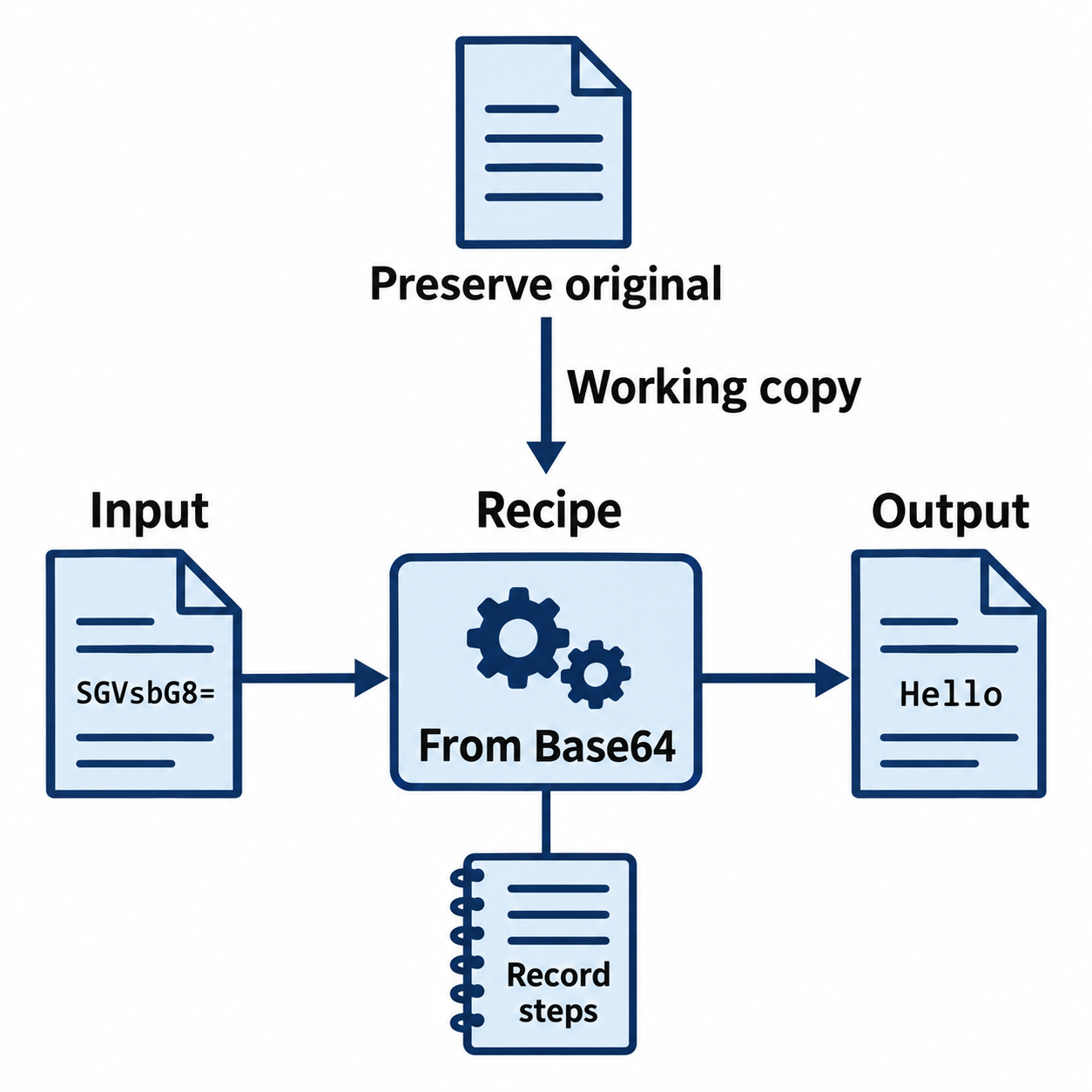
Figure 10.1: Keep the original artifact and record the recipe used to transform a working copy.
Text description for Figure 10.1
The synthetic example decodes SGVsbG8= to Hello. The analyst preserves the original evidence and applies the transformation to a working copy. Recording the operation order, parameters, and tool version makes the result reproducible. Decoding changes representation; it does not establish whether the content is malicious.
10.2 Packet Analysis Tools and Techniques
Packet analysis involves capturing and examining network traffic to understand behavior, detect anomalies, and identify attacks. Three main tools dominate the field: Wireshark (GUI), tcpdump (command-line), and network-based IDS tools (Snort, Suricata).
Wireshark: Graphical Packet Analysis
Wireshark is the industry-standard graphical packet analyzer. It captures packets on a network interface, displays them in a human-readable format, and enables detailed inspection.
Core functions:
- Live capture: Capturing packets in real-time from a specified interface
- File import: Reading previously captured packet files (.pcap, .pcapng formats)
- Filtering: Capture filters control which packets are collected. Display filters control which collected packets appear in the view and can be used during live capture or afterward. Packets hidden by a display filter remain in the capture file. The two filter languages use different syntax.
- Protocol dissection: Breaking down packets into layers (Ethernet, IP, TCP, application) and displaying each field
- Packet stream following: Reconstructing available TCP byte streams or grouping UDP conversations. Missing packets, capture placement, truncation, and encryption can limit what can be recovered.
- Statistics and analysis: Generating statistics on traffic volume, protocols, conversations, and expert annotations
Common Wireshark workflows:
Identifying suspicious traffic:
# Capture filter: only port 443 (HTTPS)
tcp port 443

# Display filter: packets to a suspicious IP
ip.dst == 192.168.1.100 and tcp.flags.syn == 1 and tcp.flags.ack == 0

# Follow TCP stream: view complete conversation
Right-click packet → Follow → TCP Stream
Analyzing DNS queries:
# Display only DNS traffic
dns

# Look for unusual domain names, unexpected response codes
Detecting port scanning:
# Display packets with SYN flag (start of connection)
tcp.flags.syn == 1 and tcp.flags.ack == 0

# High volume of SYN packets to different ports = scanning
Figure 10.2 shows synthetic results from this display filter. The SYN (synchronize) flag initiates a TCP connection, while an unset ACK (acknowledgment) flag excludes SYN-ACK responses. The filter also matches ordinary connection attempts. Repeated attempts from one source to several destination ports within a short interval support a scanning assessment.
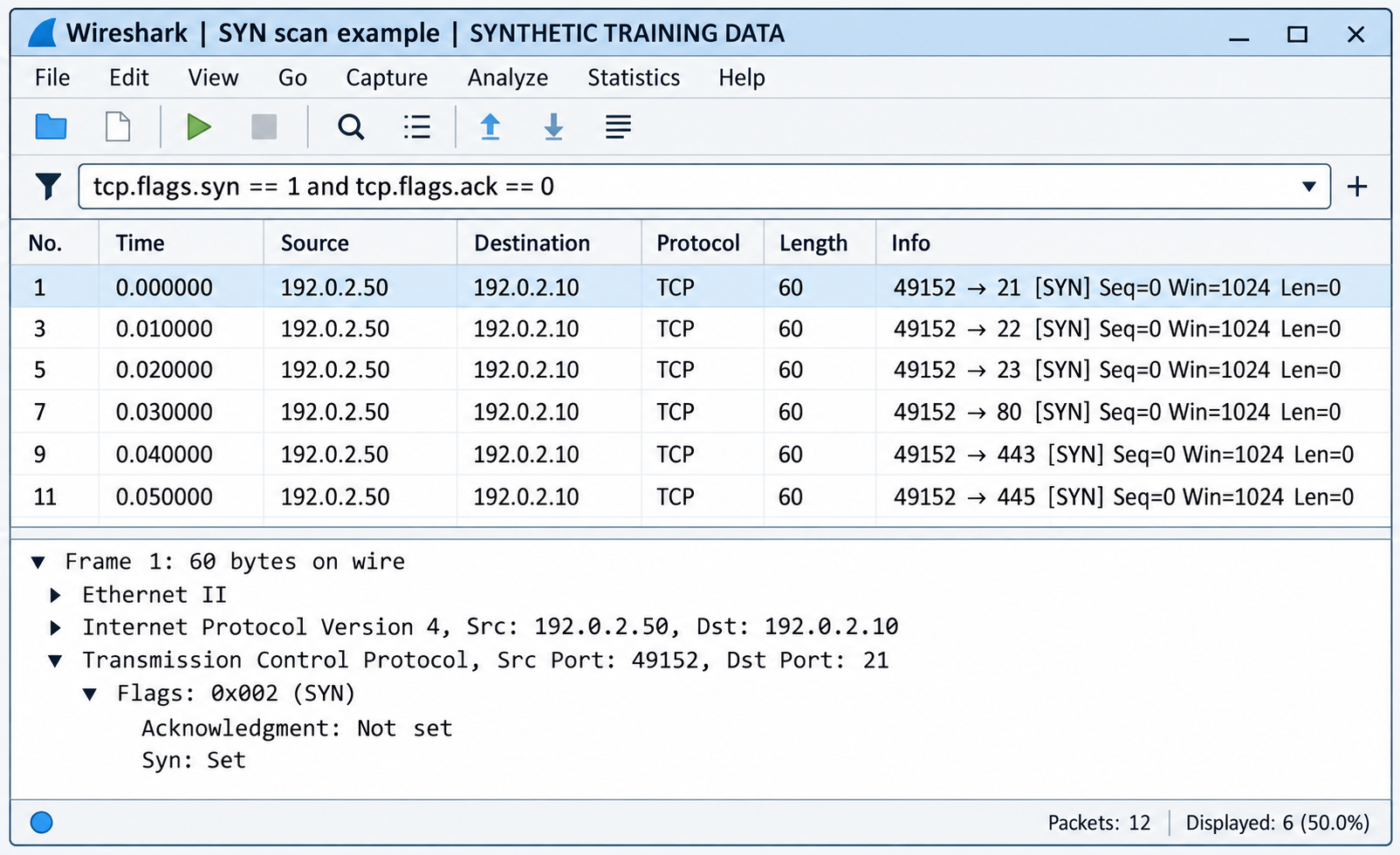
Figure 10.2: In this simulated Wireshark interface, the repeated source and destination addresses, changing destination ports, and closely spaced times illustrate a port scan. The filter selects connection attempts; analysts assess the pattern and authorization separately.
Text description for Figure 10.2
The interface is labeled SYNTHETIC TRAINING DATA and displays the filter tcp.flags.syn == 1 and tcp.flags.ack == 0. Six displayed packets share source address 192.0.2.50, source port 49152, and destination address 192.0.2.10. Their destination ports are 21, 22, 23, 80, 443, and 445. Relative times run from 0.000000 to 0.050000 seconds in 0.010000-second increments. Each packet has SYN set and carries no TCP payload.
The selected first packet targets port 21. Its details show flags 0x002 (SYN), with acknowledgment unset. The status bar reports 12 captured packets and six displayed packets. Gaps in packet numbers reflect packets hidden by the display filter. This filtered view does not establish which ports are open or whether connections completed. Clear or broaden the filter to inspect responses, and check whether the source is an authorized scanner before assigning malicious intent.
Limitations: Wireshark requires significant CPU and memory for large captures (multi-gigabyte pcaps). Packet filtering and reassembly can be slow. For production traffic analysis, streaming tools like Zeek are more practical.
Figure 10.3 distinguishes collection from display filtering.
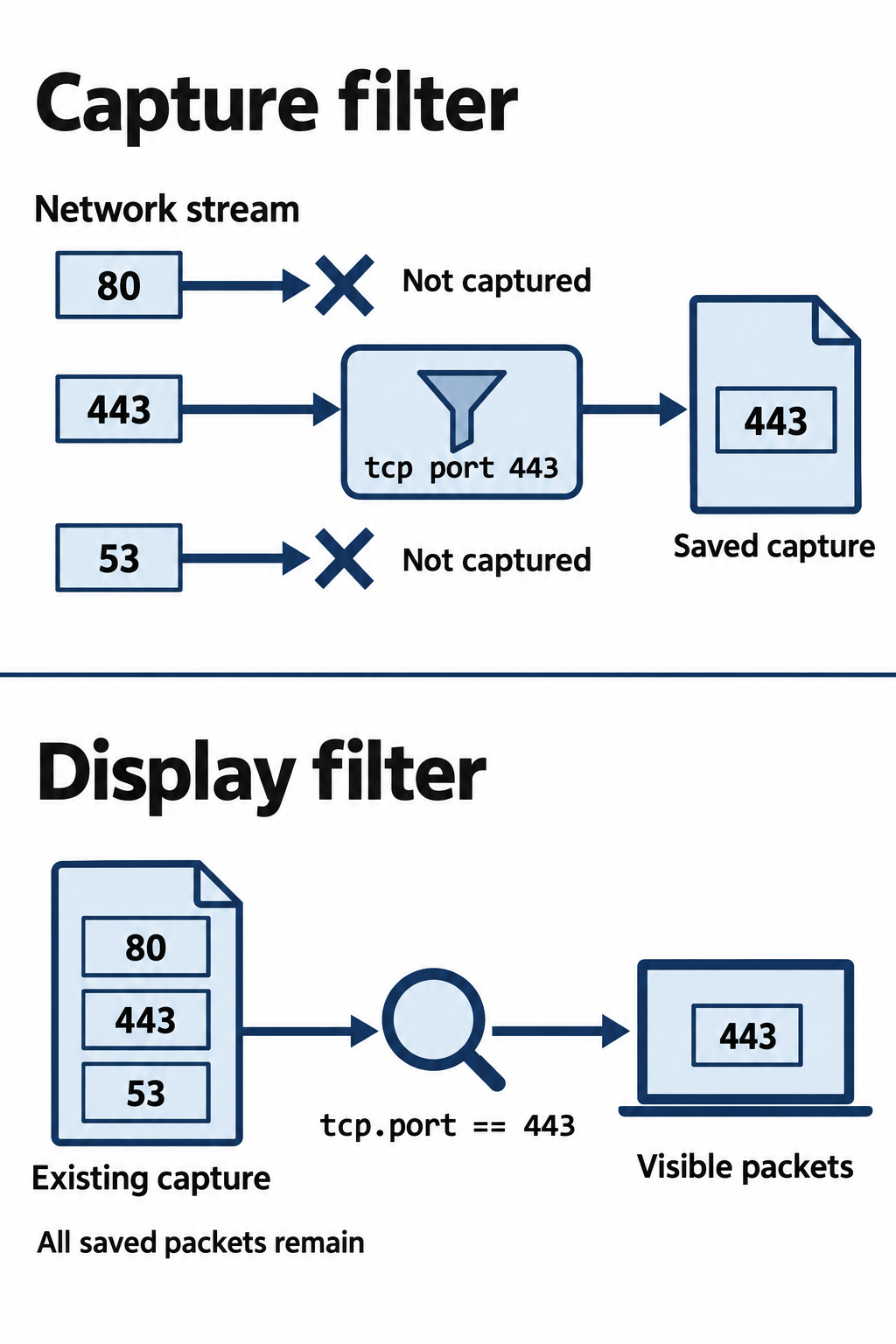
Figure 10.3: Capture filters select packets to collect. Display filters change the view of an existing capture.
Text description for Figure 10.3
The capture filter tcp port 443 limits collection to matching TCP packets. Traffic excluded during capture is absent from that file. The display filter tcp.port == 443 shows matching packets already present in a capture. Nonmatching saved packets remain available when the display filter changes. Port 443 does not by itself prove that the application protocol is HTTPS.
tcpdump: Command-Line Packet Capture
tcpdump is the command-line packet capture tool available on most Linux/macOS systems. It is lightweight and efficient for high-speed networks.
Basic syntax:
# Capture packets on interface eth0, write to file
tcpdump -i eth0 -w capture.pcap

# Read and display packets from file
tcpdump -r capture.pcap

# Capture filters (applied during capture, efficient)
tcpdump -i eth0 'tcp port 80' -w http_traffic.pcap

# Live display with limited packet count
tcpdump -i eth0 -c 100 'dst 8.8.8.8'

# Capture with packet content (-A for ASCII, -X for hex+ASCII)
tcpdump -i eth0 -A -n 'tcp port 22' | head -50
tcpdump advantages:
- Lightweight and efficient; minimal resource overhead
- Useful on production servers or resource-constrained systems
- Powerful filter syntax enabling precise traffic selection
- Can be scripted for automated capture on conditions (suspicious port, high packet rate)
tcpdump limitations:
- No graphical interface; less intuitive for complex analysis
- Limited protocol dissection; raw packet display requires knowledge of packet structure
- Performance at extreme traffic volumes may still exceed system capability
Figure 10.4 shows tcpdump displaying packets as they arrive in a Linux terminal.
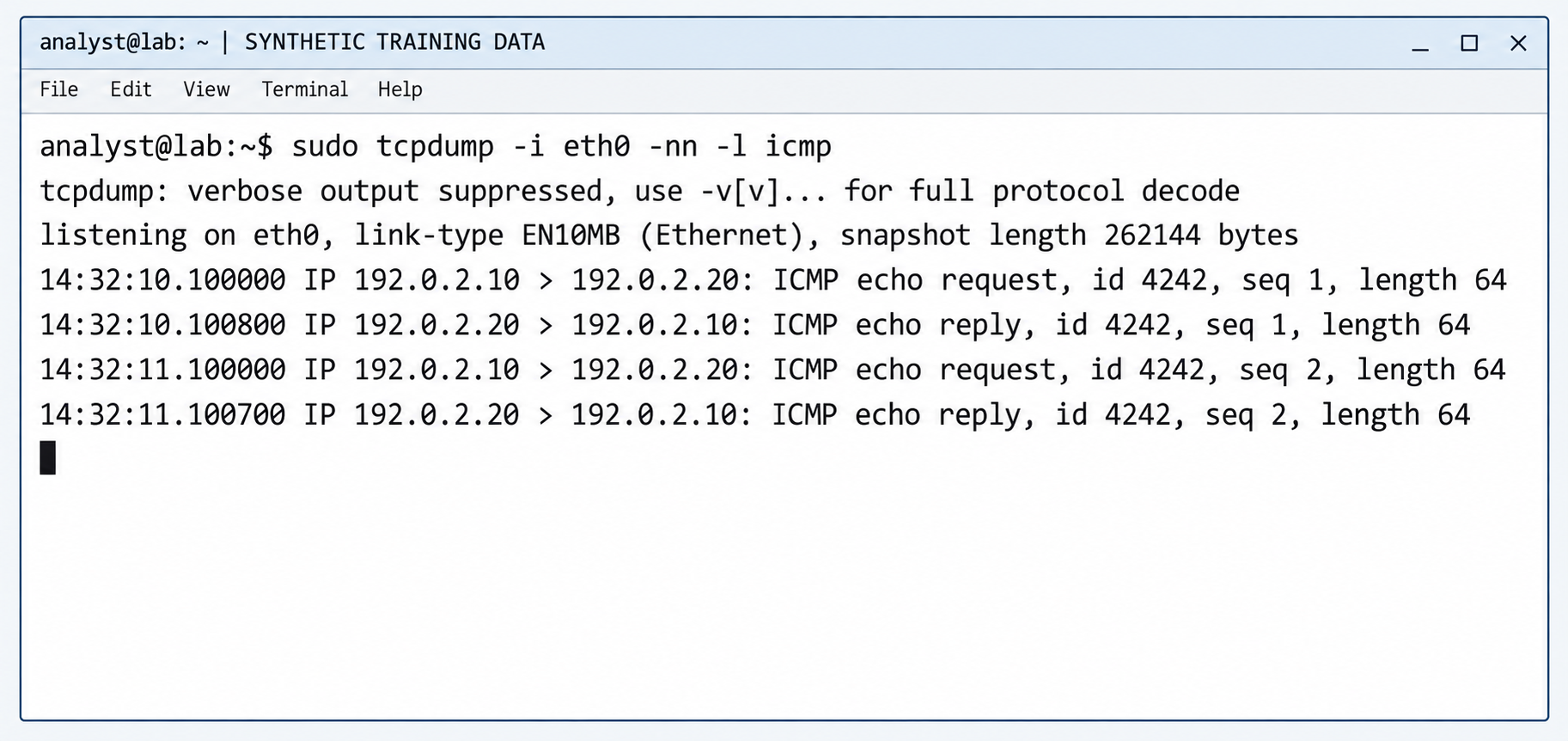
Figure 10.4: This simulated terminal shows live Internet Control Message Protocol (ICMP) traffic, the protocol used by these ping requests and replies. Each output line identifies a timestamp, source, destination, and packet summary. The capture remains active.
Command explanation and text transcript for Figure 10.4
The window is labeled SYNTHETIC TRAINING DATA. The command uses sudo to request elevated privileges, -i eth0 to select the interface, -nn to keep host addresses and port numbers numeric, and -l to flush text output one line at a time. The capture filter icmp selects IPv4 ICMP traffic. Interface names vary between Linux systems. This command displays packet summaries and does not save a capture file because it has no -w option.
analyst@lab:~$ sudo tcpdump -i eth0 -nn -l icmp
tcpdump: verbose output suppressed, use -v[v]... for full protocol decode
listening on eth0, link-type EN10MB (Ethernet), snapshot length 262144 bytes
14:32:10.100000 IP 192.0.2.10 > 192.0.2.20: ICMP echo request, id 4242, seq 1, length 64
14:32:10.100800 IP 192.0.2.20 > 192.0.2.10: ICMP echo reply, id 4242, seq 1, length 64
14:32:11.100000 IP 192.0.2.10 > 192.0.2.20: ICMP echo request, id 4242, seq 2, length 64
14:32:11.100700 IP 192.0.2.20 > 192.0.2.10: ICMP echo reply, id 4242, seq 2, length 64
Requests travel from 192.0.2.10 to 192.0.2.20, and replies reverse that direction. The matching identifier and sequence number associate each reply with its request. The reported length is 64 bytes for each ICMP message. The cursor waits on the next line without a returned shell prompt. Pressing Ctrl+C would stop the capture and display capture statistics. See the tcpdump manual for command options and output formats.
Network-Based Intrusion Detection: Snort and Suricata
Network-based intrusion detection systems (NIDS) monitor traffic and alert when patterns match known attack signatures. Snort and Suricata are the industry-standard open-source NIDS tools.
Snort is an open-source intrusion detection and prevention engine maintained by Cisco. Packet-display, logging, and detection workflows include:
- Sniffer mode: Like tcpdump; captures and displays packets
- Packet logger mode: Logs packets to disk
- Network IDS mode: Monitors traffic against a rule set and generates alerts
Suricata provides rule-based detection, protocol analysis, and supported file extraction. Performance depends on hardware, traffic, enabled analysis, and configuration; benchmark the intended workload. TLS metadata may be available even when encrypted application content is not.
NIDS capabilities:
- Signature-based detection: Rules matching known attack patterns
- Protocol analysis: Understanding protocol state machines and detecting violations
- File extraction: Extracting files from HTTP traffic for malware analysis
- File metadata and hashes: Where traffic is visible and the protocol is supported, record or extract transferred files for analysis. Monitoring changes to files on an endpoint requires host-side telemetry or a separate file integrity monitoring tool.
Illustrative Suricata rule for an inbound HTTP request URI containing UNION followed by SELECT:
alert http $EXTERNAL_NET any -> $HOME_NET any (msg:"TRAINING possible SQL injection in URI"; flow:established,to_server; http.uri; content:"UNION"; nocase; content:"SELECT"; distance:0; nocase; sid:1000001; rev:1;)
http.uri selects the normalized request URI, and distance:0 starts the second search after the first match. This teaching rule can produce false positives and miss other injection forms. Define the network variables, choose an unused rule ID, and validate syntax and behavior against the installed engine and representative captures before deployment. Snort and Suricata syntax compatibility varies by version. See Suricata's HTTP rule documentation.
Challenges with NIDS:
- False positives: Legitimate traffic matching attack patterns triggers alerts. Tuning rules is essential.
- Encrypted traffic: Sensors can inspect observable metadata, but encrypted application content requires suitable session secrets, endpoint visibility, or an authorized decryption design. A server private key alone does not decrypt modern forward-secret TLS sessions.
- Evasion: Attackers use fragmentation, obfuscation, or timing tricks to evade signature detection.
- Performance: High-traffic networks may overwhelm NIDS processing, requiring tuning or sampling.
Zeek: Network Protocol Analysis and Logging
Zeek (formerly Bro) is a network security monitoring framework that analyzes protocols and generates structured logs. Its scripts and Notice framework can also identify conditions that warrant attention and trigger configured actions. See the Zeek Notice framework.
Zeek operates differently from Snort/Suricata:
- Focus on logging: Zeek records connections and supported protocol activity, including visible DNS, HTTP, and TLS metadata. Available fields depend on the protocol version, encryption, and sensor visibility.
- Protocol understanding: Zeek understands protocol state machines and can detect anomalies (incomplete handshakes, protocol violations, unusual patterns)
- Scalability: Zeek can distribute analysis across workers. Capacity depends on traffic, enabled scripts, capture quality, and hardware.
- Correlation: Zeek logs are designed to be ingested into SIEM systems where correlation rules identify attacks
Figure 10.5 shows a simulated terminal using zeek-cut to select fields from Zeek's tab-separated logs. Each command lists the fields in output order, and < supplies the named log file as input. The uid field is the connection's unique identifier. Native field sets and output formats depend on configuration. See the Zeek log documentation for the tab-separated format and field-selection workflow.
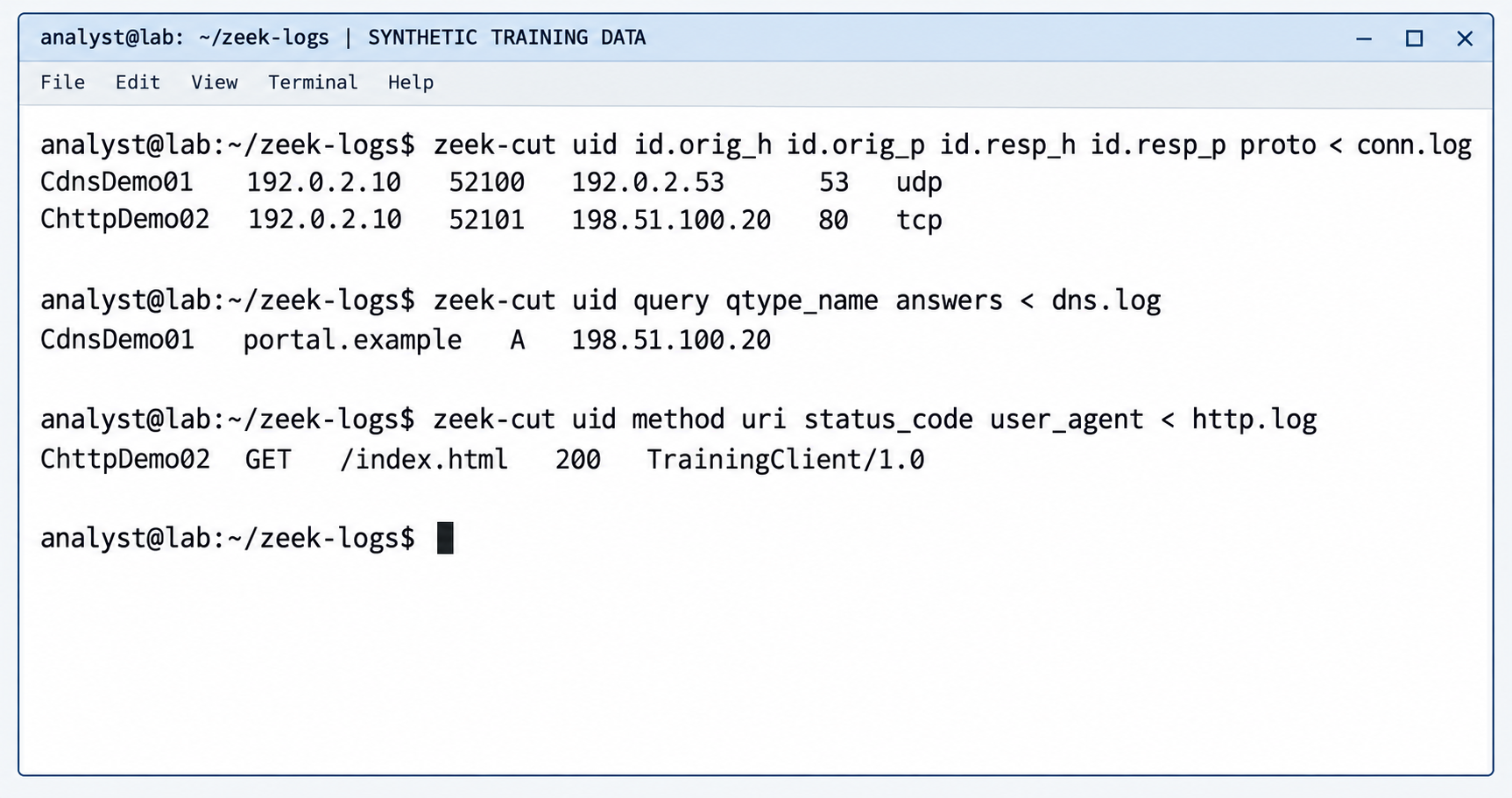
Figure 10.5: Selected fields from synthetic Zeek logs show a DNS query and a separate HTTP connection. Each protocol record shares an identifier with its own connection record.
Text transcript and field descriptions for Figure 10.5
The terminal is labeled SYNTHETIC TRAINING DATA. The following transcript reproduces the commands and selected values, with spacing for readability.
analyst@lab:~/zeek-logs$ zeek-cut uid id.orig_h id.orig_p id.resp_h id.resp_p proto < conn.log
CdnsDemo01   192.0.2.10   52100   192.0.2.53      53   udp
ChttpDemo02  192.0.2.10   52101   198.51.100.20   80   tcp

analyst@lab:~/zeek-logs$ zeek-cut uid query qtype_name answers < dns.log
CdnsDemo01   portal.example   A   198.51.100.20

analyst@lab:~/zeek-logs$ zeek-cut uid method uri status_code user_agent < http.log
ChttpDemo02  GET   /index.html   200   TrainingClient/1.0

analyst@lab:~/zeek-logs$
In conn.log, id.orig_h and id.orig_p identify the initiating host and port. The id.resp_h and id.resp_p fields identify the responding host and port, while proto identifies the transport protocol. Connection CdnsDemo01 uses UDP to port 53. Its DNS record requests an A record (an IPv4 address) for portal.example and reports 198.51.100.20 as the answer. Connection ChttpDemo02 uses TCP to port 80. Its HTTP record shows a GET request for /index.html, status 200, and the client identifier TrainingClient/1.0. These illustrative identifiers refer to two separate connections. The selected fields omit timestamps and other information available in the full logs.
The DNS records share one connection identifier; the HTTP records share a different identifier. Relating DNS resolution to the later HTTP connection requires additional evidence such as the client, returned address, and timing.
Zeek is particularly useful for:
- Detecting C2 (command and control) traffic by identifying unusual connection patterns
- Identifying data exfiltration through volume and protocol analysis
- Detecting lateral movement through SMB or RDP traffic patterns
- Building network baselines and detecting anomalies
Figure 10.6 compares complementary views of network traffic.
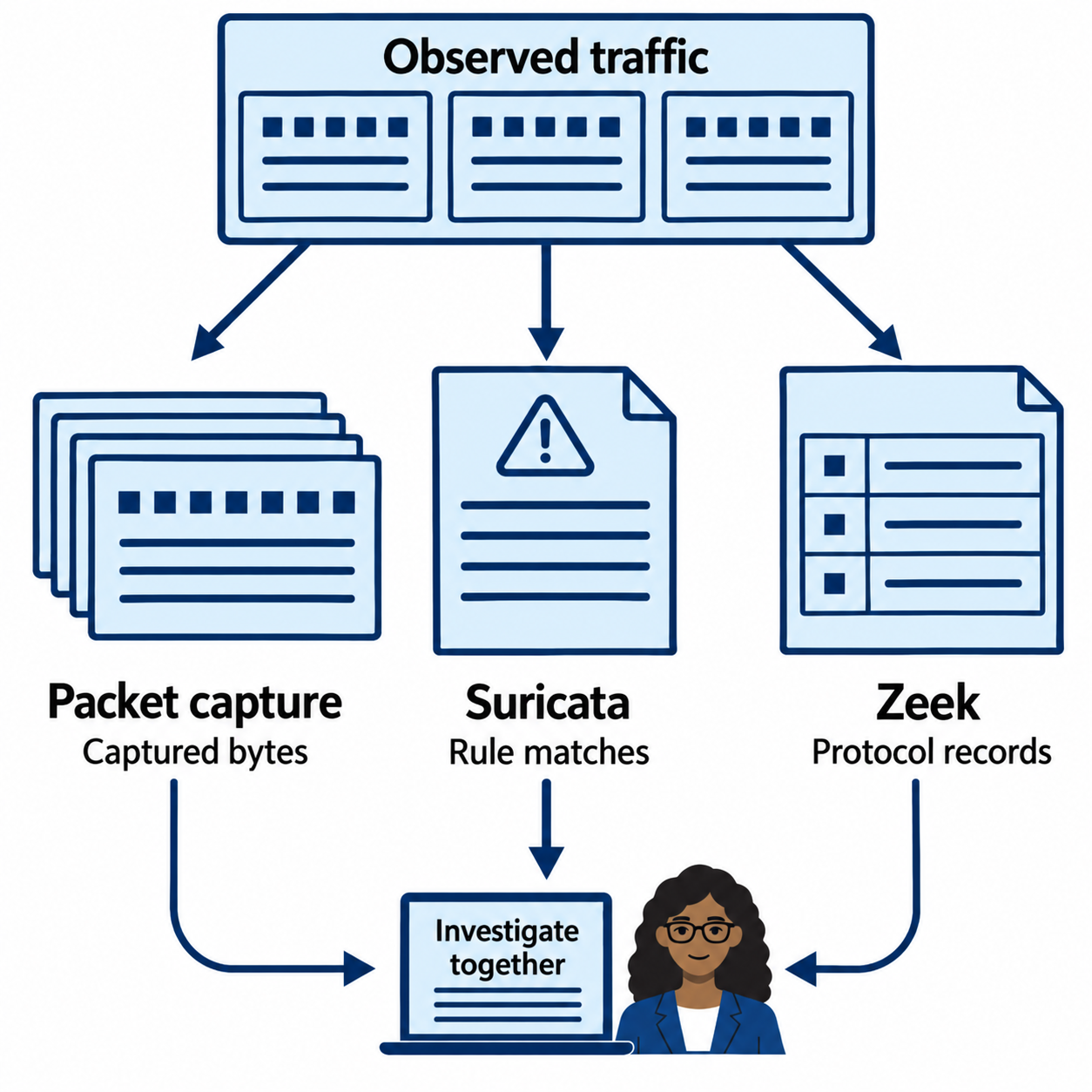
Figure 10.6: Captured packets, detection alerts, and protocol logs support different questions about the same traffic.
Text description for Figure 10.6
A packet capture can retain observed bytes for detailed inspection. A network intrusion detection system can identify rule matches. Zeek can summarize connections and protocol activity. These are complementary views rather than complete product boundaries: Suricata also logs protocol information, and Zeek can generate notices. Sensor placement, encryption, loss, and configuration determine the available evidence.
10.3 Protocol-Level Analysis
Effective packet analysis requires understanding protocols and recognizing abnormal behavior.
TCP/IP Fundamentals and Anomalies
The TCP three-way handshake establishes connections: SYN, SYN-ACK, ACK. Unusual patterns can support an investigation, but interpretation requires capture context:
- SYN floods: Attacker sends many SYN packets without completing handshakes, consuming server resources (denial of service)
- Port scanning signatures: Sequential SYN packets to incrementing port numbers indicate port scanning
- Incomplete handshakes: The capture shows a SYN without a completed handshake. Possible explanations include scanning, filtering, an unavailable service, packet loss, or a sensor that sees only one direction. Establish what the sensor could observe before inferring intent.
IP layer anomalies:
- Fragmentation: Splitting packets into fragments can evade detection systems. Reassembly is necessary for analysis.
- TTL analysis: Unusual TTL values may indicate routing anomalies or spoofing
- Source address spoofing: A sender forges an IP source address. Reverse DNS and traceroute cannot prove the true sender of a captured packet. Assess ingress paths, routing, protocol behavior, and corroborating logs; document remaining uncertainty.
Figure 10.7 shows why an incomplete handshake needs context.
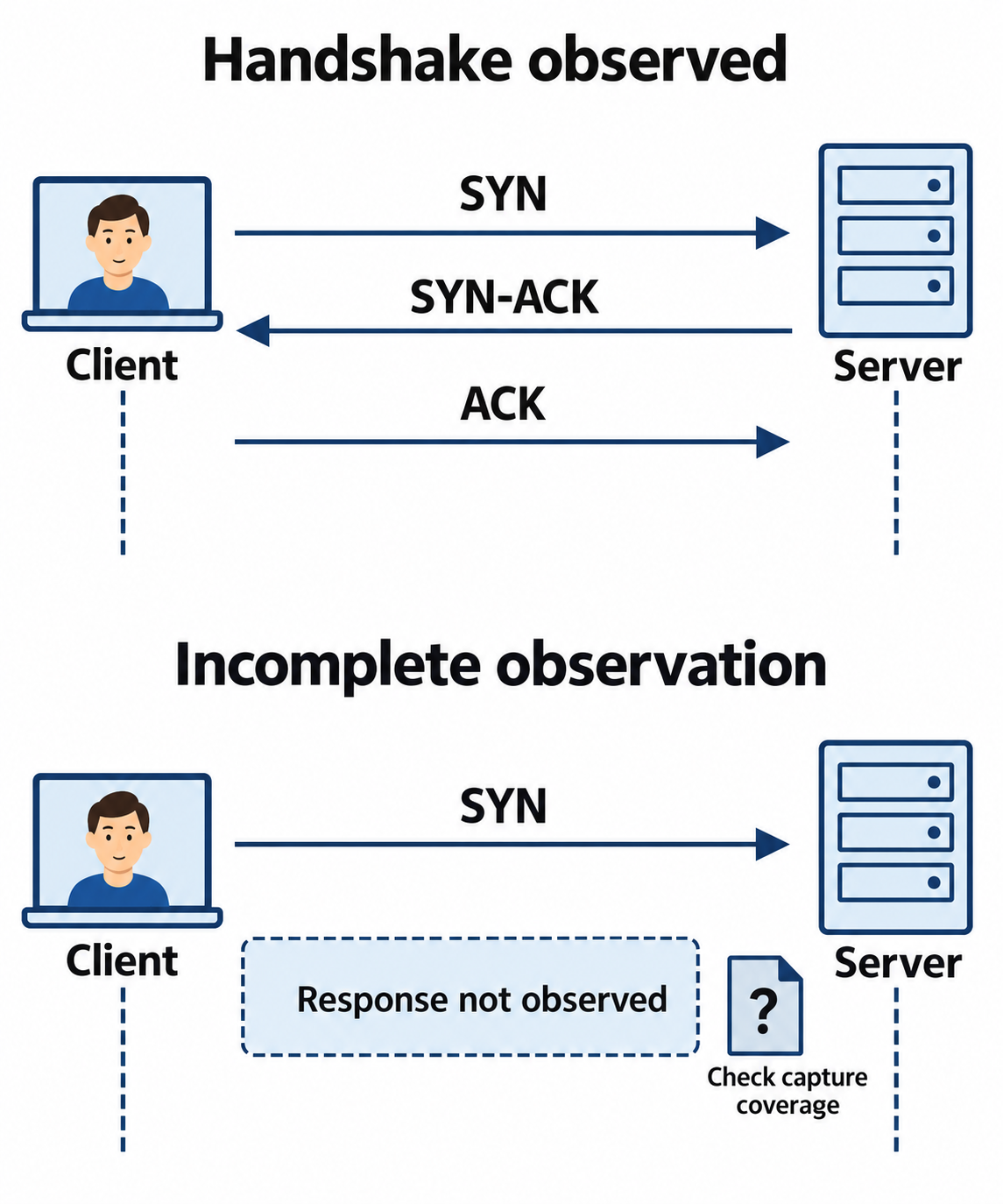
Figure 10.7: A missing handshake response calls for context about both the connection and the capture.
Text description for Figure 10.7
The client begins a TCP connection with SYN, the server responds with SYN-ACK, and the client acknowledges with ACK. A capture that shows only the first packet does not establish why the handshake is missing. The service may be unavailable, traffic may be filtered or lost, or the sensor may see only one direction. Repeated attempts across destinations can support a scanning hypothesis when corroborated.
DNS Analysis and Exfiltration Detection
DNS (Domain Name System) translates domain names to IP addresses. It is often overlooked for security analysis but reveals significant information:
- DNS query patterns: Compare query volume, names, responses, and destinations with the client's role and baseline. Browsers and legitimate applications can also query many domains.
- DNS exfiltration: An attacker can place encoded data in query labels under a domain they control. Encodings must fit the usable DNS label syntax and length limits. For example, a query to
encoded-data.exfil.exampleillustrates the structure;.exampleis reserved for documentation. - DNS tunneling: Entire communications tunneled over DNS to evade firewall detection
- Domain generation algorithms (DGA): Malware generates domain names to find C2 servers; analysis reveals algorithmic patterns
- Response code anomalies: NXDOMAIN (non-existent domain) floods indicate scanning or misconfiguration
DNS analysis workflow:
# Extract DNS queries from pcap
tshark -r capture.pcap -T fields -e dns.qry.name | sort | uniq -c | sort -rn

# Identify suspicious patterns:
# - High volume of queries to non-existent domains
# - Queries to domains associated with malware
# - Encoded data in subdomain queries
Figure 10.8 traces a query label through DNS resolution.
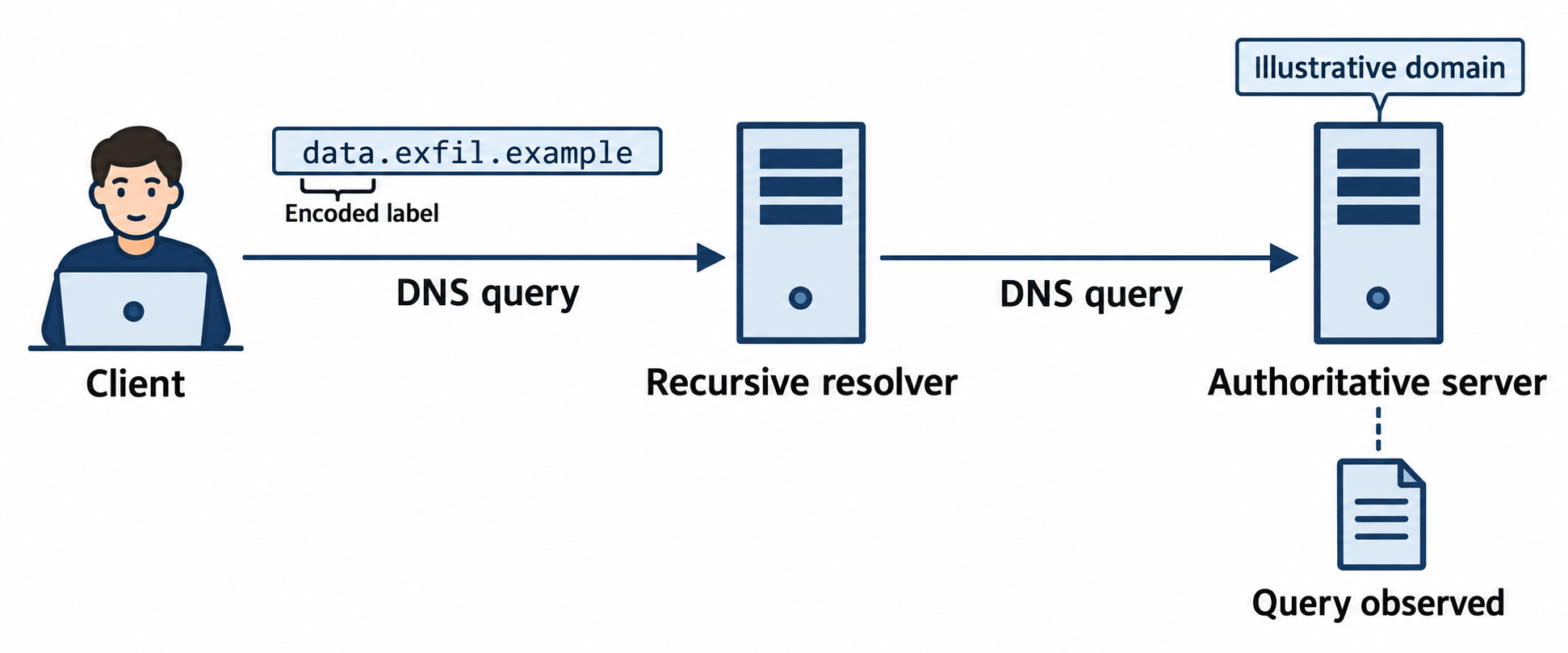
Figure 10.8: A recursive lookup can expose query labels to the authoritative server responsible for the requested domain.
Text description for Figure 10.8
The synthetic name data.exfil.example represents a query label under an attacker-controlled domain. The client sends a query to a recursive resolver, which may contact authoritative servers during resolution. The authoritative operator can observe labels in queries that reach it. Caching and resolver behavior affect the path. Unusual labels can have benign explanations, so investigators examine volume, destination, encoding, and endpoint context.
HTTP/HTTPS Inspection
HTTP carried without TLS can expose methods, paths, headers, status codes, and transferred content if the capture is sufficiently complete. HTTPS protects HTTP content with Transport Layer Security (TLS).
For a passive packet capture without session secrets:
- Usually observable: IP addresses, transport ports, connection timing, and packet lengths at that capture point.
- Conditionally observable: Some handshake fields and the requested server name, depending on protocol version and use of Encrypted Client Hello.
- Encrypted in TLS 1.3: HTTP paths, headers, bodies, and the server's certificate message. Older TLS versions have different handshake visibility.
To inspect encrypted content, analysts need authorized endpoint telemetry, suitable session secrets, or a managed decryption system. A server private key alone cannot decrypt modern forward-secret sessions. See RFC 8446 and Wireshark's TLS documentation.
When certificate information is available, an unexpected issuer or name mismatch warrants investigation. Check the certificate's Subject Alternative Name entries, expected enterprise proxies, and configuration. Certificate anomalies alone do not prove interception or malicious intent.
Figure 10.9 separates TLS 1.3 metadata from encrypted content.
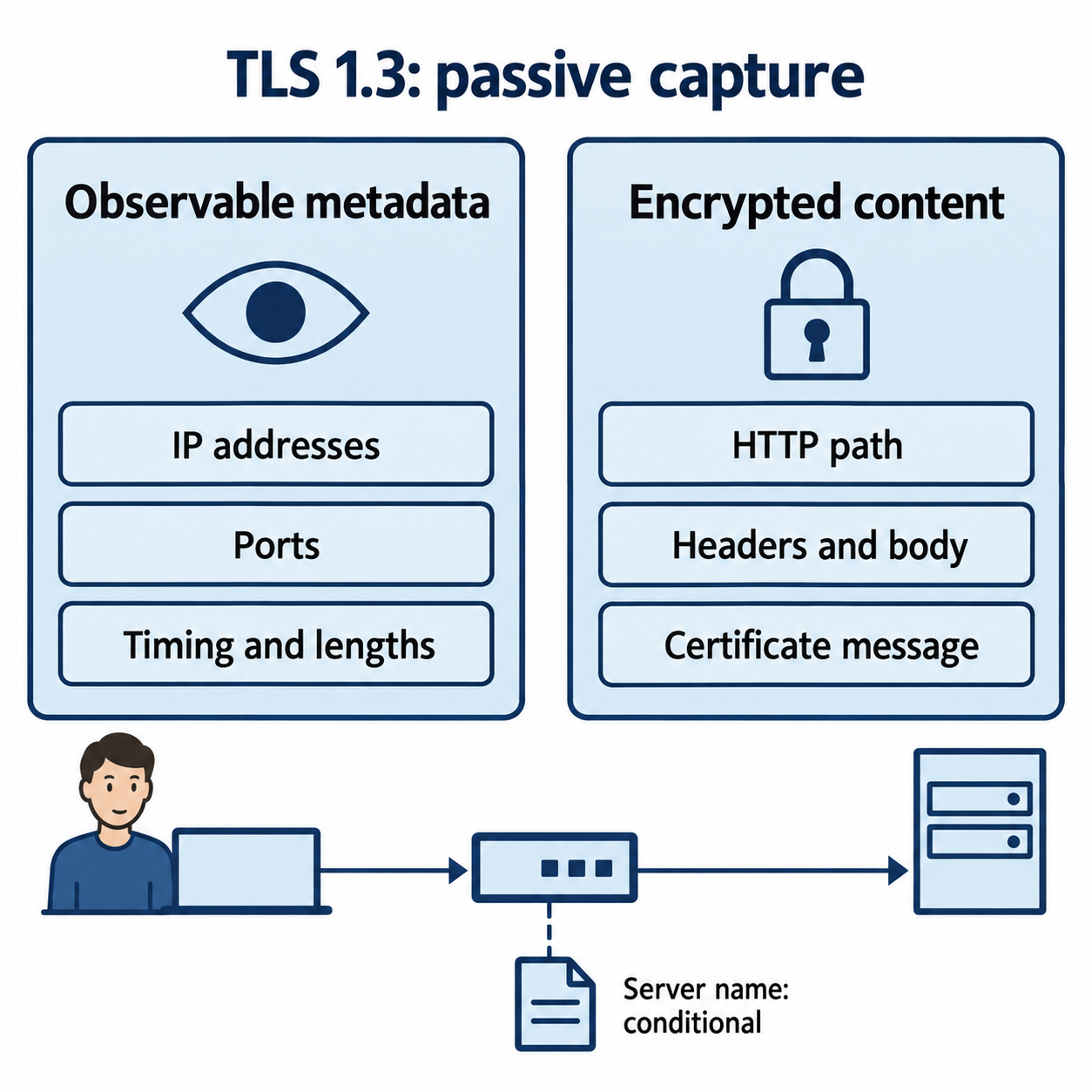
Figure 10.9: TLS 1.3 exposes some connection metadata while protecting application content and certificate messages.
Text description for Figure 10.9
At a suitable capture point, a passive observer can usually see IP addresses, transport ports, timing, and packet lengths. HTTP content and the server certificate message are encrypted in TLS 1.3. Some handshake fields and server-name information may be visible, depending on the connection and Encrypted Client Hello. Session secrets or another authorized source of plaintext are needed for deeper inspection. Older TLS versions differ.
SMB Analysis and Lateral Movement Detection
SMB (Server Message Block) is the Windows file sharing protocol. Lateral movement often uses SMB for reconnaissance and exploitation:
- SMB reconnaissance: Enumerating shares and permissions
- SMB authentication failures: Repeated failures may indicate password guessing, stale credentials, or configuration problems; correlate the account, source, status, and timing
- SMB lateral movement: Use of compromised credentials to access other systems via SMB shares
- Ransomware propagation: Ransomware uses SMB to spread to other systems
WannaCry ransomware (2017) spread via SMB exploitation (EternalBlue vulnerability). Detecting SMB reconnaissance and exploitation patterns was critical for early detection.
Figure 10.10 shows an authorized lab check of a fictional file server whose Finance and Backups shares should require authenticated staff accounts. The terminal first discovers share names, then confirms that an anonymous session can list files in both shares.
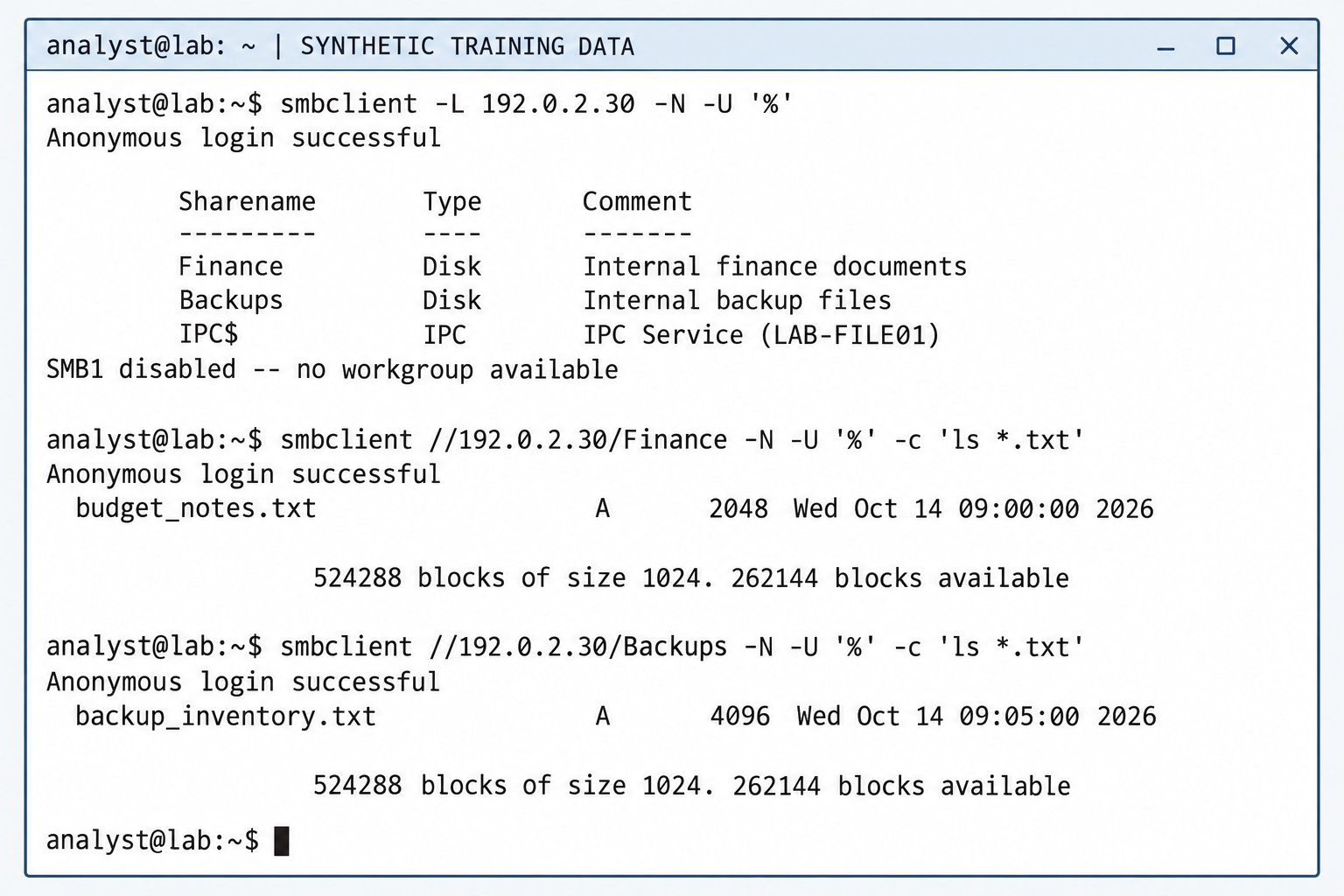
Figure 10.10: Anonymous directory listings expose file names and metadata in two shares intended for internal staff. Share discovery alone does not establish directory access; the successful follow-up listings demonstrate the misconfiguration in this synthetic scenario.
Command transcript and interpretation for Figure 10.10
The terminal is labeled SYNTHETIC TRAINING DATA. The Samba client command smbclient -L lists available shares. The -N option suppresses the password prompt, and -U '%' supplies an empty username and password. Each subsequent command connects to a named share and uses -c 'ls *.txt' to list matching directory entries, then exits. See the smbclient manual for command syntax.
analyst@lab:~$ smbclient -L 192.0.2.30 -N -U '%'
Anonymous login successful

        Sharename       Type      Comment
        ---------       ----      -------
        Finance         Disk      Internal finance documents
        Backups         Disk      Internal backup files
        IPC$            IPC       IPC Service (LAB-FILE01)
SMB1 disabled -- no workgroup available

analyst@lab:~$ smbclient //192.0.2.30/Finance -N -U '%' -c 'ls *.txt'
Anonymous login successful
  budget_notes.txt                  A      2048  Wed Oct 14 09:00:00 2026

                524288 blocks of size 1024. 262144 blocks available

analyst@lab:~$ smbclient //192.0.2.30/Backups -N -U '%' -c 'ls *.txt'
Anonymous login successful
  backup_inventory.txt              A      4096  Wed Oct 14 09:05:00 2026

                524288 blocks of size 1024. 262144 blocks available

analyst@lab:~$
The listings expose budget_notes.txt (2,048 bytes) and backup_inventory.txt (4,096 bytes), together with file attributes and modification times. The letter A indicates the archive attribute. IPC$ is an interprocess communication service used for operations such as named-pipe communication. The SMB1 message concerns legacy workgroup browsing and does not invalidate the successful share listings.
The evidence confirms anonymous directory-listing access. It does not establish file-content read access, write access, code execution, or completed lateral movement. A server may map an anonymous session to a guest account; server-side logs and configuration establish the effective identity. In this scenario, administrators should remove unintended anonymous or guest access and verify both share permissions and underlying file-system permissions against the intended staff access policy.
10.4 Log Analysis and SIEM Platforms
Packet analysis reveals network behavior, but full visibility requires log analysis across systems and applications.
Figure 10.11 introduces the overall architecture of a Security Information and Event Management (SIEM) platform.
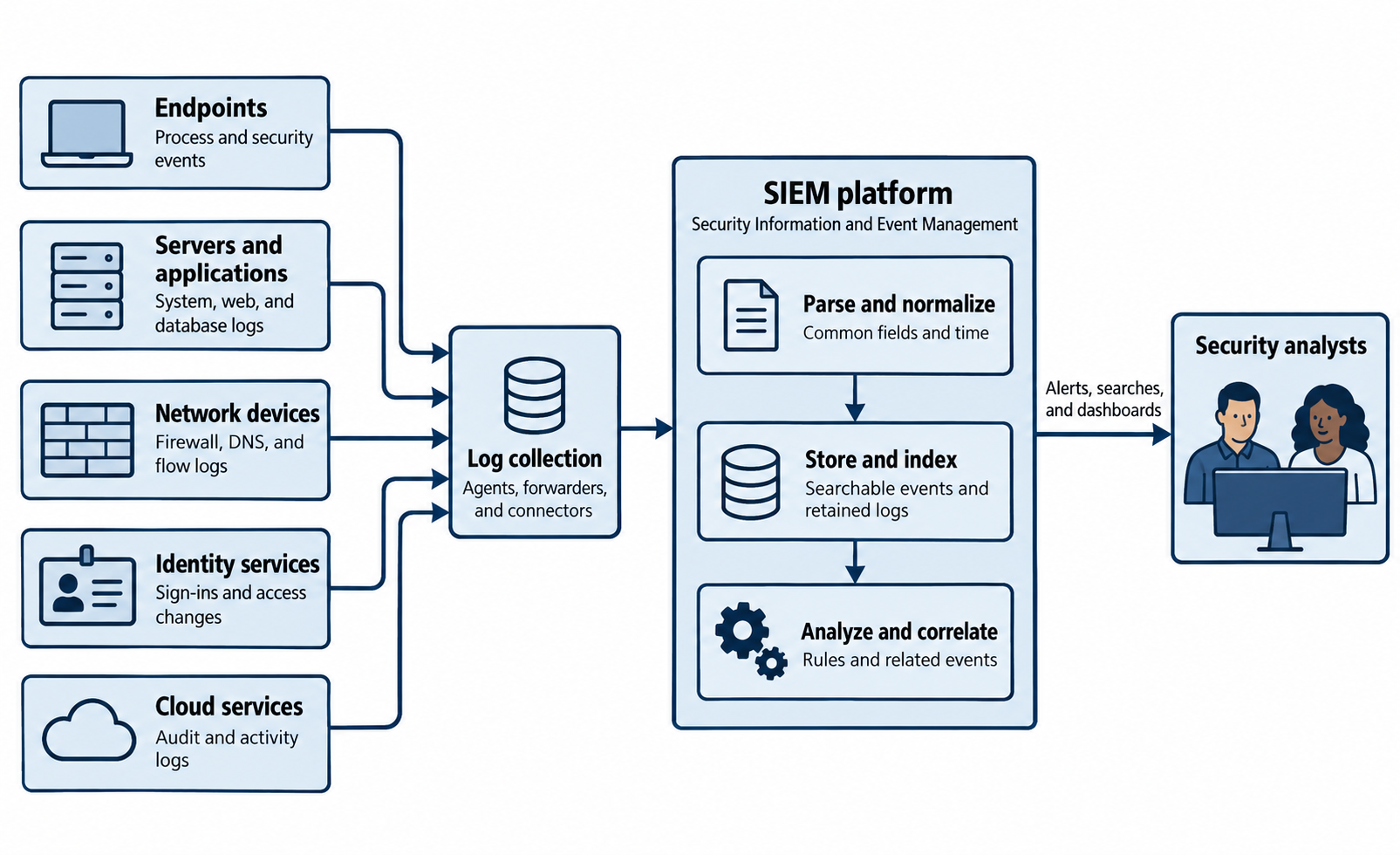
Figure 10.11: SIEM architecture brings logs from endpoints, servers, network devices, identity services, and cloud services into a shared analysis platform. Analysts use the resulting alerts, searches, and dashboards to investigate activity across systems.
Text description for Figure 10.11
Five source groups send logs toward a common collection layer. Endpoints supply process and security events. Servers and applications supply system, web, and database logs. Network devices supply firewall, Domain Name System (DNS), and flow logs, which summarize network communications. Identity services supply sign-in events and access changes. Cloud services supply audit and activity logs.
Agents collect events on monitored systems, forwarders send logs onward, and connectors integrate supported services with the collection process. Arrows lead from these collection components into the SIEM platform. Parsing extracts fields from each log format, and normalization maps comparable values into common fields and time conventions. Storage and indexing retain events and make them searchable. Analysis and correlation apply rules and relate events across sources. Alerts, searches, and dashboards support security analysts' investigations.
The diagram shows a logical architecture. Deployments may distribute collection, storage, and analysis across several systems or cloud services, and some analysis may occur before storage. Effective coverage depends on enabled logging, working collection paths, accurate timestamps, and suitable detection rules. Retention and access policies govern the stored records.
SIEM: Centralized Log Management and Correlation
Security Information and Event Management (SIEM) platforms collect, parse, normalize, and correlate logs from hundreds or thousands of systems and applications. SIEM is the central nervous system of security operations.
Core SIEM functions:
- Log collection: Agents or log shippers forward logs from endpoints, servers, network devices, and applications
- Parsing and normalization: Raw logs in different formats are parsed and normalized into common fields (source IP, destination, timestamp, event type)
- Indexing and search: Logs are indexed for rapid searching and analysis
- Alerting: Rules trigger alerts when patterns match known attack scenarios
- Correlation: Events from different sources are correlated to identify complex attacks spanning multiple systems
- Retention and archival: Retain logs under a documented schedule based on applicable obligations, investigation needs, storage, and privacy requirements
- Visualization: Dashboards display real-time security metrics and historical trends
Common SIEM Platforms
Examples include Splunk Enterprise Security, Elastic Security, Sumo Logic Cloud SIEM, and Datadog Cloud SIEM. Splunk uses Search Processing Language (SPL) for searches and aggregation. Elastic combines search, visualization, and security analysis capabilities. Cloud services can reduce infrastructure administration while retaining configuration, data-management, and cost responsibilities for the customer.
Behavioral analytics products such as Darktrace may complement a SIEM. Product capabilities, licenses, deployment options, and pricing change over time. Compare current documentation and a representative trial using:
- Required data sources, parsers, and detection use cases.
- Search performance, retention tiers, and evidence export.
- Access controls, data location, and privacy requirements.
- Ingestion, storage, support, and operational costs.
- Staff expertise and integration with the existing response process.
Avoid assuming that one vendor is always faster, cheaper, or more capable for every environment.
Log Parsing, Normalization, and Field Extraction
Raw logs vary widely in format. A Windows Event Log entry looks completely different from an Apache web server log:
# Simplified text rendering of a Windows event (synthetic)
2024-04-05T10:23:45.123Z EventID:4625 Logon failed for user admin

# Apache Web Server Log
192.168.1.100 - frank [05/Apr/2024:10:23:45 +0000] "GET /index.html HTTP/1.1" 200 1234
SIEM systems parse these logs and extract common fields:
- Timestamp: When the event occurred
- Source IP: Originating system
- Destination IP: Target system
- User: Account involved
- Action: What happened (login, file access, error)
- Status: Success or failure
- Additional context: Depends on log type
Parsing uses:
- Regular expressions (regex): Pattern matching to extract fields from unstructured text
- Format-aware parsers: JSON and XML require structure-aware parsing. CSV requires correct handling of delimiters, quoted fields, and embedded newlines
- Lookup tables: Mapping codes to human-readable values (Windows Event ID 4625 maps to "Logon Failed")
Challenges:
- Unstructured logs: Legacy systems generate unstructured text; parsing is error-prone
- Multi-line logs: Stack traces and complex messages span multiple lines; parsing must handle continuation
- Inconsistent formatting: The same log type might be formatted differently across system versions
- Performance: Complex parsing rules impact SIEM indexing performance; optimization is necessary
Figure 10.12 connects normalized fields with their original records.
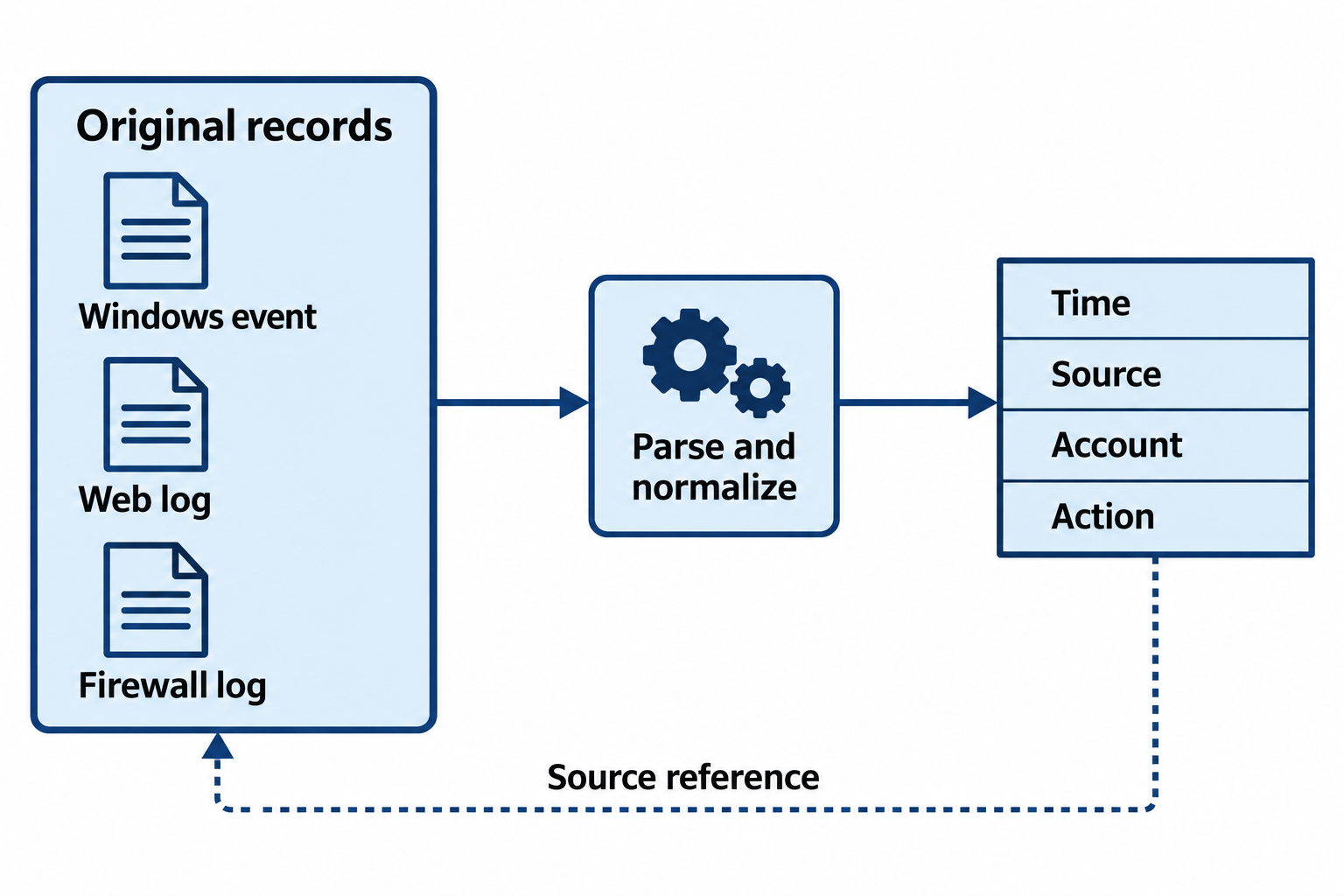
Figure 10.12: Normalization creates searchable fields while source references preserve the path back to original records.
Open Figure 10.12 at full size
Text description for Figure 10.12
Parsing reads each source according to its format. Normalization maps comparable values to consistent fields and time conventions. Preserve original records and a source reference so analysts can check transformations and missing values. Similar field names can have different meanings across products, and a normalized field cannot supply evidence absent from the original.
Correlation and Enrichment
SIEM correlation identifies related events that indicate attacks:
Time-based correlation: A time window helps find potentially related events. Ten failed logins followed by a success may support a password-guessing hypothesis when they concern the same account and relevant source or destination. Normalize time zones, consider clock error, and investigate alternative explanations. Time proximity alone does not establish a causal connection.
Event-based correlation: Events share attributes. Example: Multiple failures with the same source IP, or events involving the same user account, might be correlated.
Enrichment adds context to events:
- Threat intelligence: Cross-referencing IPs and hashes against known-malicious indicators
- Asset inventory: Mapping IP addresses to asset names, criticality, and business function
- Geolocation: Mapping IP addresses to geographic locations, enabling detection of impossible travel
- User directories: Querying AD/LDAP to identify user departments, manager, and group membership
Example: A login alert triggers for user john.smith. The SIEM enriches it by:
- Querying AD to learn John is in Marketing, based in New York
- Geolocating the login IP to discover it is from Tokyo
- Comparing against John's historical login locations to detect "impossible travel"
- Cross-referencing the IP against threat intelligence to learn it is a known proxy IP
Figure 10.13 shows the context needed to assess a candidate event sequence.
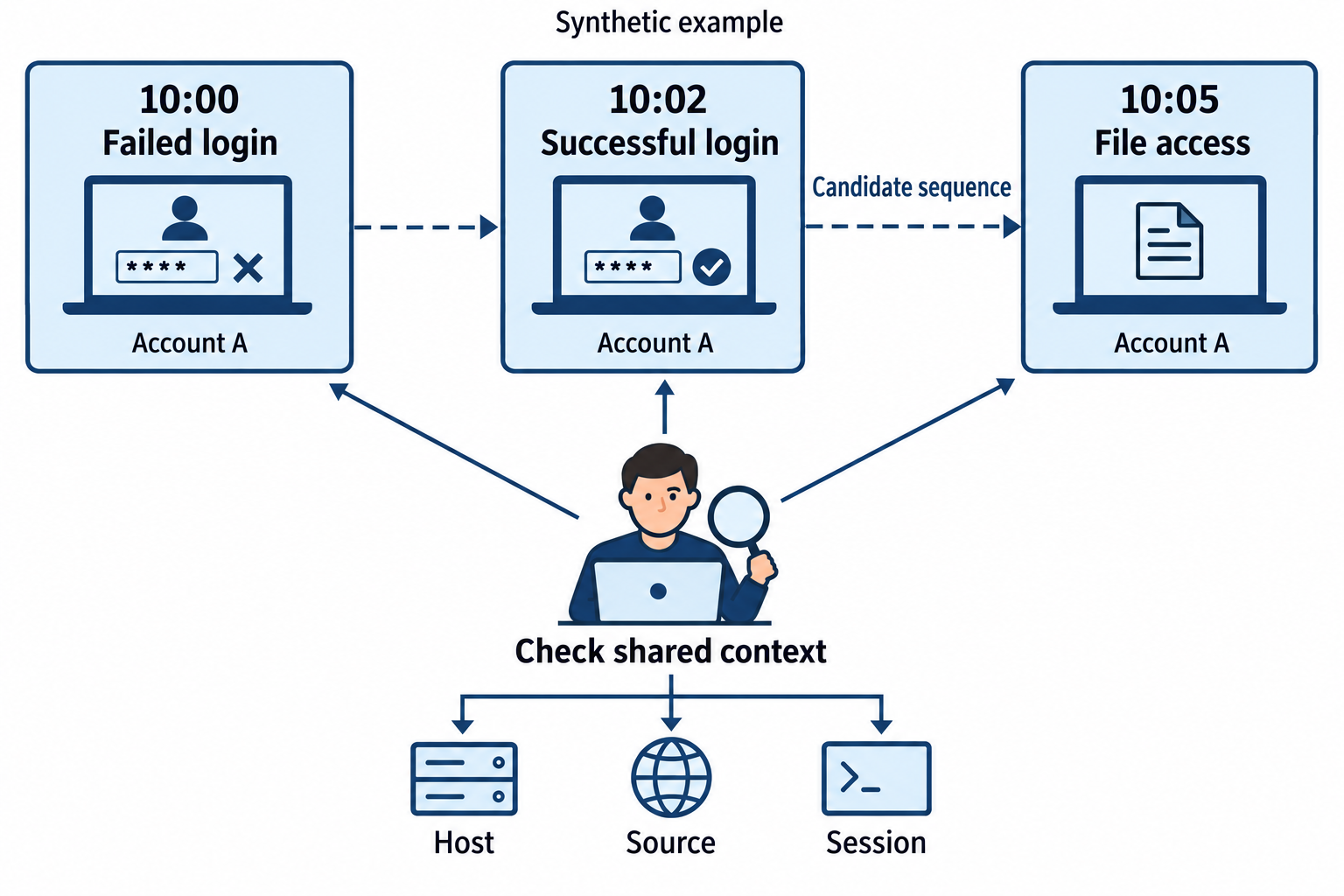
Figure 10.13: Shared account and time fields identify a candidate sequence; source, host, and session evidence determine whether it belongs together.
Open Figure 10.13 at full size
Text description for Figure 10.13
The synthetic records occur at 10:00, 10:02, and 10:05 for Account A. Their timing and account value make them candidates for correlation. Analysts compare host, source address, session identifiers, event meanings, and clock consistency before treating them as one activity chain. A successful login after failures can also reflect a legitimate user correcting a password.
Search and Investigative Queries
SIEM queries aggregate and analyze logs. Example searches in Splunk (SPL):
# Find all failed logins
index=windows EventCode=4625 | stats count by user
Figure 10.14 shows the first query's results in a simulated Splunk-style interface. The stats command aggregates matching events into one count per user.
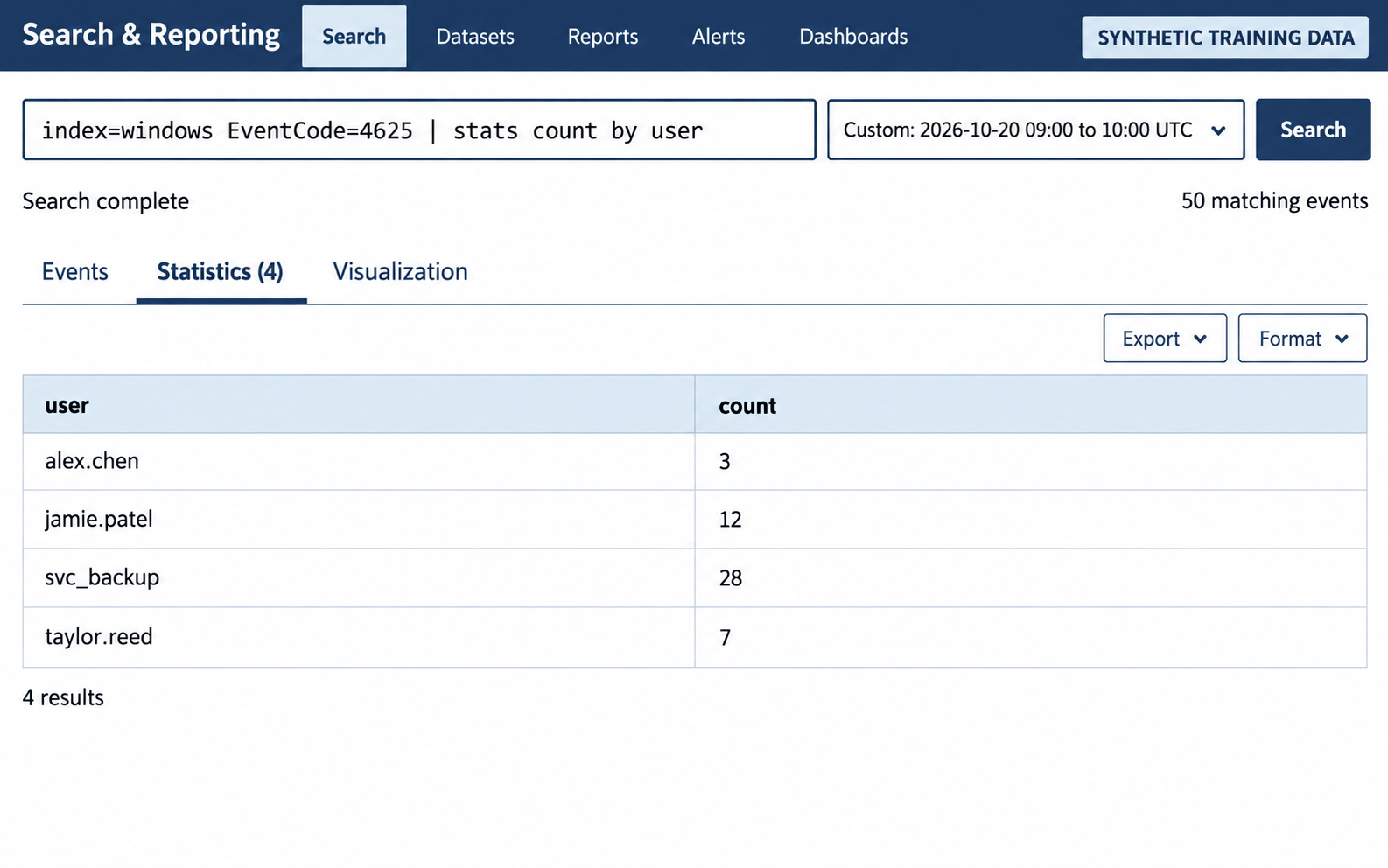
Figure 10.14: Failed-login counts by user summarize the selected hour. Each result row represents a user, and its count represents matching events in the selected index and time range.
Results and interpretation for Figure 10.14
The representative interface is labeled SYNTHETIC TRAINING DATA. The search is index=windows EventCode=4625 | stats count by user. Its time range is October 20, 2026, from 09:00 to 10:00 Coordinated Universal Time (UTC). The Statistics tab displays four results from 50 matching events.
| user | count |
|---|---|
| alex.chen | 3 |
| jamie.patel | 12 |
| svc_backup | 28 |
| taylor.reed | 7 |
The counts total 50. Aggregation removes individual event details from this result table. Analysts must examine the underlying records to determine timing, source addresses, affected hosts, and failure reasons. A large total may reflect password guessing, a mistyped password, or an application repeatedly using stale credentials.
# Detect potential brute force: more than 5 failures per user in 10 minutes
index=windows EventCode=4625
| bucket _time span=10m
| stats count as failures by user, _time
| where failures > 5
Figure 10.15 applies the second query to the same synthetic events. A time bucket is a fixed interval used to group events; _time now identifies the start of each ten-minute interval.
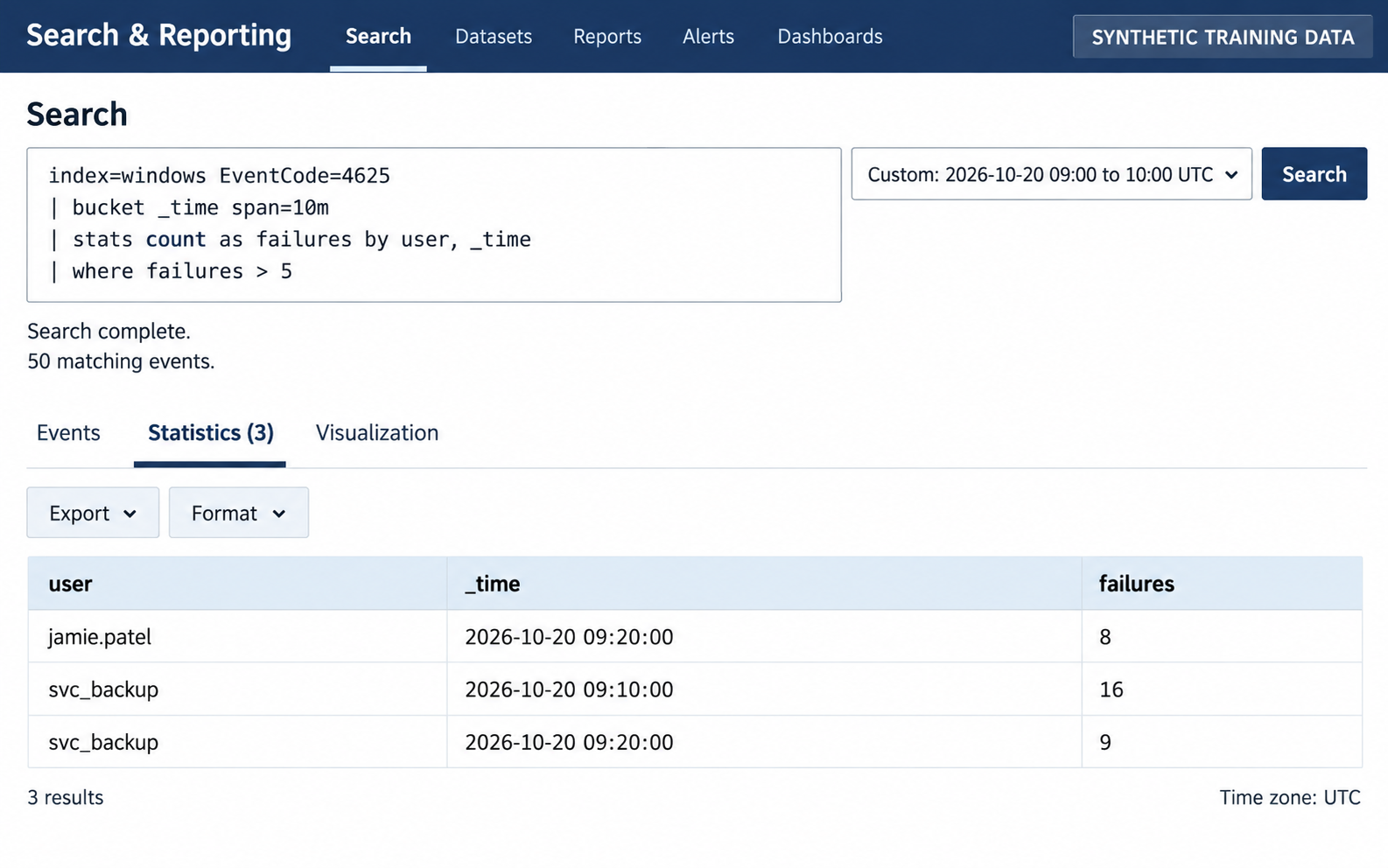
Figure 10.15: The threshold retains three user-and-time groups for investigation. These results identify concentrated failures that may indicate brute force; they require supporting evidence before an analyst concludes that an attack occurred.
Results and interpretation for Figure 10.15
The simulated interface uses the same October 20, 2026, 09:00 to 10:00 UTC search range and the same 50 matching failed-login events. The query groups events by user and fixed ten-minute interval, names each count failures, and retains only groups where failures > 5. The Statistics tab shows three results.
| user | _time (UTC) | failures |
|---|---|---|
| jamie.patel | 2026-10-20 09:20:00 | 8 |
| svc_backup | 2026-10-20 09:10:00 | 16 |
| svc_backup | 2026-10-20 09:20:00 | 9 |
The 09:20 bucket covers 09:20:00 up to, but excluding, 09:30:00. The retained groups account for 33 of the 50 events. In this scenario, jamie.patel's remaining four failures and svc_backup's remaining three occur in other buckets below the threshold. Taylor.reed's seven failures are spread across multiple buckets, each containing at most five, so that user does not appear here. Alex.chen has only three failures during the hour.
A group containing exactly five failures would also be excluded. The 50-event indicator describes the base search, while the three result rows describe the final aggregated and filtered output. This query does not group by source address or host, and it does not create an alert by itself. Analysts should inspect those fields and configure any alerting workflow separately.
# Find suspicious processes
index=endpoint process=powershell.exe
| stats count by host, CommandLine

# Correlate failed logins with successful login afterward
index=windows (EventCode=4625 OR EventCode=4624)
| transaction user host maxspan=10m startswith=(EventCode=4625) endswith=(EventCode=4624)
These examples assume your ingestion pipeline maps EventCode, user, host, and CommandLine as shown. Field names vary by source and parser. Fixed ten-minute buckets can split activity across a boundary, and a transaction groups records without proving that a successful login resulted from the failures. Inspect source addresses, logon types, and surrounding evidence. Filter the search time range and indexes to control query cost.
User and Entity Behavior Analytics (UEBA)
UEBA tools detect anomalies in user and system behavior:
- Baseline establishment: Normal activity patterns are established over time (login times, accessed resources, data volume)
- Anomaly detection: Deviations from baseline trigger alerts
- Risk scoring: Users and entities are assigned risk scores based on anomalous activity
Examples of detected anomalies:
- Impossible travel: User logs in from New York at 2 p.m., then from London at 2:15 p.m. (impossible within two hours)
- Off-hours access: User accessing systems at 3 a.m. when they normally work 9–5
- Unusual data access: User accessing customer databases when they normally only access their department's systems
- Privilege escalation: User suddenly running administrative commands when they never have before
UEBA is effective but requires extensive tuning. False positives are common if baselines are not properly established or if legitimate use cases (travel, shift changes, special projects) are not accounted for.
10.5 Log Formats and File Types
Understanding log formats is essential for both parsing and forensic analysis.
Structured Log Formats
JSON (JavaScript Object Notation) is the modern standard for structured logs:
{
  "timestamp": "2024-04-05T10:23:45.123Z",
  "source_ip": "192.168.1.100",
  "destination_ip": "8.8.8.8",
  "user": "admin",
  "action": "login",
  "status": "success",
  "details": {
    "session_id": "abc123",
    "duration": 3600
  }
}
Advantages: Hierarchical structure, nested data, widely supported by programming languages and parsing libraries.
XML (Extensible Markup Language) is verbose but schema-based:
<event>
  <timestamp>2024-04-05T10:23:45.123Z</timestamp>
  <source_ip>192.168.1.100</source_ip>
  <action>login</action>
  <status>success</status>
</event>
YAML (YAML Ain't Markup Language) is human-readable:
timestamp: 2024-04-05T10:23:45.123Z
source_ip: 192.168.1.100
action: login
status: success
CSV (Comma-Separated Values) is flat but simple:
timestamp,source_ip,destination_ip,action,status
2024-04-05T10:23:45.123Z,192.168.1.100,8.8.8.8,login,success
Windows Event Logs (EVTX)
Windows event providers generate records that the Windows Event Log service stores in .evtx files. Event Viewer displays and exports those records. Available events depend on audit policy and collection configuration. Key security-relevant Event IDs:
- 4625: Logon failed (failed authentication)
- 4624: Logon succeeded
- 4720: Account created
- 4722: Account enabled
- 4688: Process creation; the command line is included only when the applicable command-line auditing policy is enabled
- 4689: Process terminated
- 5140: Network share accessed
Windows Event Logs can be exported to XML or CSV for analysis outside of Event Viewer. Preserve the original EVTX file and record any transformations. Consult Microsoft's documentation for event 4625 and event 4688 when interpreting fields and audit prerequisites.
Parsing EVTX in Linux/macOS requires specialized tools: evtx_dump (Rust) or python-evtx (Python).
Figure 10.16 connects native event files to interpreted fields.
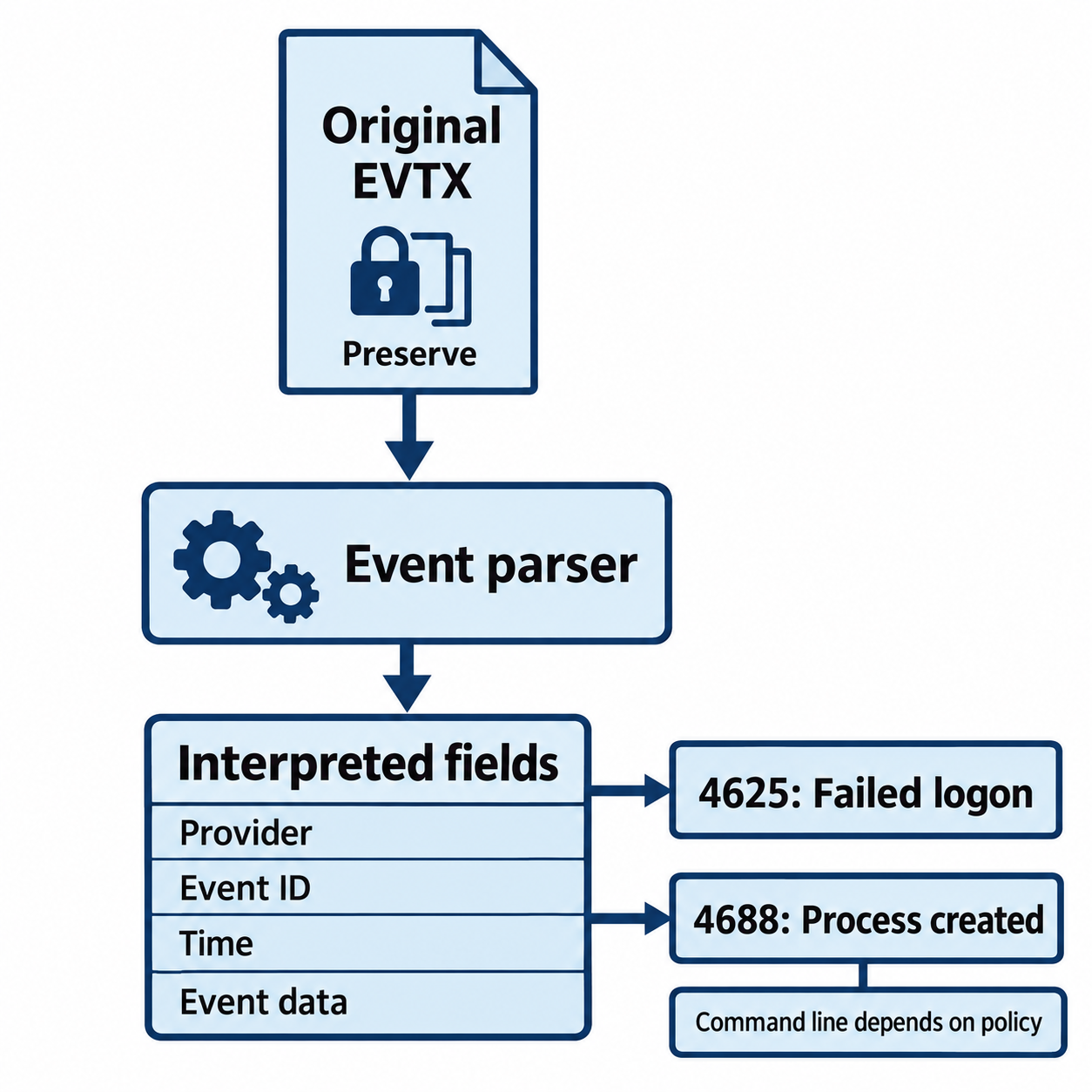
Figure 10.16: An event identifier gains meaning from its provider, fields, and audit configuration.
Open Figure 10.16 at full size
Text description for Figure 10.16
Windows event providers generate records that the event log service stores in EVTX files. Preserve the native file before exporting or parsing a working copy. Interpret the provider, event ID, timestamp, version, and event data together. Security event 4625 records a failed logon when the relevant auditing applies. Event 4688 records process creation; command-line detail depends on the applicable auditing policy.
Application and System Logs
Application logs vary by software but typically include:
- Timestamp
- Log level (DEBUG, INFO, WARN, ERROR, FATAL)
- Component or module
- Message
- Optional: stack trace, request ID, correlation ID
Example (Java application log):
2024-04-05 10:23:45.123 [main] INFO  com.app.security.AuthService - User admin login successful
2024-04-05 10:23:46.456 [pool-2-thread-1] WARN  com.app.db.ConnectionPool - Connection timeout after 30s
2024-04-05 10:23:47.789 [scheduler] ERROR com.app.jobs.DataJob - Job failed: null pointer exception
  at com.app.jobs.DataJob.process(DataJob.java:125)
System logs (syslog format, RFC 3164/5424) are standardized across Linux/Unix systems:
Apr  5 10:23:45 server01 kernel: [1234.567890] Out of memory: Kill process
Apr  5 10:23:46 server01 sshd[12345]: Failed password for admin from 192.168.1.100 port 52100 ssh2
10.6 Practical Integration and Investigation Workflow
Mature SOC teams integrate packet analysis, IDS alerts, and log analysis into a coordinated investigation workflow.
Integration and Correlation
A typical escalation path:
- Alert triggered: Suricata IDS alerts on SQL injection signature in HTTP traffic
- SIEM enrichment: SIEM query retrieves:
- All traffic from the source IP in the past hour
- Zeek logs showing all connections from that IP
- DNS logs showing domains queried by that IP
- Windows Event Logs from the destination system
- Packet capture analysis: If stored (or captured in real-time), examine actual packets to confirm the alert is not a false positive
- Timeline construction: Cross-referencing all data sources to build an attack timeline
- Escalation: Escalate according to severity, scope, and the incident response plan. High-risk activity may justify containment before malware identity or the full scope is confirmed
Triage and Investigation Workflow
When an alert fires:
- Alert validation: Is the alert a true positive? False positives waste investigation time. Initial validation might involve checking if the source IP is a known scanner or internal system.
- Context gathering:
- Who is the source and destination system?
- What is their business function?
- What is normal behavior for this interaction?
- Packet-level analysis: If the alert references network traffic, capture or retrieve the pcap and inspect actual packets to understand payload and intent
- Log analysis: Cross-reference SIEM logs for related activity from the same source, destination, or user
- Indicator extraction: Identify IOCs (Indicators of Compromise): IP addresses, domains, file hashes, user accounts involved
- Threat intelligence: Cross-reference IOCs against external threat databases (VirusTotal, AlienVault OTX, Censys)
- Escalation decision: Is this a real attack? Should it be escalated to IR team or closed as false positive?
Figure 10.17 connects the evidence sources and decisions in this section's investigation workflow.
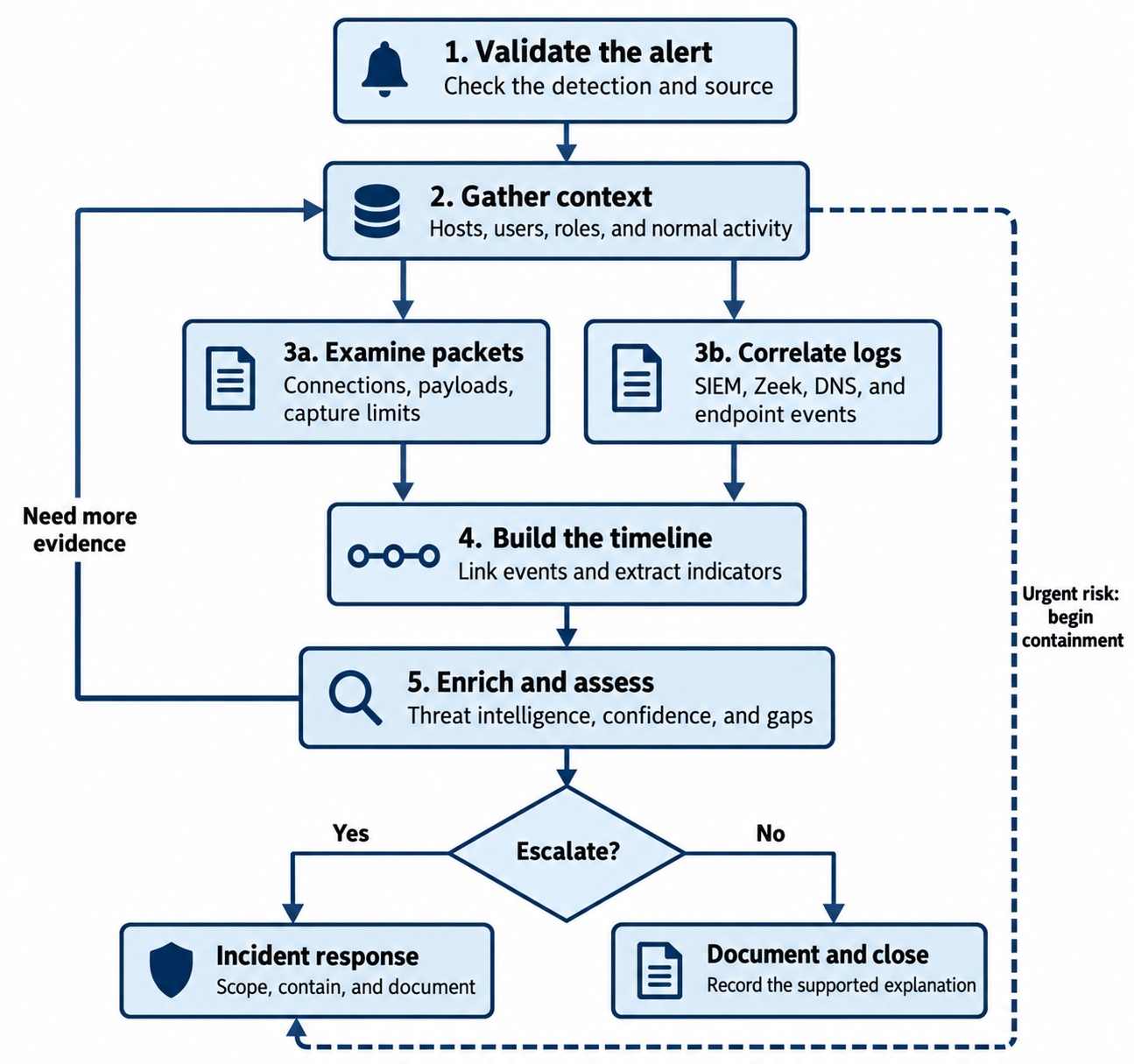
Figure 10.17: Analysts validate an alert, gather context, and combine packet and log evidence before deciding how to proceed. The feedback loop supports further investigation, while the dashed path allows urgent containment under the incident response plan.
Text description for Figure 10.17
- Validate the alert: Examine the detection and its source, including possible legitimate explanations.
- Gather context: Identify affected hosts, users, business roles, and expected activity.
- Examine complementary evidence: Packet analysis checks connections, visible payloads, and capture limitations. In parallel, log analysis correlates SIEM records, Zeek logs, DNS activity, and endpoint events.
- Build the timeline: Link relevant events and extract indicators such as addresses, domains, file hashes, and accounts while preserving references to the supporting records.
- Enrich and assess: Use threat intelligence to add context, assess confidence, and identify evidence gaps. The feedback arrow returns to context gathering when more evidence is needed.
- Decide whether to escalate: Escalation leads to incident response, including scoping, containment, and documentation. When the evidence supports closure without escalation, document the explanation and close according to procedure. An unresolved evidence gap calls for further investigation.
A separate dashed arrow leads from context gathering directly to incident response. It represents urgent risk that warrants beginning containment while investigation continues. Response actions follow the organization's incident response plan and account for evidence preservation. The diagram summarizes related activities; teams may revisit steps as new information arrives.
Chapter Summary
-
CyberChef and command-line tools (hexdump, file, strings) enable decoding of obfuscated and encoded data. Analysts must identify encoding (base64, hex) and apply appropriate transformations.
-
Wireshark provides graphical packet analysis, enabling detailed inspection of network traffic. Strengths include protocol dissection and stream reconstruction. Limitations include performance on large captures.
-
tcpdump is the lightweight command-line alternative, efficient for packet capture and piping to analysis tools.
-
Snort and Suricata are network-based intrusion detection systems that alert when traffic matches known attack signatures. Limitations include false positives, encrypted traffic blindness, and evasion techniques.
-
Zeek performs deep protocol analysis and generates detailed logs suitable for SIEM ingestion and correlation.
-
Protocol analysis requires understanding TCP/IP, DNS, HTTP/HTTPS, and SMB. Unusual protocol behavior supplies investigation leads; capture limitations, system roles, and corroborating evidence determine the conclusion.
-
SIEM platforms (Splunk, ELK, Sumo Logic) centralize log collection, parsing, correlation, and alerting across the organization. They are the operational hub of SOC work.
-
Log parsing and normalization convert unstructured logs into indexed, searchable fields. Regular expressions and structured formats (JSON, XML, YAML) facilitate this process.
-
UEBA (User and Entity Behavior Analytics) identifies deviations from a baseline that may reveal activity missed by signatures. Analysts assess legitimate explanations and tune the detections.