CH10: Cloud-Based Attacks
Introduction
Cloud platforms fundamentally changed how infrastructure is built and compromised. In traditional datacenters, an attacker needed to breach the physical perimeter, compromise network infrastructure, and access systems. In the cloud, the attack surface is global, the business logic is identity-centric, and the boundary between your infrastructure and shared infrastructure is blurred.
The shared responsibility model defines this blurred boundary. The cloud provider secures the infrastructure; you secure everything built on top of it. The problem is that most organizations misunderstand what "on top of it" means. They believe the provider is securing their data and their configurations. In reality, misconfigured S3 buckets, overpermissioned IAM roles, and unpatched applications are the customer's responsibility, and they are often overlooked.
Cloud attacks exploit this misunderstanding. An attacker does not need to break into a datacenter; they access metadata services that leak credentials. They enumerate IAM permissions to discover privilege escalation paths. They find publicly accessible storage buckets. They compromise container images and escape into the host system. They chain third-party integrations and supply chain attacks across the cloud ecosystem.
This chapter treats cloud platforms not as abstract infrastructure but as distinct attack surfaces. By the end, you will understand how cloud platforms differ from traditional infrastructure, identify cloud-specific vulnerabilities, and chain them into compromises that move from external reconnaissance to credential theft to persistent access.
Learning Objectives
Upon completing this chapter, students will be able to:
- Explain the shared responsibility model and identify gaps where misconfiguration creates exploitable attack surfaces.
- Exploit metadata services (IMDS, IMDSv2, GCP, Azure) to extract credentials and achieve privilege escalation.
- Identify IAM misconfiguration, discover privilege escalation paths, and abuse cross-account trust relationships.
- Attack cloud storage, compute, and networking resources through misconfiguration and credential exposure.
- Exploit containerized workloads through image vulnerabilities, runtime escape, and Kubernetes API abuse.
- Chain supply chain and third-party integration attacks across cloud ecosystems.
10.1 Cloud Attack Surface and Shared Responsibility
The Shared Responsibility Model as Attack Framing
The shared responsibility model defines what the cloud provider secures and what the customer secures. Understanding this model is the first step in finding cloud vulnerabilities.
AWS's shared responsibility model separates concerns like this:
- AWS responsibility: Hypervisor, physical infrastructure, host OS, networking hardware, service endpoints, availability zone isolation.
- Customer responsibility: Guest OS, applications, runtime environments, data encryption at rest and in transit, access control, identity and access management, network segmentation, firewall rules.
The gap between these responsibilities is where vulnerabilities hide. An organization assumes AWS handles patching but AWS patches the host OS, not the customer's EC2 instance OS. An organization assumes encryption is enabled by default but most services require explicit encryption configuration. An organization creates an S3 bucket intending it to be private but misconfigures the bucket policy.
Cloud Service Models and Attack Vectors
Different service models distribute responsibility differently:
IaaS (Infrastructure-as-a-Service) like EC2 gives maximum control and maximum responsibility. You manage the entire OS, applications, and patches. The provider manages only the hypervisor and hardware.
PaaS (Platform-as-a-Service) like App Engine or Lambda removes OS management. The provider maintains the runtime, but you manage code and dependencies. Third-party library vulnerabilities and supply chain attacks become more relevant because you control less of the stack.
SaaS (Software-as-a-Service) like Office 365 removes almost all infrastructure concerns, but introduces OAuth and third-party integration risks. You depend on the provider's security, and misconfigured OAuth permissions leak data to third parties.
Figure 10.1 compares which layers the customer and provider manage across the three service models.
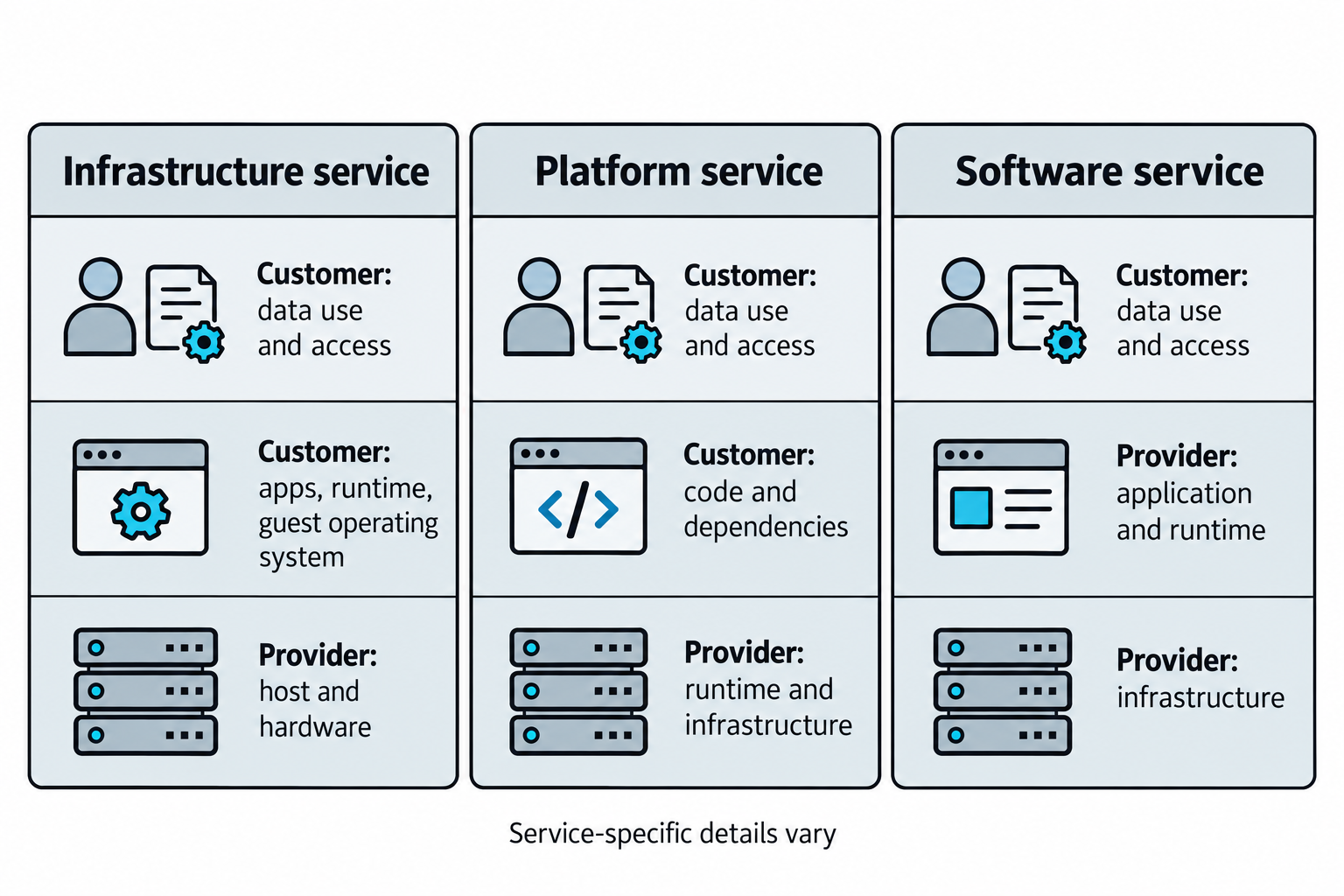
Figure 10.1: Customer and provider responsibilities shift with the service model and the specific service.
Open Figure 10.1 at full size (opens in a new tab)
Text description for Figure 10.1
Read the three columns from top to bottom. With an infrastructure service, the customer manages applications, runtime software, and the guest operating system, while the provider manages the underlying host and hardware. With a platform service, the customer supplies code and dependencies while the provider manages more of the runtime and infrastructure. With a software service, the provider also manages the application. Customers retain responsibility for their use of data, identity assignments, and available access settings in all three models. The diagram summarizes common arrangements. Individual service documentation defines the detailed division of responsibility.
10.2 Metadata Service Attacks
Instance Metadata Service (IMDS) Exploitation
Cloud instances can provide metadata services that expose configuration, credentials, and networking information to software running on the instance. Available information depends on the provider, instance configuration, and attached identity.
IMDSv1 (Instance Metadata Service Version 1) accepts requests without a metadata session token. The following examples assume that the Amazon Web Services (AWS) instance allows IMDSv1 and has an attached Identity and Access Management (IAM) role. All responses below are simulated instructional output. Names, addresses, timestamps, and credential values are fictional, and the credential placeholders cannot authenticate.
The first command lists available metadata categories:
curl http://169.254.169.254/latest/meta-data/
Simulated output (selected entries):
hostname
iam/
instance-id
local-ipv4
placement/
security-groups
This response lists paths that software can query. Individual paths return values, such as an internal address:
curl http://169.254.169.254/latest/meta-data/local-ipv4
Simulated output:
10.0.2.15
Internal addresses, hostnames, and security group names can reveal infrastructure details. The iam/ category can also lead to temporary credentials for an attached role. Query the role listing to discover its name:
curl http://169.254.169.254/latest/meta-data/iam/security-credentials/
Simulated output:
my-role
Use that returned name in the credential path. Here, my-role replaces the generic placeholder instance-role-name:
curl http://169.254.169.254/latest/meta-data/iam/security-credentials/my-role/
Simulated output (credential values replaced with nonfunctional placeholders):
{
  "Code": "Success",
  "LastUpdated": "2026-10-22T12:00:00Z",
  "Type": "AWS-HMAC",
  "AccessKeyId": "SIMULATED_ACCESS_KEY_ID",
  "SecretAccessKey": "SIMULATED_SECRET_ACCESS_KEY",
  "Token": "SIMULATED_SESSION_TOKEN",
  "Expiration": "2026-10-22T18:00:00Z"
}
The response uses JavaScript Object Notation (JSON), a format that pairs field names with values:
| Field | Meaning and sensitivity |
|---|---|
AccessKeyId |
Identifies the temporary credential set. This identifier alone does not authenticate a request. |
SecretAccessKey |
Secret used to sign AWS requests. Exposure compromises the credential set when combined with the other required values. |
Token |
Session token required alongside the access key and secret key when using these temporary credentials. Treat it as sensitive. |
Expiration |
Time when this credential set expires. The Z suffix indicates Coordinated Universal Time (UTC). |
Code, LastUpdated, Type |
Report retrieval status, the last update time, and the credential type. AWS-HMAC indicates keyed hash message authentication used in request signing. |
Someone who obtains all three credential values may authenticate as the role until expiration, subject to effective permissions and other access controls. For example, a role allowed to read a particular storage bucket could expose its contents. The response does not establish administrator access. AWS documents this response structure in Retrieve security credentials from instance metadata, and lists available paths in Instance metadata categories.
Code that can reach an enabled IMDSv1 endpoint can request this information without a metadata session token. A server-side request forgery (SSRF) vulnerability lets an attacker direct a web application to request a chosen URL. If the application can reach metadata and returns its response, this can expose the same credentials:
POST /fetch-url
url=http://169.254.169.254/latest/meta-data/iam/security-credentials/my-role/
In this example, POST /fetch-url targets the vulnerable web application. The application then makes an HTTP GET request to the supplied metadata URL. If it relays the response body, the attacker receives a credential object like the simulated JSON above. Credential retrieval from IMDS uses GET in both examples.
Figure 10.2 follows server-side request forgery (SSRF), where an application makes an attacker-directed request, through a metadata credential leak.
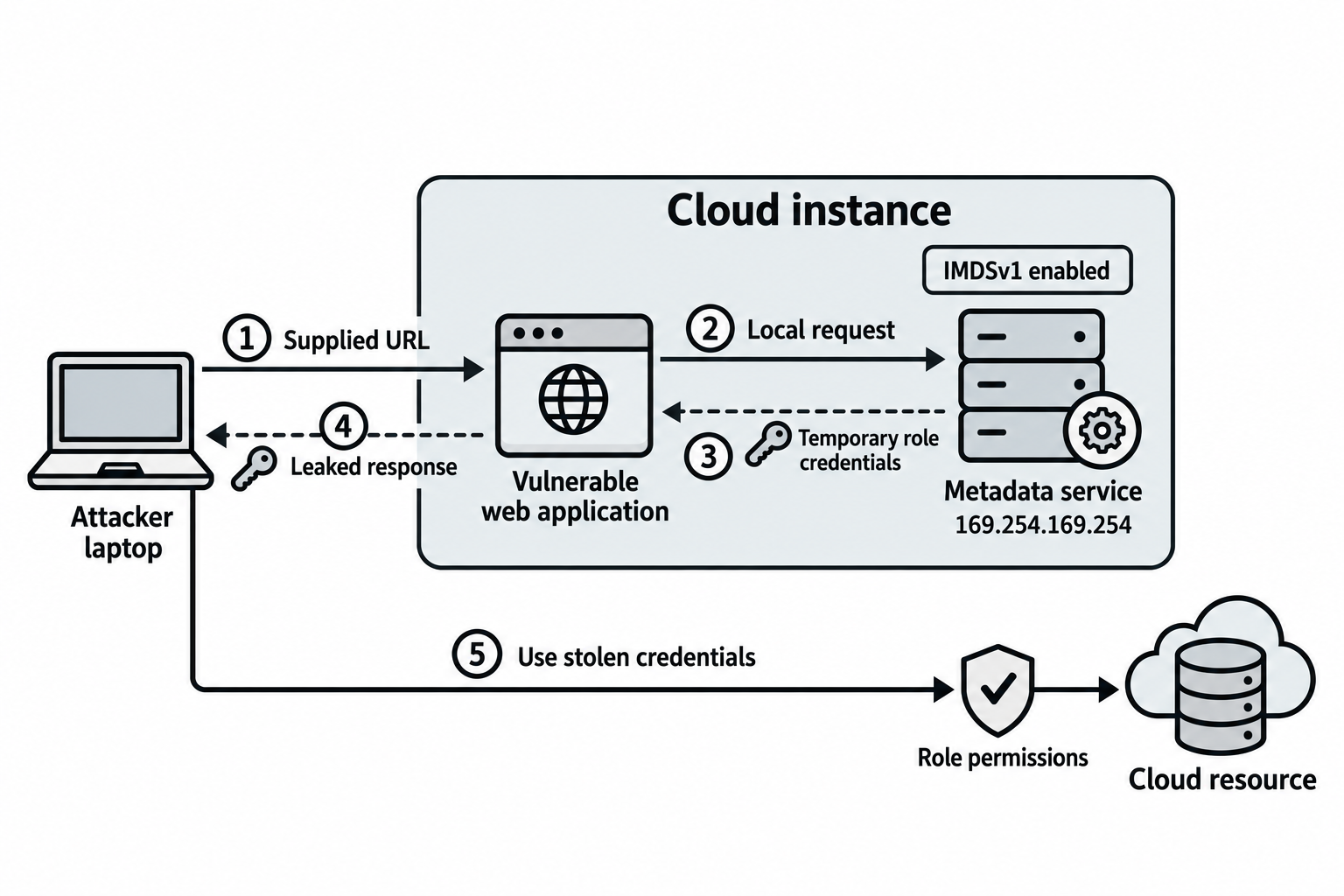
Figure 10.2: The vulnerable application connects an external request to a metadata service reachable from the instance.
Open Figure 10.2 at full size (opens in a new tab)
Text description for Figure 10.2
This synthetic example assumes Instance Metadata Service Version 1 (IMDSv1) is enabled, the application can reach it, and an attached role provides credentials. Step 1: the attacker supplies a URL to the application. Step 2: the application requests the instance-local metadata address. Steps 3 and 4: temporary role credentials return through the application and leak in its response. Step 5: the attacker presents those credentials to a cloud resource. The resource still applies the role's effective permissions and other applicable restrictions. Metadata reachability, credential availability, and response disclosure are separate prerequisites.
IMDSv2 adds a token requirement. The attacker must first make a PUT request to obtain a token, then use that token in subsequent requests:
TOKEN=$(curl -X PUT "http://169.254.169.254/latest/api/token" \
  -H "X-aws-ec2-metadata-token-ttl-seconds: 21600")
curl -H "X-aws-ec2-metadata-token: $TOKEN" \
  http://169.254.169.254/latest/meta-data/
IMDSv2 resists simple SSRF attacks because the web application cannot easily perform the PUT request needed to obtain a token. However, attacks are still possible:
- DNS rebinding: Control a domain that initially resolves to a benign IP, later resolves to 169.254.169.254. Applications that cache DNS results or trust the domain can be exploited.
- Hop count bypass: Some network architectures allow cross-account IMDS access if the attacker can manipulate the hop count that the metadata service checks.
Figure 10.3 separates the metadata session token from any cloud credentials subsequently retrieved through the service.
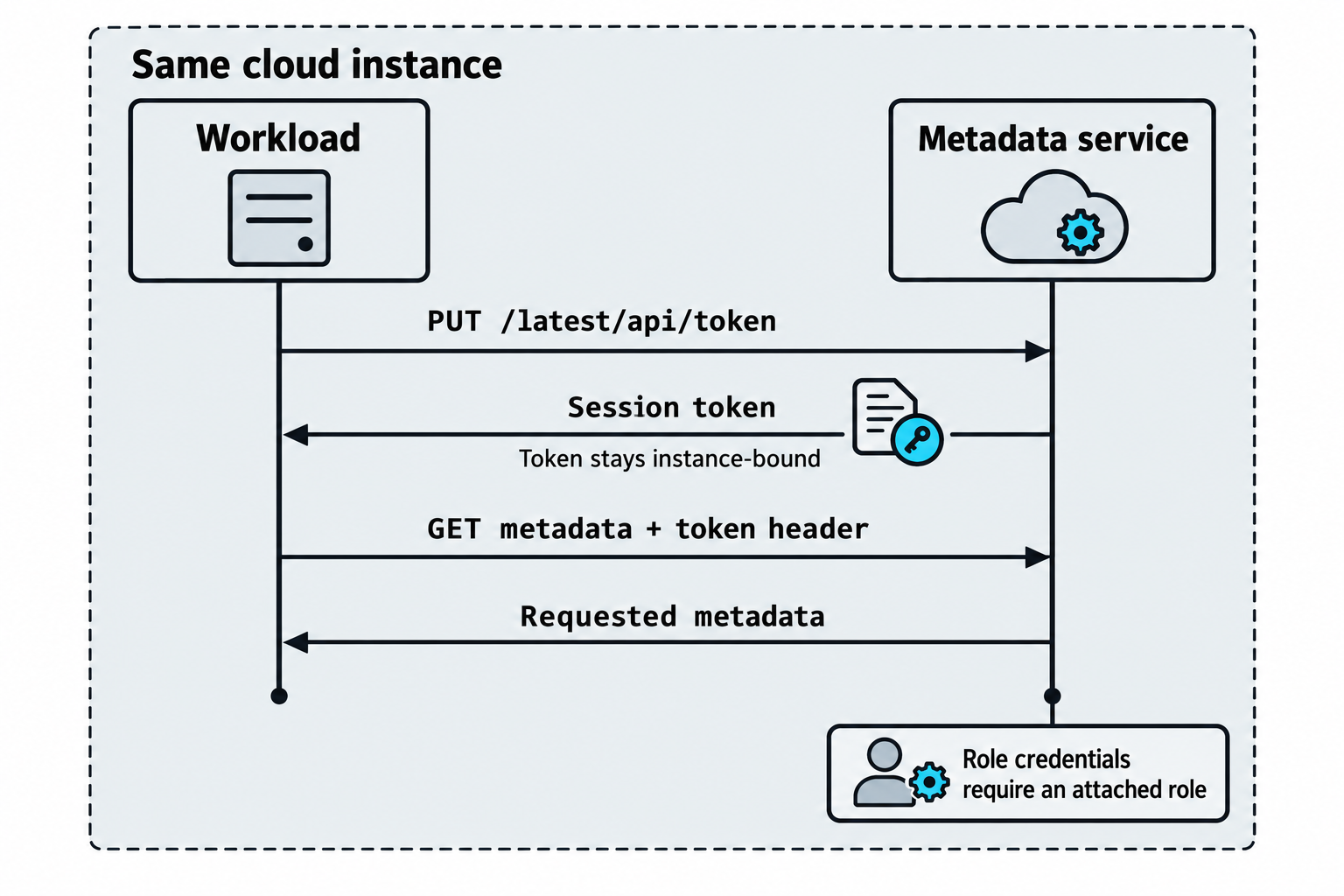
Figure 10.3: An IMDSv2 token authorizes metadata requests on its originating instance.
Open Figure 10.3 at full size (opens in a new tab)
Text description for Figure 10.3
Instance Metadata Service Version 2 (IMDSv2) uses a two-stage exchange. The workload first sends a PUT request to the token endpoint and receives a session token. It includes that token in the header of a later GET request for metadata. The metadata session token is distinct from temporary cloud role credentials. An attached role and a request for its credential path are necessary to retrieve that role's credentials. The token applies to the instance that issued it. The configurable hop limit controls how many network hops the token response can traverse. A higher hop limit alone does not establish cross-account metadata access. A vulnerable application capable of the required methods and headers may still present a risk.
Technical references: AWS: IMDSv2 exchange; AWS: metadata options.
Google Cloud Platform (GCP) Metadata Service
GCP's metadata service is similar but uses a different endpoint:
curl -H "Metadata-Flavor: Google" \
  http://metadata.google.internal/computeMetadata/v1/instance/service-accounts/default/identity
The Metadata-Flavor: Google header is meant to prevent accidental leakage but does not provide strong security. An application vulnerability allows an attacker to send this header and fetch credentials.
Azure Instance Metadata Service (IMDS)
Azure also exposes metadata:
curl -H "Metadata:true" \
  "http://169.254.169.254/metadata/instance/compute/vmId?api-version=2021-02-01"
Managed identity tokens can be extracted:
curl -H "Metadata:true" \
  "http://169.254.169.254/metadata/identity/oauth2/token?api-version=2018-02-01&resource=https://management.azure.com/"
These tokens authenticate to Azure resources with whatever permissions the managed identity has.
Figure 10.4 compares the local metadata interfaces and the identity material they can return.
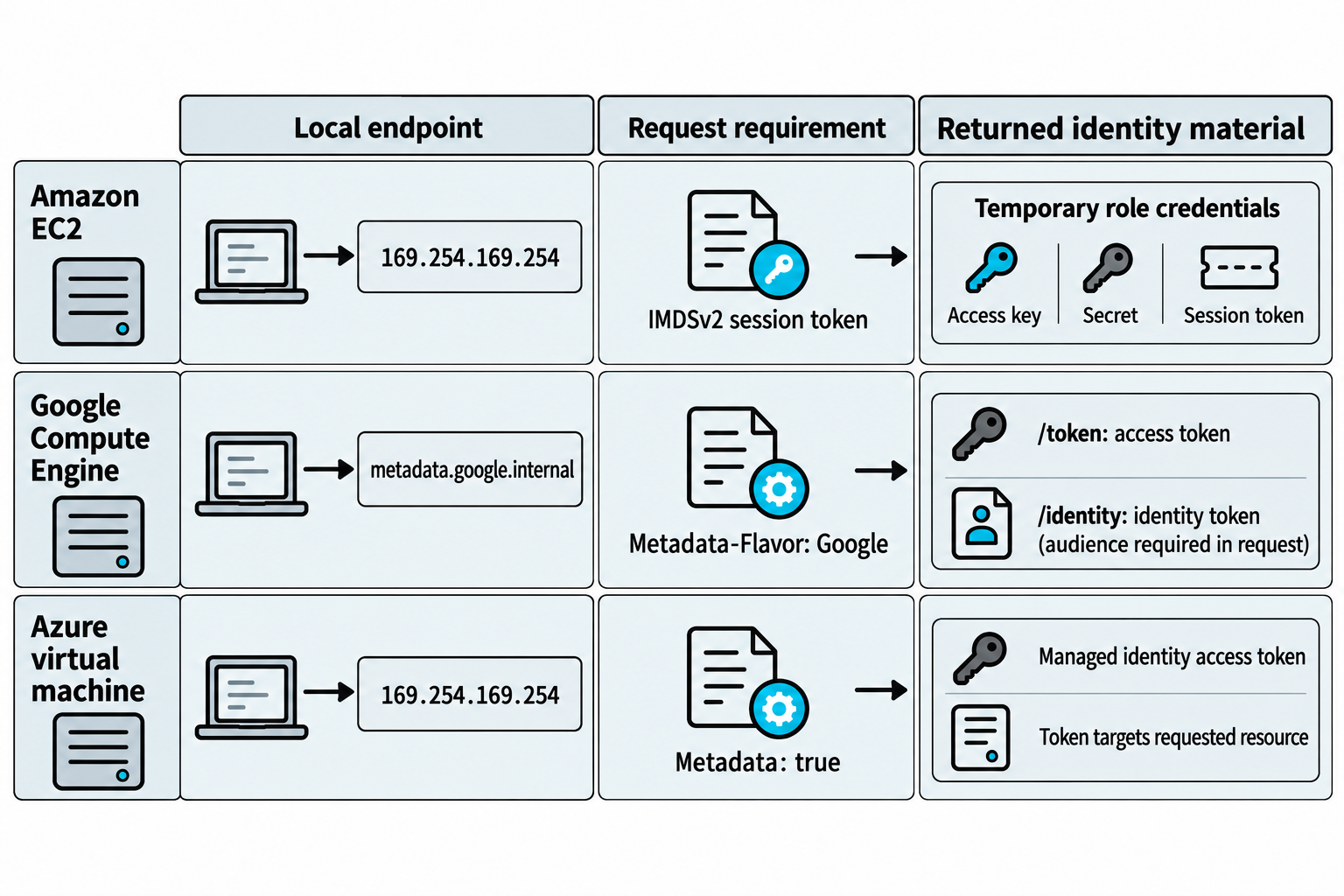
Figure 10.4: Metadata credentials and request requirements differ across cloud providers.
Open Figure 10.4 at full size (opens in a new tab)
Text description for Figure 10.4
Each row represents a workload using its own environment's metadata interface with an appropriate identity configured. Amazon Elastic Compute Cloud (EC2) can return an attached role's access key, secret access key, and session token after the IMDSv2 exchange. Google Compute Engine requests use the Metadata-Flavor: Google header. The service-account /token endpoint returns an access token, while /identity returns an identity token for an audience specified in the request. An audience identifies the intended recipient. Requests to the identity endpoint include this audience parameter. Azure requests use Metadata: true and the applicable application programming interface (API) version. Its managed-identity token request names the target resource. Receiving a valid token or credential does not establish unrestricted access.
Technical references: Google: metadata queries; Google: identity tokens; Microsoft: managed-identity tokens.
Metadata Service Chaining
Metadata service attacks are most powerful when chained with other vulnerabilities:
- SSRF vulnerability in web application → Fetch metadata service → Extract credentials.
- Container escape from compromised container → Access host metadata service → Extract credentials.
- Compromised EC2 instance → Fetch metadata → Extract IAM role credentials → Use credentials to access S3, RDS, other services.
Once credentials are extracted, the attacker has moved from external attacker to authenticated insider with the permissions of the compromised instance.
10.3 Identity and Access Management (IAM) Attacks
IAM Role and Policy Misconfiguration
Cloud access control is entirely identity-based. There is no "network inside the company," only authenticated users and services with specific permissions. Misconfigured IAM is the dominant attack vector in cloud environments.
Over-permissioned roles grant more access than necessary. An instance or service account with admin privileges, which should be limited, is commonly seen:
{
  "Version": "2012-10-17",
  "Statement": [
    {
      "Effect": "Allow",
      "Action": "*",
      "Resource": "*"
    }
  ]
}
This policy grants unrestricted access to all AWS services. An attacker who compromises the service account (via SSRF, code execution, or stolen credentials) has complete AWS access.
Privilege escalation paths exist when roles can modify policies or create new roles. For example:
{
  "Effect": "Allow",
  "Action": [
    "iam:CreateAccessKey",
    "iam:AttachUserPolicy",
    "iam:CreatePolicy",
    "iam:AttachRolePolicy"
  ],
  "Resource": "*"
}
An attacker with these permissions can create a new user with admin privileges, or modify an existing user's permissions, permanently escalating access.
Cross-account role assumption without MFA requirement allows lateral movement. If role A can assume role B in another account without additional authentication, an attacker who compromises role A can move to role B.
Figure 10.5 shows the two sides of a cross-account role-assumption request.
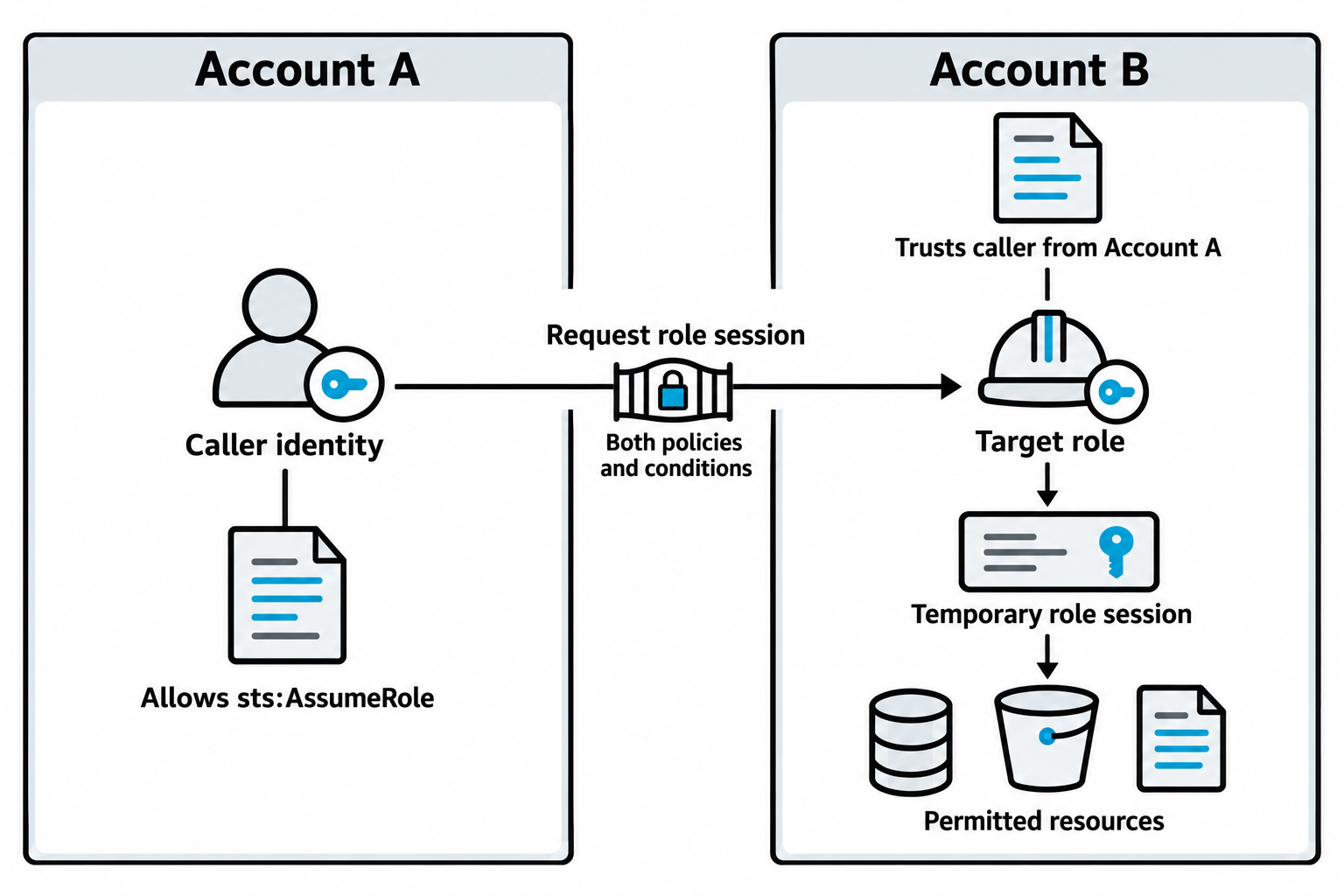
Figure 10.5: Cross-account role assumption requires compatible permissions, trust, and request conditions.
Open Figure 10.5 at full size (opens in a new tab)
Text description for Figure 10.5
The caller in Account A has an identity-based policy allowing sts:AssumeRole for the target role. The target role in Account B has a trust policy allowing that caller, subject to its conditions. Applicable policy evaluation on both sides must allow the request. Successful assumption yields a temporary role session. The role's permissions and other applicable limits govern what that session can do in Account B. The absence of a multifactor-authentication condition alone does not create a trust relationship or grant access.
Technical references: AWS: cross-account policy evaluation.
Service Account Key Exposure
Service accounts are non-human identities with long-lived credentials. Exposed keys are a critical vulnerability:
- Hardcoded in source code: A developer commits a service account JSON key to a public GitHub repository.
- Exposed in Docker images: Build secrets left in image layers.
- In configuration files: Service account keys stored in plaintext in
.envfiles or configuration management systems.
Once exposed, keys grant access until revoked. Many organizations fail to rotate keys regularly, extending the window of compromise.
Figure 10.6 traces how a copied credential can connect an exposed file or image layer to a service identity.
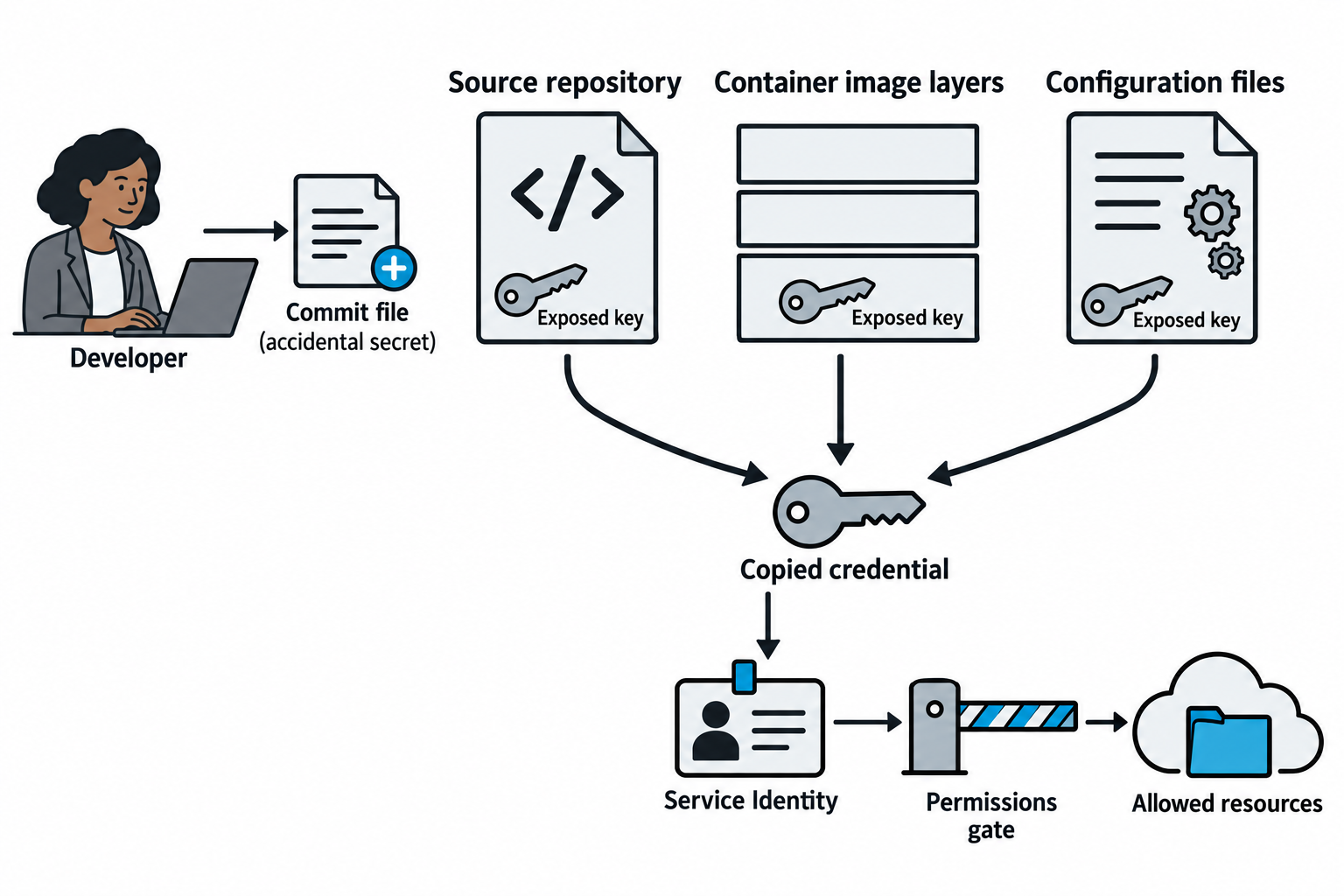
Figure 10.6: The exposure location changes how a secret is found, while the associated identity determines its access.
Open Figure 10.6 at full size (opens in a new tab)
Text description for Figure 10.6
A developer may accidentally include a secret in a committed file. Secrets can also remain in container image layers or configuration files. An attacker who can read the exposed material may copy the credential and authenticate as its associated service identity while the credential remains valid. The permissions gate shows that possession of a credential does not automatically grant administrator access. Non-human identities can also use short-lived credentials or federated identity, so long-lived keys are one exposure pattern rather than a requirement for every service account.
Privilege Escalation via IAM
Attackers discover privilege escalation paths by:
- Enumerating current permissions:
aws iam get-user,aws iam list-user-policies,aws iam list-attached-user-policies. - Testing policy simulation:
aws iam simulate-principal-policyto determine if a specific action is allowed. - Discovering dangerous permissions: Actions like
iam:PassRole,lambda:InvokeFunction,ec2:RunInstancescombined with execution permissions create escalation paths.
A simple example:
1. Service account has: ec2:RunInstances, iam:PassRole
2. Attacker launches an EC2 instance passing an admin IAM role to it
3. Attacker accesses the instance and extracts its credentials
4. Attacker now has admin access
Figure 10.7 shows the prerequisites that connect role passing to a more privileged workload session.
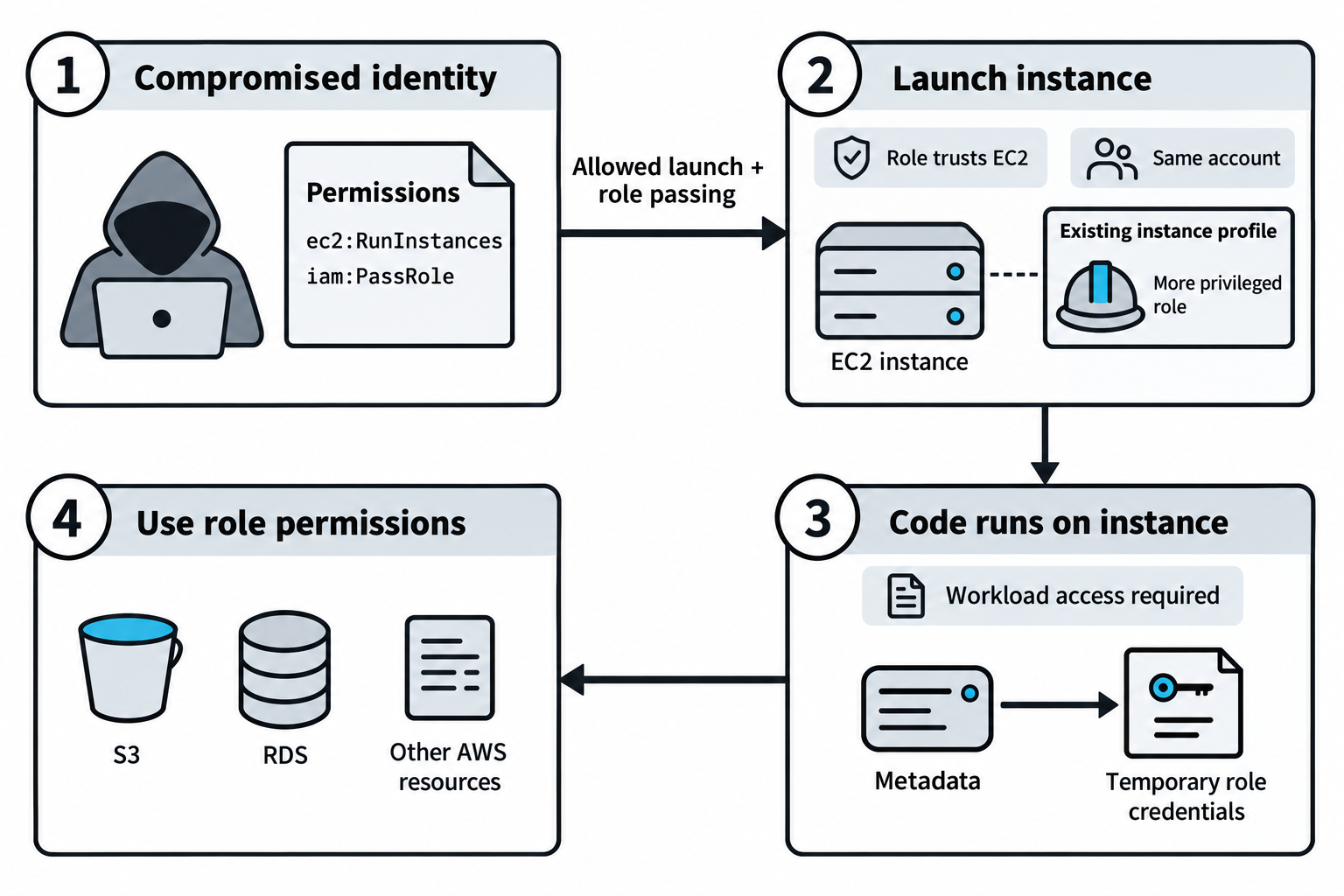
Figure 10.7: Role passing can support escalation when launch permissions, role trust, and workload access align.
Open Figure 10.7 at full size (opens in a new tab)
Text description for Figure 10.7
Identity and access management (IAM) controls who can pass a role and which role can be passed. In this example, the caller can launch an EC2 instance and pass a particular, more privileged role through an existing instance profile in the same account. The role trusts the EC2 service. The attacker must also be able to run code on the launched instance and reach the relevant metadata credential endpoint. The workload can then receive temporary role credentials and request actions allowed by the role. iam:PassRole does not itself return credentials or grant permission to create a role. Permission boundaries, organization policies, resource policies, and explicit denies may constrain the resulting access. S3 denotes Amazon Simple Storage Service; RDS denotes Amazon Relational Database Service.
Technical references: AWS: passing a role to a service; AWS: attaching a role to an instance.
Resource-Based Policies
In addition to identity-based policies, resources themselves have policies. An S3 bucket policy might grant public read access:
{
  "Version": "2012-10-17",
  "Statement": [
    {
      "Effect": "Allow",
      "Principal": "*",
      "Action": "s3:GetObject",
      "Resource": "arn:aws:s3:::my-bucket/*"
    }
  ]
}
Similarly, KMS key policies might allow any user in the account to decrypt, and Lambda resource policies might allow external accounts to invoke functions.
10.4 Cloud Storage and Data Exposure
S3 Bucket Misconfiguration
S3 buckets are frequently misconfigured:
aws s3 ls s3://my-bucket/
# Lists all objects in a publicly accessible bucket
Common misconfigurations:
- AllPublicRead ACL: Everyone can read objects.
- AllPublicReadWrite ACL: Everyone can read and write objects (data destruction).
- Permissive bucket policy:
Principal: "*"allows any principal to perform actions. - Versioning disabled: Deleted files cannot be recovered; attackers delete evidence.
- Default encryption disabled: Objects are stored in plaintext.
- Block public access disabled: Default protections are not in place.
An attacker discovering a public bucket can download all contents. If the bucket contains backups, database dumps, source code, or credentials, the damage is severe.
Figure 10.8 distinguishes listing object names from reading or writing object contents.
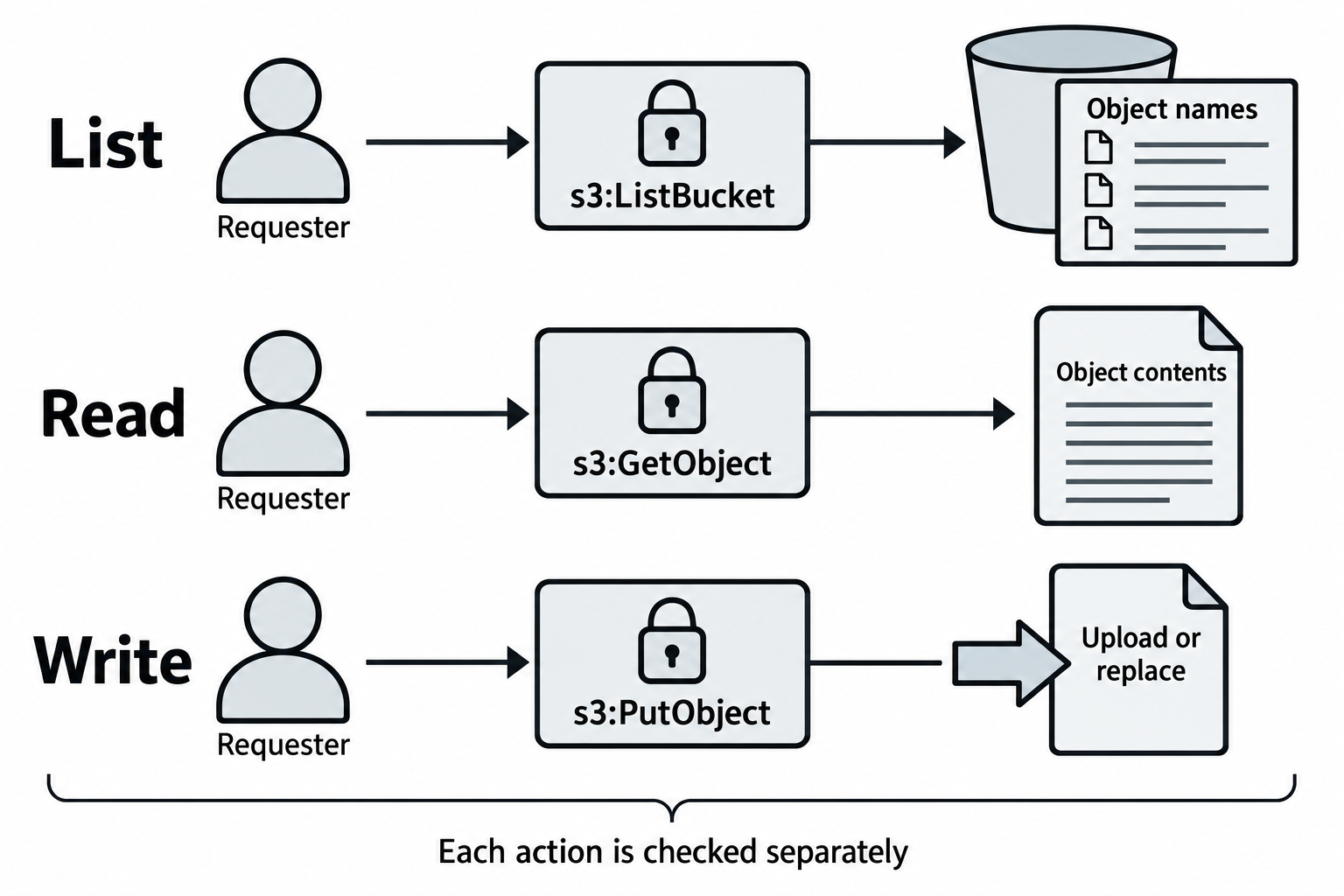
Figure 10.8: Storage exposure depends on the specific action allowed by the effective access controls.
Open Figure 10.8 at full size (opens in a new tab)
Text description for Figure 10.8
For an Amazon S3 general-purpose bucket, s3:ListBucket permits listing object names. s3:GetObject permits reading the current object's contents. s3:PutObject permits uploading or replacing an object, subject to other applicable controls. Deletion requires its own permission. A publicly readable object may exist in a bucket whose contents cannot be listed anonymously. Public-access protections and policy conditions also affect the result. Encryption is a separate control: since January 5, 2023, S3 automatically encrypts new uploads, and this baseline cannot be disabled. Encryption at rest does not prevent a read that the service authorizes.
Technical references: AWS: S3 permissions; AWS: default encryption.
Data Exfiltration Chains
Realistic scenarios chain vulnerabilities:
- SSRF in web application → Fetch credentials from metadata service.
- Credentials grant access to S3 → Download entire bucket contents.
- Bucket contains database backups → Decrypt and analyze offline.
- Backups contain credentials → Use credentials to access production RDS.
Each step is individually exploitable; chained together, they result in complete compromise.
GCP and Azure Storage Exposure
GCP Cloud Storage buckets are similarly misconfigured. The gsutil tool lists public buckets:
gsutil ls gs://publicly-readable-bucket/
Azure Blob Storage containers configured with public access leak data:
https://storage-account.blob.core.windows.net/public-container/file.txt
Shared Access Signatures (SAS) tokens provide temporary access. If SAS tokens are overly permissive or long-lived, they leak data.
10.5 Compute and Workload Attacks
EC2 and Instance Exploitation
Amazon Elastic Compute Cloud (EC2) is the virtual machine service from Amazon Web Services (AWS). A virtual machine is a computer implemented through software, with allocated processor capacity, memory, storage, and network connections. AWS calls each EC2 virtual server an instance. When launching an instance, an administrator chooses an instance type for its computing resources and an Amazon Machine Image (AMI), a template containing the operating system and initial software. Instances can run Linux distributions, such as Amazon Linux or Ubuntu, or Microsoft Windows Server. These servers can host websites, databases, business applications, and other workloads.
Administrators manage the operating system and applications much as they would on a server in their own organization. They commonly connect to Linux instances through Secure Shell (SSH), which provides an encrypted remote terminal, and to Windows instances through Remote Desktop Protocol (RDP), which provides a remote graphical desktop. An exposed remote login service, an unpatched application, or excessive permissions can therefore create an entry point into an EC2 workload.
EC2 instances expose multiple attack surfaces:
- Metadata service: Already discussed; the primary credential vector.
- Security groups: Overly permissive inbound rules expose services to the internet.
- SSH keys: Private keys left in home directories or accessible via Systems Manager.
- IAM instance profile: The role attached to the instance defines its permissions.
An attacker who compromises an EC2 instance gains whatever permissions the instance's IAM role has. If that role can access S3, RDS, Lambda, and Secrets Manager, the attacker has lateral movement paths throughout the account.
Container Exploitation and Escape
Container images often contain vulnerabilities:
- Outdated base images: Base OS images with known CVEs.
- Vulnerable dependencies: Application dependencies in the image.
- Hardcoded secrets: Database passwords, API keys in image layers.
Container escape breaks the boundary between container and host. A privileged container (running with --privileged or with dangerous Linux capabilities) can:
- Mount the host filesystem:
docker run -v /:/host --privileged. - Exploit kernel vulnerabilities to escape cgroup isolation.
- Access the Docker socket to spawn sibling containers or access the host.
An attacker escaping a container moves from application compromise to host compromise, with access to all containers on the host.
Figure 10.9 locates possible container boundary crossings within the host.
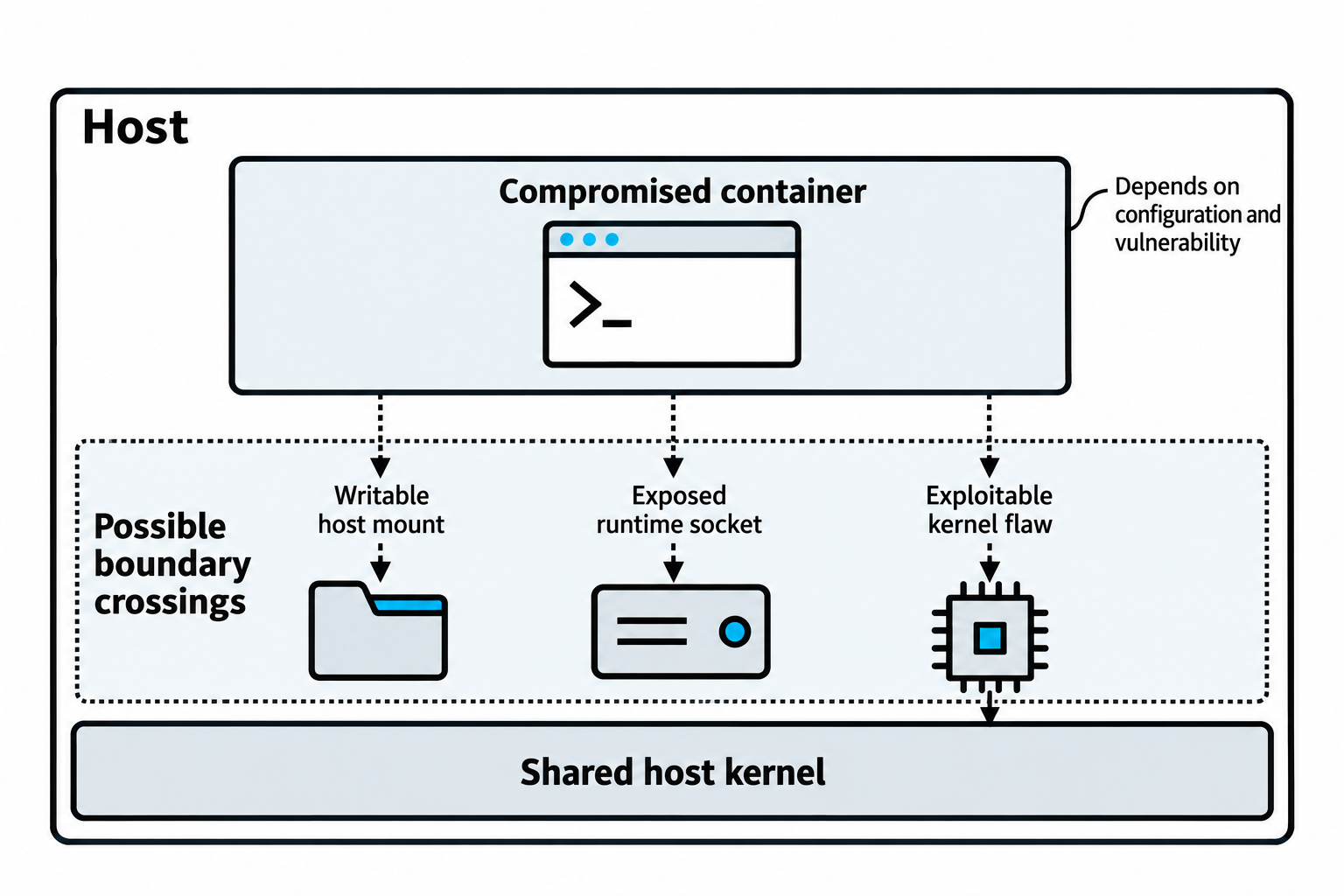
Figure 10.9: Container compromise can extend to host resources when a specific boundary-crossing path exists.
Open Figure 10.9 at full size (opens in a new tab)
Text description for Figure 10.9
The outer outline represents the host and the upper box represents a compromised container. Three dotted paths show conditional routes beyond the container's intended access. A writable host mount may expose host files. An accessible runtime socket with sufficient authority may allow control of the container runtime. A suitable exploitable kernel flaw may allow escalation through the shared host kernel. These mechanisms differ, and privileges, mounts, runtime settings, vulnerability details, and mitigation controls determine whether a path works. A compromised container does not automatically compromise the host or every other workload.
Technical references: Kubernetes: Linux kernel security constraints.
Serverless Function Attacks
Serverless functions are pieces of application code that a cloud provider runs when a request or event triggers them. An event is a notification that something happened, such as a file upload or a new message arriving in a queue. Developers supply the code and configure its triggers, resources, and permissions. The provider supplies the execution environment and manages the underlying servers and operating systems. Servers still perform the work, but the customer does not administer an individual virtual machine for each function. The platform can run additional copies of a function as demand increases, subject to service limits and configuration.
Organizations use functions for focused tasks such as creating a thumbnail after an image upload, processing an order message, answering a web application's request, or running a scheduled cleanup. For example, uploading a photograph to cloud storage can trigger a function that reads the image, creates a smaller version, and saves the result. This connects storage and processing without requiring the developer to maintain a server that continually checks for new uploads. Customers still secure their function code, software dependencies, input handling, and access permissions, which create the attack surfaces below.
Lambda, Cloud Functions, and Azure Functions provide runtime environments. Attackers target:
- Environment variables: Containing database passwords and API keys.
- Execution role privileges: Functions can be configured with overpermissioned IAM roles.
- Event source injection: Malicious events trigger function execution.
- Supply chain via dependencies: npm packages, Python modules, and other dependencies in function code.
- Concurrency exploitation: Setting unlimited concurrency and invoking a function repeatedly causes resource exhaustion or unexpected charges.
Figure 10.10 connects a serverless function's inputs and code to its resource access and usage costs.
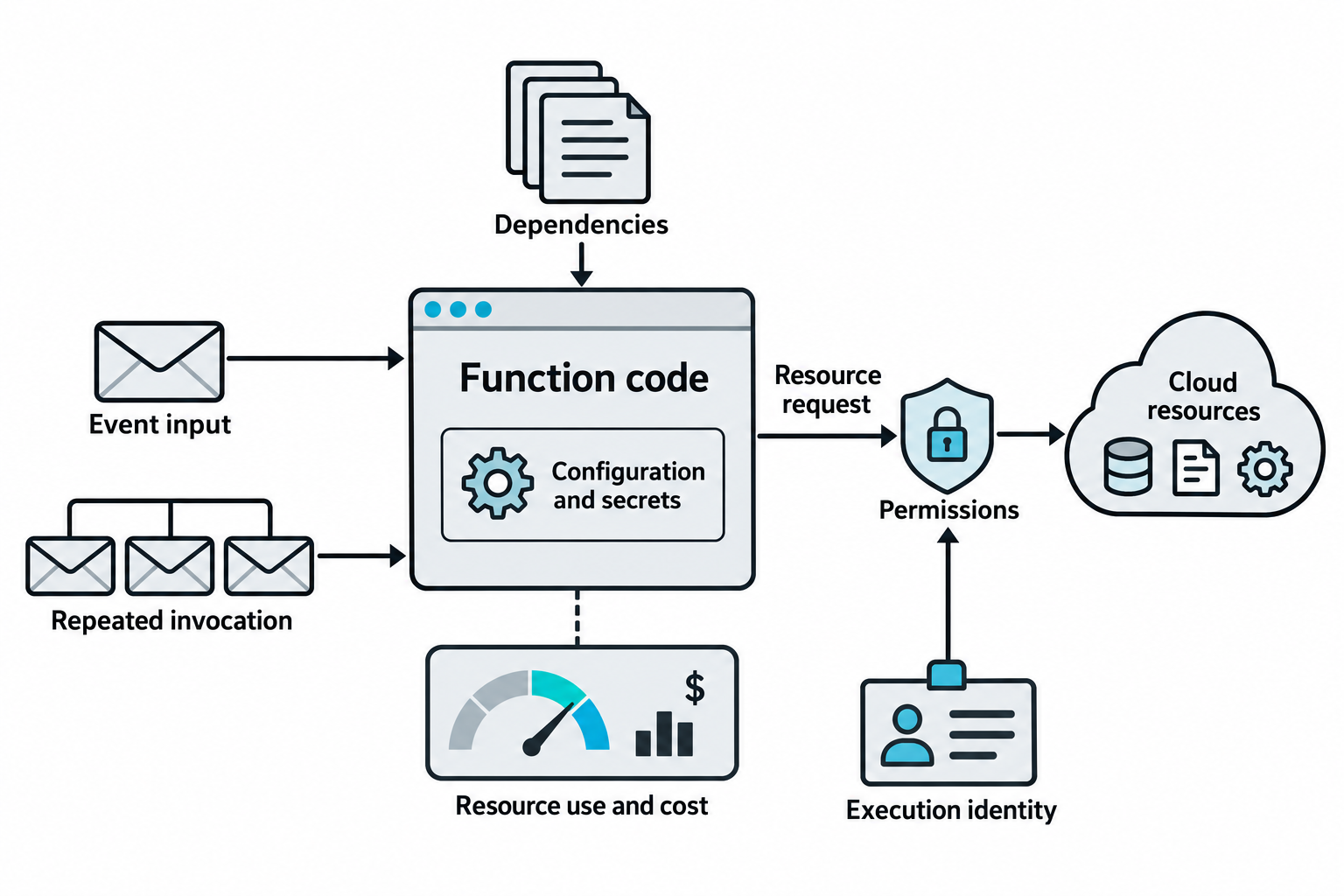
Figure 10.10: A function's attack surface includes input handling, dependencies, configuration, permissions, and invocation volume.
Open Figure 10.10 at full size (opens in a new tab)
Text description for Figure 10.10
An event supplies input to the function. The function also executes dependency code and may read configuration values or secrets available to its environment. Requests to other cloud resources use the execution identity and remain subject to permissions. Repeated invocation can increase compute use, consume concurrency capacity, and incur charges within the platform's configured limits and quotas. Malicious input requires a vulnerable processing path to produce a security impact. The diagram does not imply unlimited concurrency or that every environment variable contains a secret.
10.6 Network and Infrastructure Attacks
Security Group and Network Policy Misconfiguration
Cloud networks rely on security groups (AWS) or network policies (Azure, GCP) to segment traffic. Misconfiguration creates lateral movement paths:
- Overly permissive inbound rules:
0.0.0.0/0allowing traffic from anywhere. - Unrestricted egress: No outbound filtering, allowing data exfiltration and C2 communication.
- Missing network segmentation: All instances in a VPC can communicate with each other.
Example: Web Server with Public SSH Access
An AWS security group is a virtual firewall associated with a resource's network interface. Its inbound rules specify which incoming connections it permits, and its outbound rules specify which outgoing connections it permits. The following synthetic configuration shows the complete rule set for a fictional Linux web server. All names and identifiers are illustrative. This example intentionally includes overly permissive SSH access.
| Setting | Example value |
|---|---|
| Security group name | prod-web-sg |
| Security group ID | sg-0123456789abcdef0 |
| Description | Public website and server administration |
| Virtual private cloud (VPC), the logically isolated cloud network | vpc-0123456789abcdef0 |
| Associated instance | web-01, a Linux EC2 instance |
| Network configuration | Public IPv4 address in a subnet with an internet gateway route; IPv6 disabled |
| Other security groups on the interface | None |
Inbound rules (complete):
| Type | Protocol | Destination port | Source | Rule description |
|---|---|---|---|---|
| HTTP | TCP | 80 | 0.0.0.0/0 |
Accept web requests and redirect them to HTTPS |
| HTTPS | TCP | 443 | 0.0.0.0/0 |
Accept encrypted web connections from visitors |
| SSH | TCP | 22 | 0.0.0.0/0 |
Remote administration, incorrectly open to every IPv4 source |
HTTP is Hypertext Transfer Protocol, and HTTPS protects web traffic with encryption. TCP (Transmission Control Protocol) carries the connections shown here. SSH (Secure Shell) provides encrypted remote administration. The web server application must implement the HTTP-to-HTTPS redirect; the security group only permits the connection. In Classless Inter-Domain Routing (CIDR) notation, 0.0.0.0/0 matches every IPv4 address. Each row permits only its specified protocol and destination port.
Outbound rules (complete):
| Type | Protocol | Destination port | Destination | Rule description |
|---|---|---|---|---|
| All traffic | All | All | 0.0.0.0/0 |
Allow outbound traffic to any IPv4 destination |
Assume the server listens on ports 80, 443, and 22, and the subnet and host firewall also permit these connections. Internet users can then reach both the website and the SSH login service. Public SSH access lets attackers attempt logins, test stolen credentials, or target a vulnerable SSH service. It does not bypass SSH authentication or automatically grant access. The unrestricted outbound rule also leaves this security group without a destination restriction on new outbound connections, which can assist data theft after a compromise.
To narrow administrative access, replace the SSH source with the organization's approved administration address or network. For example, 203.0.113.25/32 represents one fictional administrator's public IPv4 address reserved for documentation. A real deployment would use its actual approved address. Remove the broad SSH rule when making this change: adding a narrower rule alongside it leaves public access in place. Security groups combine allow rules and have no explicit deny rules. They are also stateful, meaning they allow response traffic for permitted connections without requiring a separate reverse-direction rule. These behaviors follow the AWS security group documentation and web server and administrative access examples.
Figure 10.11 distinguishes incoming, internal, and outgoing network paths.
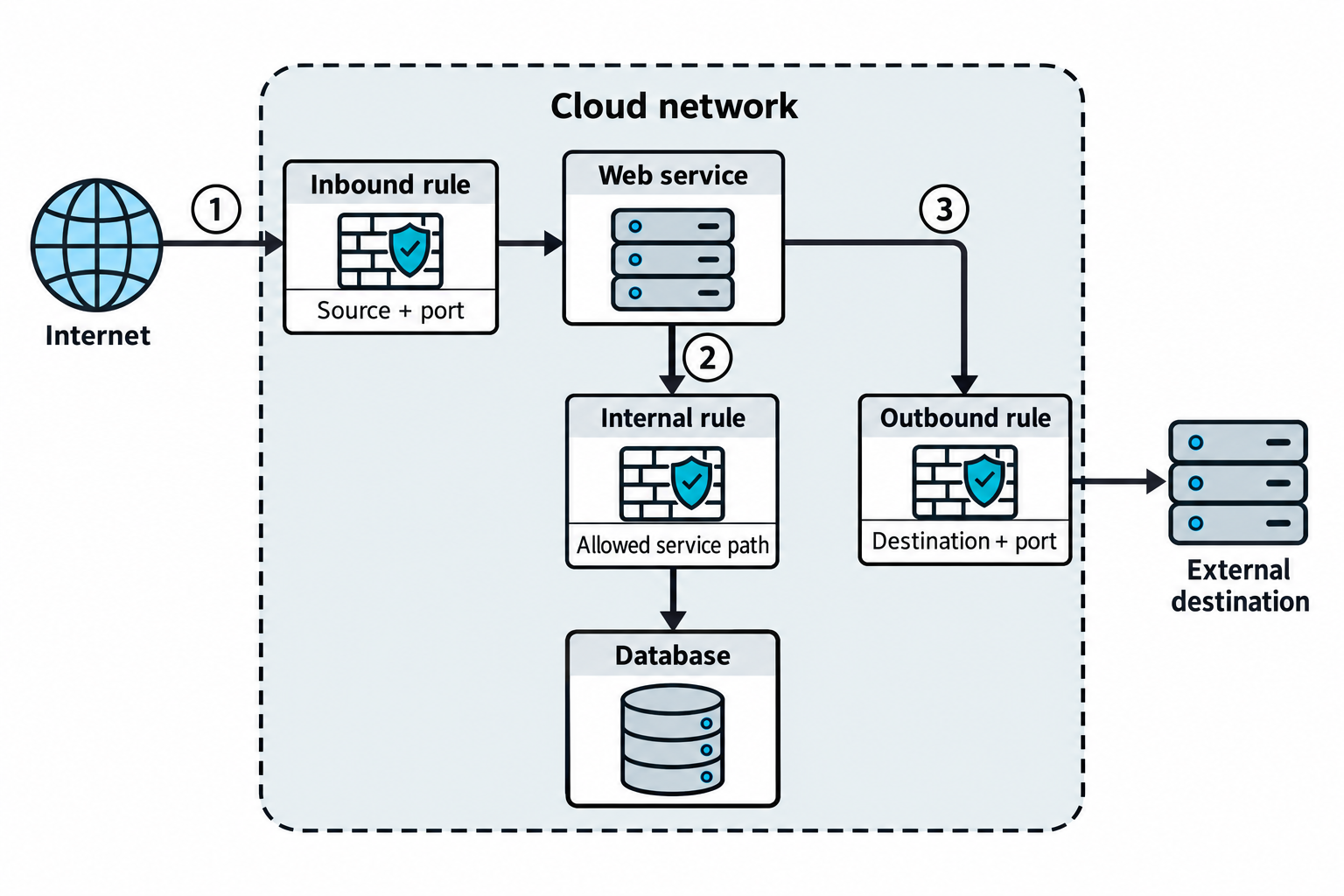
Figure 10.11: Separate network rules govern different traffic paths through a cloud environment.
Open Figure 10.11 at full size (opens in a new tab)
Text description for Figure 10.11
Path 1 reaches the web service from the Internet through an inbound rule matching the permitted source and port. Path 2 connects the web service to a database through the relevant internal rules. Path 3 connects the web service to an external destination through outbound controls. The gates summarize rule checks, rather than depicting physical firewall appliances. Actual reachability also depends on routing, attached network interfaces, other controls, and the provider's rule semantics. A broad source range permits traffic only for the protocol and ports specified by its rule.
DNS and Service Discovery
DNS services like Route 53 (AWS), Cloud DNS (GCP), or Azure DNS can be misconfigured:
- Subdomain enumeration: Discovering internal services via DNS queries or zone transfers.
- DNS hijacking: Compromising DNS to reroute traffic.
- Service discovery exposure: Consul, Eureka, or etcd APIs without authentication allow service enumeration and manipulation.
10.7 Third-Party Integration and Supply Chain Attacks
OAuth and Third-Party Integration Risks
OAuth 2.0 is an authorization framework that lets a user grant an application limited access to data or actions at another service. A third-party integration connects an application from one provider to a service from another. In a typical connection flow, the user approves access on the service provider's consent page. The application obtains an access token, a credential it presents when requesting the approved data or actions. The user keeps their service password with the service provider. A scope describes a category of access, such as reading calendar events. Google's OAuth authorization guide illustrates this consent and token process.
These illustrative examples show how integrations use that access:
- Scheduling app and calendar: A meeting scheduler requests permission to read your calendar so it can identify available times. If it also creates appointments, it needs permission to add calendar events. Access to your email messages would require a separate justification.
- Document editor and cloud storage: An online editor requests permission to open a document you select from cloud storage and save your changes. Where the provider supports access to selected files, that limits exposure compared with granting access to every file in your account.
- Social media scheduler and account: A publishing app requests permission to post updates on your behalf. After approval, it can submit scheduled posts using an access token. A stolen usable token could let an attacker publish unwanted content within the granted permissions.
Each integration's risk depends on the permissions granted and how the application protects its tokens. Misconfigured integrations can expose data or permit unwanted actions:
- Over-scoped permissions: An application requests
calendar:read, contacts:read, email:readwhen only one is needed. - Token leakage: Bearer tokens appear in logs, URLs, or error messages.
- Redirect URI bypass: An attacker registers an OAuth app with a redirect URI pointing to their server, and legitimate users' OAuth codes are sent to the attacker.
Figure 10.12 shows how OAuth, a framework for delegated authorization, connects consent to application access.
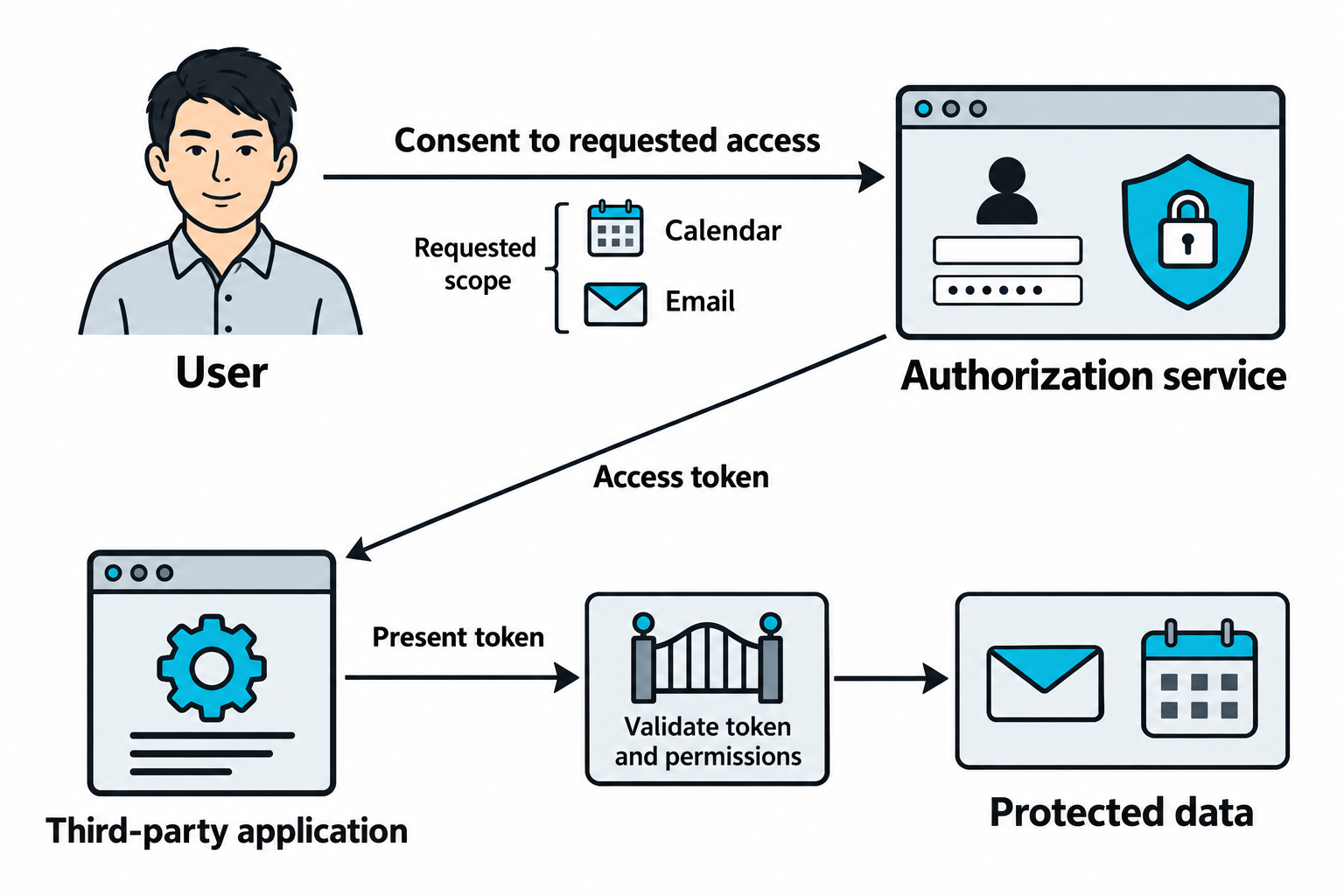
Figure 10.12: Delegated access depends on the permissions granted to the application and accepted by the resource.
Open Figure 10.12 at full size (opens in a new tab)
Text description for Figure 10.12
The user grants requested access through the authorization service. Scope describes the requested or granted extent of access, illustrated here by calendar and email data. The application obtains an access token and presents it when requesting protected data. The resource validates the token and applies the relevant permissions and token restrictions. Excessive granted scope can expose more data than the application's task requires. A leaked usable bearer token may also allow unauthorized use within its scope and lifetime. This conceptual overview omits the detailed authorization-code exchange. It does not depict sharing the user's password with the application.
Technical references: RFC 6749: OAuth 2.0; RFC 6750: bearer tokens.
Supply Chain Dependency Attacks
Every dependency is an attack surface:
- Compromised packages: A popular npm package is compromised; all applications using it are affected.
- Typosquatting: An attacker publishes
aws-sdk-jswhen the legitimate package isaws-sdk. Developers mistype the package name during installation. - Build pipeline injection: CI/CD systems are compromised; malicious code is injected into build artifacts.
- Container image supply chain: A base image is compromised and pushed to registries; applications using that base image are compromised.
Figure 10.13 follows injected code through a dependency or build process into a deployed workload.
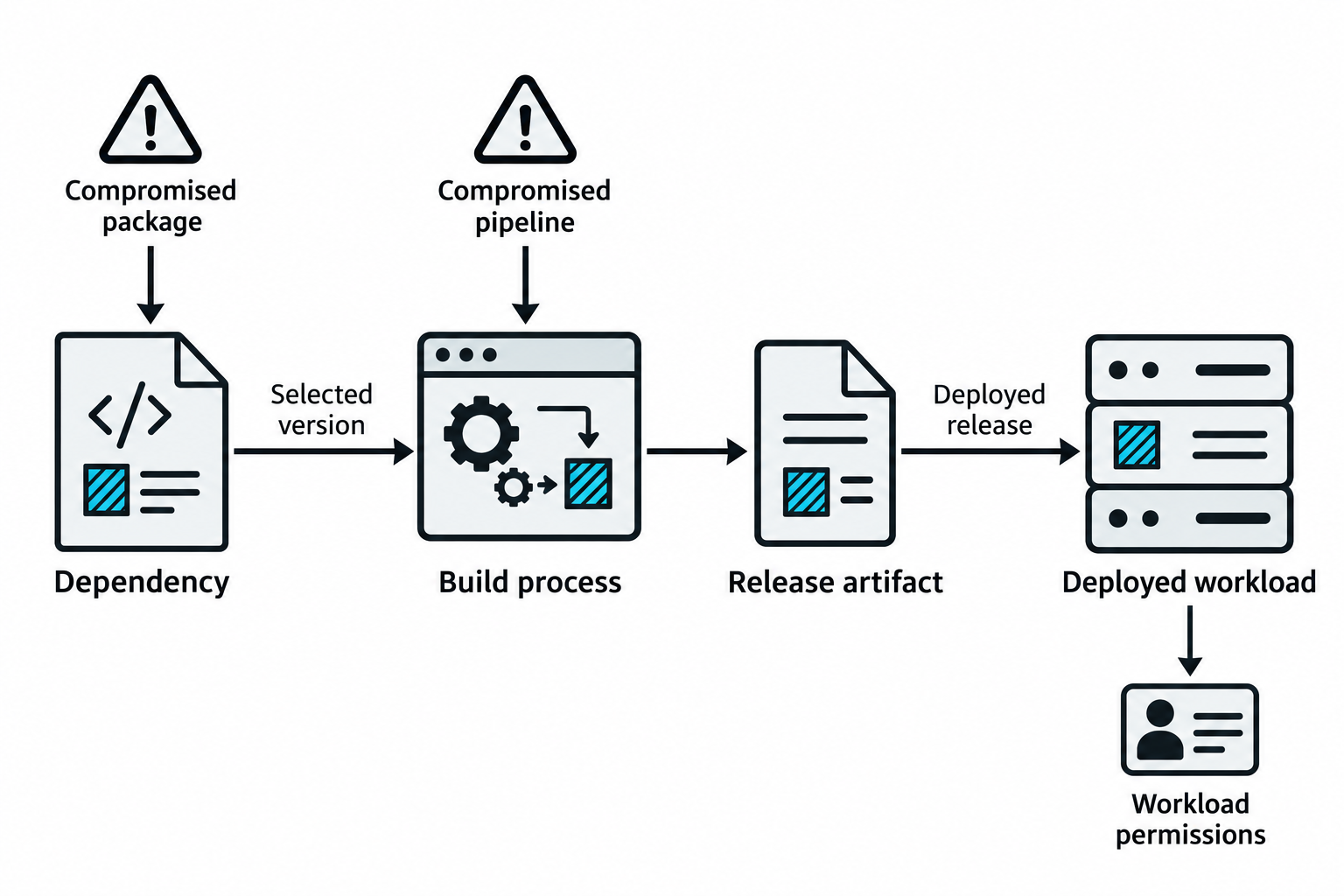
Figure 10.13: Supply-chain compromise propagates through the versions, artifacts, and releases an organization actually uses.
Open Figure 10.13 at full size (opens in a new tab)
Text description for Figure 10.13
The warning symbols mark two possible entry points: a compromised package and a compromised build pipeline. The repeated striped square represents injected code. A build using an affected dependency version may incorporate that code into its release artifact. A compromised pipeline can also alter an artifact directly. Deployment of the affected release places the code in a running workload, where execution and access depend on the workload's environment and permissions. The arrows describe adoption and deployment relationships. They do not imply that every package version, customer, or application is automatically affected.
10.8 Logging and Monitoring Evasion
AWS CloudTrail records account activity, including console sign-ins and requests to AWS application programming interfaces (APIs). Its records help analysts determine which identity requested an action, when it happened, the service involved, and the request's source address. Management events describe operations such as launching instances, changing security rules, and managing users. Data events describe operations on resource contents, such as reading or uploading an S3 object. Recording those S3 data events requires explicitly configured coverage. See AWS: CloudTrail event types.
Simulated audit trail (10 events): The following abbreviated JSON records use fictional identities, documentation IP addresses, and timestamps. Each line shows selected fields from one event, sorted by time for instruction. Actual CloudTrail log files contain fuller records inside a Records array and do not guarantee chronological order. Here, the repeated userIdentity field identifies the fictional IAM user lab-admin. The S3 entries assume data-event logging is enabled for the affected objects.
{"eventTime":"2026-10-22T14:00:00Z","eventSource":"signin.amazonaws.com","eventName":"ConsoleLogin","userIdentity":{"type":"IAMUser","userName":"lab-admin"},"sourceIPAddress":"203.0.113.25","responseElements":{"ConsoleLogin":"Success"}}
{"eventTime":"2026-10-22T14:01:00Z","eventSource":"ec2.amazonaws.com","eventName":"DescribeInstances","userIdentity":{"type":"IAMUser","userName":"lab-admin"},"sourceIPAddress":"203.0.113.25"}
{"eventTime":"2026-10-22T14:02:00Z","eventSource":"ec2.amazonaws.com","eventName":"AuthorizeSecurityGroupIngress","userIdentity":{"type":"IAMUser","userName":"lab-admin"},"sourceIPAddress":"203.0.113.25"}
{"eventTime":"2026-10-22T14:03:00Z","eventSource":"ec2.amazonaws.com","eventName":"RunInstances","userIdentity":{"type":"IAMUser","userName":"lab-admin"},"sourceIPAddress":"203.0.113.25"}
{"eventTime":"2026-10-22T14:04:00Z","eventSource":"iam.amazonaws.com","eventName":"CreateUser","userIdentity":{"type":"IAMUser","userName":"lab-admin"},"sourceIPAddress":"203.0.113.25"}
{"eventTime":"2026-10-22T14:05:00Z","eventSource":"iam.amazonaws.com","eventName":"AttachUserPolicy","userIdentity":{"type":"IAMUser","userName":"lab-admin"},"sourceIPAddress":"203.0.113.25","errorCode":"AccessDenied"}
{"eventTime":"2026-10-22T14:06:00Z","eventSource":"s3.amazonaws.com","eventName":"GetObject","userIdentity":{"type":"IAMUser","userName":"lab-admin"},"sourceIPAddress":"203.0.113.25","eventCategory":"Data"}
{"eventTime":"2026-10-22T14:07:00Z","eventSource":"s3.amazonaws.com","eventName":"PutObject","userIdentity":{"type":"IAMUser","userName":"lab-admin"},"sourceIPAddress":"203.0.113.25","eventCategory":"Data"}
{"eventTime":"2026-10-22T14:08:00Z","eventSource":"ec2.amazonaws.com","eventName":"StopInstances","userIdentity":{"type":"IAMUser","userName":"lab-admin"},"sourceIPAddress":"203.0.113.25"}
{"eventTime":"2026-10-22T14:09:00Z","eventSource":"cloudtrail.amazonaws.com","eventName":"StopLogging","userIdentity":{"type":"IAMUser","userName":"lab-admin"},"sourceIPAddress":"203.0.113.25","requestParameters":{"name":"default-trail"}}
Read eventTime as the event's time in UTC, eventSource as the AWS service, and eventName as the requested operation. These entries show a sign-in, instance discovery, an inbound security rule change, an instance launch, user creation, a denied policy attachment, object reads and writes, an instance stop, and a request to stop trail logging. AccessDenied shows that AWS rejected the policy attachment. The fuller records' request parameters identify details such as the affected security group and ports, target user, or object name. An event name alone does not establish malicious intent. Compare the activity with approved work and inspect the full record before drawing conclusions. The field structure follows AWS's CloudTrail log examples.
Cloud Audit Log Disabling
Audit logs provide evidence of cloud activity alongside application, operating system, and network logs. An attacker with sufficient permissions may stop a trail's logging to reduce future evidence collection:
# AWS CloudTrail disabling
aws cloudtrail stop-logging --name default-trail
Similar capabilities exist in GCP (Cloud Audit Logs), Azure (Activity Log), and other platforms. An attacker with appropriate permissions disables logging to cover tracks.
Figure 10.14 distinguishes a gap in one trail's collection from deletion of evidence already stored.
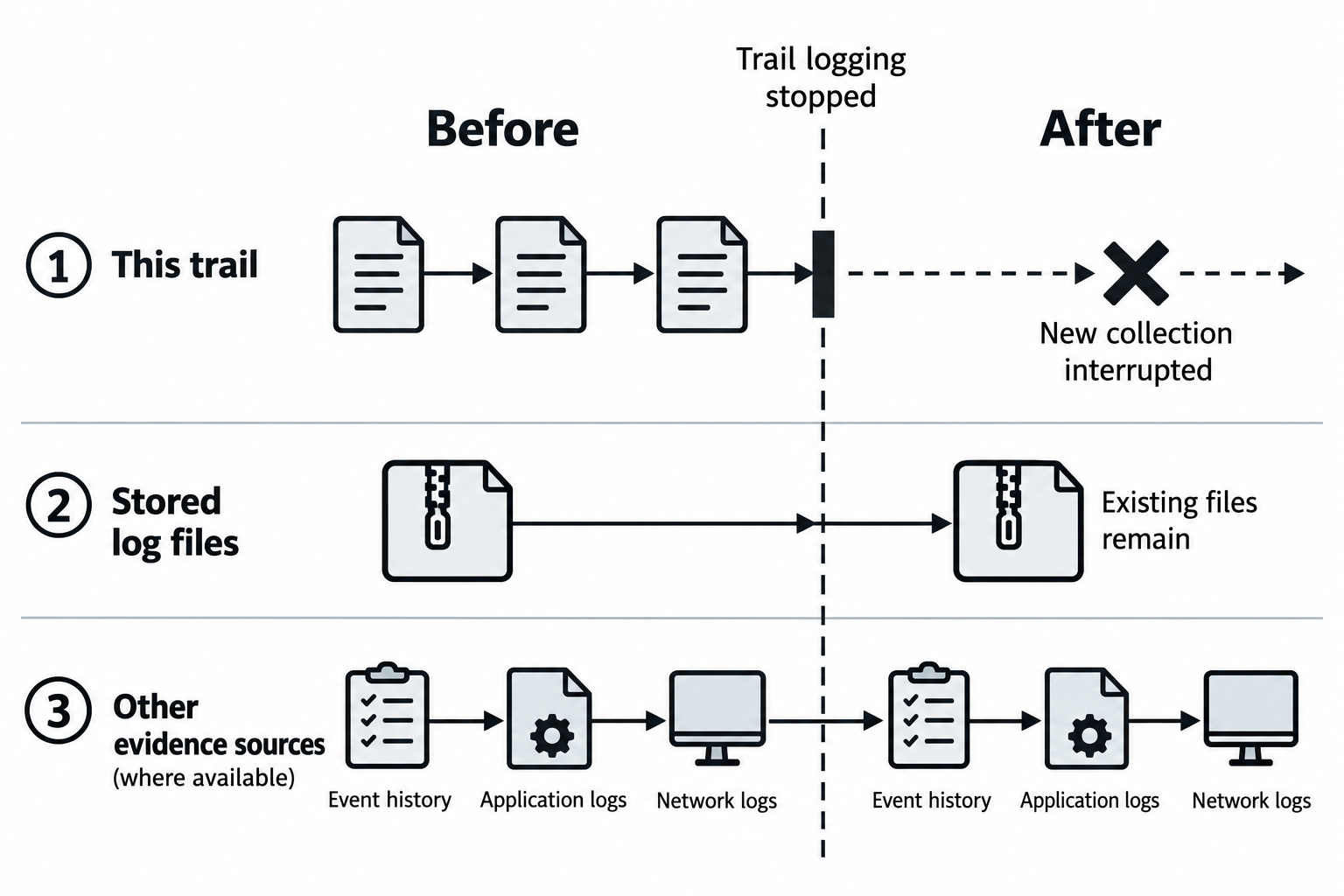
Figure 10.14: Stopping CloudTrail logging for one trail does not erase its stored files or automatically stop independent evidence sources.
Open Figure 10.14 at full size (opens in a new tab)
Text description for Figure 10.14
Read the timeline from the Before column to the After column. The vertical dashed marker represents stopping logging for one CloudTrail trail. In the first lane, new collection for that trail is interrupted. Some delayed events from before the stop may still arrive. In the second lane, previously stored log files remain in storage unless another action deletes them or retention removes them. In the third lane, independent sources may continue recording. CloudTrail Event history is separate from configured trails and retains recent management events; it does not include every event type. Application and network logs depend on their own configuration. The connected icons in the third lane indicate continuing availability over time, not one log source feeding another.
Technical references: AWS: stopping trail logging; AWS: Event history.
Detection Evasion Techniques
Attackers evade detection by:
- Slow attacks: Spreading actions over days to avoid threshold-based alerting.
- Legitimate tool abuse: Using aws-cli, gcloud, and az commands (cloud equivalent of LOLBins) that appear as normal administrative activity.
- Encrypted traffic: C2 communication over HTTPS and DNS tunneling.
- Account enumeration without lockout: Testing credentials slowly across many accounts to avoid triggering account lockout.
Analyst Perspective
Cloud compromise often begins with a single leaked credential or misconfigured resource. But the real damage comes from chaining that initial foothold with metadata service access, IAM privilege escalation, and lateral movement. When testing cloud environments, always assume that any compromise will lead to credential theft and focus on identifying what those credentials can do.
10.9 Cloud Exploitation Tools
Cloud security tools collect evidence about identities, resources, and their configuration. Some help a tester examine possible attack paths, while others compare settings with security rules or organize an inventory for review. Enumeration means systematically identifying resources, settings, and permissions. The identity used for a scan determines what the tool can inspect, so missing permissions can leave gaps in its results.
| Tool | Main purpose in an assessment | Example evidence |
|---|---|---|
| Pacu | Explore AWS permissions and test authorized attack paths through modules | An application identity has broader S3 permissions than its job requires |
| Prowler | Evaluate cloud configurations against security checks and compliance requirements | A security group permits public SSH, or an instance accepts requests without an IMDSv2 token |
| ScoutSuite | Collect cloud configuration and present findings in a browser report | A flagged security group, its ingress rules, and resource details for further review |
The commands below assume installed tools and authorized lab credentials. A named profile, such as cfs-lab, selects a saved AWS authentication configuration. The two terminal figures contain fictional, abbreviated output, with simplified labels and formatting for instruction. They illustrate findings without representing a scan of a real account. Tool versions can change output layouts and available checks.
Pacu: Examining Permissions and Attack Paths
Pacu is an open-source AWS exploitation framework maintained by Rhino Security Labs. A module performs a particular task, such as gathering identity information, enumerating permissions, or testing a privilege-escalation path. Pacu maintains sessions so a tester can retain collected information while investigating an account. Its modules include actions that change resources or identities, so the tester must review the selected module and the assessment's authorization before running it. See the Pacu project documentation.
For an initial permissions review, start Pacu, create or select a lab session, and load the approved credentials. If the lab provides a profile in the AWS credentials file, import_keys cfs-lab imports that profile. Confirm the active identity with whoami. Within the Pacu prompt, these commands display module help, enumerate the current identity's permissions, and display the resulting identity information:
help iam__enum_permissions
run iam__enum_permissions
whoami
The iam__enum_permissions module attempts to read relevant IAM policies. Its results depend on the caller's ability to retrieve those policies. Errors or unconfirmed permissions require investigation. The module source documents this enumeration process, and the Pacu command implementation documents credential import and identity display.
In the fictional scenario in Figure 10.15, lab-user only needs to read a designated application's files. The reconstructed permission summary shows s3:* on resource *, with no conditions in that allow entry. The first wildcard covers S3 actions, including operations beyond reading. The resource wildcard broadly covers resources to which those actions apply. That policy exceeds the user's stated task. A tester should identify the policy responsible and recommend the specific actions and resource paths the application needs.
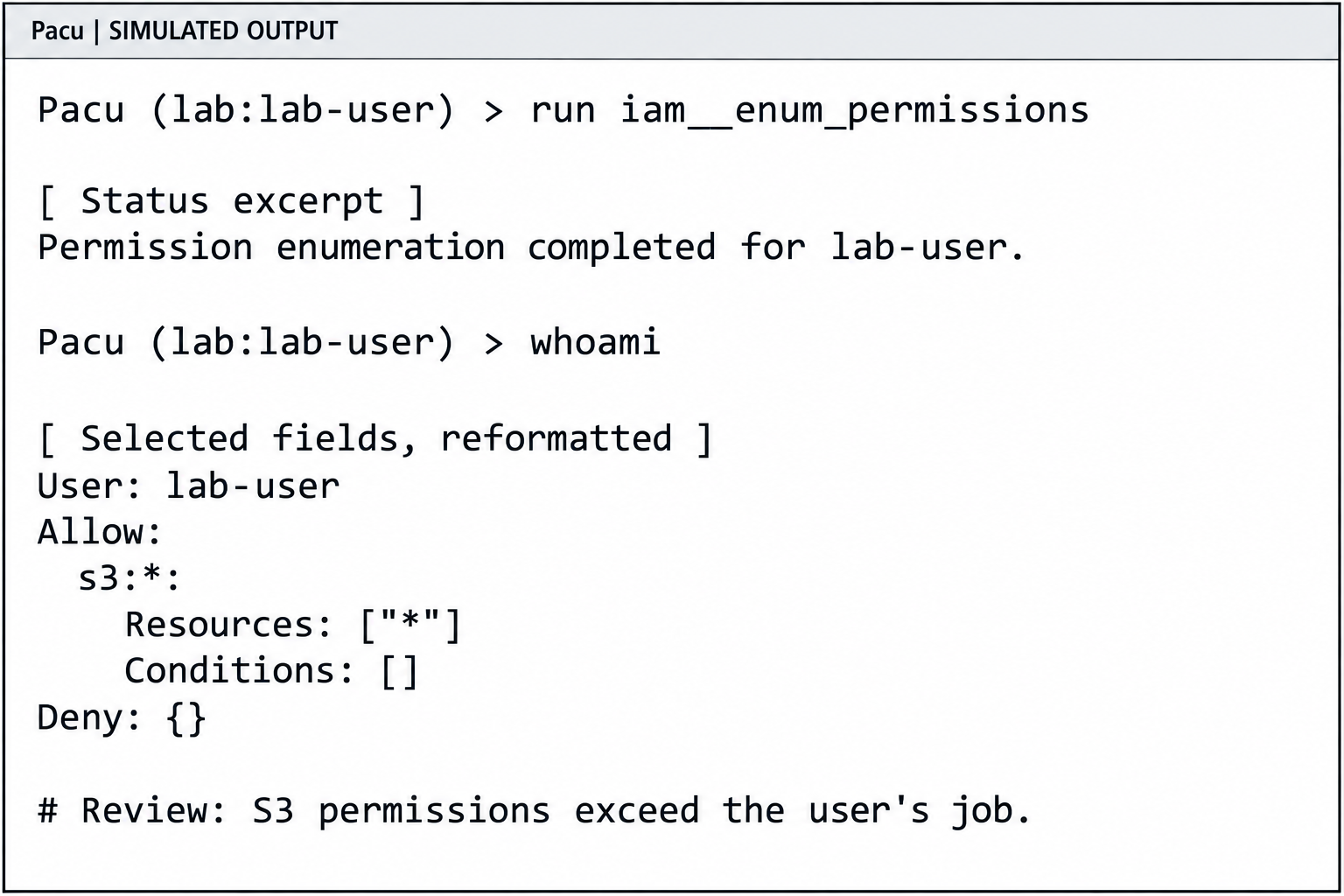
Figure 10.15: Simulated Pacu output illustrates an overly broad S3 permission grant. The selected fields and status text are reconstructed for teaching.
Text description and terminal transcript for Figure 10.15
The terminal is labeled SIMULATED OUTPUT. In session lab, using the fictional lab-user identity, the tester runs the permission enumeration module and then whoami. The following selected permission fields summarize the hypothetical policy. The final comment is an instructional annotation.
Pacu (lab:lab-user) > run iam__enum_permissions

[ Status excerpt ]
Permission enumeration completed for lab-user.

Pacu (lab:lab-user) > whoami

[ Selected fields, reformatted ]
User: lab-user
Allow:
  s3:*:
    Resources: ["*"]
    Conditions: []
Deny: {}

# Review: S3 permissions exceed the user's job.
An empty Deny entry in this excerpt only describes the collected policy information. Effective access can still depend on resource policies, permissions boundaries, organization policies, encryption-key permissions, and other restrictions. Enumeration also does not prove that an attacker has read or modified any object. When investigating privilege escalation, the tester must establish each required permission and trust relationship before claiming that a path works.
Prowler: Checking Cloud Security Configuration
Prowler evaluates cloud resources using security checks that compare observed configuration with expected settings. It supports multiple providers, including AWS, Azure, and Google Cloud. A finding associates a check result with a resource and explanatory evidence. Check mappings to frameworks such as the Center for Internet Security (CIS) Benchmarks help organize review, but a passing scan covers only the checks and resources assessed. See Prowler's compliance-check guidance.
For an AWS lab, use an assessment identity with the permissions required to read the selected services. Prowler documents its AWS authentication and permission requirements. This example selects EC2 checks with a named profile:
prowler aws --profile cfs-lab --services ec2
The command can produce many findings. Figure 10.16 selects two hypothetical failures from us-east-1. It abbreviates check names and combines the result with relevant configuration fields. The Prowler command parser defines service and individual-check selection.
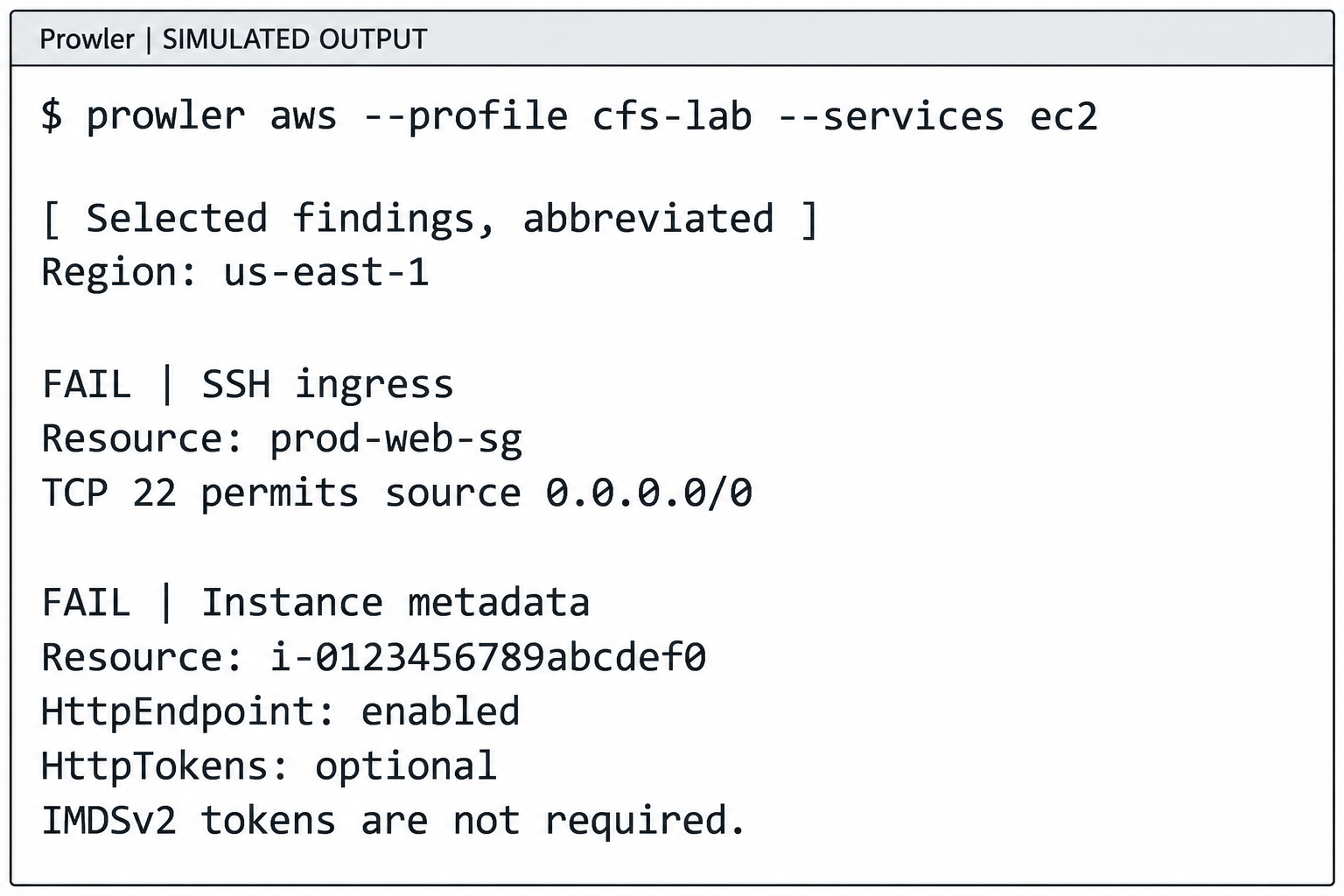
Figure 10.16: Simulated Prowler results connect failed checks to public SSH access and optional metadata tokens. These findings describe configuration risks that require contextual review.
Text description and terminal transcript for Figure 10.16
The terminal is labeled SIMULATED OUTPUT. Two selected findings in us-east-1 carry explicit FAIL labels. The first identifies a security group with public SSH access. The second identifies an instance whose metadata endpoint is enabled and whose tokens are optional. These are abbreviated instructional findings, with fictional resource identifiers.
$ prowler aws --profile cfs-lab --services ec2

[ Selected findings, abbreviated ]
Region: us-east-1

FAIL | SSH ingress
Resource: prod-web-sg
TCP 22 permits source 0.0.0.0/0

FAIL | Instance metadata
Resource: i-0123456789abcdef0
HttpEndpoint: enabled
HttpTokens: optional
IMDSv2 tokens are not required.
The SSH finding corresponds to the check ec2_securitygroup_allow_ingress_from_internet_to_tcp_port_22. It identifies a rule allowing connections to port 22 from any address. This matches the prod-web-sg example in section 10.6. The analyst still checks attached interfaces, routing, host controls, and whether SSH listens on that port before concluding that the server is reachable. The SSH check implementation defines the tested condition.
The metadata finding corresponds to ec2_instance_imdsv2_enabled. Here, HttpTokens: optional allows tokenless IMDSv1 requests while the endpoint is enabled. Requiring IMDSv2 tokens addresses that configuration weakness after application compatibility is checked. The finding alone does not establish an SSRF vulnerability or credential theft. The metadata check implementation also treats a disabled metadata endpoint as a passing condition.
A FAIL result means the resource failed that check's criteria. A PASS result applies to that particular test. Permission errors, skipped checks, and missing resource coverage must remain visible in the assessment. After correcting a setting, rerun the relevant check and retain the before-and-after evidence.
ScoutSuite: Investigating Findings in a Browser Report
ScoutSuite, developed by NCC Group, gathers cloud configuration through provider APIs and organizes it into a browser-based security report. It supports providers including AWS, Azure, and Google Cloud. The report helps an analyst move from a flagged condition to the affected resources and collected settings. This is useful when reviewing how an account's identities, storage, and network configuration fit together. The ScoutSuite project describes its collection and reporting approach.
With the installed command-line tool and an authorized AWS profile, a lab scan can use:
scout aws --profile cfs-lab --report-dir scoutsuite-report
The report directory receives the assessment output. ScoutSuite can open the report in a browser when generation finishes. Its command-line options also allow selection of regions and services. Treat report files as sensitive assessment material because they can reveal resource names, identities, network details, and security weaknesses.
For the fictional web server, an analyst could open the EC2 findings, locate a security group flagged for unrestricted SSH, and inspect its ingress rules. The analyst would record the group identifier, TCP port 22, and source 0.0.0.0/0, then correlate that group with the relevant server and network path. This supplies evidence for the same concern Prowler identified. Agreement between tools strengthens confidence in the observed setting, while reachability and business impact still require validation. Missing API permissions or uncollected services limit what the report can establish.
Using the Results Together
Begin with an inventory and configuration review using Prowler or ScoutSuite. For a finding such as public SSH, confirm the resource and network path, then determine whether the access matches an approved requirement. Use Pacu when the assessment needs to examine an AWS identity's permissions or an explicitly authorized attack path. Record the identity, account, region, tool version, collection time, and supporting configuration so another analyst can reproduce the finding. Choose a correction that addresses the cause, then verify the result after the change.
Other tools complement this workflow. Docker Bench Security checks Docker host configuration against security recommendations. Kube-hunter tests Kubernetes environments for weaknesses. Cloud provider command-line interfaces (CLIs), such as aws, gcloud, and az, let analysts retrieve individual resource settings and confirm details reported by broader assessment tools.
Putting It Together: Cloud Credential Theft to Privilege Escalation
A complete attack flow:
- Reconnaissance: Enumerate S3 buckets, CloudFront distributions, and public IPs. Use
shodan,censys, or cloud-specific tools. - Data exposure: Find publicly accessible S3 bucket or Blob Storage container containing credentials or configuration data.
- Credential extraction: Extract API keys, connection strings, or service account keys from exposed data.
- Initial access: Use extracted credentials to access cloud environment as a service account or user.
- Enumeration: Run Prowler or ScoutSuite to identify misconfigurations and over-permissioned roles.
- Privilege escalation: Identify
iam:PassRole+ec2:RunInstancesor similar escalation paths. Launch instance with admin role. - Persistence: Extract credentials from compromised instance's metadata service. Create additional backdoor users or API keys.
- Lateral movement: Use escalated credentials to access other services, storage, and databases.
Figure 10.17 marks the conditions that connect the chapter's individual weaknesses into a longer compromise.
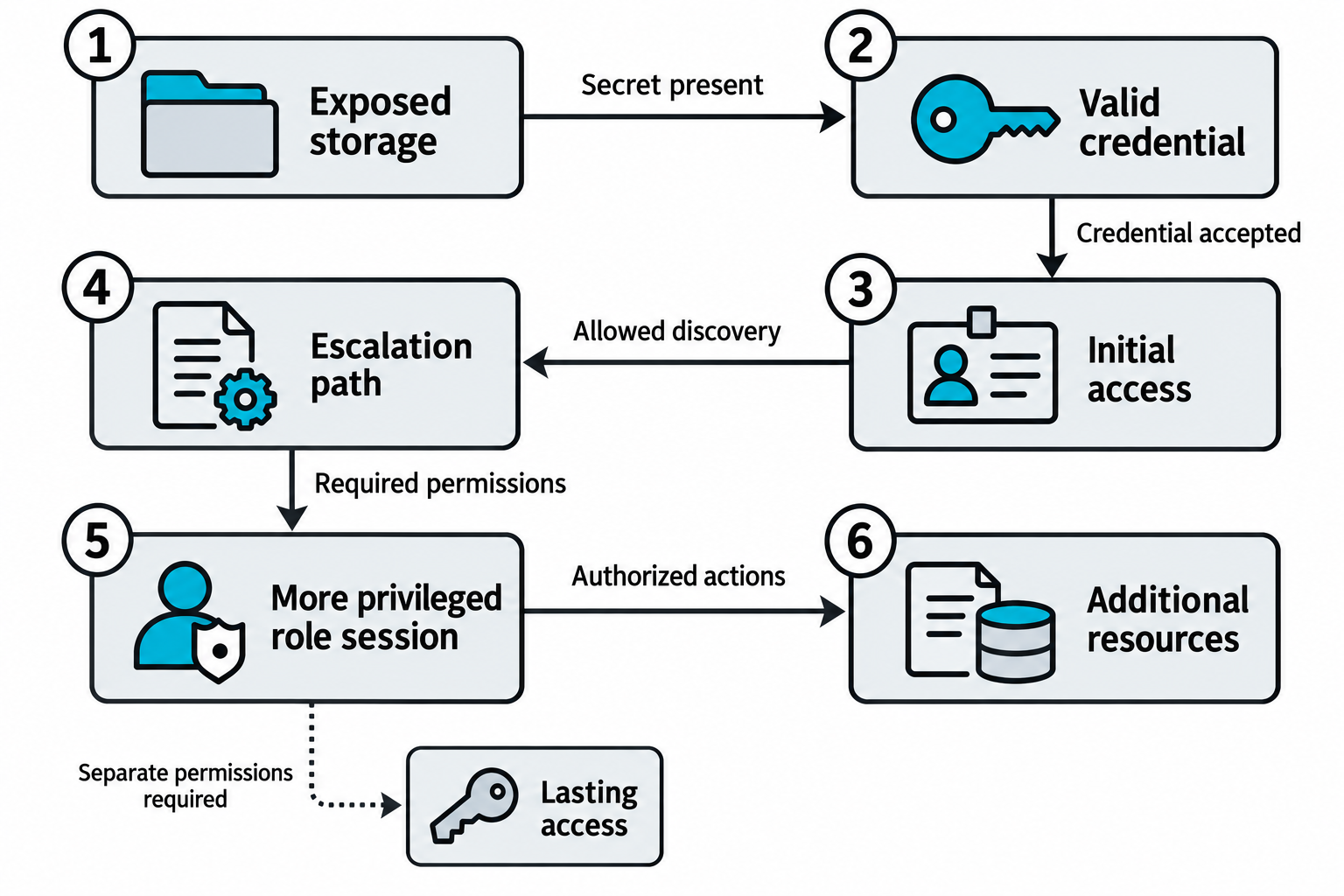
Figure 10.17: Each transition in a cloud attack chain depends on a separate exposure, accepted credential, or allowed action.
Open Figure 10.17 at full size (opens in a new tab)
Text description for Figure 10.17
Follow the numbered path from 1 through 6. Exposed storage must contain a usable secret for the attacker to obtain a credential. The receiving service must accept that credential for initial access. Permitted discovery may reveal an escalation path, but the necessary actions, role trust, and other prerequisites must also exist to obtain a more privileged role session. That session can reach additional resources only where its actions are authorized by the effective controls. The dotted branch marks lasting access as a separate outcome requiring appropriate permissions, such as authority to create another usable identity or credential. Temporary role credentials expire, so retrieving them alone does not establish permanent persistence.
Activity 1: Cloud Credential Attack Walkthrough
In this browser-based activity, you investigate fictional leaked credentials using a simulated Amazon Web Services command-line interface (AWS CLI). Follow guided commands to configure credentials, confirm the associated identity, inspect permissions, list storage buckets and files, and retrieve simulated database secrets. You will compare a credential with limited permissions against one with administrator access, observe denied operations, and use the administrator credential to simulate creating an additional user and access key. Two challenges ask you to identify evidence from the terminal and assess which data and actions each credential exposes. After completing both challenges, you can generate a score report to print or save as a PDF. The activity runs locally in your browser with fabricated credentials and makes no connections to real AWS accounts.
Launch the Cloud Credential Attack Walkthrough (opens in a new tab)
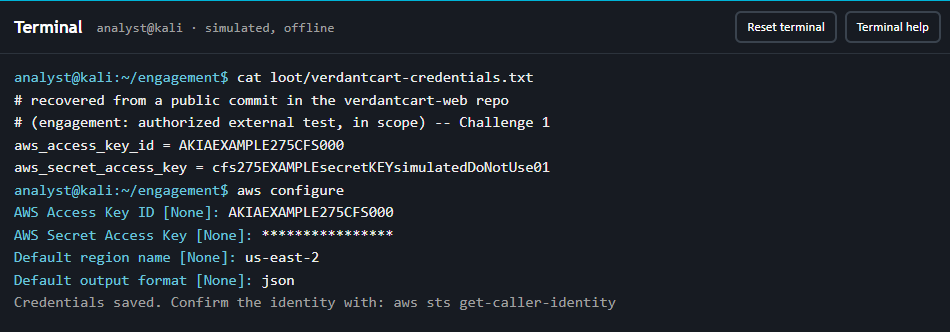
Figure 10.18: The activity's simulated terminal lets you load fictional credentials before checking the identity and permissions they provide.
Text description for Figure 10.18
The terminal identifies itself as simulated and offline. The learner runs cat loot/verdantcart-credentials.txt to display a fabricated access key ID and secret from a fictional public repository commit. Next, aws configure prompts for the key ID, masks the entered secret with asterisks, and accepts us-east-2 as the default region and json as the output format. A confirmation message recommends aws sts get-caller-identity as the next step. Reset terminal and Terminal help buttons appear above the command area.
Activity 2: Pacu and Prowler Cloud Security Simulators
Explore the same fictional AWS account through two simulated tools. In the Pacu tab, load fabricated credentials, browse modules, inspect permissions, examine possible privilege-escalation paths, identify public SSH access, and simulate copying backup files and creating an additional access key. In the Prowler tab, configure credentials, run a simulated audit, interpret PASS and FAIL findings, and filter results by service, severity, or a specific check. Compare the permissions and resources exposed in Pacu with the configuration weaknesses reported by Prowler, including public storage and excessive identity permissions. Guided commands and checkpoint questions help you interpret the evidence, and completing both tabs unlocks a score report that you can print or save as a PDF. Both simulators run locally in your browser with fictional data and make no connections to real AWS accounts.
Launch the Pacu and Prowler Cloud Security Simulators (opens in a new tab)
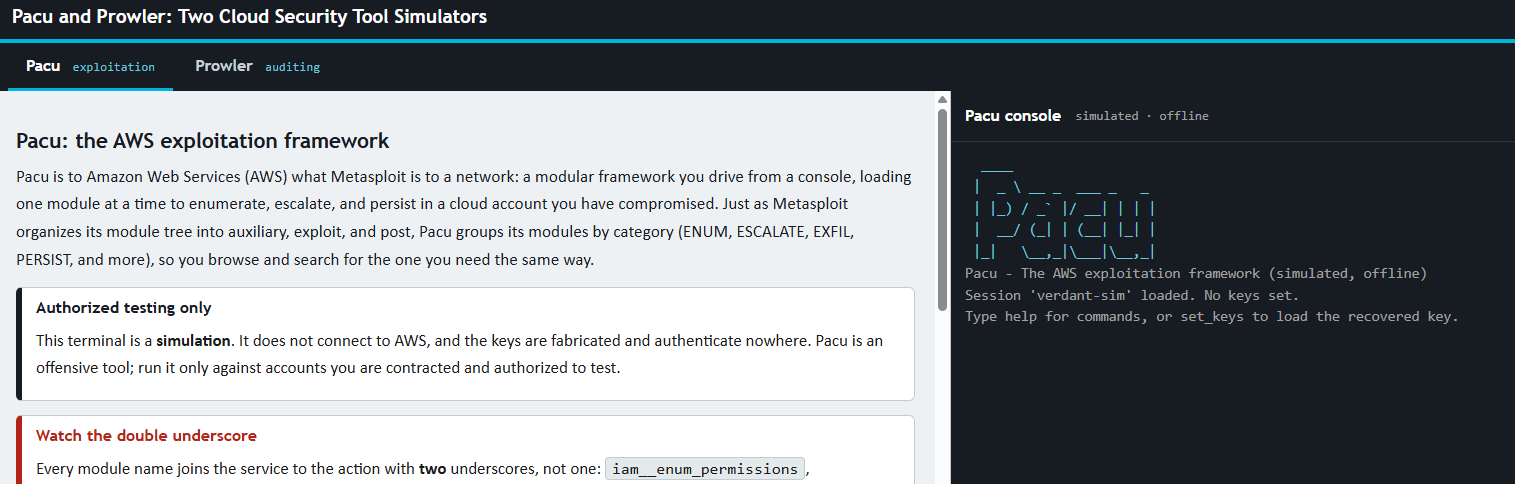
Figure 10.19: Switch between Pacu and Prowler to investigate a fictional account's permissions and configuration through guided terminal simulations.
Text description for Figure 10.19
The activity provides Pacu and Prowler tabs across the top, with Pacu selected. The left pane introduces the framework, identifies the exercise as an authorized simulation, and explains that module names use two underscores between the service and action. The right pane contains a simulated, offline Pacu console. Its opening message identifies the session as verdant-sim, reports that no keys are set, and suggests help for commands or set_keys to load the fictional recovered credentials.
Chapter Summary
- Shared responsibility model defines the boundary between provider and customer security. Misalignment of expectations leads to vulnerable configurations.
- Metadata services (IMDS, GCP, Azure) are critical attack vectors. SSRF vulnerabilities combine with metadata service access for credential extraction.
- IAM misconfiguration including over-permissioned roles, exposed keys, and privilege escalation paths is the dominant cloud vulnerability.
- Cloud storage (S3, GCS, Blob) exposed through public ACLs, permissive bucket policies, and versioning disabled allows data exfiltration.
- Compute attacks target instance metadata, security groups, and IAM roles. Container escape moves compromise from application to host level.
- Kubernetes API abuse and RBAC misconfiguration lead to cluster-wide compromise.
- Supply chain attacks compromise dependencies and build pipelines affecting multiple applications.
- Logging evasion (CloudTrail disabling, slow attacks) removes evidence of compromise.