CH5: FAT and NTFS Analysis
Introduction
FAT and NTFS are the two file systems a Windows-focused examiner meets most often. FAT (File Allocation Table) and its successor exFAT (Extended File Allocation Table) run on the removable media that moves between devices: USB (Universal Serial Bus) flash drives, SD (Secure Digital) cards, and camera storage. NTFS (New Technology File System) is the default format for Windows system and data volumes.
Chapters 3 and 4 covered how a drive is divided into sectors and clusters and how partitions organize a disk into separate volumes. This chapter looks inside a volume to see how each file system records where a file's content lives and what happens to that record when a file is deleted. One idea connects both file systems, and once you understand it, you can read either one. The goal here is to build the working knowledge an investigator uses on real removable media and Windows volumes, and to reinforce the storage concepts from the previous chapters with a concrete application.
Learning Objectives
By the end of this chapter, you will be able to:
- Explain how FAT and NTFS use metadata to locate a file's content in clusters.
- Describe where FAT and exFAT appear in the field and why removable media matters to an investigation.
- Predict when a deleted file can be recovered from a FAT, exFAT, or NTFS volume, and when it cannot.
- Compare the $STANDARD_INFORMATION and $FILE_NAME timestamps on an NTFS file to recognize signs of timestamp tampering.
- Identify Alternate Data Streams and explain how they are used to hide data on NTFS.
5.1 File Systems as Maps to Data
Chapter 3 established that a drive stores data in fixed-size blocks called clusters. A file system adds a layer on top of those clusters so the operating system can find a file by name instead of by cluster number. That layer has two separate parts, and keeping them separate is the key to understanding recovery.
The first part is the content: the actual bytes of the file, sitting in one or more clusters in the data area of the volume. The second part is the metadata: a record that stores the file's name, its size, its timestamps, and a pointer to the clusters that hold the content. The metadata acts as a map. The map tells the operating system where to look, and the clusters hold what it finds there.
Figure 5.1 connects the metadata record to the content it locates.
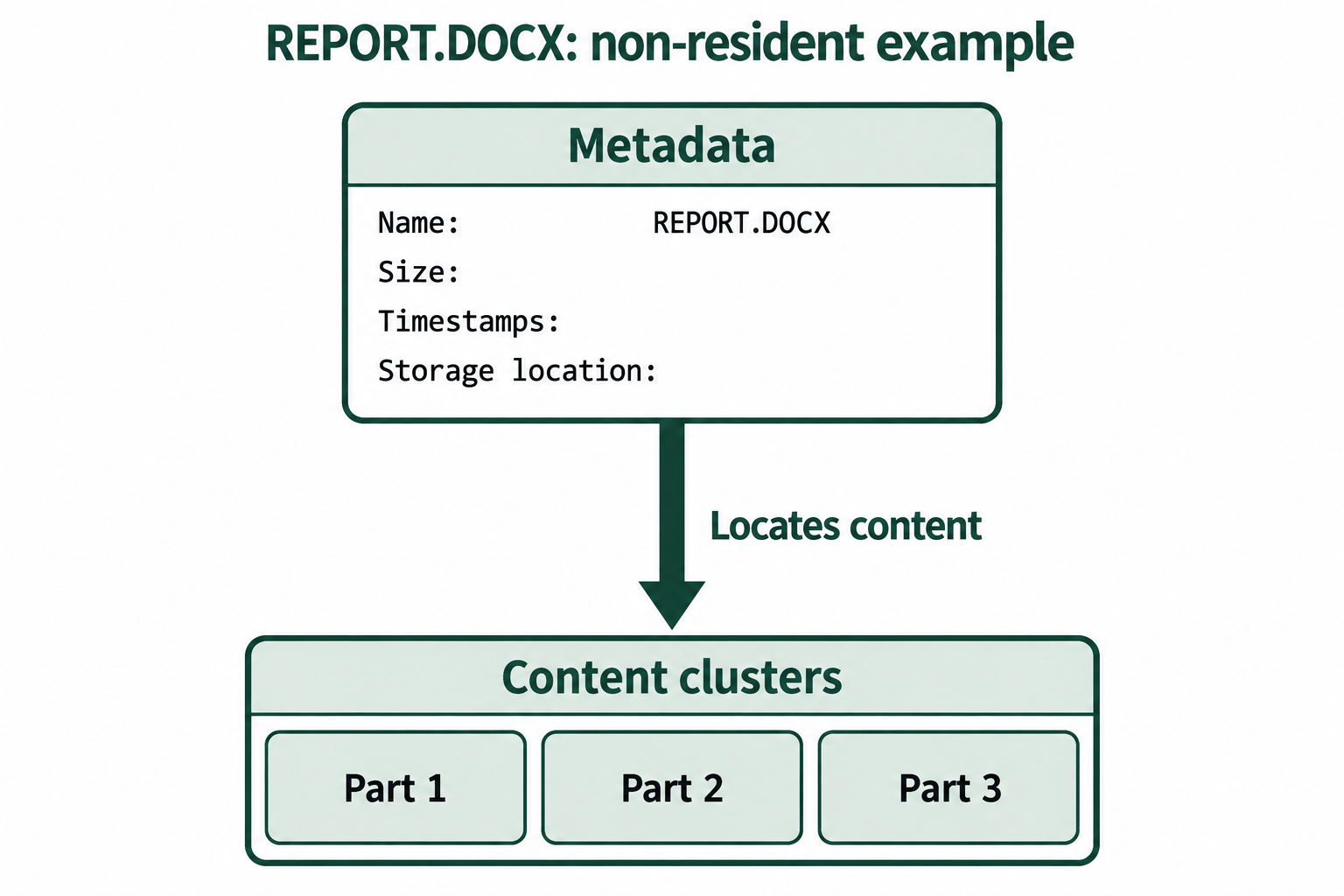
Figure 5.1: Metadata maps REPORT.DOCX to content stored in clusters.
Text description for Figure 5.1
A metadata record for REPORT.DOCX contains its name, size, timestamps, and storage location. A pointer leads to separate clusters holding file content. This is a non-resident storage example, with content outside its metadata record. The fields identify metadata roles; blank fields do not supply sample values.
This separation explains why deleted files are so often recoverable. When a user deletes a file, the file system usually does two things. It marks the metadata record as unused, and it marks the file's clusters as available for reuse. It does not erase the content. The bytes stay in the data area until another file is written on top of them. Until that happens, the content is still on the drive, and an examiner who can rebuild the map (or search the clusters directly) can recover it.
Both FAT and NTFS follow this model. They differ in how the map is structured and how much metadata each keeps, but the recovery principle is the same. A deleted file is recoverable for as long as its content clusters have not been overwritten.
5.2 FAT and exFAT on Removable Media
FAT was designed in the early 1980s for floppy disks. Its age is the reason it is still everywhere. Because the format is simple and every major operating system can read and write it, manufacturers use it wherever storage needs to move between different systems. Modern examiners rarely see the oldest variants (FAT12 and FAT16), but they routinely encounter FAT32 and exFAT.
You will find FAT32 and exFAT on:
- USB flash drives
- SD and microSD cards
- Camera and dashcam storage
- Drone storage and action-camera media
- GPS units and other embedded devices
The practical split is by capacity. FAT32 remains common on smaller USB drives and SD cards. exFAT is the default format for SDXC cards (Secure Digital eXtended Capacity, 32 GB and larger) and for large USB drives, because FAT32 cannot handle a single file larger than 4 GB and exFAT can.
FAT stores very little metadata compared to NTFS. It has no file permissions, no access control lists, and only coarse timestamps. For an investigator, that simplicity has a practical effect. FAT keeps less information about who did what, but its records are easy to read and its deleted files are often straightforward to recover. Removable media is worth close attention in a case, because it frequently holds copies of files a suspect wanted to move off a monitored computer, and the recovery odds on that media are good.
5.3 How FAT Stores and Tracks Files
A FAT volume has three regions that matter for analysis. The reserved area at the start of the volume holds the boot sector, which records the basic geometry of the volume (cluster size and the location of the other regions). The File Allocation Table comes next. The data area takes up the rest of the volume and holds the file content. Chapters 3 and 4 already covered how a tool reads the boot sector to find these regions, so this chapter treats that step as done and focuses on the two structures that track files.
Figure 5.2 locates the structures within a FAT32 volume.
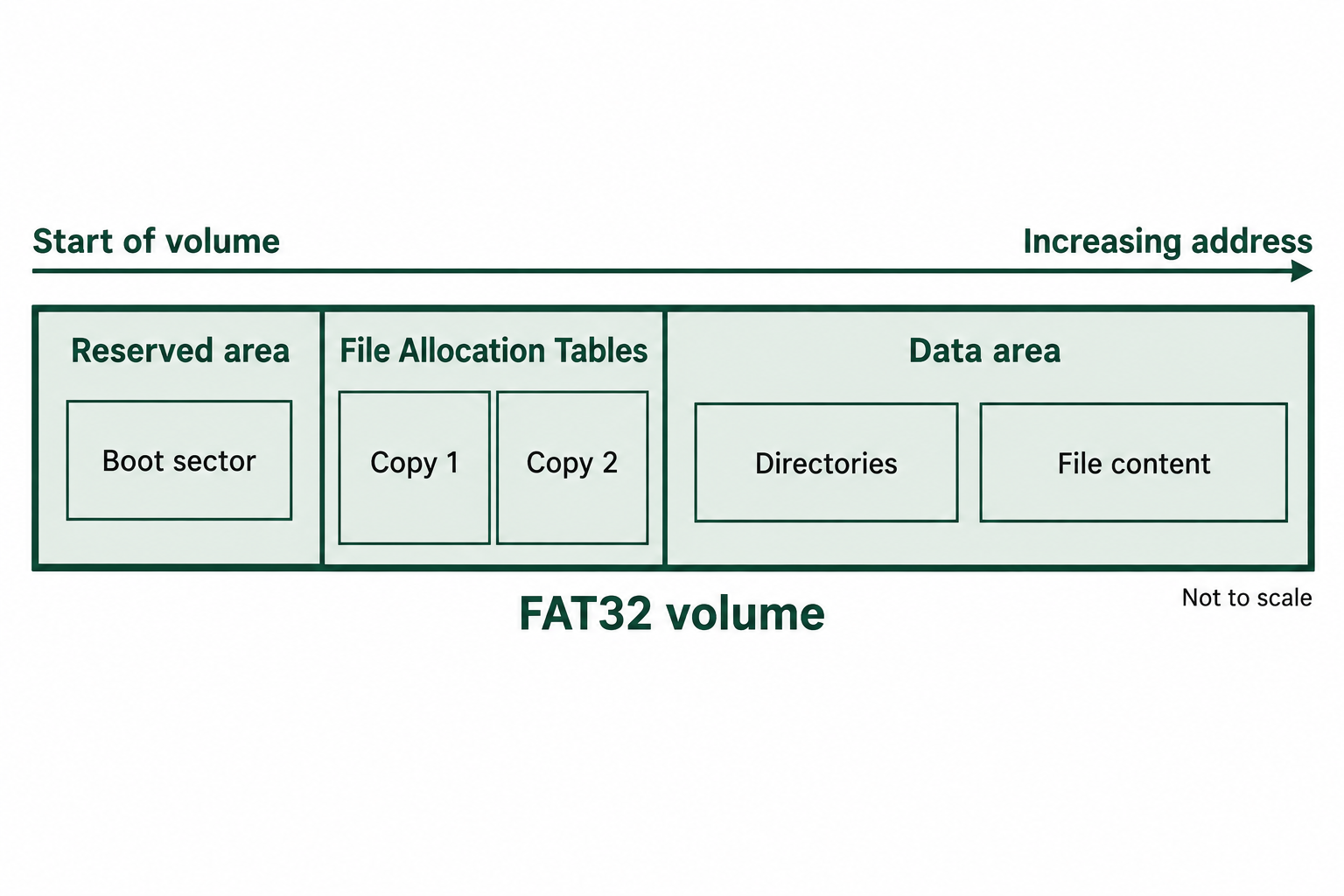
Figure 5.2: A FAT32 volume contains reserved structures, allocation tables, and a data area that includes directories.
Text description for Figure 5.2
From the start of the volume, the diagram shows the reserved area and boot sector, two allocation-table copies in this example, then the data area containing directories and file content. Addresses increase from left to right. The region widths are schematic and do not represent measured capacities.
The File Allocation Table as a chain
The File Allocation Table is a list with one slot for every cluster in the data area. The value in a slot answers one question: for the cluster this slot represents, which cluster holds the next piece of the file? Following those values from one slot to the next reconstructs the full order of a file's clusters, even when the clusters are scattered across the volume.
A slot can hold one of a few kinds of value:
- A cluster number, meaning "the next piece of this file is in that cluster."
- An end-of-file marker, meaning "this is the last cluster of the file."
- Zero, meaning "this cluster is free and belongs to no file."
Consider a file whose record says it starts at cluster 5. The table entry for cluster 5 points to cluster 6, the entry for cluster 6 points to cluster 7, and the entry for cluster 7 holds an end-of-file marker. The file's content is in clusters 5, 6, and 7, in that order. This is a linked chain, and it is what lets FAT store a file whose clusters are not next to each other. When the chain runs in order (5, 6, 7), the file is contiguous. When it jumps around, the file is fragmented, and the chain is the only reliable way to reassemble it.
Directory entries
FAT stores the rest of a file's metadata in a directory entry. A directory in FAT is itself a file, and it contains a fixed-size record for each file it holds. Each record stores the file's name, its attributes (such as read-only, hidden, or system), its timestamps, its size in bytes, and the number of its first cluster. The starting cluster from the directory entry is where you begin following the chain in the File Allocation Table.
Figure 5.3 follows the starting cluster from a directory entry through the allocation chain.
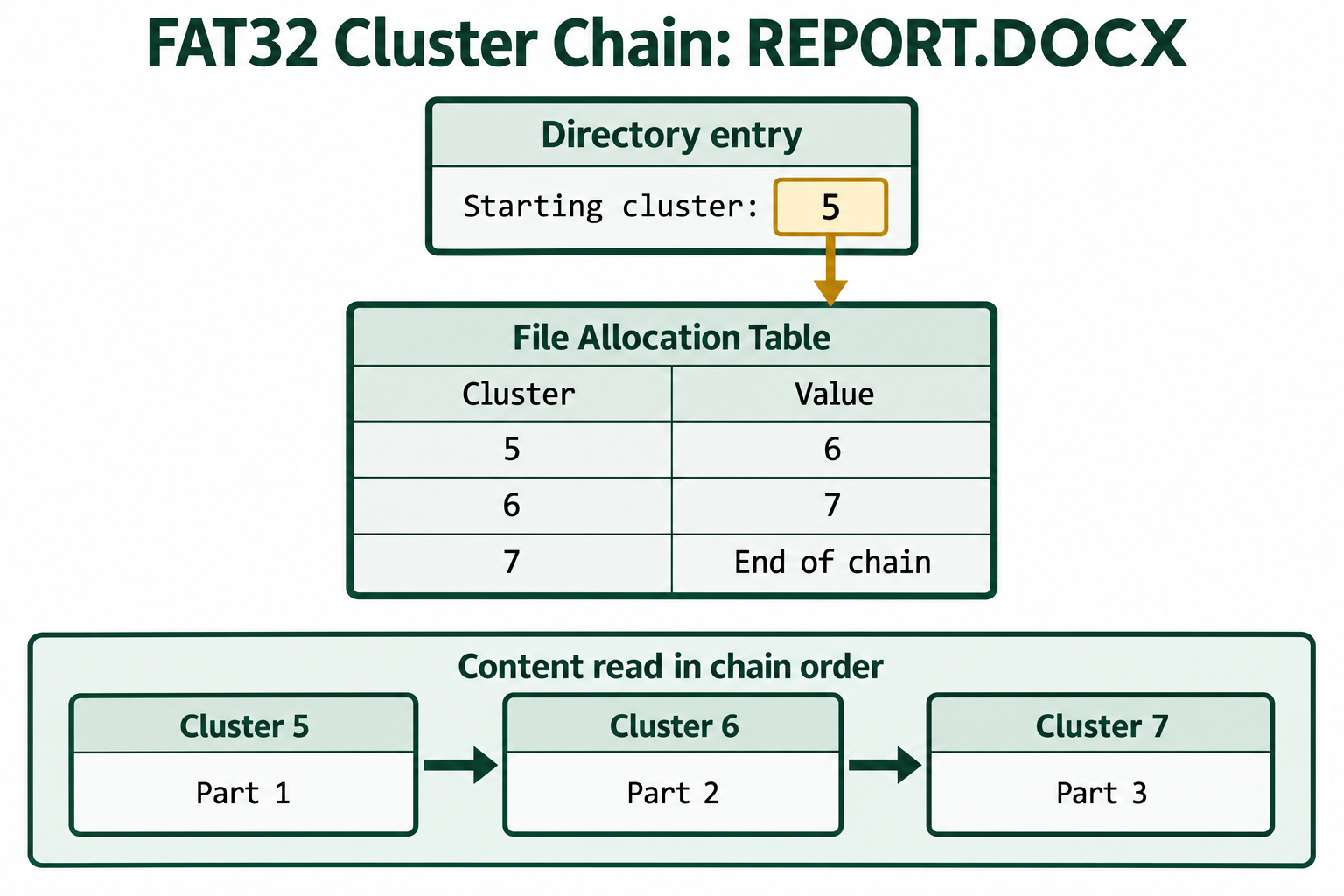
Figure 5.3: The directory entry supplies a starting cluster, and the allocation table supplies the order of REPORT.DOCX's content.
Text description for Figure 5.3
REPORT.DOCX starts at cluster 5. Table entry 5 points to 6, entry 6 points to 7, and entry 7 ends the chain. Content follows that order.
What deletion changes
When a file is deleted on a FAT32 volume, two things happen to the map, and neither one touches the content:
- The first character of the file's name in its directory entry is replaced with a specific marker byte, the value
0xE5. This flags the entry as deleted and makes the slot available for a new file. - The file's entries in the File Allocation Table are set back to zero, which frees the clusters for reuse.
The rest of the directory entry stays intact. The size, the timestamps, and the starting cluster number are all still readable. The content clusters are untouched. This is why FAT recovery is often successful: the record still points at the data, and the data is still there.
The one thing deletion removes is the chain. Because the table entries are cleared, a deleted fragmented file loses the record of which clusters came in which order. If the file was contiguous, this does not matter, because the clusters run in sequence from the known starting cluster. If the file was fragmented, the examiner falls back to file carving, which Chapter 7 covers, to reassemble it from cluster contents alone.
Figure 5.4 compares the same FAT32 file before and after deletion.
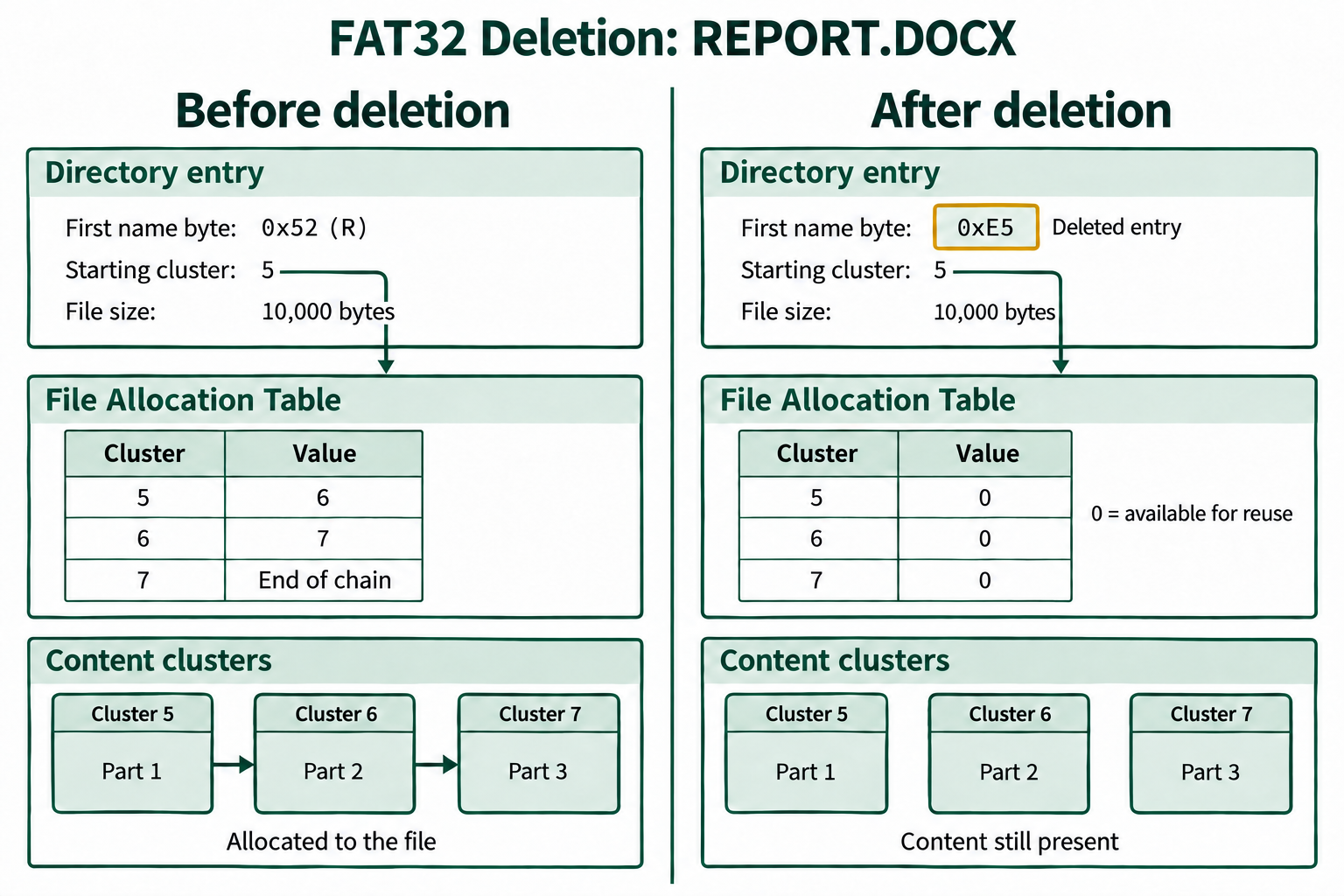
Figure 5.4: Deleting REPORT.DOCX on FAT32 marks its directory entry and clears its allocation chain. The starting cluster, file size, and content remain in this example.
Text description for Figure 5.4
Before deletion, REPORT.DOCX starts at cluster 5, contains 10,000 bytes, and follows table entries 5 to 6 to 7 to end of chain. After deletion, the first name byte is 0xE5 and all three table entries are zero. The content blocks and retained starting cluster and size are unchanged. Zero means available for reuse. The diagram simplifies the directory representation and omits long-filename entries and the associated short-name alias.
How exFAT differs
exFAT keeps the general FAT idea but changes several details, and two of them affect recovery. First, exFAT does not use the 0xE5 name marker. It flags a deleted file by clearing a bit in the record's type code, so an examiner scans for a different pattern. Second, exFAT tracks free space with an allocation bitmap, a separate structure with one bit per cluster (set means in use, clear means free), rather than reading allocation state from the table itself. When a file is deleted, its bits in the bitmap are cleared.
The result is that exFAT deletion tends to be harder to recover from than FAT32. FAT32 leaves the size and starting cluster sitting in the directory entry. exFAT can lose the equivalent information more readily, which pushes the examiner toward carving sooner. exFAT is still very recoverable in practice, but the odds on a given deleted file are lower than on FAT32.
Figure 5.5 distinguishes exFAT location metadata from allocation status.
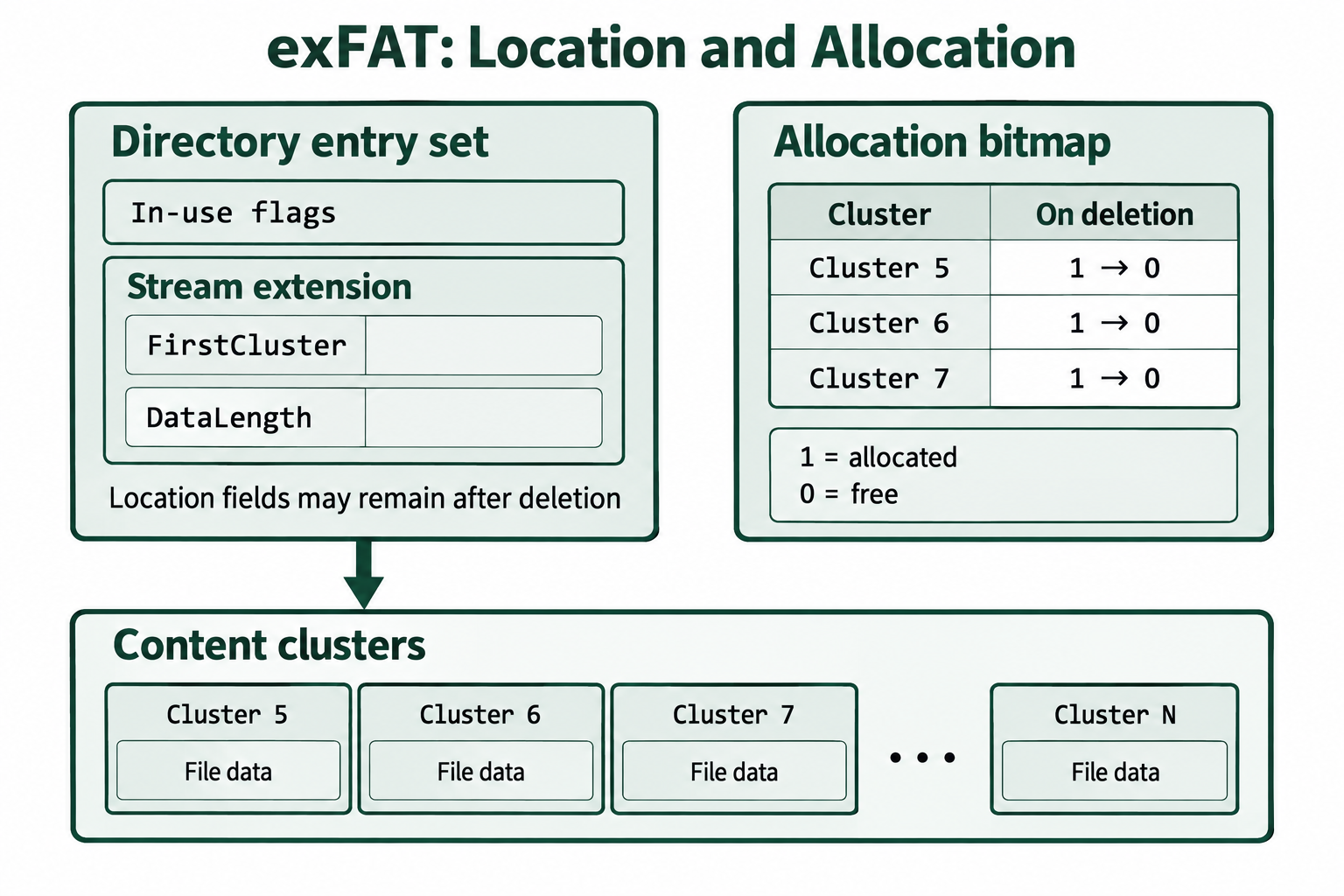
Figure 5.5: exFAT records file location separately from cluster allocation status.
Text description for Figure 5.5
The stream extension records the starting cluster and length. Bitmap bits separately mark clusters as allocated or free. A retained deleted entry may still contain location information. The fields FirstCluster and DataLength provide the starting cluster and data length. For clusters 5, 6, and 7, the bitmap changes from 1 (allocated) to 0 (free) on deletion. Clearing those allocation bits does not itself erase the retained location fields.
5.4 Deletion and Recovery in FAT and exFAT
The recovery outcome for any deleted file on removable media comes down to two questions. Can the examiner rebuild the map, and has the content been overwritten?
For a contiguous deleted FAT32 file, both answers are usually favorable. The directory entry still holds the starting cluster and the exact size. The clusters run in order from the start. A tool reads the size, walks that many clusters forward from the starting cluster, and extracts the file. Recovery is often complete.
For a fragmented deleted FAT32 file, the map is the problem. The cleared table entries mean the cluster order is gone. The clusters still hold the content, but the examiner no longer knows how to put them back in sequence. Recovery then depends on file carving and may be partial.
Figure 5.6 compares the information available for contiguous and fragmented FAT32 recovery.
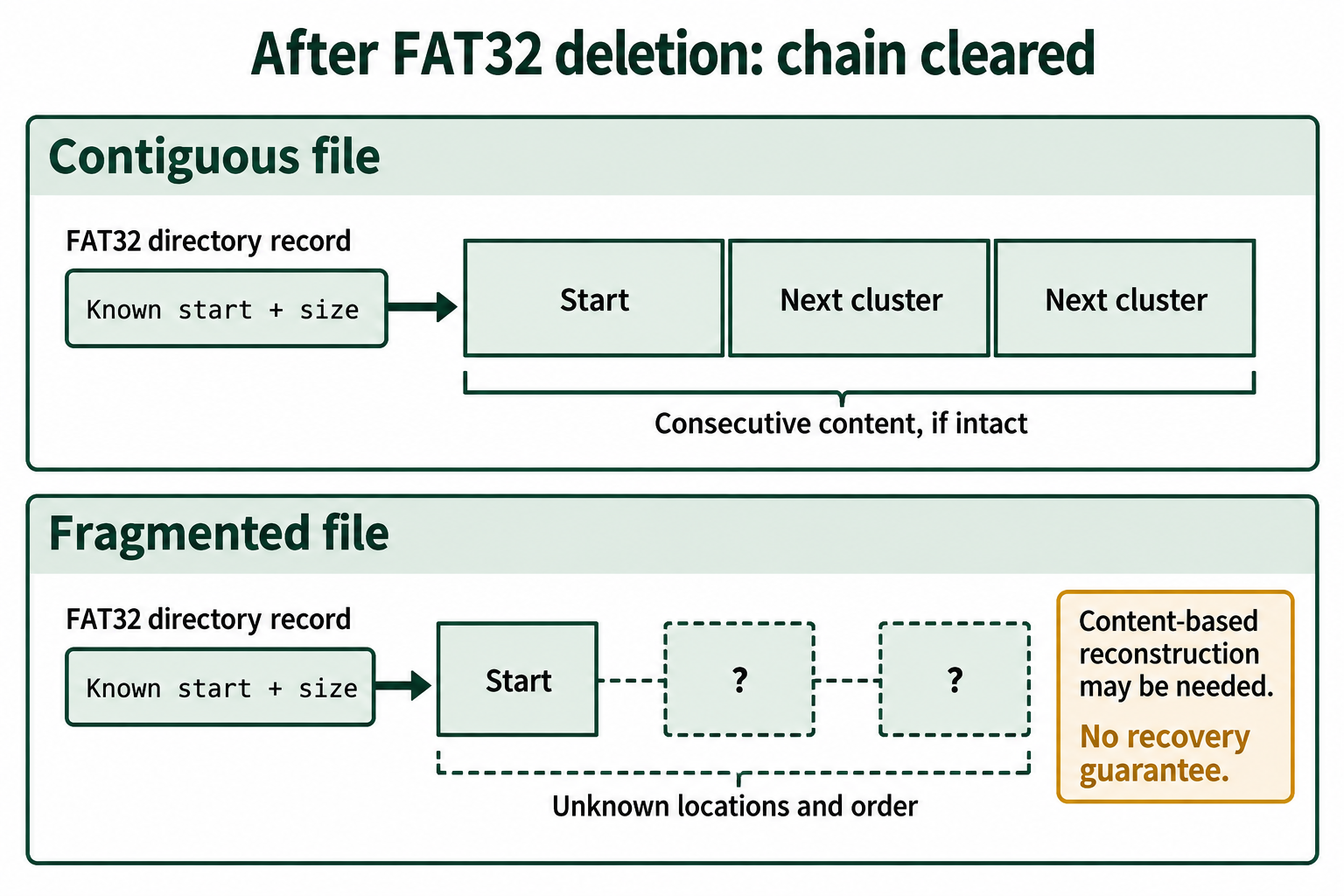
Figure 5.6: Recovering a contiguous file can use its start and size; fragmentation leaves an uncertain sequence after the FAT chain is cleared.
Text description for Figure 5.6
Both examples retain a known starting cluster and file size. Contiguous content occupies consecutive clusters. For fragmented content, later locations and their order require reconstruction after the allocation chain is cleared. Question marks identify the unknown later fragments. Recovery depends on the needed content remaining intact.
For exFAT, the same logic applies, with the added difficulty that a deleted record can lose the size and starting cluster, so carving becomes the primary approach more often.
Across all of these, the deciding factor is overwrite. A cluster holds its old content only until the file system writes a new file into it. Several things influence how quickly that happens:
- Time since deletion. More time means more chances for the cluster to be reused.
- How full and how busy the media is. A nearly full or heavily used drive reuses clusters faster.
- The type of media.
Why removable media often recovers better than an internal SSD
Internal solid-state drives use a feature called TRIM, which tells the drive to erase the contents of freed clusters in the background, sometimes within seconds of deletion. Once TRIM has run, the old content is gone and no software can recover it. Most USB flash drives and SD cards connected through a normal card reader or USB port do not receive TRIM commands, so their freed clusters keep the old content until it is overwritten. This is one reason a deleted file is frequently more recoverable from a USB stick or SD card than from a modern internal drive.
Tools that automate FAT and exFAT recovery
An examiner rarely rebuilds a chain by hand. Forensic tools parse the directory structures, find the deleted entries, follow or reconstruct the cluster order where possible, and carve unallocated clusters for known file signatures. Autopsy and OSForensics both provide this through a graphical interface. The Sleuth Kit provides the same capability at the command line, where fls lists files including deleted ones (marked with an asterisk) and icat extracts a file's content by its identifier. Knowing what these tools do under the surface lets you confirm their results and recognize when a recovery is incomplete.
5.5 NTFS and the Master File Table
NTFS is the default file system for Windows system drives, and it keeps far more information about each file than FAT does. That extra information is what makes NTFS analysis valuable, because it records not just where a file lives but a detailed history of what happened to it.
The central structure in NTFS is the Master File Table (MFT). The MFT is a large table with one record for every file and directory on the volume. If FAT's map is a directory entry plus a chain, NTFS's map is a single MFT record that gathers everything about a file in one place. Each MFT record holds a set of attributes, and each attribute stores one kind of information: one attribute holds the name and parent directory, another holds the timestamps, and another holds the file's content or a pointer to it.
Resident and non-resident data
NTFS stores a file's content in one of two ways, and the difference matters for recovery.
A small file, roughly under 700 bytes, is stored resident, meaning its content sits directly inside its own MFT record. There are no separate content clusters at all. A small text file's entire body can live in the MFT.
A larger file is stored non-resident. Its content sits in clusters in the data area, and its MFT record holds a compact list of which clusters those are and in what order. This list plays the same role for NTFS that the chain plays for FAT.
The recovery consequence is useful to remember. A resident file can sometimes be recovered even when the volume has been heavily used, because its content is inside the MFT record rather than out in reusable data clusters. A non-resident file follows the same overwrite rules as any other: its content survives until its clusters are reused.
Figure 5.7 compares the two places NTFS can store file content.
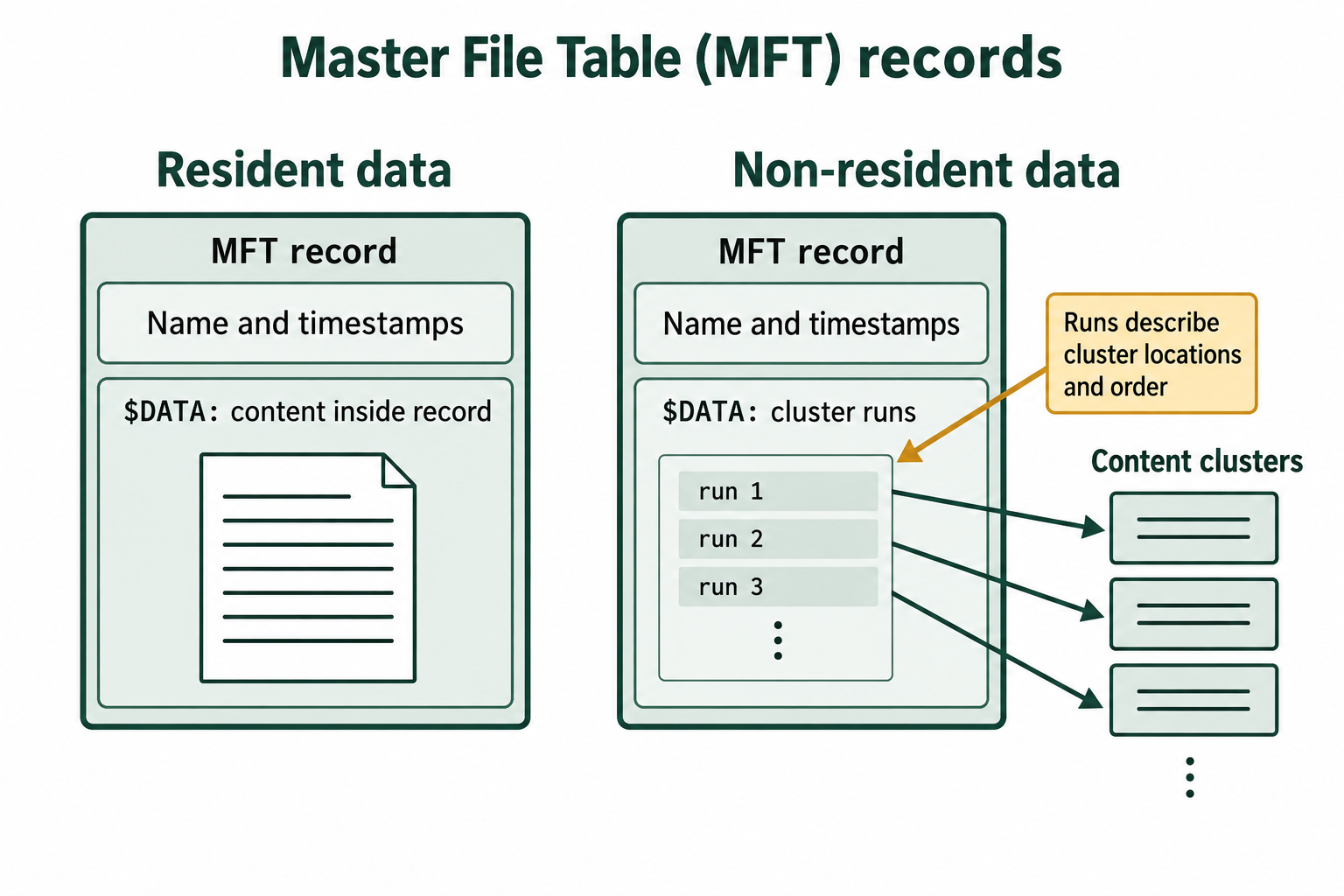
Figure 5.7: NTFS can keep content within an MFT record or describe external content through cluster runs.
Text description for Figure 5.7
The resident example stores its data inside the Master File Table record. The non-resident example stores a run list in its data attribute, pointing to clusters outside the record. A cluster run describes a consecutive group of clusters. A run list records those groups and their order; one run may cover several clusters.
Tracking free space
Like exFAT, NTFS tracks free space with a bitmap, kept in a system file named $Bitmap, with one bit per cluster. When a file is deleted, its clusters are marked free in $Bitmap, but NTFS does not erase them. Clusters that the bitmap reports as free frequently still hold the content of deleted files, which is exactly the unallocated space an examiner searches during recovery.
5.6 NTFS Timestamps and Timestomping
NTFS records timestamps in two separate places, and comparing them is one of the most useful and teachable skills in Windows forensics. The comparison lets an examiner detect timestomping, an anti-forensic technique in which an attacker changes a file's timestamps to hide when it was really created or used.
The two timestamp sets live in two different attributes of the MFT record:
- $STANDARD_INFORMATION (often written $SI). This attribute holds the timestamps that Windows shows in File Explorer and updates during normal use: created, modified, MFT-modified, and accessed. Common tools can write to $SI, which is what makes it a target for tampering.
- $FILE_NAME (often written $FN). This attribute holds the file's name and a second copy of the timestamps. Under normal operation, Windows sets the $FN timestamps when the file is created and updates them far less often than $SI. Ordinary user tools do not write to $FN directly.
NTFS stores each timestamp in a format called FILETIME, a count of 100-nanosecond intervals since January 1, 1601, in UTC (Coordinated Universal Time). The raw value may appear as a large decimal number or as hexadecimal data rather than as a date a person can read. That is a common design for timestamp data: a computer stores an exact count from a defined starting point, and software decodes that count into a calendar date and time when it needs to display it.
You can decode a FILETIME value with a tool such as DCode, available from Digital Detective, or with an online converter such as Epoch Converter's LDAP timestamp tool. Enter the value in the format expected by the tool, check whether it is decimal or hexadecimal, and confirm that the result is being interpreted as UTC. The same idea appears on Linux, where timestamps are commonly stored as Unix epoch time: a count of seconds since January 1, 1970, UTC. The starting point and unit differ, but the lesson is the same: timestamp data is often encoded for computers first and becomes easy to interpret once you recognize its format.
Figure 5.8 shows a FILETIME value converted to a human-readable UTC date.
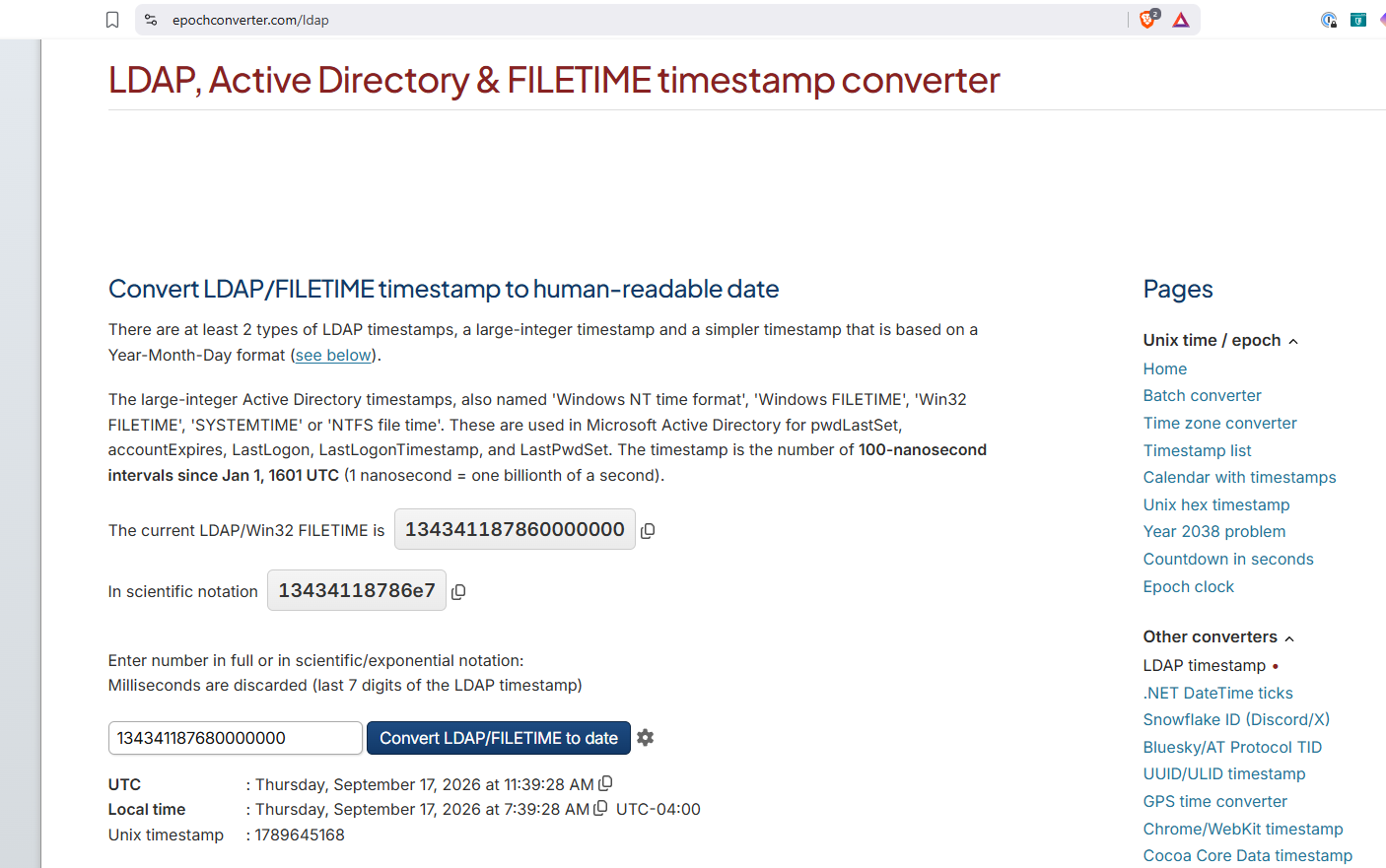
Figure 5.8: A Windows FILETIME value can be decoded into a human-readable UTC date.
Text description for Figure 5.8
The Epoch Converter LDAP and FILETIME timestamp converter accepts the Windows FILETIME value 134341187680000000 and reports Thursday, September 17, 2026 at 11:39:28 AM UTC. The converter identifies the value as 100-nanosecond intervals since January 1, 1601, UTC.
Forensic tools convert FILETIME values to readable dates and times, so the examiner can work with normal dates while still knowing what the underlying number represents. This recognition step matters when validating tool output or examining raw metadata directly.
Because $SI is easy to change and $FN is not, tampering usually alters one and leaves the other alone. That mismatch is the signal. Several patterns point to timestomping:
- A created time later than the modified time in $SI. A file cannot be modified before it exists, so a created time that falls after the modified time is a strong sign that the created time was set by hand.
- All four $SI timestamps identical, often down to the second. Normal activity produces different times for creation, modification, and access. Four identical values suggest a tool wrote them all at once.
- $SI and $FN timestamps that disagree by a large amount. These two sets normally track closely for a given file. A gap of hours or days between them, when the file has not been renamed or moved, points to a change made to $SI while $FN kept the real time.
Figure 5.9 presents a fictional timestamp discrepancy for investigation.
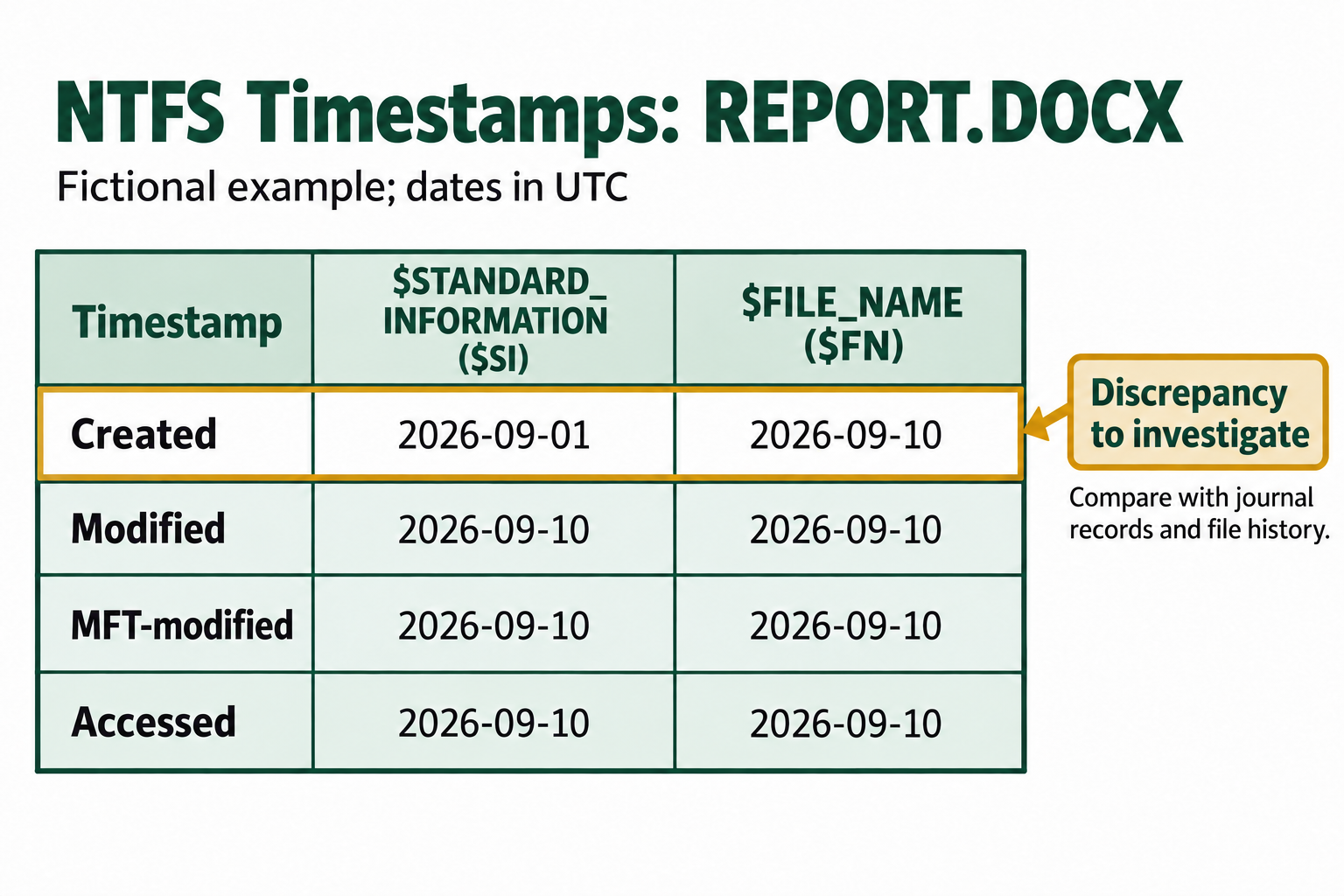
Figure 5.9: A difference between NTFS timestamp sets is an investigative lead that requires context and corroboration.
Text description for Figure 5.9
In a fictional REPORT.DOCX example, the created date in STANDARD_INFORMATION is September 1, while FILE_NAME records September 10. The other displayed dates match. This discrepancy requires investigation and does not establish tampering by itself. The table uses Coordinated Universal Time (UTC). The $STANDARD_INFORMATION created date is 2026-09-01, and the $FILE_NAME created date is 2026-09-10. Modified, MFT-modified, and accessed dates are 2026-09-10 in both columns. Compare journal records and file history to interpret the difference.
Analyst Perspective
When I work a Windows case, comparing $SI and $FN is one of the first things I do. I use a tool such as MFTECmd to pull every file's $SI and $FN timestamps into a timeline, then look for files where the $SI created time falls after the $SI modified time, or where $SI and $FN disagree sharply. Those files rise to the top of the list quickly. I still need to understand the mechanism to explain the finding in a report or in testimony, because the tool flags the mismatch but the examiner has to say what it means.
5.7 Alternate Data Streams
NTFS allows a single file to carry more than one stream of content. The main content is the default stream, and any additional named streams attached to the same file are called Alternate Data Streams (ADS). An alternate stream is referenced with the syntax filename:streamname, so a stream named hidden attached to report.txt is addressed as report.txt:hidden.
Windows uses ADS for legitimate purposes. The most common is Zone.Identifier, a small stream Windows attaches to files downloaded from the internet to record where they came from. This is the mechanism behind the "this file came from another computer" security prompt.
ADS also has an anti-forensic use, and it is one students can grasp immediately. Because File Explorer shows only the default stream, content placed in an alternate stream does not appear in a normal directory listing and does not change the size shown for the file. An attacker can attach a hidden document, a script, or malware to an ordinary-looking file, and a casual look at the folder reveals nothing unusual.
Alternate streams are not truly hidden from an examiner. The command dir /r lists them, and forensic tools such as Autopsy and MFTECmd enumerate and extract every stream on a file. Checking common executables and system files for unexpected alternate streams is a fast, high-value step in a Windows examination.
Figure 5.10 shows several content streams attached to one NTFS file.
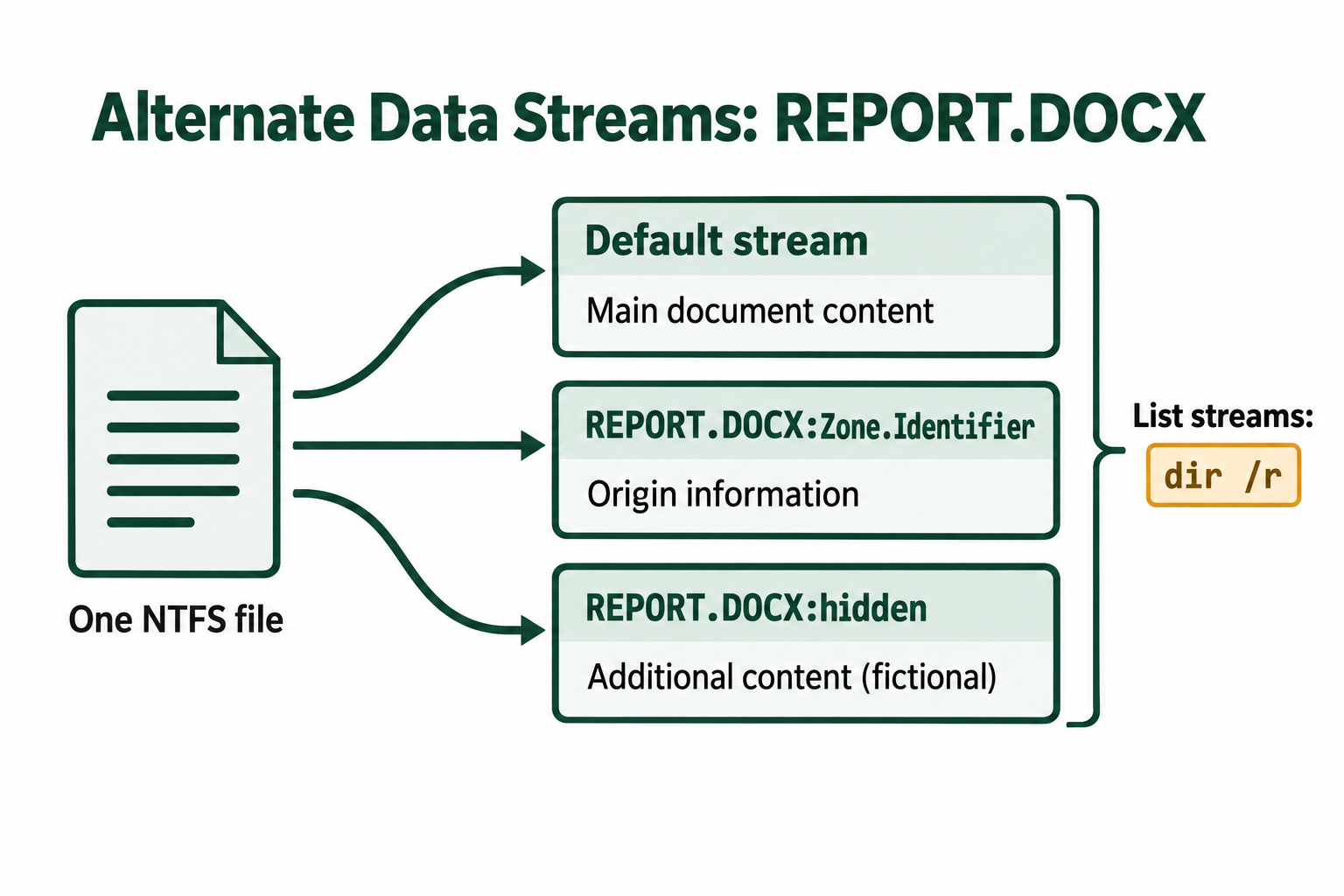
Figure 5.10: One NTFS file can contain a default stream and additional named streams.
Text description for Figure 5.10
REPORT.DOCX branches to its main document content, a Zone.Identifier stream that can store origin information, and a fictional hidden stream holding additional content. The command dir /r can list named streams.
5.8 Deletion, Recovery, and Activity Journals in NTFS
What deletion changes on NTFS
Deleting a file on NTFS follows the same pattern as FAT, applied to NTFS structures. Windows clears the in-use flag in the file's MFT record, removes the file's entry from its parent directory, and marks the file's clusters free in $Bitmap. It does not erase the MFT record or the content clusters. The record keeps its attributes, including the name and the pointer to the content, and the clusters keep their data until they are reused.
This gives NTFS a recovery window like FAT's. An examiner recovers a deleted file by locating its MFT record, reading the name from $FILE_NAME and the cluster locations from the content attribute, and extracting those clusters. If the record has already been reused for a new file, or the clusters have been overwritten, recovery is partial or impossible.
Figure 5.11 shows how NTFS deletion changes directory, record, and allocation status.
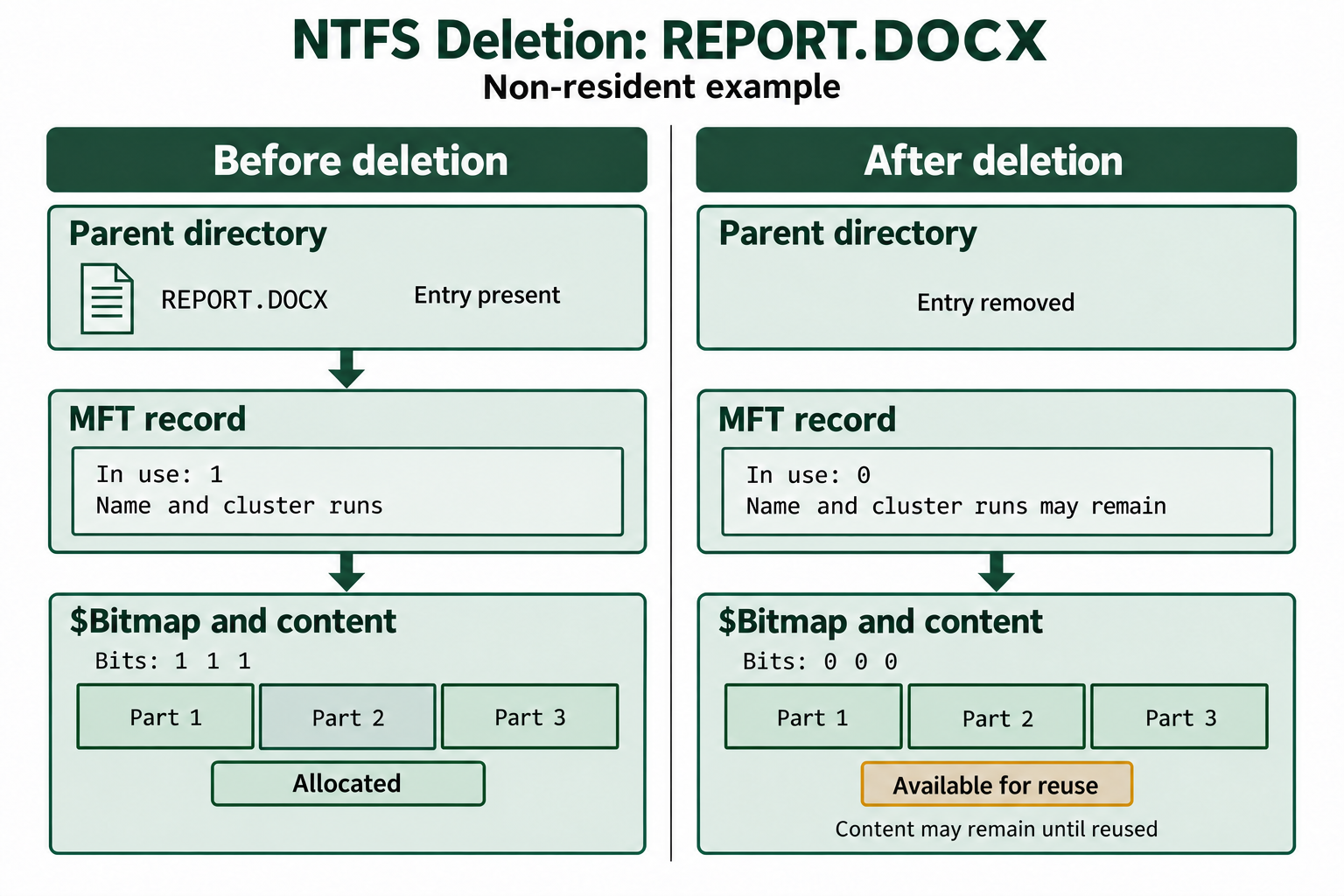
Figure 5.11: NTFS deletion changes record and allocation status while content may remain until later reuse.
Text description for Figure 5.11
Before deletion, a parent directory links to an in-use MFT record and allocated content clusters. After deletion, the directory entry is removed, the record is marked unused, and the bitmap marks clusters free. Retained metadata and content support possible recovery. The illustrated in-use flag changes from 1 to 0, and the three allocation bits change from 1 to 0. This is a non-resident example. The bitmap and content share a panel to show their relationship; the bitmap stores allocation bits, while content occupies separate clusters.
A related case is the orphaned file, a file whose MFT record still exists but whose parent directory entry is gone. The file cannot be reached by browsing folders, but the record is intact, so a tool that scans the MFT directly can still find it, read its name, and recover its content.
Figure 5.12 shows how a direct MFT scan can reach a record whose directory link is missing.
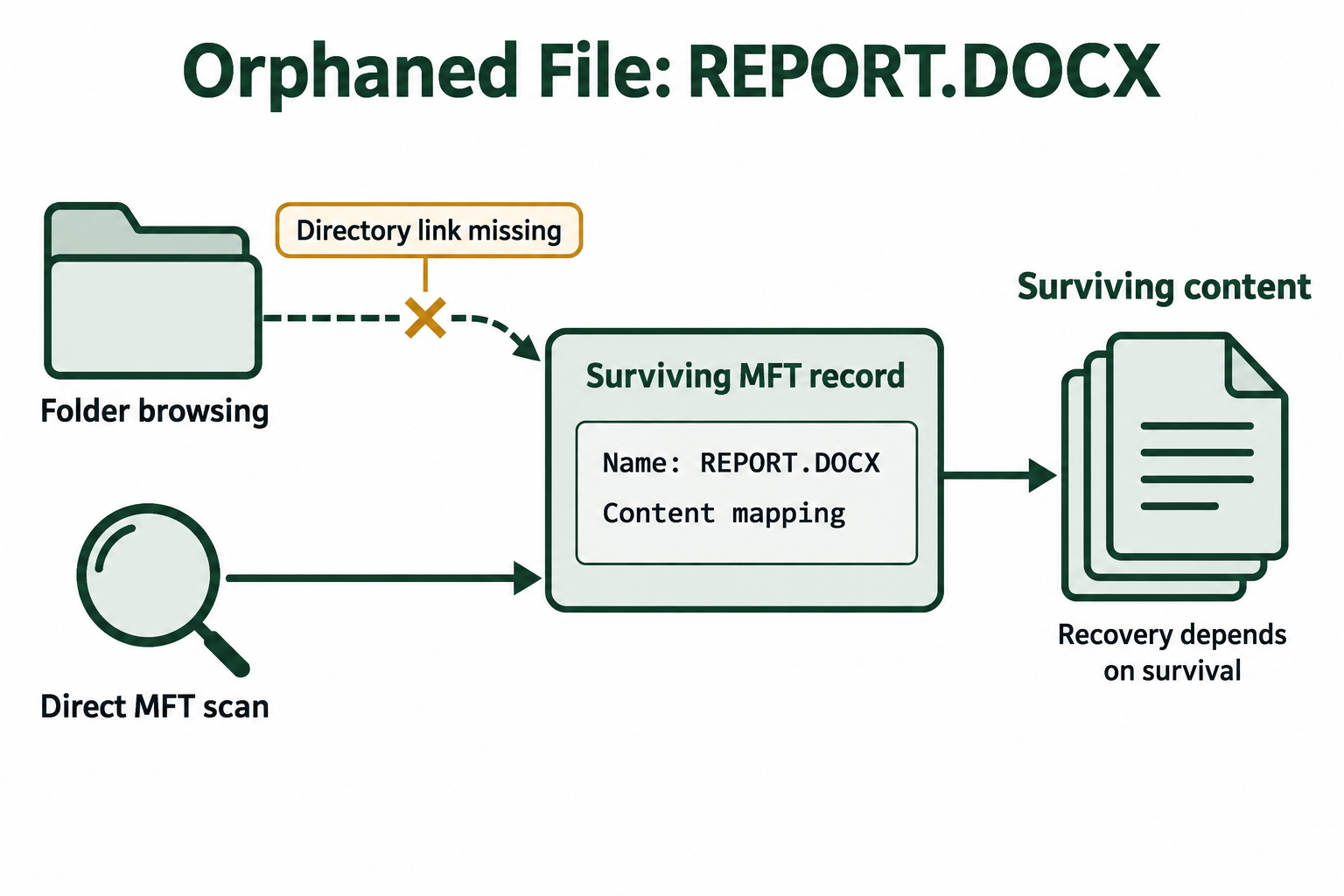
Figure 5.12: A direct MFT scan can find a surviving record whose directory link is missing.
Text description for Figure 5.12
The ordinary folder path has a missing link to REPORT.DOCX. A separate MFT scan reaches its surviving record and follows its retained content mapping. Recovery still depends on the record and content surviving.
Activity journals
NTFS keeps two journals that record what happens on the volume, and both are sources of evidence that FAT does not offer.
The $LogFile is a transaction journal. NTFS writes a file system change to $LogFile before making the change, so that an interrupted operation (from a crash or power loss) can be replayed or undone when the volume is mounted again. This is the journaling feature that protects NTFS from corruption. For an examiner, $LogFile records recent creations, deletions, renames, and attribute changes. It is a circular log, so old entries are overwritten as new ones arrive, and a busy volume may keep only a short window of history.
The $UsnJrnl (Update Sequence Number Journal, also called the change journal) records a summary entry each time a file or directory changes. Each entry names the file, records a timestamp, and includes a reason code describing what happened, such as file created, data overwritten, renamed, or deleted. The change journal generally holds a longer history than $LogFile.
Together, these journals let an examiner reconstruct activity that the file's own timestamps might not show, or might misrepresent. A change-journal entry showing that a file was created at a specific time is independent evidence that can confirm or contradict the file's $SI created timestamp. A deletion entry records when a file was removed and what it was named, even after the file itself is gone. Because Windows writes these journals automatically, they can document actions a user took without the user's involvement in creating that record.
Figure 5.13 compares the records maintained by the two NTFS journals.
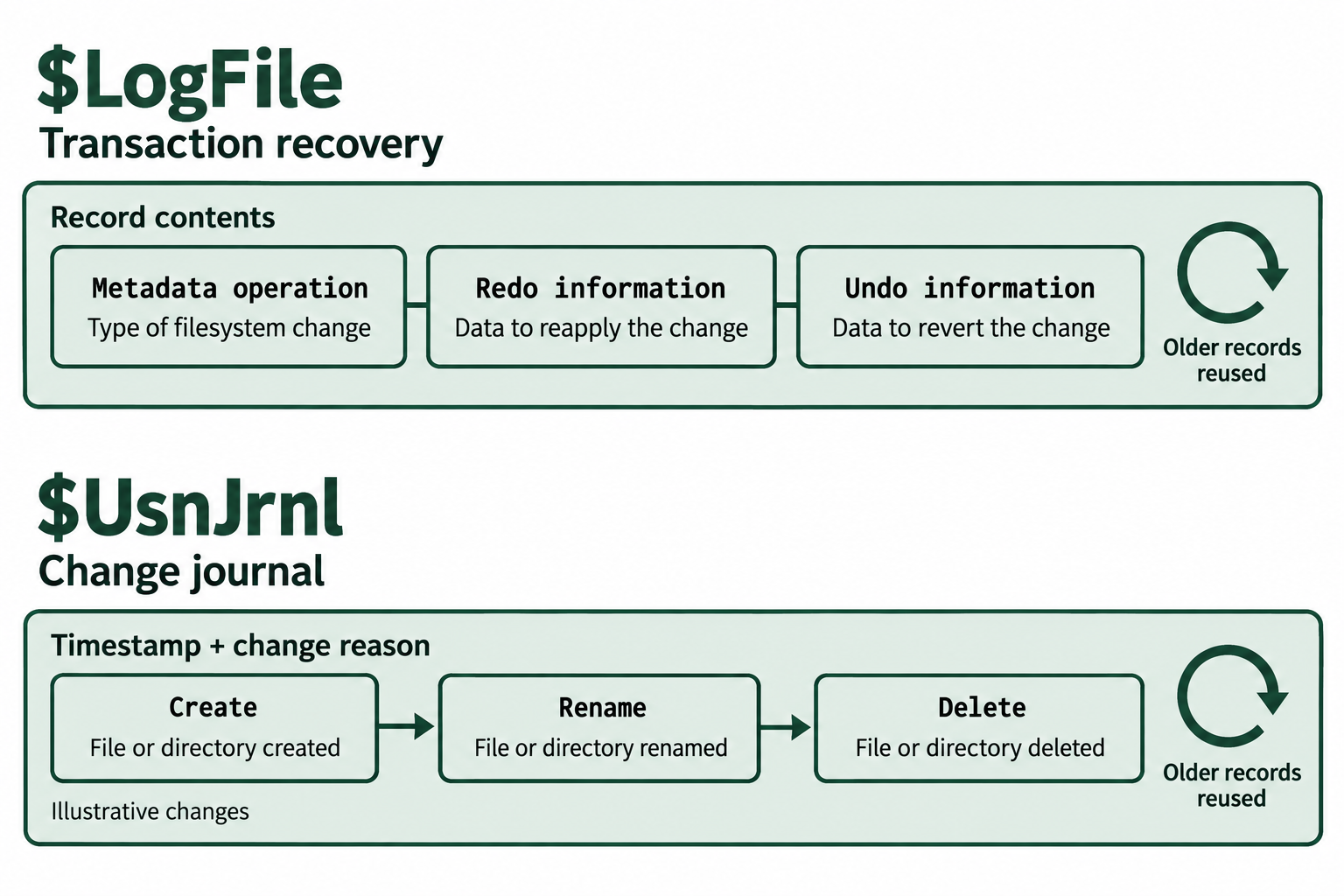
Figure 5.13: NTFS journals offer different records of file-system activity and retain a limited history.
Text description for Figure 5.13
LogFile records transactions used for file-system recovery. UsnJrnl records file and directory changes with timestamps and reason codes. The illustrative change sequence is create, rename, delete. Neither is a general log of file reading. In $LogFile, metadata-operation information identifies the change, redo information supports replaying it, and undo information supports reversing it. The $UsnJrnl examples pair timestamps with change reasons. Circular arrows indicate reuse of older journal records.
Tools do the parsing, the examiner does the reasoning
The internal formats of the MFT, $LogFile, and $UsnJrnl are complex, and no examiner reads them byte by byte in casework. Tools such as MFTECmd parse the MFT and the change journal and produce readable timelines. The examiner's job is to interpret those timelines: to notice a timestamp that cannot be right, a deletion that contradicts a statement, or an alternate stream that should not exist, and to explain what each finding means.
Putting It Together: A Mixed-Media Scenario
A company reports that a departing employee may have copied confidential project files before leaving, and that the employee denies opening the project folder on their last day. Investigators recover two items: a USB flash drive found in the employee's desk, and the employee's assigned Windows laptop. This case uses both halves of the chapter, because the two devices use different file systems and answer different questions.
The USB drive (exFAT). The drive is a 64 GB exFAT device, and a first look shows only a few ordinary documents. The examiner images the drive and searches its unallocated space. Because exFAT deletion clears the allocation bitmap, the deleted records no longer point cleanly at their content, so the examiner relies on carving the free clusters for known file signatures. Several deleted image files and a deleted spreadsheet come back from the unallocated clusters. The drive connected through a normal USB port and never received TRIM, so the freed clusters still held their content. The recovered spreadsheet matches the confidential project data.
The laptop (NTFS). The examiner turns to the question the employee raised, which is whether the project folder was opened on the last day. Three NTFS features answer it:
- The change journal ($UsnJrnl) contains entries for files in the project folder, timestamped on the day in question, with reason codes showing the files were opened and closed. This is independent of anything the employee could edit through normal use.
- A timestamp comparison on one of those files shows a created time in $STANDARD_INFORMATION that falls after its modified time, while the $FILE_NAME timestamps still hold an earlier, consistent time. The $SI timestamp was altered. The $FN timestamp and the change journal agree with each other and contradict the altered value.
- An Alternate Data Stream on an unremarkable file in the employee's Documents folder holds a copy of one confidential document. It did not appear in the folder listing or change the file's displayed size, and it surfaced only when the examiner enumerated streams.
The file system evidence, taken together, contradicts the employee's account. The map-to-data model, the recovery of deleted content from removable media, the comparison of two timestamp sets, and the reading of NTFS journals each contribute one piece, and no single piece required going below what standard forensic tools report.
Chapter Summary
- A file system separates a file's content (bytes in clusters) from its metadata (a record that names the file and points to those clusters). Deletion usually removes or unlinks the record and frees the clusters without erasing the content, which is why recovery is possible until the clusters are reused.
- FAT tracks a file's clusters with a chain in the File Allocation Table and stores the rest of the metadata in a directory entry. Deleting a FAT32 file replaces the first name character with the
0xE5marker and frees the chain, while leaving the size, starting cluster, and content intact. Contiguous files recover cleanly. Fragmented files require carving. - exFAT modernizes FAT for large removable media and is the default for SDXC cards and large USB drives. Its deletion is more destructive than FAT32's, so recovery leans on carving sooner.
- NTFS represents every file with a record in the Master File Table. Small files are stored resident inside the record. Larger files store their content in clusters listed by the record.
- NTFS keeps two timestamp sets, $STANDARD_INFORMATION and $FILE_NAME. Comparing them detects timestomping. A created time later than the modified time, four identical timestamps, or a large gap between the two sets are all signs of tampering.
- Alternate Data Streams let an NTFS file carry hidden extra content addressed as
filename:streamname. They are invisible in File Explorer but readable withdir /rand forensic tools. - NTFS records activity in $LogFile and $UsnJrnl, which can prove when a file was created, accessed, or deleted, independent of the file's own timestamps.
- Recovery on any of these file systems depends on overwrite. Removable flash media often recovers better than an internal SSD because it usually does not receive TRIM.
The next chapter moves to Linux and macOS file systems, which are built on different designs but present the same recovery question: find the metadata that maps a file to its content, and determine whether that content still survives on the media.