CH5: Enumeration, Scripting, and Social Engineering
Introduction
Enumeration is the backbone of every successful engagement. Where reconnaissance is passive, gathering information without direct interaction, enumeration is active: you knock on doors, query systems, and listen for responses. The data you extract during enumeration guides your assessment priorities. Without rigorous enumeration, you're guessing. With it, you're executing a plan.
This chapter covers the mechanics of extracting intelligence from target infrastructure: Domain Name System (DNS) hierarchies, service configurations, hidden directories, file shares, user accounts, wireless networks, and the secrets buried in code repositories. You will also learn how to weaponize that intelligence through scripting and social engineering, translating technical findings into human vulnerabilities.
Enumeration, scripting, and social engineering form a pipeline. You map the network, automate discovery, identify staff, craft a pretext, and deliver a payload. This is professional offensive security.
Section 5.1 introduces the thirteen hands-on tools this chapter uses, by name and before any of them appears in a worked example. The goal is familiarity: when a tool returns in the section that needs it, the example can teach one thing at a time instead of introducing a tool and a technique at once.
Learning Objectives
After completing this chapter, you will be able to:
- Identify the purpose, platform, and basic invocation of the chapter's hands-on toolkit, from subdomain discovery through wireless capture to the phishing frameworks.
- Execute service and protocol enumeration using DNS and targeted queries to extract live services and their configurations.
- Perform directory, file, and share enumeration using both active scanning and credential-based queries.
- Develop and deploy custom enumeration scripts in Bash, Python, and PowerShell to automate discovery and reduce manual effort.
- Design and execute social engineering campaigns leveraging phishing, vishing, pretext development, and credential harvesting.
5.1 The Enumeration and Engagement Toolkit
Chapter 4 introduced the reconnaissance toolkit and drew the line between passive and active work. This chapter crosses that line for good. Enumeration is active by definition: you send queries to the target and read what comes back, and every tool below leaves a trace in someone's logs.
Thirteen tools carry the hands-on work of this chapter, from subdomain discovery through wireless capture to the social-engineering frameworks that skip the network entirely. This section introduces each one by name before it appears in a worked example, so that when ffuf shows up in the directory-enumeration section or Gophish shows up in the phishing section, you already know what you are looking at. As in Chapter 4, each profile answers four questions: what the tool does, how you run it, where it came from, and its practical use for a penetration tester.
The tools group by the job they do. Two find subdomains, two brute-force web content, two enumerate network services, one harvests open-source intelligence (OSINT), two work wireless networks, one hunts secrets in code, and three run social-engineering campaigns.
Authorization is not optional for anything in this chapter
Everything here sends traffic at a target or a person. The wireless tools capture frames and transmit deauthentication packets. The phishing frameworks clone real login pages and capture real credentials. None of this is lawful without written authorization that specifically names the activity and the scope. The statement of work and rules of engagement from Chapter 2 must cover active scanning, wireless testing, and social engineering as separate, explicitly permitted items. Running any of these against a system or a person you are not authorized to test is a crime, not a lesson.
Subdomain and DNS Discovery
Amass
- What it does. Amass maps an organization's external attack surface by discovering subdomains and related infrastructure. It combines passive open-source intelligence with active DNS resolution.
- How you run it. Command line, cross-platform (Linux, macOS, Windows), and preinstalled on Kali Linux. It is an Open Worldwide Application Security Project (OWASP) project maintained at
github.com/owasp-amass/amass. A basic run isamass enum -d example.com; add-passiveto skip active resolution and stay off the target entirely. - Where it came from. Built by Jeff Foley and adopted as an OWASP project. Version 4 rewrote the tool, which is why older tutorials break: passive mode is now a flag on
enum, not a separate subcommand, and the configuration moved to a YAML file plus a separate data-sources file. - Practical use: Amass is the most thorough subdomain enumerator in common use. Subdomains are where forgotten staging servers, admin panels, and legacy applications live, and those are frequently the softest way in.
Sublist3r
- What it does. Sublist3r enumerates subdomains quickly by scraping search engines and public sources, with optional brute-forcing.
- How you run it. Command line, Python, run as
sublist3r -d example.com. It is not in Kali's default install; add it withsudo apt install sublist3ror clone it fromgithub.com/aboul3la/Sublist3r. - Where it came from. Written by Ahmed Aboul-Ela. Its last release was version 1.1 in 2018, and it is effectively dormant: hundreds of open issues, and several of its sources are unreliable now because the search engines it scrapes have changed their behavior.
- Practical use: It is fast and simple, which makes it a reasonable first pass, but treat its output as incomplete. It is included here because you will meet it constantly in tutorials and older assessment reports, and you need to know its limits. Amass is the more reliable tool.
Analyst Perspective
A dormant tool can still be useful, but it is dangerous to trust blindly. When Sublist3r returns eight subdomains and Amass returns forty, the gap usually means Sublist3r's scrapers are quietly failing, not that the target got more secure. Always corroborate a fast tool's findings with a maintained one before you tell a client their attack surface is small.
Web Content Discovery
Gobuster
- What it does. Gobuster brute-forces hidden paths on a target using a wordlist: directories and files on a web server, subdomains through DNS, virtual hosts, and cloud storage buckets.
- How you run it. Command line, a compiled program written in the Go language, cross-platform, and preinstalled on Kali. It is mode-based; the directory mode is
gobuster dir -u http://example.com -w wordlist.txt. The-wwordlist argument is required. - Where it came from. Written by OJ Reeves. Current version 3 added modes beyond the original directory brute-forcing:
dir,dns,vhost,fuzz,s3,gcs, andtftp. - Practical use: Applications expose functionality through paths that are never linked from the home page. An
/adminconsole or a/backup.sqlfile that the site never advertises is still reachable if you know to ask for it, and Gobuster asks for thousands of candidates per minute.
ffuf
- What it does. ffuf, "Fuzz Faster U Fool," is a fast web fuzzer. You place the keyword
FUZZanywhere in a request and ffuf substitutes each line of a wordlist in turn, then filters the responses. - How you run it. Command line, written in Go, cross-platform, preinstalled on Kali. A basic content-discovery run is
ffuf -w wordlist.txt -u http://example.com/FUZZ. TheFUZZmarker can go in the address, a header, or a request body, which makes it more flexible than a directory brute-forcer. - Where it came from. Written by Joona Hoikkala, maintained at
github.com/ffuf/ffuf. - Practical use: ffuf does directory discovery like Gobuster, but the movable
FUZZkeyword also fuzzes parameters, virtual hosts, and login forms. Its filtering is the key feature:-mcmatches response codes,-fcfilters them out, and-fwfilters by word count, which is how you suppress the flood of identical soft-error pages that would otherwise bury the real findings.
Filter before you trust the output
Since version 2, ffuf matches all 2xx responses by default. On a site that returns a friendly 200 page for missing content instead of a 404, every request "succeeds" and the output is noise. Learn to filter by size or word count (-fs, -fw) on the wildcard response before you believe a single result. This is the most common way a beginner produces a directory list full of pages that do not exist.
Service and Directory Enumeration
smbclient
- What it does. smbclient is a command-line client for Windows file sharing. It lists the shares a system offers and lets you browse them like a File Transfer Protocol (FTP) session.
- How you run it. Command line, part of the Samba suite, standard on Linux and present on Kali. List shares with
smbclient -L //target -N, where-Nattempts an anonymous connection with no password. - Where it came from. Part of Samba, the open-source implementation of the Server Message Block (SMB) protocol, maintained by the Samba Team.
- Practical use: A misconfigured file server is a common finding, and a human-named share like "Backups" or "HR" is a data repository someone forgot to lock down. Note the 2026 reality: modern smbclient speaks SMB3 by default, and most systems now disable the ancient SMB1 protocol, so the null-session enumeration that older guides rely on is refused more often than not. Prefer the
-Nflag over the older-U ""idiom for an anonymous attempt.
ldapsearch
- What it does. ldapsearch queries a Lightweight Directory Access Protocol (LDAP) server, which on a Windows network usually means Active Directory. It can dump users, groups, and organizational structure.
- How you run it. Command line. An anonymous query is
ldapsearch -x -H ldap://target -b "dc=target,dc=com", where-xselects simple authentication,-Hgives the server address, and-bsets the search base. It is not installed by default on most systems; add theldap-utilspackage first. - Where it came from. Part of the OpenLDAP project's client utilities.
- Practical use: When a directory server permits anonymous binds, ldapsearch hands you the organization's user list, group memberships, and naming convention in one query. That list feeds password spraying and social engineering directly. If you do not know the search base, query the server's root entry with
-b "" -s baseto discover it.
Open-Source Intelligence Harvesting
theHarvester
- What it does. theHarvester gathers open-source intelligence about a domain from many public sources at once: email addresses, subdomains, hostnames, and employee names.
- How you run it. Command line, Python, preinstalled on Kali. Run it as
theHarvester -d example.com -b crtsh, where-bnames the data source. Use-b allto query every source at once. - Where it came from. Written by Christian Martorella, maintained at
github.com/laramies/theHarvester. Current versions require a recent Python and are run through theuvtool. - Practical use: It automates hours of manual searching into one command, and the email addresses it returns are the target list for a phishing campaign. The critical caveat for 2026: the source list has changed, and google, linkedin, and twitter no longer work as sources; naming them returns an error. Sources that still work without an application programming interface (API) key include
crtsh,duckduckgo, andhackertarget. Roughly thirty-five sources need a key, including Shodan and Hunter.
Wireless Network Testing
aircrack-ng
- What it does. aircrack-ng is a suite for auditing Wi-Fi security: capturing wireless frames and cracking Wired Equivalent Privacy (WEP) and Wi-Fi Protected Access (WPA/WPA2) keys.
- How you run it. Command line, on Linux, preinstalled on Kali. It is a suite of separate programs, not one command. The four a beginner meets are
airmon-ng(put the adapter into monitor mode),airodump-ng(capture frames and find access points),aireplay-ng(inject packets, including deauthentication), andaircrack-ng(crack the captured handshake). - Where it came from. Maintained by Thomas d'Otreppe at
aircrack-ng.org. Version 1.7 is current. - Practical use: Wireless is a physical attack surface that scoping often overlooks. The important mechanic to understand up front: cracking WPA2 is not a live attack against the access point. You capture the four-way handshake once, then run an offline dictionary attack against it. If the passphrase is not in your wordlist, you get nothing, and a strong random passphrase does not fall. It also requires a wireless adapter that supports monitor mode and packet injection, which most built-in laptop cards do not.
Kismet
- What it does. Kismet is a passive wireless detector, sniffer, and wireless intrusion detection system. It discovers Wi-Fi, Bluetooth, and other devices by listening, without transmitting anything.
- How you run it. A server with a browser-based interface, on Linux, preinstalled on Kali. You launch the server with an interface as its data source, for example
sudo kismet -c wlan0, then open the web interface athttp://localhost:2501to watch devices appear. - Where it came from. Written by Mike Kershaw at
kismetwireless.net. It was rewritten into its current server-and-web-interface form; older guides describing a text-based console are out of date, and modern Kismet manages monitor mode itself rather than requiring you to runairmon-ngfirst. - Practical use: Kismet maps the wireless environment without announcing your presence, which makes it the reconnaissance counterpart to aircrack-ng's active attacks. The distinction to hold onto: Kismet is passive and does not inject or deauthenticate, so it is not a substitute for the aircrack-ng suite when the engagement calls for capturing a handshake.
Secrets Discovery
TruffleHog
- What it does. TruffleHog scans code, version-control history, and other sources for leaked secrets such as passwords, API keys, and private keys, then verifies whether each one still works.
- How you run it. Command line, a single Go program, cross-platform. It is not preinstalled on Kali; install it from the repositories with
sudo apt install trufflehog. Every run starts with a source:trufflehog git https://github.com/target/repo --only-verified, orfilesystem, orgithub. - Where it came from. Maintained by Truffle Security at
github.com/trufflesecurity/trufflehog. Version 3 was a complete rewrite from the original Python tool into Go, and the original is now legacy. - Practical use: Developers commit credentials by accident constantly, and a live key in a public repository is often a faster path in than any exploit. Version 3's defining feature is verification: rather than flagging anything that looks like a secret, it makes a live call to the provider to confirm the credential still works, which cuts false positives dramatically. Understand that verification touches third-party systems, so
--only-verifiedis active behavior, and any secret it confirms is a live, sensitive credential to be handled with care.
Social Engineering and Phishing
The three tools below attack people rather than systems, and they carry the heaviest authorization requirements in the course. Each clones a real login, captures real credentials, or both.
Evilginx
- What it does. Evilginx is a man-in-the-middle phishing framework. It sits between the victim and the real website as a reverse proxy, so the victim logs in on what looks like the genuine site while Evilginx captures the session token. Because it steals the authenticated session, it defeats most multi-factor authentication (MFA), not just the password.
- How you run it. Command line, a Go program that runs its own web and DNS servers, on Linux, with a real registered domain pointed at it. It is not preinstalled on Kali. The current version is 3.x, run as
evilginx; tutorials showing./evilginx2are dated. Its site configurations are called phishlets. - Where it came from. Written by Kuba Gretzky at
github.com/kgretzky/evilginx2. The phishlet format changed between versions 2 and 3, and the author deliberately ships no working phishlets, so most public ones found online fail on the current version. - Practical use: Multi-factor authentication is the control clients rely on most, and Evilginx demonstrates that a session-stealing proxy walks straight through it. That makes it a powerful teaching point and a serious liability. It is a favorite of real criminals, and standing up an Evilginx lure requires explicit written authorization covering session-token capture, plus a plan for handling what you capture.
Gophish
- What it does. Gophish runs and measures phishing campaigns: email templates, cloned landing pages, target lists, and tracking of who opened, clicked, and submitted credentials.
- How you run it. A Go program with a web administration console, cross-platform. Download a release and run
./gophish. On first run it prints a randomly generated admin password to the terminal; the oldadmin/gophishdefault was removed years ago, so tutorials still showing it are wrong. The admin console runs on port 3333, separate from the phishing server that delivers the campaign. - Where it came from. Written by Jordan Wright at
getgophish.com. - Practical use: Gophish is the standard tool for authorized phishing simulations and security-awareness training. It produces the metrics a client actually wants, click rate and submission rate, and it does so within a documented, controllable campaign. It is a legitimate assessment tool, which does not lessen the requirement that every recipient be inside an authorized target list.
Social-Engineer Toolkit (SET)
- What it does. SET is a menu-driven framework of social-engineering attacks. Its headline classroom use is the Credential Harvester, which clones a login page and records the credentials victims enter.
- How you run it. Command line with numbered menus, on Linux, preinstalled on Kali. Launch it with
sudo setoolkit; the root privilege matters because the credential harvester binds a web server to port 80 and fails silently without it. The Credential Harvester lives under Social-Engineering Attacks, then Website Attack Vectors. - Where it came from. Written by Dave Kennedy at TrustedSec, maintained at
github.com/trustedsec/social-engineer-toolkit. - Practical use: SET makes cloning a target's portal and collecting submitted passwords a three-menu operation, which is exactly why its output is unauthorized-access territory the moment it points at anyone outside a signed engagement. The most common reason a capture never arrives is the "IP address for the POST back" field: it must be the address the victim's browser can actually reach, which on a local network is your host's address, not
127.0.0.1.
Toolkit at a Glance
| Tool | Job | Interface | On Kali |
|---|---|---|---|
| Amass | Subdomain discovery | CLI | Preinstalled |
| Sublist3r | Subdomain discovery | CLI | Install required |
| Gobuster | Web content discovery | CLI | Preinstalled |
| ffuf | Web fuzzing | CLI | Preinstalled |
| smbclient | SMB share access | CLI | Preinstalled |
| ldapsearch | LDAP queries | CLI | Install ldap-utils |
| theHarvester | OSINT harvesting | CLI | Preinstalled |
| aircrack-ng | Wi-Fi capture and cracking | CLI suite | Preinstalled |
| Kismet | Passive wireless detection | Server + web | Preinstalled |
| TruffleHog | Secret scanning | CLI | Install required |
| Evilginx | MFA-bypass phishing proxy | CLI | Install required |
| Gophish | Phishing campaigns | Web console | Install required |
| SET | Social-engineering attacks | CLI menus | Preinstalled |
5.2 Service and Protocol Enumeration
DNS Enumeration
DNS is the Internet's phone book. A single DNS query can expose the organizational structure, server naming conventions, and IP space allocation. DNS enumeration extracts A records, AAAA records, MX records, TXT records, and NS records to map the target's digital footprint.
Standard tools query one record type at a time:
nslookup -type=A example.com
dig @8.8.8.8 example.com MX
host -t TXT example.com
But comprehensive enumeration requires a more aggressive approach. Amass, a subdomain enumeration tool, combines DNS queries, certificate databases (CT logs), web scraping, and brute-force techniques to discover subdomains:
amass enum -d example.com -o subdomains.txt
amass enum -passive -d example.com    # OSINT only, no active resolution
In version 4 and later, passive mode is a flag on enum rather than a separate subcommand, which is a common tripping point for anyone following an older guide.
Zone transfers, the ability to pull an entire DNS zone from an authoritative nameserver, represent a configuration error. When a secondary nameserver queries the primary for a zone transfer (AXFR request), a misconfigured primary may respond without authentication:
dig @ns1.example.com example.com AXFR
Zone transfers are rare in production environments (access control lists and transaction signatures prevent them), but they appear in legacy systems or testing environments left in production.
Zone transfers and nslookup on Linux
nslookup can attempt a zone transfer on Windows, but on Linux and Berkeley Software Distribution (BSD) systems its ls subcommand is documented as "not implemented." Guides showing nslookup -type=AXFR on Linux will not work. Use dig AXFR, shown above, on those systems.
Reverse DNS lookups map IP addresses to hostnames. A range scan can reveal named infrastructure:
for i in {1..254}; do
  nslookup 192.168.1.$i 2>/dev/null | grep "name ="
done
Tools like Amass, Sublist3r, and Fierce automate these workflows. Each combines multiple enumeration vectors to maximize discovery.
Analyst Perspective
During reconnaissance of a financial services firm, Amass identified a subdomain internal-vpn.example.com via CT logs. The VPN gateway was exposed to the internet with default credentials. That single subdomain became the initial access vector. DNS enumeration often reveals what the organization believes is hidden.
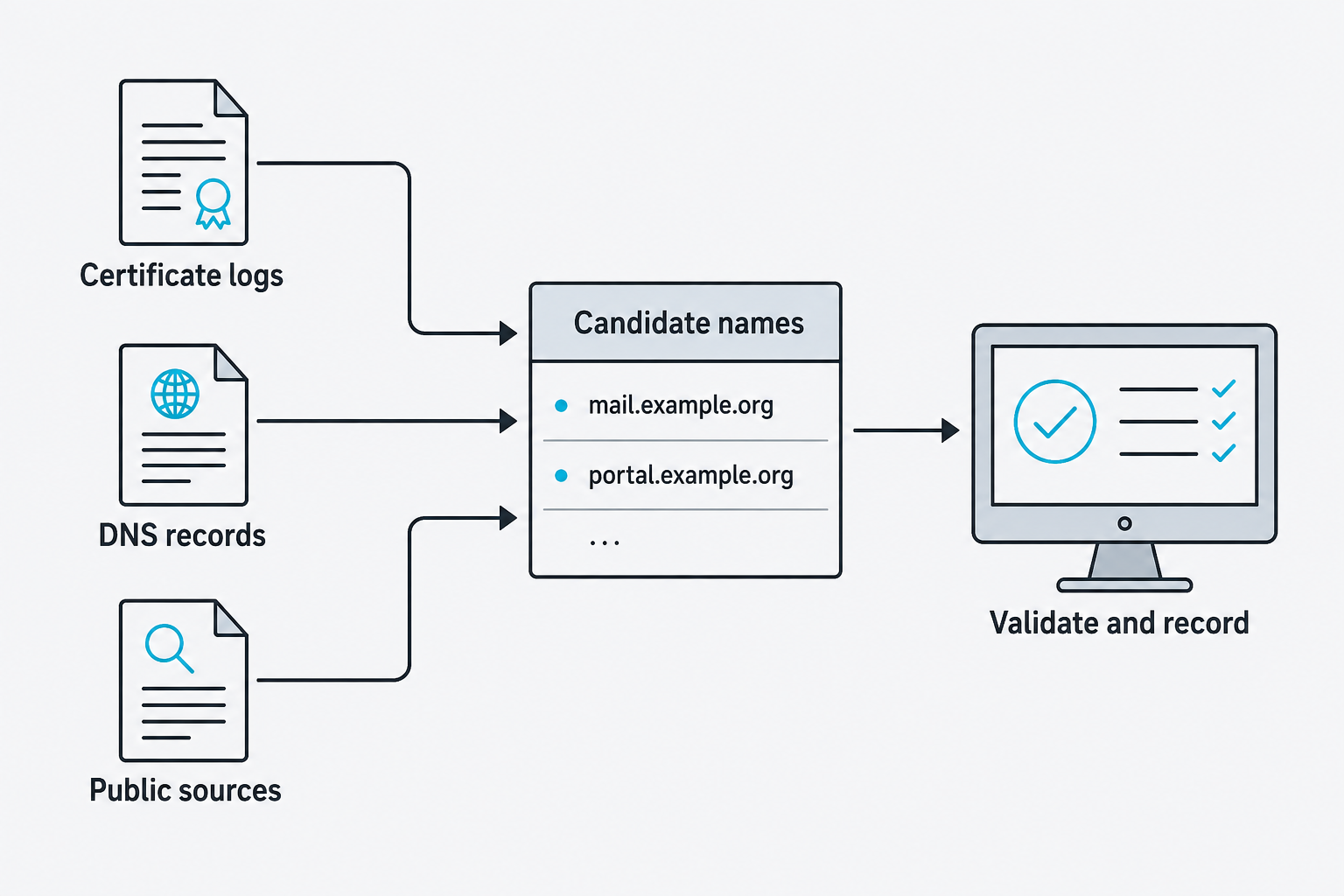
Figure 5.1: Several sources contribute candidate hostnames that require validation.
Text description for Figure 5.1
Certificate transparency logs, Domain Name System (DNS) records, and public sources provide candidate names. A candidate may be stale, out of scope, or no longer resolve. Validation records the source, timestamp, DNS result, and authorized scope before further enumeration.
Protocol Enumeration and Service Fingerprinting
Once you identify a live host, you probe its open ports to identify services and their versions. Nmap, the standard port scanner, performs this with the -sV flag:
nmap -sV -p 22,80,443,3389,5985,5986 example.com
The -sV flag sends service-specific probes to extract version information. The output reveals not just "port 445 is open" but "port 445 is open, running Windows SMB, version 7601 (Windows 7 SP1)."
Nmap Scripting Engine (NSE) scripts automate targeted queries beyond basic port scanning. Pre-written scripts query SNMP communities, enumerate SMB shares, test SSL/TLS ciphers, and enumerate RDP sessions:
nmap -p 445 --script smb-enum-shares example.com
nmap -p 3389 --script rdp-enum-encryption example.com
nmap -p 25 --script smtp-enum-users example.com
Script categories include:
- auth: Authentication bypass, default credentials
- intrusive: Scans that may disrupt service or trigger alarms
- vuln: Known vulnerability checks
- discovery: Host, service, and application discovery
NSE scripts are written in Lua and live in /usr/share/nmap/scripts/. You can develop custom scripts, but the standard library covers the vast majority of enumeration scenarios.
Putting It Together: Protocol Enumeration Workflow
You've identified that admin.example.com resolves to 10.0.1.50. Here's a realistic enumeration sequence:
Phase 1: Live host confirmation
ping 10.0.1.50
nmap -sn 10.0.1.50  # ICMP and ARP ping
Phase 2: Port discovery
nmap -p- -sS 10.0.1.50 -oG ports.txt # SYN scan, all ports
Phase 3: Service identification and vulnerability check
nmap -p 22,80,443,3306,5432,8080 -sV --script vuln 10.0.1.50
Phase 4: Target-specific enumeration
# If MySQL detected on 3306
nmap -p 3306 --script mysql-enum,mysql-empty-password 10.0.1.50

# If SMB detected on 445
nmap -p 445 --script smb-enum-*,smb-os-discovery 10.0.1.50
This layered approach starts broad (all ports), narrows to relevant services (SYN scan + version detection), then goes deep with service-specific queries.
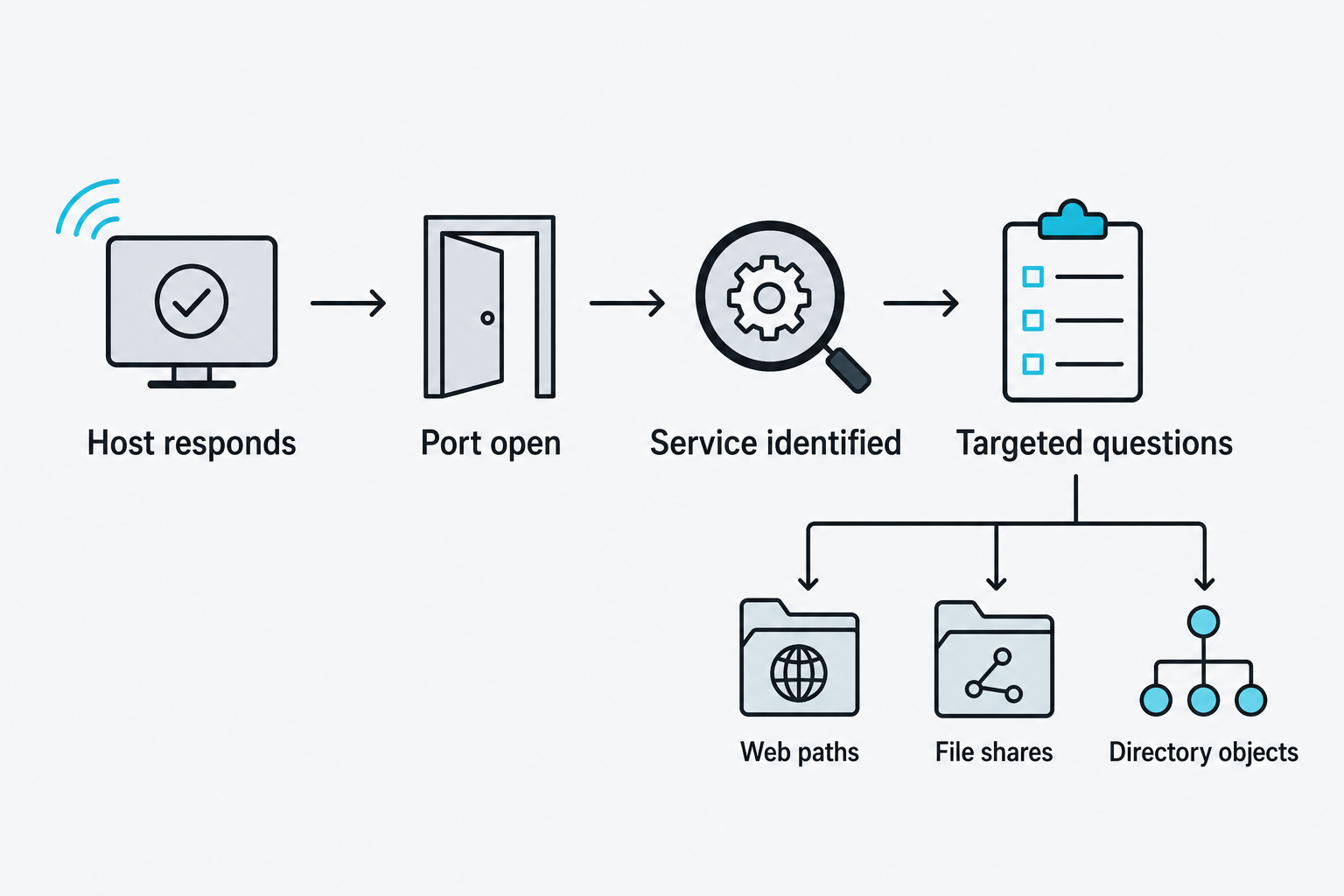
Figure 5.2: Service identification guides the next enumeration questions.
Text description for Figure 5.2
An initial response establishes reachability under the tested conditions. An open port indicates a listening service, while service identification supplies a protocol hypothesis. The tester then selects authorized queries appropriate to that service. A port number alone does not prove which application is listening.
5.3 Directory, File, and Share Enumeration
Directory and File Discovery
Web applications expose functionality through URLs. Directory enumeration attempts to discover directories and files that the web server may not link from the main site. A common scenario: the /admin directory isn't advertised, but it exists.
Tools like Gobuster, Dirbuster, and FFuf use wordlists to brute-force directory and file names:
gobuster dir -u http://example.com -w /usr/share/wordlists/dirb/common.txt
ffuf -u http://example.com/FUZZ -w common.txt -fw 1000
Wordlists vary by target:
- Curated lists (dirb, SecLists, Seclists): Common directory names across many frameworks
- Application-specific lists: Django admin paths, WordPress plugins, Magento modules
- Custom lists: Derived from leaked wordlists, source code repositories, or previous assessments
The tool sends requests like GET /admin, GET /config, GET /backup.sql and evaluates the HTTP response code:
- 200: File/directory found, accessible
- 301/302: Redirect
- 403: Found but forbidden (valuable intelligence: the directory exists, access is restricted)
- 404: Not found
A smart enumeration strategy avoids "404 storms," meaning thousands of requests that trigger intrusion detection and web application firewall alerts. Rate limiting, request filtering, and rotating user agents reduce noise:
ffuf -u http://example.com/FUZZ -w common.txt -rate 50 -H "User-Agent: Mozilla/5.0"
Extensions matter. A script might enumerate .php files on a PHP-based site, .aspx on .NET, or .jsp on Java:
gobuster dir -u http://example.com -w wordlist.txt -x php,html,txt
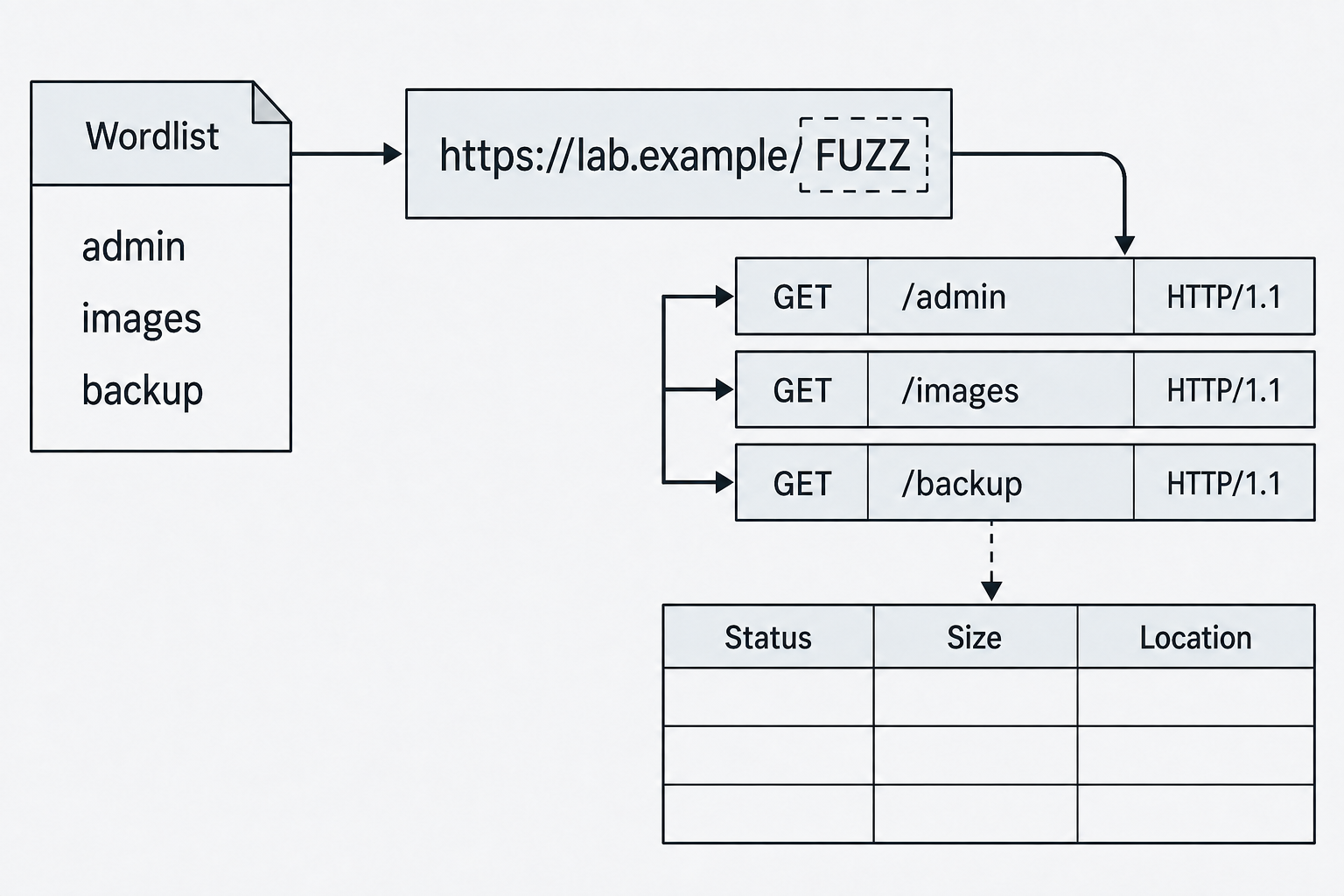
Figure 5.3: A wordlist supplies candidate paths while response fields provide evidence for review.
Text description for Figure 5.3
Each wordlist entry replaces the placeholder in the URL path. The tool records the HTTP status, response size, and redirect location when present. These fields help prioritize candidates, but a successful status alone does not prove a distinct resource exists. The example domain is illustrative.
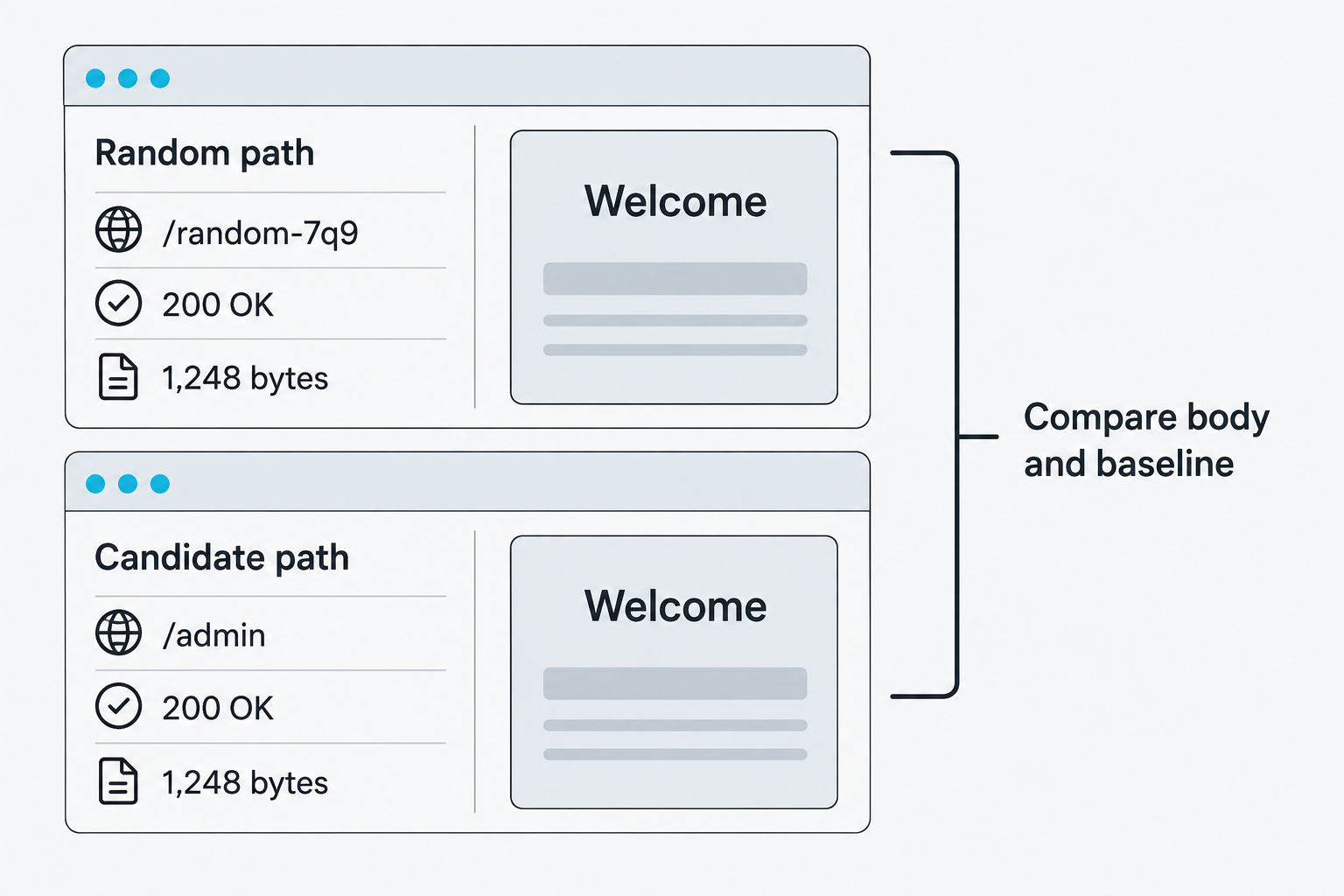
Figure 5.4: A baseline response helps distinguish real discoveries from generic responses.
Text description for Figure 5.4
In this fictional example, both paths return an identical generic page. A wildcard route or custom error handler can produce successful HTTP responses for nonexistent paths. Comparing the body, size, redirects, and random-path baseline reduces false positives. Matching sizes alone do not establish identical content.
SMB Share Enumeration
Windows systems expose file shares via the Server Message Block (SMB) protocol on port 445 (or 139 on older systems). SMB enumeration lists available shares and tests for read/write access without credentials.
smbclient lists shares on a target, and the -N flag attempts an anonymous connection with no password:
smbclient -L //example.com -N
Modern smbclient speaks Server Message Block version 3 by default, and most current systems disable the legacy version 1 protocol, so the null-session enumeration older guides depend on is refused more often than it succeeds.
Output shows:
Sharename       Type      Comment
---------       ----      -------
ADMIN$          Disk      Remote Admin
C$              Disk      Default share
IPC$            Disk      Remote IPC
Users           Disk      User home directories
Backups         Disk      Nightly backups
The ADMIN$, C$, and IPC$ shares are default administrative shares. The presence of human-named shares like "Backups" or "Projects" indicates data repositories.
Null session enumeration connects to the IPC$ share without credentials to extract user lists and group membership:
rpcclient -N -c "enumdomusers" example.com
On systems with null sessions enabled (increasingly rare), you can list local users, groups, and domain information without a password.
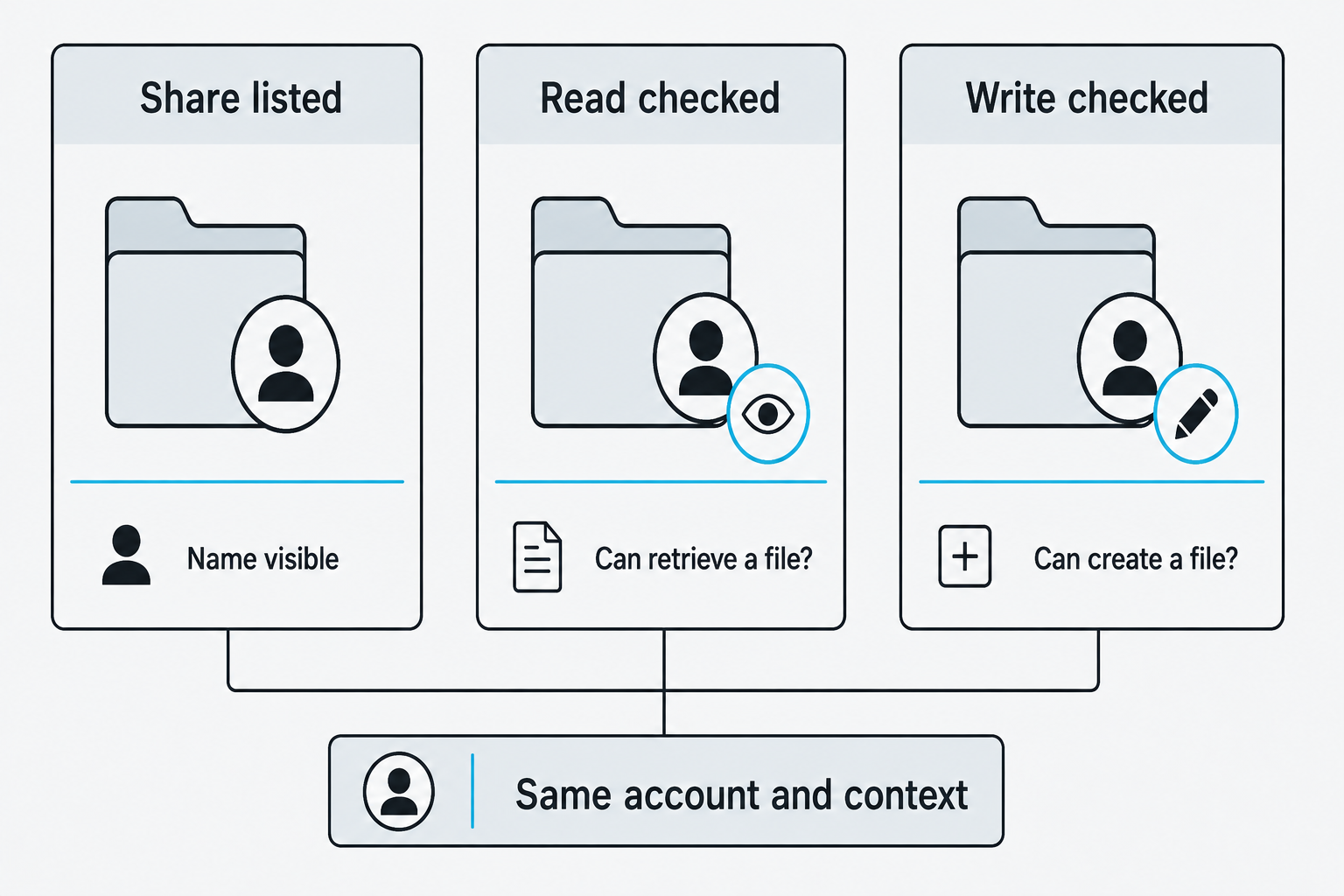
Figure 5.5: Share visibility and file permissions answer different questions.
Text description for Figure 5.5
A share name may be visible even when its contents are inaccessible. Read and write checks assess different permissions and depend on the account, share permissions, and filesystem permissions. A listed share does not prove either capability. Record which checks were authorized and their actual outcomes.
Putting It Together: Filesystem Reconnaissance
You're assessing a target running IIS and Windows SMB. Here's your sequence:
Phase 1: Web directory discovery
ffuf -u http://example.com/FUZZ -w /usr/share/wordlists/raft-medium-directories.txt -x aspx,html,txt
You discover /reports, /admin, and /data.
Phase 2: SMB share enumeration
smbclient -L //example.com -N
You find a "Reports" share (likely the same as /reports), plus "Backups" and "Config".
Phase 3: Attempt null access to IPC$
rpcclient -N -U "" example.com
rpcclient> enumdomusers
user:[Administrator] rid:[0x1f4]
user:[Guest] rid:[0x1f5]
user:[ServiceAccount] rid:[0x3e8]
You've discovered three users. The "ServiceAccount" is a lead for credential stuffing or targeted phishing.
5.4 User, Wireless, and Secrets Enumeration
Local User and Email Enumeration
Identifying valid usernames accelerates downstream attacks (password spraying, social engineering). Harvesting usernames occurs through multiple vectors:
LDAP enumeration (if exposed):
ldapsearch -x -H ldap://example.com -b "dc=example,dc=com"
Web application user enumeration: - Registration pages that say "That username is taken" - Password reset forms that reveal "User not found" vs. "Email sent" - LinkedIn searches targeting the organization's domain - Cached or indexed pages via Google dorking
Wireless network enumeration (detailed below) may reveal SSIDs naming conventions indicating departments, allowing you to infer usernames.
Email harvesting from public sources:
# OSINT tool that extracts emails from public records
theHarvester -d example.com -b crtsh,duckduckgo,hackertarget
Automated tools search certificate logs, search engines, and other public databases for email addresses and hostnames matching the target's domain. The google, linkedin, and twitter sources shown in older guides no longer function and now return an error; crtsh, duckduckgo, and hackertarget still work without an application programming interface key, while roughly thirty-five sources require one.
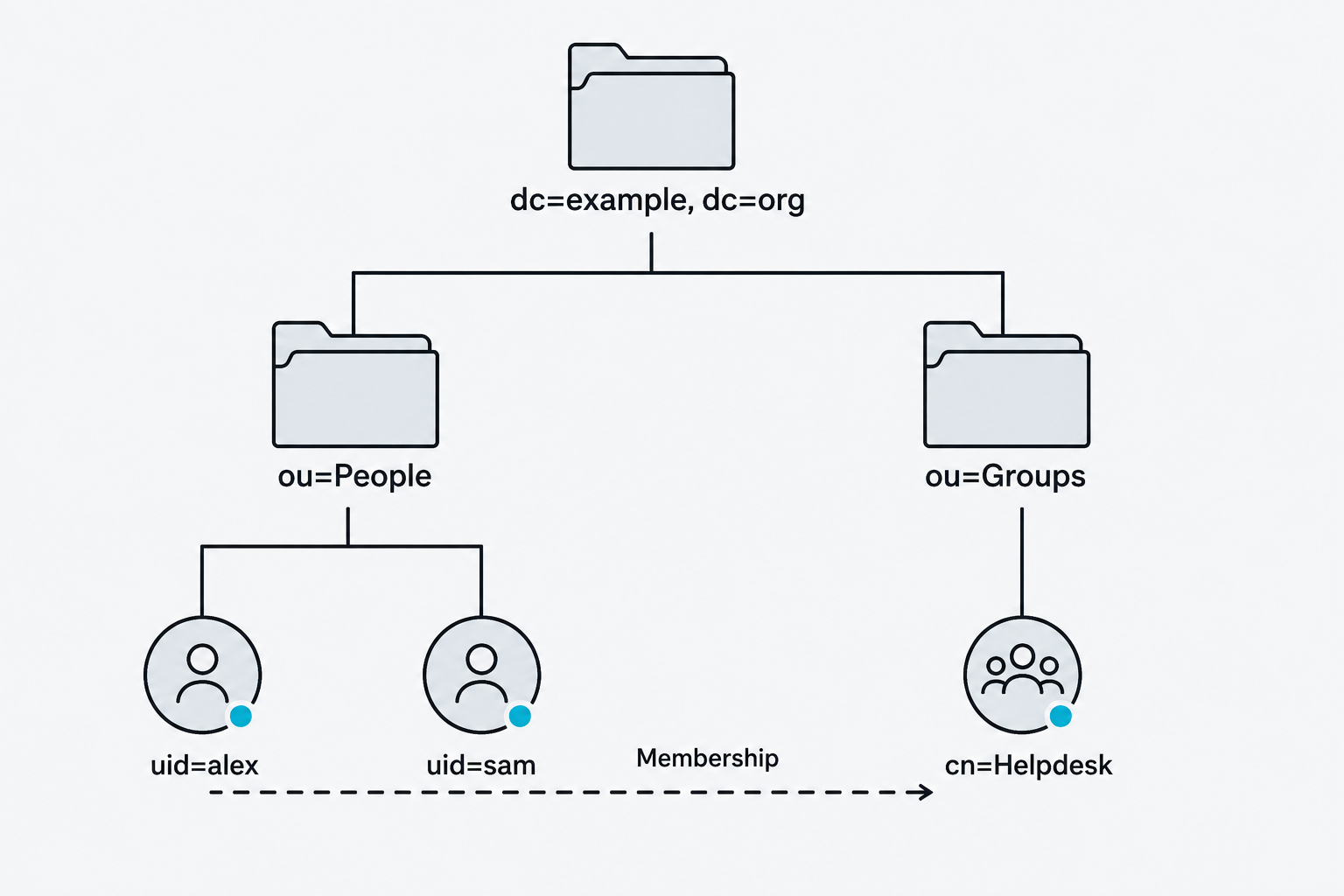
Figure 5.6: Directory structure and group membership describe different relationships.
Text description for Figure 5.6
The Lightweight Directory Access Protocol (LDAP) exposes directory objects through authorized queries. This schematic uses an example directory root, organizational units, user entries, and a group entry. Tree edges show where entries reside. The separately labeled dashed edge represents membership, which is a relationship rather than a directory location.
Wireless Network Enumeration
Wireless networks are often overlooked during scoping but represent a physical attack surface. Tools like Kismet, Aircrack-ng, and inSSIDer perform wireless enumeration:
# Set wireless adapter to monitor mode
sudo airmon-ng start wlan0

# Scan for broadcast beacons
sudo airodump-ng wlan0mon

# Capture handshake for WPA2 cracking
sudo airodump-ng -c 6 --bssid AA:BB:CC:DD:EE:FF wlan0mon -w capture
The output reveals:
- SSID (network name)
- BSSID (access point MAC address)
- Channel and frequency
- Encryption type (WEP, WPA, WPA2, WPA3)
- Signal strength
- Connected clients
Hidden SSIDs don't broadcast their name, but the BSSID and connected clients are still visible. Deauthentication attacks force clients to reassociate, revealing the hidden SSID in the reassociation frame:
sudo aireplay-ng --deauth 10 -a AA:BB:CC:DD:EE:FF wlan0mon
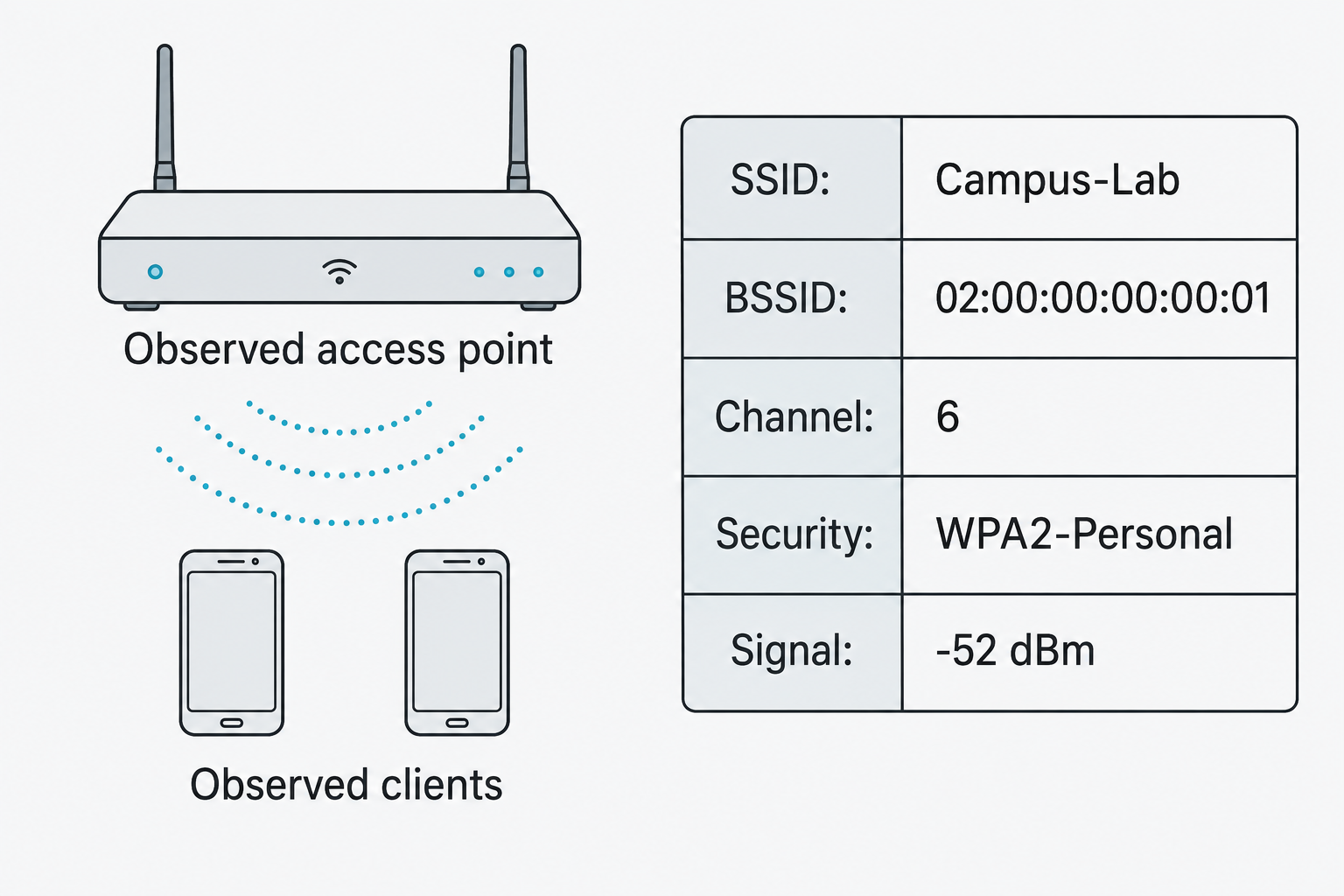
Figure 5.7: Wireless observations describe an access point and its nearby activity.
Text description for Figure 5.7
The service set identifier (SSID) names the wireless network. The basic service set identifier (BSSID) identifies the observed radio interface. Channel, advertised security, signal strength, and observed clients add context. The sample values are illustrative and do not establish ownership, authorization, or password strength.
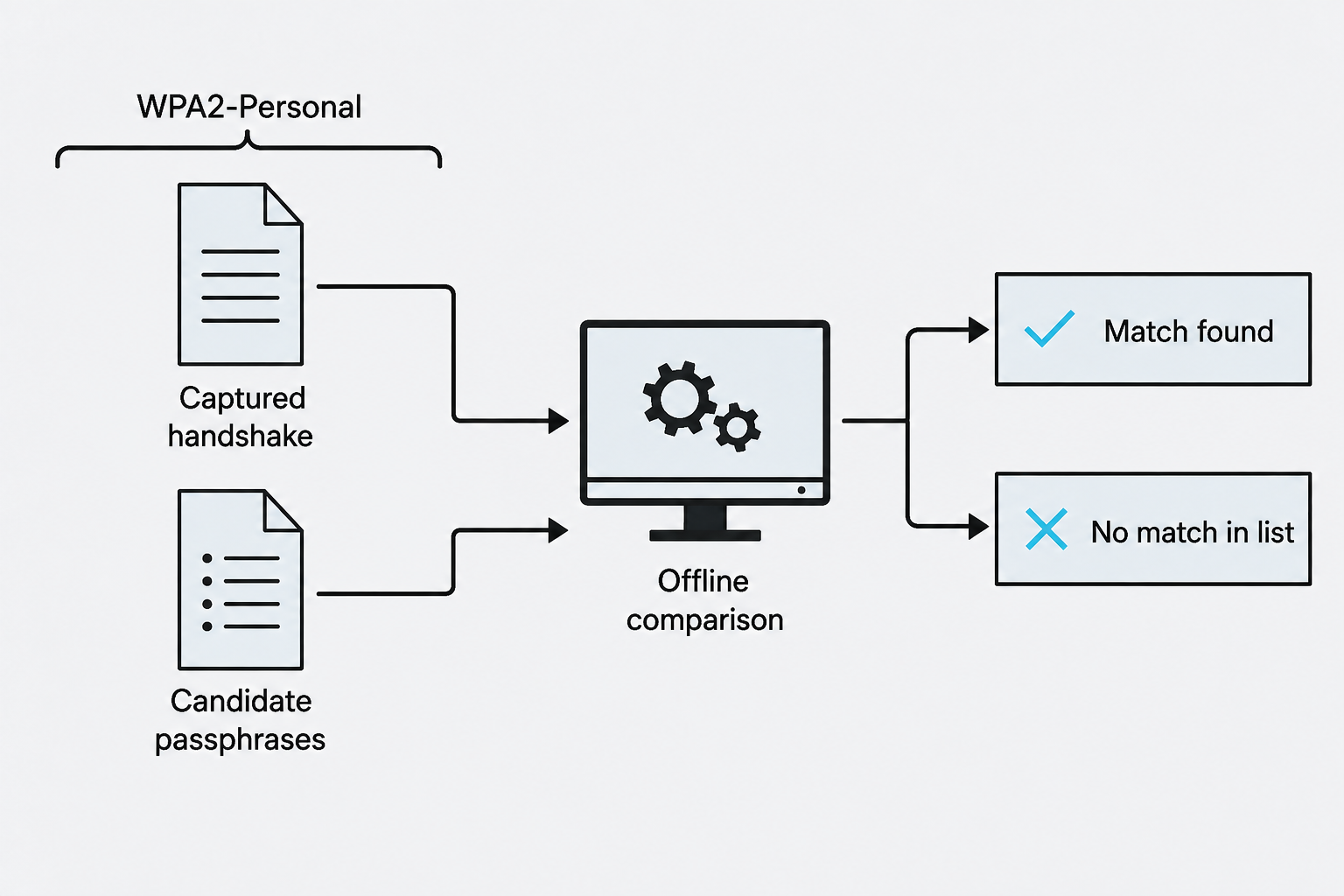
Figure 5.8: A captured WPA2-Personal handshake supports offline checking of candidate passphrases.
Text description for Figure 5.8
For WPA2-Personal, suitable captured authentication data can support offline checking of candidate passphrases. Each candidate is tested against the captured data without a new access-point login for every guess. A list that lacks the correct passphrase will not recover it. This simplified mechanism does not describe all wireless authentication modes.
File and Secret Scanning
Source code repositories, configuration files, and backup archives often contain hardcoded credentials, API keys, or private keys. Secret scanning tools search for patterns indicating exposed secrets:
# TruffleHog searches Git history for secrets and verifies them
trufflehog git https://github.com/target/repo --only-verified

# Trivy scans filesystem, images, and repositories
trivy fs /path/to/code --scanners misconfig,secret
TruffleHog version 3 requires a source keyword (git, filesystem, github, and others) as its first argument, and the --only-verified flag limits output to secrets it confirmed are still live by making a real call to the provider. That verification step is active behavior, and any secret it confirms is a working credential to be handled as sensitive.
These tools detect patterns like:
- AWS access keys (
AKIA*) - Private SSH keys (
-----BEGIN PRIVATE KEY-----) - Slack tokens (
xoxp-,xoxb-) - API keys in
config.json,.envfiles, or source code comments
The severity escalates if secrets are exposed in public repositories or unencrypted backups.
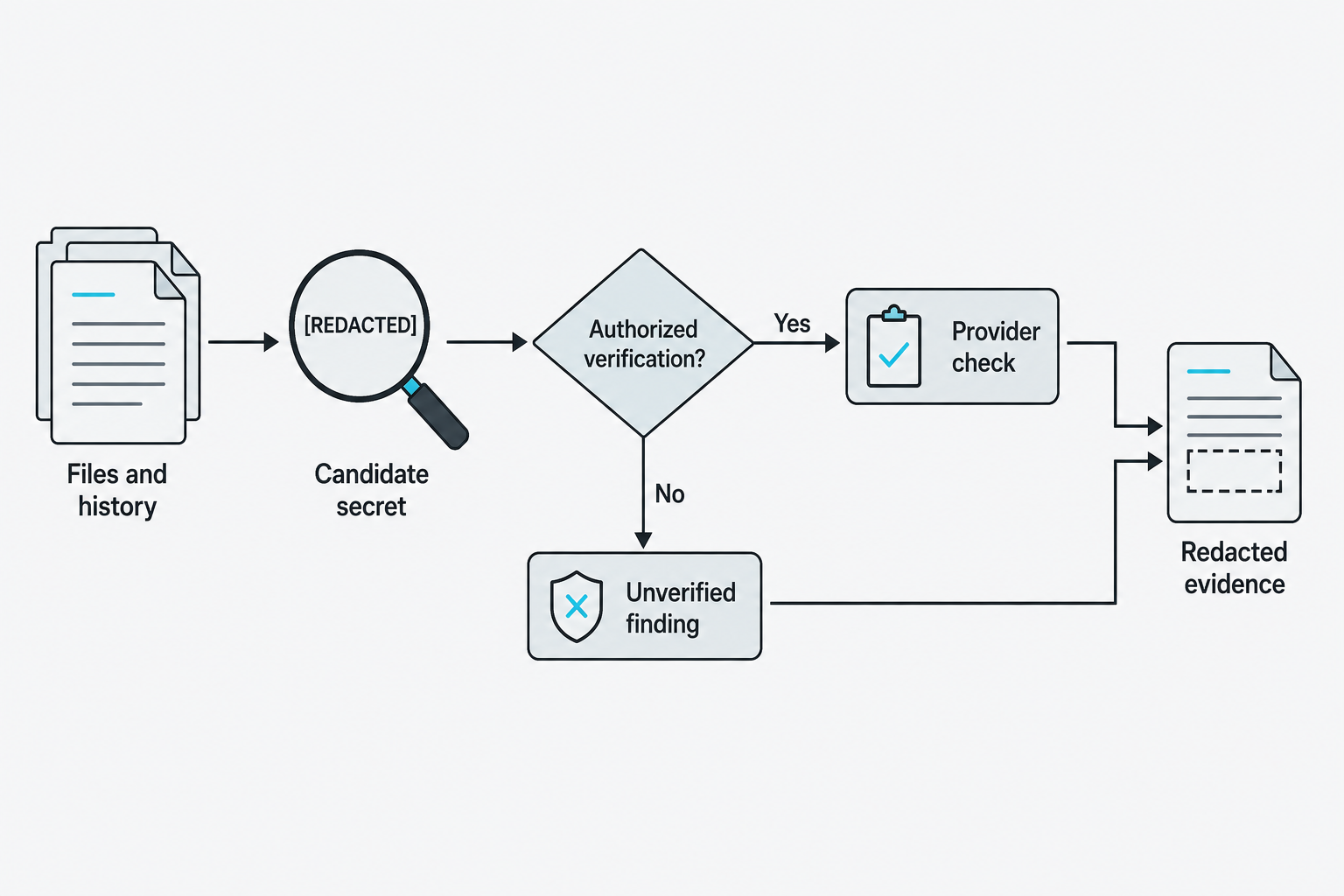
Figure 5.9: Secret discovery and live verification produce different evidence.
Text description for Figure 5.9
A detector identifies a possible secret in files or revision history. Live verification may contact the relevant provider, so it depends on the engagement scope and tool configuration. An unverified finding remains a candidate rather than proof of a valid credential. Evidence should retain useful location and status information while protecting the secret value.
5.5 Scripting for Enumeration
Bash Scripting Fundamentals
Bash scripts automate repetitive enumeration tasks. A basic enumeration script accepts a target, performs DNS queries, and ports the results:
#!/bin/bash

TARGET=$1
OUTPUT_DIR="./results_${TARGET}"

# Create output directory
mkdir -p $OUTPUT_DIR

# DNS enumeration
echo "[*] Running DNS enumeration on $TARGET"
nslookup $TARGET > $OUTPUT_DIR/dns_basic.txt
dig @8.8.8.8 $TARGET ANY >> $OUTPUT_DIR/dns_basic.txt

# Port scanning
echo "[*] Running port scan"
nmap -p- -sS -oG $OUTPUT_DIR/nmap_ports.txt $TARGET

# Extract open ports
OPEN_PORTS=$(grep "open" $OUTPUT_DIR/nmap_ports.txt | cut -d'/' -f1 | tr '\n' ',' | sed 's/,$//')

# Version detection on open ports
echo "[*] Running version detection on ports: $OPEN_PORTS"
nmap -p $OPEN_PORTS -sV -oX $OUTPUT_DIR/nmap_services.xml $TARGET

# Report
echo "[+] Enumeration complete. Results in $OUTPUT_DIR/"
This script:
1. Accepts a target as argument: ./enum.sh example.com
2. Creates a results directory
3. Runs DNS queries
4. Performs a full port scan
5. Extracts open ports using grep and text processing
6. Runs detailed version detection on only those ports
Loops automate tasks across multiple targets or IP ranges:
#!/bin/bash

# Scan a /24 subnet
for ip in 192.168.1.{1..254}; do
  timeout 2 ping -c 1 $ip > /dev/null && echo "$ip is live"
done > live_hosts.txt

# Enumerate each live host
while read host; do
  echo "[*] Scanning $host"
  nmap -sV -p 22,80,443,445,3306 -oX results/$host.xml $host
done < live_hosts.txt
Conditional logic adapts behavior:
#!/bin/bash

TARGET=$1

# Check if port 443 is open
if nc -zv -w 2 $TARGET 443 2>/dev/null; then
  echo "[+] Port 443 open - HTTPS application detected"
  # Run HTTPS-specific probes
  nmap -p 443 --script ssl-enum-ciphers,ssl-cert $TARGET
else
  echo "[-] Port 443 closed"
fi
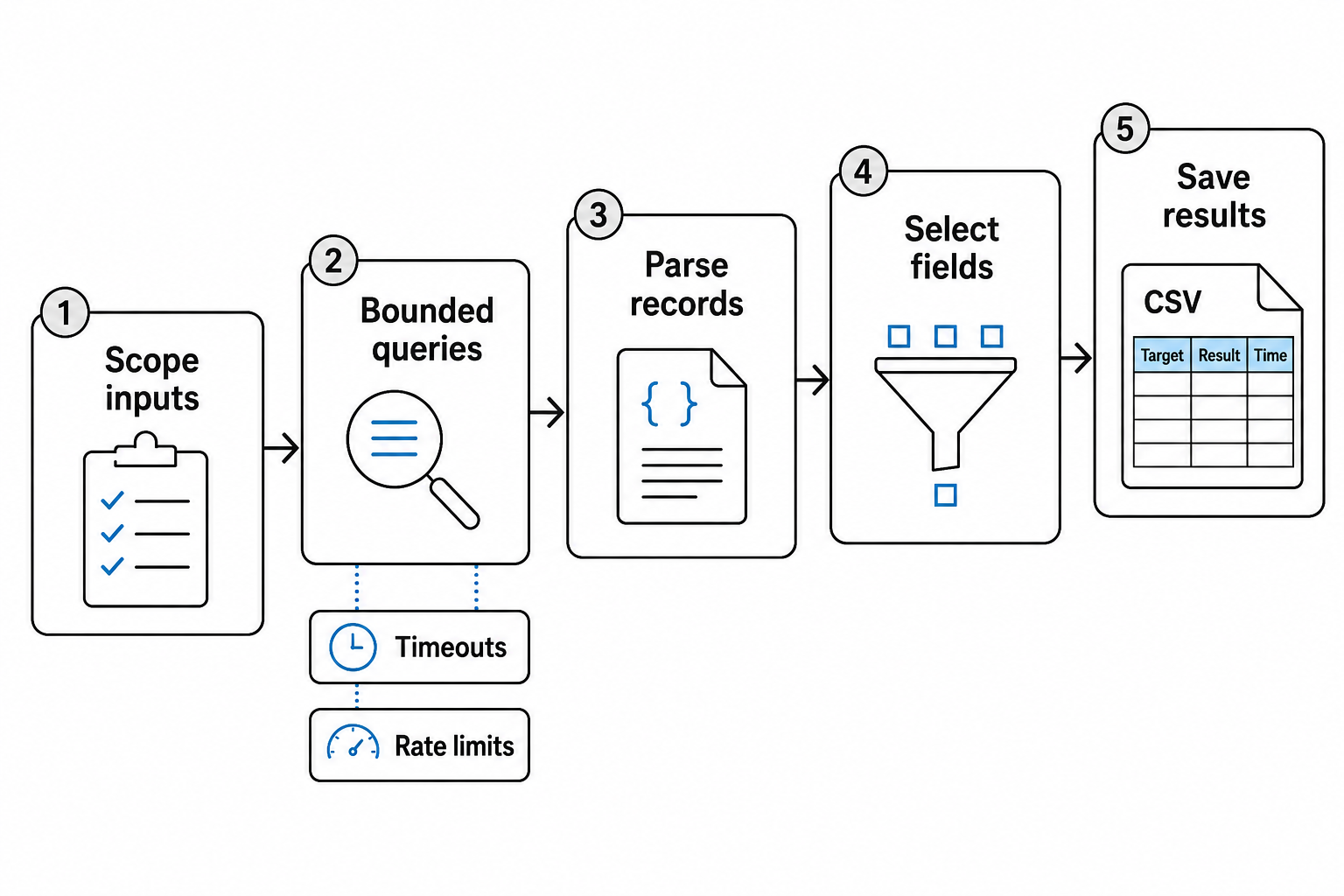
Figure 5.10: A repeatable enumeration script transforms scoped inputs into structured evidence.
Text description for Figure 5.10
The script starts from an explicit target list, constrains request rate and waiting time, and parses responses into records. Filtering selects relevant fields without discarding the evidence needed to interpret them. Saved output should retain the target, outcome, and time so another reviewer can reproduce and assess the work.
Python Scripting for Custom Enumeration
Python excels at parsing, data processing, and making HTTP requests. The requests library simplifies HTTP enumeration:
#!/usr/bin/env python3

import requests
import sys
from urllib.parse import urljoin

target = sys.argv[1]
wordlist = sys.argv[2]

print(f"[*] Enumerating directories on {target}")

with open(wordlist, 'r') as f:
    for directory in f:
        directory = directory.strip()
        url = urljoin(target, directory)

        try:
            response = requests.get(url, timeout=3, allow_redirects=False)
            if response.status_code in [200, 301, 302, 403]:
                print(f"[+] {url} [{response.status_code}]")
        except requests.exceptions.Timeout:
            pass
        except Exception as e:
            pass
Run with:
python3 dir_enum.py http://example.com /usr/share/wordlists/dirb/common.txt
Libraries expand capability:
- dnspython: DNS queries and zone transfers
- paramiko: SSH connections and command execution
- impacket: SMB, LDAP, Kerberos protocol implementation
- scapy: Raw packet crafting
- pwntools: Binary exploitation utilities
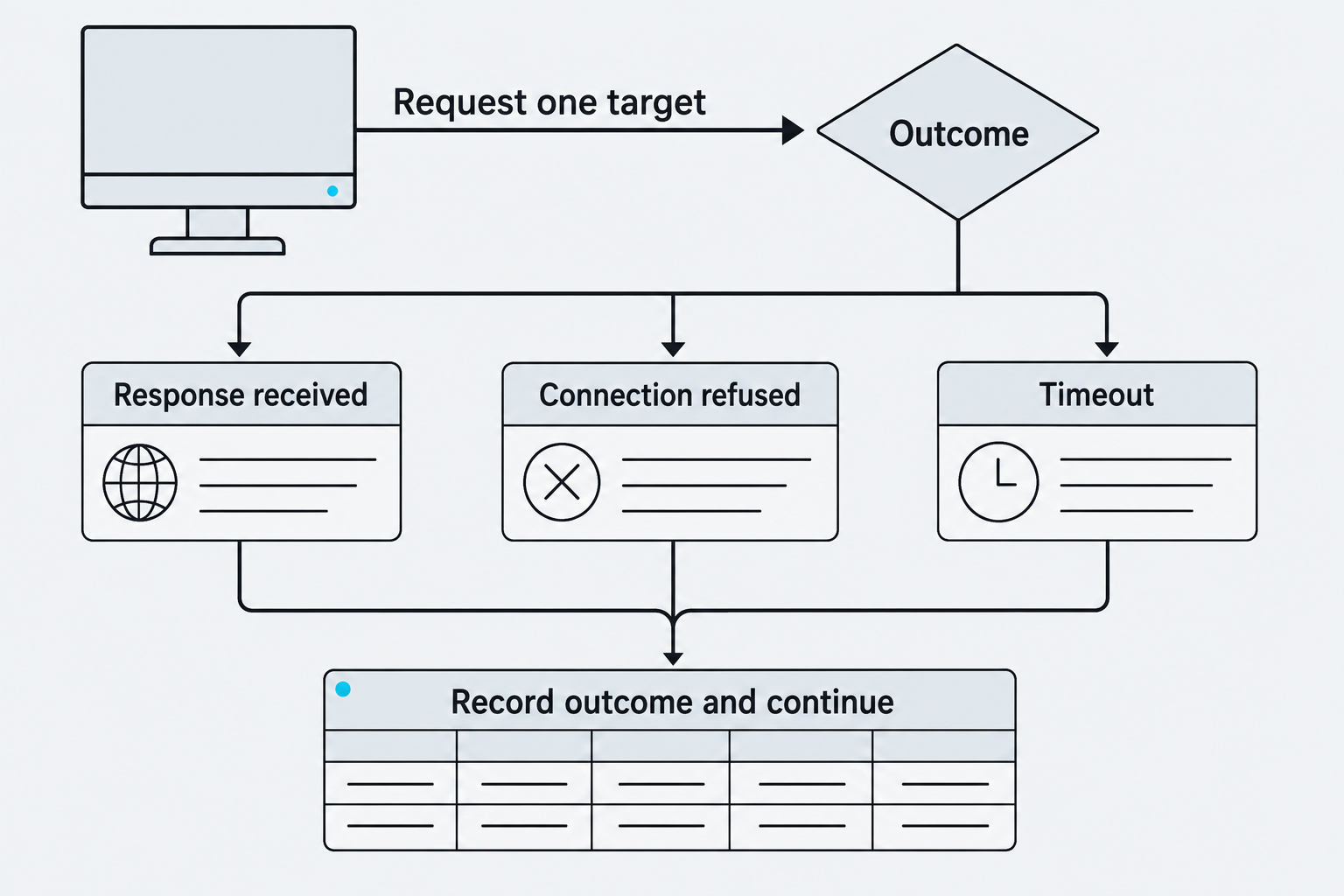
Figure 5.11: A script should preserve different outcomes instead of treating every failed request as the same result.
Text description for Figure 5.11
A received response, an explicit refusal, and a timeout provide different evidence. A timeout can reflect filtering, packet loss, an unavailable host, or a slow response. Keeping those outcomes separate prevents the script from claiming that every silent target has a closed port. The diagram shows control flow rather than executable code.
PowerShell Scripting for Windows Enumeration
On Windows targets, PowerShell is built-in and powerful. PowerShell scripts enumerate Active Directory, local groups, and network configuration:
# List all domain users
Get-ADUser -Filter * | Select-Object Name, SamAccountName

# List group membership
Get-ADGroupMember "Domain Admins" | Select-Object Name

# Enumerate local administrators
Get-LocalGroupMember -Group "Administrators"

# List network adapters and configurations
Get-NetIPConfiguration | Select-Object InterfaceAlias, IPv4Address, IPv4DefaultGateway

# Query running processes with their owners
Get-Process | Select-Object Name, @{Name="Owner";Expression={$_.GetOwner().User}}
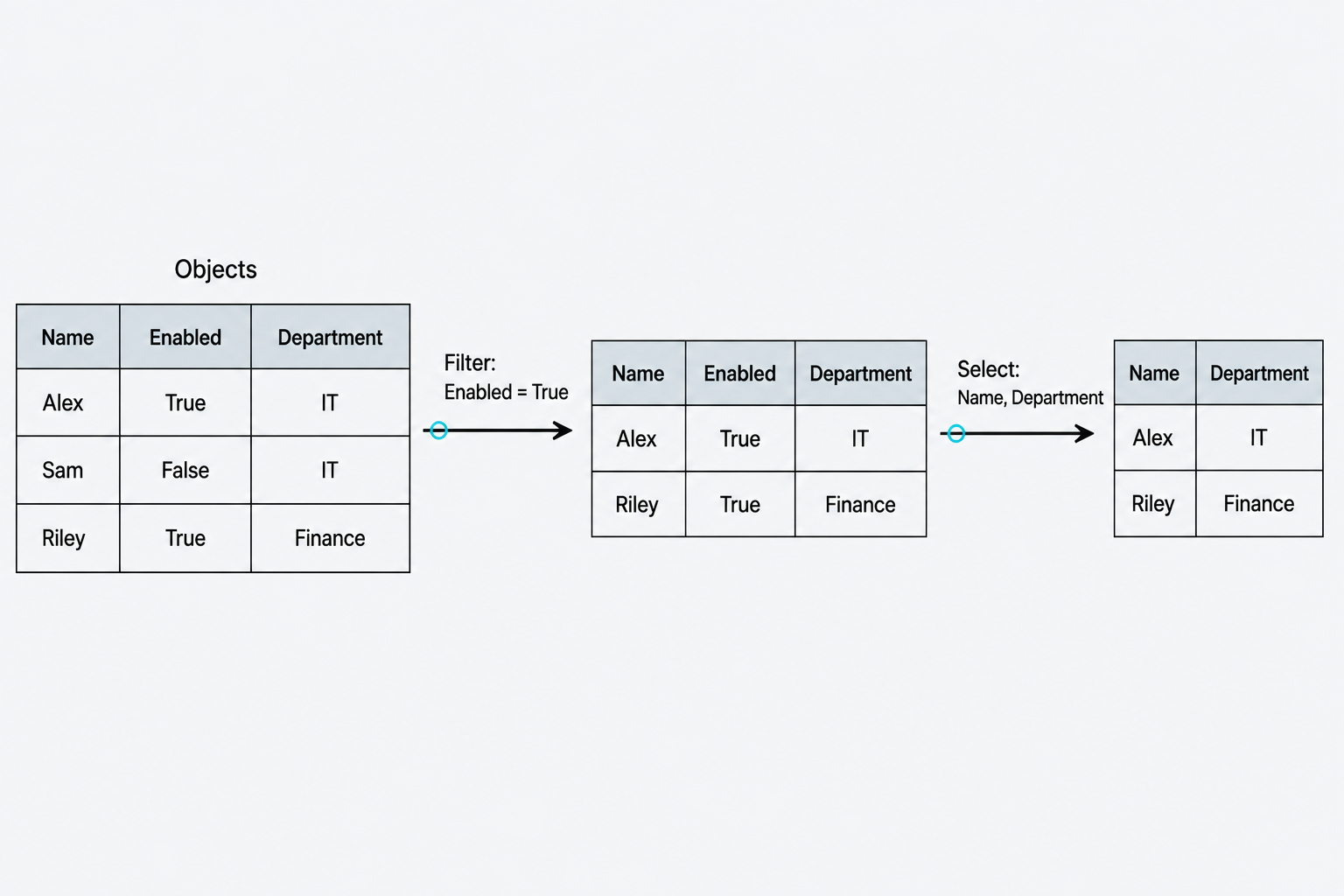
Figure 5.12: Filtering selects objects, while property selection controls the fields retained.
Text description for Figure 5.12
PowerShell commonly passes structured objects through a pipeline. Filtering retains objects that meet a condition, while property selection chooses fields from those retained objects. The example records are fictional. The figure illustrates the distinction without requiring a particular directory module or command.
5.6 Social Engineering: Taxonomy and Execution
Social Engineering Framework
Social engineering exploits human psychology, not technology. Humans are the weakest link: they make mistakes, trust authority, and respond to urgency. The goal is to extract information, credentials, or access by manipulating behavior. A lot of these concepts should be review from previous courses you have taken, and this chapter focuses more on the tools and methodology of conducting social engineering in an authorized pentest.
The social engineering taxonomy categorizes attacks by delivery method and target interaction:
| Attack Type | Mechanism | Example |
|---|---|---|
| Phishing | Deceptive email | Email mimicking information technology (IT) department requesting password reset |
| Spearphishing | Targeted phishing | Email targeting specific employee with personal details |
| Whaling | Executive phishing | CEO impersonation requesting wire transfer |
| Smishing | SMS-based phishing | Text message claiming account lockout, link to fake login |
| Vishing | Voice-based phishing | Phone call impersonating IT requesting credentials |
| Dumpster Diving | Physical information gathering | Searching trash for printed documents with personally identifiable information (PII) |
| Surveillance | Physical observation | Watching badge access patterns, camera positions |
| Shoulder Surfing | Direct observation | Watching someone type their password |
| Tailgating/Piggybacking | Physical access | Entering secure area by following badged employee |
| Eavesdropping | Overhearing conversations | Listening to phone calls or in-person discussions |
| Watering Hole | Compromised website | Malicious ad or script on industry forum |
| Impersonation | False identity | Calling as vendor support requesting access confirmation |
| Credential Harvesting | Fake login page | Clone of company portal capturing credentials |
None of these attacks require technical sophistication. They require understanding human behavior.
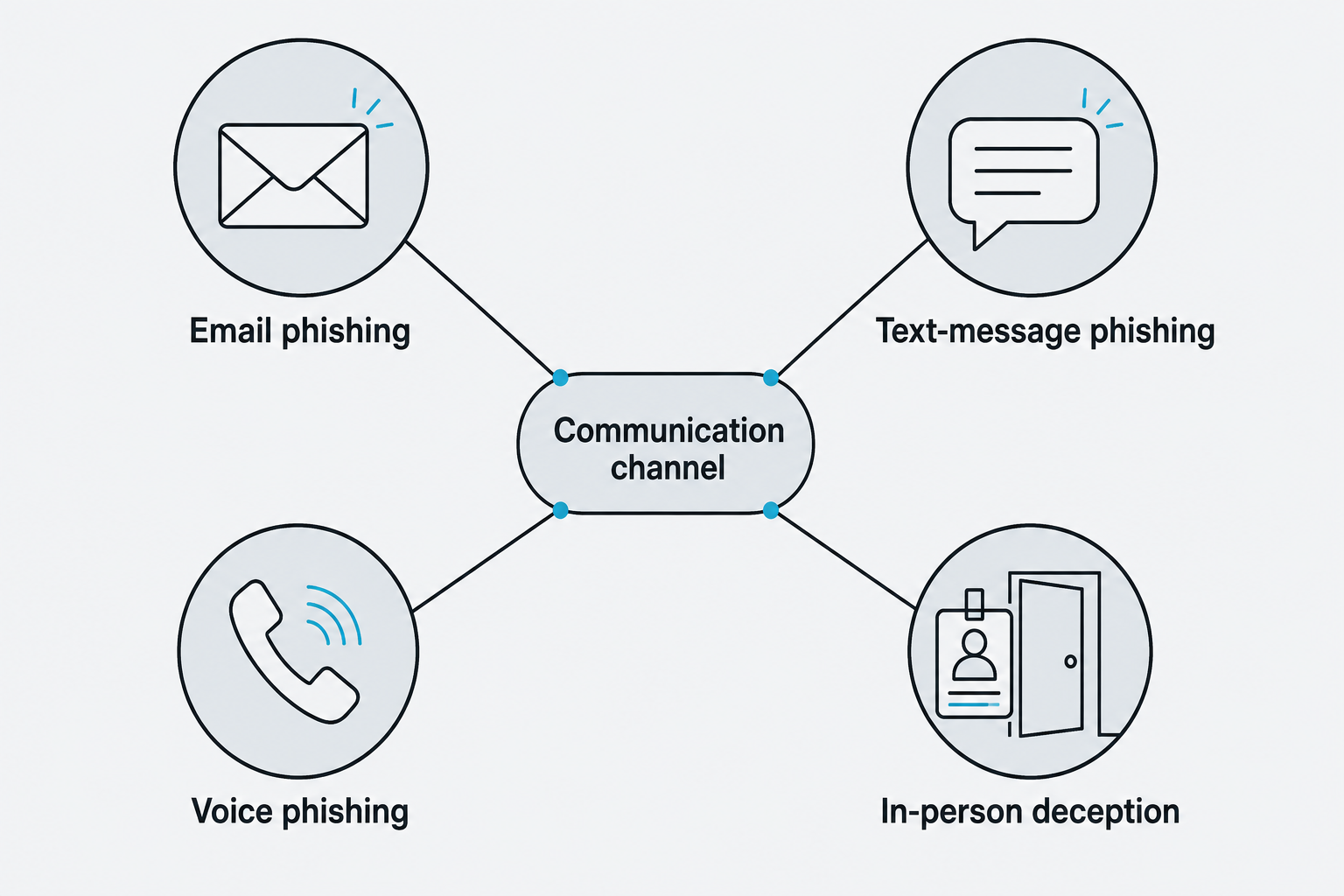
Figure 5.13: Social-engineering attempts reach people through several communication channels.
Text description for Figure 5.13
Phishing uses deceptive messages to influence a recipient. Text-message phishing is often called smishing, and voice phishing is often called vishing. In-person deception can involve an assumed identity or misleading request. The channel describes how contact occurs; the claimed identity, context, pressure, and requested action explain the mechanism.
Pretext Development
A pretext is your cover story. Without it, you're a stranger making suspicious requests. With it, you're a plausible character in a plausible scenario.
Strong pretexts:
- Leverage organizational structure: "I'm from the new IT service desk, confirming email migration."
- Create time pressure: "The system reset your password. You have 30 minutes to change it before your account locks."
- Appeal to helpfulness: "I'm verifying security protocols for our compliance audit. Can you confirm your account access?"
- Use external authority: "This is from the CEO's office requesting a spreadsheet of user credentials for the board meeting."
Weak pretexts:
- "Hi, I'm testing your security. Give me your password."
- Vague claims with no organizational context
- Requests that contradict policy ("IT will never ask for your password")
Reconnaissance feeds pretext development. During enumeration, you gathered:
- Employee names and titles (LinkedIn)
- Department structure (internal directory or leaked org charts)
- IT contact information (phishing as "noreply@itdesk.com")
- Recent projects or initiatives (phishing as "compliance team")
A realistic spearphishing campaign targeting a Finance Director:
Email details:
- From: alerts@trustedvendor-payroll.com (mimics payroll system)
- Subject: "Action Required: W-4 Update for Tax Season"
- Body: Addresses the target by name, references their role, and includes details from LinkedIn about their tenure
Link: https://trustedvendor-payroll.com/2fa-verify (attacker-controlled domain)
Result: Credential entry, session token capture, or phishing page redirect to the real vendor site (covering tracks).
Credential Harvesting and Phishing Tools
Evilginx2 is a man-in-the-middle (MITM) proxy that stands between the victim and the legitimate login page. The victim enters credentials on what appears to be the real site, but Evilginx captures them:
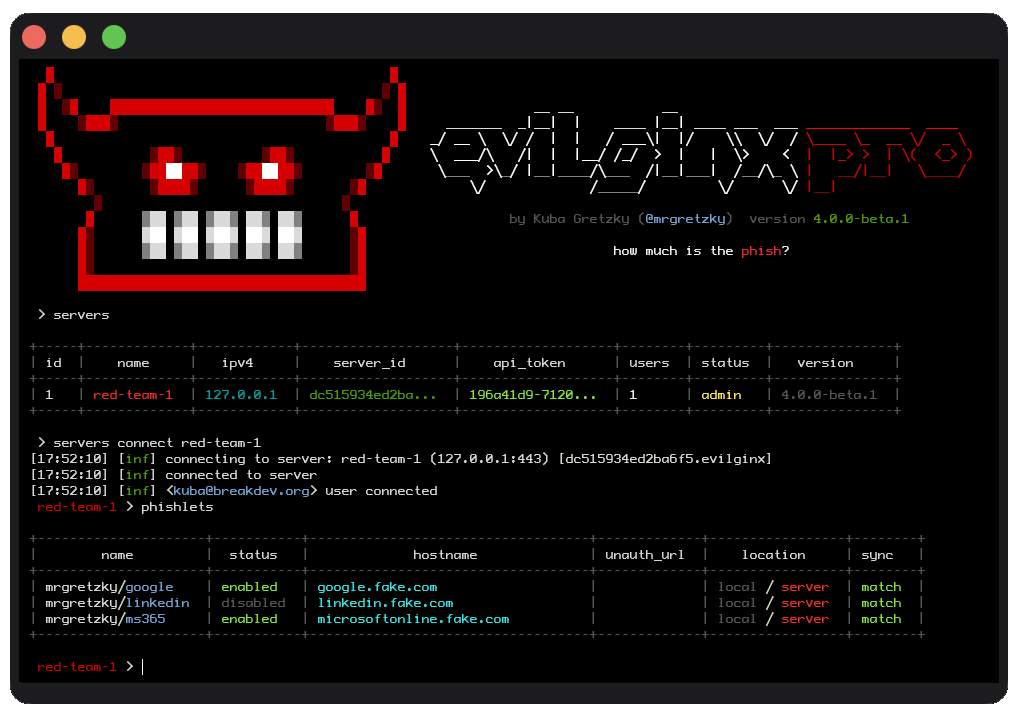
Figure 5.14: The Evilginx console shows an active server connection and enabled phishlets.
Text description for Figure 5.14
The Evilginx terminal is connected to a local server named red-team-1. Its phishlets table shows enabled configurations for Google and Microsoft 365, while LinkedIn is disabled. The display illustrates the management console and configured phishing sites, not a completed credential capture.
Image credit: evilginx.com
sudo ./evilginx
: config domain attacker.com
: config ipv4 external <public-ip>
: phishlets hostname linkedin login.attacker.com
: phishlets enable linkedin
: lures create linkedin
: lures get-url 0
Output: a URL that proxies the real login page. The current release is version 3, run as evilginx; guides showing ./evilginx2 and the older single-word phishlet commands are dated. The phishlet configuration format also changed between versions 2 and 3, so most public phishlets fail on the current version.
When the target enters credentials, Evilginx logs them:
(evilginx) : creds
ID | Username | Password | UserAgent
1  | john.doe@example.com | SuperSecure123! | Mozilla/5.0...
Social Engineering Toolkit (SET) automates credential harvesting pages:
SET was built by Dave Kennedy of TrustedSec as an open-source framework for demonstrating social-engineering techniques in authorized security assessments. Its modules guide a tester through campaign setup, website cloning, payload delivery, and credential-harvesting workflows from a menu-driven interface. The project is maintained on GitHub.
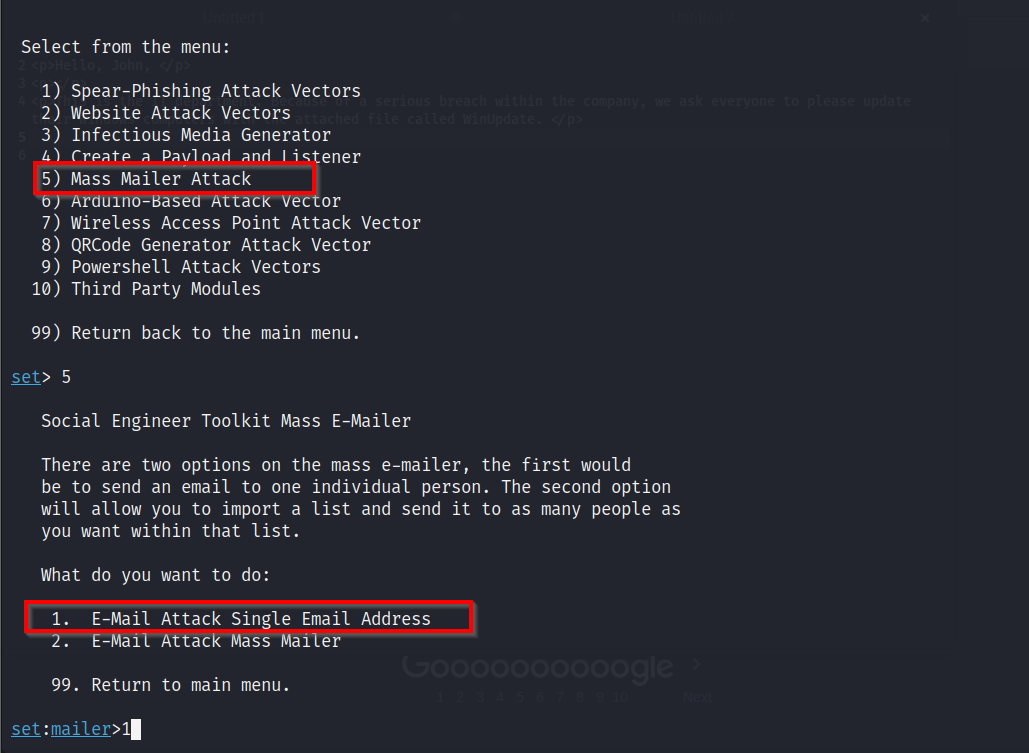
Figure 5.15: SET's menu selects a mass-mailer workflow and a single-recipient email attack.
Text description for Figure 5.15
The Social-Engineer Toolkit menu highlights Mass Mailer Attack. After that selection, SET offers an email attack against one address or a mass mailer using an imported list. This shows how the framework organizes campaign delivery options; it does not show a message being sent.
Image credit: StationX
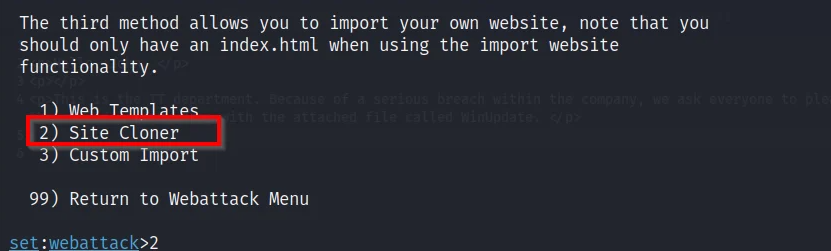
Figure 5.16: SET's Website Attack Vectors menu offers Site Cloner for importing a website.
Text description for Figure 5.16
The SET Website Attack Vectors menu lists Web Templates, Site Cloner, and Custom Import, with Site Cloner selected. The screen explains that the imported site should contain an index.html file. In an authorized exercise, this option creates a convincing training page for measuring whether participants submit test data.
Image credit: StationX
sudo setoolkit
1) Social-Engineering Attacks
2) Website Attack Vectors
3) Credential Harvester Attack Method
[Choose the vector and target site]
SET clones a website, such as a company portal, and logs the credentials entered. Run it with sudo: the credential harvester binds a web server to port 80 and fails silently without root. The most common reason a capture never arrives is the post-back address, which must be an address the victim's browser can reach, not 127.0.0.1.
Gophish is an open-source phishing-simulation framework for building, delivering, and measuring authorized awareness campaigns. Its web interface brings together email templates, landing pages, target groups, campaign scheduling, and reporting, so an assessor can follow a campaign from setup through results without stitching together separate tools. The workflow shown below moves from defining templates and targets, to launching the campaign, to reviewing delivery, open, click, and submitted-data events. Any landing page or submitted data used in an assessment must be clearly scoped as test data and handled according to the rules of engagement.
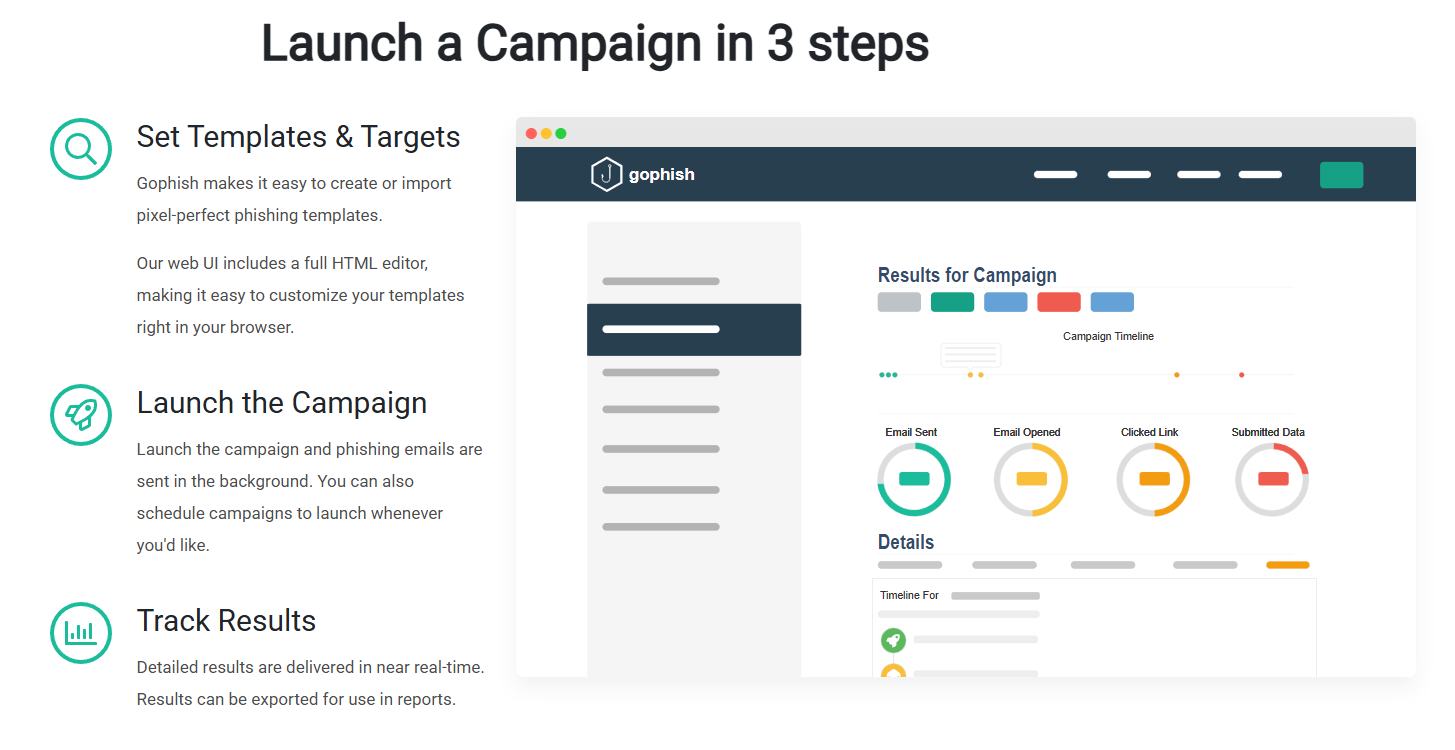
Figure 5.17: Gophish organizes an authorized phishing simulation into setup, launch, and results tracking.
Text description for Figure 5.17
The graphic presents Gophish's campaign workflow in three steps. The first step sets templates and targets, the second launches the campaign and sends messages, and the third tracks results in near real time. A sample results panel shows separate measures for email sent, email opened, link clicked, and data submitted. The interface is illustrative; it does not represent real recipients or credentials.
Image credit: getgophish.com
./gophish
# Admin console: https://127.0.0.1:3333
# First run prints a random admin password to the terminal
On first launch Gophish generates a random administrator password and prints it to the log. The old admin / gophish default was removed years ago, so any guide still showing it is out of date. The admin console on port 3333 is separate from the phishing server that delivers the campaign.
Within Gophish:
- Create a landing page (clone company intranet)
- Create email templates
- Import target lists
- Send campaigns
- Track open rates, click rates, submitted credentials
Analyst Perspective
During a real assessment, a phishing campaign targeting the information technology department (posing as a new single sign-on system) achieved 65% click-through and 40% credential submission. The team, trained annually on phishing, still failed to notice the slight domain misspelling. The lesson is that social engineering succeeds by exploiting attention under normal operational stress, not by defeating anyone's intelligence.
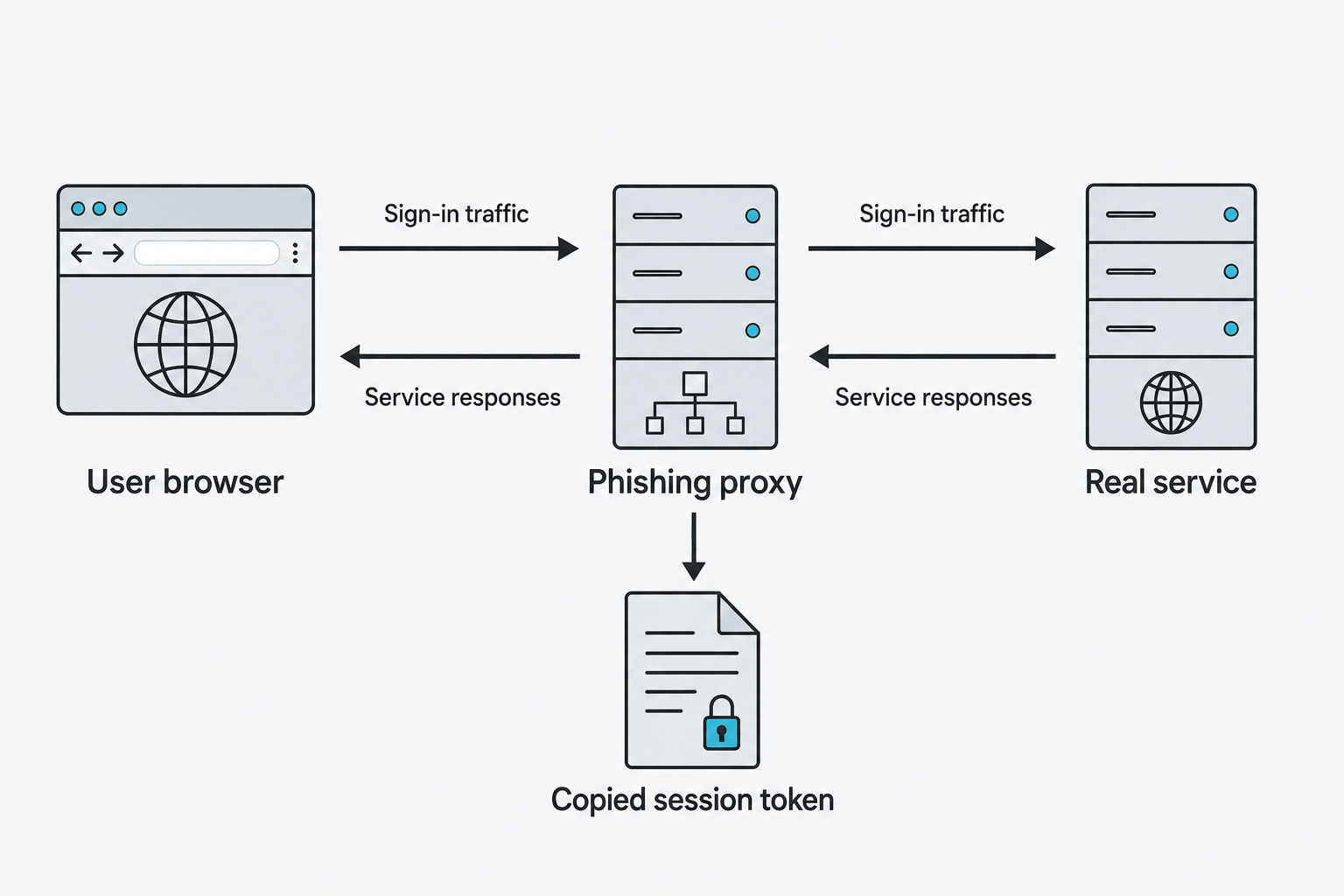
Figure 5.18: An adversary-in-the-middle phishing proxy relays authentication traffic and can capture a resulting session token.
Text description for Figure 5.18
In this conceptual adversary-in-the-middle (AiTM) flow, the user connects through a deceptive intermediary. The proxy relays traffic to the legitimate service and may capture a session token returned after authentication. The illustration describes the session-theft mechanism and does not imply that every form of multifactor authentication is vulnerable. Phishing-resistant authentication binds authentication to the legitimate service.
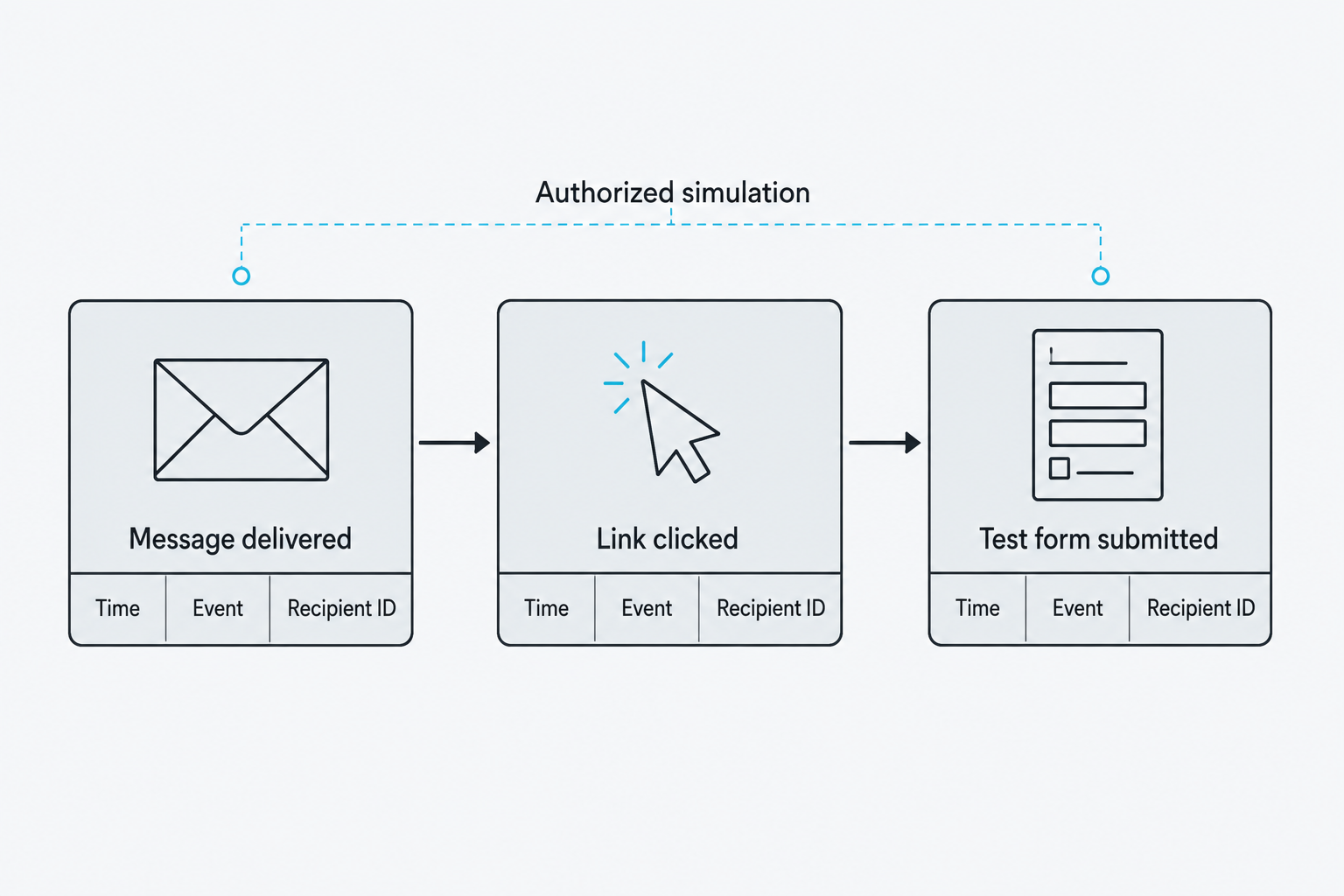
Figure 5.19: An authorized simulation records distinct events for later review.
Text description for Figure 5.19
A campaign record distinguishes delivery from later interaction. A click does not establish that credentials were entered, and event counts can be affected by mail scanners or other automated activity. Use the simulation's approved collection limits and interpret its event definitions before reporting results. The example contains no actual recipient data.
Chapter Summary
-
DNS enumeration exposes organizational structure; zone transfers, if misconfigured, leak entire DNS zones. Tools like Amass combine multiple vectors (CT logs, DNS queries, web scraping) for comprehensive discovery.
-
Service enumeration uses Nmap and NSE scripts to identify running services and extract version information that feeds vulnerability analysis.
-
Directory enumeration discovers hidden web paths; tools like FFuf and Gobuster use wordlists and rate limiting to avoid detection.
-
SMB enumeration lists file shares and tests for null session access; discovering shares like "Backups" or "Config" often reveals data gold mines.
-
User and email harvesting from LDAP, web errors, and OSINT feeds social engineering campaigns; wireless enumeration reveals SSIDs and connected clients, expanding the attack surface.
-
Secrets scanning (TruffleHog, Trivy) uncovers hardcoded credentials in repositories and configuration files, an often-overlooked attack vector.
-
Bash scripting automates multi-step enumeration workflows; Python enables custom logic and protocol-level queries via libraries like impacket; PowerShell is the native language for Windows enumeration.
-
Social engineering exploits human psychology through phishing, vishing, pretexting, and credential harvesting. Success depends on reconnaissance-informed pretexts and psychological manipulation.