CH4: Boot Firmware, Partition Structures, and Hidden Storage Areas
Introduction
Chapter 3 established the geometry of a single volume: sectors, clusters, slack, and the arithmetic that connects them. This chapter zooms out to the whole disk and answers a different question. Given a raw image with no filesystem tool loaded, how do you determine where each volume starts, where it ends, and whether the disk contains storage that the operating system never reported at all?
The answer begins before the operating system exists. Firmware controls the machine at power-on, and the firmware type, legacy BIOS or UEFI, determines which partitioning scheme the disk uses. Legacy BIOS reads a 512-byte Master Boot Record from sector 0. UEFI reads a GUID Partition Table beginning at sector 1 and requires a dedicated FAT32 partition to hold its bootloaders. Both schemes are readable by hand, and both leave forensic artifacts that a tool summary will not show you.
The last section covers the storage that no partition table describes. A Host Protected Area and a Device Configuration Overlay are firmware-level features that make a drive report a smaller capacity than it physically has. Both are legitimate manufacturer mechanisms, and both have been used to hide data. An acquisition that trusts the reported capacity silently omits those regions, and an examiner who does not check for them will never know what was missed. This is a recurring interview topic for digital forensic examiner and forensic acquisition specialist roles, because it separates examiners who image drives from examiners who verify their images are complete.
Learning Objectives
By the end of this chapter, you will be able to:
- Describe the legacy BIOS and UEFI boot sequences and identify which partitioning scheme each requires.
- Locate the partition table on a raw image using both operating system tools and a hex editor.
- Manually parse an MBR partition table entry from raw hex and calculate the partition's start offset, end offset, and size.
- Manually parse a GPT header and partition entry from raw hex, including mixed-endian GUID interpretation.
- Explain extended partitions and Extended Boot Record chains, and describe how a broken chain hides logical volumes.
- Detect a Host Protected Area or Device Configuration Overlay, explain its forensic significance, and describe the acquisition steps required to capture it.
- Identify inter-partition gaps and end-of-disk unallocated space as sources of recoverable data.
4.1 BIOS, UEFI, and the Boot Sequence
Before the operating system loads, firmware controls the computer. The choice between legacy BIOS and UEFI firmware determines which partition scheme the drive uses and how the boot process unfolds. Boot mechanisms matter to an examination because they reveal which partition the system was configured to load, what code executes first, and whether anything about that configuration has been altered.
Legacy BIOS Boot Sequence
Legacy BIOS (Basic Input/Output System) dates to the original IBM PC in 1981. The BIOS performs a Power-On Self-Test (POST), then loads and executes 512 bytes of code from sector 0 of the boot disk. That code is the MBR bootstrap code. The bootstrap code reads the partition table stored in the same 512-byte sector, finds the partition marked as bootable, loads the first sector of that partition, and transfers control to it.
The bootable flag is a single byte in each partition table entry. Only one partition should be marked bootable, though the firmware does not enforce this. A multi-boot system may have more than one partition flagged, and the firmware boots the first one it encounters.
The sequence is:
- CPU executes BIOS firmware code.
- BIOS executes POST hardware checks.
- BIOS reads sector 0 (the MBR) into memory at address 0x7C00.
- BIOS verifies the signature bytes 55 AA at offsets 510 and 511 of that sector.
- BIOS executes the MBR bootstrap code, which occupies offsets 0 through 445.
- Bootstrap code parses the partition table at offsets 446 through 509 to find the bootable partition.
- Bootstrap code reads the bootable partition's first sector, its Volume Boot Record.
- The Volume Boot Record's code loads the operating system bootloader or kernel.
Analyst Perspective
In a forensic image, sector 0 shows you what the firmware saw. If the 55 AA signature is missing, the firmware would refuse to execute the sector and the system would not boot from that disk. If no partition carries the bootable flag, the bootstrap code has nothing to load. Either condition is a finding worth documenting, because it points to corruption, an anti-forensic step, or a disk that was never meant to boot on its own.
UEFI Boot and Secure Boot
UEFI (Unified Extensible Firmware Interface) replaced BIOS in modern systems. UEFI is a complete firmware environment with its own filesystem driver, far larger than a single 512-byte sector, and it does not depend on executable code in sector 0.
UEFI requires a dedicated partition called the EFI System Partition (ESP). The ESP is formatted as FAT32 and contains bootloaders, firmware applications, and configuration files. On a UEFI system, the partitioning scheme is GPT, and the ESP is identified by the partition type GUID C12A7328-F81F-11D2-BA4B-00A0C93EC93B. The ESP is typically 100 MB to 500 MB and sits near the beginning of the disk.
The ESP is worth examining on its own. Because it is a normal FAT32 volume, you can mount and browse it, and its \EFI\ directory tree names every bootloader the firmware was offered. Unexpected entries there are a starting point for bootkit analysis.
Secure Boot is an optional UEFI feature that validates the digital signature of boot code before executing it. On a system with Secure Boot enabled, modifying the bootloader requires either disabling Secure Boot in firmware or obtaining a valid signature. Secure Boot state, enrolled third-party certificates, and any record of Secure Boot being disabled are configuration facts that may be relevant to how a compromise occurred.
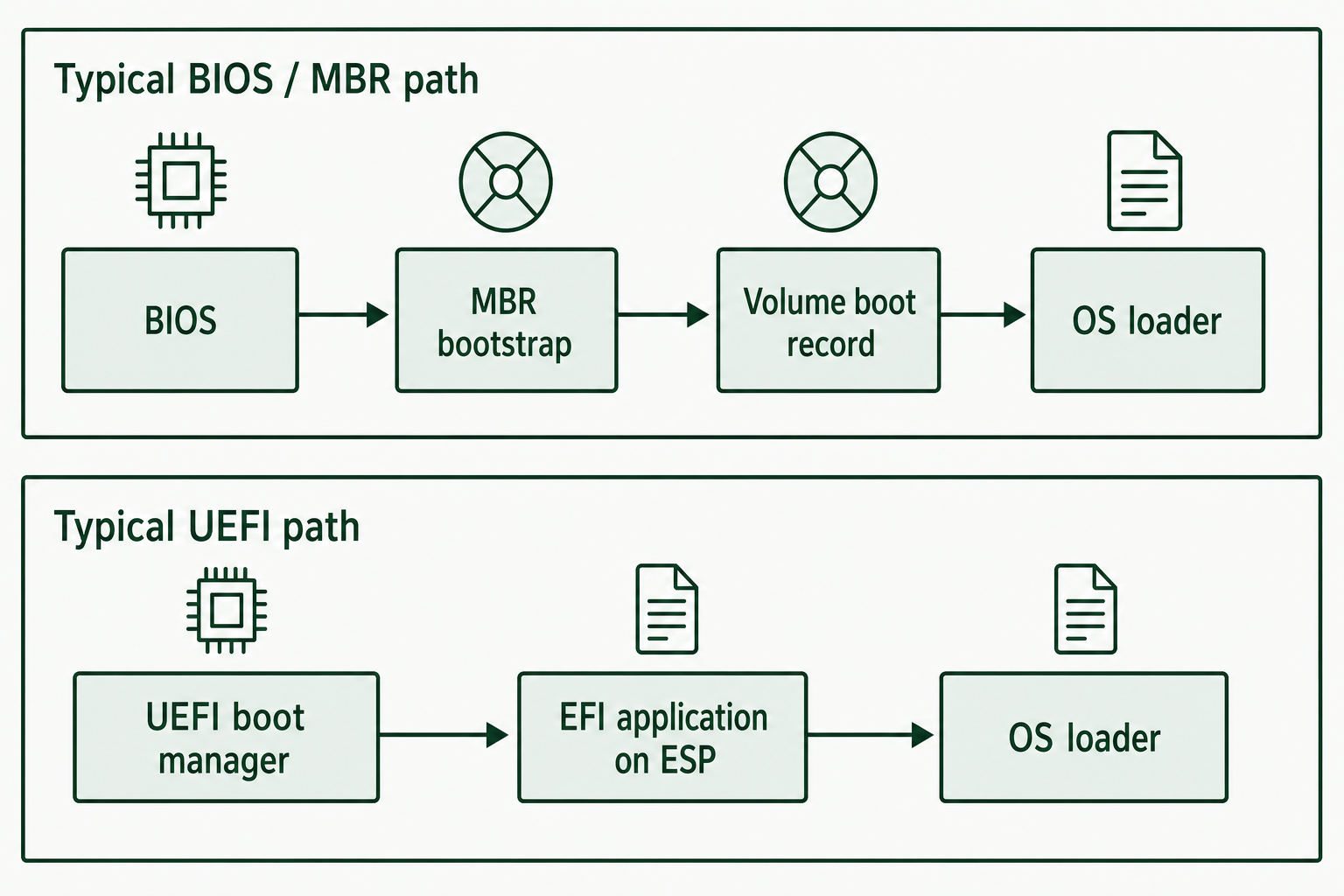
Figure 4.1: Typical boot paths reach loader code through different disk structures.
Text description for Figure 4.1
The Basic Input/Output System (BIOS) path shown uses Master Boot Record (MBR) bootstrap code and a volume boot record. The Unified Extensible Firmware Interface (UEFI) path loads an EFI application from the EFI System Partition (ESP). These are common configurations. Firmware type alone does not establish every disk's partition scheme.
Forensic Significance of Boot Configuration
The boot configuration tells you which volume the system was set up to load at startup. On an MBR disk with several primary partitions and only one marked bootable, that partition is the active one. A partition that is present but not bootable may have been kept out of the normal startup path while still holding data.
The MBR bootstrap code itself is an artifact. Standard bootstrap code produced by Windows or by a Linux bootloader is predictable and can be compared against known samples. Non-standard code in that region may indicate a bootkit, a full-disk encryption product's pre-boot environment, or a custom boot manager. Comparing the actual bytes at offsets 0 through 445 against a reference sample is a routine step in rootkit and bootkit analysis.
4.2 Locating the Partition Table
Disk sectors are commonly identified by a Logical Block Address (LBA). An LBA is a zero-based sector number: LBA 0 is the first sector, LBA 1 is the second, and so on. To convert an LBA to a byte offset in a raw image, multiply it by the logical sector size. For example, with 512-byte sectors, LBA 2,048 begins at byte offset 1,048,576.
The partition table is data stored on the disk: the MBR at sector 0, or the GPT header at sector 1 with its entry array beginning at sector 2. You can read it through operating system tools or directly in a hex editor. Both approaches belong in your workflow, because the tools are faster and the hex editor is authoritative.
On Linux:
fdisk -l /dev/sdX          # List MBR partitions on device X
gdisk -l /dev/sdX          # List GPT partitions on device X
parted -l                  # List all disks and partitions, MBR and GPT
Output shows partition boundaries, type codes, sizes, and boot flags.
On Windows:
diskpart
list disk                  # List all disks
select disk X              # Select disk X
list partition             # Show partitions on the selected disk
Disk Management provides the same information graphically through Computer Management.
Using a hex editor on the image:
- MBR: Navigate to byte offset 0x1BE (446 decimal). The next 64 bytes contain the partition table as four 16-byte entries.
- GPT: Navigate to sector 1 (byte offset 512 on a 512-byte-sector disk). The GPT header begins with the ASCII signature "EFI PART" in bytes 0 through 7. Partition entries begin at sector 2 (byte offset 1024).
The hex editor approach reads the actual bytes and bypasses operating system abstractions. Use it when the disk is corrupted, when the partition table has been altered, or any time a tool result needs to be defended. A tool that cannot parse a damaged table reports nothing. A hex editor still shows you what is there.
Warning
Operating system tools query the drive as the drive presents itself. If a Host Protected Area is active, fdisk and diskpart report the reduced capacity without indicating that anything is hidden. Section 4.5 covers how to detect that condition.
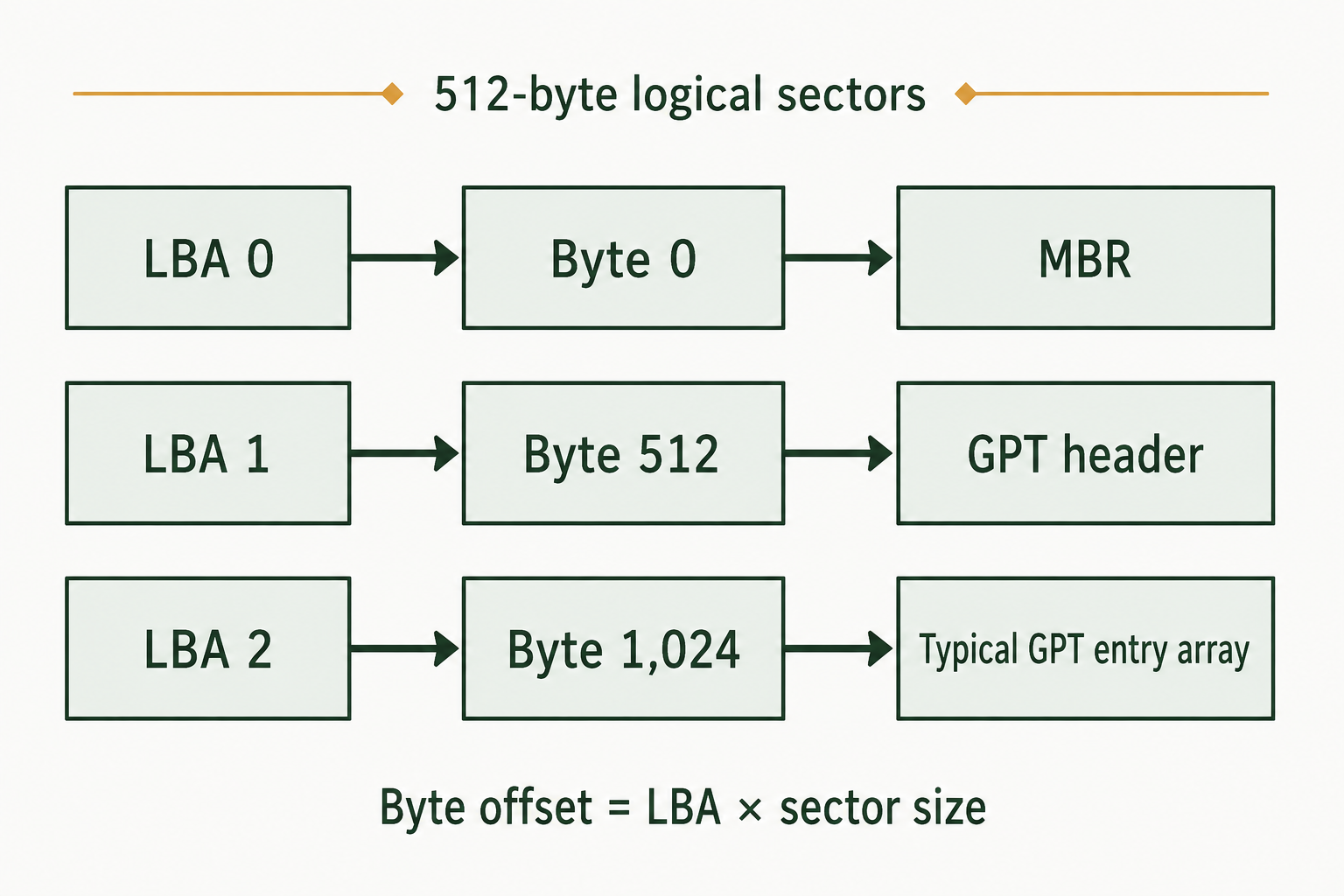
Figure 4.2: Logical sector size determines the byte offsets used in a hex editor.
Text description for Figure 4.2
A logical block address (LBA) numbers sectors starting at zero. Multiply it by the logical sector size to obtain the byte offset in a raw device image. The entry array location shown is typical; read its actual location from the GPT header. A disk with 4,096-byte logical sectors has different byte offsets.
4.3 MBR Partition Structure
The Master Boot Record occupies sector 0 of a disk and defines how the disk is partitioned on legacy systems. It is 512 bytes: 446 bytes of bootstrap code, 64 bytes of partition table, and a 2-byte signature.
MBR Layout
| Offset (decimal) | Size (bytes) | Purpose |
|---|---|---|
| 0 | 446 | Bootstrap code |
| 446 | 64 | Partition table (4 entries of 16 bytes each) |
| 510 | 2 | Signature bytes 55 AA |
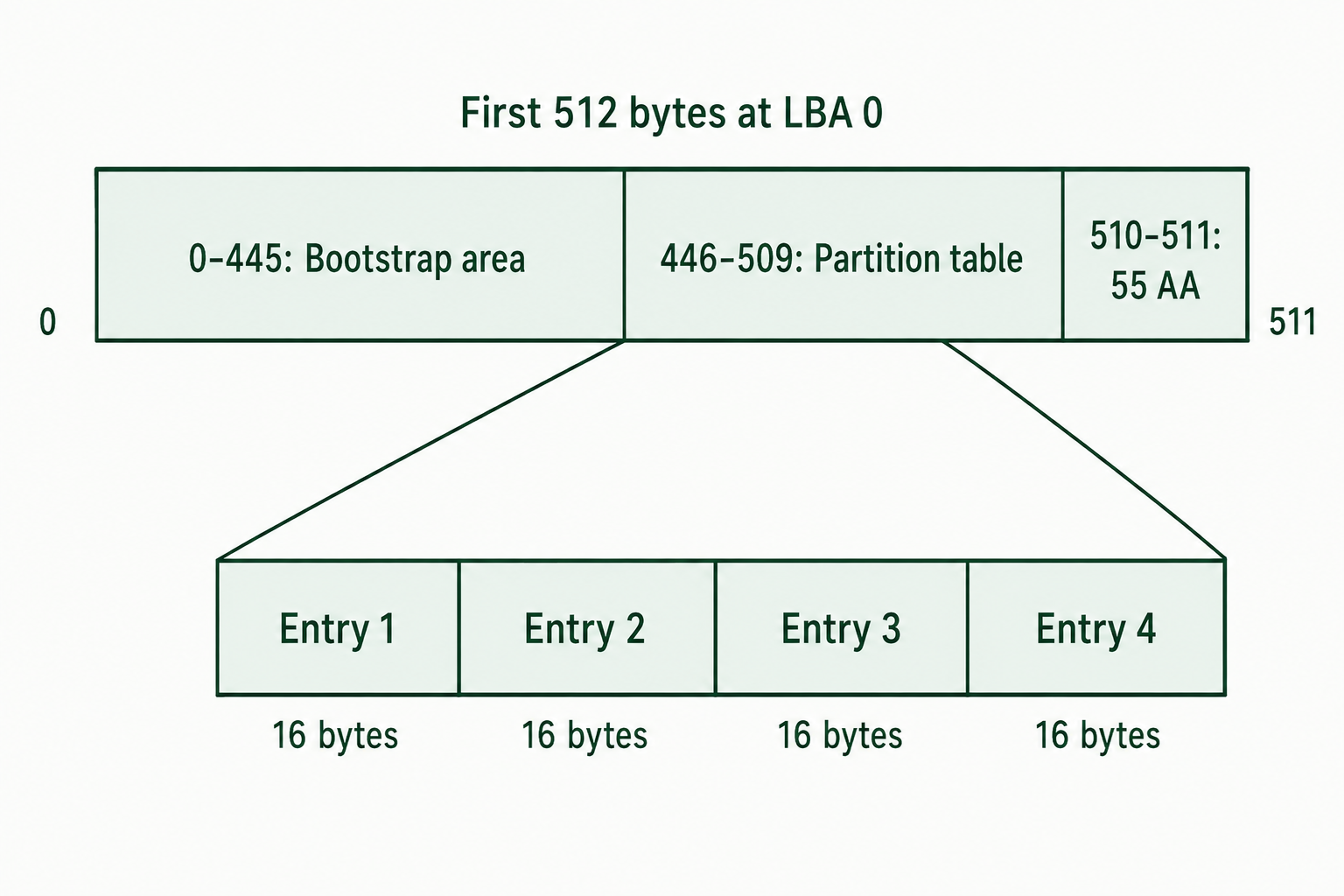
Figure 4.3: The MBR partition table occupies 64 bytes between the bootstrap area and signature.
Text description for Figure 4.3
Offsets 0 through 445 contain the bootstrap area, which may also contain a disk signature and reserved fields. Four 16-byte partition records occupy offsets 446 through 509. The final two bytes are 55 AA. Block widths are schematic so the small structures remain readable.
Partition Table Entry Structure
Each of the four entries is 16 bytes. Offsets below are relative to the start of the entry.
| Entry offset | Size (bytes) | Field | Description |
|---|---|---|---|
| 0 | 1 | Status | 0x80 = bootable, 0x00 = not bootable |
| 1 | 3 | CHS Start | Cylinder, Head, Sector start address (legacy) |
| 4 | 1 | Partition Type | Code identifying the partition type |
| 5 | 3 | CHS End | Cylinder, Head, Sector end address (legacy) |
| 8 | 4 | LBA Start | Logical Block Address of the first sector, little-endian |
| 12 | 4 | Sector Count | Number of sectors in the partition, little-endian |
Cylinder-Head-Sector values are historical. Modern tools use LBA exclusively. CHS addressing tops out near 8 GB, and MBR itself tops out near 2.2 TB, because the sector count field is a 4-byte unsigned integer: 2^32 - 1 = 4,294,967,295 sectors × 512 bytes = about 2.2 TB.
Because each entry is 16 bytes and the table starts at 446, the absolute offsets of the four entries are:
| Entry | Absolute offset range (decimal) | Absolute offset range (hex) |
|---|---|---|
| 1 | 446 to 461 | 0x1BE to 0x1CD |
| 2 | 462 to 477 | 0x1CE to 0x1DD |
| 3 | 478 to 493 | 0x1DE to 0x1ED |
| 4 | 494 to 509 | 0x1EE to 0x1FD |
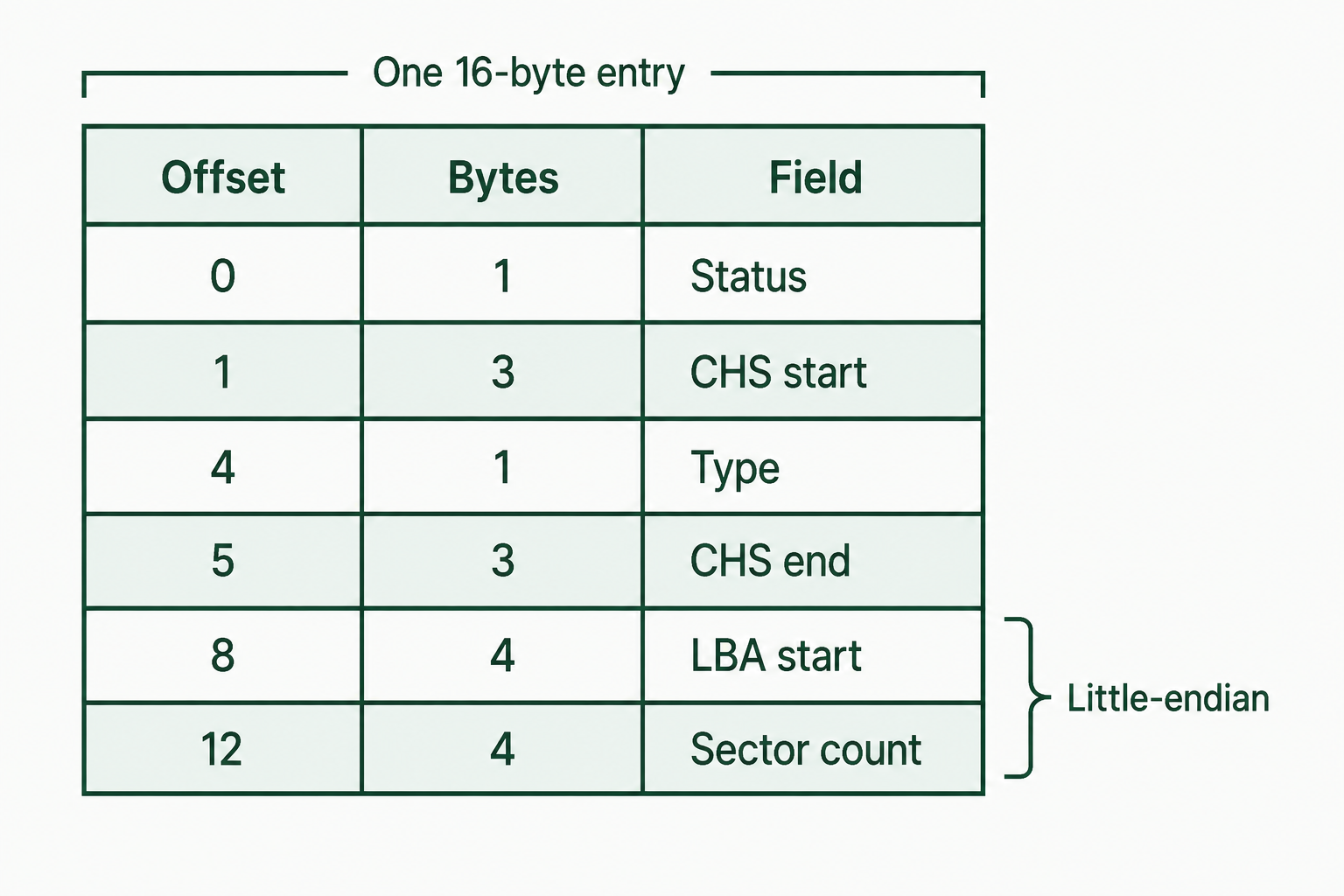
Figure 4.4: Each MBR entry combines legacy address fields with a starting LBA and sector count.
Text description for Figure 4.4
Offsets are relative to the entry's start. Cylinder-head-sector (CHS) addresses occupy two three-byte fields. The four-byte LBA start and sector count use little-endian storage, with the least significant byte first. The type byte identifies an intended partition type; filesystem structures require separate verification.
Common Partition Type Codes
| Type Code | Hex | Typical Filesystem |
|---|---|---|
| Empty | 0x00 | Unallocated or unused entry |
| Extended (CHS) | 0x05 | Container for logical partitions |
| NTFS or exFAT | 0x07 | NTFS, exFAT |
| FAT32 (CHS) | 0x0B | FAT32 |
| FAT32 (LBA) | 0x0C | FAT32 |
| Extended (LBA) | 0x0F | Container for logical partitions |
| Linux Swap | 0x82 | Swap space |
| Linux | 0x83 | ext2, ext3, ext4, and others |
| GPT Protective | 0xEE | Marks a GPT disk to legacy tools |
Warning
The type code is a label, not a guarantee. Nothing prevents a user from writing 0x83 into an entry that points at an NTFS volume. Confirm the filesystem by reading the volume boot record at the partition's start sector, not by trusting the type byte.
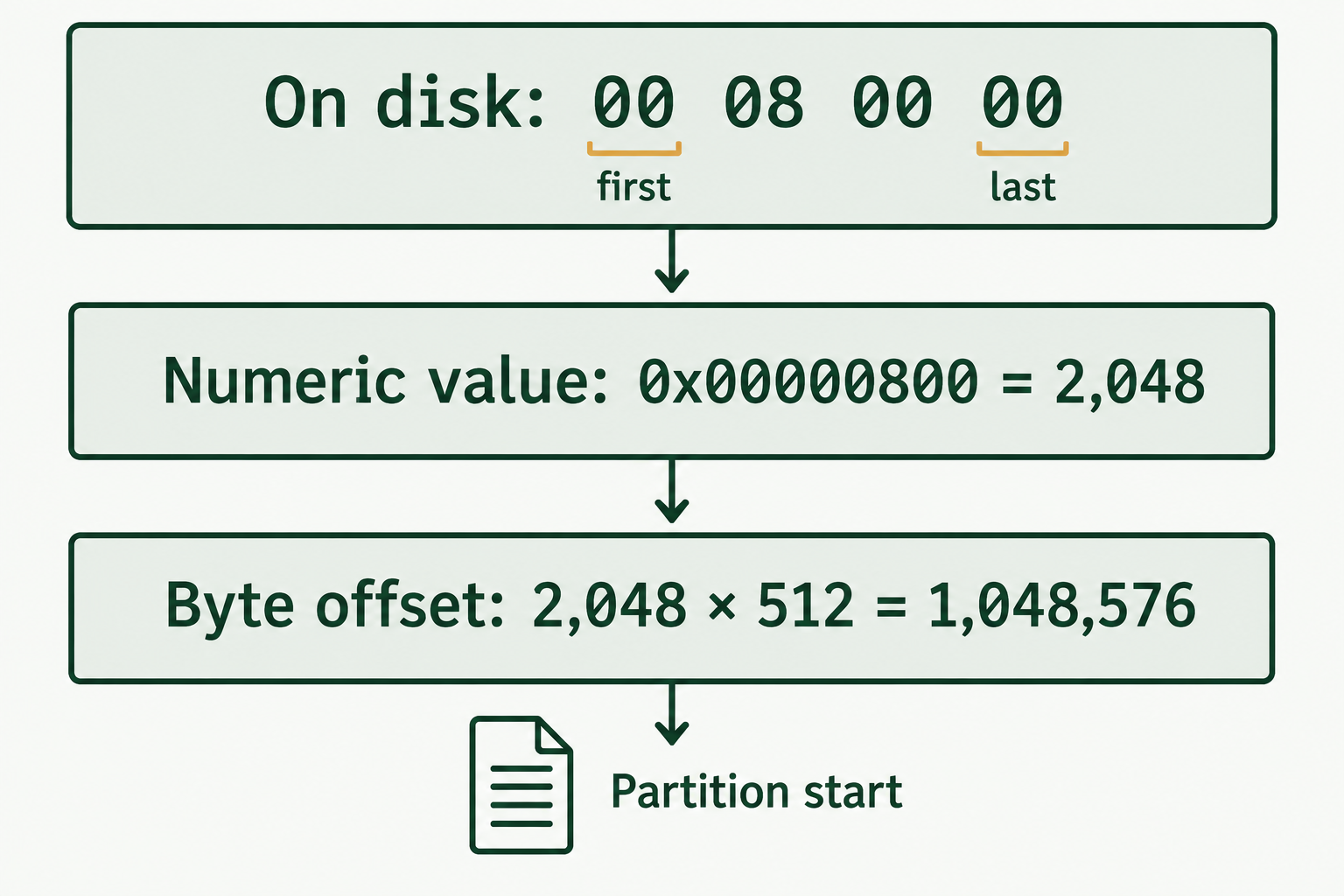
Figure 4.5: The chapter's little-endian example locates the partition at byte offset 1,048,576.
Text description for Figure 4.5
The stored bytes represent the number 0x00000800 because the least significant byte comes first. The starting LBA is 2,048. Multiplying by the stated 512-byte logical sector size gives 1,048,576 bytes, or 1 MiB. This conversion changes interpretation, not the bytes in the evidence image.
Extended Partitions and Logical Drives
MBR allows only four primary partitions. To exceed that limit, one primary entry is marked as extended (type 0x05 or 0x0F) and acts as a container. The extended partition is not formatted. Its first sector holds an Extended Boot Record (EBR), which has the same 16-byte entry structure as an MBR but uses only two entries: one describing a logical partition and one pointing to the next EBR in the chain.
The chain is a linked list. Each EBR describes one logical volume and the location of the next EBR. Extended partitions are a legacy workaround and are uncommon on modern systems, since GPT supports 128 partitions by default.
Warning
An EBR chain has a single point of failure at every link. If one EBR is corrupted or overwritten, every logical partition after it in the chain becomes invisible to the operating system, and tools that follow the chain will stop at the break. The data in those volumes is still on the disk. Locating orphaned volumes by scanning for volume boot record signatures, rather than by following the chain, is a standard recovery technique.
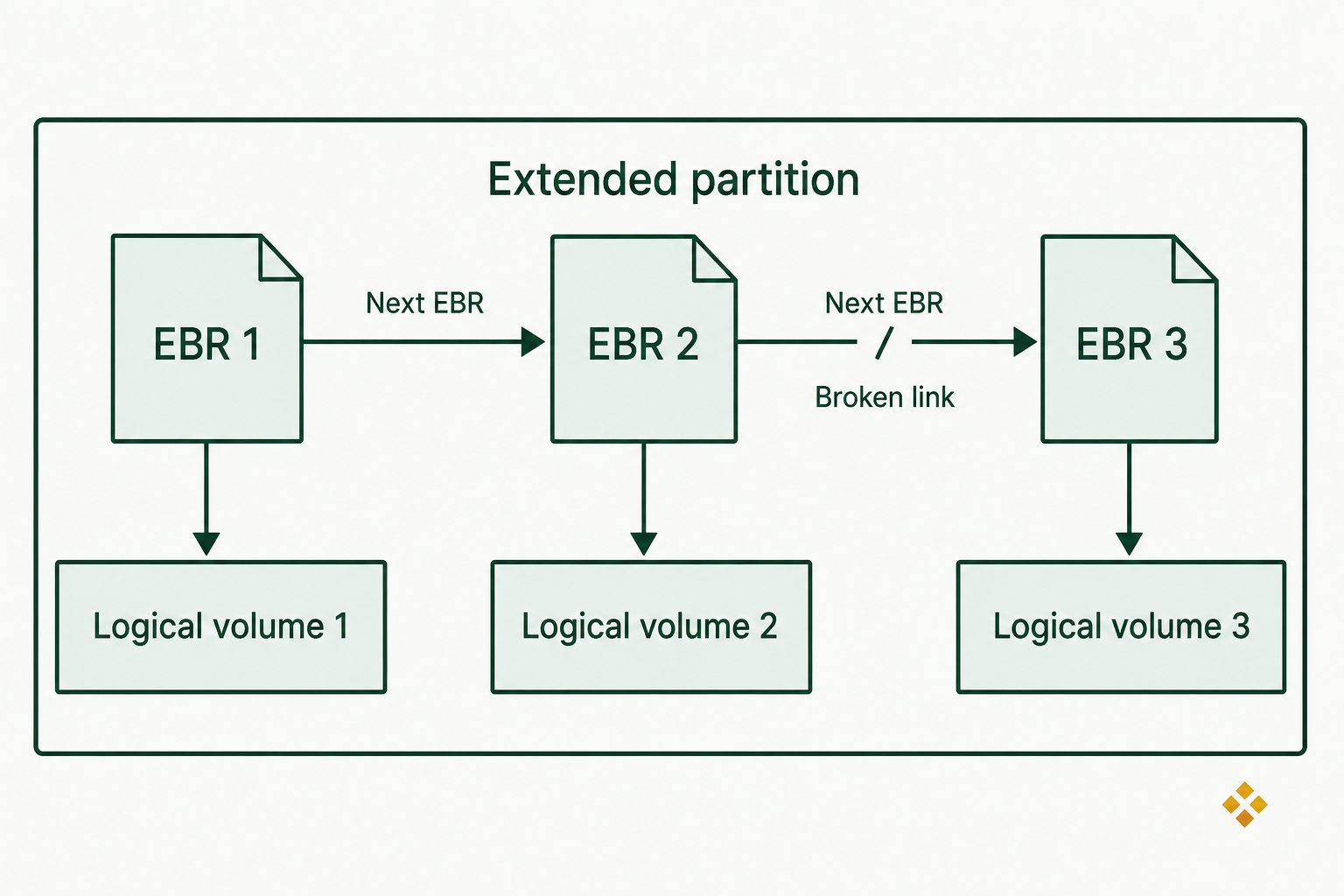
Figure 4.6: A broken EBR link can interrupt discovery while later volume data remains present.
Text description for Figure 4.6
An Extended Boot Record (EBR) describes a logical volume and can link to another EBR inside an extended partition. A damaged link may stop a chain-following parser before it reaches later records. The corresponding sectors can still contain volume data. This schematic shows relationships without encoding the different relative-address bases used by EBR fields.
4.4 GPT Partition Structure
The GUID Partition Table (GPT) is the modern standard, required by UEFI systems and used on large disks. GPT supports 128 partitions by default, addresses up to 2^64 sectors, and includes redundancy and integrity checking that MBR lacks.
GPT stands for GUID Partition Table. A GUID (Globally Unique Identifier) is a 128-bit value used to identify a disk, partition type, or individual partition. In practice, GUIDs provide identifiers that are extraordinarily unlikely to collide, allowing GPT to distinguish partitions reliably across systems and disks.
GPT Layout
| Region | Location | Purpose |
|---|---|---|
| Protective MBR | Sector 0 | Backward compatibility with legacy tools |
| Primary GPT Header | Sector 1 | Disk GUID, entry array location, CRC values |
| Primary GPT Entry Array | Sectors 2 through 33 (typical) | 128 entries of 128 bytes each |
| User Data | Sector 34 through the last usable LBA | Partitions |
| Backup GPT Entry Array | 32 sectors before the last sector (typical) | Copy of the entry array |
| Backup GPT Header | Last sector of the disk | Copy of the header |
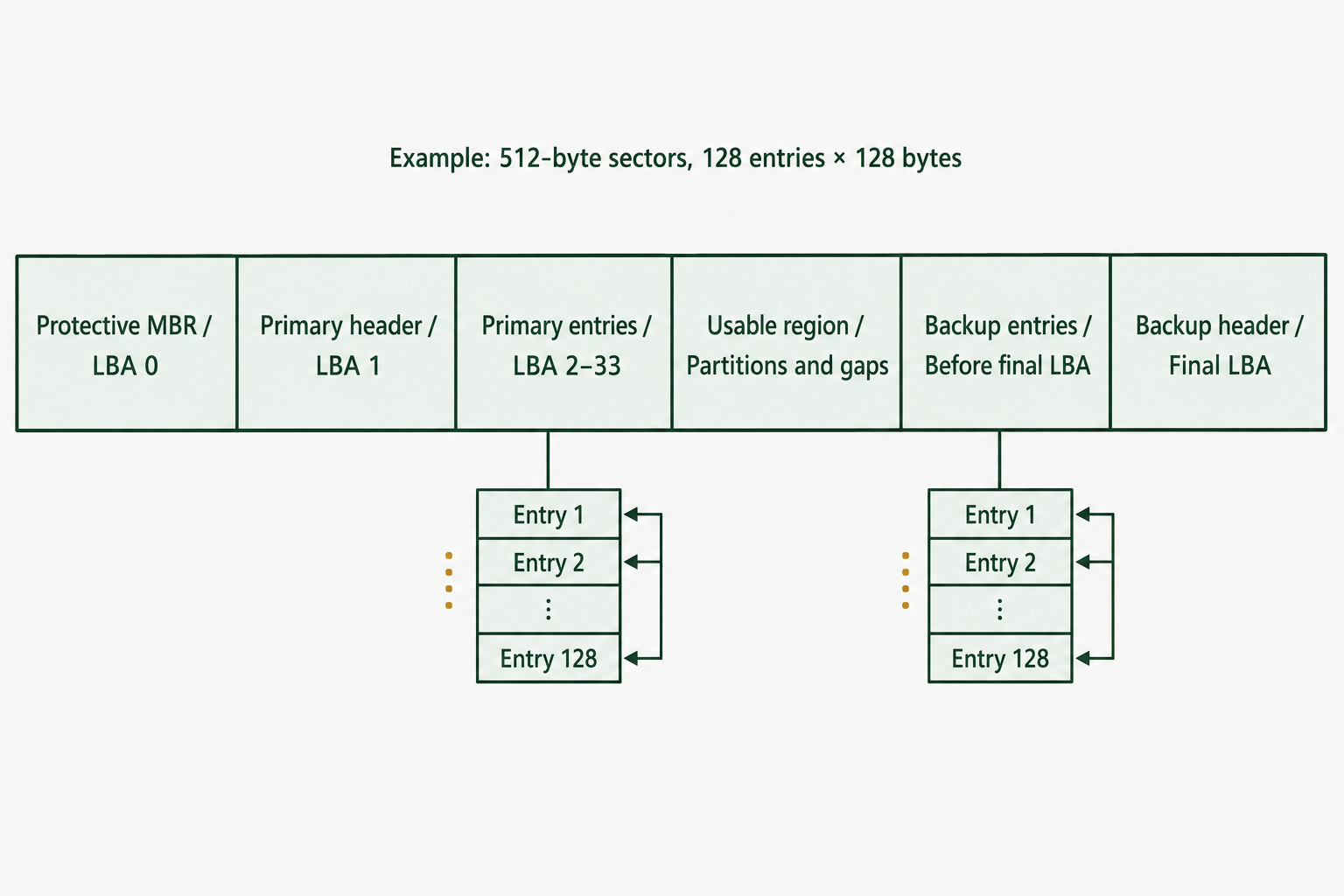
Figure 4.7: GPT stores partition metadata at both ends of the disk.
Text description for Figure 4.7
This example assumes 512-byte logical sectors and 128 entries of 128 bytes, so each entry array occupies 32 sectors. The primary header is at LBA 1 and the backup header is at the final LBA. Header fields provide the actual array locations and usable bounds. The usable region can include both partitions and unallocated space. Widths are schematic.
Protective MBR
To keep older tools from misreading a GPT disk as unpartitioned, GPT places a Protective MBR in sector 0. It is a standard MBR structure holding one partition entry that spans the whole disk, capped at 0xFFFFFFFF sectors, with partition type 0xEE. Firmware and modern tools recognize 0xEE and switch to GPT parsing. Legacy tools see one large partition of an unknown type and, in most cases, decline to modify it.
A canonical protective MBR entry at offset 0x1BE looks like this:
00 00 02 00 EE FF FF FF 01 00 00 00 FF FF FF FF
Parsed:
- Status 0x00, not bootable
- CHS start 00 02 00, a fixed legacy value
- Type 0xEE, GPT protective
- CHS end FF FF FF, the maximum legacy value
- LBA start 0x00000001, sector 1
- Sector count 0xFFFFFFFF, the maximum a 4-byte field can express
Deviation from this pattern is a finding. Bootstrap code in offsets 0 through 445 that is not zeroed, or a second populated entry, indicates either a hybrid MBR configuration or something that warrants closer analysis.
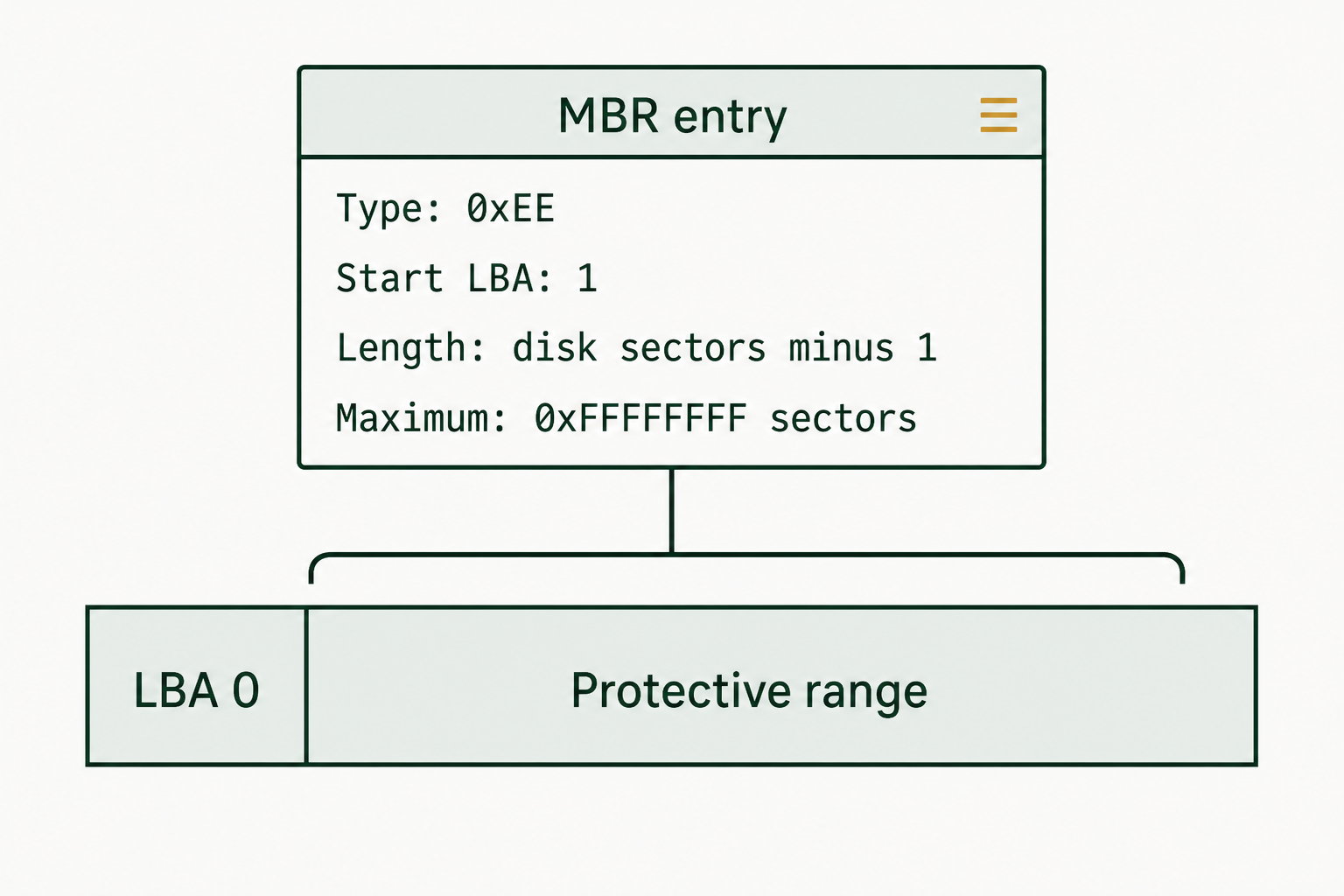
Figure 4.8: The protective MBR describes a compatibility range covering the GPT disk after LBA 0.
Text description for Figure 4.8
The protective MBR reserves the disk for GPT-aware tools. Its SizeInLBA is the disk's logical sector count minus one, capped at 0xFFFFFFFF when necessary. A smaller disk should use its actual covered length. This record is a compatibility mechanism and does not enumerate the individual GPT partitions.
GPT Header Structure
The GPT header occupies sector 1 for the primary copy and the final sector of the disk for the backup. Offsets are relative to the start of the header.
| Offset | Size (bytes) | Field | Description |
|---|---|---|---|
| 0 | 8 | Signature | ASCII "EFI PART" |
| 8 | 4 | Revision | 0x00010000 for revision 1.0 |
| 12 | 4 | Header Size | Usually 92 bytes |
| 16 | 4 | Header CRC32 | Checksum of the header |
| 20 | 4 | Reserved | Must be zero |
| 24 | 8 | Current LBA | Sector holding this header |
| 32 | 8 | Backup LBA | Sector holding the other header |
| 40 | 8 | First Usable LBA | First sector available to partitions |
| 48 | 8 | Last Usable LBA | Last sector available to partitions |
| 56 | 16 | Disk GUID | Unique identifier for this disk |
| 72 | 8 | Partition Entry LBA | Sector where the entry array begins, usually 2 |
| 80 | 4 | Number of Partition Entries | Default 128 |
| 84 | 4 | Size of Partition Entry | Usually 128 bytes |
| 88 | 4 | Partition Entry Array CRC32 | Checksum of the entry array |
The signature is stored as the literal ASCII string "EFI PART", so the eight bytes read 45 46 49 20 50 41 52 54 in that order. No byte reversal applies. The numeric fields that follow are little-endian and do require reversal.
The two CRC32 fields allow integrity checking. Because GPT stores a full second copy of both the header and the entry array at the end of the disk, a damaged primary structure can be rebuilt from the backup.
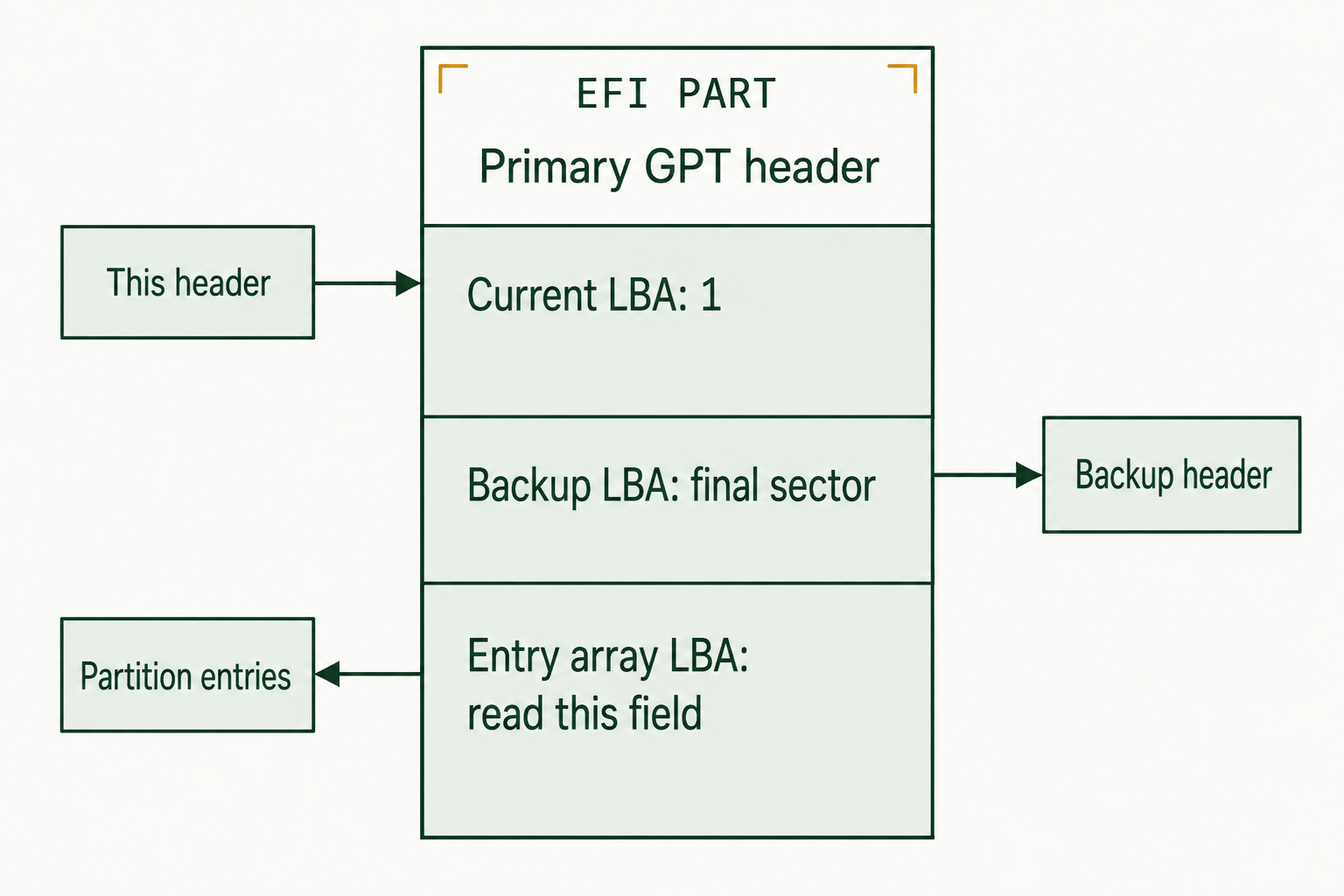
Figure 4.9: GPT header fields locate the current header, its counterpart, and the partition entries.
Text description for Figure 4.9
The Current LBA identifies the header's own location. Backup LBA identifies its counterpart. Partition Entry LBA identifies the entry array associated with this header. The EFI PART signature is an identification clue. Header bounds, checksums, and other structural requirements still need validation.
Partition Entry Structure
Each GPT partition entry is 128 bytes by default. Offsets are relative to the start of the entry.
| Offset | Size (bytes) | Field | Description |
|---|---|---|---|
| 0 | 16 | Partition Type GUID | Identifies the partition type |
| 16 | 16 | Unique Partition GUID | Identifies this specific partition |
| 32 | 8 | First LBA | Starting sector |
| 40 | 8 | Last LBA | Ending sector, inclusive |
| 48 | 8 | Attributes | Flags such as required-partition, hidden, and no-automount |
| 56 | 72 | Partition Name | UTF-16LE label, up to 36 characters |
Partition size in sectors = Last LBA - First LBA + 1.
Reading a GUID from Raw Hex
GUIDs are stored in a mixed-endian layout, which is the single most common hand-parsing mistake in GPT analysis. The first three fields of a GUID are stored little-endian. The last two are stored in the order they are printed.
The EFI System Partition type GUID is written as:
C12A7328-F81F-11D2-BA4B-00A0C93EC93B
On disk, those 16 bytes appear as:
28 73 2A C1 1F F8 D2 11 BA 4B 00 A0 C9 3E C9 3B
Field by field:
C12A7328(4 bytes, reversed) stored as28 73 2A C1F81F(2 bytes, reversed) stored as1F F811D2(2 bytes, reversed) stored asD2 11BA4B(2 bytes, not reversed) stored asBA 4B00A0C93EC93B(6 bytes, not reversed) stored as00 A0 C9 3E C9 3B
If you compare a GUID left to right against a reference table without applying this rule, no partition will ever match.
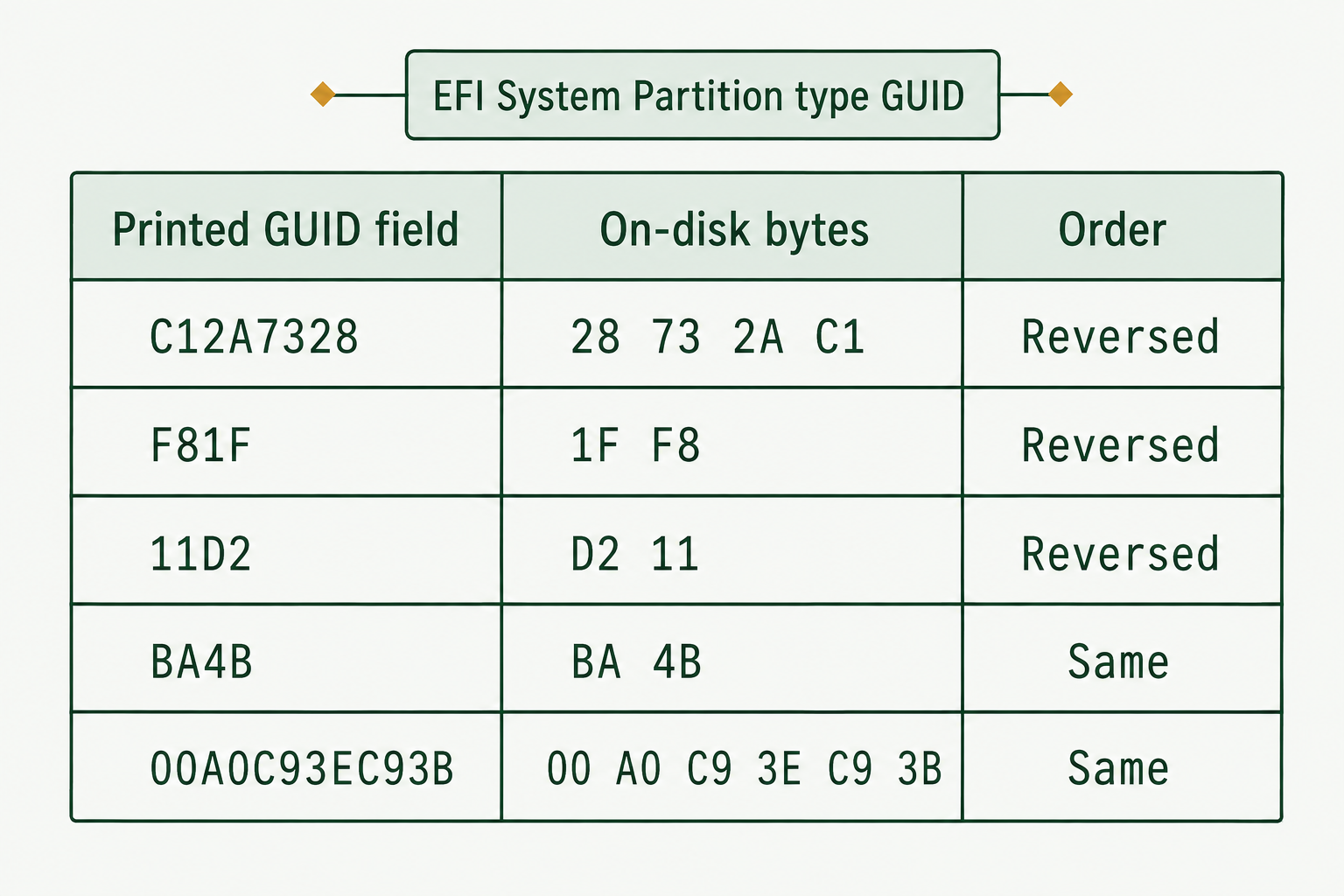
Figure 4.10: The ESP type GUID uses reversed byte order in its first three fields.
Text description for Figure 4.10
A globally unique identifier (GUID) is 16 bytes. In this GPT encoding, the first four-byte field and the next two two-byte fields use little-endian storage. The remaining eight bytes retain their displayed order. Reading the table from top to bottom reconstructs the ESP type GUID C12A7328-F81F-11D2-BA4B-00A0C93EC93B.
Common Partition Type GUIDs
| Type | GUID | Typical Use |
|---|---|---|
| Unused | 00000000-0000-0000-0000-000000000000 | Empty entry |
| EFI System | C12A7328-F81F-11D2-BA4B-00A0C93EC93B | EFI System Partition (ESP) |
| BIOS Boot | 21686148-6449-6E6F-744E-656564454649 | GRUB BIOS boot partition |
| Microsoft Reserved | E3C9E316-0B5C-4DB8-817D-F92DF00215AE | Windows MSR |
| Microsoft Basic Data | EBD0A0A2-B9E5-4433-A02D-B30D9B1D97BE | Windows NTFS and exFAT volumes |
| Windows Recovery | DE94BBA4-06D1-4D40-A16A-BFD50179D6AC | Windows Recovery Environment |
| Linux Filesystem | 0FC63DAF-8483-4772-8E79-3D69D8477DE4 | Linux ext4 and others |
| Linux Swap | 0657FD6D-A4AB-43C4-84E5-0933C84B4F4F | Linux swap |
| Apple APFS | 7C3457EF-0000-11AA-AA11-00306543ECAC | macOS APFS container |
| Apple HFS+ | 48465300-0000-11AA-AA11-00306543ECAC | macOS HFS+ volume |
GPT Redundancy and Recovery
GPT is designed on the assumption that structures get damaged. The backup header and entry array live at the end of the disk, so a single event that destroys the beginning of the disk does not destroy the partition map. Tools including gdisk and TestDisk can rebuild a primary GPT from the backup copy.
Analyst Perspective
Compare the primary and backup GPT structures on every GPT disk you examine. If the header CRC32 does not validate, or if the primary and backup disagree on partition boundaries, you have either media damage or a deliberate modification. Recording which copy you relied on, and why, belongs in the examination notes. On a disk where the two copies disagree, that discrepancy may be the reason the case was opened.
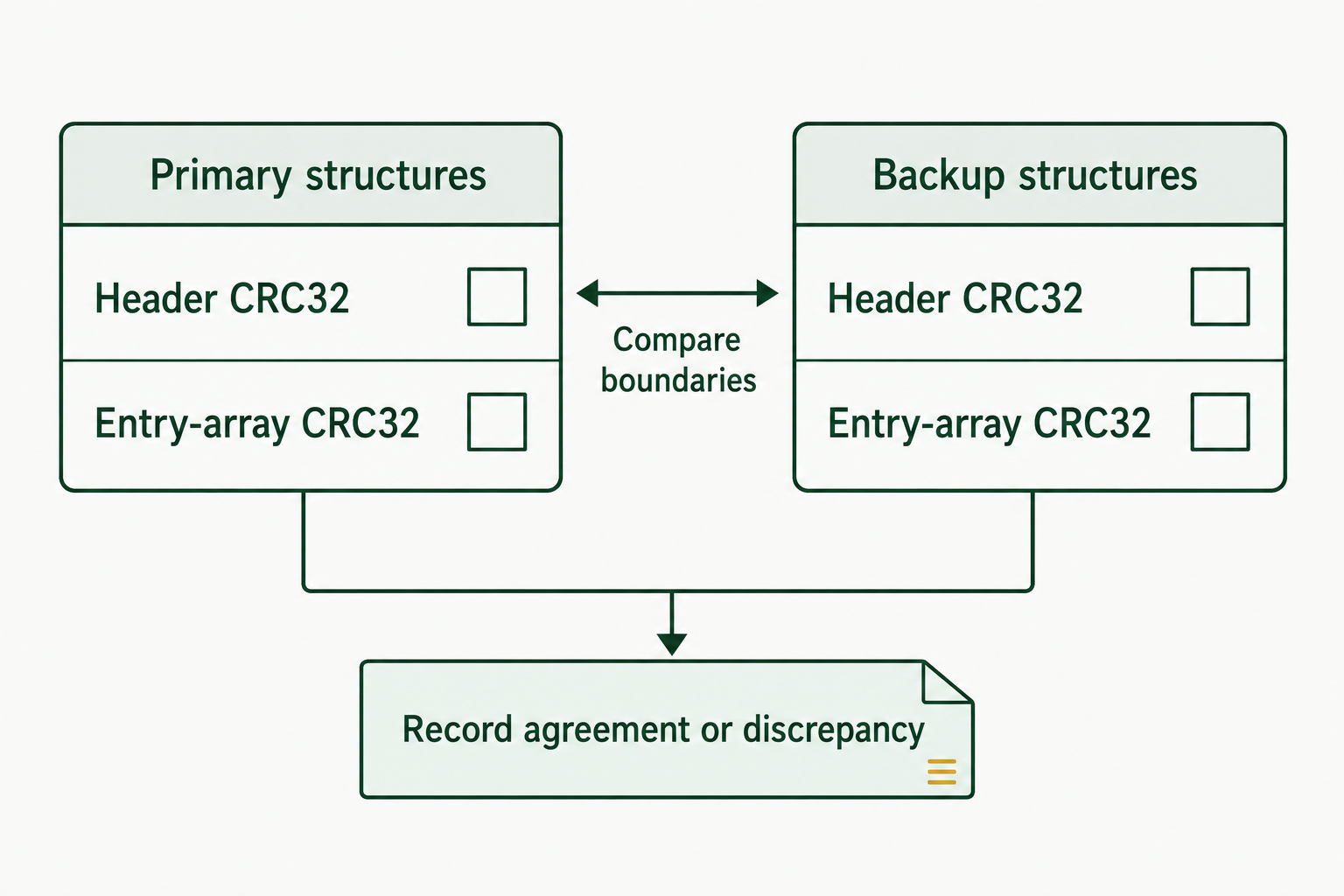
Figure 4.11: GPT review checks each copy's integrity and compares the partition information.
Text description for Figure 4.11
A cyclic redundancy check (CRC32) can detect many accidental changes but does not prove authenticity. Validate each header using its own values and check the relevant entry array. Primary and backup headers legitimately differ in location fields and their header checksums. Compare the partition records and usable bounds, and document discrepancies before considering recovery on a working copy.
4.5 Hidden Storage Areas
A partition table describes only what the disk admits to having. Two ATA features let a drive report a smaller capacity than it physically contains, and neither one appears in any partition table. A third category, unallocated space between and after partitions, is visible in principle but is skipped by any acquisition that images partitions instead of the whole device.
ATA commands are low-level protocol requests defined by the ATA standard that allow a computer to query or configure a storage device. They are not commands typed directly into the drive. A utility such as hdparm packages a request, opens the device through the operating system, and asks the kernel to send the ATA command over the storage connection using ATA passthrough. For example, hdparm -N queries the drive's addressable capacity, while hdparm --dco-identify queries its Device Configuration Overlay settings. The connection must support passthrough: a direct SATA connection or a forensic bridge usually can, while many consumer USB-to-SATA bridges cannot. A write blocker may prevent data writes, but it must also support the required passthrough commands.
Host Protected Area (HPA)
An HPA is a region of sectors at the end of a disk that the drive firmware hides from everything above it. The drive responds to the ATA IDENTIFY DEVICE command with a reduced sector count, so the operating system, the partitioning tools, and ordinary imaging tools all see a smaller drive. The hidden sectors are not addressable through normal read commands.
Manufacturers use HPAs legitimately, to store recovery images, diagnostic utilities, and firmware. The feature is also available to anyone with the right tool, which is why it appears in anti-forensics discussions.
Detection. On Linux, query the maximum address:
hdparm -N /dev/sdX
For example, a drive with an HPA might return output like this:
/dev/sdX:
 max sectors   = 1953000000/1953525168, HPA is enabled
This is illustrative; spacing and wording can vary by hdparm version. The first number is the sector count reported to the operating system, and the second is the native maximum. The difference between them is the capacity currently hidden by the HPA.
The output reports two values in the form max sectors = <reported>/<native>. When the reported value is lower than the native value, hdparm states that an HPA is enabled. Equal values mean no HPA.
You can also detect an HPA without any ATA command by comparing the drive's reported capacity against the manufacturer's published sector count for that exact model. A nameplate 1 TB drive has 1,953,525,168 sectors. A drive of that model reporting fewer sectors has something hiding the difference.
Access requires ATA passthrough. Many USB-to-SATA bridges do not pass ATA commands through, so hdparm -N may fail or return nothing useful on a drive connected through a consumer enclosure. Connect the drive to a SATA port behind a software or hardware write blocker, or use a forensic bridge that supports ATA passthrough.
Acquisition. dd, dd_rescue, and ddrescue read what the drive reports and nothing more. None of them can see into an HPA on their own. Two approaches work:
- Use a hardware forensic imager or bridge that detects and temporarily unlocks HPA and DCO regions. Tableau and Atola devices in current lab use handle this as a standard feature.
- Temporarily raise the maximum address with
hdparm -N, then image the full native capacity. A value passed without a leadingpis volatile and reverts when the drive is power-cycled, which is the form to prefer in an examination. The ATA specification allows the volatile form to be issued only once per power cycle, so plan the sequence before you issue it.
Either approach changes the state of the evidence drive, even temporarily. Document the command issued, the time, the before and after sector counts, and the hash of every image produced.
Forensic significance. An HPA found on a machine that was not manufactured with one, or an HPA whose size does not match the vendor's recovery partition, deserves examination. It may hold a hidden volume, an encrypted container, or an exfiltration staging area. It may also be exactly what the vendor shipped. The finding is the presence and the contents, not the assumption.
Device Configuration Overlay (DCO)
A DCO is a second ATA mechanism for reducing the capacity a drive reports. It also works by lowering the maximum addressable sector, so like an HPA, the concealed region sits at the end of the drive. A DCO can additionally mask supported features, making a drive appear to lack capabilities it actually has.
The difference that matters operationally is layering. A DCO is applied beneath an HPA. A drive can carry both, and the HPA must be removed before the DCO becomes visible. A DCO is also invisible to hdparm -N, because -N reports the native maximum as the DCO has redefined it.
Detection. Query the drive configuration directly:
hdparm --dco-identify /dev/sdX
For example, a representative result might include:
/dev/sdX:
DCO Revision: 0
Real max sectors: 1953525168
This output is illustrative; hdparm may list additional configurable features, and the formatting varies by drive and version. The Real max sectors value is the factory maximum reported by the DCO. Compare it with the native value from hdparm -N: if the factory maximum is larger, the DCO is hiding capacity beneath the current native limit.
The output reports the real factory maximum sector count. Compare that value against what hdparm -N reported as native. A difference means a DCO is in place.
Removal. hdparm --dco-restore resets the drive to its factory configuration. This is permanent, it clears the DCO settings rather than suspending them, and hdparm requires an explicit confirmation flag before it will run. Treat it as a last resort, perform it only after the reported-capacity image is acquired and hashed, and document it fully. Where the lab has a hardware imager that handles DCO, use that instead.
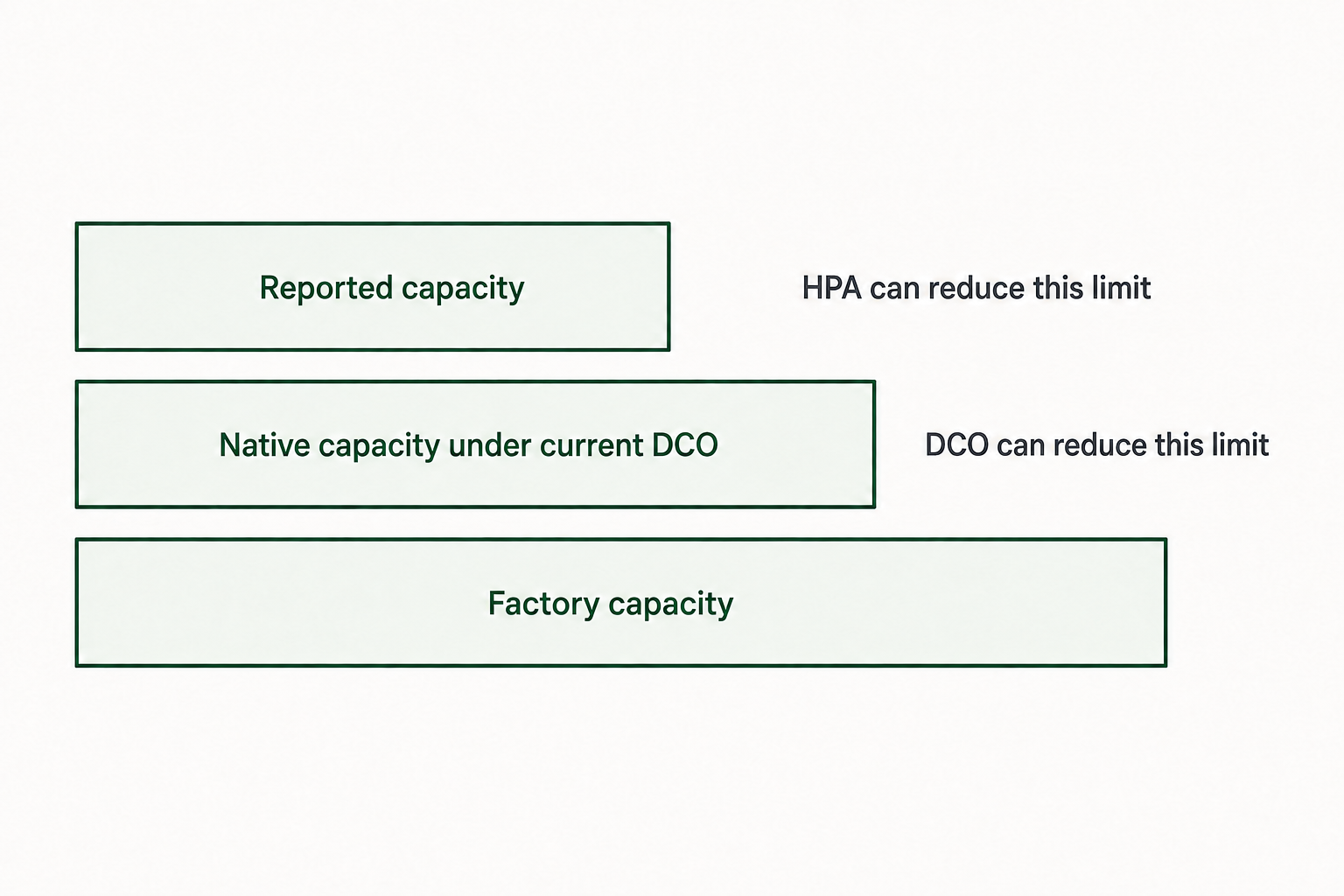
Figure 4.12: Reported, native, and factory capacities can expose separate capacity restrictions.
Text description for Figure 4.12
The Host Protected Area (HPA) mechanism can lower the reported capacity relative to the current native limit. A Device Configuration Overlay (DCO) can lower that native limit relative to factory capability. The diagram shows a device with both restrictions. Actual command support, interface passthrough, and device state affect which limits can be queried. Widths do not represent measured sizes.
Inter-Partition Gaps and End-of-Disk Space
Not all unreported storage is hidden by firmware. Two ordinary conditions leave data outside every partition:
Gaps between partitions. Partitioning tools align partitions to boundaries, commonly 1 MiB, which is why so many first partitions start at sector 2048 rather than sector 1 or 34. The sectors skipped for alignment, and any sectors left between one partition's end and the next partition's start, hold whatever was there before. On a repartitioned disk, that is often the beginning of a previous volume, including its old volume boot record.
Space after the last partition. A disk is rarely partitioned to its exact last usable sector. The tail region can contain the remains of a larger previous partition, a deleted volume, or the backup GPT structures themselves.
Both regions are captured automatically when you image the whole device and are lost entirely when you image partitions individually.
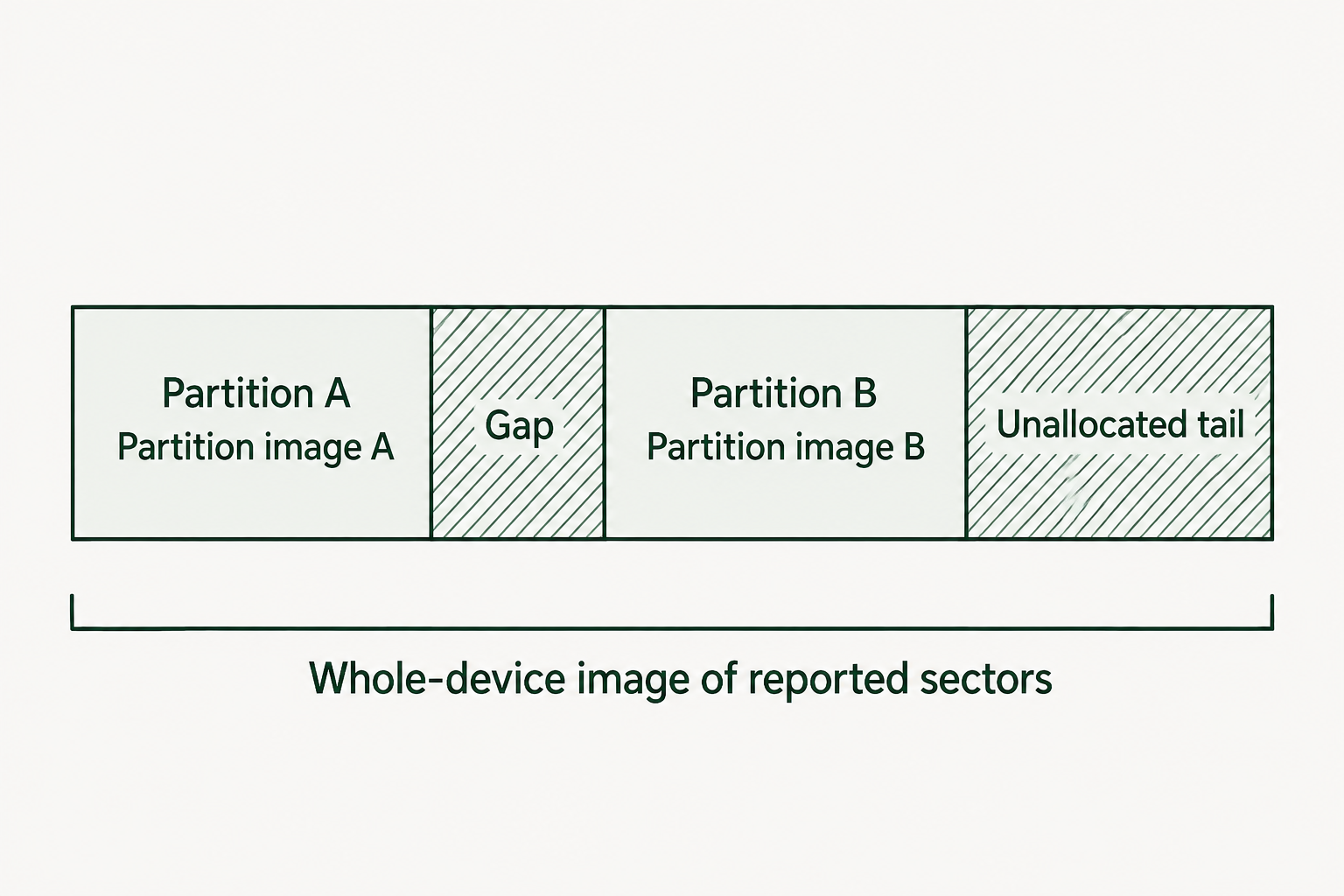
Figure 4.13: Whole-device acquisition includes reported sectors outside the partitions.
Text description for Figure 4.13
Imaging individual partitions omits sectors outside their boundaries. A whole-device image of the reported address range includes the shown gaps and tail, subject to read errors and acquisition settings. Those areas may contain older data. Firmware-restricted sectors require separate detection and handling; whole-device acquisition alone does not make them readable.
Acquiring Hidden Areas
The rules that follow from all of the above are short:
- Image the physical device, not its partitions.
- Before imaging, compare the reported capacity against the manufacturer's specification for the model.
- Check for an HPA, then check for a DCO.
- Acquire and hash the reported-capacity image first, so you always have an image that required no configuration change.
- If hidden regions exist, unlock them by the least invasive method available, acquire the full native capacity, and hash that image as well.
- Document every command that altered the drive's configuration, including the volatile ones.
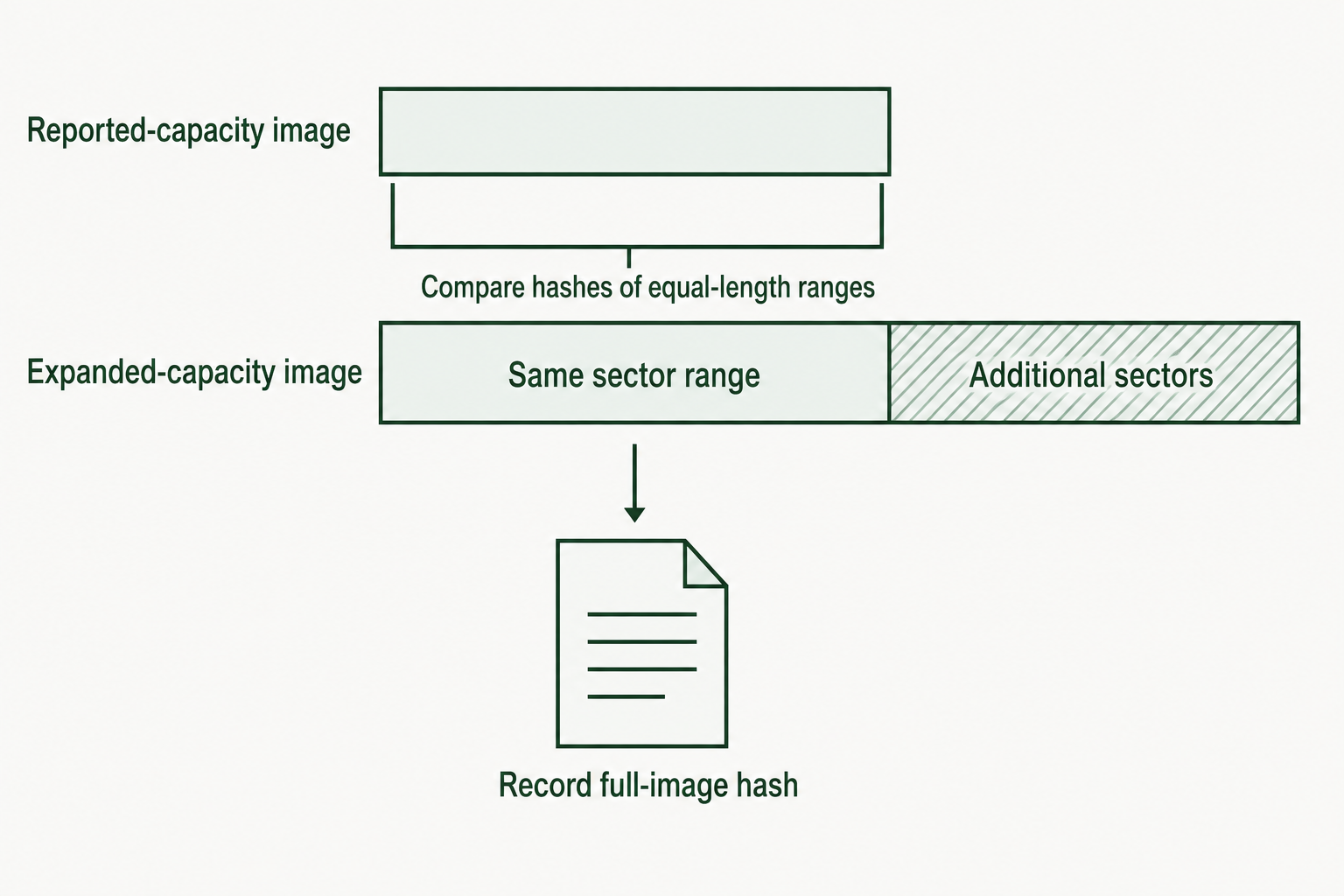
Figure 4.14: Compare the preserved baseline with the corresponding range of the expanded acquisition.
Text description for Figure 4.14
Acquire and hash the reported range before a configuration change. If an expanded image is later acquired, compare the hash of its corresponding equal-length range with the baseline's hash. Also record a hash for the complete expanded image. Different total image sizes normally produce different full-image hashes; the range comparison tests preservation of the previously captured bytes.
Chapter Summary
- Firmware type determines partition scheme. Legacy BIOS executes bootstrap code from sector 0 and reads an MBR. UEFI reads a GPT and loads bootloaders from a FAT32 EFI System Partition identified by the type GUID C12A7328-F81F-11D2-BA4B-00A0C93EC93B.
- Boot configuration is evidence. The bootable flag, the presence or absence of the 55 AA signature, and the contents of the bootstrap code region all describe how the machine was configured to start, and all can be compared against expected values.
- MBR is four 16-byte entries at offset 446. Status at entry offset 0, type at 4, LBA start at 8, sector count at 12, with the last two fields little-endian. MBR tops out near 2.2 TB and at four primary partitions, with extended partitions and EBR chains as the legacy workaround.
- GPT is redundant and checksummed. A header at sector 1 and a copy at the last sector, each with an entry array, CRC32 values, and a pointer to the other. Disagreement between the two copies is a finding, not a formality.
- GUIDs are stored mixed-endian. The first three fields are reversed on disk and the last two are not. Comparing raw bytes left to right against a printed GUID will never match.
- Reported capacity is a claim, not a measurement. An HPA or a DCO makes a drive report fewer sectors than it has, and ordinary imaging tools capture only what is reported. Compare against the manufacturer's specification, check with
hdparm -Nandhdparm --dco-identify, and image the physical device rather than its partitions. - Unallocated space is not empty space. Alignment gaps, inter-partition gaps, and the tail after the last partition routinely hold remnants of earlier volumes.