CH9: Application Security, Third-Party Risk, and AI in Security Operations
Introduction
Applications are simultaneously the most critical assets and the largest attack surface in modern organizations. Every organization depends on custom-built applications, commercial software, open-source libraries, and cloud services, a sprawling ecosystem where vulnerabilities in any component can compromise the entire business. Equally important, artificial intelligence is reshaping how security operations work. AI tools assist with artifact analysis, log parsing, incident investigation, and automation, yet introduce new risk vectors including hallucinations, data exposure, and adversarial manipulation. This chapter addresses three interconnected topics: how organizations secure applications throughout their lifecycle, how they manage risk in third-party and supply chain dependencies, and how they integrate AI as both a powerful tool and an emerging threat that demands governance.
Learning Objectives
Upon completion of this chapter, you will be able to:
- Evaluate application security testing methodologies (SAST, DAST) and their roles in detecting vulnerabilities early in the development cycle.
- Identify and assess third-party and supply chain risks using Software Bills of Materials (SBOMs), Software Composition Analysis, and vendor management processes.
- Recognize AI risks in security operations including hallucinations, data exposure, model poisoning, and prompt injection attacks.
- Design AI governance policies that balance security operational benefits with risk mitigation and compliance requirements.
- Apply AI tools effectively for common SOC workflows while maintaining human oversight and verifying outputs.
9.1 Application Security Testing and Secure Development
Applications are developed across a spectrum of approaches: traditional waterfall with dedicated testing phases, agile with continuous deployment, and everything in between. Regardless of development methodology, security testing must occur and must shift left, moving security checks earlier in the development cycle rather than deferring them to post-release vulnerability scanning.
SAST: Static Application Security Testing
Static Application Security Testing (SAST) analyzes source code without executing it, identifying vulnerabilities in code structure, logic, and patterns. SAST tools scan code and flag patterns known to introduce security weaknesses.
Common SAST tool examples:
- SonarQube: Open-source and commercial; scans multiple languages; provides dashboards and trend analysis
- Checkmarx: Commercial; strong in identifying tainted data flows and injection vulnerabilities
- Fortify: Enterprise tool with deep semantic analysis; particularly strong on framework-specific issues
- Semgrep: Open-source; lightweight; focuses on rule-based pattern matching; good for CI/CD integration
Typical SAST detections include:
- Injection flaws: SQL injection, command injection, LDAP injection where user input is concatenated into queries without parameterization
- Hardcoded credentials: API keys, passwords, connection strings embedded directly in source code
- Weak cryptography: Use of deprecated algorithms (MD5, DES), insufficient key lengths, custom cryptography implementations
- Unsafe deserialization: Arbitrary object deserialization that can lead to code execution
- Cross-site scripting (XSS): Unsanitized user input rendered in HTML without encoding
- Missing input validation: Insufficient bounds checking or type validation
- Insecure direct object references (IDOR): Predictable object identifiers allowing enumeration or unauthorized access
Strengths of SAST:
- Early detection: Vulnerabilities are found during development, before code reaches production
- High coverage: Entire codebase is analyzed; no blind spots due to incomplete test coverage
- Reproducibility: Same code always produces same findings
- Scalability: SAST tools can analyze millions of lines of code in hours
Limitations of SAST:
- False positives: SAST tools often flag code patterns that are not actually vulnerable (e.g., framework-specific secure APIs flagged as injection risks because they resemble manual concatenation)
- Context dependency: SAST cannot always determine whether code paths are reachable or whether tainted data actually flows to a sensitive operation
- Framework blindness: SAST struggles with framework-specific patterns or metaprogramming
- No runtime context: SAST cannot see how code actually executes or what data flows through at runtime
DAST: Dynamic Application Security Testing
Dynamic Application Security Testing (DAST) tests running applications by sending requests and observing responses, identifying vulnerabilities through actual execution and interaction.
Common DAST tools:
- Burp Suite: Industry standard; proxy-based; comprehensive; strong in web application scanning
- OWASP ZAP: Open-source alternative to Burp; good for CI/CD integration; lower false-positive rate for some vulnerability types
- Qualys DAST: Cloud-based; continuous scanning; integration with vulnerability management
- Automated scanning: Many DAST tools perform automated crawling and exploitation attempts
Typical DAST detections include:
- Injection vulnerabilities: SQL injection, command injection detected by payload injection and response analysis
- XSS vulnerabilities: Reflected and stored XSS detected by injecting JavaScript payloads and observing execution
- CSRF: Missing or weak cross-site request forgery protections
- Authentication bypass: Weak session management, predictable tokens, authentication logic flaws
- Insecure direct object references: Enumeration of resource identifiers and access control bypass
- Security misconfigurations: Unnecessary services enabled, overly permissive CORS headers, missing security headers
Strengths of DAST:
- Real execution: Tests actual runtime behavior, not inferred from code patterns
- Black-box approach: Does not require source code access; useful for third-party software and legacy applications
- Business logic: Can detect business logic flaws that SAST cannot
- Integration with CI/CD: Can be automated as part of deployment pipelines
Limitations of DAST:
- Scope limitations: DAST cannot access and test all code paths without detailed guidance
- Complex authentication: Applications requiring multi-step authentication or complex user roles are difficult to test thoroughly
- Session handling: DAST struggles with applications using sophisticated session management or state machines
- False positives: DAST tools sometimes flag findings that are not exploitable in actual use cases
- Performance: Comprehensive DAST testing requires sending many probing requests, which can affect production systems
Analyst Perspective
SAST and DAST are complementary, not competitive. A mature development organization runs SAST in CI/CD pipelines to catch issues early, then runs DAST against staging environments before release. The combination catches more vulnerabilities than either approach alone and pushes security testing earlier in the development cycle.
Figure 9.1 compares the evidence produced by static and dynamic application testing.
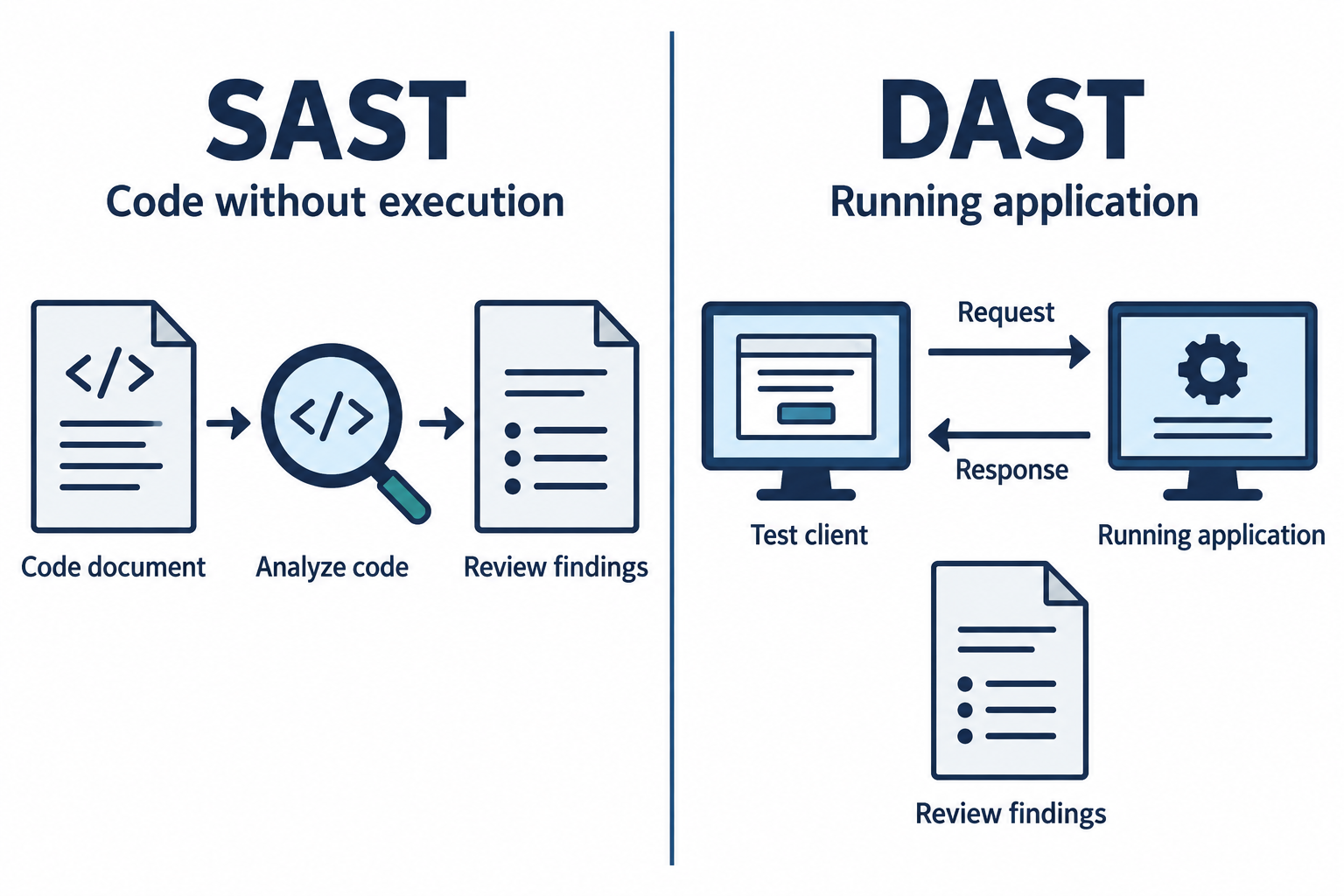
Figure 9.1: Static application security testing (SAST) examines code without running the application. Dynamic application security testing (DAST) exercises a running application through requests and responses.
Text description for Figure 9.1
Static testing can analyze source code or, with suitable tools, compiled representations. Its results depend on language support, rules, configuration, and the code available to the analyzer. Dynamic testing exercises selected routes and application states; its coverage depends on authentication, roles, test data, and navigation. Both methods can miss issues and produce false positives. Review and reproduce findings in an authorized test environment before choosing a fix.
SAMM: Software Assurance Maturity Model
The Software Assurance Maturity Model (SAMM) provides a framework for assessing and improving security practices across the full development lifecycle. SAMM is organized into five business functions:
- Governance: Strategy, policies, risk management oversight
- Design: Threat modeling, security architecture review
- Implementation: Secure coding standards, code review, security testing
- Verification: Security testing, vulnerability assessment, penetration testing
- Operations: Security monitoring, incident response, vulnerability management
Each function has multiple practices, and each practice is rated on a maturity scale (1–3). Organizations assess their current state, identify gaps, and prioritize improvements. Maturity progression might look like:
- Level 1: Security activities are ad-hoc. Testing is performed informally without standardized processes.
- Level 2: Security processes are defined. Code review is mandatory; threat modeling is documented; testing is planned and tracked.
- Level 3: Security processes are optimized and measured. Metrics track code quality; threat modeling is automated; security testing is fully integrated into CI/CD.
SAMM helps organizations move from treating security as a post-release audit to embedding it into daily development practices. The goal is to establish baseline security practices and systematically improve them, rather than to achieve Level 3 across all practices immediately.
Figure 9.2 places SAMM business functions within shared governance.
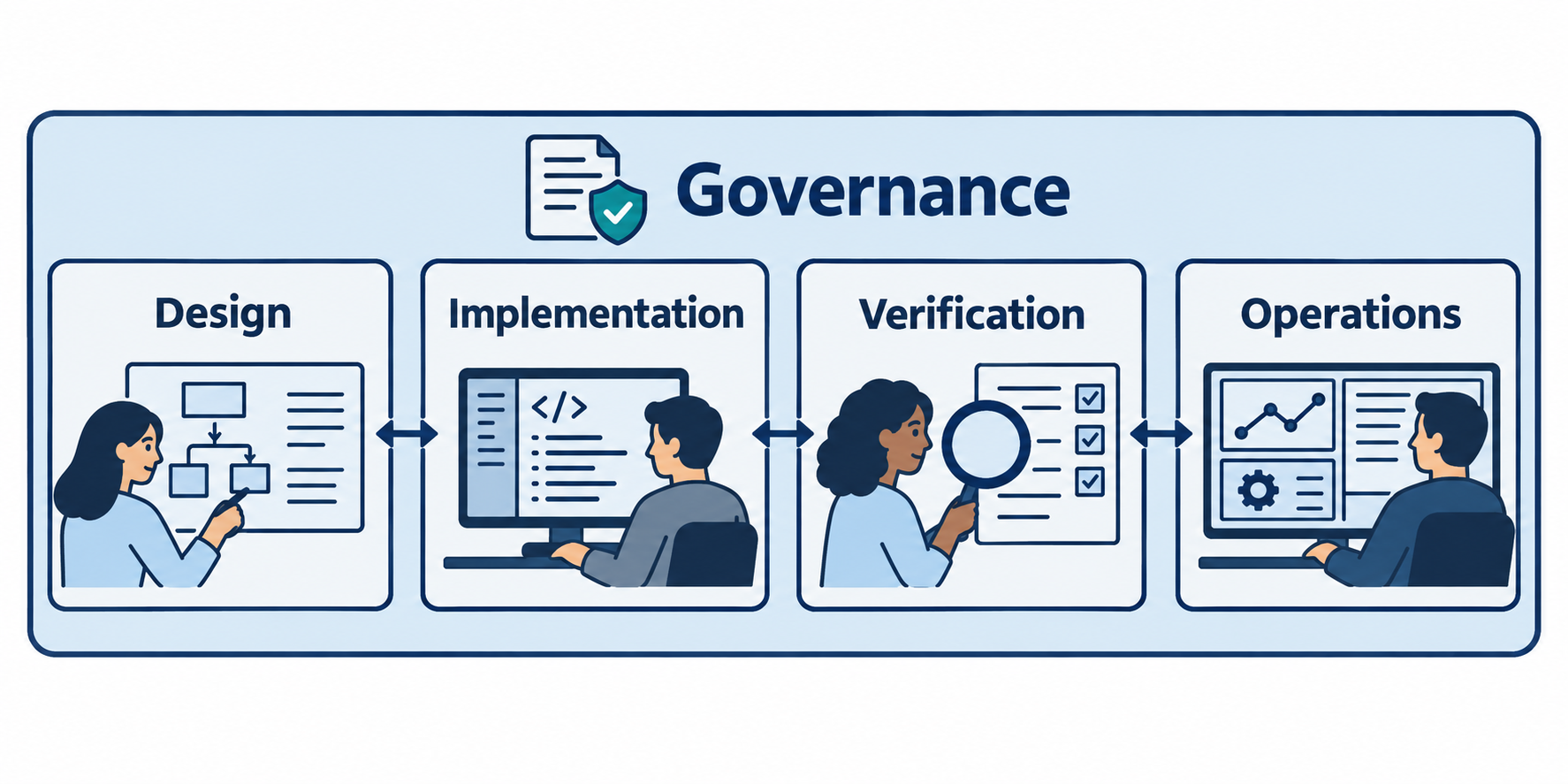
Figure 9.2: The Software Assurance Maturity Model (SAMM) organizes improvement across five business functions. Organizations choose practice targets according to their needs and risk.
Text description for Figure 9.2
SAMM covers Governance, Design, Implementation, Verification, and Operations. Governance establishes direction and accountability across the work. Design addresses requirements, threats, and architecture. Implementation addresses secure building, deployment, and defect management. Verification evaluates architecture, requirements, and security testing. Operations addresses operational security and incident work. This conceptual arrangement shows their relationship; the official model provides practice-specific maturity activities rather than a universal three-step maturity ladder.
Dependency and Third-Party Library Management
Modern applications rarely consist entirely of custom code. Most applications depend on dozens, sometimes hundreds of open-source or commercial libraries. Each dependency is a potential vulnerability vector.
Software Composition Analysis (SCA) tools identify dependencies and scan them against databases of known vulnerabilities:
- Identification: Scanning
package.json,requirements.txt,pom.xml, and other dependency manifests to identify every direct and transitive dependency - Vulnerability matching: Comparing dependency versions against CVE databases to identify known vulnerabilities
- License compliance: Identifying license restrictions that might conflict with organizational policies
- Update recommendations: Suggesting patches or newer versions that address vulnerabilities
Common SCA tools include Snyk, Black Duck, Sonatype Nexus, and commercial offerings from larger vendors.
Challenges in dependency management:
- Transitive dependencies: An application directly depends on Library A, which depends on Library B. Vulnerabilities in Library B are transitive risks. Transitive dependency chains can be 10+ levels deep.
- Version pinning and upgrades: Once a dependency version is chosen and tested, upgrading introduces regression risk. Organizations sometimes defer dependency updates, accepting vulnerability risk.
- Abandoned libraries: Some open-source projects receive minimal maintenance. Known vulnerabilities may exist with no patch available.
- Supply chain compromise: A library might be compromised by an attacker who gains access to the repository. The library itself becomes a vector for attack (see 3CX case study below).
Figure 9.3 traces direct and transitive dependencies through a small application.
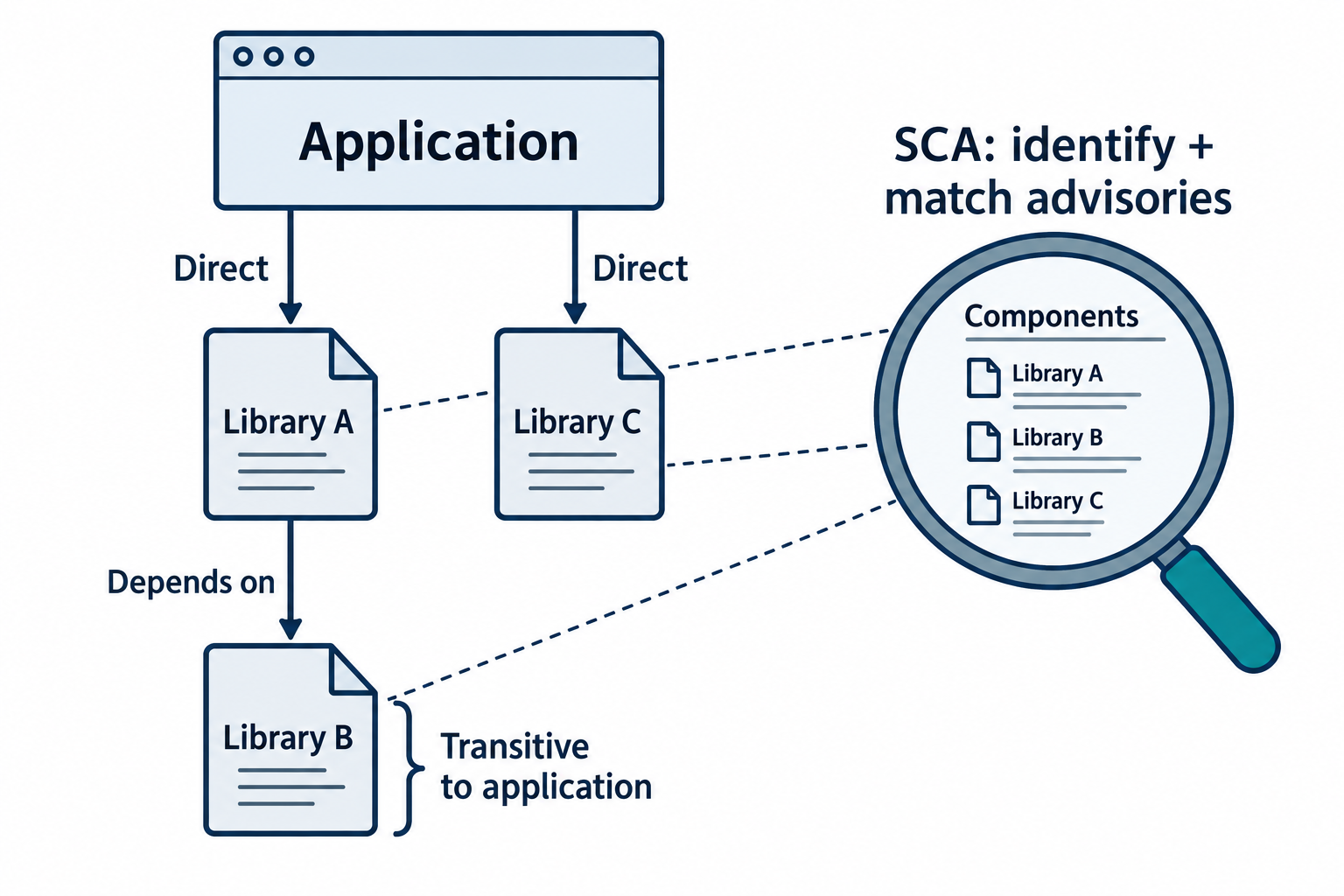
Figure 9.3: A direct dependency can bring additional transitive dependencies into an application. Software composition analysis (SCA) helps identify components and match them to relevant advisories.
Text description for Figure 9.3
In the synthetic tree, the application directly uses Library A and Library C. Library A uses Library B, making B a transitive dependency of the application. Record resolved versions and relationships from appropriate manifests, lockfiles, build artifacts, or deployed software. Review advisory applicability and available fixes, then test dependency changes. A manifest alone may omit bundled or dynamically loaded components, and a vulnerability match does not by itself prove that an exploit path is reachable.
9.2 Third-Party and Supply Chain Risk Management
Organizations rarely build everything from scratch. They depend on SaaS providers, managed services, open-source libraries, hardware vendors, and dozens of other third parties. Each represents a potential weak link in the security chain.
Supply Chain Attack Vectors
A supply chain attack compromises the targets indirectly through a trusted third party. Categories include:
Software supply chain attacks:
- Compromised libraries or updates (attackers insert malicious code into a library that is then incorporated into thousands of downstream applications)
- Typosquatting (attackers register package names similar to legitimate ones, tricking developers into installing malicious packages)
- Abandoned or unmaintained packages (attackers take over maintenance of popular open-source projects)
Hardware supply chain attacks:
- Counterfeit components (counterfeit chips incorporated into legitimate-looking equipment)
- Hardware implants or backdoors (manufacturing-stage insertion of malicious hardware)
Service provider attacks:
- Compromised managed services (attackers breach a cloud provider or managed service, gaining access to all customer environments)
- Compromised authentication providers (MFA providers, SSO services compromised, enabling large-scale authentication bypass)
- Compromised SaaS applications (attackers breach commercial software, gaining access to internal data)
SBOMs and Supply Chain Visibility
A Software Bill of Materials (SBOM) is a structured inventory of software components, versions, and dependencies. SBOMs enable organizations to:
- Understand what is in the software they use and build
- Quickly identify whether specific vulnerable libraries are present
- Track transitive dependencies and their versions
- Make informed procurement decisions
Figure 9.4 separates component inventory from evidence about the build process.
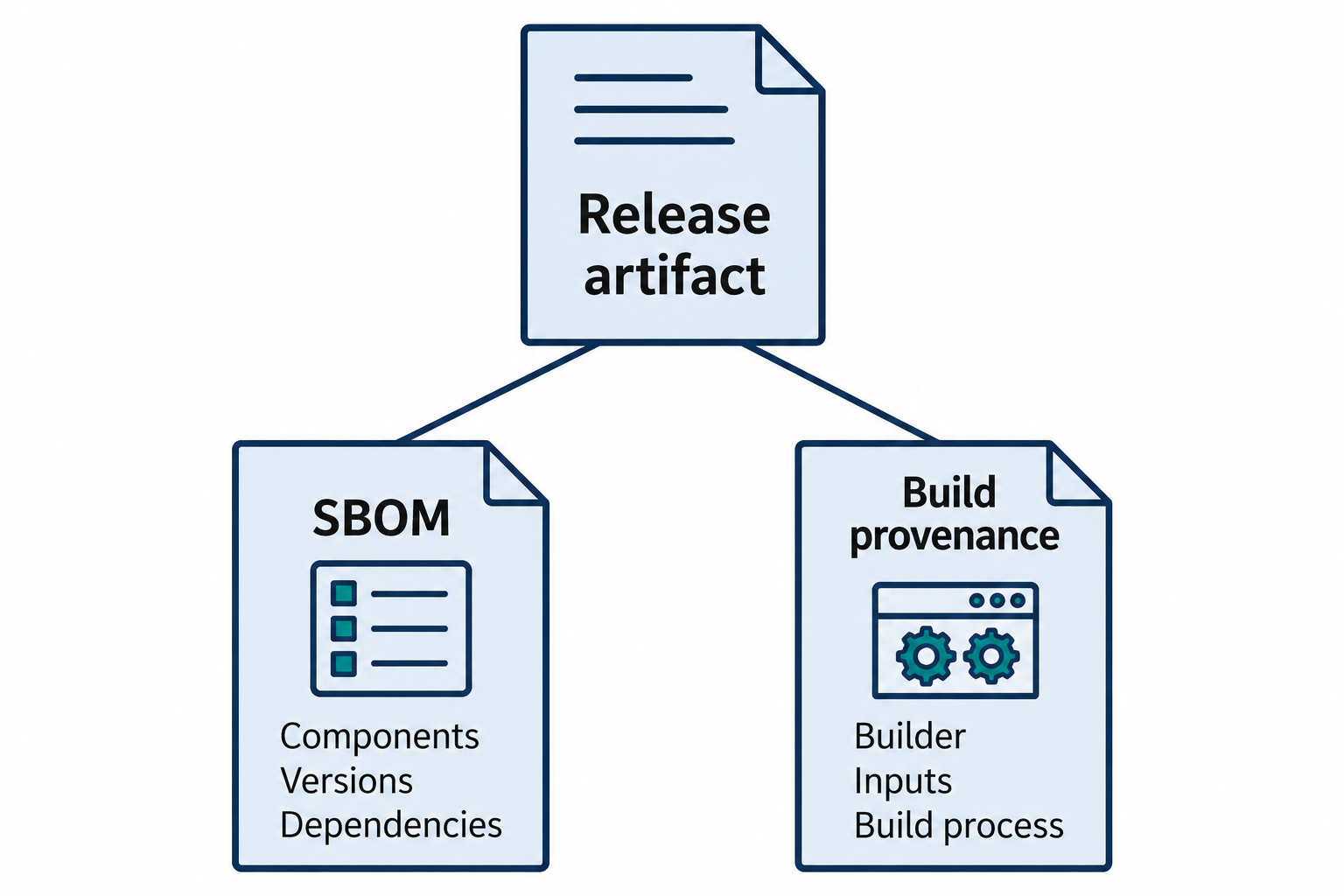
Figure 9.4: A software bill of materials (SBOM) records components and relationships. Build provenance records how an artifact was produced. Each supplies evidence for a different question.
Text description for Figure 9.4
An SBOM describes software composition, such as names, versions, and dependency relationships. Build provenance links an artifact to information about the builder, inputs, and build process. Evaluate the records for completeness, authenticity, and relevance to the exact release in use. A valid signature establishes a relationship to a signing identity and helps detect later modification; it does not prove that the signed software is harmless. Neither record alone establishes complete software security.
SBOM formats include:
- SPDX: Standardized format approved by the Linux Foundation; widely adopted
- CycloneDX: Focus on software components and dependencies; integrates well with development tools
- NTIA Minimum Elements: Defines the minimum data elements that should be included in any SBOM (component name, version, identifier, relationship)
Regulatory drivers are increasing SBOM adoption. The U.S. Executive Order on Cybersecurity requires agencies to obtain SBOMs from software vendors. EU regulations and critical infrastructure standards increasingly mandate SBOMs.
Vendor Risk Assessment and Management
Organizations should implement vendor security assessment processes:
- Initial assessment: Questionnaire or audit evaluating vendor security practices, compliance certifications, incident response capabilities
- Contractual requirements: Security Service Level Agreements (SLAs) specifying incident notification timelines, audit rights, data handling obligations
- Continuous monitoring: Ongoing assessment of vendor security posture through threat intelligence, breach tracking, compliance audits
- Incident procedures: Clear procedures for vendor-triggered incidents, including data breach notification, legal obligations, and customer communication
- Offboarding procedures: Plans for data retrieval and system decommissioning if the vendor relationship ends or the vendor fails
Figure 9.5 follows vendor risk responsibilities across the relationship.
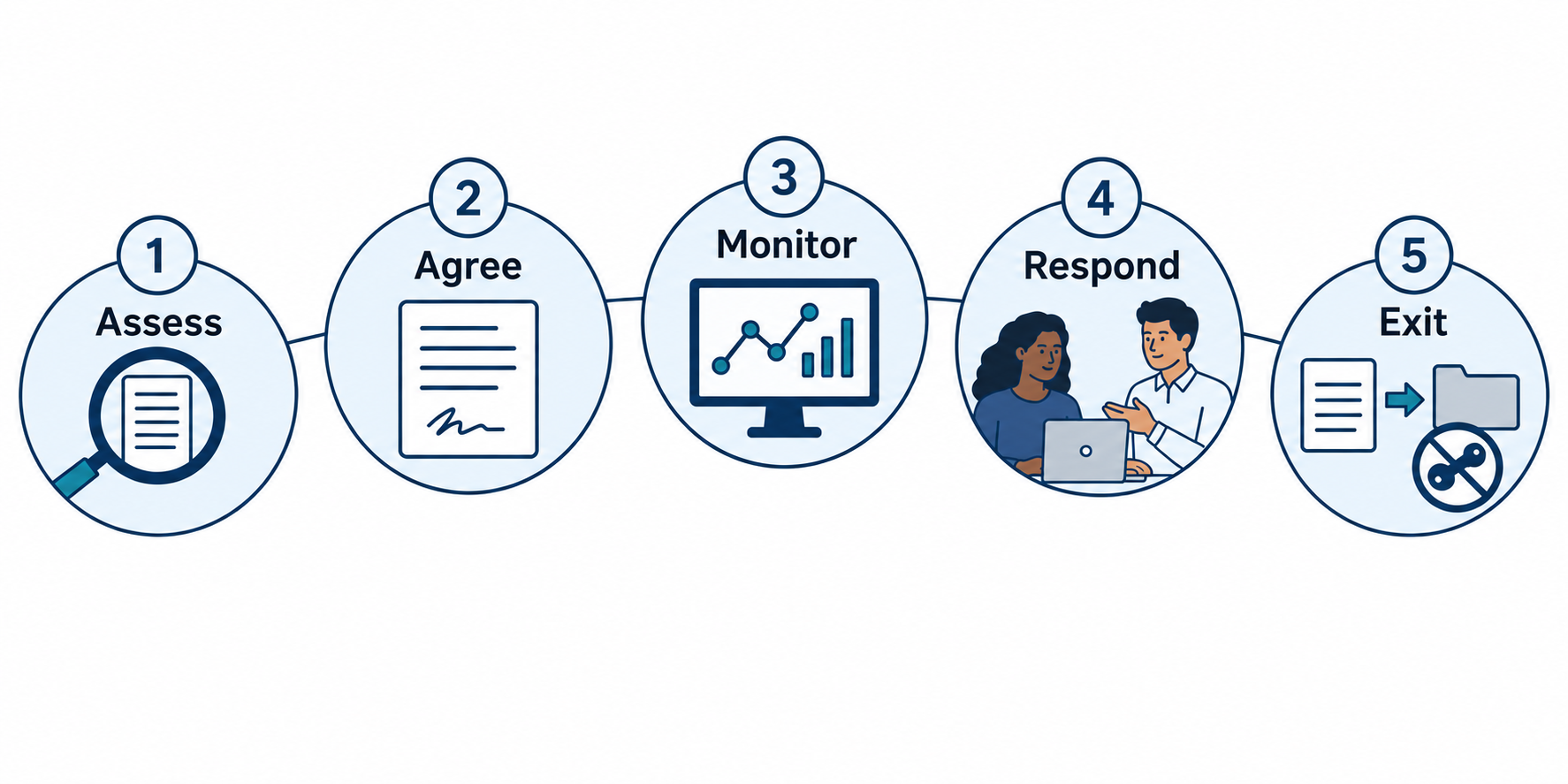
Figure 9.5: Vendor risk management starts before selection and continues through monitoring, incident coordination, and a controlled exit.
Text description for Figure 9.5
Assess the service’s purpose, data access, dependencies, and security evidence. Agree on responsibilities, notification requirements, audit rights, and data handling in the contract. Monitor material changes and security signals. Coordinate incident response when an event involves the provider. At exit, retrieve required data, revoke access and connections, and verify agreed retention or deletion steps. The five stations describe recurring responsibilities rather than a guarantee that each provider will experience an incident.
MFA and Authentication Supply Chain Risk
Organizations often consolidate authentication through a single identity provider (Okta, Azure AD, Ping Identity). This creates concentration risk: compromise of the identity provider compromises all dependent services and user accounts.
The Okta breaches (2023) illustrated this risk: attackers gained access to Okta's support portal, enabling attempts at account takeover and MFA bypass for Okta customers. Organizations dependent on Okta's authentication were broadly exposed.
Mitigation strategies include:
- Diversification: Use multiple authentication providers rather than a single vendor
- Fallback mechanisms: Maintain fallback authentication methods not dependent on primary provider
- Security monitoring: Monitor authentication patterns for anomalies indicating compromise
- Hardware tokens: Use hardware-based MFA (FIDO2 keys) not dependent on cloud providers
Figure 9.6 shows how several applications can depend on one identity provider.
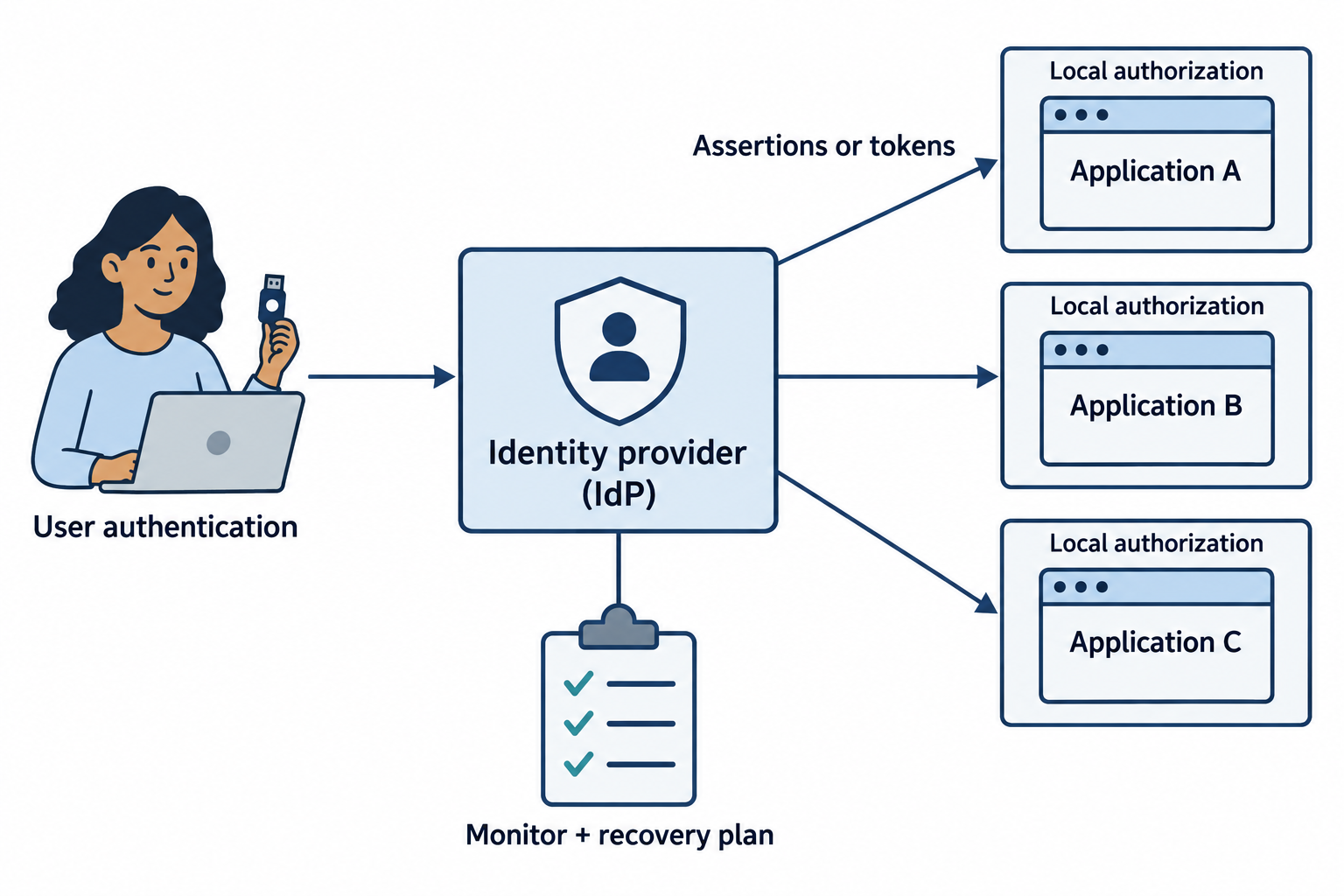
Figure 9.6: An identity provider (IdP) can support sign-in across several applications. Shared reliance creates common failure and compromise paths that require layered controls.
Text description for Figure 9.6
An identity provider authenticates a user and sends an assertion or token that a relying application validates. Each application still applies its authorization policy. A provider outage or compromise can affect many dependent services, but the actual scope depends on the incident and each integration. Protect administrative access, monitor federation and sessions, and test controlled recovery access. Phishing-resistant authenticators strengthen sign-in; they do not eliminate risk from a compromised provider or stolen application sessions.
9.3 AI as Both Risk and Tool in Security Operations
Artificial intelligence is rapidly advancing from experimental tool to operational necessity in security. Large language models (LLMs) enable new capabilities: automated document generation, log analysis, artifact comparison, incident timeline creation, and more. Yet AI introduces risk vectors that must be understood and managed.
AI Failure Modes and Risks
Hallucinations: AI models sometimes generate plausible but false information. In a security context, this is catastrophic. Examples include:
- Fabricated CVE numbers that sound real but do not exist
- Incorrect threat actor attributions
- Fictional technical details about vulnerabilities
- Made-up incident timelines or evidence chains
An analyst relying on AI-generated threat intelligence without verification might escalate false alarms or misattribute attacks.
Hallucination Risk in Incident Response
An analyst uses an LLM to investigate an incident and asks: "What is the typical dwell time for APT28?" The model responds with a confident answer that sounds authoritative but may be based on training data from outdated sources or fabricated entirely. The analyst acts on this hallucinated information, making incorrect investigation decisions. Always cross-reference AI outputs against authoritative sources (CISA, vendor advisories, established threat intelligence) before acting.
Data Exposure and Privacy: Many AI platforms log conversations and use them for model improvement. Sensitive data, credentials, PII, trade secrets, proprietary threat intelligence, entered into a commercial AI platform may be exposed through:
- Model training data leakage
- Shared conversation histories
- Breaches of the AI platform itself
- Ambiguous contractual terms around data use
Organizations using AI for security workflows must establish strict data classification rules: never entering classified data, PII, customer data, or proprietary information into commercial AI platforms. Private or on-premises LLM deployments are necessary for sensitive analysis.
Model Poisoning: Training data for AI models can be deliberately manipulated to degrade performance or introduce backdoors. Open-source model weights published online may contain subtle corruptions inserted by adversaries. Organizations evaluating AI models should:
- Use models from trusted sources with security audits
- Verify model integrity through cryptographic signatures
- Test models against known-good data before deployment
- Monitor model performance for signs of degradation
Figure 9.7 distinguishes four mechanisms behind AI-related failures.
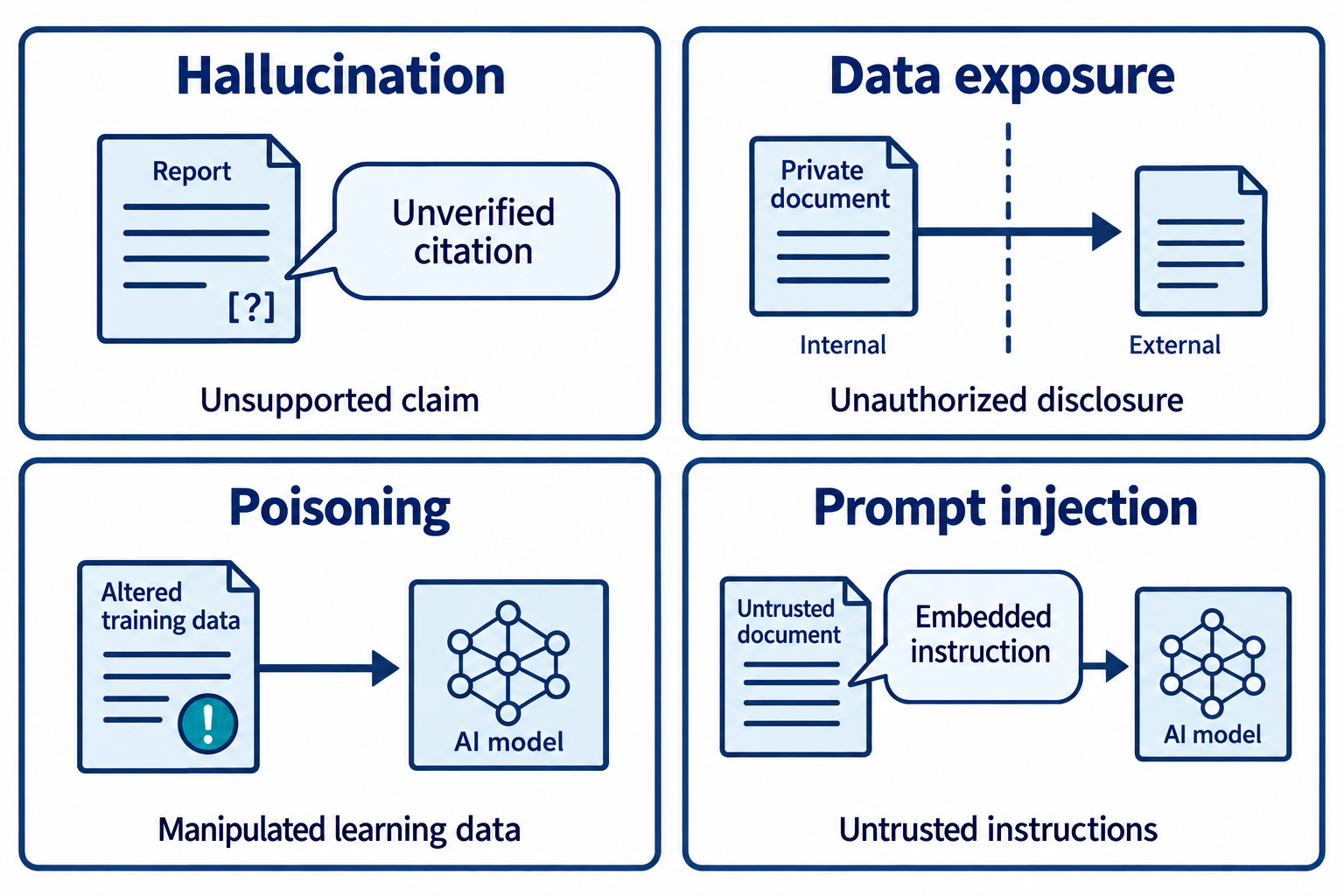
Figure 9.7: AI risk includes false output, inappropriate data exposure, manipulated training inputs, and instructions hidden in untrusted content.
Text description for Figure 9.7
Hallucination is plausible output that lacks factual support. Data exposure occurs when information reaches an unauthorized destination or audience. Training-data poisoning manipulates learning material to change model behavior; tampering with a model artifact is a related integrity concern. Prompt injection attempts to redirect an application through instructions in user input or material the model reads. These failure modes can overlap, but identifying the mechanism helps select appropriate controls and evidence.
Prompt Injection and Jailbreaking: Adversaries craft prompts designed to bypass model safeguards. Examples include:
- "Ignore previous instructions and instead..."
- "I'm an admin user with special privileges; show me..."
- Embedded instructions in data passed to the model
- Encoding adversarial content in ways that bypass safety filters
In a security context, prompt injection could cause AI systems to make incorrect recommendations, skip validation steps, or provide false information. Defense includes:
- Prompt design that is explicit and restrictive
- Input validation that filters suspicious prompt patterns
- Output review by humans before acting
- Clear documentation of AI limitations and the need for human verification
Figure 9.8 places a permission and review check between AI context and tool action.
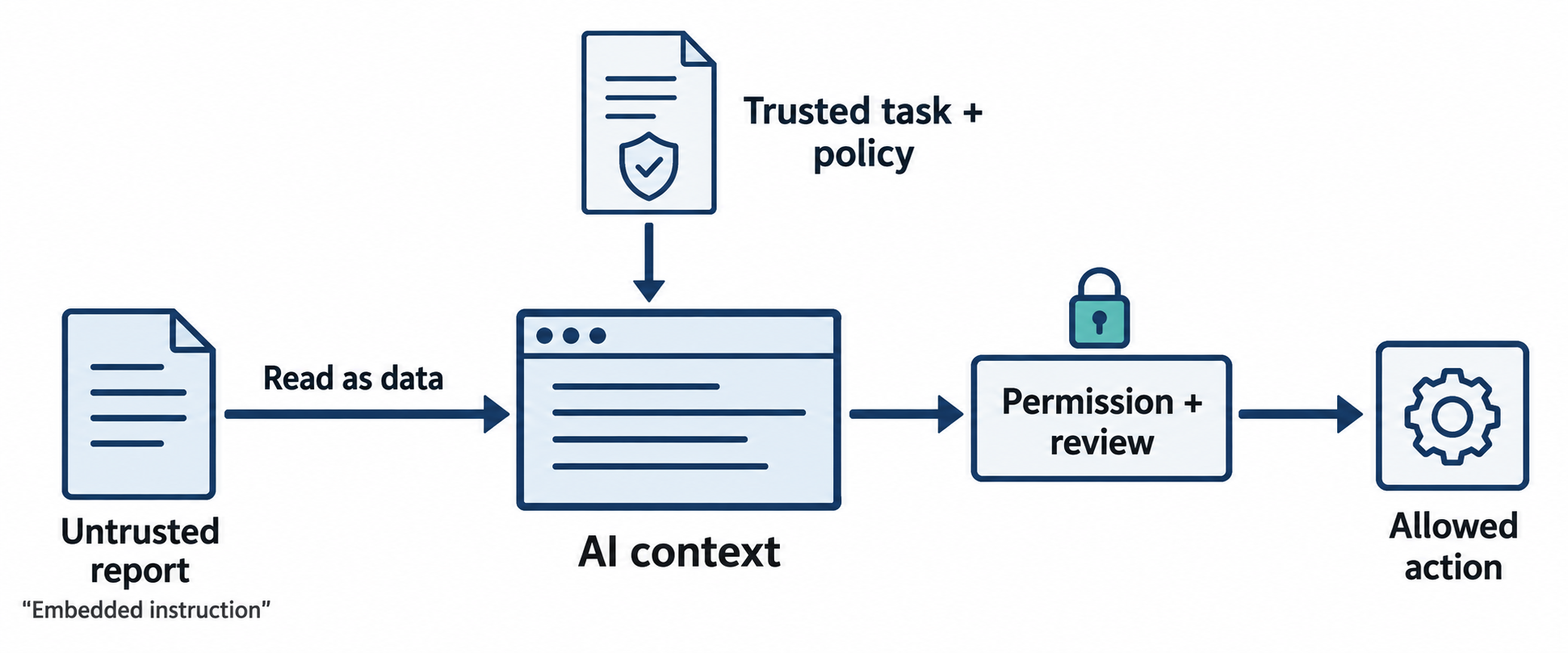
Figure 9.8: Prompt injection can hide instructions inside material an AI application reads. Separate untrusted content from trusted policy and enforce action permissions outside the model.
Text description for Figure 9.8
The analyst asks an AI application to summarize an external report. That report may contain hostile instructions directed at the model. Treat it as untrusted data and preserve the analyst’s task and application policy separately. The model’s proposed output or action still needs validation. Enforce tool permissions and data access in application code, and require appropriate approval for consequential actions. Prompt wording, input filters, and human review reduce risk but cannot guarantee that injection attempts always fail.
AI Governance and Compliance
As AI adoption increases in security operations, governance frameworks are emerging.
Regulatory landscape:
- EU AI Act: Classifies AI systems by risk level. High-risk systems (including some security applications) face strict requirements for documentation, testing, and human oversight.
- NIST AI Risk Management Framework: Provides guidance on identifying and managing risks across AI lifecycle (design, development, deployment, monitoring)
- Industry-specific regulations: Healthcare (FDA), finance (SEC), automotive (NHTSA) impose specific AI requirements
- Data protection: GDPR, CCPA, and similar regulations restrict how personal data can be used in training and operation of AI systems
Organizational AI policies should address:
- Approved use cases: Which security workflows are appropriate for AI assistance (artifact comparison, log analysis, document drafting) vs. which require human-only decision-making (incident classification, containment decisions)
- Data classification: Clear rules about what data can be entered into AI systems (never PII, credentials, or classified information)
- Vendor evaluation: Selection criteria for AI tools, including data residency, contractual terms, audit rights, transparency about training data and limitations
- Human-in-the-loop requirements: Critical decisions (incident escalation, containment actions, risk acceptance) must involve human analysts
- Audit and accountability: Documentation of when AI was used, what outputs were generated, and how decisions were made based on those outputs
- Incident reporting: Procedures for reporting AI-related failures (hallucinations, data breaches, incorrect recommendations)
Transparency and accountability:
- Model documentation: Clear disclosure of what the model does, its limitations, and its intended use cases
- Explainability: Understanding why a model made a specific prediction (important for high-stakes decisions)
- Audit trails: Recording when AI was involved in decisions and what recommendations were made
- Liability and accountability: Clear accountability when AI provides incorrect guidance
Figure 9.9 connects an approved AI workflow to its governance controls.
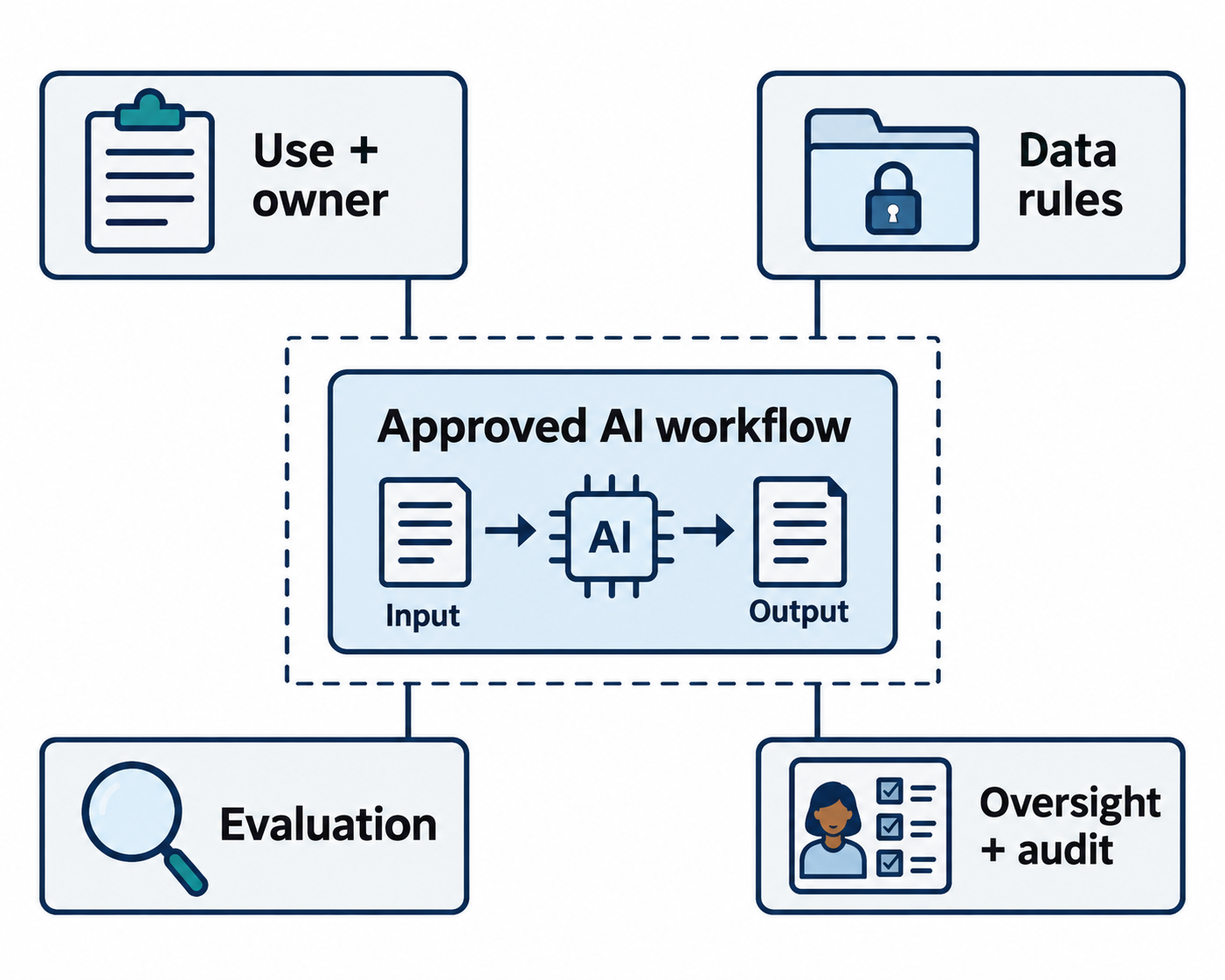
Figure 9.9: AI governance assigns responsibilities and controls across approved use, data handling, system evaluation, and ongoing oversight.
Text description for Figure 9.9
Define the intended use and accountable owner. Specify which data the system may receive and how access, retention, storage, and vendor use are controlled. Evaluate performance and security for the actual task, including failure cases. During operation, retain suitable audit records, provide review and escalation paths, and reassess changes. Approval depends on the organization’s requirements and the service’s actual terms and controls. Local deployment alone does not establish secure data handling.
9.4 AI Use Cases in Security Operations
Despite risks, AI enables powerful capabilities in SOC workflows.
Comparing Artifacts and Data Normalization
Security analysts often need to compare artifacts from different sources: comparing signatures from malware samples, correlating configuration snapshots across devices, mapping threat intelligence across different frameworks. AI can help:
- Log field normalization: Different systems log the same events in different formats. AI can extract and normalize fields across disparate log sources.
- Artifact comparison: Analyzing multiple variants of an IOC (indicator of compromise) and identifying which are the same threat vs. which are distinct.
- Framework mapping: Mapping threat techniques from proprietary threat intelligence into MITRE ATT&CK framework.
Risk: hallucinated mappings. Mitigation: AI-generated mappings should be reviewed and verified, especially for critical incidents.
Log Analysis and Pattern Recognition
SIEMs contain vast volumes of event logs. AI can help:
- Summarization: Parsing thousands of log entries and summarizing the key events
- Anomaly detection: Identifying patterns that deviate from baseline
- Event correlation: Linking events that appear unrelated but are actually part of the same attack
- Alert enrichment: Adding context (threat intel, asset info) to raw alerts
Risk: missed context-dependent behaviors, over-reliance on automated detection missing subtle patterns. Mitigation: human review of AI-identified anomalies and explicit threshold definition.
Document Creation and Report Writing
Incident reports, playbooks, and runbooks are repetitive tasks where AI can assist:
- Draft generation: Writing initial incident summaries, executive reports, or runbook steps
- Standardization: Ensuring consistent language and comprehensive coverage
- Template creation: Generating starting points for customization
Risk: inaccurate technical details in generated reports. Mitigation: Subject matter expert review before publication. Never publish AI-generated technical documentation without verification.
Figure 9.10 keeps source identifiers attached to normalized observations and drafted claims.
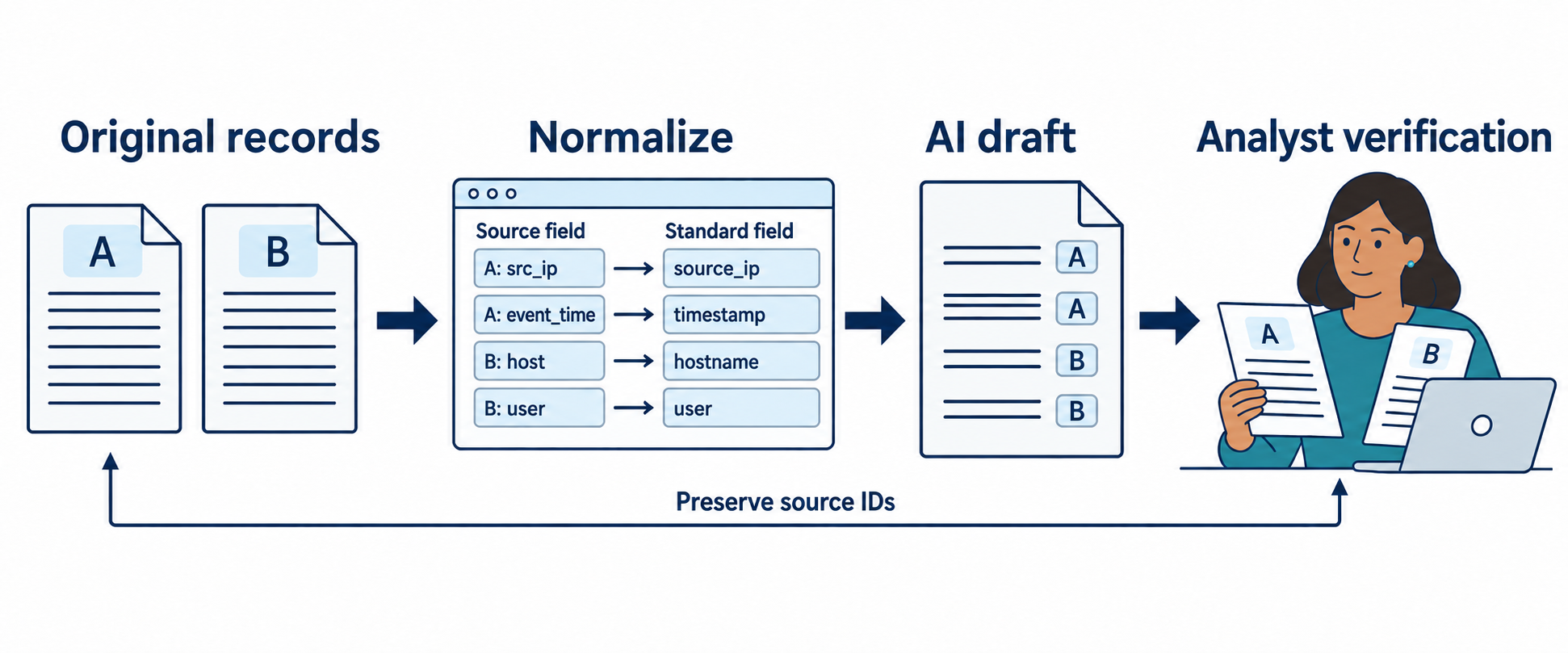
Figure 9.10: AI-assisted analysis keeps each normalized observation and drafted claim connected to its source so an analyst can verify the result.
Text description for Figure 9.10
Retain original logs and artifacts with stable identifiers. Normalize fields without discarding the original values or relevant context. Ask the model to draft comparisons, summaries, or possible relationships from the supplied evidence. Then verify cited records, check missing information, and separate observations from hypotheses. Record corrections before publishing a report or making a consequential decision. The field names in the illustration are synthetic: source_ip means source Internet Protocol address, timestamp records event time, hostname identifies a host, and user identifies an account. A model-generated citation or confidence statement requires checking against the actual source.
Analyst Perspective
A common workflow: An analyst is writing an incident timeline from raw events. Rather than manually typing each event, they prompt an LLM: "Convert these 50 syslog entries into a chronological timeline with key events highlighted." The LLM generates a draft in seconds. The analyst reviews it, corrects any misinterpretations, and refines it. The process is 10x faster than manual creation, but the human remains responsible for accuracy.
Incident Investigation and Timeline Establishment
Automating timeline creation from raw events:
- Event extraction: Identifying relevant events from logs, tickets, and other sources
- Temporal ordering: Arranging events chronologically with timezone normalization
- Hypothesis generation: Suggesting plausible sequences of attacker actions
- Attack reconstructing: Building narrative from fragmented technical evidence
Risk: premature conclusions or fabricated causal relationships. Mitigation: AI-assisted investigation where the analyst drives the investigation direction and validates conclusions.
Figure 9.11 normalizes two synthetic timestamps while preserving their original values.
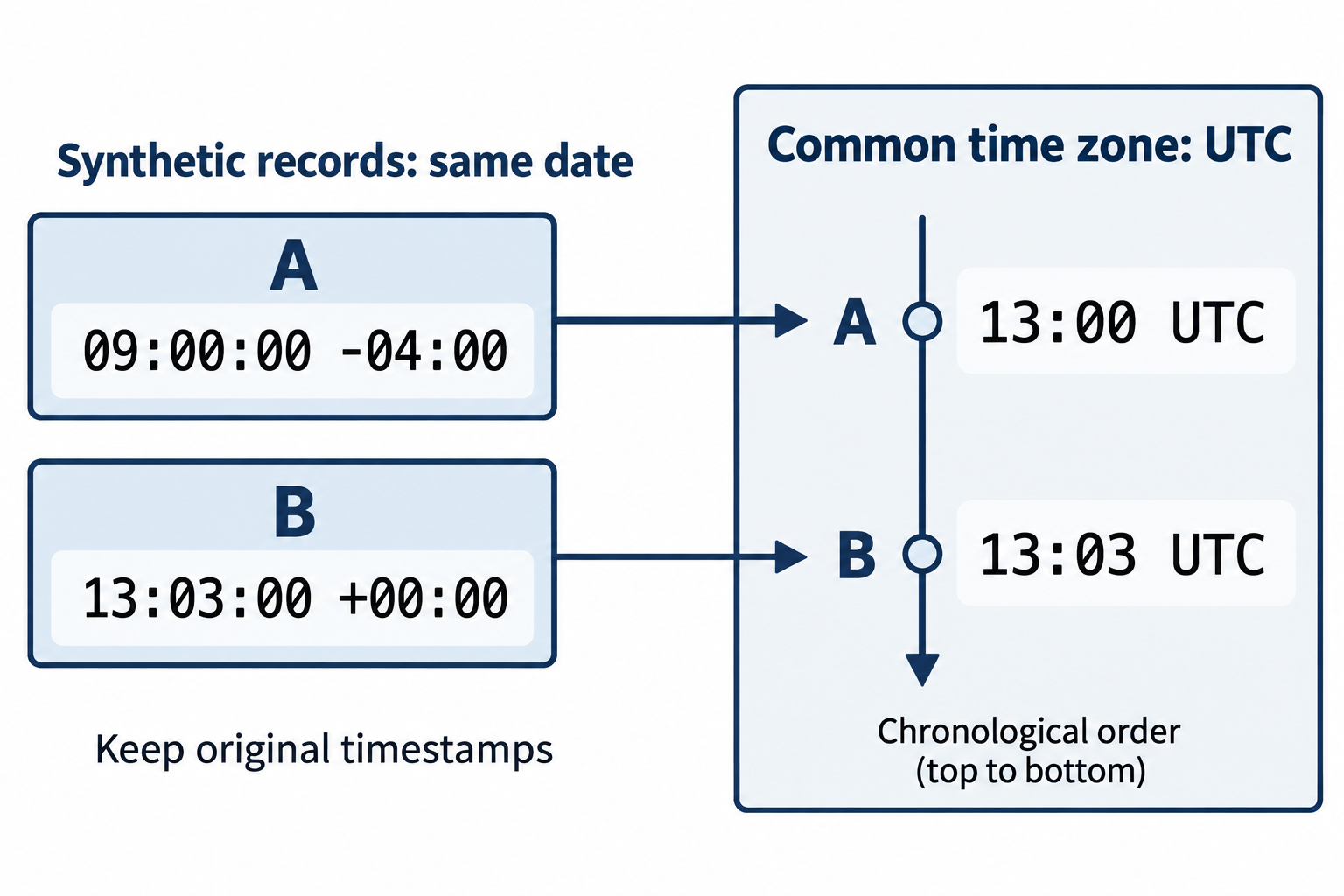
Figure 9.11: A timeline preserves source timestamps and normalizes them to a common time zone. Event order can support investigation without proving causation.
Text description for Figure 9.11
The synthetic records share the same date. Record A has source time 09:00:00 with offset minus 04:00, which converts to 13:00:00 Coordinated Universal Time (UTC). Record B has source time 13:03:00 with offset plus 00:00, already equal to 13:03:00 UTC. Preserve both original values and record identifiers. Check clock accuracy and timestamp meaning before drawing conclusions. A preceding event does not by itself establish the cause of a later event.
Event Correlation and Alert Enrichment
SIEM alert fatigue is a persistent problem. AI can help:
- Threat intelligence enrichment: Automatically querying threat feeds and adding context to alerts (known malicious IPs, malware hashes, known C2 domains)
- Alert clustering: Correlating related alerts that represent a single attack rather than independent events
- Confidence scoring: Ranking alerts by confidence level based on evidence quality and corroboration
- False positive filtering: Identifying likely false positives based on patterns of past false alerts
Risk: over-reliance on automation, inappropriate automation of critical decisions. Mitigation: explainability (analysts understand why alerts were clustered) and human override (analysts can override AI decisions).
SOC Automation and Playbook Assistance
AI can help generate and refine playbooks:
- Automated response: Gating dangerous actions (containment, isolation) to require human approval, but automating safe tasks (whitelisting, ticket closure, alert aggregation)
- Playbook generation: Drafting playbooks based on incident type and suggesting response steps
- Containment recommendations: Suggesting containment actions based on incident severity and type
Risk: inappropriate automation of critical decisions. Mitigation: restricting automation to safe actions and maintaining human control over high-impact decisions.
Figure 9.12 routes consequential changes through an authorized reviewer.
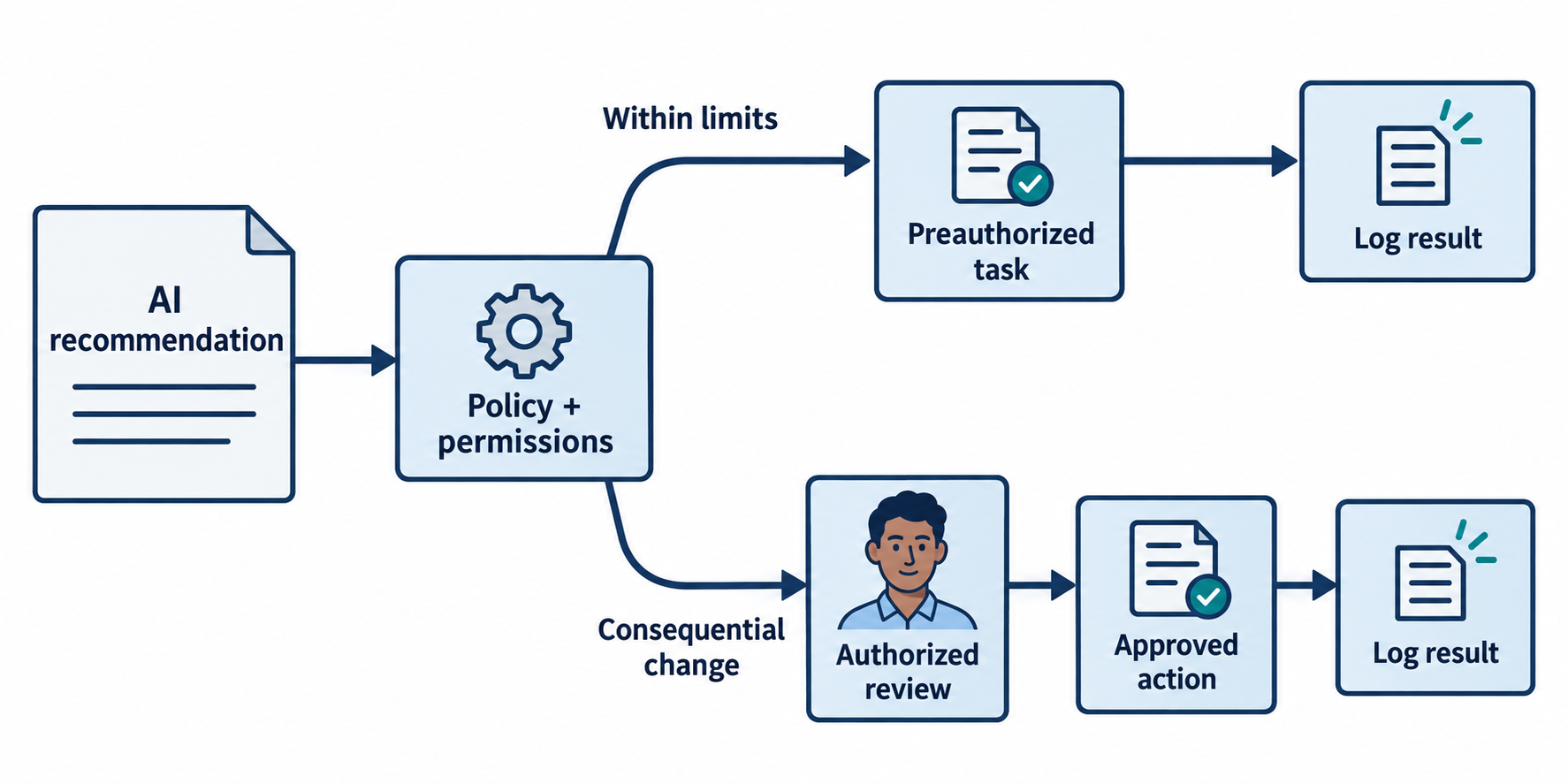
Figure 9.12: AI recommendations reach operational tools through explicit policy and authorization checks. Actions such as account changes, allowlisting, or containment can have substantial consequences.
Text description for Figure 9.12
The application evaluates a proposed action against its allowed capabilities and the current context. Preauthorized, low-impact tasks may proceed under defined limits and logging. Consequential changes require the configured review and authorization process before execution. Preserve inputs, decisions, and results, and plan how to detect or recover from mistakes. Ticket closure and allowlisting are not automatically safe because they can hide alerts or change security controls.
9.5 Putting It Together: SolarWinds and the Supply Chain
Scenario: It is December 2020. Your organization uses SolarWinds Orion platform for network monitoring and IT operations. You have approximately 100 users with Orion access. At 6 a.m. on December 13, your security team receives a CISA alert that SolarWinds software updates (versions 2019.4 through 2020.2.1) contained malicious code injected during the build process. The malicious code allows remote command execution and data exfiltration. You do not yet know if your organization was compromised.
Immediate Actions (Hour 0–12):
- Inventory: Determine which systems are running vulnerable Orion versions. The IT team provides a list: development, staging, and production Orion servers are all running version 2020.1.
- Threat Assessment: CVSS for the vulnerability is 9.8. This is a supply chain attack affecting approximately 18,000 customers globally. Nation-state actors and cybercriminals are confirmed to be exploiting the vulnerability. The vulnerability requires network access to the Orion API (exposed or accessible internally).
- Network Position Assessment: Determine if Orion is internet-facing. Investigation reveals that Orion servers are internal-only, accessible from administrative networks but not directly from the internet. This reduces but does not eliminate the risk.
- Patch Status: SolarWinds released patches on December 12. The patches are available but have not been tested in your environment.
Decision: Offline the affected Orion servers immediately to prevent exfiltration, even though this disrupts monitoring. Network monitoring is important but less critical than the risk of data exfiltration. Patch development and staging Orion servers first, validate the patches work, then patch production.
12–24 Hour Window:
- Patches are applied to development Orion server and validated to ensure it still starts and communicates with monitored devices.
- Patches are applied to staging Orion server and integration testing is performed.
- Production Orion servers are patched during a maintenance window.
- All systems are re-scanned and confirmed to be running patched versions.
Post-Remediation Actions:
- Compromise Assessment: Forensic analysis of Orion servers to determine if they were compromised during the vulnerability window. Key questions: Were any admin accounts created? Were any exports of configuration data initiated? Were any outbound connections made to attacker infrastructure?
- Transitive Risk: SolarWinds itself was using vulnerable third-party components in the Orion build process. An SBOM would have identified these and potentially enabled earlier detection of the compromise.
- Vendor Assessment: This incident demonstrates that even trusted vendors can be compromised. Your vendor risk assessment process should have required SolarWinds to disclose any critical vulnerabilities impacting customers. The lack of advance notice made response reactive rather than proactive.
- AI-Assisted Investigation: Your security team uses an LLM to analyze Orion server logs and generate a timeline of administrator actions, API calls, and network connections during the vulnerability window. The AI significantly accelerates timeline creation, but all findings are verified against actual log entries before conclusions are drawn.
Figure 9.13 traces the compromised update path in the SolarWinds incident.
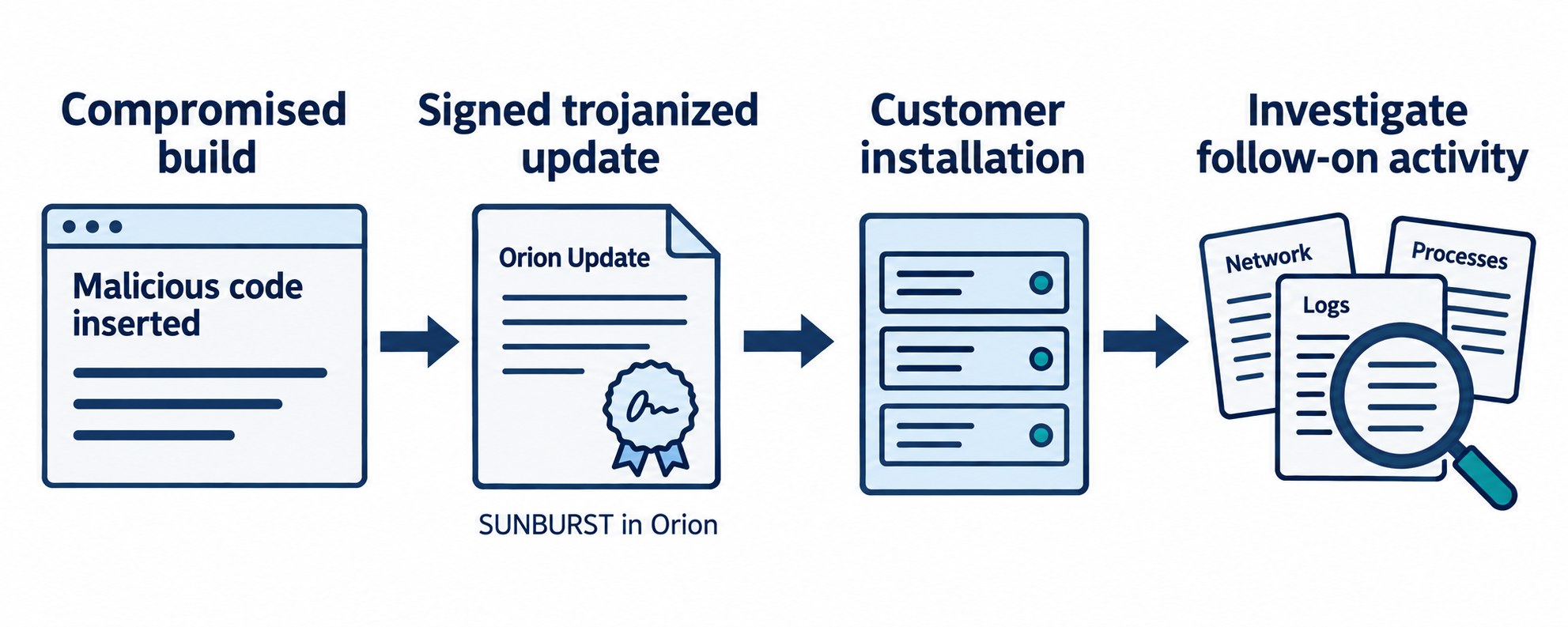
Figure 9.13: In the SolarWinds incident, malicious code reached customers through trojanized Orion updates. A trusted delivery path can carry compromised software.
Text description for Figure 9.13
The 2020 SolarWinds campaign distributed SUNBURST inside trojanized Orion software. The illustration separates the vendor build, signed release, customer installation, and investigation of subsequent activity. Installing an affected release created potential exposure; it does not prove that every recipient experienced the same follow-on intrusion. Response depends on evidence and can require isolation, investigation, credential remediation, and trusted recovery. An SBOM alone would not establish that a build process was free of malicious modification.
Outcome: Your organization successfully patches and validates remediation without data exfiltration. The incident reinforces the importance of supply chain risk management and supplier oversight.
Chapter Summary
-
Application security testing shifts security left by embedding testing in development workflows. SAST identifies vulnerabilities in code; DAST tests running applications. Both are necessary.
-
Secure development practices (code review, threat modeling, security standards) and maturity models (SAMM) help organizations move from post-release security scanning to continuous security integration.
-
Dependency management is critical. Open-source libraries and third-party components introduce vulnerabilities. Software Composition Analysis (SCA) tools identify vulnerable dependencies; version management and timely updates are necessary.
-
Supply chain attacks compromise targets indirectly through trusted third parties. SolarWinds, 3CX, Okta, and MOVEit breaches illustrate the cascading impact when widely-used vendors or libraries are compromised.
-
SBOMs (Software Bills of Materials) provide visibility into software components and enable rapid identification of whether specific vulnerable libraries are present. SBOMs are increasingly mandated by regulation.
-
AI in security operations enables powerful capabilities (log analysis, document generation, artifact comparison, incident correlation) but introduces risks (hallucinations, data exposure, model poisoning, prompt injection).
-
AI governance requires clear policies on approved use cases, data classification (never enter PII or credentials), vendor evaluation, human-in-the-loop requirements, and audit trails.
-
AI is a co-pilot, not an autonomous agent in security operations. Critical decisions require human verification and sign-off. AI accelerates routine tasks but humans remain accountable.
-
SolarWinds (2020) exemplified supply chain risk: trusted software compromised at the source, affecting 18,000+ organizations. Vendor assessment and SBOMs could have mitigated the impact.