CH12: Vulnerability Management and Security Monitoring
Introduction
Organizations cannot secure what they cannot see. Vulnerability management and security monitoring are the two primary mechanisms through which organizations gain visibility into their security posture and respond to threats before they become breaches.
Vulnerability management is a systematic process: discover weaknesses in systems and applications, evaluate their severity, prioritize remediation based on risk, and verify that patches and fixes actually resolve the issues. Security monitoring continuously observes systems for signs of attack, compromise, or policy violation. Together, these practices form the foundation of a mature security operations program.
This chapter examines the vulnerability management lifecycle from discovery through verification, the monitoring and detection technologies that organizations use to identify suspicious activity, and the frameworks that help analysts and incident responders understand the significance of what they observe. Students will learn the difference between a vulnerability (a weakness that could be exploited) and an indicator of compromise (evidence that a compromise has already occurred), how organizations prioritize vulnerabilities using Common Vulnerability Scoring System (CVSS) scores, and how security operations centers (SOCs) use log aggregation, correlation, and threat hunting to find attackers within their networks.
By the end of this chapter, students will be able to design a vulnerability management program, interpret vulnerability assessments and scanning reports, and understand the role of monitoring within a broader security operations context.
Learning Objectives
Upon completing this chapter, students will be able to:
- Explain the vulnerability management lifecycle, including discovery, analysis, prioritization, remediation, and verification phases.
- Differentiate between credentialed and non-credentialed vulnerability scans, understand their respective strengths and limitations, and identify appropriate frequencies for scanning.
- Interpret Common Vulnerability Scoring System (CVSS) scores and apply them to prioritize remediation efforts.
- Describe SIEM (Security Information and Event Management) concepts including log aggregation, normalization, correlation, and alerting.
- Explain security monitoring techniques including baseline establishment, anomaly detection, and threat hunting.
- Differentiate between vulnerability indicators, indicators of compromise (IoCs), and behavioral indicators, and explain how each informs incident response.
- Describe patch management processes and the risks of delayed patching.
- Apply vulnerability management and monitoring concepts to a scenario involving threat detection and response.
12.1 The Vulnerability Management Lifecycle
Vulnerability management is not a one-time activity. It is a continuous cycle that organizations repeat throughout the year. The cycle has five phases: identify, analyze, prioritize, remediate, and verify.
Figure 12.1 shows how each phase feeds the next assessment cycle.
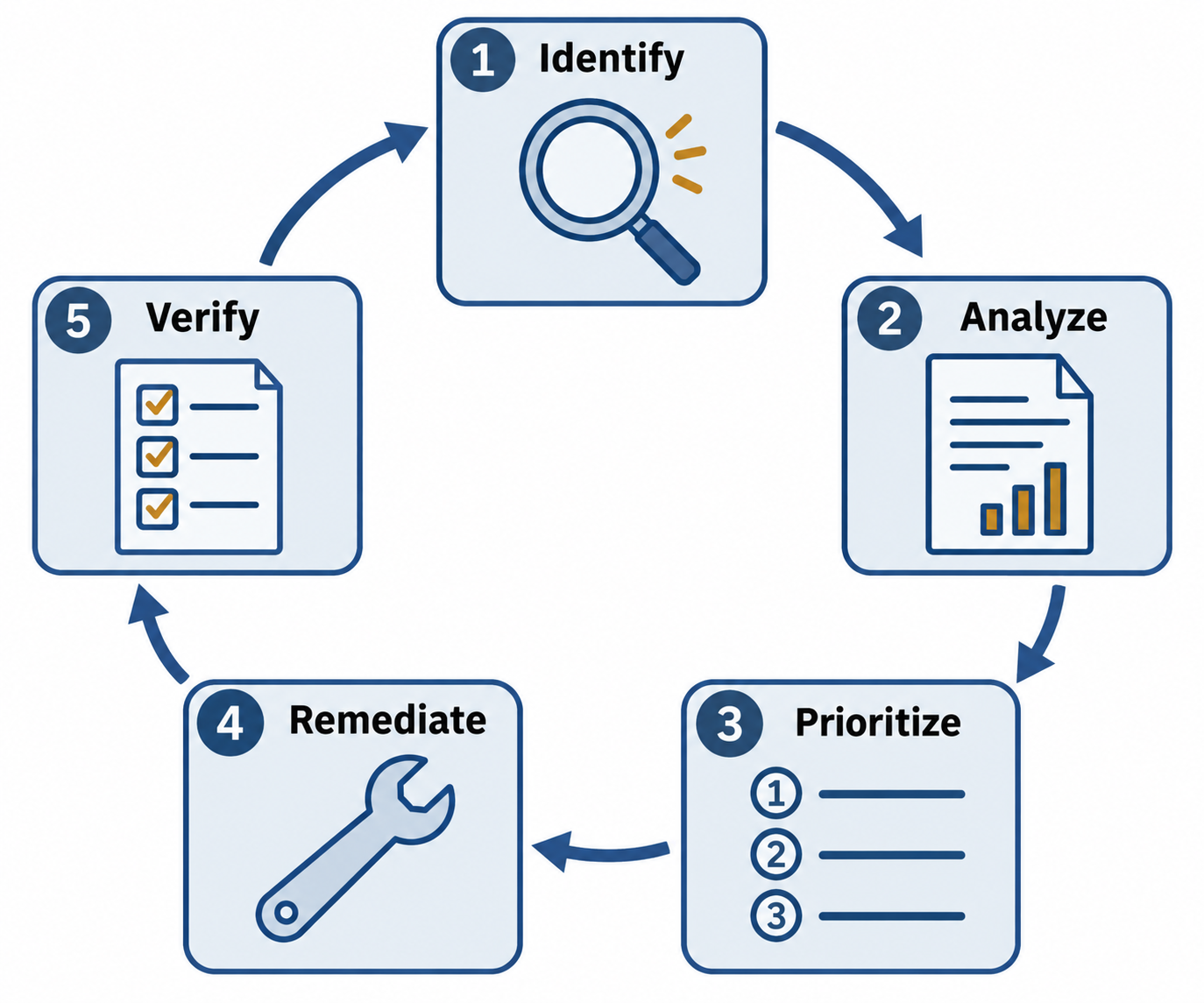
Figure 12.1: Vulnerability management repeats discovery, analysis, prioritization, remediation, and verification as systems and threats change.
Text description for Figure 12.1
Identify candidate weaknesses, analyze evidence and affected conditions, prioritize work using risk context, remediate or reduce exposure, and verify the resulting state. Keep records linking an asset and finding to its owner, action, and evidence. New findings and incomplete fixes feed the next pass.
Phase 1: Identify (Vulnerability Discovery)
The first phase discovers vulnerabilities through multiple methods:
Vulnerability scanning uses automated tools (Nessus, OpenVAS, Qualys) to check systems against a database of known vulnerabilities. Scanners check for missing patches, misconfigured systems, weak passwords, open unnecessary ports, and outdated software versions.
Penetration testing involves authorized security professionals attempting to exploit vulnerabilities to understand exploitability and business impact. Penetration testing is more thorough than automated scanning but more time-consuming and expensive. Security+ focuses on vulnerability scanning; penetration testing is covered in depth in advanced courses.
Code review and static application security testing (SAST) examine source code and compiled applications for coding flaws that could be exploited (buffer overflows, SQL injection vulnerabilities, insecure authentication logic).
Dynamic application security testing (DAST) tests running applications by sending malicious inputs and observing how the application responds. DAST can discover vulnerabilities that are only visible during execution.
Hardware and firmware scanning checks firmware versions on network devices, servers, and IoT devices for known vulnerabilities.
Configuration auditing compares system configurations against documented baselines and security standards to identify deviations that create vulnerabilities.
Phase 2: Analyze
Once vulnerabilities are identified, analysis determines what each vulnerability is, why it matters, and whether it is exploitable in the organization's specific context.
Severity assessment evaluates the technical properties of the vulnerability. Common Vulnerability Scoring System (CVSS) is described in detail in Section 12.2.
Exploitability assessment determines whether a vulnerability can actually be exploited. Some vulnerabilities require specific conditions (a particular application version, a specific network configuration) that may not exist in the organization. Some require specialized tools or significant technical skill. Others are trivial to exploit.
Business context evaluates whether the vulnerable system is critical to operations. A vulnerability in a critical payment processing system has higher impact than the same vulnerability in a rarely-used legacy system.
Evidence review examines whether the vulnerability actually exists in the organization. Scanning tools sometimes report false positives (flagging systems as vulnerable when they are actually patched, or misidentifying software versions).
Phase 3: Prioritize
Not all vulnerabilities can be fixed immediately. Prioritization determines which vulnerabilities receive remediation efforts first.
CVSS scores are the primary industry standard for prioritization. A vulnerability with a CVSS 9.8 (critical) receives immediate attention; a vulnerability with a CVSS 3.1 (low) is addressed on a normal maintenance schedule.
Vulnerability age is also considered. A vulnerability that has been publicly disclosed and actively exploited receives higher priority than a newer vulnerability for which no working exploit exists.
Exploit availability matters. Vulnerabilities with readily available, easy-to-use exploits pose higher risk than vulnerabilities that require custom exploit development.
System criticality weights the impact. A critical vulnerability in a web server available to the internet is higher priority than the same vulnerability in an internal administrative system with limited access.
Compensating controls reduce priority. A vulnerability in a system that is already protected by network segmentation and access controls poses lower risk than the same vulnerability in an exposed system.
A typical prioritization matrix combines CVSS scores with business context to produce a risk score that guides remediation planning.
Figure 12.2 combines the evidence needed to set a remediation priority.
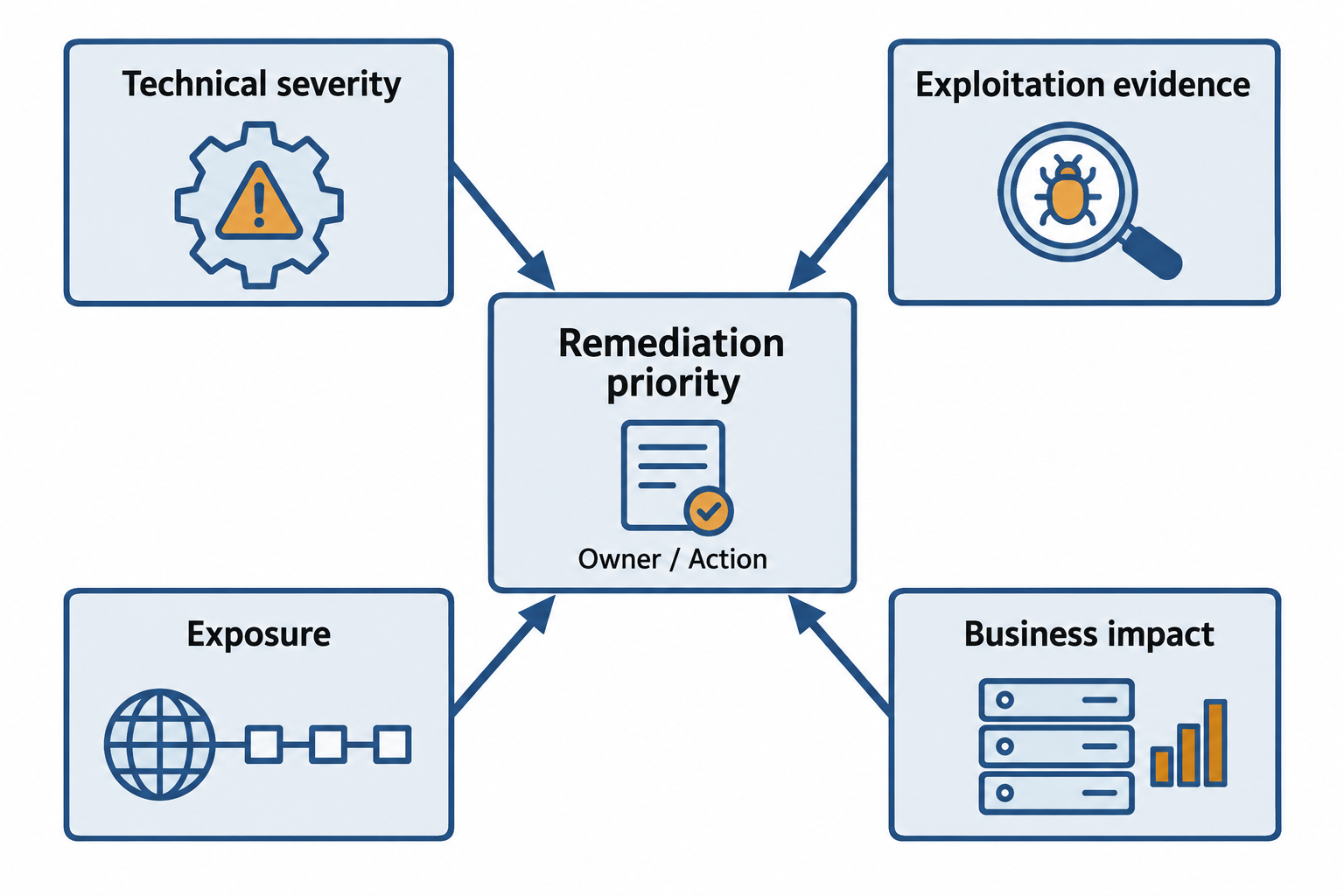
Figure 12.2: Technical severity, exploitation evidence, exposure, and business impact jointly inform remediation priority.
Text description for Figure 12.2
The Common Vulnerability Scoring System (CVSS) communicates technical severity. An organization also evaluates observed exploitation, reachable attack paths, service dependencies, and the expected effectiveness of existing controls. The resulting work item names an owner and action. A score alone does not prescribe a universal deadline.
Phase 4: Remediate
Remediation addresses vulnerabilities through multiple approaches:
Patching is the most common approach: updating software to a version that fixes the vulnerability. Patches must be tested before production deployment to ensure they do not break functionality.
Configuration changes can sometimes eliminate vulnerabilities without patching. Disabling unnecessary services, enforcing strong passwords, or restricting file permissions may resolve vulnerabilities.
Compensating controls reduce the impact or exploitability of vulnerabilities. A vulnerable service can be isolated to a protected network segment, restricting who can access it. Increased monitoring can detect if the vulnerability is exploited. Access controls can prevent unauthorized users from accessing the vulnerable system.
Decommissioning of end-of-life systems eliminates vulnerabilities by removing the vulnerable system entirely. This is appropriate when the system is no longer needed for business operations.
Workarounds are temporary measures while a permanent fix is being developed. A workaround might be a firewall rule that blocks the attack vector, even though the underlying vulnerability remains.
Phase 5: Verify
After remediation is deployed, verification confirms that the vulnerability has actually been fixed.
Re-scanning with vulnerability scanning tools confirms that the vulnerability is no longer reported.
Manual testing may be performed for critical vulnerabilities to ensure the fix is effective.
Change verification confirms that the deployed change (patch, configuration change) actually made it to the target system and was not reverted.
The verification phase closes the loop. If a vulnerability remains, the cycle begins again to determine why the remediation failed.
Analyst Perspective
In practice, vulnerability management feels endless: as soon as you finish patching one set of vulnerabilities, scanning discovers new ones. The key to effectiveness is discipline in the process. Organizations that skip the analysis phase and try to patch everything based on CVSS scores alone waste resources on low-impact vulnerabilities. Organizations that skip verification and assume patches worked often discover months later that the vulnerability still exists because the patch failed to deploy. The cycle becomes sustainable only when every phase is consistently executed.
12.2 Vulnerability Scanning
Vulnerability scanning is the primary discovery method in most vulnerability management programs. Understanding what scans do, what they can and cannot detect, and how to interpret their results is essential.
Credentialed vs. Non-Credentialed Scans
Non-credentialed scans operate without authentication to the target systems. The scanner connects as an unauthenticated user and probes for vulnerabilities based on publicly visible information: open ports, service banners, web application responses, DNS information.
Non-credentialed scans are useful for discovering externally visible vulnerabilities (what an attacker can see from outside the network) but cannot discover vulnerabilities that require authentication to see, such as:
- Missing patches on systems that are fully patched according to the vendor (detected only by comparing installed package versions against a database of vulnerability-to-patch mappings)
- Misconfigured permissions within systems (only visible to authenticated users)
- Weak password policies enforced by the operating system
- Out-of-date software on internal systems
Credentialed scans authenticate to target systems and perform checks that non-credentialed scans cannot. A credentialed scanner with administrative access to a system can enumerate installed software, examine configuration files, review user accounts and permissions, and test specific functionality.
Credentialed scans are significantly more effective at discovering vulnerabilities but require distributing credentials to scanning systems (which introduces security risks). Proper credential management for scanning tools is essential: use dedicated scanning accounts with minimal necessary privileges, rotate credentials regularly, and store credentials in a secure vault.
Figure 12.3 compares the information available from two scan perspectives.
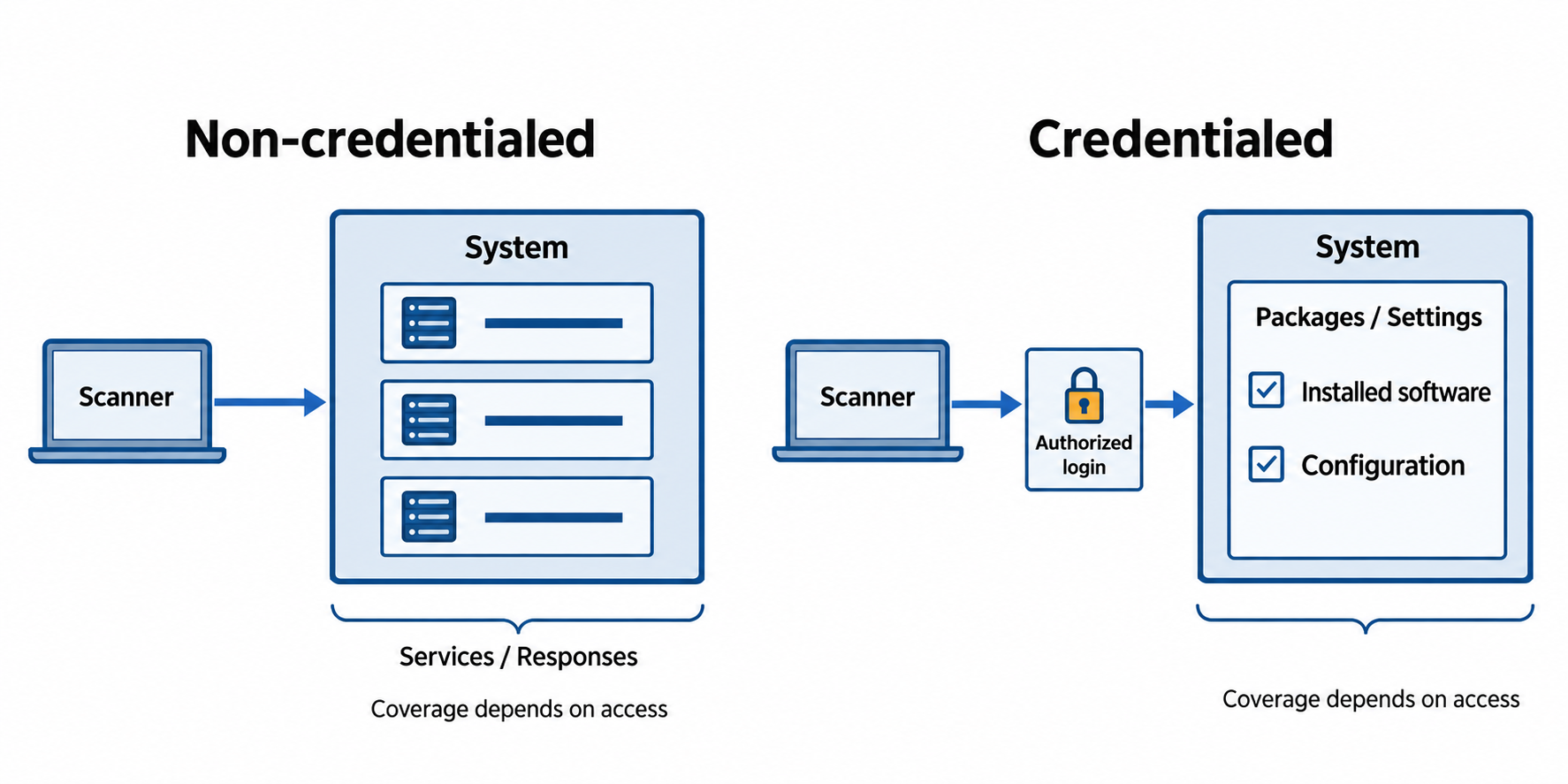
Figure 12.3: Credentialed and non-credentialed scans reveal different information. Both depend on reachability, enabled checks, and successful access.
Text description for Figure 12.3
A non-credentialed scan probes network-visible services from its location. A credentialed scan logs in with an approved account to inspect available installed software and settings. Limited permissions or failed authentication reduce that visibility. Use protected dedicated credentials with the privileges required by the checks, and review scan coverage before drawing conclusions.
Scan Frequency and Scope
Frequency depends on the environment's stability and risk profile. A security-conscious organization typically scans:
- External networks: Weekly or monthly (less frequently because externally visible vulnerabilities are a direct attack vector)
- Internal networks: Monthly or quarterly (internal vulnerabilities typically have lower risk due to network segmentation)
- Specific systems after changes: Immediately after patches, configuration changes, or major updates
- Compliance and audit purposes: As required by regulations (e.g., PCI DSS requires quarterly scans)
Scope determines which systems are scanned. Comprehensive scans include all systems; targeted scans focus on high-risk systems (web servers, database servers, systems handling sensitive data). Comprehensive scans discover more vulnerabilities but consume more time and resources.
Interpreting Scan Results
Vulnerability scanners produce reports listing discovered vulnerabilities with associated severity scores, affected systems, and (in better tools) remediation guidance. Interpreting reports requires understanding:
False positives: Scanners sometimes report vulnerabilities that do not actually exist. A system might be detected as running an outdated software version when it has actually been patched. Manual verification is necessary for critical findings.
False negatives: Scanners sometimes fail to detect vulnerabilities that exist. Limited scanner capabilities, scanner misconfiguration, or network issues can cause missed vulnerabilities. This is why scanning is part of a broader vulnerability management program, not the only discovery method.
Plugin versions and vulnerability databases: Scanning tools use databases of known vulnerabilities. As new vulnerabilities are discovered, scanner vendors release updated plugins/databases. Older plugin versions might not detect newly discovered vulnerabilities.
Figure 12.4 separates finding validation from coverage review.
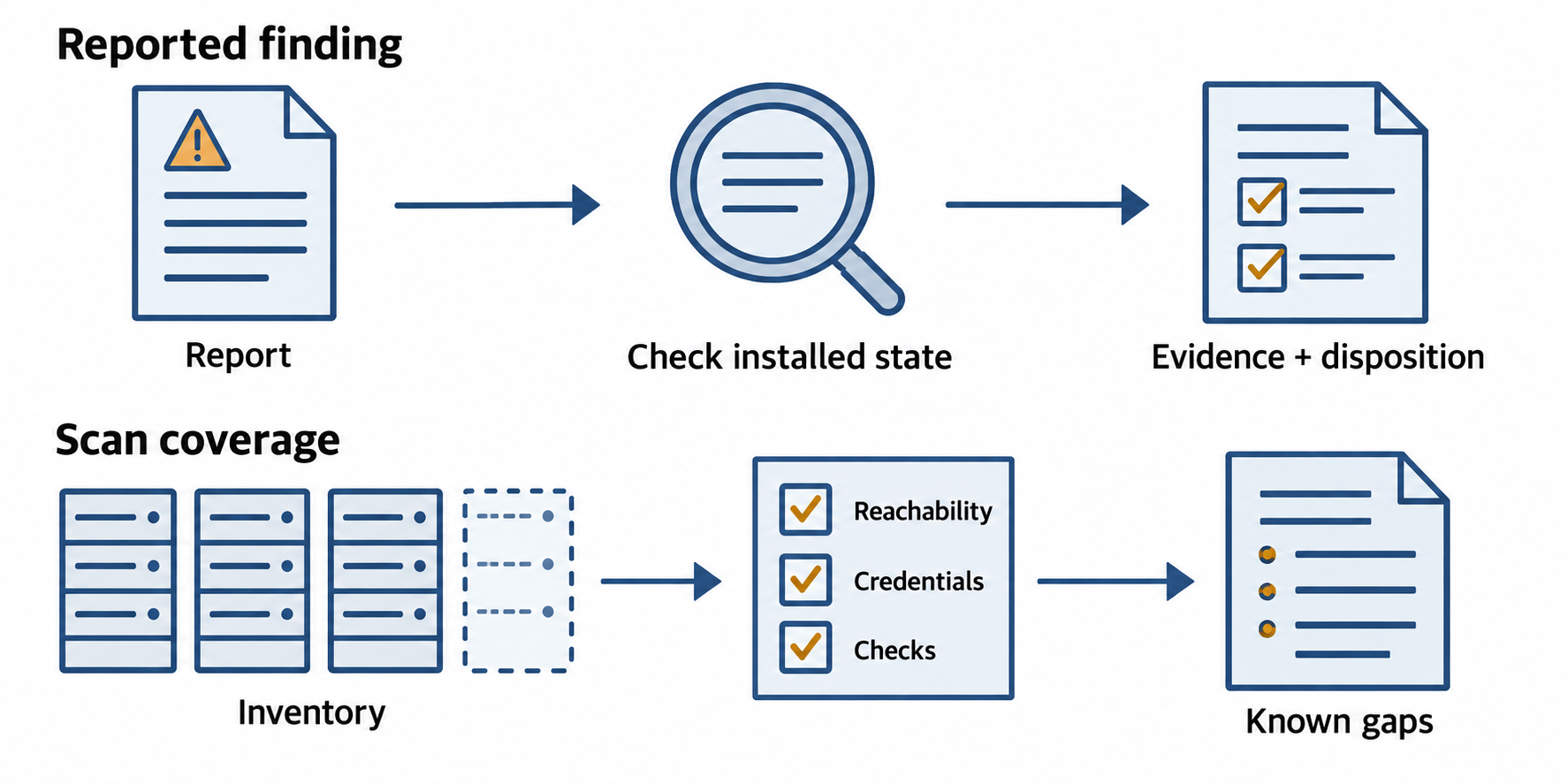
Figure 12.4: Confirm reported findings and inspect scan coverage. An absent finding can reflect a missed check or unreachable asset.
Text description for Figure 12.4
For a reported issue, verify the affected component, configuration, and patch state. Record a confirmed finding, supported false positive, or unresolved result. Separately check reachability, credentials, enabled tests, and current scanner content. An empty report cannot establish that an unexamined asset is secure.
12.3 CVSS (Common Vulnerability Scoring System)
CVSS provides a standardized way to evaluate and communicate vulnerability severity. CVSS scores range from 0.0 (no severity) to 10.0 (critical). CVSS has become the de facto standard for vulnerability prioritization.
CVSS Components and Base Score
The CVSS base score is calculated from several factors that describe the vulnerability's intrinsic properties:
Attack Vector (AV): How an attacker accesses the vulnerable component.
- Network (N): Remotely exploitable over a network (highest severity)
- Adjacent Network (A): Requires physical proximity or access to a local network (medium severity)
- Local (L): Requires local access to the device (lower severity)
- Physical (P): Requires physical manipulation of the device (lowest severity)
Attack Complexity (AC): Whether the attacker needs specific circumstances to exploit the vulnerability.
- Low (L): No special circumstances required; straightforward exploitation (higher severity)
- High (H): Specific circumstances or significant skill required (lower severity)
Privileges Required (PR): Whether the attacker must have valid credentials or access rights.
- None (N): No authentication required; most severe
- Low (L): Valid credentials required for a low-privilege account
- High (H): Valid credentials required for an administrative account; least severe
User Interaction (UI): Whether the vulnerability requires a user to take an action (click a link, open a file).
- None (N): The vulnerability can be triggered without user action (more severe)
- Required (R): The vulnerability requires user action (less severe)
Scope (S): Whether exploitation impacts only the vulnerable component or impacts other components.
- Unchanged (U): Impacts only the vulnerable component
- Changed (C): Exploitation breaks the boundary and impacts other components; more severe
Confidentiality Impact (C): The severity of information disclosure.
- High (H): Total information disclosure (most severe)
- Low (L): Some information disclosed
- None (N): No information disclosure
Integrity Impact (I): The severity of unauthorized data modification.
- High (H): Total data modification (most severe)
- Low (L): Some data modification
- None (N): No data modification
Availability Impact (A): The severity of disruption to availability.
- High (H): Total availability loss (most severe)
- Low (L): Some availability loss
- None (N): No availability loss
Severity Ratings
CVSS scores are typically grouped into severity ratings:
| Score Range | Severity | Response Time |
|---|---|---|
| 9.0-10.0 | Critical | Immediate (same day) |
| 7.0-8.9 | High | Days to weeks |
| 4.0-6.9 | Medium | Weeks to months |
| 0.1-3.9 | Low | Normal maintenance cycle |
| 0.0 | None | No action required |
Limitations of CVSS
CVSS measures technical severity but does not account for business context. A critical vulnerability in a rarely-used legacy system might be lower risk than a medium-severity vulnerability in a critical system. Organizations supplement CVSS with business risk assessment to guide prioritization.
CVSS also does not account for exploit availability. A vulnerability with a CVSS 7.0 that is being actively exploited by attackers should be treated more urgently than a CVSS 8.0 vulnerability with no known exploit.
Figure 12.5 identifies the CVSS version and metric groups discussed here.
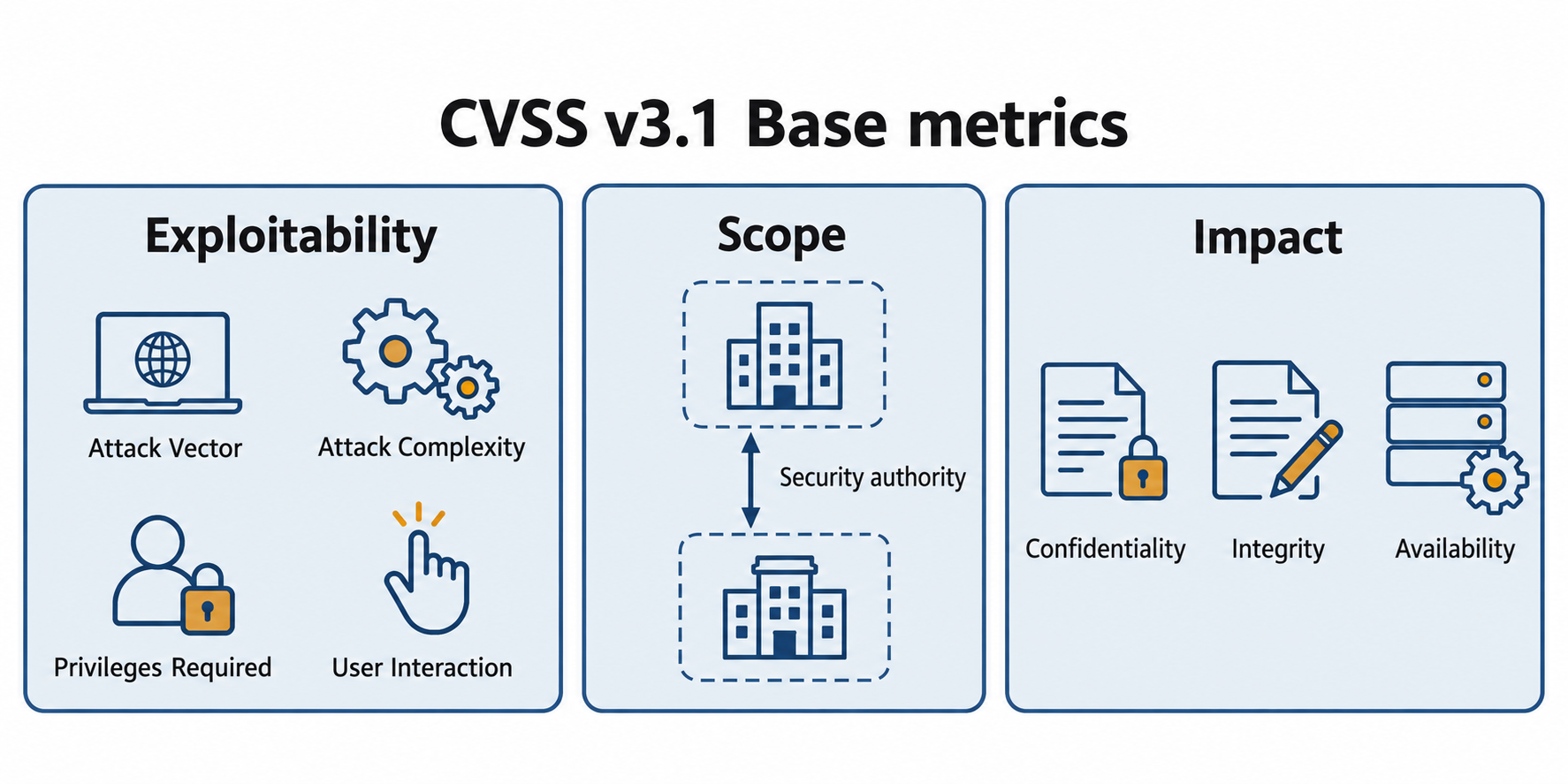
Figure 12.5: The chapter’s Base metrics match CVSS v3.1. Record the version and vector with a score; organizational policy supplies response deadlines.
Text description for Figure 12.5
CVSS v3.1 Base metrics describe Attack Vector, Attack Complexity, Privileges Required, User Interaction, Scope, and confidentiality, integrity, and availability impacts. Scope concerns the security authority affected, rather than simply counting machines. FIRST now maintains v4.0, whose model differs. Technical severity and an organization’s response deadline are separate decisions.
12.4 SIEM and Log-Based Monitoring
Security Information and Event Management (SIEM) is the central technology for detecting and investigating security events. SIEM aggregates logs from across the organization, normalizes them into a common format, correlates events to identify attacks, and alerts security analysts to suspicious activity.
Log Aggregation and Normalization
Log aggregation collects logs from diverse sources: firewalls, servers, domain controllers, databases, applications, endpoint protection software. Each source generates logs in different formats and with different field names.
Normalization converts diverse log formats into a common structure. Once normalized, logs from different sources can be searched and correlated together. A SIEM might normalize the concept of "user authentication failure" across Windows domain controllers (which use the Windows Event Log format), Linux servers (which log to syslog), and network devices (which log to different vendors' proprietary formats).
Figure 12.6 traces logs from collection to analyst review.
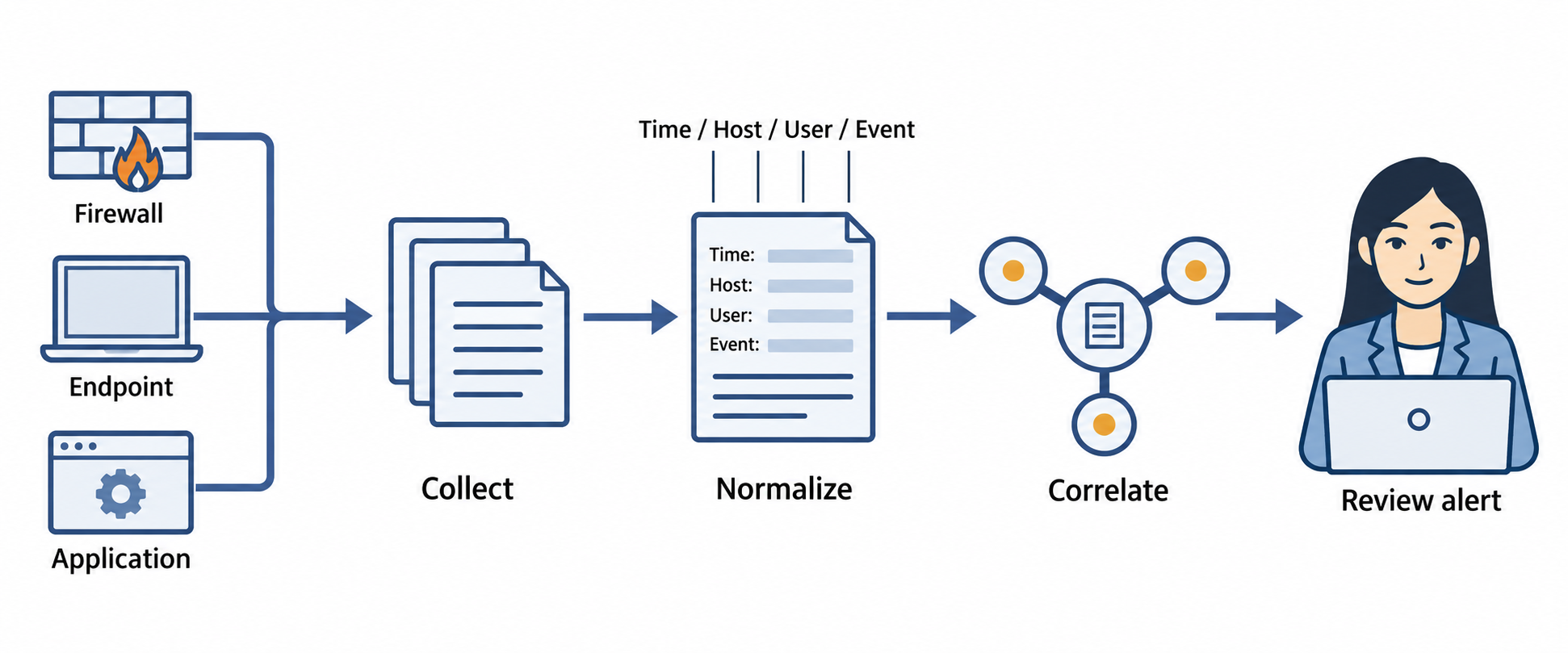
Figure 12.6: Security Information and Event Management (SIEM) collects and organizes logs so analysts can search for related events.
Text description for Figure 12.6
Firewalls, endpoints, and applications produce different event formats. Collection brings them together. Normalization maps relevant fields to a common structure, and correlation searches for relationships. An alert brings a candidate pattern to an analyst for review. Retain original records and relevant timing context so analysts can check what the normalized fields represent.
Correlation and Alerting
Correlation looks for relationships between individual log entries that might indicate an attack. Some examples:
- Multiple failed login attempts from the same source IP followed by a successful login (brute force attack)
- A user authenticating from two geographically distant locations within a short time window (impossible travel, indicating credential compromise)
- A user accessing sensitive data immediately after logging in from an unusual location (potential insider threat)
- A system scanning many different IP addresses on a network segment (potential network reconnaissance)
Alerting triggers when correlated events match a suspicious pattern. SIEM systems are configured with rules that define what combinations of events should generate alerts.
Figure 12.7 shows how a correlated sequence becomes an investigation lead.
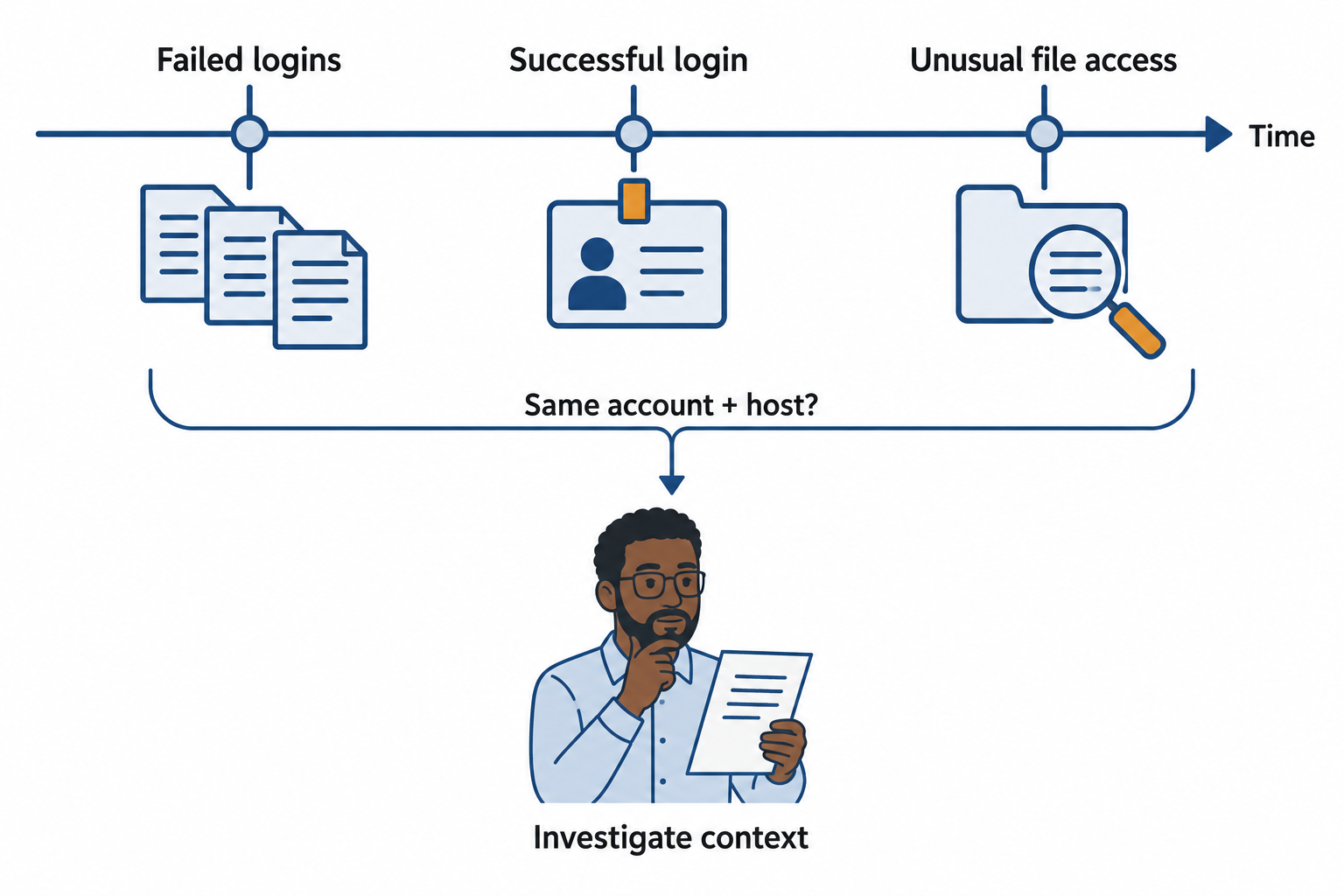
Figure 12.7: A sequence of failed logins, a successful login, and unusual access can justify investigation. The pattern alone does not prove compromise.
Text description for Figure 12.7
Correlate events using identifiers such as account, host, and source address, while checking time synchronization. Repeated failures followed by success may result from an attack or an ordinary user correcting a password. Unusual subsequent resource access adds context. An analyst compares the sequence with authorized activity and corroborating evidence.
Challenges with SIEM
Alert volume: SIEMs in large environments can generate thousands of alerts per day. Most are false positives or low-priority events. Security analysts suffer from "alert fatigue," missing critical alerts in the noise. Effective SIEM tuning requires carefully calibrated rules that balance sensitivity (catching real attacks) and specificity (reducing false positives).
Data volume and retention: Modern enterprises generate enormous amounts of log data. Storing and searching years of logs for a forensic investigation requires significant infrastructure. Many organizations keep detailed logs for weeks or months, with longer-term archival in cheaper storage.
Rule maintenance: As the environment changes (new applications deployed, infrastructure modified), SIEM rules must be updated to remain effective. Outdated rules miss attacks that exploit new attack patterns.
12.5 Security Monitoring: Baselines, Anomalies, and Threat Hunting
Beyond SIEM alerting, security monitoring involves understanding normal network and system behavior, detecting deviations from that baseline, and proactively searching for indicators of attack.
Baseline Establishment
A baseline defines normal behavior for a system, network, or user. Baselines for different entities include:
Network baselines: Normal traffic patterns, typical communication partners, expected data volumes, normal port usage. Deviations might indicate malware (unexpected outbound connections), data exfiltration (unusual data volumes), or reconnaissance (scanning unusual ports).
System baselines: Normal CPU usage, memory usage, disk I/O, process behavior. Deviations might indicate malware (resource hogging), unauthorized access (process execution), or compromise (process behavior changes).
User baselines: Normal login times and locations, which systems they access, typical data access patterns. Deviations might indicate credential compromise (login from unusual location), insider threat (accessing unusual data), or privilege escalation (access patterns changing).
Establishing baselines requires collecting data over a baseline period (typically 2-4 weeks) and using statistical methods to define normal ranges. Baselines must be periodically reviewed and updated as operations change.
Anomaly Detection
Anomaly detection identifies deviations from established baselines. Deviation may indicate legitimate operational changes or may indicate an attack. Anomalies are investigated rather than automatically blocked (to avoid disrupting legitimate operations).
Figure 12.8 compares an observation with expected activity and operational context.
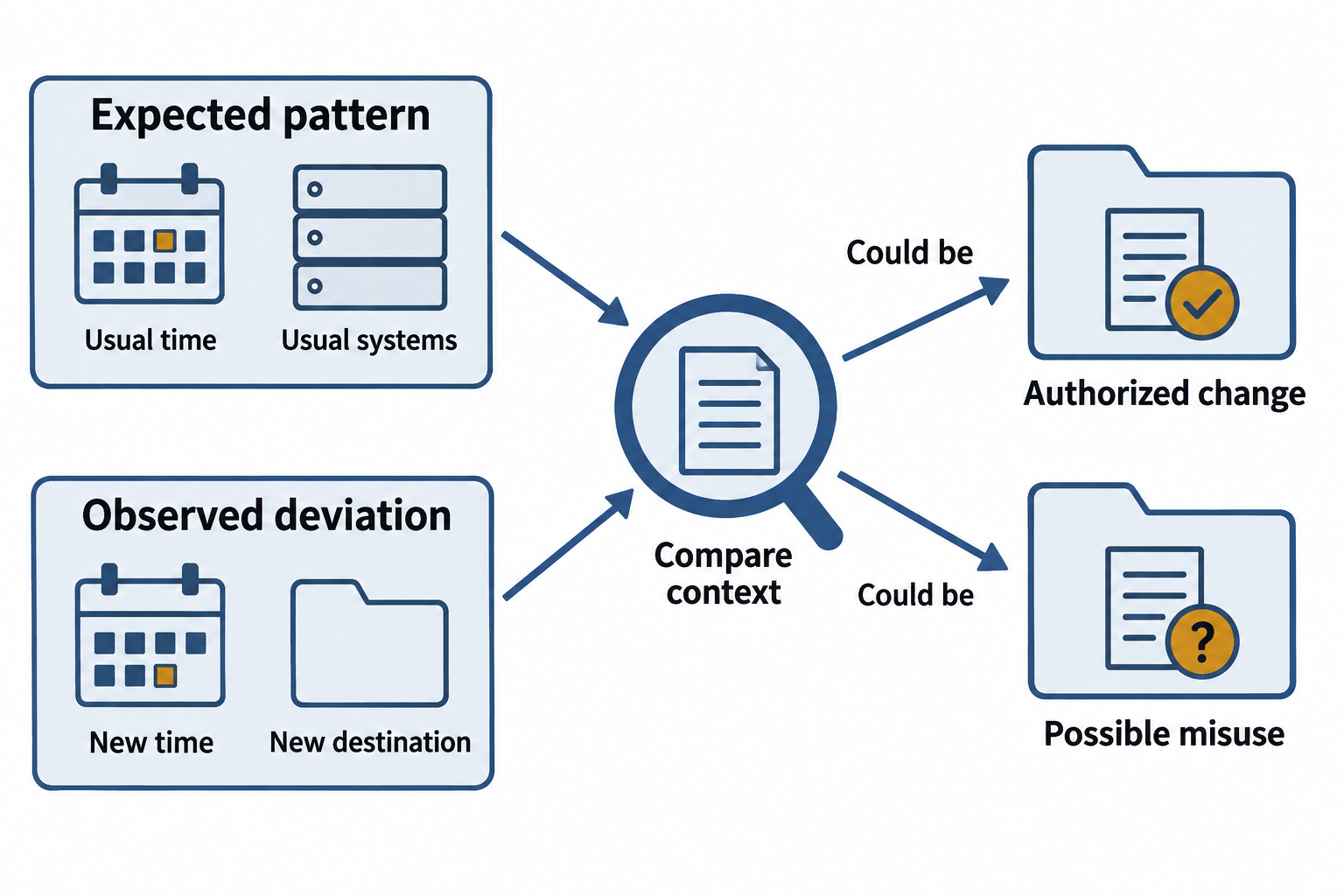
Figure 12.8: A baseline describes expected behavior. A deviation prompts investigation of both authorized changes and possible misuse.
Text description for Figure 12.8
Build baselines from representative activity and account for work schedules, service functions, and approved changes. Compare the current observation with that baseline. A new location, time, or destination can be meaningful, but it can also have a legitimate explanation. Review context and update the baseline when the organization’s normal operations change.
Examples of monitored anomalies:
- A user accessing sensitive data they do not normally access
- A system connecting to external IP addresses on unusual ports
- A service account being used to log into systems other than those it normally services
- Execution of suspicious processes (processes launching other processes, unsigned executables)
Threat Hunting
Threat hunting is proactive, hypothesis-driven searching for indicators of compromise. Unlike SIEM, which relies on automated rules to detect suspicious patterns, threat hunting involves analysts actively searching for attackers who may have evaded detection.
Hypothesis-driven threat hunting starts with an assumption about what an attacker might be doing and searches for evidence. Examples:
- "Attackers often maintain persistence through scheduled tasks. Are there scheduled tasks on systems that were not there during our last audit?"
- "Ransomware often encrypts files, leaving unique characteristics in filesystem metadata. Are there patterns of files being modified and encrypted?"
- "Compromised accounts often access resources at unusual times. Are there authentication patterns that look unusual?"
Indicator-driven threat hunting searches for known indicators of compromise (IoCs) discovered through threat intelligence, past incident investigations, or security research. An analyst might search for DNS queries to a known command-and-control domain, network connections to IP addresses associated with a particular malware family, or files with signatures of known malware.
Figure 12.9 turns a hunting hypothesis into a documented evidence review.
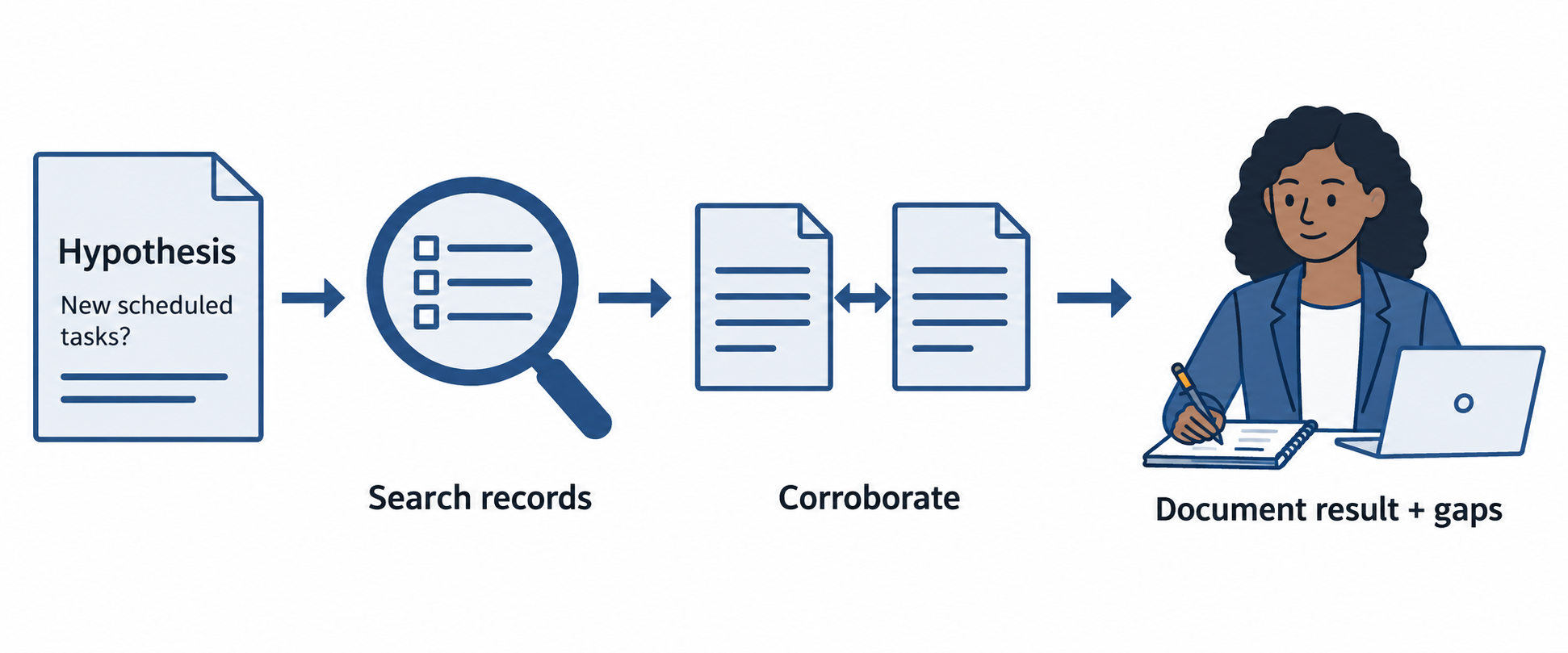
Figure 12.9: Threat hunting turns a testable question into a search, evidence review, and a documented conclusion.
Text description for Figure 12.9
Begin with a hypothesis, such as an intruder using a newly created scheduled task for persistence. Select data that can test it, search the available records, and check ownership and approved changes. Corroborate suspicious results with other evidence. Record the conclusion and any gaps; a search without a match does not prove the absence of an attacker.
Analyst Perspective
Threat hunting often feels like trying to find a hidden attacker in a data haystack, but it is surprisingly effective. Many successful incident investigations start with a threat hunter noticing something slightly off: a user accessing systems at 3 AM (when they normally work 9-5), a server connecting to an IP address it has never communicated with before, or a process behavior that does not match the vendor's documentation. These findings often lead to discovery of breaches that automated systems missed.
12.6 Indicators and Evidence
Understanding the difference between various types of indicators is essential for both proactive hunting and incident response.
Indicators of Compromise (IoCs)
Indicators of Compromise (IoCs) are pieces of evidence that suggest a system has been compromised. IoCs are artifacts left behind by attackers.
Network IoCs include:
- Connections to known command-and-control (C&C) servers
- DNS queries to known malicious domains
- Unusual outbound connections to uncommon ports
- Connections to IP addresses associated with known attack groups
File and hash IoCs include:
- File hashes matching known malware samples
- Files found in unusual locations (e.g., system binaries in temporary directories)
- Files with suspicious names or extensions
- Modifications to system binaries
Process IoCs include:
- Execution of known malware samples (by hash)
- Unusual process behavior (parent-child relationships that do not match normal operation)
- Processes creating network connections from unusual sources
- Process injection attacks (one process launching threads in another process)
Behavioral IoCs include:
- Unusual file access patterns (accessing files a user normally does not access)
- Unusual authentication patterns (logins from new locations, at unusual times)
- Unusual data exfiltration (large data transfers to external destinations)
False Positives and Evidence Quality
IoCs must be evaluated carefully because false positives waste investigation time. A hash match might indicate malware, or it might indicate a file that is benign but happens to match the hash (hash collisions are rare but possible). A connection to an IP address might be malicious or might be legitimate traffic that was miscategorized.
Quality IoCs are:
- High confidence: Based on reliable sources (direct victim reporting, vendor analysis, law enforcement) rather than theoretical
- Specific: Describing a particular attack (not overly broad) to avoid matching legitimate activity
- Actionable: Describing something that can be searched for in the environment
- Contextual: Understood within the specific attack campaign or threat group
Figure 12.10 shows the checks that give an indicator evidentiary value.
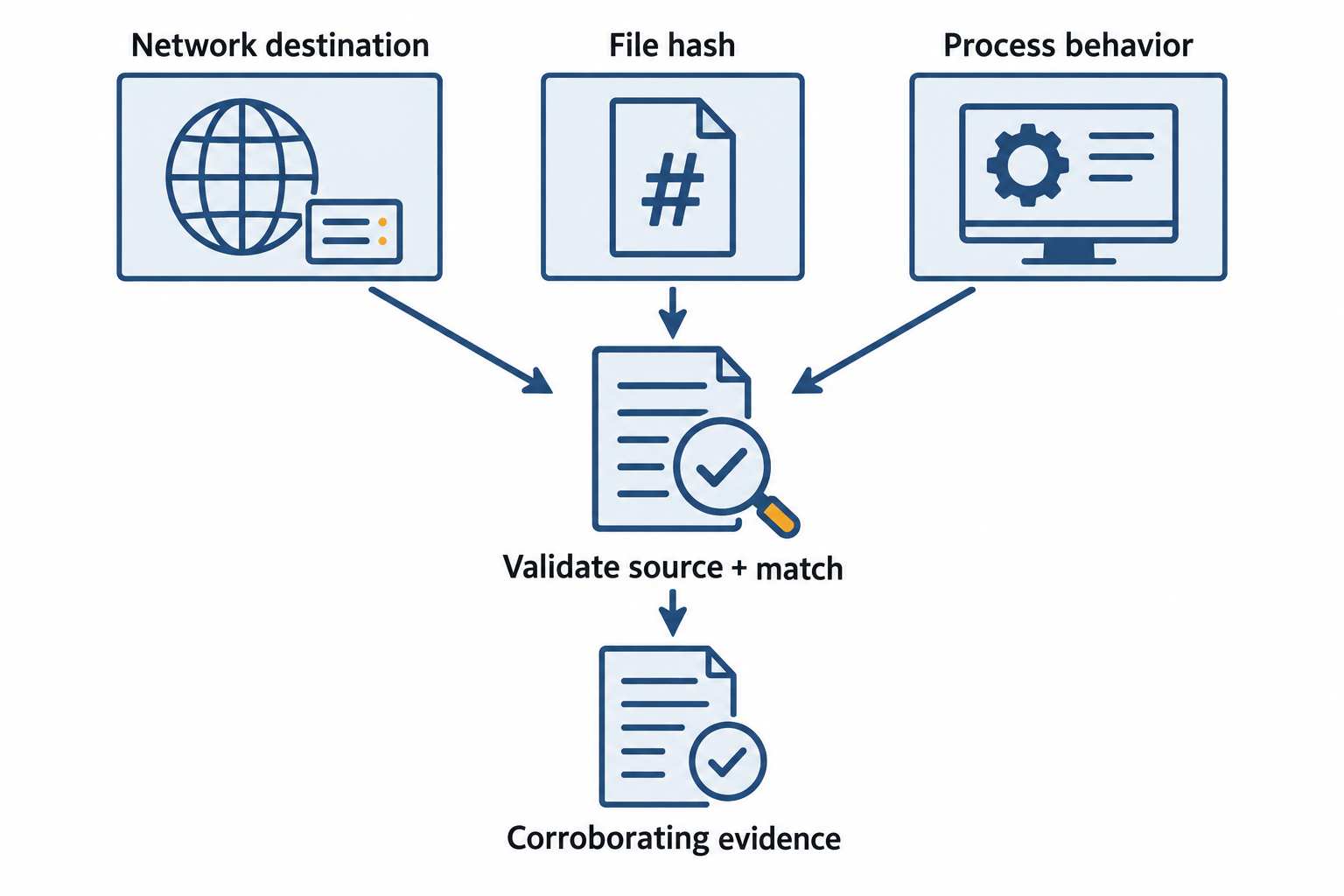
Figure 12.10: Indicators of compromise (IoCs) are investigation leads whose meaning depends on source quality, specificity, and local evidence.
Open Figure 12.10 at full size
Text description for Figure 12.10
A network destination may have a suspicious history, a file hash may match a reported sample, and a process relationship may differ from expected activity. Validate the indicator source, the actual match, timing, and local context. Reputation mistakes, shared infrastructure, and benign dual-use tools can cause misleading matches. Avoid treating a routine strong-hash match as likely to be an accidental collision.
12.7 Patch Management and Vulnerability Remediation
Patching is the most direct response to vulnerabilities discovered through scanning. Effective patch management requires coordination across multiple teams.
Patch Management Process
Identification: New patches are released by vendors (operating system vendors, software vendors, firmware vendors). Organizations subscribe to vendor security advisories to learn about new patches.
Assessment: For each new patch, the organization assesses whether it is necessary (does it fix a vulnerability affecting the organization?), what the patch includes, and what the risk is if the patch is not applied.
Testing: Patches are tested in a non-production environment (a staging environment that mirrors production) before deployment to production systems. Testing confirms that the patch does not break functionality and does not cause performance degradation.
Deployment: Patches are deployed to production systems according to a schedule. Critical patches might be deployed quickly (days); routine patches might be deployed on a monthly or quarterly patch cycle. Organizations must balance the risk of missing patches against the risk of deploying patches that break systems.
Verification: After patch deployment, systems are rescanned to confirm the vulnerability has been fixed. Deployment logs are reviewed to ensure all intended systems received the patch.
Figure 12.11 connects patch deployment to evidence that the change worked.
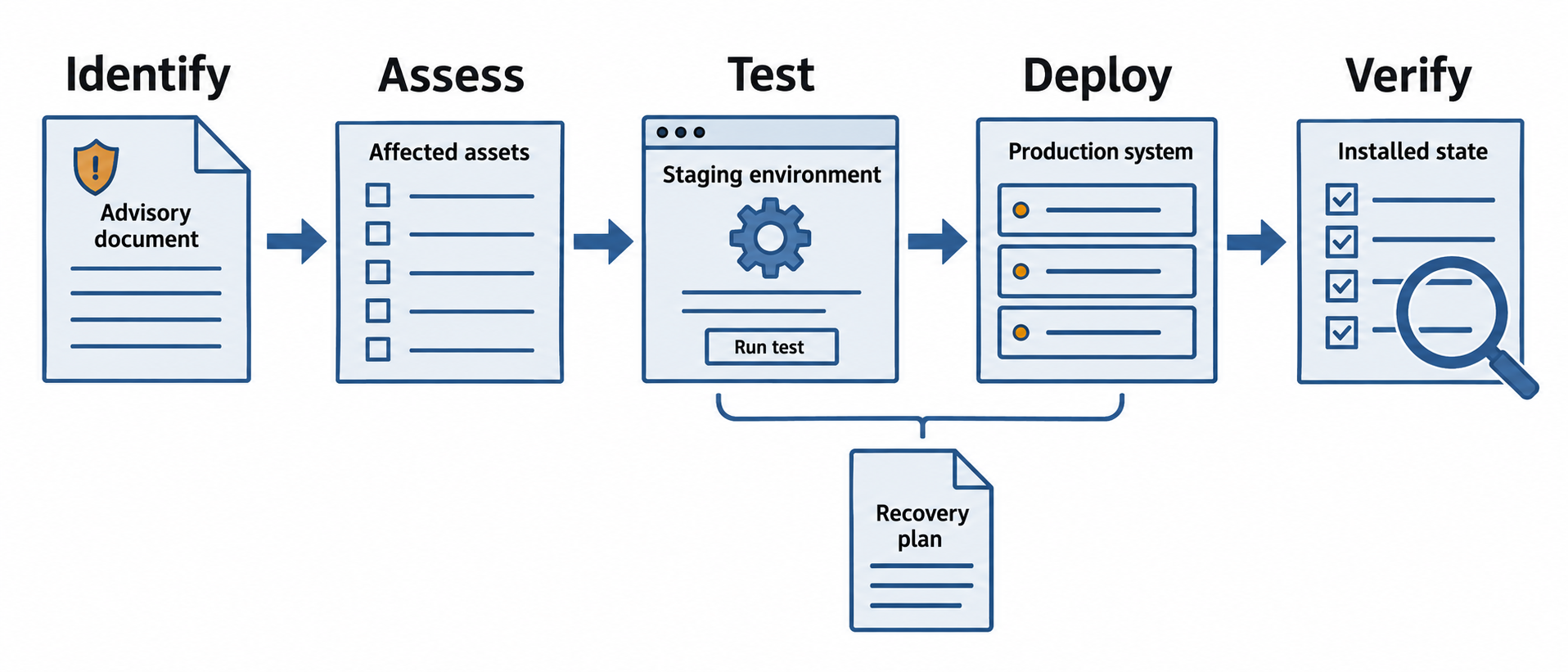
Figure 12.11: Patch management links an affected asset to assessment, testing, deployment, and verified outcomes.
Open Figure 12.11 at full size
Text description for Figure 12.11
Confirm which assets need a patch and assess urgency. Test relevant service behavior, plan deployment and recovery, then apply the change. Verify installed state and expected operation using appropriate checks. Record exceptions and failed deployments for follow-up. A completed deployment job alone does not prove that all intended systems received an effective fix.
Patch Management Challenges
Testing overhead: Each patch requires testing. An organization with hundreds or thousands of systems and monthly or weekly patch cycles faces significant testing burden.
Compatibility risks: Some patches break functionality or conflict with other software. Customers of patched systems sometimes experience outages after patches are deployed.
Zero-day vulnerabilities: Between the time a vulnerability is discovered and a patch is released, systems are at risk. Organizations must use compensating controls (network segmentation, access restrictions, monitoring) to reduce the risk.
End-of-life systems: Systems that are no longer supported by vendors do not receive patches. Organizations must decide whether to continue running unsupported systems (accepting ongoing vulnerability risk), invest in upgrades, or decommission the systems.
12.8 Putting It Together: A Vulnerability Management Program
Northwind Manufacturing operates industrial equipment in three facilities. The company has recently experienced a security incident where an unpatched server was exploited to gain access to the network. Leadership has asked the security team to design a vulnerability management program to prevent similar incidents.
Discovery phase: The team purchases a vulnerability scanner and configures credentialed scans of all internal systems to run monthly. External scans of internet-facing systems run weekly. The scanner database is updated daily to ensure newly discovered vulnerabilities are included in upcoming scans.
Analysis phase: The team establishes a policy that all critical (CVSS 9.0+) and high (CVSS 7.0-8.9) vulnerabilities are manually reviewed within 48 hours of discovery to confirm they are real (not false positives) and to assess exploitability in Northwind's environment.
Prioritization phase: The team creates a prioritization matrix that combines CVSS scores with system criticality. A critical vulnerability in the main production control system receives immediate attention. A critical vulnerability in an administrative system receives attention within a week. The team uses this matrix to create a remediation schedule.
Remediation phase: The team coordinates with system owners to prioritize patches. For critical vulnerabilities, patches are tested in a small staging environment and deployed within days. For routine patches, monthly patch cycles are sufficient.
Verification phase: After patches are deployed, the team rescans affected systems to confirm the vulnerabilities are resolved. A dashboard tracks the number of open vulnerabilities by severity, providing visibility to management on the program's effectiveness.
Putting It Together: Detecting and Responding to a Compromised Workstation
Elena is a SOC analyst monitoring alerts from the SIEM system. She notices an alert about a workstation conducting DNS queries to a domain associated with malware. The alert itself could be benign, but she decides to investigate.
Step 1 - Correlation: Elena queries the SIEM for other suspicious activity from the same workstation. She discovers:
- Multiple failed login attempts from the workstation to different systems over the past week
- Successful login to an administrative system using a service account credential
- Unusual file access patterns (accessing finance system files from a workstation that normally does not access the finance system)
Step 2 - Evidence Collection: Elena collects logs from the workstation, the systems accessed, and the network. She notes:
- The process that initiated the DNS queries to malicious domains
- The timing and destination of failed login attempts
- The source IP of the administrative system access
Step 3 - Isolation: Elena coordinates with the IT team to immediately isolate the workstation (disconnect from network, disable network connection) to prevent further damage.
Step 4 - Investigation: Elena examines the workstation's logs and files. She discovers malware installed on the system. She traces the malware installation to a suspicious email attachment received a week earlier.
Step 5 - Response: The incident response team disinfects the workstation, revokes the compromised credentials, audits systems accessed from the workstation to determine if additional systems are compromised, and sends communications to users about the phishing email to prevent similar incidents.
Figure 12.12 connects the workstation alert to coordinated investigation and recovery.
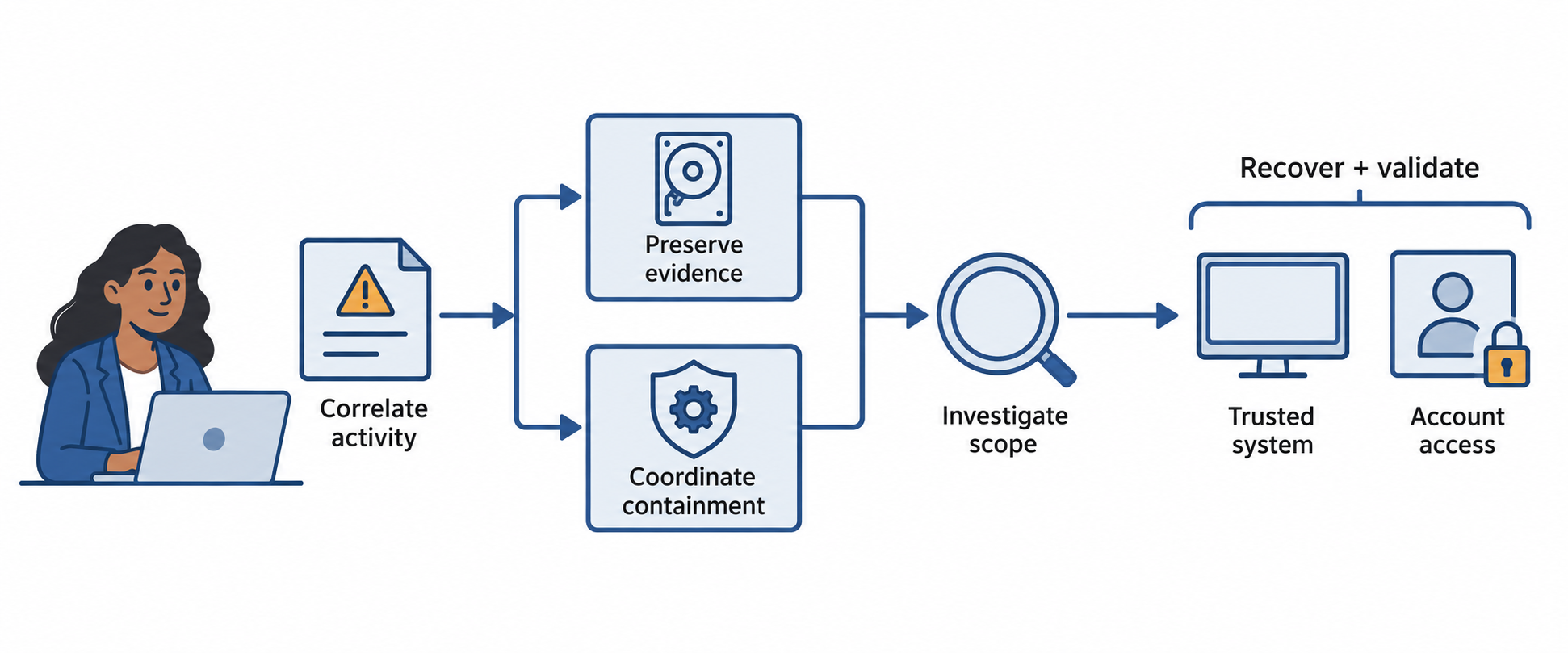
Figure 12.12: Elena correlates the workstation alert with other activity, preserves evidence, coordinates containment, and investigates the scope of compromise.
Open Figure 12.12 at full size
Text description for Figure 12.12
The scenario begins with suspicious Domain Name System (DNS) queries. Elena checks account and file activity from the same workstation. Evidence preservation and containment require coordination based on urgency; active harm can require containment before complete collection. Investigation identifies the cause and affected assets. Recovery includes restoring trusted operation, addressing compromised credentials, and reviewing systems the account accessed.
Chapter Summary
- Vulnerability management is a continuous lifecycle with five phases: identify (discover vulnerabilities), analyze (assess severity and exploitability), prioritize (determine which to fix first), remediate (apply fixes), and verify (confirm fixes are effective).
- Vulnerability scanning using credentialed and non-credentialed scans discovers most vulnerabilities. Credentialed scans are more thorough but require distributing credentials. Scanning frequency depends on risk profile and compliance requirements.
- CVSS (Common Vulnerability Scoring System) provides a standardized severity score (0.0-10.0) that accounts for attack vector, complexity, required privileges, user interaction, scope, and impact (confidentiality, integrity, availability).
- SIEM (Security Information and Event Management) aggregates logs from diverse sources, normalizes them into common formats, correlates events to identify attacks, and alerts analysts to suspicious patterns.
- Security monitoring establishes baselines of normal behavior, detects anomalies that deviate from baselines, and hunts proactively for indicators of compromise that automated systems might miss.
- Indicators of Compromise (IoCs) are artifacts of past compromise including network IoCs (malicious connections), file IoCs (malware hashes), process IoCs (unusual process behavior), and behavioral IoCs (unusual access patterns).
- Patch management is the most direct remediation approach, but requires assessment, testing, deployment planning, and verification. Zero-day vulnerabilities and end-of-life systems present ongoing challenges.