CH12: Email and Social Media Investigations
Introduction
Email remains one of the most heavily relied-upon forms of digital communication in both personal and professional settings, and it is correspondingly one of the most common sources of digital evidence. From business email compromise (BEC) schemes and intellectual property theft to harassment cases and insider threats, the ability to trace, acquire, and analyze email evidence is a core competency for any digital forensics examiner. Social media platforms present a parallel challenge: they generate enormous volumes of investigatively relevant data, but that data is volatile, platform-controlled, and often scattered across multiple services.
This chapter takes a methodology-driven approach to email and social media evidence and connects directly to Chapter 11. The mobile apps you examined there cache mail and social media messages in SQLite databases on the device, and the provider-side records covered in this chapter often confirm or fill gaps in what the device holds. You will examine email infrastructure at the protocol level, learn to read and interpret email headers with precision, understand where forensic artifacts reside across different email architectures, and apply structured acquisition and analysis techniques to social media communications. The emphasis throughout is on repeatable, defensible methods that produce evidence capable of withstanding legal scrutiny.
Learning Objectives
By the end of this chapter, you will be able to:
- Describe the end-to-end email infrastructure and identify where forensic artifacts reside at each stage of message transit.
- Analyze email headers to trace message origin, identify spoofing indicators, and evaluate SPF, DKIM, and DMARC authentication results.
- Examine email server logs on both Windows (Exchange) and Linux (Postfix) platforms to reconstruct communication timelines.
- Evaluate specialized tools for email forensic acquisition, parsing, and analysis.
- Apply digital forensics methods to acquire, preserve, and analyze social media communications as admissible evidence.
12.1 The Role of Email in Digital Investigations
Email is unique among digital evidence sources because it simultaneously contains content (the message body and attachments), metadata (headers, timestamps, routing information), and relational data (sender, recipients, CC/BCC fields). This combination makes email evidence valuable across a wide range of investigation types.
Investigation Types Involving Email Evidence
Email evidence appears in nearly every category of digital investigation. Understanding why an examiner has been asked to analyze email helps define the scope of the examination and determine which artifacts matter most.
- Business Email Compromise (BEC): An attacker impersonates a trusted party (often a CEO or vendor) to trick employees into transferring funds or sharing sensitive data. The examiner must trace the email's true origin through header analysis and identify discrepancies between the displayed sender and the actual sending infrastructure.
- Insider Threat and Intellectual Property Theft: An employee exfiltrates proprietary data by emailing documents to a personal account or to a competitor. Server logs and email metadata establish the timeline of exfiltration.
- Harassment and Threats: Threatening or harassing emails require attribution. Header analysis, IP correlation, and account activity logs help connect messages to a specific individual or device.
- Fraud and Financial Crime: Phishing campaigns, invoice fraud, and social engineering attacks all rely on email as the delivery mechanism. Examiners analyze both the technical headers and the content to identify patterns across multiple victims.
- Civil Litigation and eDiscovery: In civil cases, email is frequently the primary evidence in disputes over contracts, employment, and regulatory compliance. Courts closely scrutinize preservation and chain of custody in these cases.
Dimensions of Email Evidence
When approaching email evidence, forensic examiners focus on four primary dimensions:
- Content: The actual message body and any attachments. What was communicated, and does it contain evidence of the alleged activity?
- Metadata: Header fields, timestamps, and routing information. Where did this message actually originate, and what path did it take?
- Relationships: Sender and recipient patterns across multiple messages. Who is communicating with whom, how frequently, and does the communication pattern change around key dates?
- Timeline: Precise chronological ordering of communications. When combined with other digital artifacts (file access logs, login records), email timestamps help establish a sequence of events.
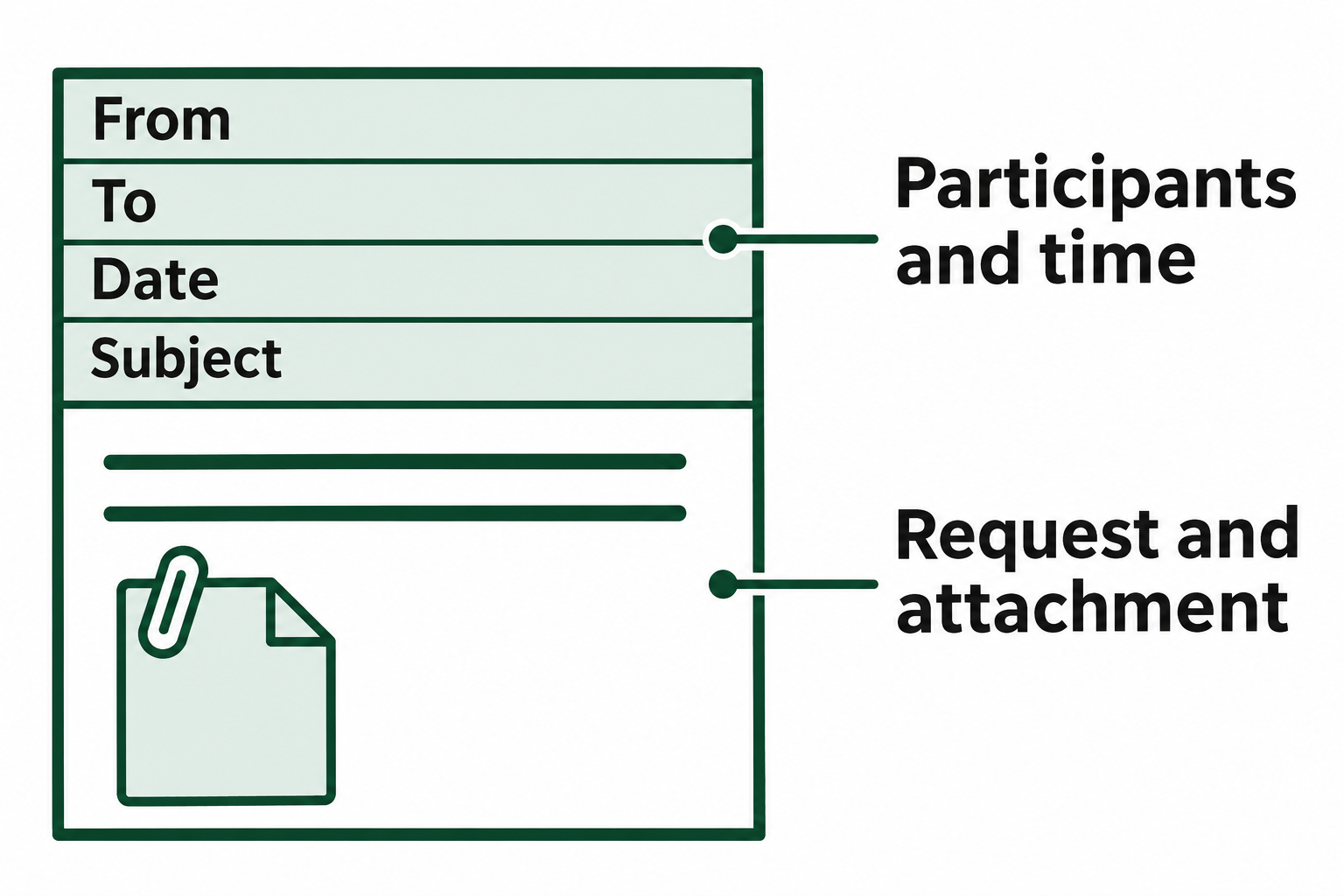
Figure 12.1: The body and attachment show what the message asks for. The address and date fields give an examiner names and a time to check.
Text description of Figure 12.1
Analyst Perspective
In practice, content analysis alone is rarely sufficient. A suspect can claim they never sent a particular email, that their account was compromised, or that the message was fabricated. Header analysis and server log correlation provide independent technical evidence that supports or refutes those claims.
12.2 Email Infrastructure and Architecture
To analyze email forensically, you must understand how messages move from sender to recipient. Each component in the email infrastructure generates artifacts, and knowing where those artifacts reside determines your acquisition strategy.
The Message Lifecycle
An email message passes through a series of distinct stages between composition and delivery. At each stage, a different system component handles the message and records information about the transaction.
- Composition: The user drafts a message using a Mail User Agent (MUA). This is the email client the user interacts with directly, whether a desktop application like Microsoft Outlook, a mobile app, or a webmail interface like Gmail.
- Submission: The MUA hands the composed message to a Mail Submission Agent (MSA), which accepts the message for delivery. The MSA typically operates on port 587 (or port 465 with implicit TLS) and requires the user to authenticate.
- Relay/Transfer: The MSA passes the message to a Mail Transfer Agent (MTA), which is responsible for routing the message across the internet to the recipient's mail server. MTAs communicate using the Simple Mail Transfer Protocol (SMTP) and perform DNS lookups (specifically MX records) to determine the destination server. A message may pass through multiple MTAs before reaching its destination, and each one adds a
Receivedheader to the message. - Delivery: The recipient's MTA hands the message to a Mail Delivery Agent (MDA), which deposits the message into the recipient's mailbox on the server.
- Retrieval: The recipient's MUA retrieves the message from the server using either the Internet Message Access Protocol (IMAP) or the Post Office Protocol version 3 (POP3).
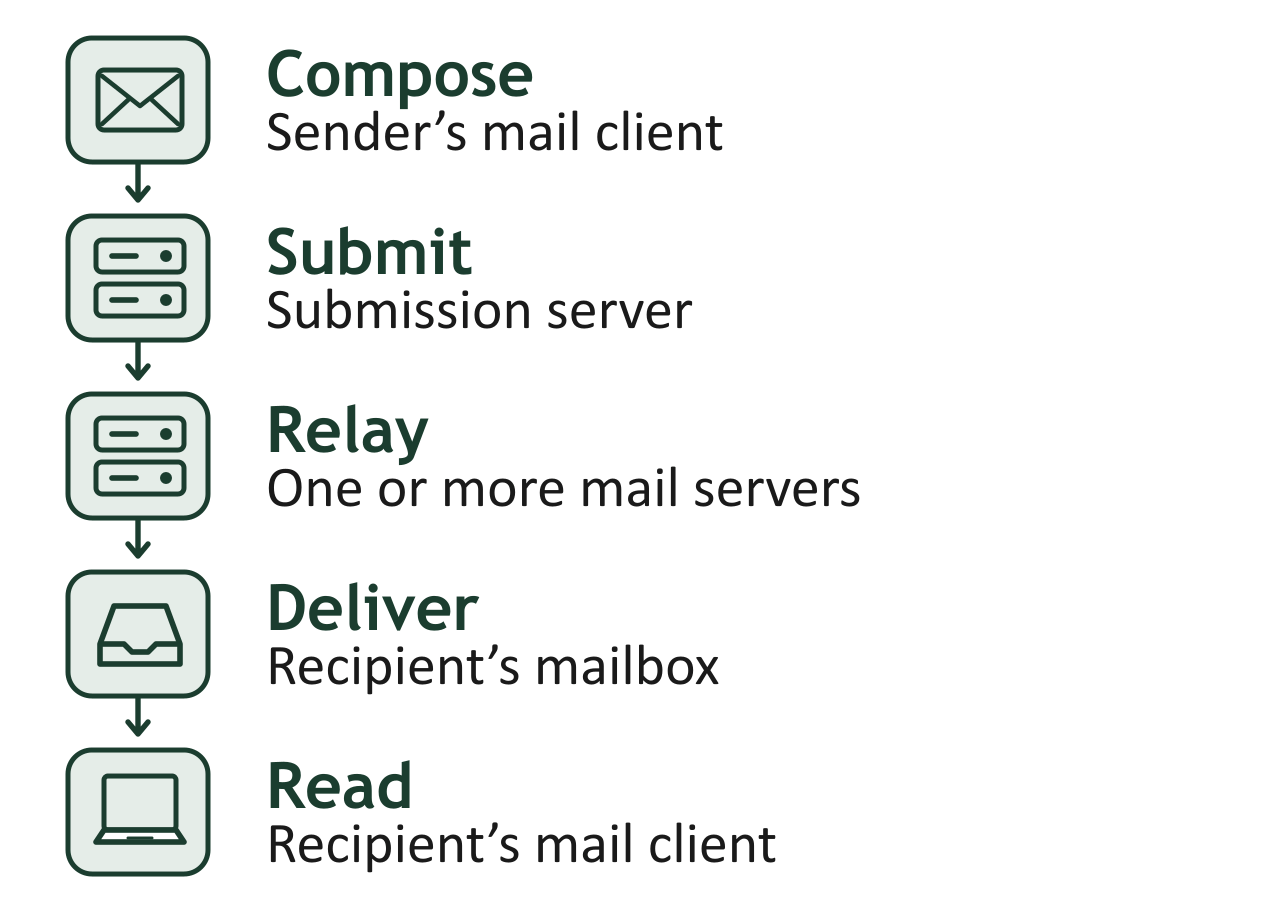
Figure 12.2: A sender’s mail client submits the message. Mail servers relay it to the recipient’s mailbox, where a client can retrieve it.
Text description of Figure 12.2
Core Protocols
Three protocols form the backbone of email communication. Each protocol serves a distinct function, and the choice of retrieval protocol has direct forensic implications.
SMTP (Simple Mail Transfer Protocol)
SMTP handles the sending and relaying of messages between servers. It operates on port 25 for server-to-server relay, port 587 for authenticated client submission (STARTTLS), and port 465 for implicit TLS connections. SMTP is a push protocol: it moves messages forward toward their destination. From a forensic standpoint, SMTP transactions are the primary source of the Received header chain that traces a message's path.
IMAP (Internet Message Access Protocol) IMAP operates on port 143 (or port 993 with TLS) and synchronizes messages between the server and client. Messages remain stored on the server, and the client maintains a synchronized local cache. When a user reads, flags, or organizes messages in folders, those actions are reflected on the server.
POP3 (Post Office Protocol version 3) POP3 operates on port 110 (or port 995 with TLS) and downloads messages from the server to the local client. In its default configuration, POP3 removes messages from the server after download, leaving the local client as the sole repository.
Warning
The distinction between IMAP and POP3 has significant forensic consequences. If a suspect uses IMAP, email evidence may still reside on the server even after local deletion. If they use POP3 with default settings, server-side evidence may be gone, making the local device the only viable acquisition target. Always determine the retrieval protocol early in your investigation to guide your acquisition strategy.
Webmail vs. Desktop Client vs. Mobile Client
Where email artifacts reside depends heavily on how the user accesses their email.
- Desktop Clients (Outlook, Thunderbird, Apple Mail): Store messages in local database files on the user's hard drive. These files persist even if the user deletes individual messages from the interface, because the database may retain deleted items in recoverable space. Microsoft's new Outlook for Windows, which is replacing classic Outlook, is built on Outlook on the web and does not rely on the OST file that classic Outlook uses, so confirm which Outlook version is installed before deciding what to collect.
- Webmail (Gmail, Outlook.com, Yahoo Mail): Messages are stored entirely on the provider's cloud infrastructure. The local machine may contain browser cache artifacts (cookies, cached HTML, local storage entries), but the authoritative copy resides on the server. Acquisition requires either a data export from the provider or a legal process.
- Mobile Clients: Typically use IMAP synchronization with locally cached copies stored in app-specific databases (often SQLite). Both the server and the device contain relevant artifacts, though the mobile copy may be a subset of the full mailbox.
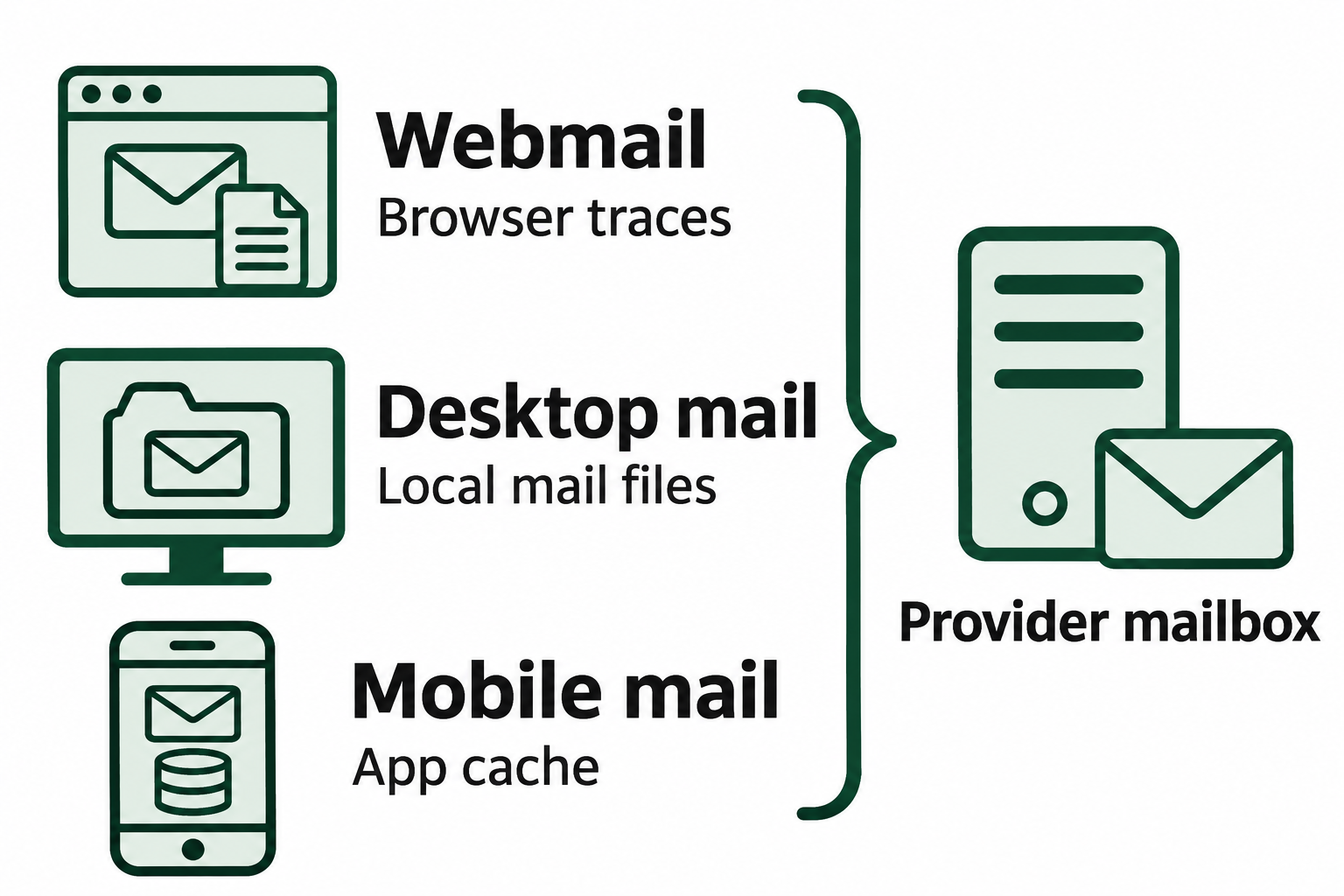
Figure 12.3: How a person accessed email helps an examiner decide which local records to compare with the provider’s mailbox.
Text description of Figure 12.3
Protocol Comparison Matrix
| Feature | SMTP | IMAP | POP3 |
|---|---|---|---|
| Function | Send and relay messages | Synchronize and retrieve messages | Download messages |
| Standard Port | 25 (relay), 587 (submission) | 143 | 110 |
| Encrypted Port | 465 (implicit TLS) | 993 | 995 |
| Direction | Push (outbound) | Sync (bidirectional) | Pull (download) |
| Server Retention | Logs only (no message storage) | Messages remain on server | Messages typically removed after download |
| Primary Forensic Artifact | Received headers, server transaction logs | Server-side mailbox, sync state | Local client mailbox file |
| Acquisition Target | Server logs | Server mailbox and/or client cache | Client device storage |
12.3 Email File Formats and Acquisition
Before an examiner can analyze email content and metadata, the messages must be acquired in a forensically sound manner. The specific acquisition approach depends on the email file format in use, which in turn depends on the email client and platform.
Common Email File Formats
PST (Personal Storage Table) and OST (Offline Storage Table) Microsoft Outlook uses PST files to store local archives of email, calendar, contacts, and tasks. OST files serve as offline caches for Exchange and Microsoft 365 accounts, synchronizing with the server when connectivity is available. Both formats use a structured binary database format.
- Windows default path:
C:\Users\<username>\AppData\Local\Microsoft\Outlook\ - Forensic note: PST/OST files can grow very large (multi-gigabyte) and may contain deleted items that have not been purged from the internal database. Tools that parse PST internals can recover messages the user deleted from their Outlook interface.
MBOX (Mailbox)
MBOX is a plain-text format that concatenates multiple email messages into a single file, with each message separated by a From line (note the trailing space). Thunderbird, many Linux mail clients, and mail servers use MBOX format.
- Linux default path:
/var/mail/<username>or~/.thunderbird/<profile>/ImapMail/ - Forensic note: Because MBOX is plain text, it is directly readable with any text editor. However, deleted messages are typically removed from the file entirely, making filesystem-level recovery (the deleted-file recovery and carving methods from Chapters 6 and 7) necessary for deleted MBOX content.
EML (Electronic Mail)
EML files represent individual email messages stored as plain-text files in MIME format. Each .eml file contains the full headers and body of a single message. Thunderbird (for exports) and many forensic tools use EML format. Apple Mail stores each message as an .emlx file, a close variant of EML.
MSG (Outlook Message) MSG is a proprietary Microsoft format that stores a single email message as a structured binary file. It is the default format when a user drags an email from Outlook to a folder or saves an individual message.
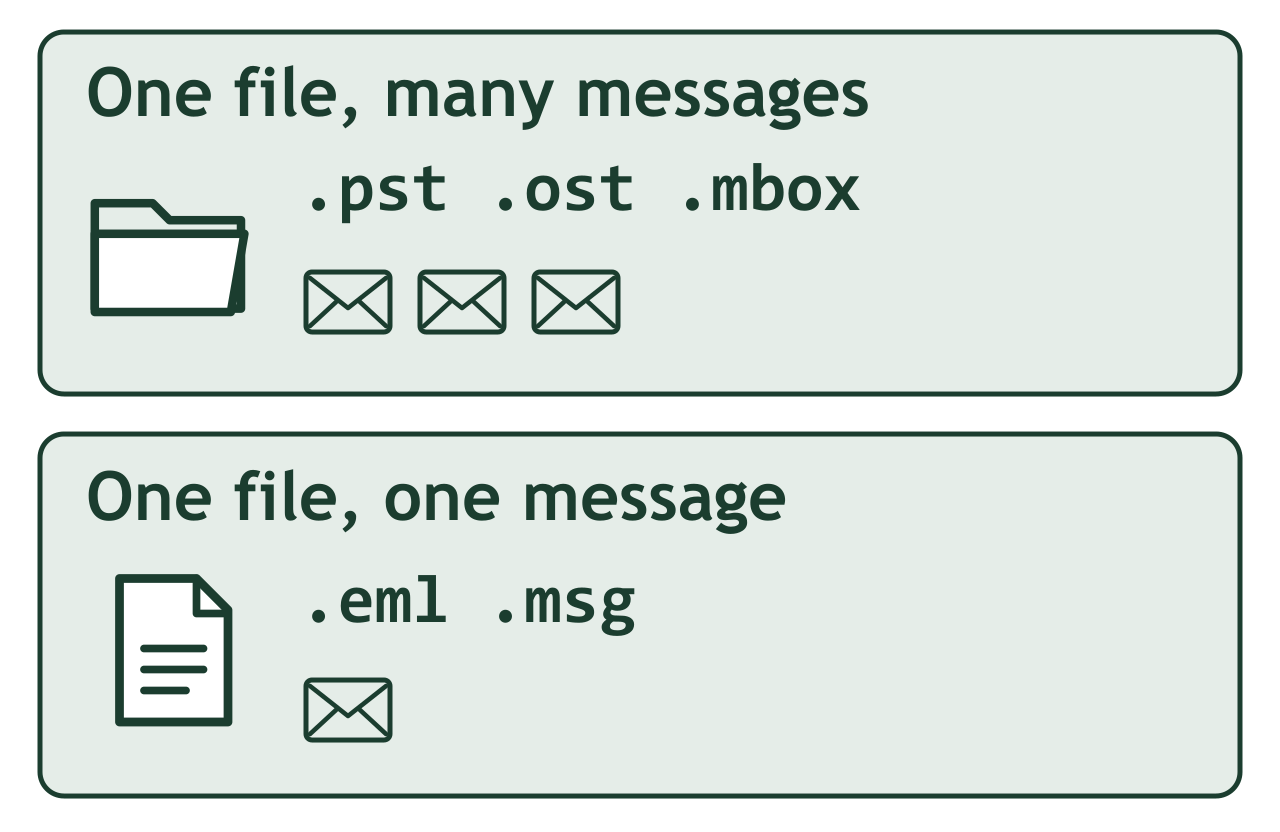
Figure 12.4: A single mailbox file can contain an entire collection. An individual message file can include the message body and its attachments.
Text description of Figure 12.4
Email File Format Comparison
| Format | Associated Client | Storage Model | Acquisition Method | Deleted Message Recovery |
|---|---|---|---|---|
| PST | Microsoft Outlook | Single database file, multiple messages | Image user profile directory; extract PST | Internal database may retain deleted items |
| OST | Outlook (Exchange/M365) | Offline cache database | Image user profile directory; extract OST | Mirrors server state; deleted items may persist locally |
| MBOX | Thunderbird, Linux mail clients | Plain-text concatenated file | Image mail directory; copy MBOX files | Deleted messages removed from file; use disk-level recovery |
| EML | Various (export format) | One file per message | Collect individual files | Standard file deletion recovery applies |
| MSG | Microsoft Outlook | One binary file per message | Collect individual files | Standard file deletion recovery applies |
Cloud Email Acquisition
The majority of email today resides in cloud-hosted platforms rather than on local servers. Acquiring this evidence requires approaches distinct from traditional disk imaging.
Microsoft 365 (Exchange Online) Microsoft provides several mechanisms for email acquisition depending on the requester's role:
- Microsoft Purview eDiscovery: In the Microsoft Purview portal, authorized administrators create an eDiscovery case, place the custodian's mailbox on hold (preserving all content, including deleted items in the Recoverable Items folder), search the mailbox, and export the results, commonly as PST files.
- On-premises Exchange export: For mailboxes hosted on an on-premises Exchange server, administrators can export a mailbox to PST with the
New-MailboxExportRequestcmdlet. This cmdlet is not available in Exchange Online, so cloud mailboxes are exported through Purview.
Google Workspace (Gmail) Google provides parallel capabilities for organizational accounts:
- Google Vault: The compliance and eDiscovery tool for Google Workspace. Administrators can place holds, search, and export email in MBOX or PST format.
- Google Takeout: Available to individual account holders, Takeout exports the entire Gmail mailbox in MBOX format.
Individual/Consumer Accounts For personal accounts (Gmail, Outlook.com, Yahoo) outside of organizational control, acquisition typically requires one of the following:
- A legal process (subpoena, search warrant, or court order) served to the provider.
- The account holder's voluntary cooperation to perform a data export.
- A forensic image of the device where the account is accessed, capturing cached data and browser artifacts.
In the United States, legal process for provider-held email is governed by the Stored Communications Act (18 U.S.C. §§ 2701-2713), which Section 12.8 covers in more detail. The CLOUD Act (2018) amended that law so that U.S. providers must produce data in their possession, custody, or control in response to valid U.S. legal process, even when the data is stored on servers outside the United States.
Analyst Perspective
When working with cloud email, ask the organization to place a legal hold before you begin the investigation. Cloud platforms automatically purge deleted items after a retention period. Microsoft 365 keeps deleted items for 14 days by default (configurable up to 30), and Gmail empties Trash after 30 days. A legal hold suspends this automatic deletion, preserving evidence that might otherwise be permanently lost before you can acquire it.
Maintaining Chain of Custody
Regardless of the acquisition method, the examiner must document and verify the integrity of acquired email data:
- Hash the source before and after acquisition to confirm no modification occurred.
- Document the acquisition method in your case notes (tool used, account accessed, date/time, who performed the export).
- Hash the exported files immediately upon receipt.
- Store exports on write-protected or access-controlled media.
For cloud acquisitions where you cannot hash the source mailbox directly, document the export tool, the search parameters used, the export timestamp, and preserve the platform's export confirmation or audit logs as supporting evidence.
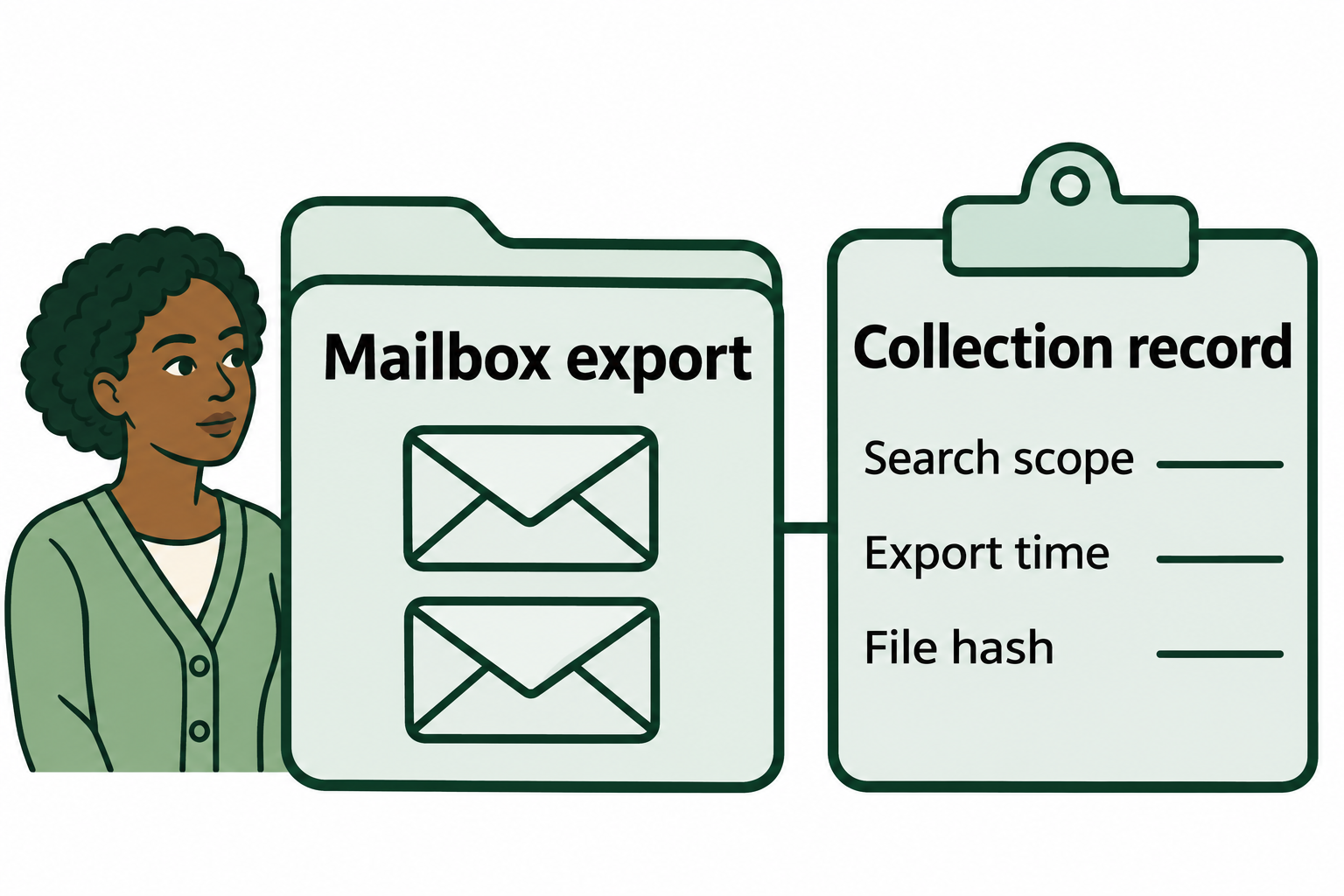
Figure 12.5: The collection record preserves how the examiner obtained the export. A file hash, a fingerprint calculated from the file’s bytes, lets another examiner check the copy later.
Text description of Figure 12.5
12.4 Email Header Analysis
Email header analysis is a core technical skill in email forensics. The message body shows what was said. The headers show where the message came from, what infrastructure it passed through, and whether the receiving server was able to authenticate it. Every email message contains a block of header fields that are normally hidden from the end user but are fully accessible to a forensic examiner.
Anatomy of an Email Header
Email headers are a series of key-value pairs, each on its own line, prepended to the message body during composition and transit. Headers are added from the bottom up: the oldest header (generated by the sender's mail client) appears at the bottom of the header block, and each subsequent server that handles the message adds its own headers above the previous ones. This means you read the routing path from bottom to top to trace the message chronologically.
A complete email header block can contain dozens of fields. The following are the headers most relevant to forensic analysis:
| Header Field | Purpose | Forensic Significance |
|---|---|---|
| From | Displays the sender's name and email address | Easily spoofed; do not trust in isolation |
| To / CC / BCC | Lists recipients | BCC headers are stripped before delivery. A BCC header in recovered mail usually indicates the sender's own copy |
| Date | Timestamp set by the sender's mail client | Can be falsified; compare against Received timestamps |
| Subject | Message subject line | Content indicator; useful for search and correlation |
| Message-ID | Unique identifier, usually generated by the sender's mail client or submission server | Used to correlate a message across mailboxes and server logs. The sending software can set any value, so it does not prove origin |
| Return-Path | Address for bounce/non-delivery reports | Set during SMTP envelope; may differ from From header in spoofed messages |
| Reply-To | Address replies are directed to | Commonly manipulated in phishing to redirect responses to the attacker |
| Received | Routing entry added by each MTA that handles the message | The primary header for route tracing. Forms a traceable chain from origin to destination |
| X-Originating-IP | IP address of the client that submitted the message | Not universally present; when available, directly identifies the sender's network location |
| X-Mailer / User-Agent | Identifies the email client software used | Useful for profiling the sender's environment |
| MIME-Version | Indicates the message uses MIME encoding | Standard in modern email; its absence is anomalous |
| Content-Type | Specifies the media type and encoding of the body | Determines how attachments and multipart messages are structured |
| Authentication-Results | SPF, DKIM, and DMARC verification outcomes | Records whether the receiving server could authenticate the message or flagged it as possible spoofing |
Reading the Received Chain
The Received headers are the main source for email route tracing. Each server that processes the message prepends a Received header documenting what server received the message, where it received it from, the protocol used, and a timestamp.
A typical Received header follows this structure:
Received: from sending-server.example.com (sending-server.example.com [203.0.113.45])
        by receiving-server.example.net (Postfix) with ESMTPS id A1B2C3D4
        for <recipient@example.net>; Wed, 15 Jan 2025 09:23:17 -0500 (EST)
Breaking this down:
- from: The hostname (and sometimes IP address) the sending server identified itself as.
- by: The hostname of the receiving server that generated this header.
- with: The protocol used (ESMTP, ESMTPS for encrypted, etc.).
- id: The receiving server's internal transaction ID (useful for correlating with server logs).
- for: The intended recipient.
- Timestamp: The date, time, and timezone offset when the receiving server processed the message.
To trace an email's path, start at the bottom-most Received header (the first server to handle the message) and work upward. Each hop represents a server-to-server handoff. Gaps in the chain, mismatched hostnames, or IP addresses that resolve to unexpected locations are red flags.
Warning
Only the Received headers added by servers you trust, such as the recipient organization's own mail servers, are reliable records. A sender can insert fabricated Received headers at the bottom of the block before the message is sent. Treat any entry below the first trusted hop as a claim to verify against other evidence.
Header Examples: Legitimate and Spoofed
The examples below use domains under the reserved .example top-level domain and IP addresses from documentation-only ranges (RFC 2606 and RFC 5737), so they do not point to real organizations or hosts. The receiving organization in both examples hosts its mail on Google Workspace, so Google's mail servers appear in the headers.
Example 1: Legitimate Corporate Email
The following header block represents a normal message sent from a corporate employee through their organization's Exchange server to an external recipient:
Delivered-To: analyst@ovaccounting.example
Received: by 2002:a05:6a00:1234:0:0:0:0 with SMTP id ab12cde34;
        Wed, 15 Jan 2025 06:23:22 -0800 (PST)
Received: from mail-out.quillfeatherfab.example (mail-out.quillfeatherfab.example [198.51.100.25])
        by mx.google.com with ESMTPS id xyz789
        for <analyst@ovaccounting.example>;
        Wed, 15 Jan 2025 06:23:21 -0800 (PST)
Authentication-Results: mx.google.com;
        dkim=pass header.d=quillfeatherfab.example header.s=selector1;
        spf=pass (google.com: domain of dkirkwell@quillfeatherfab.example designates 198.51.100.25 as permitted sender) smtp.mailfrom=dkirkwell@quillfeatherfab.example;
        dmarc=pass (p=QUARANTINE dis=NONE) header.from=quillfeatherfab.example
Received: from EXCHMB01.internal.quillfeatherfab.example (10.0.1.50) by
        mail-out.quillfeatherfab.example (198.51.100.25) with Microsoft SMTP Server
        (TLS) id 15.1.2507.35; Wed, 15 Jan 2025 09:23:18 -0500
From: "Dana Kirkwell" <dkirkwell@quillfeatherfab.example>
To: "Forensic Analyst" <analyst@ovaccounting.example>
Subject: Q4 Financial Summary
Date: Wed, 15 Jan 2025 09:23:15 -0500
Message-ID: <abc123def456@EXCHMB01.internal.quillfeatherfab.example>
X-Mailer: Microsoft Outlook 16.0
MIME-Version: 1.0
Content-Type: multipart/mixed; boundary="----=_NextPart_001"
What makes this header trustworthy:
- The
Receivedchain is consistent: the message originates from an internal Exchange server (EXCHMB01.internal.quillfeatherfab.example), passes through the organization's outbound relay (mail-out.quillfeatherfab.exampleat198.51.100.25), and arrives at Google's mail server. - All three authentication checks pass: DKIM verifies the message was signed by
quillfeatherfab.example, SPF confirms the sending IP is authorized, and DMARC passes. Thep=QUARANTINEvalue shows the domain owner has told receiving servers to send failing messages to the spam folder. - The
Message-IDdomain matches the internal Exchange server. - Timestamps across all
Receivedheaders are consistent and chronologically logical.
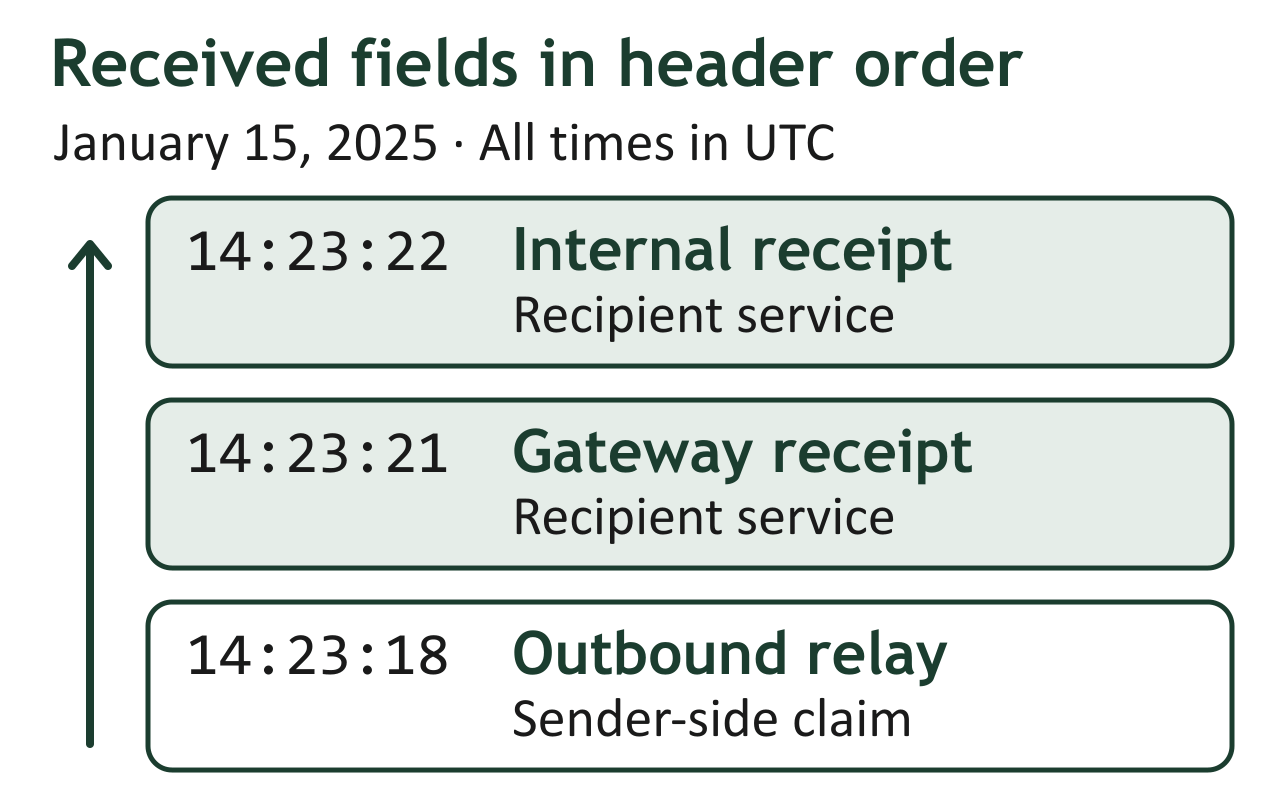
Figure 12.6: Converting the first header example to Coordinated Universal Time (UTC) puts the three reported handoffs four seconds apart from first to last.
Text description of Figure 12.6
Example 2: Suspicious/Spoofed Email
The following header block represents a phishing email that attempts to impersonate the same organization:
Delivered-To: analyst@ovaccounting.example
Received: by 2002:a05:6a00:1234:0:0:0:0 with SMTP id ab12cde34;
        Wed, 15 Jan 2025 06:45:03 -0800 (PST)
Received: from unknown (unknown [203.0.113.77])
        by mx.google.com with SMTP id bad456
        for <analyst@ovaccounting.example>;
        Wed, 15 Jan 2025 06:45:02 -0800 (PST)
Authentication-Results: mx.google.com;
        dkim=none (message not signed);
        spf=fail (google.com: domain of dkirkwell@quillfeatherfab.example does not designate 203.0.113.77 as permitted sender) smtp.mailfrom=dkirkwell@quillfeatherfab.example;
        dmarc=fail (p=QUARANTINE dis=QUARANTINE) header.from=quillfeatherfab.example
Received: from localhost (localhost [127.0.0.1])
        by mailserver.budget-vps-host.example (Postfix) with ESMTP id F9E8D7C6;
        Wed, 15 Jan 2025 14:44:58 +0000 (UTC)
From: "Dana Kirkwell" <dkirkwell@quillfeatherfab.example>
Reply-To: dkirkwell.qff@freemail-relay.example
To: "Forensic Analyst" <analyst@ovaccounting.example>
Subject: URGENT: Q4 Financial Summary - Action Required
Date: Wed, 15 Jan 2025 09:44:55 -0500
Message-ID: <randomstring8842@budget-vps-host.example>
X-Mailer: PHPMailer 6.8.0
MIME-Version: 1.0
Content-Type: multipart/mixed; boundary="----=_Part_8842"
Red flags an examiner should identify:
- Authentication failures: SPF fails because
203.0.113.77is not authorized to send forquillfeatherfab.example. DKIM returnsnonebecause the message carries no DKIM signature. DMARC fails, anddis=QUARANTINEshows that the receiving server applied the domain's policy and placed the message in the spam folder. Users do open messages from spam folders, which is one way phishing still reaches its targets. - Received chain inconsistency: The message originates from
localhoston a budget hosting provider (budget-vps-host.example) instead of the company's own mail infrastructure. - Reply-To mismatch: The
Fromaddress showsdkirkwell@quillfeatherfab.example, butReply-Toredirects responses to a free webmail address outside the company's domain. Attackers use this technique to capture replies. - Message-ID domain mismatch: The
Message-IDreferencesbudget-vps-host.exampleinstead of the company's domain. - X-Mailer discrepancy: The legitimate email was sent from Microsoft Outlook. This one was generated by PHPMailer, a server-side scripting library commonly used in automated phishing campaigns.
- Social engineering indicators: "URGENT" in the subject line and "Action Required" are pressure tactics.
Email Authentication: SPF, DKIM, and DMARC
Modern email infrastructure includes three complementary authentication mechanisms designed to combat spoofing and phishing. Their results, recorded in the Authentication-Results header, give the examiner machine-verified evidence about whether a message came from infrastructure the domain owner authorized.
SPF (Sender Policy Framework)
SPF allows a domain owner to publish a DNS TXT record specifying which IP addresses and servers are authorized to send email on behalf of that domain. When a receiving MTA accepts a message, it checks the sending server's IP address against the SPF record for the domain in the MAIL FROM (envelope sender) field.
- pass: The sending IP is explicitly authorized. The message came from legitimate infrastructure.
- fail: The sending IP is not authorized. The message is likely spoofed.
- softfail: The IP is not authorized, but the domain owner has not set a hard reject policy (often seen during SPF deployment).
- none: No SPF record exists for the domain.
- neutral, permerror, or temperror: The domain makes no assertion about the IP, the SPF record is malformed, or a temporary DNS error occurred. None of these results supports a spoofing conclusion on its own.
DKIM (DomainKeys Identified Mail)
DKIM provides cryptographic verification that the message content has not been altered in transit. The sending server generates a digital signature of specified header fields and the message body using a private key. It attaches the signature as a DKIM-Signature header. The receiving server retrieves the corresponding public key from the sender's DNS records and verifies the signature.
- pass: The signature is valid. The message content has not been modified since it left the signing server.
- fail: The signature does not match. Either the message was altered in transit, or it was forged.
- none: The message carries no DKIM signature, which is common in spoofed messages sent from infrastructure the attacker controls.
DMARC (Domain-based Message Authentication, Reporting, and Conformance)
DMARC ties SPF and DKIM together and adds a policy layer. A domain owner publishes a DMARC DNS record that specifies what receiving servers should do when a message fails authentication: none (monitor only), quarantine (send to spam), or reject (block delivery). DMARC also requires alignment, meaning the domain in the From header must match the domain verified by SPF or DKIM. Under the default relaxed alignment, a subdomain such as mail.example.com aligns with example.com. Strict alignment requires an exact match.
- pass: The message passed either SPF or DKIM (or both) with proper domain alignment.
- fail: The message failed both SPF and DKIM alignment checks. The DMARC policy dictates the action.
Adoption of these controls increased after Google and Yahoo began requiring SPF, DKIM, and DMARC from bulk senders in February 2024. Microsoft applied similar requirements to Outlook.com, Hotmail.com, and Live.com in May 2025. As a result, most legitimate commercial mail now carries authentication results an examiner can evaluate.
Warning
A message that passes SPF and DKIM is not automatically trustworthy. SPF only verifies that the sending server's IP is authorized for the domain and says nothing about who wrote the message. DKIM verifies that the signed content is unaltered and that the signing domain controlled the key, which also says nothing about which person sent it. A compromised legitimate account will send emails that pass all three checks. Authentication results describe the sending infrastructure. Content analysis and a review of account activity are needed to determine whether the person using the account was authorized. Also confirm that the Authentication-Results header you rely on was added by the recipient's own mail server, because a sender can insert a fabricated one lower in the header block.
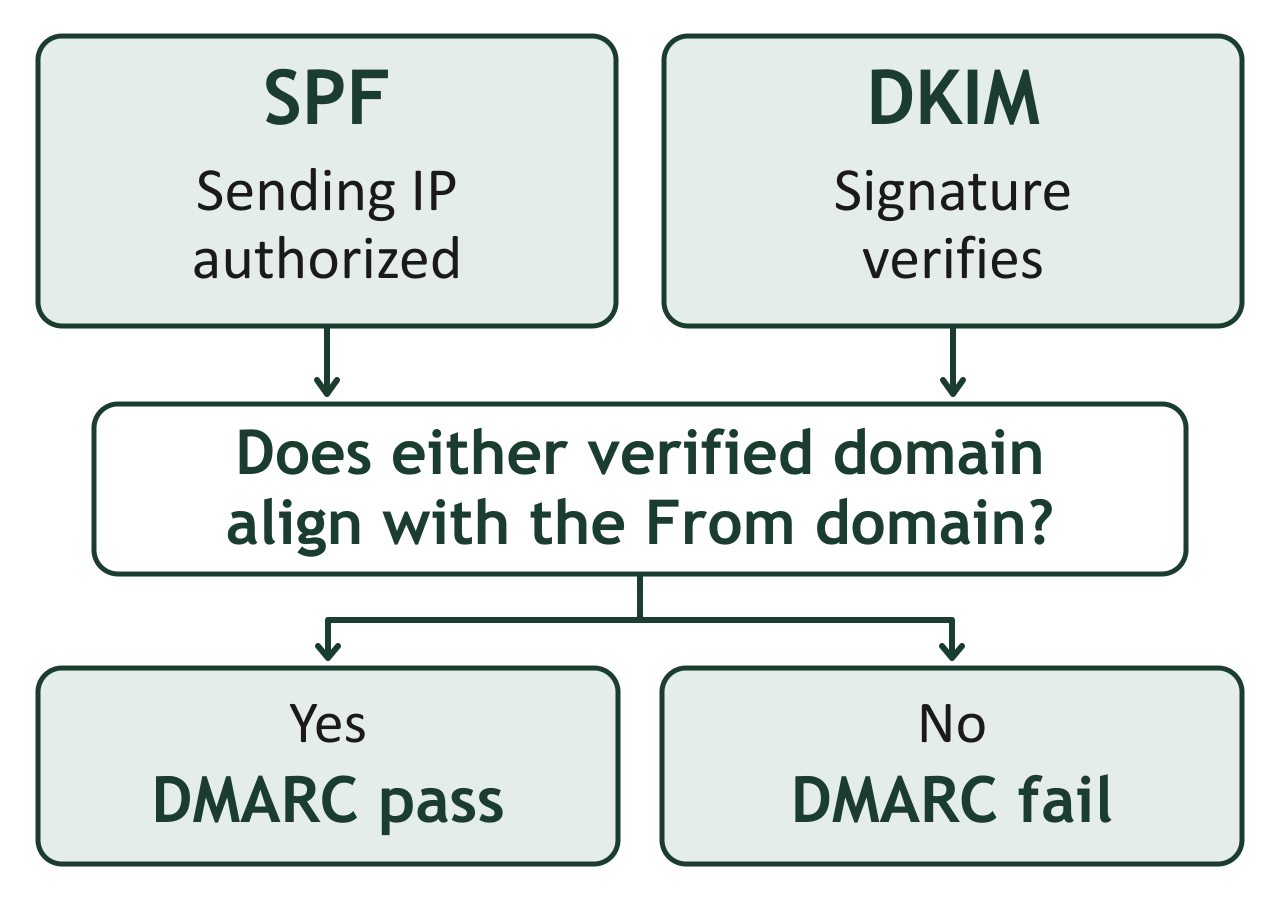
Figure 12.7: For a message subject to DMARC, one passing check with an aligned domain is sufficient. The result describes the domain a receiver could authenticate.
Text description of Figure 12.7
Putting It Together: Analyzing a Phishing Email
You receive a case referral from a corporate HR department. An employee in the accounting department received an email appearing to be from the CFO, instructing them to wire $47,000 to a new vendor account. The employee complied before realizing the request was unusual.
Step 1: Acquire the original email. Request the raw message source (including full headers) from the employee's mailbox. If the organization uses Microsoft 365, export the message through Microsoft Purview eDiscovery so the original is preserved with its full headers. For quick triage, the headers are also visible in classic Outlook (open the message, then File > Properties) and in the new Outlook and Outlook on the web (View > View message details).
Simplified header example (synthetic): This excerpt includes the fields used in the analysis below. The domains and IP address are reserved examples; the server's geographic location in Step 3 would require separate verification in a real case.
Received: from vps.budget-host.example ([203.0.113.77])
        by mx.quillfeatherfab.example with ESMTP id QFF47000;
        Wed, 15 Jan 2025 09:45:02 -0500
Authentication-Results: mx.quillfeatherfab.example;
        spf=fail smtp.mailfrom=cfo@quillfeatherfab.example;
        dkim=none;
        dmarc=fail header.from=quillfeatherfab.example
From: "Dana Kirkwell (CFO)" <cfo@quillfeatherfab.example>
Reply-To: cfo@quillfeather-fab.example
To: accounting@quillfeatherfab.example
Subject: Urgent: Wire $47,000 to new vendor account
Date: Wed, 15 Jan 2025 09:45:00 -0500
Message-ID: <wire47000@vps.budget-host.example>
X-Mailer: Python smtplib
Step 2: Examine the authentication results. You check the Authentication-Results header and find: SPF=fail, DKIM=none, DMARC=fail. This immediately confirms the message did not originate from the CFO's actual email infrastructure.
Step 3: Trace the Received chain. Reading from bottom to top, you identify the originating server as a VPS hosted by a cloud provider in Eastern Europe. The IP address does not belong to the company's mail infrastructure.
Step 4: Identify spoofing artifacts. The From header displays the CFO's name and address, but the Reply-To field points to a lookalike domain (quillfeather-fab.example instead of quillfeatherfab.example). The X-Mailer header shows the message was generated by a Python script rather than Outlook.
Step 5: Correlate with server logs. You request SMTP transaction logs from the company's inbound mail gateway. The logs confirm the message was received from the Eastern European IP and flagged with a high spam score, but it was delivered to the inbox due to a misconfigured spam filter threshold.
Step 6: Document and report. You compile the header analysis, server log correlation, authentication failures, and the identified originating infrastructure into a forensic report. The spoofed email, the legitimate CFO's actual email for comparison, and the server logs together establish that the message was fraudulent.
12.5 Email Server Logs
While email headers are embedded in individual messages, server logs provide a broader view of email activity across an entire organization. Logs record every SMTP transaction, including messages that were rejected, deferred, or bounced, giving examiners visibility into communications that may never have reached a user's inbox.
What Server Logs Capture
Email server logs document the server-side processing of every message transaction. Key data points include:
- Timestamps for each event (message received, queued, delivered, bounced)
- Source and destination IP addresses
- Sender and recipient email addresses (envelope-level, from the SMTP transaction)
- Message-ID (correlates with the header in the actual message)
- Message size (useful for identifying whether attachments were present)
- Delivery status (delivered, deferred, bounced, rejected)
- TLS encryption status (whether the connection was encrypted)
- Queue IDs (internal tracking identifiers for each transaction)
Windows: Microsoft Exchange Message Tracking Logs
In organizations running Microsoft Exchange (on-premises or hybrid), the primary forensic resource is the Message Tracking Log. Exchange records detailed information about every message that passes through its transport pipeline.
Log Location (Exchange Server 2016, 2019, and Subscription Edition):
C:\Program Files\Microsoft\Exchange Server\V15\TransportRoles\Logs\MessageTracking\
Exchange Server 2016 and 2019 reached end of support on October 14, 2025. Exchange Server Subscription Edition (SE), released in July 2025, is now the supported on-premises version and uses the same V15 folder structure. Examiners still encounter unsupported versions regularly, so record the Exchange version and build in your notes.
Log Format: CSV files with filenames based on date (e.g., MSGTRK20250115-1.LOG). Each row represents a single event in the message lifecycle.
Key Fields:
| Field | Description |
|---|---|
| date-time | UTC timestamp of the event |
| client-ip | IP address of the sending client or server |
| client-hostname | Hostname of the sending system |
| server-ip | IP address of the Exchange server processing the event |
| sender-address | SMTP address of the sender (envelope) |
| recipient-address | SMTP address of the recipient(s) |
| message-subject | Subject line of the message |
| message-id | Message-ID header value |
| event-id | Type of event: RECEIVE, SEND, DELIVER, FAIL, etc. |
| total-bytes | Size of the message including attachments |
| directionality | Originating, Incoming, or Undefined |
Querying Exchange Logs with PowerShell:
Exchange provides the Get-MessageTrackingLog cmdlet for structured searches. For example, to find all messages sent by a specific user during a date range:
Get-MessageTrackingLog -Sender "dkirkwell@quillfeatherfab.example" -Start "01/10/2025 00:00:00" -End "01/20/2025 23:59:59" -EventId SEND | Format-Table Timestamp, Sender, Recipients, MessageSubject
For Exchange Online (Microsoft 365), the equivalent is Message Trace, available in the Exchange admin center under Mail flow > Message trace and in PowerShell through the Get-MessageTraceV2 cmdlet. Microsoft began retiring the older Get-MessageTrace cmdlet on September 1, 2025, so scripts and tutorials that still use it are out of date:
Get-MessageTraceV2 -SenderAddress "dkirkwell@quillfeatherfab.example" -StartDate "01/10/2025" -EndDate "01/20/2025" | Format-Table Received, SenderAddress, RecipientAddress, Subject, Status
Analyst Perspective
Exchange Online message trace covers only the most recent 90 days, and each Get-MessageTraceV2 query returns at most 10 days of data, so longer ranges must be split into several queries. For investigations requiring older data, the organization must have Microsoft Purview audit and retention features or a third-party archiving solution in place. Always confirm the retention period early in your investigation.
Linux: Postfix Mail Logs
On Linux systems running Postfix (one of the most widely deployed open-source MTAs), email transaction logs are written to the system log facility.
Log Location:
- Debian/Ubuntu:
/var/log/mail.log - RHEL, Rocky Linux, and AlmaLinux:
/var/log/maillog
These files exist only when a syslog daemon such as rsyslog is installed. Debian 12 and later no longer install rsyslog by default, so on those systems Postfix events may exist only in the systemd journal. Query the journal with journalctl -u 'postfix*' and save the output to a file for analysis.
Log Format: Each line is a syslog entry with a timestamp, hostname, process name, queue ID, and event details. Unlike Exchange's structured CSV, Postfix logs are free-form text that requires parsing.
Example Postfix Log Sequence (Single Message):
Jan 15 09:23:15 mailserver postfix/smtpd[12345]: connect from sender-relay.example.com[203.0.113.45]
Jan 15 09:23:15 mailserver postfix/smtpd[12345]: 4F2E1A8B9C: client=sender-relay.example.com[203.0.113.45]
Jan 15 09:23:16 mailserver postfix/cleanup[12346]: 4F2E1A8B9C: message-id=<abc123@example.com>
Jan 15 09:23:16 mailserver postfix/qmgr[1001]: 4F2E1A8B9C: from=<dkirkwell@example.com>, size=15234, nrcpt=1 (queue active)
Jan 15 09:23:17 mailserver postfix/smtp[12347]: 4F2E1A8B9C: to=<recipient@example.net>, relay=mx.example.net[198.51.100.10]:25, delay=1.8, delays=0.5/0.1/0.8/0.4, dsn=2.0.0, status=sent (250 2.0.0 Ok: queued as 7D3F2B1A)
Jan 15 09:23:17 mailserver postfix/qmgr[1001]: 4F2E1A8B9C: removed
Reading This Log:
- Connection: The remote server at
203.0.113.45connects to the local Postfix instance. - Queue assignment: The message is assigned queue ID
4F2E1A8B9C. - Message identification: The
Message-IDheader is logged. - Queue processing: The sender address, message size, and recipient count are recorded.
- Delivery: The message is relayed to the recipient's MX server. The
status=sentwith DSN code2.0.0confirms successful delivery. The remote server's queue ID (7D3F2B1A) is also recorded, enabling cross-server correlation. - Queue removal: The message is removed from the local queue after successful delivery.
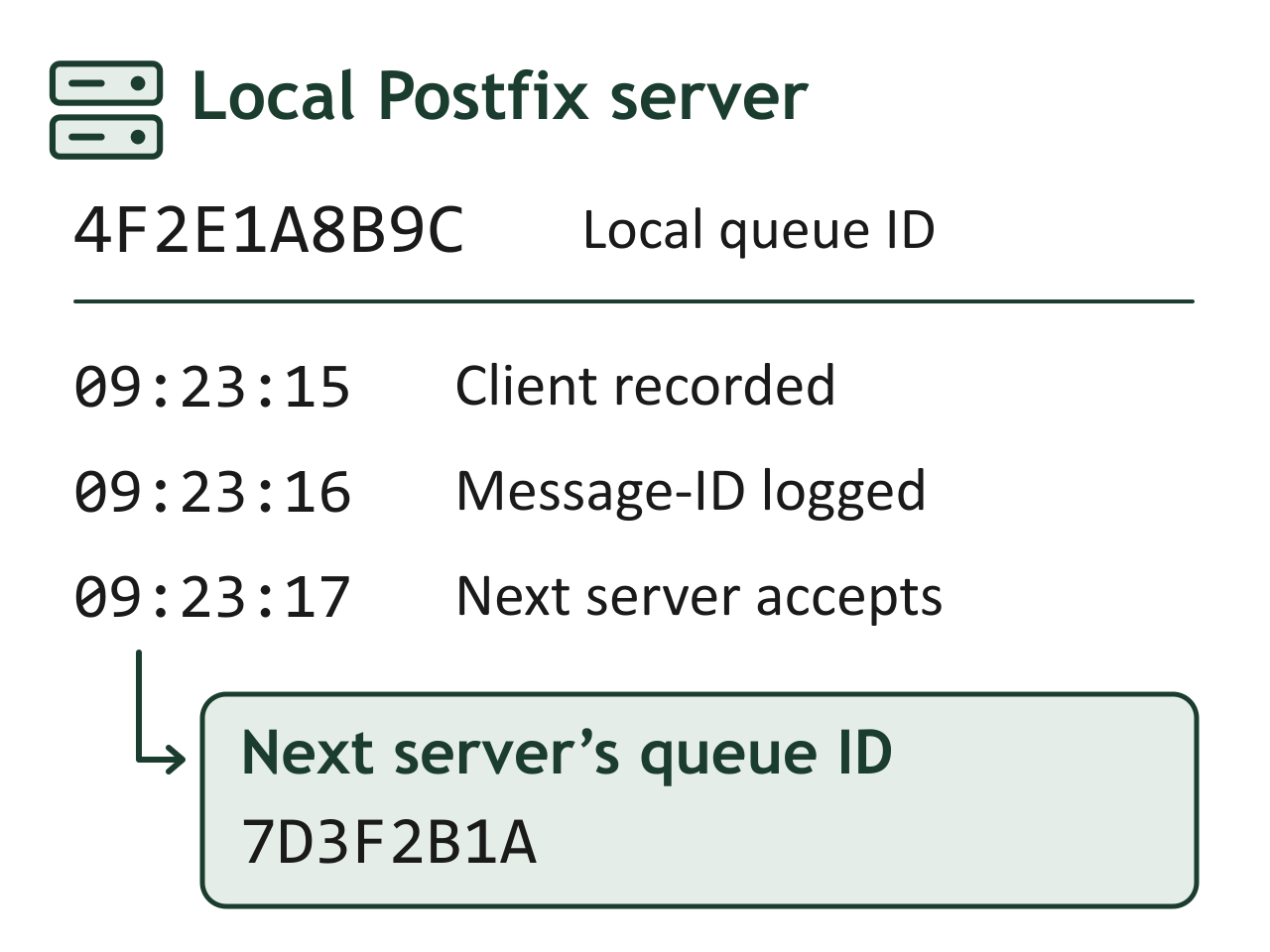
Figure 12.8: The Postfix log records the next server accepting the message at 09:23:17. Its reply gives the examiner a new queue identifier to look up.
Text description of Figure 12.8
Useful Command-Line Queries:
To find all messages from a specific sender:
grep "from=<dkirkwell@example.com>" /var/log/mail.log
To trace all events for a specific queue ID:
grep "4F2E1A8B9C" /var/log/mail.log
To identify all rejected or bounced messages:
grep -E "status=(bounced|deferred|reject)" /var/log/mail.log
Warning
Timestamps in email server logs are central to timeline reconstruction, but they are only as reliable as the server's clock. Verify that the server uses NTP (Network Time Protocol) synchronization. Clock skew between the sending and receiving servers can make messages appear to arrive before they were sent, creating confusion in cross-server timeline analysis. Always document the NTP configuration status of any server whose logs you use as evidence.
Log Retention and Preservation
Email server logs are frequently subject to automatic rotation and deletion. Linux systems typically use logrotate to compress and eventually purge old logs, often retaining only 4 to 12 weeks of history. Exchange keeps message tracking logs for 30 days by default and also deletes the oldest files when the log directory reaches its configured size limit.
When an investigation begins, the examiner or the organization's IT team should immediately preserve current logs by copying them to write-protected storage and disabling automatic rotation for the relevant log files. Failure to preserve logs early is one of the most common reasons relevant email evidence is lost.
Example: Configure Mail Log Retention
Log rotation moves the current log into an archive so the logging service can start a new file. On an Ubuntu server where rsyslog writes /var/log/mail.log, the following example retains 12 weekly archives. Edit the existing rule in /etc/logrotate.d/rsyslog, preserving its other log paths and system-specific settings. If the rule lists several logs, its settings apply to all of them.
/var/log/mail.log {
    weekly
    rotate 12
    missingok
    notifempty
    compress
    delaycompress
    postrotate
        /usr/lib/rsyslog/rsyslog-rotate
    endscript
}
| Setting | Effect |
|---|---|
weekly |
Rotate once per week when the scheduled logrotate job runs. |
rotate 12 |
Keep up to 12 rotated files. Remove the oldest when another rotation would exceed that count. |
missingok |
Skip a missing log without reporting an error. |
notifempty |
Skip rotation if the log is empty. |
compress |
Compress archived logs to save disk space. |
delaycompress |
Leave the newest archive uncompressed until the next rotation. |
postrotate ... endscript |
Run the enclosed command after rotation. This Ubuntu helper tells rsyslog to reopen its log files. |
The helper path comes from the Ubuntu rsyslog package configuration. Other distributions may use a different command.
With successful weekly rotations, this keeps about 12 weeks of archived logs plus the active file. The rotate setting counts files, so the actual time covered depends on the rotation schedule and any other retention limits. See the logrotate manual for the directive definitions. Keep preserved evidence copies outside this automatic deletion policy.
12.6 Specialized Email Forensics Tools
Email forensics involves distinct phases: acquisition, parsing and viewing, analysis, and reporting. No single tool handles every phase equally well, and experienced examiners assemble a toolkit that combines open-source utilities with commercial platforms as needed. This section surveys the major tool categories and highlights where each fits in a forensic workflow.
Acquisition Tools
Acquisition tools extract email data from its source (a local client, a server, or a cloud platform) in a forensically sound manner.
- Autopsy (Email Module): Autopsy's built-in email parser can ingest PST, MBOX, and EML files from a forensic disk image. It extracts messages, attachments, and metadata into a searchable, indexed format within the case database. As an open-source tool, Autopsy is well-suited for labs that need auditable processing.
- readpst (Linux): A command-line utility from the libpst package that converts Microsoft PST files into MBOX format or individual EML files on Linux systems. Useful when the forensic workstation runs Linux and the evidence is in Outlook format.
- Google Vault / Microsoft Purview: As discussed in Section 12.3, these are the primary acquisition mechanisms for cloud-hosted email in organizational environments. They are compliance tools built into the platforms, and they produce the exports that forensic tools then analyze.
- Forensic Email Collector (Metaspike): A commercial tool that acquires mail directly from servers such as Microsoft 365 and Gmail, logging each step and hashing the collected items so the acquisition can be documented and verified.
Parsing and Viewing Tools
Once email data is acquired, parsing tools extract and display the content, metadata, and structure of individual messages.
- Aid4Mail: A Windows tool that can convert, migrate, filter, and search email across dozens of formats (PST, OST, MBOX, EML, MSG, Thunderbird, Gmail). Its Investigator and Enterprise editions add forensic features such as metadata preservation, hash verification, and recovery of deleted messages. It is particularly useful for format conversion when the analysis tool does not natively support the source format.
- Kernel OST Viewer / PST Viewer: Free viewers that open Outlook data files without requiring Microsoft Outlook to be installed. Useful for quick triage on forensic workstations that do not have Office licenses.
- Command-line MBOX parsing (Linux): Because MBOX is plain text, standard tools such as
grep,awk, andsed, or short Python scripts using the standard librarymailboxmodule, can search and filter large MBOX files on a Linux workstation.
Analysis and Examination Suites
Analysis tools go beyond viewing to provide search, filtering, timeline construction, relationship mapping, and reporting capabilities.
- MailXaminer (SysTools): A commercial email forensics platform that supports a wide range of email file formats and webmail sources. It provides keyword search, email threading, attachment analysis, header analysis, and generates court-ready reports. It includes a built-in email header analyzer and supports hash-based deduplication.
- Paraben E3 (Electronic Evidence Examiner): Paraben's email analysis features, once sold as the standalone E-mail Examiner, are now part of the E3 platform. E3 processes local mail archives such as PST, OST, and MBOX and, with the appropriate license, network mail stores such as Exchange EDB files. It supports recovery of deleted items from PST databases, attachment extraction, deduplication, and export to PST, EML, or MSG.
- X-Ways Forensics: While primarily a general-purpose forensic suite, X-Ways includes robust email parsing for PST, OST, MBOX, and individual message files. Its strength is in processing email alongside other disk artifacts in a unified case environment.
- FTK (Forensic Toolkit): Exterro FTK (originally developed by AccessData) processes email as part of its full-disk analysis pipeline. It automatically parses PST and MBOX files found on forensic images, indexing their content for search alongside all other evidence.
Header Analysis Utilities
Dedicated header analysis tools simplify the process of parsing and interpreting raw email headers.
- MXToolbox Email Header Analyzer: A free web-based tool that accepts raw headers and produces a formatted, color-coded breakdown of the routing chain, timestamps, and authentication results. Useful for quick triage but requires uploading header data to a third-party service (consider sensitivity).
- Google Admin Toolbox Messageheader: Google's free header analysis tool that visualizes the message path and calculates delays between each hop. Particularly useful for identifying where delivery delays or anomalies occurred.
- Command-line approaches: For examiners who prefer not to use web-based tools, raw headers can be parsed with standard text processing tools (
grep,awk) or custom Python scripts using theemailstandard library module.
Decoding and Defanging with CyberChef
CyberChef (developed by GCHQ) is a free, browser-based data manipulation tool that forensic examiners use extensively during email investigations. It operates as a drag-and-drop "recipe" builder: you drag operations into a recipe, set each operation's arguments (CyberChef calls these ingredients), and the operations run in sequence to decode, transform, or analyze data. CyberChef can run entirely offline by downloading the standalone HTML file, which makes it safe to use with sensitive case data without transmitting anything to a third party.
Common CyberChef operations in email forensics include:
- Base64 decoding: Email attachments, MIME-encoded content, and obfuscated payloads frequently use Base64 encoding. CyberChef's "From Base64" operation instantly decodes these into readable text or extractable binary files. Chaining "From Base64" with "Render Image" lets you preview encoded image attachments directly.
- Quoted-Printable decoding: Email bodies encoded with Quoted-Printable (common in HTML emails) can be decoded using the "From Quoted Printable" operation, revealing the original text or HTML content.
- URL and email defanging/refanging: When documenting malicious URLs or email addresses in reports, examiners defang them (e.g., converting
http://invoice-update.example/logintohxxp[://]invoice-update[.]example/login) to prevent accidental clicks. CyberChef's "Defang URL" and "Defang IP Addresses" operations automate this. The reverse operations ("Refang URL") restore live links when you need to investigate them in a sandboxed environment. - Header field decoding: Internationalized email headers use RFC 2047 encoded-word syntax (e.g.,
=?UTF-8?B?...?=). CyberChef can decode these into readable text by chaining "From Base64" or "From Quoted Printable" after extracting the encoded portion. - Hash generation: CyberChef generates MD5, SHA-1, SHA-256, and other hash values for any input, allowing you to quickly hash extracted attachments or message content for evidence documentation.
- Extracting indicators of compromise (IOCs): The "Extract URLs," "Extract Email Addresses," and "Extract IP Addresses" operations pull all IOCs from a raw email body or header block in a single step, producing a clean list for further investigation or blocklist submission.
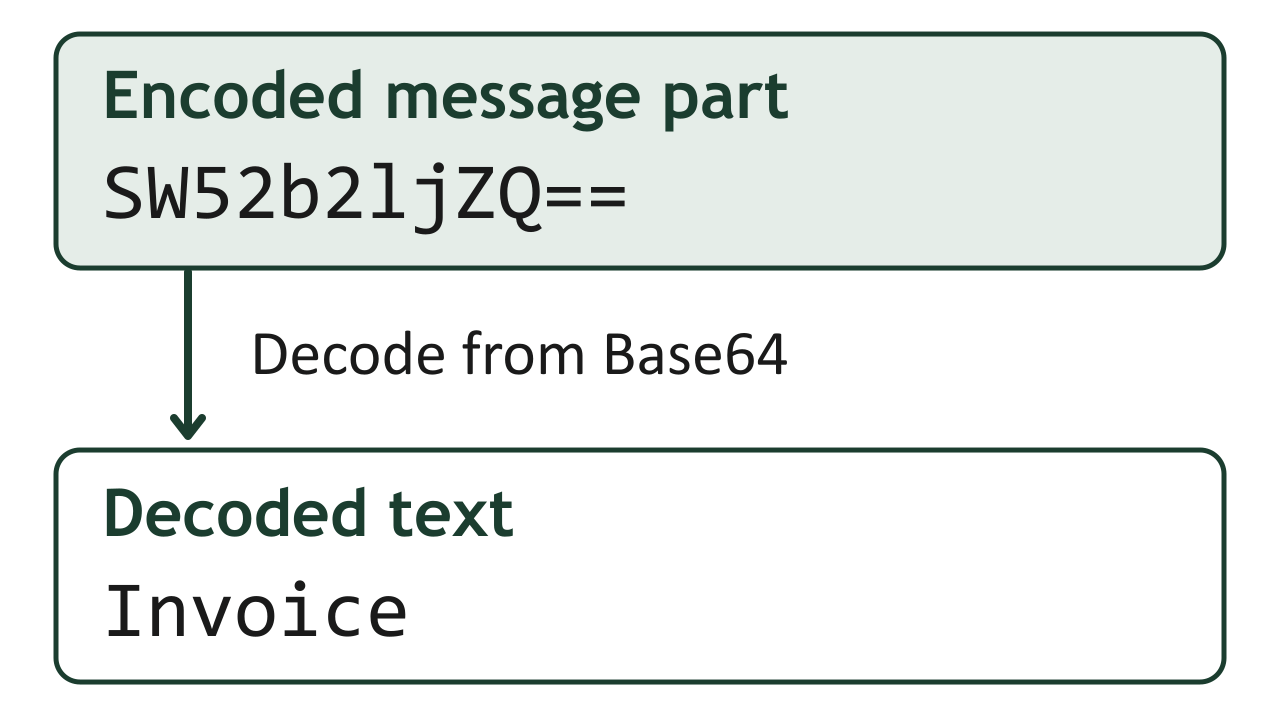
Figure 12.9: In CyberChef, applying From Base64 to this example yields the word Invoice. Keeping the original message lets another examiner repeat the operation.
Text description of Figure 12.9
Analyst Perspective
CyberChef recipes can be saved and shared as URL parameters. If your team develops a standard email triage recipe (e.g., Base64 decode > Extract URLs > Defang URLs > Generate SHA-256), you can save that recipe URL in your lab's standard operating procedures so every examiner applies the same processing steps consistently.
Email Forensics Tool Comparison
| Tool | Category | Platform | Cost | Key Capability |
|---|---|---|---|---|
| Autopsy | Acquisition / Analysis | Windows, Linux, macOS | Free (open source) | Full-case email parsing from disk images |
| readpst | Acquisition / Conversion | Linux | Free (open source) | PST to MBOX/EML conversion |
| Forensic Email Collector | Acquisition | Windows | Commercial | Server-side acquisition from Microsoft 365, Gmail, and IMAP with logging and hashing |
| Aid4Mail | Parsing / Conversion | Windows | Commercial (limited free trial) | Multi-format conversion with metadata preservation |
| MailXaminer | Analysis / Reporting | Windows | Commercial | Broad format support, header analysis, court-ready reports |
| Paraben E3 | Analysis / Recovery | Windows | Commercial | Email processing within a full forensic platform, deleted item recovery |
| X-Ways | General + Email | Windows | Commercial | Unified disk and email analysis |
| FTK | General + Email | Windows | Commercial | Automated email indexing from forensic images |
| MXToolbox | Header Analysis | Web-based | Free | Visual header breakdown and authentication check |
| CyberChef | Decoding / Analysis | Web-based or offline HTML | Free (open source) | Base64/QP decoding, defanging, IOC extraction, hashing |
Analyst Perspective
Tool selection depends heavily on case context. For a quick triage of a single suspicious email, MXToolbox and manual header review may be sufficient. For a large-scale corporate investigation involving thousands of messages across multiple custodians, a commercial suite like MailXaminer or FTK is more practical. In either case, always validate tool output against raw data. Parse at least a sample of headers manually to confirm the tool is interpreting them correctly.
12.7 Social Media as a Forensic Evidence Source
Social media platforms generate massive volumes of data that is increasingly relevant to both criminal and civil investigations. Unlike email, which operates on standardized open protocols, each social media platform is a proprietary, closed ecosystem with its own data structures, retention policies, and access mechanisms. This creates unique challenges for forensic examiners.
Why Social Media Evidence Matters
Social media evidence appears in a broad range of investigation types:
- Threats and harassment: Direct messages, public posts, and comments can constitute threats, stalking, or harassment. Screenshots alone are insufficient. Examiners must establish authenticity and attribution.
- Fraud and identity crimes: Fake profiles, impersonation accounts, and social engineering campaigns frequently use social media as the attack surface.
- Missing persons and human trafficking: Investigators trace last-known activity, communications, and geolocation data from social media accounts.
- Drug trafficking and organized crime: Social media platforms (including encrypted messaging apps) are used for communication, coordination, and even advertising illegal goods.
- Civil litigation: Defamation, employment disputes, and custody cases increasingly rely on social media evidence to demonstrate behavior, statements, or contradictions.
- Terrorism and extremism: Radicalization, recruitment, and operational planning have well-documented social media footprints.
Types of Social Media Artifacts
Forensic examiners should be aware of the full range of artifacts available from social media platforms:
- Content artifacts: Posts (text, images, video), stories (ephemeral content with defined expiration), comments, reactions/likes, and shared/reposted content.
- Communication artifacts: Direct messages (DMs), group chats, voice and video call logs.
- Metadata: Timestamps (creation, edit, deletion), geolocation data (from tagged locations or embedded EXIF in uploaded photos), device information (mobile app vs. web browser, device model), and IP address logs.
- Relationship artifacts: Friend/follower lists, group memberships, tagged individuals, blocked accounts, and interaction frequency.
- Account artifacts: Profile information (name, bio, profile pictures over time), login history (IP addresses, device types, timestamps), account creation date, and linked email addresses or phone numbers.
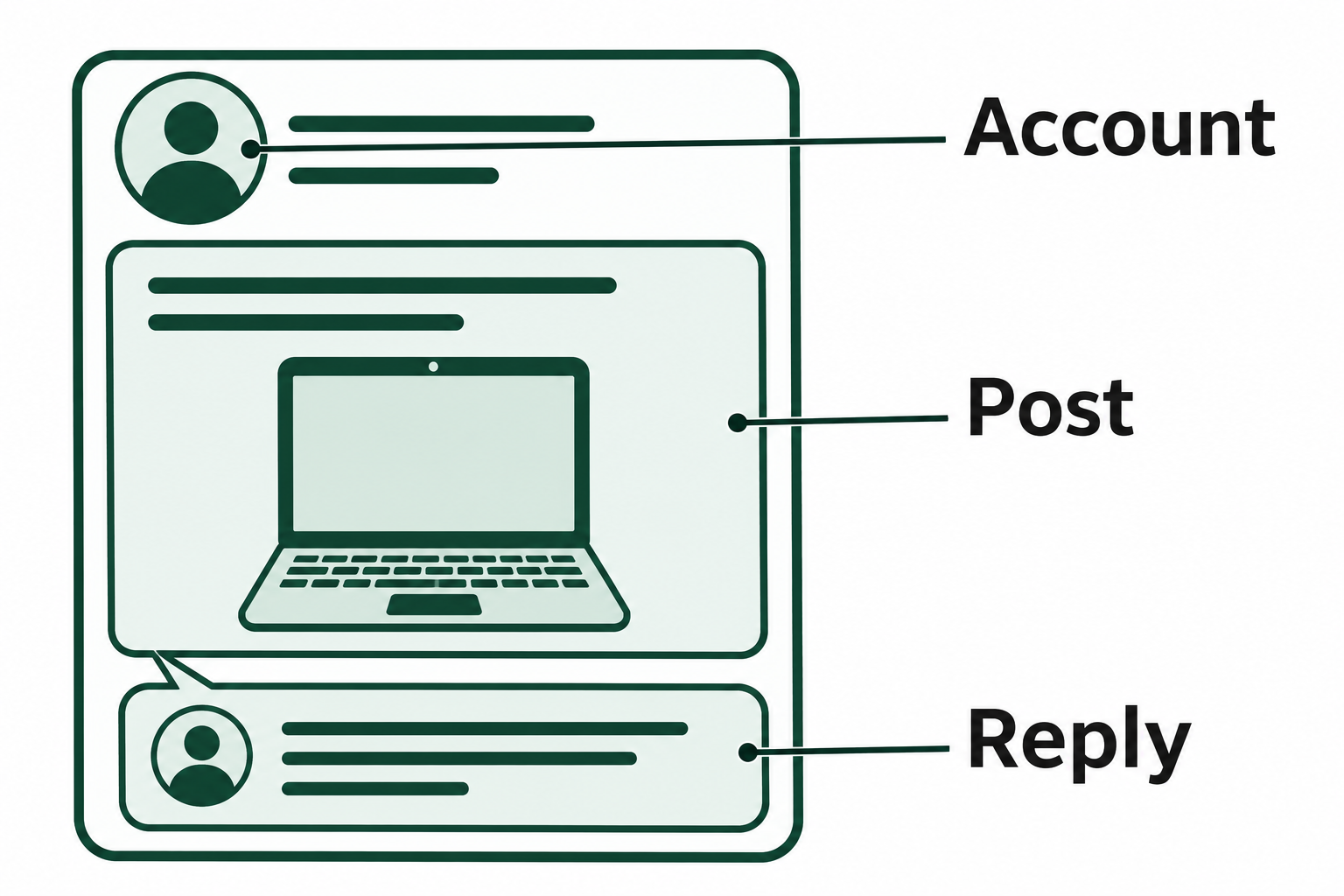
Figure 12.10: Capturing the account and the reply with a listing preserves the context needed to interpret a later conversation about the item.
Text description of Figure 12.10
Volatility of Social Media Evidence
Social media evidence is inherently volatile. Unlike data stored on a hard drive in an evidence locker, social media content can be:
- Deleted by the user at any time, potentially with no server-side recovery after a platform-defined retention period.
- Deleted by the platform due to content policy violations, automated moderation, or account deactivation.
- Modified through post or message editing. Many platforms now allow edits after publication, and only some keep a visible edit history.
- Expired in the case of ephemeral content (Snapchat messages, Instagram Stories, disappearing messages in various platforms).
This volatility means that evidence preservation must begin as early as possible in an investigation. By the time a formal legal process is served on the platform, the target content may already be gone.
Warning
Screenshots taken by a witness or complainant are a starting point, but they are not forensically sound evidence on their own. Screenshots can be easily fabricated or altered using basic image editing tools. They lack metadata proving when or how they were captured. Forensic acquisition methods that capture the underlying data and its metadata along with the visual content provide stronger evidentiary value.
End-to-End Encryption and Provider Records
End-to-end encryption (E2EE) determines whether a platform can produce message content at all. When a service uses E2EE, only the participants' devices hold the decryption keys. The provider cannot read the messages and cannot hand them over in response to a warrant. It can still produce non-content records such as subscriber details, login IP addresses, and, on many platforms, metadata about when and with whom an account communicated.
Platforms change their encryption practices often, so confirm the current status for each platform at the start of a case. As of 2026:
- Encrypted by default: WhatsApp, Signal, Apple iMessage, and Google Messages (for RCS chats) encrypt messages end to end by default. Facebook Messenger began enabling default E2EE for personal chats in December 2023.
- Encrypted only by user choice: Telegram encrypts end to end only in optional secret chats.
- Not end-to-end encrypted: Instagram offered encrypted direct messages only as an opt-in feature and removed the option entirely on May 8, 2026. Instagram direct messages are again readable by Meta and available through legal process.
| Platform Status | What Legal Process to the Provider Can Yield | Where Message Content Is Most Likely Found |
|---|---|---|
| E2EE by default | Subscriber records, login IPs, limited communication metadata | Participants' devices (app databases, backups) |
| E2EE optional | Full content for unencrypted chats, records only for encrypted chats | Provider for standard chats, devices for encrypted chats |
| No E2EE | Subscriber records, login IPs, and message content | Provider production and participants' devices |
When a provider cannot produce content, the participants' devices become the primary source. Recovering cached messages from app databases on a seized phone, using the acquisition and SQLite analysis methods from Chapter 11, may be the only way to obtain the conversation.
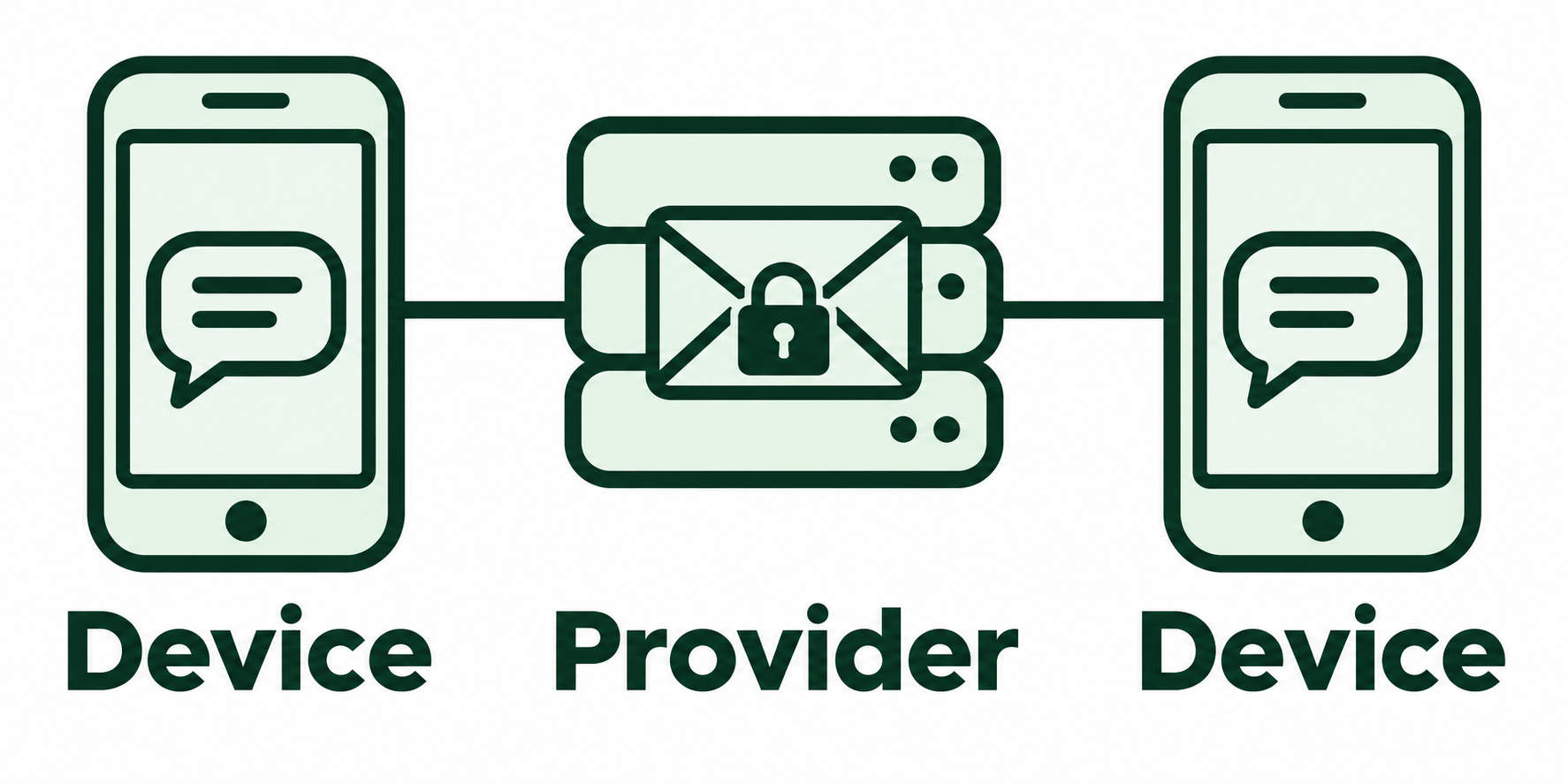
Figure 12.11: In an end-to-end encrypted conversation, participants’ devices decrypt messages. The provider may separately retain limited account records.
Text description of Figure 12.11
12.8 Acquiring and Analyzing Social Media Evidence
Social media evidence acquisition follows a hierarchy: preserve first, then acquire through the strongest available method. The specific approach depends on whether the investigation is being conducted by law enforcement (with legal authority to compel production) or by a private-sector examiner (limited to publicly available data and voluntary cooperation).
Preserving Social Media Evidence
Before any acquisition begins, take steps to ensure the evidence is not destroyed:
- Legal preservation requests: Law enforcement can serve preservation letters (under 18 U.S.C. § 2703(f)) to U.S.-based social media companies, requiring them to preserve account data for 90 days (renewable for an additional 90 days). This does not provide access to the data. It only prevents the platform from deleting it while a warrant or subpoena is prepared.
- Platform-specific preservation portals: Major platforms (Meta, Google/YouTube, X/Twitter, Snapchat, TikTok) maintain law enforcement portals or dedicated request processes for preservation and production.
- Immediate manual documentation: While legal processes are initiated, document all visible content through forensically sound methods (discussed below). Do not rely solely on the preservation request, because platforms occasionally fail to preserve all requested data.
Acquisition Methods
Manual Forensic Documentation
For publicly visible content or content accessible with the account holder's cooperation:
- Screen capture with metadata: Use a tool or process that records the URL, page title, timestamp, and a hash of the captured image. Simply pressing Print Screen is not forensically sound.
- Screen recording: Video capture of the browsing session, including the URL bar, timestamps, and scrolling through content. This provides context that static screenshots lack.
- Web archiving: Tools like Hunchly (a browser extension designed for investigators) automatically capture, timestamp, hash, and log every web page visited during an investigation session. This creates an auditable, tamper-evident record of online evidence collection.
Platform Data Exports
Most major platforms allow users (or administrators of organizational accounts) to download a copy of their data:
- Facebook/Instagram: Meta's Accounts Center > Your information and permissions > Download your information (labeled Export your information in some app versions). Facebook and Instagram data can be exported together or separately, in HTML for reading or JSON for parsing. Exports include posts, messages, photos, login history, and IP logs.
- X/Twitter: Settings and privacy > Your account > Download an archive of your data. Exports include tweets, DMs, and account data.
- Google (including YouTube): Google Takeout exports data from all Google services, including YouTube activity, location history, and connected accounts.
- Snapchat: The My Data option in Snapchat's privacy settings submits an export request. Exports include snap history, chat history, and account information. Note that actual snap/chat content may not be available depending on retention settings.
These exports are valuable when the account holder cooperates, but the data is self-reported by the platform and should be verified against other evidence where possible.
Legal Process (Law Enforcement)
For data not publicly accessible or when the account holder is the suspect, U.S. law enforcement uses the tiers of legal process defined in the Stored Communications Act (18 U.S.C. § 2703):
- Subpoena: Typically yields basic subscriber information (name, email, phone number, account creation date, recent login IP addresses).
- Court Order (18 U.S.C. § 2703(d)): Yields subscriber information plus transactional records (message headers, friend/connection lists, group memberships) but not message content.
- Search Warrant: Required for message content, stored photos/videos, and other account content. Must meet the probable cause standard. Major providers require a warrant for content regardless of how long it has been stored, following United States v. Warshak (6th Cir. 2010), which held that users have a reasonable expectation of privacy in the content of their stored email.
- Emergency Disclosure Request: In cases involving imminent danger of death or serious physical injury, platforms may disclose records without a warrant under 18 U.S.C. § 2702(b)(8).
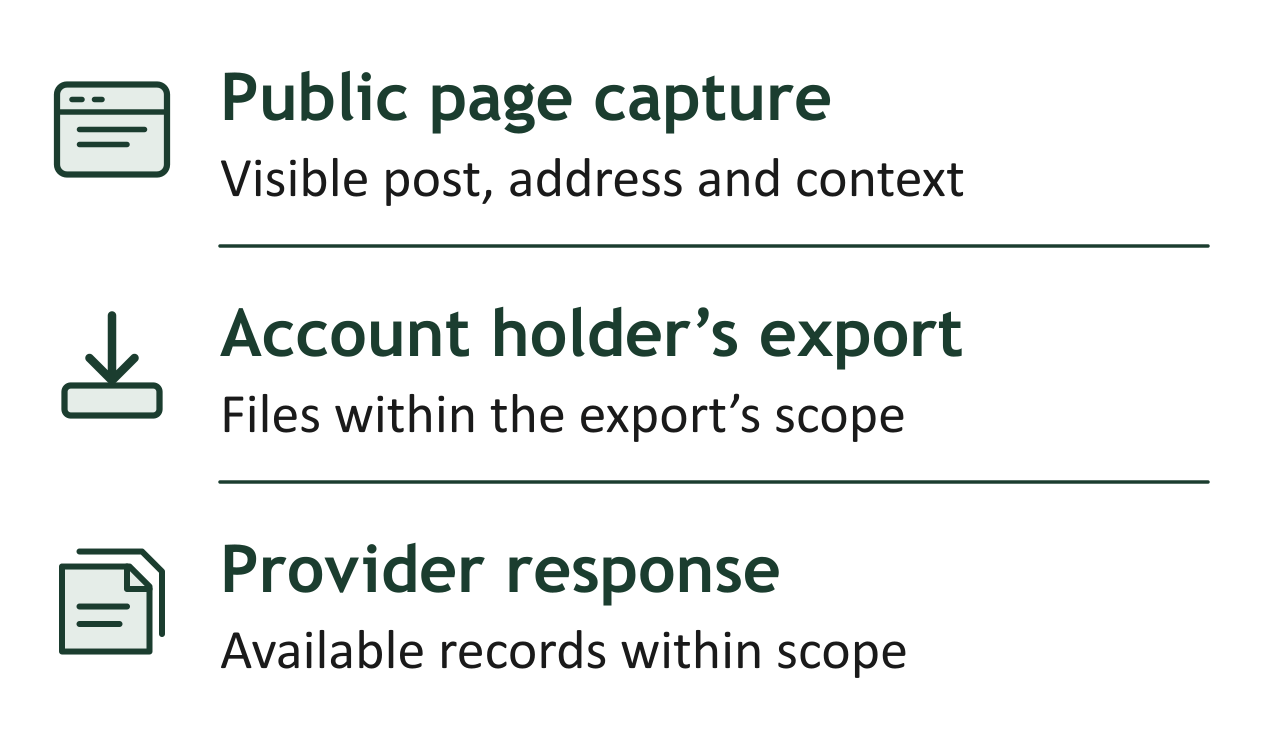
Figure 12.12: A public capture, an account export, and a provider response each document a different view of the account. Compare their coverage when reconstructing an event.
Text description of Figure 12.12
Analyzing Social Media Evidence
Once acquired, social media evidence is analyzed using many of the same principles applied to email:
Timeline Construction Map all account activity chronologically: posts, messages, logins, and profile changes. Overlay this timeline with other case evidence (phone records, surveillance footage, email activity) to identify correlations or contradictions.
Geolocation Analysis Social media platforms embed location data in multiple ways: tagged locations on posts, geolocation metadata in uploaded photos (though most platforms strip EXIF GPS data on upload), IP addresses from login records, and check-in features. Cross-reference reported locations with other evidence to verify or refute alibis.
Relationship Mapping Use friend/follower lists, group memberships, tagged photos, and direct message histories to map the social network around a subject. Identify co-conspirators, intermediaries, or victims. Visualization tools can help represent complex relationship networks.
Content Authentication Establish that the evidence is genuine and has not been fabricated:
- Compare acquired data against multiple sources (platform export, forensic capture, server-side records from legal process).
- Verify that timestamps, usernames, and content are consistent across sources.
- Hash all acquired data at the time of collection and maintain chain of custody documentation.
Putting It Together: Social Media Investigation Scenario
A law enforcement agency receives a report that an individual is using Instagram to sell stolen electronics. The suspect's account is public, and several buyers have provided screenshots of direct messages arranging sales.
Step 1: Preserve. The investigator serves a preservation request to Meta (Instagram's parent company) under 18 U.S.C. § 2703(f), specifying the suspect's account URL and username. This ensures Meta will retain all account data for 90 days.
Step 2: Document public content. Using Hunchly, the investigator browses the suspect's public Instagram profile, capturing every post, story highlight, and tagged photo. Hunchly automatically timestamps, hashes, and logs each page visit.
Step 3: Obtain a search warrant. Based on the preserved evidence and victim statements, the investigator obtains a search warrant for the suspect's Instagram account, requesting: account registration information, login/IP history, all posts and stories, direct message content, and uploaded media with metadata.
Step 4: Analyze the production. Meta provides the data in JSON format. Because Instagram direct messages are not end-to-end encrypted, the production includes the message content as well as the account records. The investigator parses the data and constructs a timeline of sales activity: when items were posted, when DMs were exchanged with buyers, what prices were negotiated, and what location data is embedded in the posts or photos.
Step 5: Correlate. The investigator cross-references the Instagram DM timestamps with the buyers' screenshots to verify consistency. Login IP addresses are geolocated and compared against the suspect's known locations. Photos of the stolen items are compared against serial numbers from the theft reports using metadata and visual analysis.
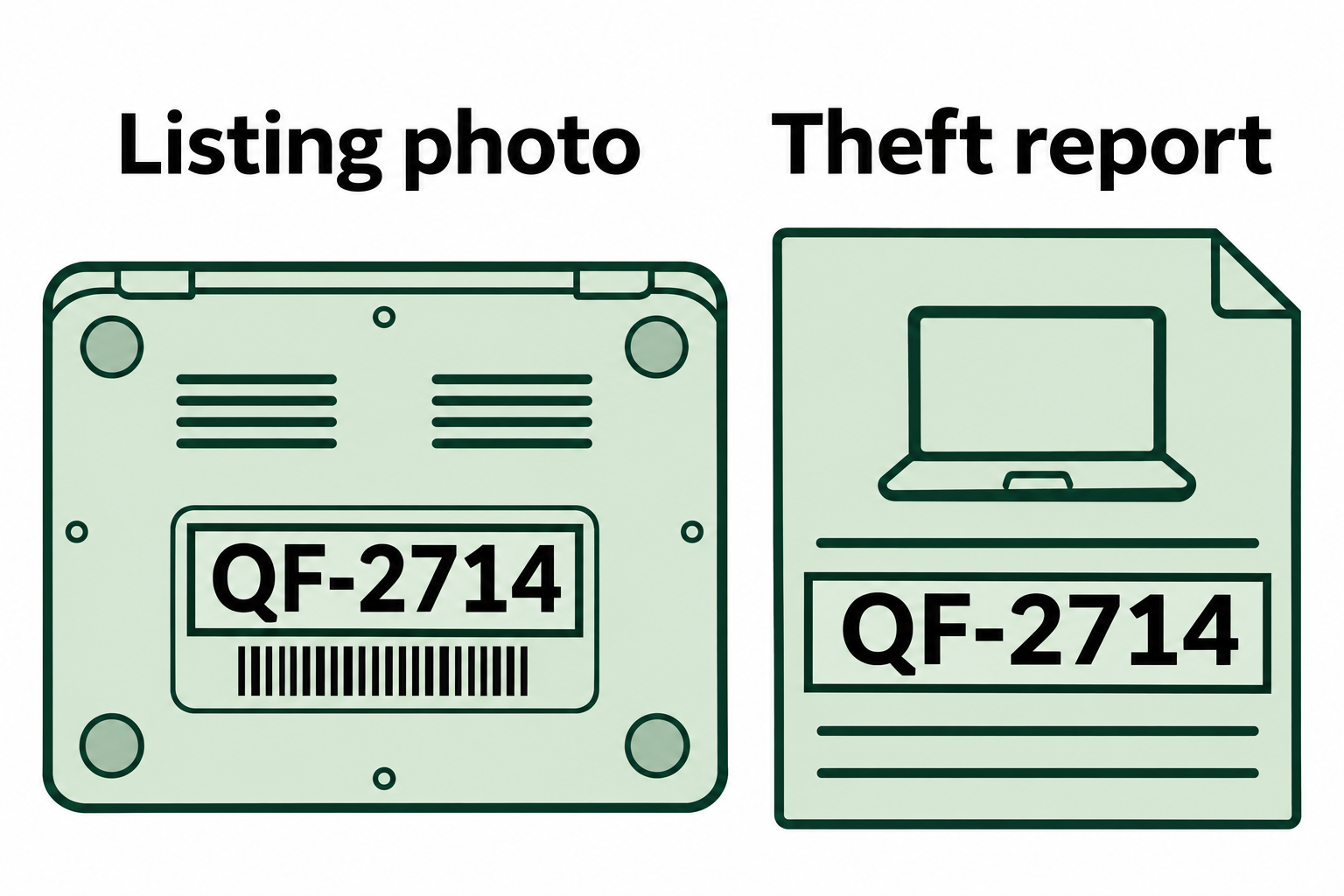
Figure 12.13: In this fictional comparison, a matching serial number links the listed laptop to the item in the theft report. Identifying who controlled the account requires separate evidence.
Text description of Figure 12.13
Step 6: Report. The investigator documents the full acquisition chain (preservation request, Hunchly session logs, warrant, Meta production), the analysis methodology, and the findings. All evidence is hashed, and the chain of custody is maintained throughout.
Chapter Summary
This chapter examined the forensic analysis of email and social media communications, two of the most prevalent evidence sources in modern investigations.
- Email's role in investigations spans business email compromise, insider threats, fraud, harassment, and civil litigation. Examiners analyze content, metadata, relationships, and timelines to build defensible cases.
- Email infrastructure operates through a defined chain of components (MUA, MSA, MTA, MDA) using SMTP for sending, and IMAP or POP3 for retrieval. The retrieval protocol determines where the authoritative copy of a message resides and directly shapes the acquisition strategy.
- Email file formats (PST, OST, MBOX, EML, MSG) vary by client and platform. Cloud email acquisition through Microsoft Purview or Google Vault is increasingly common and requires early legal hold to prevent automatic purging.
- Email header analysis is the core technical skill in email forensics. The
Receivedchain traces a message's path from origin to destination. SPF, DKIM, and DMARC authentication results (recorded in theAuthentication-Resultsheader) provide machine-verified evidence of whether a message's claimed origin is legitimate. - Email server logs on both Windows (Exchange Message Tracking Logs) and Linux (Postfix mail logs) provide organization-wide visibility into email transactions, including messages that were rejected or bounced. Log preservation must begin immediately when an investigation starts.
- Specialized tools span acquisition, parsing, analysis, and header examination. Examiners build hybrid toolkits combining open-source utilities (Autopsy, readpst) with commercial suites (MailXaminer, FTK) based on case requirements.
- Social media evidence is volatile, platform-controlled, and governed by specific legal authorities. Preservation requests, forensic documentation tools (Hunchly), and platform data exports provide the primary acquisition mechanisms.
- End-to-end encryption controls what a provider can produce. When a platform encrypts messages end to end, legal process yields account and connection records but no message content, and the participants' devices become the primary source.
- Social media analysis follows the same foundational principles as other digital evidence: timeline construction, geolocation analysis, relationship mapping, and rigorous content authentication establish the evidentiary value of acquired data.